
ASUS Vivobook Go 15.6 FHD Slim Laptop
4.3Editor score
AMD Ryzen 3 Processor
15.6 Inch Display
Military Grade Durability
Finding a lightweight ASUS laptop is essential for students and professionals who need portability without sacrificing power. These devices offer sleek designs and efficient components that make traveling easier than ever before.
We have carefully evaluated ten distinct models ranging from budget-friendly options to premium ultrabooks. Each entry was selected based on build quality, processor efficiency, and overall user experience in real-world scenarios.
Every pick highlights specific strengths and trade-offs to help you make an informed decision quickly. Please note that availability and pricing can change frequently so always verify details before purchasing your new device.
4.3Editor score

4.8Editor score
3.7Editor score
As an Amazon Associate we earn from qualifying purchases.
The following table provides a quick side-by-side look at the key specifications and features of all ten selected models to help you compare them efficiently.





The ASUS Vivobook Go 15.6 stands out as an excellent entry-level option for users seeking portability without breaking the bank. It holds a solid rating due to its balanced mix of essential features and durable build quality.
We may earn a commission when you buy through this link, at no additional cost to you.
Its AMD Ryzen 3 processor delivers reliable performance for everyday tasks like web browsing and document editing. The inclusion of DDR5 RAM ensures smoother multitasking compared to older memory standards found in similar budget models.
While the storage is limited to 128GB, this is often sufficient for students or professionals who rely heavily on cloud services. The military-grade durability certification adds peace of mind for frequent travelers.
This laptop is ideal for budget-conscious buyers who need a dependable machine for basic computing needs. It offers great value for its price while maintaining a sleek and portable profile.
The military-grade certification means this device can withstand drops and extreme temperatures better than standard consumer laptops.
A physical webcam shutter is included to protect your privacy during video calls or when the camera is not in use.
We may earn a commission when you buy through this link, at no additional cost to you.
This model improves on the base Vivobook Go series with a more powerful Ryzen 5 processor and increased storage space. It is designed for users who need a bit more power for multitasking or light creative work.
We may earn a commission when you buy through this link, at no additional cost to you.
The upgrade to 512GB SSD storage is significant for anyone managing large files or installing multiple applications. The faster processor ensures that system responsiveness remains snappy even under moderate loads.
Despite the performance boost, it retains the lightweight and durable characteristics of the Go series. The silver finish gives it a professional look suitable for business environments or academic settings.
Choose this version if you need more storage and CPU power than the entry model provides. It strikes a good balance between cost and capability for general productivity tasks.
The Ryzen 5 chip offers better multi-core performance than the Ryzen 3 making it better suited for heavier workloads.
With 512GB of space you can store more documents and media locally without relying as heavily on external drives.
We may earn a commission when you buy through this link, at no additional cost to you.
The ASUS Vivobook 14 with Snapdragon X represents the future of lightweight computing with its focus on AI and efficiency. It has earned high marks for its impressive battery life and modern feature set.
We may earn a commission when you buy through this link, at no additional cost to you.
As a Copilot+ PC it offers unique AI capabilities that can enhance productivity through intelligent text and image generation. The 16GB of RAM ensures that these tasks run smoothly without slowdowns.
The ARM-based architecture is designed to consume less power than traditional x86 chips which extends usage time away from a charger. This makes it a top choice for frequent travelers or students.
Buyers looking for a cutting-edge device with great battery life should consider this model. It delivers a premium experience with modern features that justify its higher price point.
Built-in neural processing allows for advanced AI tasks directly on the device without needing cloud connections.
The chip design prioritizes power efficiency allowing for multi-day battery life during typical office workloads.
We may earn a commission when you buy through this link, at no additional cost to you.
This 16-inch variant brings the same Snapdragon power to a larger screen for users who need more workspace. It is ideal for those who find 14-inch screens too small for their daily workflow.
We may earn a commission when you buy through this link, at no additional cost to you.
The 1920×1200 resolution provides sharp visuals for multitasking with multiple windows open. The efficiency of the Snapdragon chip helps keep the weight manageable despite the larger chassis size.
It maintains the Copilot+ PC features found in its smaller sibling ensuring you get all the latest AI tools. The increased screen real estate is particularly useful for spreadsheet work or video editing.
Select this model if screen size is a priority for your productivity. It offers a great compromise between portability and the need for a larger viewing area.
The extra two inches of screen space allow for more content visibility which reduces eye strain during long sessions.
A 16:10 aspect ratio maximizes vertical space making it easier to read documents and code without excessive scrolling.
We may earn a commission when you buy through this link, at no additional cost to you.
This entry-level option is designed specifically for students who need a basic machine for writing papers and browsing the web. It is the most affordable choice in the lineup but has limitations in performance.
We may earn a commission when you buy through this link, at no additional cost to you.
The Intel Celeron processor handles light tasks well but may struggle with heavy multitasking or modern web applications. The 4GB of RAM is the minimum recommended for running Windows efficiently.
Storage is limited to 128GB eMMC which is slower than a standard SSD but sufficient for basic file storage. The laptop remains light and portable making it easy to carry around campus.
It is a viable choice for young students with minimal computing needs. If you are on a tight budget and only need simple tools this model will serve its purpose.
The slim design and light weight make it easy to slip into a backpack for daily commutes or classes.
A backlit keyboard allows for typing in dimly lit environments like libraries or study halls.
We may earn a commission when you buy through this link, at no additional cost to you.
This model stands out with its 16GB of RAM which is generous for a laptop in this price range. It provides a smooth experience for users who keep many browser tabs open simultaneously.
We may earn a commission when you buy through this link, at no additional cost to you.
The Intel i3 processor from the 12th generation offers a good balance of power and efficiency for general use. Wi-Fi 6 ensures fast and stable internet connections for streaming and video calls.
It includes a variety of ports including HDMI which simplifies connecting to external monitors or projectors. The blue color adds a touch of style to an otherwise standard looking chassis.
For users who need more memory for multitasking this is a strong contender. It offers solid performance and connectivity features that make it versatile for home or office use.
With 16GB of RAM you can run multiple applications at once without noticing slowdowns or lag.
The inclusion of Wi-Fi 6 ensures you can take advantage of the latest wireless networks for better speed.
We may earn a commission when you buy through this link, at no additional cost to you.
This cool silver version of the Vivobook 14 brings the same powerful Snapdragon experience to a stylish package. It is well rated for its ability to handle modern computing tasks with ease.
We may earn a commission when you buy through this link, at no additional cost to you.
The WUXGA display offers higher resolution than standard FHD providing sharper text and images for work and entertainment. The efficient processor ensures that the device stays cool even during extended use.
It is designed to be a productivity powerhouse with AI tools that can help streamline your workflow. The battery life is another major selling point for those who work away from outlets often.
This model is great for professionals who want a reliable and good looking device. It combines performance with aesthetics to deliver a high quality user experience.
The higher resolution screen makes a difference in clarity for reading and working with detailed content.
The system is designed to manage heat effectively ensuring consistent performance without loud fan noise.
We may earn a commission when you buy through this link, at no additional cost to you.
The 2026 edition features the latest 13th Gen Intel processor promising better performance than previous models. It is marketed as a thin and light option suitable for business and school use.
We may earn a commission when you buy through this link, at no additional cost to you.
With 16GB of RAM and a PCIe SSD the system boots quickly and runs applications smoothly. The processor is capable of handling moderate workloads including video conferencing and data entry.
Wi-Fi 6E support ensures you have the latest wireless standard for faster internet speeds when available. The lack of a mouse might be a minor inconvenience for some users out of the box.
This laptop is a good pick for those who prioritize processing speed and modern connectivity. It offers a reliable platform for productivity tasks with a sleek profile.
The 13th Gen chip offers improved efficiency and speed compared to older generations for better daily performance.
Wi-Fi 6E allows for less interference and faster data transfer in compatible network environments.
We may earn a commission when you buy through this link, at no additional cost to you.
This black variant of the Vivobook Go offers a practical layout with a numeric keypad for easier data entry. It is highly rated for its long battery life and reliable build quality.
We may earn a commission when you buy through this link, at no additional cost to you.
The Ryzen 3 processor combined with DDR5 RAM provides a smooth experience for standard office work and media consumption. The 256GB storage is a step up from the base 128GB models.
Military-grade testing ensures the device can handle rough handling which is ideal for students or travelers. Fast charging technology means you can get back to work quickly when battery runs low.
It is a solid choice for users who need a reliable workhorse with extra battery endurance. The numeric keypad is a specific benefit for those who work with numbers often.
The full numeric keypad on the side helps speed up data entry and accounting tasks significantly.
The efficient power management allows for all-day usage without needing to carry a charger everywhere.
We may earn a commission when you buy through this link, at no additional cost to you.
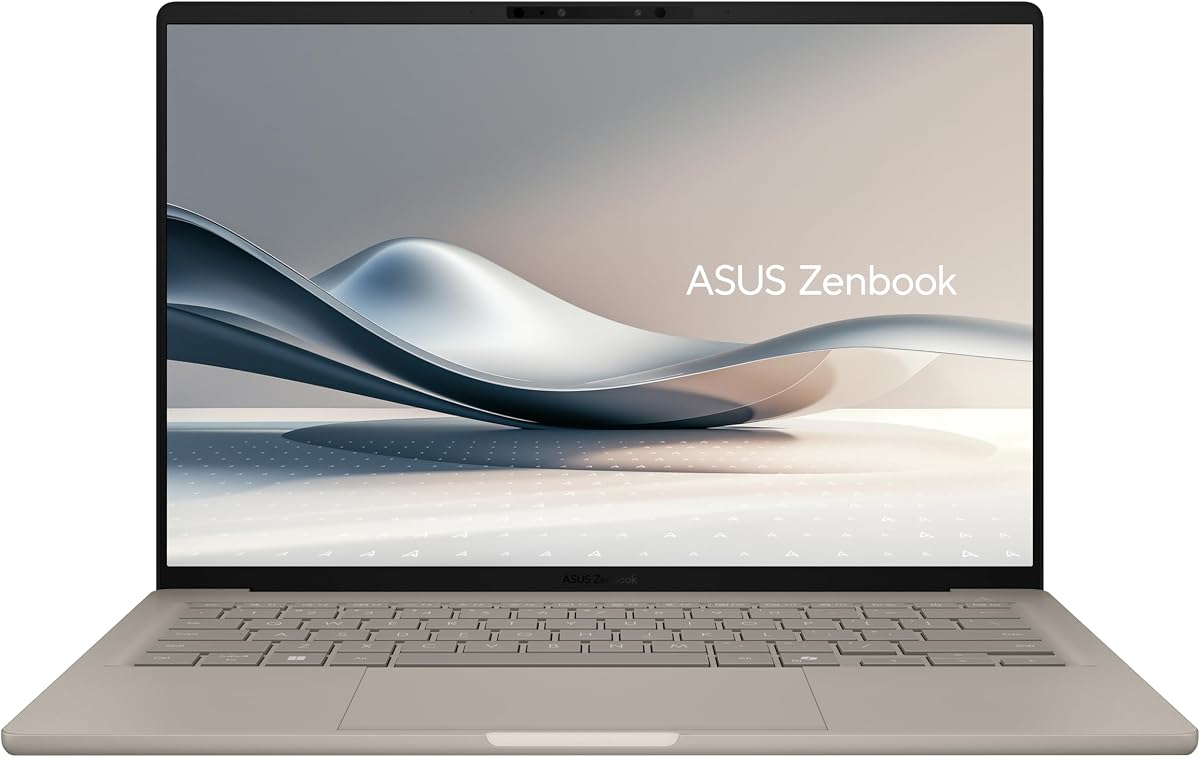
The Zenbook A14 is arguably the lightest 14-inch Copilot+ PC available offering unmatched portability for premium users. It features a unique Ceraluminum construction that is durable yet featherlight.
We may earn a commission when you buy through this link, at no additional cost to you.
The OLED display provides stunning visuals with deep blacks and vibrant colors which is rare for a device this light. It is packed with high-end specs including 16GB of LPDDR5X RAM and a 512GB SSD.
While it is expensive the build quality and design innovations justify the cost for professionals who value aesthetics and weight. The battery life is also exceptional allowing for days of unplugged work.
If you want the absolute lightest premium laptop with top-tier specs this is the one to choose. It sets a new standard for how portable a powerful machine can truly be.
Weighing just 980g this laptop is so light you might barely notice it in your bag.
The OLED panel delivers industry-leading contrast and color accuracy for media viewing and photo editing.
We may earn a commission when you buy through this link, at no additional cost to you.
Selecting the right laptop involves balancing weight performance and features to suit your specific lifestyle and work requirements.
When choosing a lightweight laptop consider the physical weight and dimensions as you will be carrying it frequently. Models under 3 lbs are ideal for travel but often come with trade-offs in battery size or port selection.
Prioritize a device that feels comfortable to hold and fits easily into your bag without adding unnecessary bulk.
The processor determines how well your laptop handles tasks ranging from web browsing to creative editing. ARM-based chips like Snapdragon offer great efficiency while Intel and AMD provide broader software compatibility.
Select a processor that matches your daily workload to avoid lag or sluggish performance during multitasking.
RAM is crucial for smooth multitasking so aim for at least 8GB for general use and 16GB for heavier workloads. Storage speed matters too so SSDs are far superior to older eMMC or hard drive options.
Ensure you have enough space for your files or plan to use cloud storage solutions for larger media libraries.
Portability means little if the laptop dies quickly so check the battery capacity in Wh to estimate runtime. Newer efficient processors can offer all-day battery life even on smaller batteries.
Look for models that support fast charging to minimize downtime when you need a quick power boost.
A good screen reduces eye strain and improves productivity so look for at least 1920×1080 resolution. OLED panels offer better contrast but IPS screens are often more affordable and durable.
Consider the brightness level to ensure the screen is visible in various lighting conditions like outdoors or offices.
Durable materials like aluminum or specialized composites protect your device from the rigors of travel. Military-grade certification is a good indicator that the laptop can withstand drops and temperature changes.
Investing in a well-built machine can extend the lifespan of your device and reduce repair costs over time.
Modern laptops often rely on USB-C but having a mix of ports can save you from carrying dongles. Check for HDMI USB-A and audio jacks to ensure compatibility with your existing peripherals.
Wi-Fi 6 or 6E support ensures you have fast and reliable wireless connections in crowded environments.
Windows 11 is standard on these devices but consider if you need specific AI features or Copilot+ capabilities. Some models offer privacy features like webcam shutters which are essential for secure video calls.
Choose an OS configuration that supports your software needs and provides the security features you require.
To keep your laptop performing well avoid exposing it to extreme temperatures or direct sunlight for long periods. Use a soft cloth to clean the screen and keyboard to prevent scratches or residue buildup.
Manage your battery by keeping it between twenty and eighty percent when possible and using fast charging only when necessary. This practice helps prolong the health of the internal cells over time.
Update your drivers and operating system regularly to ensure security patches are applied and performance is optimized. Backup your important files to an external drive or cloud service to prevent data loss in case of hardware failure.
Most of these models are designed for productivity and general use rather than heavy gaming. While they can handle light casual games their integrated graphics may struggle with demanding titles. For serious gaming a dedicated GPU model would be a better choice.
Yes all the laptops listed in this guide come pre-installed with Windows 11 Home. This OS provides the latest features and security updates for everyday users. Some models may also include extra software or trial versions of Microsoft Office.
Battery life varies by model but newer efficient processors can provide up to 11 hours or more on a single charge. Factors like screen brightness and active applications will influence real-world performance. Always check the specific specs for expected usage times.
Many modern ultrabooks have soldered RAM which means it cannot be upgraded after purchase. Storage upgrades are possible on some models but not all so check the specs before buying. It is better to choose the right capacity upfront.
Snapdragon processors are based on ARM architecture offering better battery efficiency and AI features. Intel processors use x86 architecture which has wider software compatibility and raw power for legacy apps. Your choice depends on whether you prioritize battery or app support.
Many of these models feature military-grade durability certification which tests them against shocks and temperature extremes. The Zenbook A14 uses Ceraluminum for added strength and scratch resistance. They are generally robust enough for student or business travel.
Yes most models include HDMI or USB-C with DisplayPort support for connecting external monitors. This allows you to expand your workspace for better productivity at home or in the office. Check the specific ports available on the model you choose.
The privacy shutter is a sliding cover located over the webcam lens that you can manually close. It provides a physical guarantee that the camera is off which is great for privacy. It is a simple feature that adds peace of mind during video calls.
We have reviewed ten excellent options that balance portability with performance for a wide range of users. From the budget-friendly Vivobook Go series to the premium Zenbook A14 there is a model for every need.
Prioritize battery life and build quality if you travel frequently while focusing on RAM and storage for heavy workloads. Consider the latest AI features if you want a device that stays relevant for years.
Remember to check current pricing and availability before making your final decision as these can change quickly. With the right choice you will have a reliable companion for work and travel for years to come.