
Guermok Video Capture Card
4.4Editor score
USB 3.0 interface
Plug and play setup
Ultra low latency
HDMI recorders allow you to capture high definition video from various sources without needing a constant computer connection. They are essential for gamers, archivists, and professionals who need reliable playback tools.
We evaluated ten leading models based on resolution support, ease of use, and recording features. Each device offers unique strengths for different user needs and technical requirements.
Every pick includes key specs and real world performance notes. Remember that availability and pricing can change rapidly so check current details before buying.
4.4Editor score
4.0Editor score

4.1Editor score
As an Amazon Associate we earn from qualifying purchases.
This side by side comparison highlights the core specifications and capabilities of each HDMI recorder to help you find the right fit.





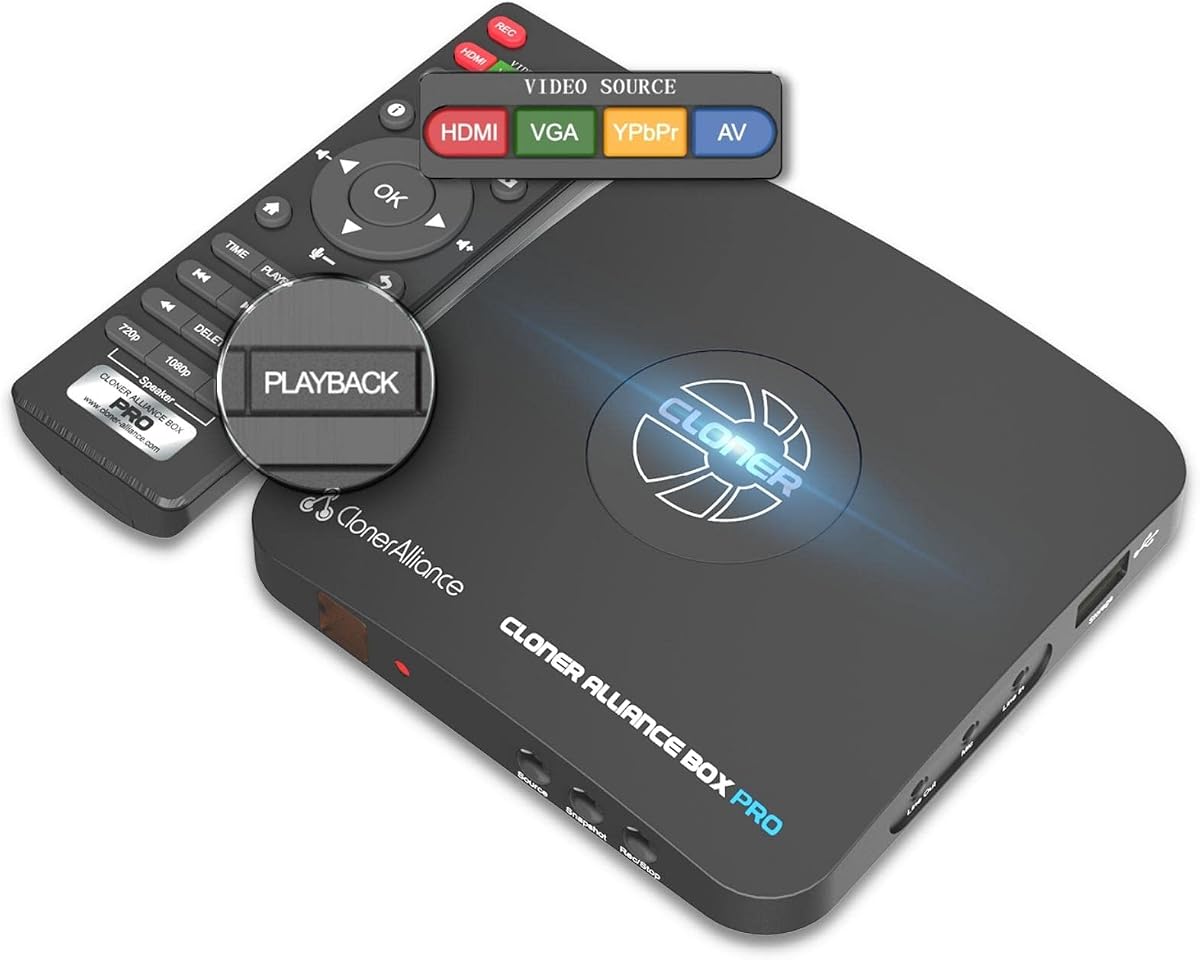
The ClonerAlliance Box Pro stands out as a top contender for users needing reliable standalone recording without a computer. It captures up to 1080p at 60fps and connects to various analog and digital sources including RCA and VGA inputs. This makes it incredibly versatile for archiving old VHS tapes or capturing modern console gameplay independently.
We may earn a commission when you buy through this link, at no additional cost to you.
Its standout quality lies in the ability to record directly to USB storage while watching playback on a TV. The included remote simplifies navigation and scheduling tasks allow automatic recording at set times. The device handles multiple file systems ensuring compatibility across different storage devices and computer platforms.
While it does not support 4K recording, the 1080p performance is solid for most use cases. The lack of HDCP support means protected streaming content will not record correctly which is a common limitation in standalone devices. However this is expected and does not detract from its core utility for unprotected sources.
This recorder is ideal for families or hobbyists who want to preserve media without technical setup. Its plug-and-play nature and remote control make it accessible for all ages. We recommend it highly for anyone prioritizing independence from a PC.
The ability to convert RCA VGA and YPbPr signals allows you to digitize old VHS tapes and camcorder footage easily.
Support for exFAT NTFS and FAT32 ensures you can use any standard USB drive or hard drive for ample recording space.
We may earn a commission when you buy through this link, at no additional cost to you.
The Guermok Video Capture Card offers an exceptional value proposition for those needing high quality capture on a tight budget. It supports 4K input at 30Hz and outputs crisp 1080p at 60fps making it suitable for streaming and recording gaming sessions. The aluminum alloy casing ensures good heat dissipation during extended use.
We may earn a commission when you buy through this link, at no additional cost to you.
Its primary strength is the ultra-low latency performance which prevents lag during live streaming or real-time recording. Plug-and-play functionality means no drivers are needed and it works seamlessly with popular software like OBS Studio and Potplayer. The compact form factor makes it easy to pack for travel or on-the-go content creation.
The main trade-off is that it relies entirely on a computer for recording and playback. Users must have capture software installed and running which adds a layer of complexity compared to standalone boxes. Additionally it uses USB 2.0 bandwidth if not connected properly which can limit performance.
This card is perfect for streamers and YouTubers who already own a reliable PC. It delivers professional results without breaking the bank. We recommend it for budget-conscious creators seeking performance and flexibility.
Ultra-low latency ensures your audience sees your gameplay in real-time without frustrating delays or audio sync issues.
Compatible with Windows Mac and Linux it pairs well with OBS Twitch and Zoom for diverse streaming scenarios.
We may earn a commission when you buy through this link, at no additional cost to you.
The ClonerAlliance UHD Pro brings premium 4K recording capabilities to standalone users without requiring a computer connection. It supports H.265 codecs for efficient file sizes and allows cinematic 24fps recording for a professional look. The 4K60fps passthrough ensures you can watch gameplay or video while recording in high fidelity.
We may earn a commission when you buy through this link, at no additional cost to you.
Its key strength lies in the advanced compression standards that maintain quality while saving storage space. The pause and resume recording feature helps keep important moments in a single file reducing post-production editing time. Schedule tasks function reliably for unattended recording sessions.
While it commands a higher price than 1080p models the 4K resolution justifies the cost for serious archivists and gamers. The lack of HDCP support is a limitation but expected for this class of device. Users should ensure their source devices output unprotected signals for successful capture.
This device is best suited for professionals or enthusiasts who need standalone 4K capture. It offers reliability and high quality that matches much more complex PC setups. We recommend it for those who value independence and top-tier resolution.
H.265 and H.264 codecs provide better compression allowing longer recording times without sacrificing visual quality.
Selecting 24fps gives your footage a cinematic feel ideal for creating movies or high-quality gaming montages.
We may earn a commission when you buy through this link, at no additional cost to you.
This capture card delivers reliable performance for PC-based gaming and streaming setups. It supports 1080p capture at 60fps which is standard for most high-quality streams. The HDMI loop-out ensures you can view your game on a monitor while streaming or recording without lag or delay.
We may earn a commission when you buy through this link, at no additional cost to you.
Its standout feature is the dedicated microphone input which allows you to add commentary directly through the device. This simplifies your setup by reducing the need for extra audio routing cables. The plug-and-play design ensures compatibility with major streaming platforms like Twitch and YouTube immediately upon connection.
The primary limitation is that it requires a computer to function which adds to your total system cost. While the 1080p capture is sufficient for most, 4K recording is not supported. However the reliable performance and low CPU usage make it a solid choice for consistent streaming.
It is perfect for streamers and gamers who want a straightforward setup without complex drivers. The loop-out and mic-in features add significant value for interactive content. We recommend it for PC owners seeking dependable performance.
The mic-in jack lets you add voice commentary directly to the capture device simplifying your audio routing setup.
HDMI loop-out ensures your monitor receives an unaltered signal so you never feel lag while playing games.
We may earn a commission when you buy through this link, at no additional cost to you.
The Audio Express AXHDCAP is an ultra-affordable option for basic capture needs on a PC. It supports 4K input and outputs 1080p at 30Hz making it suitable for standard video streaming and conferencing. The plug-and-play design ensures immediate recognition by your computer without extra drivers.
We may earn a commission when you buy through this link, at no additional cost to you.
Its main advantage is the low latency performance which keeps video and audio in sync during live streams. The lightweight compact build makes it easy to carry for travel or mobile setups. Despite the lower USB 2.0 interface it still delivers reliable performance for casual use.
The limitation lies in the 30Hz output which can appear less smooth for fast-paced gaming compared to 60Hz options. Additionally USB 2.0 bandwidth restricts higher frame rate options. However for static content or casual streaming it performs admirably at a fraction of the cost of other cards.
This is an ideal starter capture card for students or casual streamers on a tight budget. It provides essential functionality without complex setup requirements. We recommend it for entry-level users who prioritize value and ease of use.
The low cost makes it accessible for anyone needing basic capture without investing in high-end hardware immediately.
Works with Windows Mac and Linux ensuring you can use it across different computer setups seamlessly.
We may earn a commission when you buy through this link, at no additional cost to you.
This capture card is designed for creators who need high-quality streaming on the go. It offers 1080p capture at 60fps with minimal latency ensuring smooth video for live broadcasts. The USB 3.0 interface provides fast data transfer which helps reduce buffering during recording.
We may earn a commission when you buy through this link, at no additional cost to you.
Its standout feature is the seamless passthrough which allows zero-delay gaming while streaming. The compact design fits easily in a laptop bag making it perfect for LAN parties or travel. It works with all major streaming software including OBS Studio and Streamlabs out of the box.
The lack of audio passthrough means you may need to route audio separately depending on your setup. Additionally it requires a PC to function which limits use cases compared to standalone units. However for portable streaming it delivers excellent performance at a competitive price.
This is the best choice for mobile streamers who need reliability and speed without bulk. It ensures your audience sees high-quality footage regardless of location. We recommend it for portable content creators.
Passthrough ensures you play without lag while capturing your gameplay for your live audience simultaneously.
USB 3.0 ensures your video files save quickly and efficiently without bottlenecks during recording sessions.
We may earn a commission when you buy through this link, at no additional cost to you.
This unit stands out for its ability to accept two HDMI inputs simultaneously making it ideal for multi-camera or multi-device setups. The built-in 7-inch screen allows you to preview and switch between sources without connecting to a PC. It supports picture-in-picture layouts that are perfect for professional presentations or commentary.
We may earn a commission when you buy through this link, at no additional cost to you.
Its primary strength is the flexibility to manage multiple video feeds independently. You can save recordings directly to USB or SD cards and switch sources on the fly using the remote. The option to use a battery adds portability for live events or field work.
The main drawback is the price point which is higher than basic standalone boxes. Additionally the interface may take time to learn compared to simpler devices. However the dual-input capability is unique and valuable for specific production needs.
This is best suited for professionals or content creators who need to mix sources live. The display and switching options save time during production. We recommend it for advanced users needing flexibility.
Connect two devices like a console and a camera to record or switch between them without interruption.
The 7-inch screen lets you adjust angles and sources directly on the device without needing a monitor.
We may earn a commission when you buy through this link, at no additional cost to you.
The ZowieREC 4K HDMI offers a premium standalone solution for recording 4K content without a computer. Its sleek aluminum casing ensures durability while providing excellent heat dissipation during long sessions. It supports 4K 30fps recording and 4K 60fps passthrough for smooth viewing while capturing.
We may earn a commission when you buy through this link, at no additional cost to you.
Its key strength is the advanced pause and resume feature which gives you control over file management. You can pause recording during loading screens or breaks to create seamless footage. The built-in scheduler ensures you capture scheduled events automatically without manual intervention.
While the 4K support is robust the device does not support protected content which limits streaming recordings. Additionally it has fewer reviews than other models which may raise concerns about long-term reliability. However for PC-free capture it offers premium features and build quality.
This device is ideal for professional archivists who need reliable 4K recording. The pause and schedule features enhance usability significantly. We recommend it for those valuing build quality and control.
Instantly pause and resume recording to skip unwanted content and keep files streamlined without editing.
Set timers to automatically start recording at specific times so you never miss important live content.
We may earn a commission when you buy through this link, at no additional cost to you.
The ClonerAlliance ViewPro is a portable standalone recorder that brings convenience to video capture. Its 7-inch LCD screen lets you view and playback videos anywhere without needing a TV. It supports both HDMI and analog inputs making it versatile for legacy and modern devices.
We may earn a commission when you buy through this link, at no additional cost to you.
Its standout quality is the complete independence from external monitors. You can connect a game console or camcorder directly and watch the output on the device itself. The IR remote simplifies control and scheduling tasks ensure you capture content even when you are away.
While it lacks 4K recording the 1080p quality is sufficient for most needs. The reliance on SD or USB storage means you must manage space regularly. However the ability to carry a full recorder and screen in one unit is unmatched for travel.
This is perfect for travelers or field workers who need to record on the go. It eliminates the need for extra screens or PCs. We recommend it for anyone needing a truly portable solution.
The built-in 7-inch LCD screen means you do not need a separate TV to preview your recordings.
Support for HDMI RCA VGA and YPbPr lets you connect almost any video device directly to the recorder.
We may earn a commission when you buy through this link, at no additional cost to you.
The Blackmagic Design UltraStudio Express is a professional grade device for studio environments. It supports SDI video inputs with multi-speed compatibility ensuring reliable capture of broadcast quality signals. The loop output allows you to route video to monitors while capturing simultaneously.
We may earn a commission when you buy through this link, at no additional cost to you.
Its primary strength is the integration with professional editing software and broadcast standards. It ensures color accuracy and stability that consumer devices cannot match. The loop output ensures your workflow remains seamless during live production setups.
The main limitation is the reliance on Thunderbolt connections which are less common on consumer PCs. It also requires specific drivers and software which adds complexity. However for professional work the reliability and performance justify the investment.
This is best suited for video production professionals and broadcast stations. It ensures your recordings meet industry standards for quality. We recommend it for studio and professional use.
SDI support ensures you capture video at professional frame rates and resolutions without compression artifacts.
Designed to work with major editing software it ensures seamless workflows in professional production environments.
We may earn a commission when you buy through this link, at no additional cost to you.
Selecting the right HDMI recorder depends on your specific recording needs and technical setup. Here are the key factors to consider before making a decision.
Standalone recorders operate independently from a computer making them ideal for simple recording tasks without extra hardware. PC-based capture cards require a computer to run software but offer more flexibility and editing options on the fly.
Choose standalone for convenience and travel or PC-based for advanced editing and streaming control.
Ensure the device supports your source resolution such as 1080p 4K or higher. Frame rates like 60fps provide smooth motion essential for gaming or action video while 30fps is sufficient for general content.
Higher resolution and frame rates require more storage space so choose a device that matches your quality needs and storage capacity.
Check that the recorder has the correct inputs for your devices such as HDMI RCA or VGA. Having a loop-out port allows you to watch video on a monitor while recording without interrupting the feed.
Verify all port types and count to ensure compatibility with your existing setup and future device additions.
Look for recorders that support common file systems like exFAT or NTFS to maximize storage capacity on USB drives. Some models also support SD cards which can be more portable and easier to swap.
Choose a device that works with storage types you already own to avoid extra costs and ensure reliability during recording.
Devices using modern codecs like H.265 can reduce file sizes while maintaining quality. For PC-based units ensure the included or compatible software supports your operating system and streaming platforms.
Efficient codecs save space while flexible software ensures you can edit or share your recorded content easily.
If you need to travel with your recorder choose a compact design with a durable casing. Some standalone units come with batteries allowing operation without power outlets during field recording.
Prioritize build quality and portability if you plan to use the device in different locations frequently.
Most standalone HDMI recorders do not support HDCP protected content from streaming services or certain devices. This means you may not be able to record protected movies or shows but you can capture unprotected gaming or camera feeds.
Check if the device supports protected content if you need to record streaming services as most budget models will not.
Consider whether the device offers features like schedule recording pause resume or built-in screens. These features can simplify your workflow and allow you to automate tasks without manual intervention.
Select a recorder with intuitive controls and helpful features that match your technical comfort level and workflow needs.
Connect your HDMI source to the recorder and ensure both devices are powered on correctly. Select the correct input source on the recorder to begin capturing video from your console or camera.
Use a high-quality USB or SD card formatted to the supported file system to avoid errors during recording. Regularly check your storage space to ensure long recording sessions do not fill up unexpectedly.
Keep the device in a well-ventilated area to prevent overheating during extended use. If using a PC-based card ensure your computer is updated to the latest drivers for optimal performance.
Most HDMI recorders do not support HDCP protected content which prevents recording from services like Netflix. You can record unprotected sources like gaming consoles and analog devices.
No standalone recorders operate independently. You can connect and record directly to USB or SD cards without a computer.
This usually indicates HDCP protection. Ensure your source is not protected or use an HDMI splitter if allowed.
Use large capacity USB drives or SD cards formatted to exFAT or NTFS to store high-resolution video files.
Yes PC-based cards work with OBS or Streamlabs for live streaming while standalone boxes are better for simple recording.
Use the remote or buttons on the device to cycle through available inputs. Some models allow picture-in-picture for multiple views.
We recommend the ClonerAlliance Box Pro for its reliable standalone operation and analog support. It balances features and ease of use for most general users.
For gamers and streamers the Guermok Video Capture Card offers excellent performance at a low price point. It ensures quality capture without needing a standalone unit.
Remember that availability and pricing can change quickly. Always verify current specifications and availability before finalizing your purchase.