
KETIEE Drawing Projector for Kids
4.5Editor score
Complete set with pens and boards
Affordable entry-level price point
4-in-1 multifunction design
This guide compares the top kids drawing projector models for 2026, evaluating features like AI generation, tracing ease, safety certifications, and content
Finding the right creative tool for your child can be challenging. A kids drawing projector offers a unique way to teach art skills by projecting images for tracing. These devices help develop hand-eye coordination while keeping kids engaged in screen-free fun.
We have carefully reviewed ten popular models available in the market today. Our comparison focuses on ease of use, image quality, safety features, and the variety of included content. We also consider battery life, build quality, and app integration where applicable.
Each pick in this list highlights specific strengths for different needs and budgets. Prices and availability change frequently so always check the current listing before purchasing. We aim to help you find the perfect artistic companion for your child's growth and enjoyment.
4.5Editor score

4.6Editor score

4.5Editor score
The table below provides a side-by-side overview of all ten models we reviewed. It highlights key specifications such as included accessories, power requirements, and unique features to help you narrow down your choice quickly.



The Caydo T3 AI Drawing Projector stands out as a top choice for families seeking versatility. With a strong rating of 4.6 stars it offers more than just tracing. It transforms into a full streaming projector for cartoons making it a dual-purpose device for creative and entertainment needs.
We may earn a commission when you buy through this link, at no additional cost to you.
Its standout feature is the ability to turn any photo into a clean outline. This allows children to draw family portraits or pets with ease. The built-in WiFi and Bluetooth enable streaming content on the wall after art time. Safety is also prioritized with RG0 blue light certification to protect eyes.
While the price is higher than entry-level options the added functionality justifies the cost. The only trade-off is the dependency on internet connectivity for the full app experience. However for offline modes are available for basic drawing tasks ensuring continuous play without connection.
This model is ideal for tech-savvy parents who want a long-term tool. It grows with the child from tracing simple shapes to creating complex art. The combination of safety features and creative freedom makes it our top recommendation for 2026.
Snap a photo of a toy or pet and the device creates a traceable outline instantly.
Switch modes to stream videos or music turning the art station into a movie theater.
We may earn a commission when you buy through this link, at no additional cost to you.
This AI Drawing Projector focuses on sparking imagination through text input. Children can type ideas like a dragon or space castle and see them projected. It bridges the gap between writing and drawing allowing kids to visualize their unique concepts easily.
We may earn a commission when you buy through this link, at no additional cost to you.
The built-in speaker adds an educational layer by teaching numbers and words. When selected packs are used the device speaks while images appear. This makes it useful for dual learning of language and art skills. The packaging is premium making it a thoughtful gift option.
The main limitation is the need for constant power connection. It does not have a battery which limits portability. Additionally some audio features only work with specific learning packs. Despite this the AI generation feature is unique in this price range.
Choose this for kids who have vivid imaginations and enjoy storytelling. It encourages them to think creatively before they even pick up a pen. The mix of tech and traditional art makes it a great educational tool for home learning.
Type a simple phrase and watch as the projector generates a matching image to trace.
Listen to numbers and words spoken by the speaker while tracing matching pictures.
We may earn a commission when you buy through this link, at no additional cost to you.
The Flycatcher smART Sketcher 2.0 is designed for structured learning. It breaks down complex drawings into manageable steps. This approach helps children build confidence as they progress from simple lines to complete artworks. It is more than a toy it is an educational toolkit.
We may earn a commission when you buy through this link, at no additional cost to you.
The app connectivity allows for endless content updates. You can snap a picture of anything and project it for tracing. This flexibility keeps the experience fresh over time. The step-by-step mode is particularly helpful for beginners who feel overwhelmed by full images.
While the app is a great feature it requires initial setup and connectivity. Extra content packs may cost more after the free images run out. However the quality of the tutorials justifies the investment. It encourages self-paced learning and problem-solving skills.
This projector is perfect for kids who want to improve their drawing skills systematically. The ability to trace their own photos adds a personal touch. Parents appreciate the focus on motor skills and creativity without needing to guide every step.
Link the device to a smartphone to unlock personalized drawing tutorials and content.
Follow clear instructions that guide your child from start to finish on each drawing.
We may earn a commission when you buy through this link, at no additional cost to you.
The Caydo T3 Joy is tailored for children ages four and up. Its adorable sloth design appeals to younger kids while the functionality remains robust. With a rating of 4.8 stars it is highly rated for ease of use and durability. It simplifies the drawing process significantly.
We may earn a commission when you buy through this link, at no additional cost to you.
It comes with 120 built-in patterns across fun themes like animals and space. This means kids can start drawing immediately without setup. The step-by-step feature breaks images into simple lines. This prevents frustration and encourages patience and focus during creative time.
Safety is a key focus with the adjustable timer settings. Parents can set limits for healthy breaks to protect eyes and prevent fatigue. The SGS certified eye protection ensures the light is safe for viewing. These features provide peace of mind for parents.
This model is an excellent gift for preschoolers and early elementary children. The combination of cute design and practical safety features makes it stand out. It builds artistic confidence from an early age without overwhelming the child with complexity.
Set timers to ensure your child takes regular breaks during creative play sessions.
Choose from themes like space and animals to keep young artists engaged daily.
We may earn a commission when you buy through this link, at no additional cost to you.
Thin Air Brands offers a robust kit designed for active young kids. The projector is made from rugged ABS plastic that resists shocks and drops. It comes complete with discs crayons and paper making it an all-in-one solution. This convenience is great for parents looking for ready-to-play options.
We may earn a commission when you buy through this link, at no additional cost to you.
The kit includes 32 animal drawings on four sturdy discs. This provides a good variety for beginners to explore. The battery-operated design means no cords are needed to play. This portability allows for drawing in different rooms or even on the go.
While it lacks the digital features of higher-end models it focuses on durability. It is built to withstand the rough handling typical of preschoolers. The included art supplies mean kids can start using it right out of the box.
This is a top choice for families needing a tough and simple toy. The 4.6 rating reflects its reliability and ease of use. It is perfect for toddlers who are just starting their artistic journey and need a robust device.
Receive everything needed for tracing and coloring in a single purchase.
Enjoy cordless use anywhere thanks to the efficient battery-powered design.
We may earn a commission when you buy through this link, at no additional cost to you.
Blue Marble has won a Toy of the Year Award for this product. It features a patent-pending design that prevents kids from blocking the light. The unit is collapsible which makes storage and transport very simple. This is ideal for smaller spaces or travel.
We may earn a commission when you buy through this link, at no additional cost to you.
The kit includes markers and discs with tutorial instructions. One disc specifically guides children through drawing a fantasy scene. This instructional focus helps kids learn fundamentals rather than just copying. The adjustable legs allow for different viewing angles easily.
Storage is built-in for the markers and discs. This keeps all accessories organized and prevents loss. While it has fewer digital features it excels in physical design and organization. The award status suggests it is a reliable and high-quality choice.
Choose this if you need a compact and organized art tool. The step-by-step tutorials are excellent for teaching the basics of drawing. It is a great option for kids who want to learn structured art skills at home.
Trusted by the Toy Association for fostering education and creativity in kids.
Fold the legs to store the projector easily when not in use.
We may earn a commission when you buy through this link, at no additional cost to you.
Gohero provides a comprehensive set with 64 images to start. This is one of the highest counts in the budget category. The device rotates 360 degrees allowing for flexible positioning. This ensures the projection is always clear and accessible for the child.
We may earn a commission when you buy through this link, at no additional cost to you.
The kit includes 10 color pens and drawing paper. This adds immediate value as you do not need to buy extras right away. The focus button helps sharpen the image so tracing is easier. It is a solid all-in-one solution for beginners.
While it does not have smart features it covers the basics well. The storage box design keeps everything tidy after play. It is affordable enough for trial without a huge investment. The variety of images ensures hours of entertainment.
This is a great choice for families wanting a complete kit. The rotating feature and high image count make it versatile. It is suitable for kids who want to explore different styles without needing complex technology.
Adjust the projector angle freely to find the perfect position for tracing.
Access a wide variety of designs right from the start to keep kids engaged.
We may earn a commission when you buy through this link, at no additional cost to you.
The KETIEE projector is a budget-friendly option that does not compromise on features. It includes a generous set of accessories like 12 pens and an erasable board. The soft light design ensures eye safety while using the device. It is an excellent entry point for new artists.
We may earn a commission when you buy through this link, at no additional cost to you.
With nine discs included there is a good amount of content to explore. It also plays music which adds to the fun environment. The smooth edges and safe materials make it suitable for young hands. This makes it a great gift for kids under five.
The lower price comes with simpler mechanics like manual slide insertion. You do not get the advanced digital features of higher models. However the core tracing function works well. For the price the value and accessory count are hard to beat.
Choose this for a simple and safe art toy on a budget. The inclusion of boards and pens makes it a complete package. It is perfect for introducing the concept of tracing and drawing to very young children.
Listen to music while you draw to create a lively creative atmosphere.
Practice on the included erasable board to save paper and reduce waste.
We may earn a commission when you buy through this link, at no additional cost to you.
Crayola offers a classic tracing solution that works slightly differently. Instead of projecting from above it uses an LED surface. This creates a bright even light for transferring images accurately. It is a reliable alternative for kids who prefer flat surfaces.
We may earn a commission when you buy through this link, at no additional cost to you.
The kit includes colored pencils and tracing sheets with designs. The non-slip frame ensures the pad stays steady during use. It is lightweight and easy to carry to a table. This makes it great for art classes or travel.
While it is not a projector it serves the same core purpose. The LED surface is often easier to use for older kids. The brand reputation ensures safety and durability. It is a great tool for focused artistic practice.
This option is ideal for kids who want to improve precision. The even lighting helps with fine detail work. It is a timeless choice for encouraging sketching and animation basics at home.
Get consistent bright lighting that makes transferring designs simple and accurate.
Take your drawing setup anywhere with the lightweight and easy-to-carry design.
We may earn a commission when you buy through this link, at no additional cost to you.
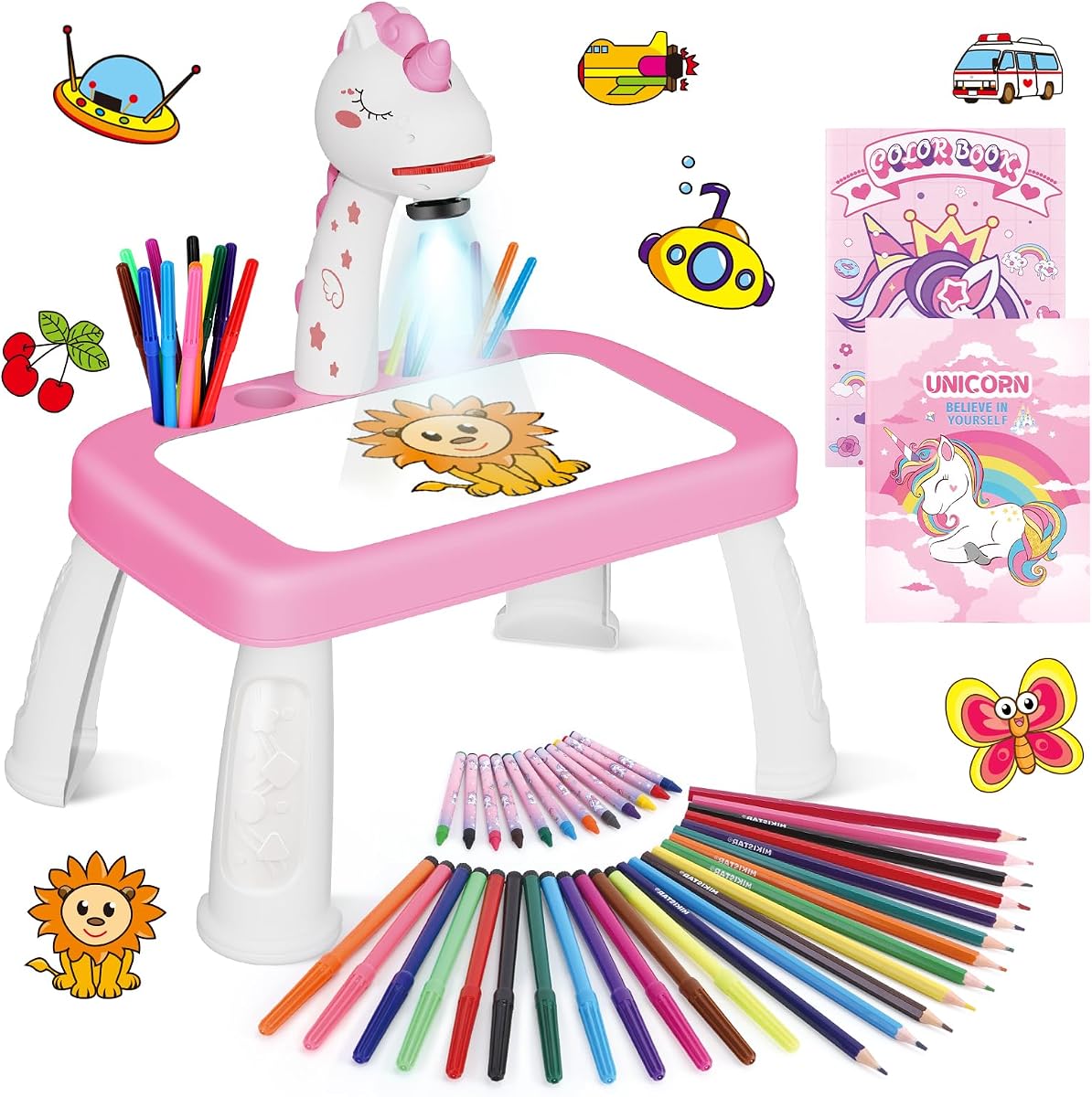
This unicorn-themed kit is designed to attract younger children with its design. It includes a massive number of supplies ranging from pens to crayons. The board is drop-resistant and built to last through daily play. It is a complete craft set rather than just a projector.
We may earn a commission when you buy through this link, at no additional cost to you.
The sticker book and scrapbook add extra creative layers. Children can decorate their drawings after tracing. This expands the play value beyond simple tracing. The durable build ensures it can handle the energy of active kids easily.
While the projector function is basic the accessory count is impressive. It provides a broad range of tools for different types of art. The theme makes it a specific hit for kids who love unicorns. It is a thoughtful gift for creative toddlers.
Choose this for a comprehensive art set with a fun theme. The variety of pens and crayons allows for color mixing and expression. It is perfect for kids who enjoy decorating and coloring as much as tracing.
Access a wide range of pens crayons and stickers for endless craft possibilities.
Enjoy peace of mind with a drop-resistant build made for active play.
We may earn a commission when you buy through this link, at no additional cost to you.
Selecting the right drawing projector depends on age skill level and budget. We have outlined key factors to consider before making your purchase to ensure the best experience.
Different models target different age groups from toddlers to pre-teens. Younger kids benefit from simple mechanical devices with sturdy parts while older children may prefer app connectivity and AI features. Check the recommended age range on the product page to ensure safety and usability.
Match the complexity of the device to your child's motor skills.
Look for devices with a large built-in library of images. Some models come with physical discs while others offer digital content through apps. More images mean more longevity for the toy as kids will not get bored quickly.
Prioritize models that offer expandable content options for long-term fun.
Since these devices use light sources safety is a top priority. Look for certifications like SGS RG0 which ensures low blue light emission. Models that project downward onto paper are generally safer than those that shine directly at the eyes.
Always verify safety certifications before buying to protect your child's vision.
Consider whether the device runs on batteries or requires a power outlet. Battery-operated models offer portability for travel but need constant battery changes. Corded models offer consistent power but limit where the child can sit.
Choose based on how mobile you need the device to be during play.
Children prefer toys they can start using immediately. Check if the device requires complex assembly or app pairing. Models with simple knobs or buttons are better for independent play. Avoid units that require extensive adult intervention for basic tasks.
Simple setups reduce frustration and encourage independent creative time.
Art supplies can be rough on devices so durability matters. Look for ABS plastic or reinforced frames that resist breaking. A sturdy product will withstand drops and rough handling by small hands.
Invest in durable materials to ensure the projector lasts through multiple play sessions.
Some kits come with markers pens and paper while others do not. A complete kit saves you from buying extra supplies separately. Check if the set includes enough drawing materials to last for several hours of play.
Verify what is in the box to avoid hidden costs for additional art tools.
Modern projectors often use apps to expand functionality. This allows for custom image uploads and updates. However ensure you are comfortable with data collection and app permissions. Offline modes are a bonus for uninterrupted play.
Choose app-enabled models only if you want custom content features.
To start using your projector place it on a flat surface and turn it on. Ensure the room is dimly lit for the clearest projection. Insert a disc or select an image from the menu to begin tracing. Keep the paper steady under the light.
Regularly check lenses and surfaces for dust to maintain image clarity. Use a soft dry cloth to wipe away smudges without scratching the plastic. Store discs in their compartments to prevent loss or damage. This ensures the device lasts longer.
Encourage your child to take breaks to prevent eye strain. Use any timer settings provided to remind them to rest. Clean up art supplies after each session to keep the workspace safe. Proper care keeps the project ready for future creative sessions.
Most modern models are designed with eye safety in mind. Look for devices that project downward rather than into the eyes. Many reputable brands include certifications like SGS RG0 which guarantees low blue light exposure. Always supervise usage to ensure proper distance.
Most drawing projectors are designed for children aged three to six years old. However some advanced models cater to older kids up to twelve. Always check the manufacturer's age recommendation to ensure the difficulty level matches your child's skills.
Most basic drawing projectors do not require a subscription. They come with built-in discs or images that work offline. Some advanced models with AI features may offer optional paid content packs but the core functions remain free.
Many modern projectors allow you to use your own photos. You can upload them via an app or insert a USB drive depending on the model. Check the product specifications to confirm if custom image support is included.
Projectors work best in dimly lit rooms. If the room is too bright the image may be faint. It is recommended to close curtains or turn off bright lights for the clearest drawing experience.
Use a soft dry cloth to gently wipe the lens. Avoid using harsh chemicals or water directly on the lens as this can damage the coating. Dust should be removed gently to prevent scratches on the surface.
A projector projects an image onto a surface from above. A light pad shines light from underneath the paper. Projectors allow for larger drawings while light pads are better for precision work. Both are useful for learning to draw.
Most battery-operated projectors do not include batteries in the box. You will need to purchase AA or AAA batteries separately. Check the product details to see which type and how many are required for operation.
We have explored ten distinct options ranging from budget-friendly kits to advanced AI devices. Our top pick the Caydo T3 AI Drawing Projector offers the best balance of features and safety. The Flycatcher and KETIEE models provide excellent alternatives for different needs.
Prioritize safety certifications and ease of use when making your decision. If you want smart features look for app connectivity. For younger kids a simpler mechanical unit may be more practical. Consider what will keep your child engaged longest.
Prices and availability change frequently so verify current details before purchasing. Always check for any additional costs like batteries or content subscriptions. We hope this guide helps you find the perfect tool to inspire your young artist.