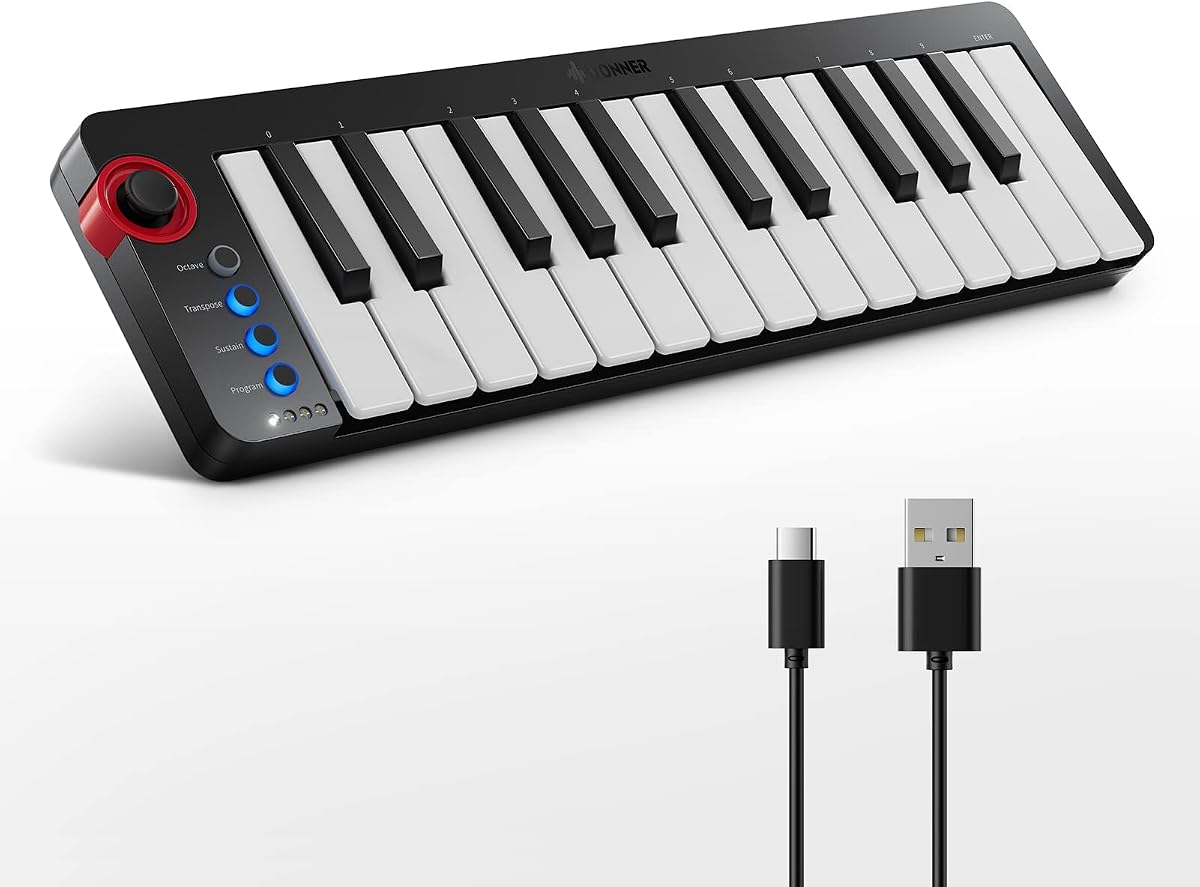
Donner Mini MIDI Keyboard N-25
4.1Editor score
40 teaching courses included
Light-up rocker buttons
Velocity-sensitive mini keys
Explore our expert guide comparing the top 25 key MIDI controllers for music production, featuring detailed reviews of keybeds, pads, and DAW integration.
Choosing the right MIDI controller can transform your music production workflow significantly. A good 25-key controller offers portability without sacrificing essential controls for melodies and chords.
We compared ten leading models based on keybed quality, control layout, software bundles, and DAW integration capabilities. Each product was evaluated for build quality, responsiveness, and value for different user needs.
Each pick highlights unique strengths like velocity sensitivity, programmable pads, or included production software. Keep in mind that product availability and specifications may change over time as manufacturers update their lines.
4.1Editor score

4.6Editor score

4.6Editor score
This side-by-side comparison highlights the core specifications and unique features of each model to help you identify the best fit for your studio setup and workflow requirements.


The Akai Professional MPK Mini MK3 stands out as a top choice for producers seeking a compact yet feature-rich controller. It receives strong ratings for its intuitive layout and professional-grade software bundle.
We may earn a commission when you buy through this link, at no additional cost to you.
Its standout features include velocity-sensitive mini keys that offer dynamic playability and eight backlit MPC-style pads perfect for drumming or triggering samples. The 4-way thumbstick provides precise pitch and modulation control essential for expressive performances.
While the mini keys are compact and portable, they may take time for players used to full-size keys to adjust to. Additionally, the lack of aftertouch limits some advanced expressive capabilities found in higher-end models.
This controller is ideal for bedroom producers, students, or anyone needing a reliable travel companion for music creation. Its extensive software in and broad DAW compatibility make it a versatile investment for modern music production workflows.
Native Kontrol Standard support ensures seamless interaction with industry-standard synthesizer plugins and sound libraries.
The included arpeggiator and editable parameters allow musicians to craft complex patterns effortlessly during composition sessions.
We may earn a commission when you buy through this link, at no additional cost to you.
The Donner N-25 targets beginners and casual creators looking for an entry point into MIDI music production without breaking the bank. It offers essential controls wrapped in a simple package designed for ease of use.
We may earn a commission when you buy through this link, at no additional cost to you.
Key strengths include its compact design with velocity-sensitive mini keys and light-up rocker buttons that provide visual engagement. The inclusion of forty keyboard teaching courses helps new users learn music theory and arrangement basics directly on the device.
Users should expect a simpler build quality compared to premium models, which may limit durability for heavy daily use. The feature set is focused on basics rather than advanced performance tools like programmable macro controls or complex sequencing.
This controller is best suited for hobbyists, educators, or students starting their music journey who need a straightforward tool to explore creativity. It effectively bridges the gap between software and hardware without overwhelming complexity.
Integrated lessons cover arrangement essentials making it a unique tool for self-teaching without needing external courses.
Works seamlessly with smartphones using OTG adapters expanding its utility beyond traditional computer setups.
We may earn a commission when you buy through this link, at no additional cost to you.
The Novation Launchkey Mini 25 MK4 offers a significant upgrade in control fidelity and software integration for serious music producers. It brings studio-grade features to a compact form factor ideal for portable setups.
We may earn a commission when you buy through this link, at no additional cost to you.
Its 16 force-sensitive resistor pads and polyphonic aftertouch support allow for expressive playing and dynamic sound manipulation. Scale Mode ensures you never hit a wrong note, speeding up composition for those unfamiliar with musical theory.
The device is more expensive than basic controllers and requires initial configuration to leverage its full DAW integration capabilities fully. Users new to MIDI mapping might find the initial setup process slightly steeper than plug-and-play alternatives.
Producers looking for a controller that grows with their skills will find this model exceptional. Its seamless integration with major DAWs makes it a powerful ally for live performance and complex studio arrangements.
Polyphonic aftertouch allows individual notes to modulate parameters, adding nuance to melodies and chords.
Includes Ableton Live Lite and various instrument packs providing a complete production environment out of the box.
We may earn a commission when you buy through this link, at no additional cost to you.
The LPK25 focuses on the essentials of melody creation with a clean and straightforward interface. It is praised for its responsive keys and rapid setup process allowing songwriters to capture ideas immediately.
We may earn a commission when you buy through this link, at no additional cost to you.
Key features include dedicated octave buttons and a sustain button which are vital for playing chords and sustaining notes effectively. The built-in arpeggiator with clock synchronization helps generate rhythmic patterns that add depth to compositions.
Users seeking drum programming or extensive macro control may find the lack of pads and knobs limiting for complex production tasks. The streamlined design prioritizes keyboard playability over broader controller functionality.
This model is perfect for composers who primarily work with keyboards and virtual instruments. Its simple layout encourages focus on melody and harmony rather than navigating complex control surfaces.
Dedicated preset slots allow instant recall of mappings for different virtual instruments during live sessions.
The included arpeggiator supports creative songwriting by generating complex rhythmic textures from simple input.
We may earn a commission when you buy through this link, at no additional cost to you.
The Arturia MiniLab 3 brings modern technology like Midi 2.0 support to a compact controller designed for intuitive use. It is highly rated for its quality build and comprehensive package that includes premium software.
We may earn a commission when you buy through this link, at no additional cost to you.
Its standout attributes include eight velocity-sensitive pads and four assignable faders that provide versatile control over effects and mixing without needing a mouse. The keybed is optimized for comfort during extended playing sessions.
The unique white design may attract dust and require more frequent cleaning than darker models. Additionally, the included software suite is powerful but can be overwhelming for beginners unfamiliar with advanced synthesis features.
This controller fits producers who appreciate clean design and deep software integration. It offers a professional workflow in a small footprint making it suitable for both studio and mobile setups.
Midi 2.0 support ensures compatibility with the latest standards and richer expressive capabilities for future devices.
Four 64-step faders allow hands-on control of parameters like volume pan or filter cutoff efficiently.
We may earn a commission when you buy through this link, at no additional cost to you.
The Rhymo 25-Key Controller prioritizes mobility with USB-C connectivity and Bluetooth MIDI support for tablet users. It is appreciated for its plug-and-play simplicity and lack of need for external power adapters.
We may earn a commission when you buy through this link, at no additional cost to you.
Features like an X-Y joystick for pitch and modulation plus loop and tap tempo controls make it useful for live performers needing quick adjustments. Its USB-MIDI class compliance ensures reliable connection across various systems without drivers.
The joystick control can be sensitive to accidental movements during intense playing sessions. The keys are functional but lack the weighted feel preferred by piano-focused musicians.
This controller is ideal for travelers who need a lightweight solution for mobile production. Its Bluetooth capability adds significant value for working with smartphones and tablets directly.
Bluetooth MIDI support enables seamless connection to mobile devices for on-the-go composition.
Built-in loop and tempo controls allow dynamic adjustments without interrupting the flow of a performance.
We may earn a commission when you buy through this link, at no additional cost to you.
The M-VAVE 25 Key stands out for its wireless operation capability allowing producers to compose without cable clutter. It offers a long battery life making it suitable for extended sessions in various locations.
We may earn a commission when you buy through this link, at no additional cost to you.
Its eight RGB backlit pads and capacitive touch stripes provide expressive control over samples and pitch bending without needing dedicated wheels. The velocity-sensitive keys ensure dynamic playing across all connected devices.
The internal battery is not user-replaceable which may affect long-term maintenance and repairability. The lightweight construction is portable but might feel less sturdy during vigorous performances.
This unit is great for users who prioritize freedom of movement during creation. Its combination of wireless tech and visual feedback makes it a versatile tool for modern beat-making.
Built-in battery supports hours of use on battery power enhancing portability away from mains outlets.
Capacitive touch stripes add a modern interface option for subtle pitch modulation and creative effects.
We may earn a commission when you buy through this link, at no additional cost to you.
The MPK Mini Play MK3 adds standalone capabilities allowing it to function without a connected computer or DAW. This versatility is appreciated by performers who need a self-contained unit for quick practice or gigs.
We may earn a commission when you buy through this link, at no additional cost to you.
Features include a built-in speaker and over one hundred internal sounds enabling immediate play and recording. The OLED display provides clear feedback on settings making navigation intuitive during live use.
Internal sounds are functional but lack the depth of external VSTs available when connected to a computer. The added functionality increases the price compared to standard MIDI controllers.
Ideal for musicians who need a portable workstation that doesn't rely on external hardware this model offers significant freedom. It serves as both a controller and a standalone instrument for quick ideas.
Built-in speaker and battery option allow creation anywhere without needing a computer connection.
OLED display enhances usability by showing parameters clearly during performance or editing.
We may earn a commission when you buy through this link, at no additional cost to you.
The black variant of the MPK Mini MK3 offers the same professional features as the standard model in a different aesthetic. It maintains the high ratings for functionality and build quality found in the white version.
We may earn a commission when you buy through this link, at no additional cost to you.
Its 4-way thumbstick and MPC-style pads deliver precision control ideal for beat-making and sound design. The velocity-sensitive keys respond well to dynamic playing styles ensuring expressive output.
Fingerprints may be more visible on the black surface requiring occasional wiping to keep it looking clean. The key feel remains identical to other versions which some users may find too light.
This choice suits studios prioritizing a specific look without compromising performance. It remains a top contender for producers seeking a versatile and reliable portable controller.
Black finish complements dark studio setups providing a professional look without altering performance.
All control features and software bundles remain identical to the white model ensuring full compatibility.
We may earn a commission when you buy through this link, at no additional cost to you.
The APC Key 25 MK2 is designed specifically for seamless integration with Ableton Live making it the top choice for users of that DAW. It offers immediate control over clips and scenes with pre-mapped functions.
We may earn a commission when you buy through this link, at no additional cost to you.
A 5×8 RGB pad matrix provides visual feedback for launching clips allowing for complex live performances and instant creativity. Dedicated directional arrows simplify navigation through large projects and scene management.
Outside of Ableton Live the functionality is limited compared to more generic controllers lacking custom mapping capabilities. The lack of faders restricts mixing control compared to other models in this size range.
This controller is perfect for Ableton-focused producers and live performers who need quick scene access. Its tight integration with the DAW streamlines workflow significantly during both recording and live sets.
RGB pads offer instant visual cues for launching audio and MIDI clips during performances.
Directional arrows allow easy scrolling through tracks and scenes without reaching for a mouse.
We may earn a commission when you buy through this link, at no additional cost to you.
Selecting the right controller involves balancing portability with the specific features you need for your workflow.
Velocity sensitivity is crucial for dynamic expression allowing you to control volume and tone by how hard you press. Some controllers offer semi-weighted or spring-loaded keys which can impact playability over long sessions.
Look for velocity-sensitive keys that respond accurately to your playing style to ensure your musical nuances are captured correctly.
The arrangement of pads knobs and sliders should match your primary activities such as drumming mixing or synth tweaking. Controllers with dedicated transport buttons can save time during recording sessions.
Choose a layout that keeps your most frequently used controls within easy reach to maintain creative flow without interruption.
Many controllers include specific mappings for Digital Audio Workstations allowing for intuitive control over virtual instruments. Seamless integration reduces setup time and allows you to focus on creating music immediately.
Verify that your preferred DAW has native support or robust drivers for the controller to ensure smooth operation.
USB connectivity is standard but some models offer Bluetooth MIDI or audio inputs for broader compatibility with mobile devices. Class compliance ensures plug-and-play functionality across different operating systems.
Consider whether wireless capabilities or additional ports like sustain pedal inputs are necessary for your specific setup.
Materials and construction quality determine how well the controller withstands regular use and transportation. Metal plates and reinforced plastic often indicate better longevity compared to cheaper plastic housings.
Invest in a sturdy build if you plan to travel frequently or use the controller in demanding environments.
The physical dimensions and weight affect how easily you can store or transport the device. A compact footprint is essential if you have limited desk space or need to move gear between studios.
Ensure the controller fits your travel needs without requiring excessive protective gear or sacrificing essential features.
Prices vary based on feature sets and build quality so determine what you need before shopping. Entry-level options often provide sufficient features for beginners while advanced models offer better tactile feedback.
Balance your spending between hardware capabilities and the value of included software bundles to maximize your investment.
Choosing a controller with standards like MIDI 2.0 ensures compatibility with future software updates and newer instruments. Expandable firmware can also extend the life of your device by adding new functions over time.
Look for models with regular driver support and firmware updates to keep your gear relevant in the long term.
Connect your controller to a computer via USB ensuring the cable is securely inserted to maintain stable data transfer. Install any required drivers or DAW mappings provided by the manufacturer to enable full functionality.
Keep your controller clean by wiping it with a dry cloth regularly to remove dust that can settle between keys and pads. Avoid exposing it to direct sunlight or extreme temperatures which may damage internal components.
Store the device in a protective case when transporting to prevent physical damage from impacts or moisture exposure. Regularly check cables for wear and replace them if they show signs of fraying to ensure reliability.
Most modern MIDI controllers are class-compliant meaning they work instantly with any computer without driver installation. However installing manufacturer software can unlock specific DAW mappings and advanced features.
Yes compact 25-key controllers are designed for portability and ease of use on stage. Features like pad triggering and quick scene access make them ideal for live electronic performances.
Many models support USB-C or Bluetooth MIDI allowing direct connection to smartphones and tablets. You may need a simple adapter depending on your device's port type.
Velocity sensitivity measures how hard a key is pressed while pressure detects how hard you press after the note is struck. Pressure allows for more nuanced expression like vibrato during a hold.
Most bundles include DAWs and virtual instruments to get you started. These software packages are often limited versions but provide enough to begin professional-quality music production.
Check that the USB port is functional and the cable is undamaged before attempting connections. Rebooting your computer and ensuring the DAW is focused on the MIDI device can resolve most sync issues.
We reviewed ten excellent controllers ranging from budget-friendly entry points to professional-grade production tools. Each option offers unique benefits tailored to different music production needs and preferences.
Prioritize controllers that match your specific workflow such as DAW integration for studio work or portability for on-the-go creation. Key quality and control layout significantly impact your day-to-day creative experience.
Remember to check current availability and updated specifications as manufacturers frequently release new versions. Investing in a quality controller is a long-term decision that enhances your musical capabilities.