
TECKNET Wired Keyboard
4.5Editor score
RGB color modes
Silent typing design
Spill resistant build
This guide compares the best backlit illuminated keyboard options for visibility and typing comfort across various budgets and user needs including seniors.
Finding the right backlit illuminated keyboard can transform your typing experience by improving visibility and reducing eye strain in low light environments.
We evaluated ten top models based on lighting quality, key layout, durability, and specific features like large print or silent typing for diverse user needs.
Each pick highlights unique strengths and tradeoffs to help you choose confidently though note that availability and pricing may vary over time.
4.5Editor score

4.9Editor score

4.1Editor score
The following table provides a side by side comparison of all ten models highlighting key specifications to help you find the perfect fit for your setup.





The TECURS Large Print Backlit Keyboard stands out with a top rating for its oversized letters and even lighting ideal for seniors or low vision users.
We may earn a commission when you buy through this link, at no additional cost to you.
It features oversized printed letters four times larger than standard keys and a soft membrane structure that reduces noise significantly.
While it only offers white backlighting and no RGB options the seven adjustable brightness levels ensure clear visibility in any lighting condition.
This model is a top choice for anyone prioritizing visibility and quiet typing without sacrificing full size functionality or ergonomic comfort.
The large print ensures keys are easy to find quickly reducing errors and strain during long typing sessions.
Soft membrane keys minimize noise making this perfect for shared offices or late night work environments.
We may earn a commission when you buy through this link, at no additional cost to you.
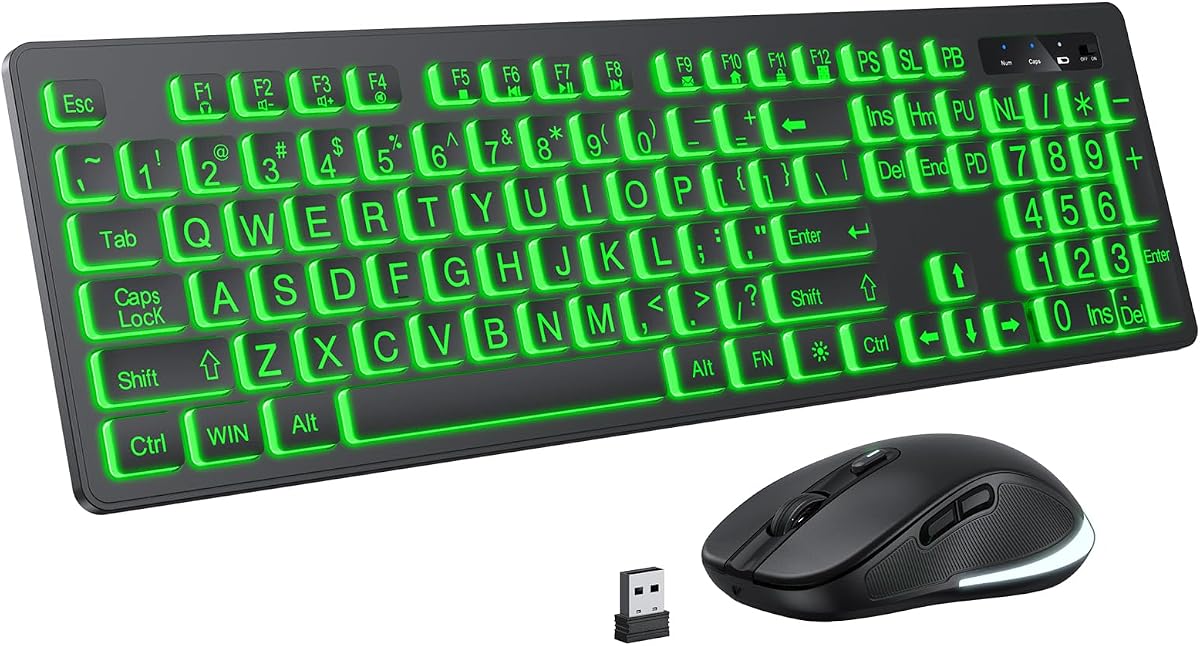
The TECKNET Wired Keyboard offers an affordable entry point into backlit keyboards with seven vibrant RGB colors and a silent typing experience.
We may earn a commission when you buy through this link, at no additional cost to you.
Its low-profile membrane keys reduce noise significantly while the spill resistant design and sturdy frame ensure long-term reliability.
Although it lacks advanced macro programming the twelve FN multimedia shortcuts handle essential tasks like volume and playback with ease.
This keyboard is an excellent budget pick for users wanting RGB aesthetics and quiet performance without spending a premium price.
Seven colors and two modes let you personalize your desk setup to match any vibe or lighting preference.
Quiet keystrokes make this ideal for libraries or shared spaces where noise can be disruptive to others.
We may earn a commission when you buy through this link, at no additional cost to you.
The HP 400 Backlit Wired Keyboard delivers a premium experience with warm white LED illumination and a slim portable design for hybrid workers.
We may earn a commission when you buy through this link, at no additional cost to you.
Its programmable keys and sanitizable surface offer convenience and hygiene benefits that appeal to professionals and health conscious users alike.
While it lacks full RGB customization the warm white light is easy on the eyes and helps reduce fatigue during extended typing sessions.
This model is ideal for users seeking a high-quality compact keyboard with professional features and reliable wired connectivity.
The sanitizable surface ensures easy cleaning which is essential for shared desks or environments with high usage.
Twelve programmable shortcuts streamline workflows by giving you quick access to frequently used applications or functions.
We may earn a commission when you buy through this link, at no additional cost to you.
The X9 Large Print Backlit Keyboard emphasizes bold oversized keys and seven color options making it easy to see and type even in dim rooms.
We may earn a commission when you buy through this link, at no additional cost to you.
Its full size layout includes a number pad and shortcut keys to support efficient workflows while maintaining reliable wired connectivity.
While it lacks advanced features the simple plug and play setup and four brightness levels ensure it works right out of the box.
This keyboard is a strong choice for students or seniors who want clear visibility and dependable performance without complex setup steps.
Seven colors and four brightness levels guarantee keys remain visible regardless of the lighting environment or personal preference.
The number pad and full layout support data entry and spreadsheet work without compromising on comfort or efficiency.
We may earn a commission when you buy through this link, at no additional cost to you.
The Arteck Backlit USB Wired Keyboard combines a sleek thin design with a scissors X structure that provides a comfortable and quiet typing experience.
We may earn a commission when you buy through this link, at no additional cost to you.
Its ultra thin profile and light weight make it easy to pack and transport while still offering full size keys and number pad.
While the cable is relatively short the three brightness levels and seven colors offer enough variety for most users without needing complex settings.
This keyboard is ideal for laptop users who want a desktop replacement that saves desk space and delivers a professional look.
The thin lightweight build makes it easy to fit into backpacks or briefcases for mobile work without adding bulk.
Low profile scissors keys offer a tactile feel that reduces fatigue during long typing sessions or daily office use.
We may earn a commission when you buy through this link, at no additional cost to you.
The KOPJIPPOM Large Print Backlit Keyboard focuses on accessibility with four times larger fonts and white backlighting for clear visibility in low light.
We may earn a commission when you buy through this link, at no additional cost to you.
Its spill resistant design and durable frame ensure it can handle daily use while the plug and play setup simplifies installation.
While it only supports white lighting the even distribution and adjustable brightness still provide excellent readability for various users.
This keyboard is perfect for schools or libraries where clear visibility and durability are critical for shared and diverse user bases.
Large fonts ensure that users with vision impairments can type confidently without constant squinting or strain.
Spill resistance and a tough frame protect against accidents making it suitable for busy shared workspaces.
We may earn a commission when you buy through this link, at no additional cost to you.
The Large Print Wireless Keyboard Mouse offers a complete wireless combo with oversized keys and seven color backlighting for a flexible typing experience.
We may earn a commission when you buy through this link, at no additional cost to you.
Its rechargeable battery saves on battery costs while the silent tactile keystrokes make it suitable for quiet environments.
While it requires periodic charging the shared USB receiver reduces clutter and ensures stable connectivity up to thirty three feet.
This set is a great choice for users who want both a keyboard and mouse in one package without sacrificing visibility or convenience.
Freedom from cables lets you arrange your workspace more freely and type comfortably from different positions.
Rechargeable batteries reduce waste and cost making this a sustainable choice for long term daily use.
We may earn a commission when you buy through this link, at no additional cost to you.
The Perixx PERIBOARD-317 provides a slim and quiet option with large print keys and white backlighting for daily typing comfort.
We may earn a commission when you buy through this link, at no additional cost to you.
Its long USB cable offers flexible desk placement while the membrane switches deliver reliable performance rated for ten million keystrokes.
While the backlight disables scroll lock the adjustable brightness and low profile keys make it a practical and comfortable choice.
This keyboard is a solid pick for budget conscious users who want a slim reliable keyboard with clear visibility and good ergonomics.
The slim profile saves desk space while maintaining a full size layout ideal for compact workstations.
High quality key switches ensure consistent performance over years of daily use reducing replacement needs.
We may earn a commission when you buy through this link, at no additional cost to you.
The Large Print Backlit Keyboard USB includes a foldable wrist rest and protective cover making it a complete package for senior or low vision users.
We may earn a commission when you buy through this link, at no additional cost to you.
Its white backlight and oversized fonts provide clear visibility while the quick rebound keys reduce hand fatigue during extended typing sessions.
While the backlight cannot fully turn off in sleep mode the protective cover extends keyboard life against dust and spills effectively.
This model is an excellent choice for home or office environments where comfort and protection are priorities for daily typing use.
A foldable wrist rest helps maintain proper posture reducing strain during long typing sessions or workdays.
The included cover shields against dust spills and pet hair extending the keyboard life and keeping it clean.
We may earn a commission when you buy through this link, at no additional cost to you.
The Large Print Backlit Keyboard with Wrist Rest combines colorful seven color lighting with ergonomic design for comfortable stylish typing.
We may earn a commission when you buy through this link, at no additional cost to you.
Soft touch keys and a built-in wrist rest reduce fatigue while the plug and play setup ensures easy connectivity without drivers.
While it lacks a dedicated numeric keypad its full size layout still supports efficient typing and gaming for most users.
This keyboard is a great pick for those wanting both visual appeal and physical comfort in a versatile affordable backlit solution.
A built-in wrist rest and tilted angle support natural hand posture reducing fatigue during long work sessions.
Seven colors let you match your desk vibe and express personal style while typing in any lighting condition.
We may earn a commission when you buy through this link, at no additional cost to you.
Choosing the right keyboard involves evaluating lighting quality, layout, and special features that match your workflow and environment.
Look for even LED distribution and multiple brightness levels to prevent eye strain and ensure clear key visibility in any light.
Models with adjustable brightness and multiple colors offer more flexibility than single-color fixed lighting setups.
Oversized fonts and larger key surfaces help users with vision challenges locate keys quickly and reduce typing errors significantly.
If visibility is a priority choose models specifically advertising large print or oversized lettering options.
Wired keyboards offer plug and play reliability while wireless models provide cable freedom and portable convenience for modern workspaces.
Check compatibility with your devices such as USB-A versus USB-C or wireless receiver availability before purchase.
Keyboards with adjustable tilt or wrist rests support better posture and reduce hand fatigue during long typing sessions.
Low-profile keys often feel more comfortable for extended use compared to traditional tall keycaps.
Spill-resistant designs and sturdy frames protect against accidents and wear ensuring longer lifespan in active environments.
Check key switch life ratings for millions of keystrokes to gauge long-term reliability and value.
Silent membrane keys reduce noise making them ideal for shared offices or quiet study spaces where typing sounds may disturb others.
Avoid mechanical clicky switches if noise reduction is a primary requirement for your work environment.
Multimedia keys and programmable shortcuts can speed up daily tasks like volume control or app launching without extra mouse movement.
Evaluate if these extras add genuine workflow benefits to your specific use case before paying extra.
While budget options often lack advanced features they still provide solid lighting and reliability for most basic typing tasks.
Invest in premium models only if you need specialized features like customizable macros or high-end build materials.
Plug the USB cable into a free port or pair the wireless receiver to enable immediate setup without needing drivers or software installation.
Use the designated function key to toggle backlight brightness and colors so you can adjust the lighting for any ambient condition.
Keep the keyboard clean by using compressed air or a soft cloth to remove dust and debris that may accumulate between the keys over time.
A backlit illuminated keyboard has LED lights built under the keycaps to improve visibility in low light. It helps users see key labels clearly without external light sources reducing eye strain.
Yes because they provide direct light on the keys making it easier to type without turning on room lights. This reduces eye strain and keeps your workspace calm and focused.
Most quality LEDs last over 50000 hours meaning they will outlast the keyboard keys. They are highly reliable and rarely need replacement during normal daily use.
Many models allow full backlight toggling off or brightness to zero. Check the product specs since some older designs keep LEDs partially on even when dimmed.
Yes they combine high contrast large letters with lighting to make keys easier to see. This makes typing simpler and more accurate for users with vision challenges or seniors.
Yes many wireless models feature backlit keys but may need periodic charging or battery changes. Ensure they support the lighting features you want before choosing wireless over wired.
Our top picks highlight diverse strengths from the TECURS Large Print for visibility to the TECKNET for budget-friendly RGB and the HP 400 for premium portability.
Prioritize lighting clarity ergonomic comfort and special features like large print or silence based on your specific work environment and personal typing needs.
Always verify current product availability and specifications since models and features may update over time before finalizing your purchase decision.