
LGA 1155 Motherboard H61 for Intel 2th/3th Core i7/i5/i3 DDR3
5.0Editor score
Supports Intel 2nd 3rd gen CPUs
Includes M.2 NVMe and NGFF slots
Dual channel DDR3 memory support
This guide compares the top Lga 1155 Motherboard options for budget and performance builds including modern M.2 support and classic chipset features for Intel
Finding the right Lga 1155 Motherboard can be challenging as many legacy options lack modern features. This guide helps you choose a board that supports your specific processor and memory needs without breaking the bank.
We have analyzed ten real products available on the market to provide you with a comprehensive overview. Each selection offers unique benefits ranging from budget-friendly H61 models to feature-rich Z77 and H77 chipsets for enthusiasts.
Every pick in this list highlights specific strengths and potential weaknesses to help you make an informed decision. Please note that availability and pricing can change frequently so always verify details before purchasing your next component.
5.0Editor score

4.3Editor score

4.0Editor score
The following table provides a side-by-side comparison of all ten selected motherboards. It highlights key specifications and features to help you quickly identify which board fits your specific build requirements and budget constraints best.



This H61 motherboard stands out as the most affordable option for rebuilding older Intel systems. It supports 2nd and 3rd generation Core processors along with Xeon E3 chips making it versatile for budget builds.
We may earn a commission when you buy through this link, at no additional cost to you.
The inclusion of an M.2 slot is a significant upgrade over typical H61 boards allowing for faster NVMe storage. It also features dual channel DDR3 support up to 16GB and video outputs for integrated graphics.
While it lacks a user manual and battery the board is functional upon arrival with essential cables. You will need to download drivers separately but the hardware itself performs reliably for basic tasks.
Buyers looking to save money while upgrading storage and memory will find this board ideal. It is a practical choice for office PCs or light gaming rigs that need a modern twist on legacy hardware.
The M.2 interface allows you to use NVMe SSDs which are much faster than traditional SATA drives. This feature bridges the gap between old and new technology effectively.
This board supports a wide range of Intel CPUs including the popular Xeon E3 v2 series. This makes it an excellent choice for those seeking high performance on a budget.
We may earn a commission when you buy through this link, at no additional cost to you.
The MACHINIST H61 is another budget option that targets compact builds with its Flex-ATX form factor. It supports 2nd and 3rd gen Intel processors and includes useful video outputs for display connectivity.
We may earn a commission when you buy through this link, at no additional cost to you.
Like the previous H61 it offers an M.2 slot for faster storage options. The board supports up to 16GB of DDR3 memory and includes SATA ports for additional hard drives.
The main drawback is the 100M LAN speed which limits network performance compared to Gigabit standards. Additionally user reviews suggest potential setup challenges requiring careful attention to compatibility.
This board is best for users who need a small form factor and are constrained by budget. It works well for media centers or basic office tasks where network speed is not critical.
The Flex-ATX size allows for installation in smaller cases which is great for space constrained environments. This makes it versatile for mini PC builds without sacrificing core functionality.
You can install up to 16GB of DDR3 RAM which is sufficient for most everyday computing tasks. The M.2 slot adds modern storage capabilities to an older chipset platform.
We may earn a commission when you buy through this link, at no additional cost to you.
The Gigabyte Z77-DS3H represents a step up in performance with the Z77 chipset. This board is ideal for enthusiasts who want overclocking capabilities and robust connectivity for their system.
We may earn a commission when you buy through this link, at no additional cost to you.
It features an ATX form factor which provides ample space for expansion cards and components. The Gigabit LAN ensures fast network speeds and RAID support offers data redundancy options.
While more expensive than budget H61 boards the Z77 offers better longevity and performance potential. It remains a solid choice for high performance builds using older 2nd and 3rd gen CPUs.
Users seeking reliability and expansion options should consider this board. It balances modern features with legacy support making it a versatile option for demanding workloads.
The Z77 chipset allows for CPU overclocking which can significantly boost performance in gaming and rendering tasks. This feature is crucial for enthusiasts pushing hardware limits.
ATX size ensures you have enough PCIe slots for multiple graphics cards or capture cards. This makes it suitable for multi monitor setups or specialized workstation needs.
We may earn a commission when you buy through this link, at no additional cost to you.
The ASUS P8Z77-V offers premium features designed for home environments and enthusiasts. It includes USB BIOS Flashback which allows BIOS updates without a CPU making recovery easier.
We may earn a commission when you buy through this link, at no additional cost to you.
Fan Xpert 2 provides automated fan tuning to keep temperatures low and noise minimal. The board supports high speed DDR3 memory and includes comprehensive power management features.
While it does not have built-in Wi-Fi the Wi-Fi GO feature allows for remote control and media management. The premium price reflects the advanced software and hardware quality.
This board is perfect for users who value ease of use and advanced features. It offers a refined experience for those willing to invest in a higher quality platform.
USB BIOS Flashback ensures you can update firmware even if the system fails to boot. This is a critical feature for maintaining system stability and compatibility.
SMART DIGI+ Power Control provides precise adjustments for stability and efficiency. This helps in reducing power consumption while maintaining performance under load.
We may earn a commission when you buy through this link, at no additional cost to you.
This H61 board is branded for gaming but functions as a solid budget ATX option. It supports 2nd and 3rd gen Intel processors and includes an M.2 slot for modern storage.
We may earn a commission when you buy through this link, at no additional cost to you.
The 3 phase power supply ensures stable delivery to components which is crucial for reliable operation. It supports up to 16GB of DDR3 memory and features VGA and HDMI video outputs.
While marketed for gaming the lack of advanced overclocking features may limit enthusiasts. However it remains a reliable choice for budget systems needing basic modern connectivity.
Buyers needing a standard ATX size at a low price will appreciate this board. It balances essential features with cost effectiveness for everyday use cases.
The 3 phase power supply with solid state capacitors ensures stable power. This helps in preventing crashes and extends the lifespan of your components.
The M.2 NVMe slot allows for fast boot times and application loading. This feature adds significant value to an otherwise entry level board.
We may earn a commission when you buy through this link, at no additional cost to you.
The ASUS P8H77-V LE offers a balanced approach with the H77 chipset. It includes features like USB 3.0 Boost for faster data transfers and EPU for energy efficiency.
We may earn a commission when you buy through this link, at no additional cost to you.
Fan Xpert allows you to adjust fan speeds based on system loading which helps with noise and cooling. The board supports SATA 6Gb/s and HDMI for modern connectivity needs.
Being an LE model it may lack some premium features found on higher tier boards. However it provides robust performance and reliability for standard computing tasks.
This board is ideal for users seeking a balance between performance and cost. It is a solid choice for office or home systems requiring stable and efficient operation.
USB 3.0 Boost improves read and write speeds significantly. This is beneficial for external drives and peripherals requiring high bandwidth.
The EPU feature manages power usage dynamically to reduce electricity costs. It ensures your system operates efficiently without compromising performance.
We may earn a commission when you buy through this link, at no additional cost to you.
The ASUS P8H77-V supports up to 32GB of DDR3 memory which is excellent for memory intensive tasks. It includes PCIe 3.0 support for faster graphics cards and improved bandwidth.
We may earn a commission when you buy through this link, at no additional cost to you.
With multiple PCIe slots and RAID support it offers flexibility for multi GPU or storage configurations. The board includes HDMI and USB 3.0 for modern peripheral connectivity.
While priced higher than budget options the additional features justify the cost for demanding users. It is suitable for workstations needing reliable performance and expandability.
Buyers requiring more memory and expansion will find this board compelling. It provides a stable platform for professional applications and heavier workloads.
Supporting up to 32GB of RAM allows for smoother multitasking and virtualization. This is a key advantage over boards limited to 16GB.
Multiple PCIe slots allow for add-on cards such as sound or capture cards. This versatility makes it ideal for specialized workstation builds.
We may earn a commission when you buy through this link, at no additional cost to you.
The P8Z77-V LK features dual PCIe 3.0 x16 slots for multi GPU setups. It supports up to 32GB of DDR3 memory and includes overclocking capabilities of the Z77 chipset.
We may earn a commission when you buy through this link, at no additional cost to you.
It is designed to support 22nm CPUs which were common in 3rd gen Intel processors. The board offers a balance of performance and features for enthusiasts.
While it supports 22nm CPUs it may require a BIOS update for newer CPUs. However it remains a powerful option for those wanting to maximize legacy hardware.
This board is best for users seeking multi GPU capability on an older platform. It delivers strong performance for gaming and rendering when paired with compatible CPUs.
Dual PCIe 3.0 slots allow for SLI or CrossFire configurations. This enables higher frame rates in gaming and better rendering speeds.
Support for 22nm CPUs ensures compatibility with 3rd gen Core processors. This provides access to newer architectures within the LGA 1155 socket.
We may earn a commission when you buy through this link, at no additional cost to you.
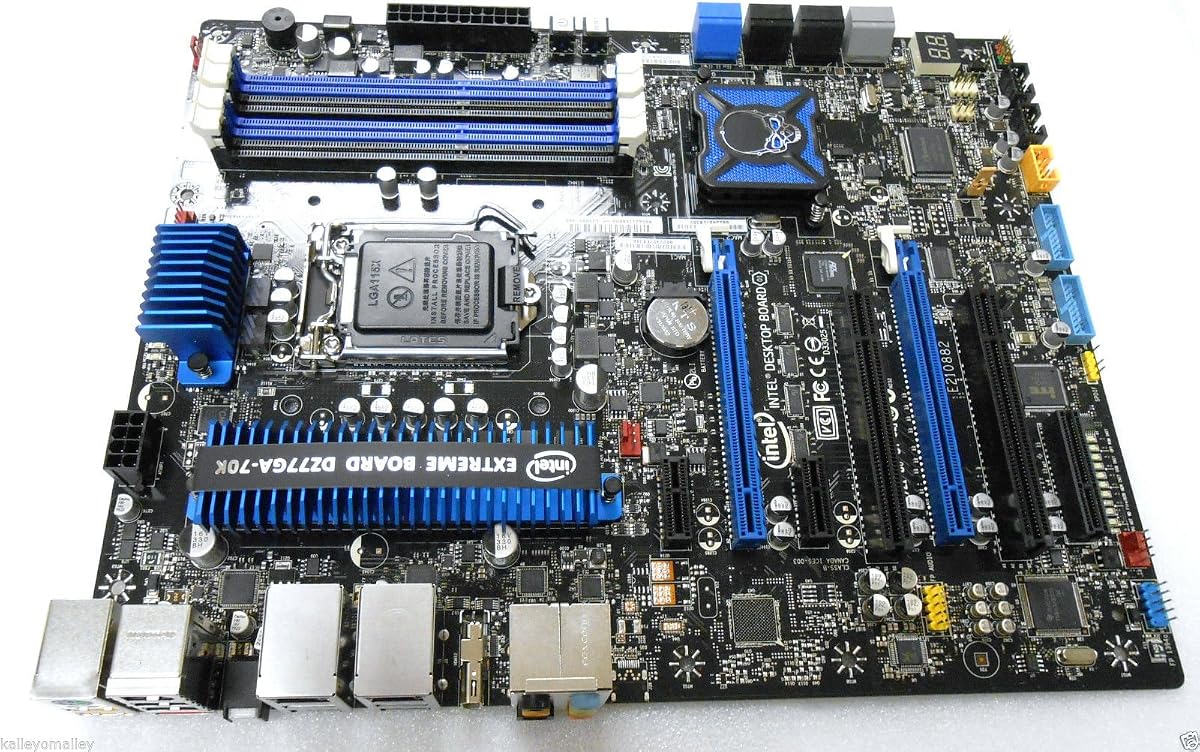
The Intel Z77 Extreme Series offers dual Gigabit LAN ports which are rare for consumer boards. It supports SATA 6Gb/s and includes Firewire for specialized legacy peripheral connectivity.
We may earn a commission when you buy through this link, at no additional cost to you.
As an ATX board it provides ample space for components and cooling. Intel chipset reliability is a major plus for those prioritizing stability and support.
While Firewire is less common now it remains useful for video editors or legacy devices. Dual LAN is great for NAS setups or network redundancy needs.
This board is perfect for users requiring dual networking or specialized connectivity. It stands out as a reliable choice for specific professional or legacy use cases.
Dual Gigabit LAN ports allow for network redundancy or dedicated traffic channels. This is highly beneficial for file servers or media centers.
The inclusion of Firewire supports older cameras and storage devices. This makes it a versatile option for specialized workflows.
We may earn a commission when you buy through this link, at no additional cost to you.
The P8B75-M/CSM uses the B75 chipset which offers business focused features. It includes EPU for energy saving and a UEFI BIOS for easier configuration.
We may earn a commission when you buy through this link, at no additional cost to you.
GPU Boost helps enhance integrated graphics performance which is useful for systems without a dedicated GPU. The high user rating reflects reliability and ease of use.
While not designed for heavy overclocking it provides stable performance for office and home use. It is a good choice for users prioritizing efficiency and simplicity.
This board is best for standard computing needs where efficiency matters. It offers a reliable platform with modern features for everyday tasks.
EPU adjusts power usage to reduce electricity consumption. This helps lower costs while maintaining consistent performance levels.
The UEFI BIOS offers an intuitive graphical interface for setup. This simplifies hardware configuration for users of all skill levels.
We may earn a commission when you buy through this link, at no additional cost to you.
Selecting the right motherboard requires understanding chipsets and features available. This section covers key factors to consider before making your purchase decision.
The chipset determines overclocking support and expansion features. Z77 allows overclocking while H61 and H77 do not. Choose based on whether you need performance tuning or stability.
ATX boards offer more expansion slots and ports. Flex-ATX is smaller for compact cases. Ensure your case supports the size you choose to avoid fit issues.
Most Lga 1155 boards use DDR3 RAM. Check maximum capacity and speed supported. Some boards support up to 32GB while others are limited to 16GB.
Look for M.2 slots if you want faster NVMe drives. SATA 6Gb/s is standard on most boards. Ensure enough ports for your hard drives and SSDs.
Check for USB 3.0 and HDMI ports on the rear panel. Gigabit LAN is preferable for faster network speeds. Some boards include older ports like Firewire for legacy devices.
Robust power delivery ensures stable performance under load. Look for solid state capacitors and adequate VRM design. This prevents crashes and extends component life.
Ensure enough USB ports for peripherals. Check audio quality for gaming or media needs. Realtek HD Audio is common and usually sufficient for most users.
Modern UEFI BIOS makes setup easier. Features like USB Flashback help recover BIOS updates. Consider ease of use for future maintenance and updates.
Install components carefully by aligning the CPU with the socket and securing it with the lever. Ensure RAM is clicked in firmly until the sides click shut.
Connect all power cables from the PSU to the 24pin and 8pin CPU connectors. Verify all peripheral cables are seated properly to avoid loose connections.
Regularly clean dust from vents and fans to maintain airflow. Update BIOS and drivers periodically for better stability and compatibility with newer software.
Yes most Lga 1155 motherboards support both 2nd and 3rd generation Intel Core processors. However check specific BIOS requirements for 3rd gen models to ensure compatibility before purchasing.
No H61 motherboards do not support CPU overclocking. You will need a Z77 or Z68 chipset to unlock overclocking features for compatible processors.
Some H61 boards include M.2 slots that support NVMe SSDs. Check the product details to confirm if NVMe mode is available on your specific model.
Most Lga 1155 boards support up to 16GB or 32GB of DDR3 RAM depending on the chipset. H77 and Z77 models often support the higher capacity.
Yes most have PCIe x16 slots compatible with modern graphics cards. Ensure your PSU can handle the power requirements of your GPU before installation.
These boards are cost effective for budget builds and legacy systems. They support affordable Xeon E3 CPUs and DDR3 memory which are cheaper than modern equivalents.
Choosing a Lga 1155 Motherboard involves balancing budget with required features. The H61 options offer value while Z77 boards provide performance and overclocking capabilities for enthusiasts.
Prioritize form factor and connectivity needs based on your case and peripherals. Ensure you select a board that supports your specific CPU and memory configuration for stability.
Remember to verify current prices and availability before purchasing. While these boards are legacy options they remain relevant for specific budget and upgrade scenarios.