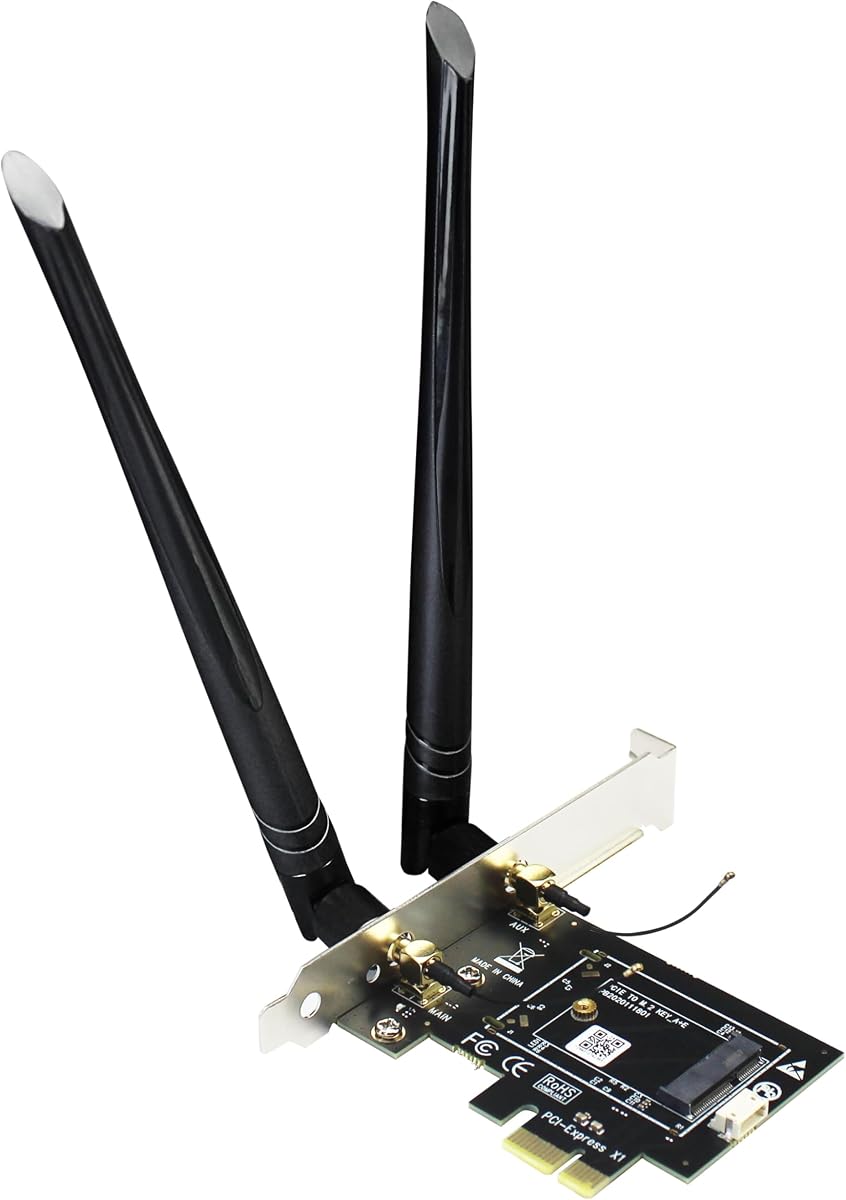
GLOTRENDS WA01 M.2 E Key to PCIe X1 WiFi Bluetooth Adapter
4.1Editor score
Supports WiFi 4/5/6/6E/7
Includes 6-dBi SMA Antenna Kits
Compatible with M.2 WiFi modules
This guide compares the top M2 Key E WiFi cards for laptops and desktops, covering features like WiFi 6E, WiFi 7, Bluetooth versions, and compatibility.
Finding the right wireless adapter can transform your computing experience. M2 Key E WiFi cards offer high-speed connectivity and modern standards like WiFi 6E and WiFi 7 for seamless internet access.
We evaluated ten leading models based on performance, compatibility, and features. Our analysis focuses on chipset quality, antenna support, and driver reliability to help you choose the best upgrade for your system.
Each pick highlights specific strengths such as speed, range, or budget value. Note that prices and availability change frequently, so check current listings before purchasing to ensure you get the best deal today.
4.1Editor score

4.5Editor score

4.6Editor score
This table provides a side-by-side comparison of all ten selected M2 Key E WiFi cards. Review the key specifications, ratings, and links to find the model that fits your specific hardware needs and performance requirements.


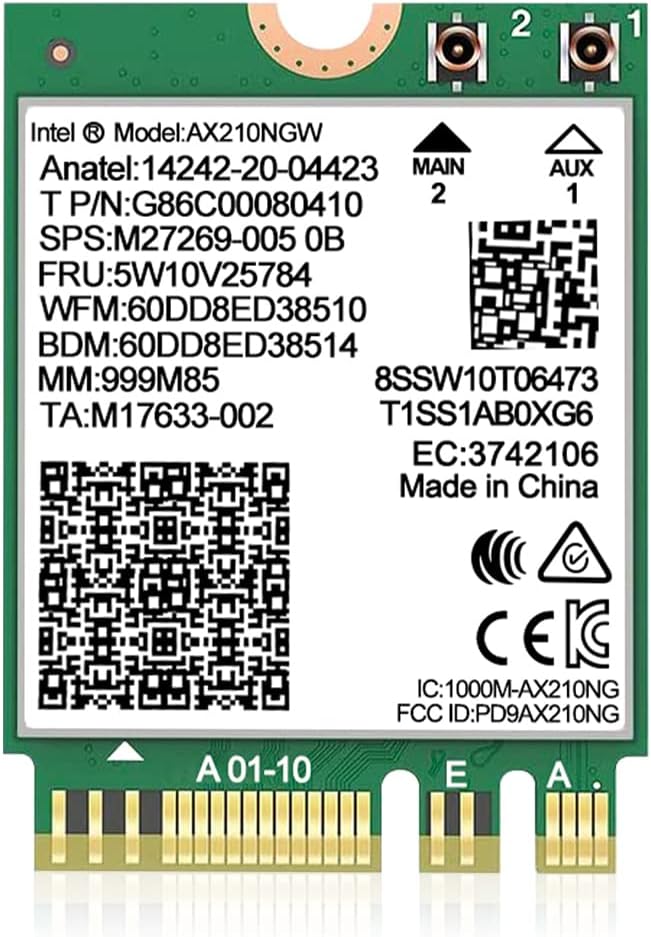



This AX210NGW DTK WiFi Card ranks as our top choice for its comprehensive package and strong performance. With a rating of 4.5 stars, it delivers reliable WiFi 6E connectivity across three bands for optimal speed.
We may earn a commission when you buy through this link, at no additional cost to you.
The inclusion of 5dBi high gain antennas and RF cables ensures you get the best signal possible without buying extras. Its tri-band setup allows you to use the 6GHz band for interference-free high-speed tasks like 8K streaming.
While it requires driver installation from Intel, the process is straightforward. Some users may need to enable specific BIOS settings to ensure full functionality. However, the performance benefits outweigh these minor setup steps.
If you want a complete solution that works out of the box with strong hardware, this card is highly recommended. It offers excellent value for anyone looking to upgrade their laptop or desktop with modern WiFi standards.
The kit includes all necessary cables and brackets, saving you time and extra costs during setup.
Accessing the 6GHz band provides ultra-low latency and massive speed for demanding applications.
We may earn a commission when you buy through this link, at no additional cost to you.
The GLOTRENDS WA01 Adapter offers excellent value for those who already have a WiFi module or need to convert an M.2 slot to PCIe. It allows you to use various WiFi modules including the latest WiFi 7.
We may earn a commission when you buy through this link, at no additional cost to you.
Its main strength is flexibility, supporting modules like AX210, BE200, and Coral TPU. The included 6-dBi antennas help maintain strong signal strength even when placed in a desktop case far from the router.
Note that Bluetooth functionality relies on a USB connection to your motherboard, which adds an extra cable to manage. Also, it does not work with CNVio2 modules like AX201. Despite this, it is a powerful tool for desktop upgrades.
Buy this if you need a cost-effective way to add wireless capabilities to a desktop motherboard or expand a laptop's antenna range. It bridges the gap between internal modules and external antennas perfectly.
Compatible with a wide range of M.2 WiFi modules including future WiFi 7 standards.
Turns internal laptop cards into desktop PCIe adapters for better signal management.
We may earn a commission when you buy through this link, at no additional cost to you.
The Intel Killer BE200 Card is designed for users demanding top-tier performance with WiFi 7 technology. It supports speeds up to 5.8Gbps and features Bluetooth 5.4 for the best connectivity experience on supported systems.
We may earn a commission when you buy through this link, at no additional cost to you.
Its ultra-low latency makes it ideal for gaming where every millisecond counts. The optimization for Intel processors ensures stable performance and efficient resource management within the system architecture.
However, this card is restricted to Intel-based systems and requires a compatible WiFi 7 router to unlock full speeds. Without these prerequisites, you may not see the full benefits of this expensive upgrade.
Choose this card if you have a modern Intel PC and want to future-proof your network with the latest standards. It is the best option for gamers and power users who need maximum throughput and low latency.
Ultra-low latency ensures smooth, lag-free online gaming and real-time communication.
WiFi 7 support prepares your system for upcoming high-speed internet technologies.
We may earn a commission when you buy through this link, at no additional cost to you.
This QCNCM865 card brings the benefits of WiFi 7 to laptops and desktops with its powerful 5.8Gbps speed capabilities. It supports Multi-Link Operation to reduce latency and improve overall connection stability.
We may earn a commission when you buy through this link, at no additional cost to you.
The card works well on both Intel and AMD platforms, making it versatile for various modern PCs. Its 320MHz channel bandwidth allows for massive data transfer rates when paired with a supporting router.
You must run Windows 11 version 24H2 or newer to use this card effectively. Additionally, you will need to download specific drivers from the vendor website to ensure Bluetooth functionality is active.
This option is great for users who want advanced WiFi 7 features without the Intel-only restrictions of other top models. It provides a solid upgrade path for those seeking higher bandwidth and better performance.
Simultaneous band use ensures smoother connections for streaming and gaming tasks.
Works on both Intel and AMD systems unlike some competitor cards restricted to one brand.
We may earn a commission when you buy through this link, at no additional cost to you.
This AX210 NGW card offers a reliable WiFi 6E experience with excellent ratings from users. It delivers up to 5400Mbps across three bands, ensuring you have the bandwidth needed for streaming and downloading.
We may earn a commission when you buy through this link, at no additional cost to you.
The AX210 chipset is known for stability and compatibility with most motherboards. It supports Windows 10 and 11 easily, making it a safe choice for general laptop upgrades without complex configuration steps.
Be aware that it does not support CNVio2 protocols found in some newer laptops. Also, antennas are not included in the box, so you may need to reuse existing ones or purchase them separately.
If you need a stable and fast WiFi upgrade for a laptop that supports M.2 A/E slots, this card is a solid option. It balances performance and compatibility well for everyday computing needs.
Achieve speeds up to 5400Mbps to handle multiple heavy-duty tasks efficiently.
Simple installation and driver setup make it accessible for non-technical users.
We may earn a commission when you buy through this link, at no additional cost to you.
The OKN AX210 Wireless Card is a strong contender for those looking for high efficiency and security. It supports MU-MIMO for better network flexibility and uses WPA3 for enhanced protection of your data.
We may earn a commission when you buy through this link, at no additional cost to you.
Its ultra-low latency ensures smooth performance during online gaming or video calls. The Bluetooth 5.3 module provides improved range and energy efficiency compared to older versions, keeping your battery life better.
You will need to ensure your laptop has compatible antennas for this module to function correctly. Also, like other AX210 cards, you must download the latest drivers from the Intel website for full features.
This card is an excellent choice for security-conscious users who need reliable WiFi 6E performance. It fits well in laptops that support M.2 2230 modules and offers a robust upgrade path.
WPA3 protocol ensures your wireless connection remains protected from modern threats.
MU-MIMO technology allows multiple devices to communicate effectively without slowdowns.
We may earn a commission when you buy through this link, at no additional cost to you.
This AX210 NGW Wireless Card stands out for including 8dBi high gain antennas which boost signal range significantly. It is designed for users who need to pull in a strong signal from a distance.
We may earn a commission when you buy through this link, at no additional cost to you.
The complete kit includes IPEX cables and brackets, making it a convenient choice for desktop or laptop upgrades. With tri-band support, it handles interference well and offers dedicated space for high-speed tasks.
However, the external antennas can be bulky and might not fit well in small cases or tight spaces. Also, connecting the internal cables requires careful handling to avoid damage during installation.
If your priority is maximum signal strength and range for your wireless connection, this card is highly recommended. It provides everything you need in one box for a high-performance upgrade.
8dBi gain ensures you can connect reliably even when far from the router.
Everything needed for installation is included to simplify the upgrade process.
We may earn a commission when you buy through this link, at no additional cost to you.
This QCNCM865 card is another excellent option for WiFi 7 technology. It features Multi-Link Operation which allows the router to use multiple bands simultaneously for improved reliability and speed.
We may earn a commission when you buy through this link, at no additional cost to you.
The 4K QAM modulation and 320MHz bandwidth provide massive throughput capabilities for large file transfers. Bluetooth 5.3 ensures your peripherals remain responsive with lower power consumption for longer battery life.
Users should disable old WiFi drivers before installation to avoid conflicts on Windows 11. This is a specific requirement for this vendor to ensure the system recognizes the new hardware correctly.
If you have a modern Windows 11 system and a WiFi 7 router, this card delivers top performance. It is ideal for users seeking the latest connectivity features without sticking to older standards.
Multi-Link Operation ensures your connection stays stable during heavy network usage.
Supports the latest modulation to handle the fastest internet speeds available.
We may earn a commission when you buy through this link, at no additional cost to you.
The BrosTrend WiFi 6 Card is a solid choice for users looking for a standard WiFi 6 upgrade at a budget-friendly price. It offers AX1800 speeds which are sufficient for most home streaming and browsing needs.
We may earn a commission when you buy through this link, at no additional cost to you.
It supports both Windows and Linux systems, making it versatile for different operating environments. The standard 2230 form factor ensures it fits easily into most laptops and small form factor PCs.
Note that it only supports WiFi 6 and not the newer 6E standard, so you miss out on the 6GHz band. Also, it does not include antennas, so ensure your laptop has functional internal antennas.
If you are on a strict budget and do not need 6E features, this card provides reliable performance. It is a practical swap for older cards that need to be replaced due to age or failure.
Supports Linux kernel 6.5 for open-source users needing wireless upgrades.
Uses standard dimensions that fit the majority of laptop and PC slots.
We may earn a commission when you buy through this link, at no additional cost to you.
This second listing of the Intel Killer BE200 Card reinforces its status as a top-tier gaming solution. It offers ultra-low latency which is critical for competitive gaming where split-second reactions matter most.
We may earn a commission when you buy through this link, at no additional cost to you.
The card utilizes the latest WiFi 7 standards to provide the fastest possible speeds. It is designed specifically for Intel processors to ensure maximum optimization and stability for high-performance tasks.
As an AMD unsupported model, it limits your upgrade options if you are using a non-Intel CPU. The price point is also higher than WiFi 6E cards, reflecting its premium features and positioning.
If you are a serious gamer with a modern Intel PC, this card will minimize lag effectively. It is the best choice for those prioritizing speed and stability for real-time online interactions.
Designed specifically to reduce ping and jitter for online gaming experiences.
Delivers speeds up to 5.8Gbps for rapid data transfer and streaming.
We may earn a commission when you buy through this link, at no additional cost to you.
Choosing the right M2 Key E WiFi card involves considering your current hardware, internet needs, and budget. This guide covers essential factors to help you make an informed decision.
Ensure your laptop or motherboard supports the WiFi standard you want. WiFi 6E and WiFi 7 require specific hardware support to access new frequency bands like 6GHz. Check your device manual before purchasing.
Verify that your device supports the WiFi standard to avoid buying incompatible hardware.
High-quality antennas are crucial for signal strength. Cards with included high-gain antennas offer better range. If your device lacks antennas, check if the card supports external SMA connectors.
Look for cards with good antenna support to ensure strong and reliable connectivity.
Newer Bluetooth versions like 5.3 or 5.4 offer lower latency and better power efficiency. Ensure the card supports the version compatible with your peripherals. This impacts how well devices like headsets connect.
Select a card with a recent Bluetooth version for seamless connectivity with wireless devices.
Check if drivers are available for your operating system. Some cards need specific drivers from the manufacturer or Intel. Linux support varies widely so verify compatibility before buying if you use Linux.
Confirm driver availability for your operating system to ensure smooth installation.
Some cards only work with Intel or AMD systems. Verify your processor type before purchasing a specific model. CNVio2 protocols are also a restriction for some older or newer laptops.
Check system restrictions to ensure the card works with your specific processor.
WiFi 7 cards cost more than WiFi 6E or WiFi 6. Decide how much you need advanced features. Budget options can still deliver great performance for standard home internet usage.
Balance your budget against the speed and features you actually need.
Before installing the card, turn off your laptop and disconnect the battery. Locate the M.2 slot on your motherboard and insert the card at an angle. Secure it with a screw and connect the antenna cables carefully.
Download the latest drivers from the official website after installation. Restart your system to ensure the new hardware is recognized. Check device manager to confirm both WiFi and Bluetooth are active.
Keep your laptop clean and avoid physical shocks to the WiFi card. Update drivers regularly for security and performance improvements. If issues arise, check that antennas are connected securely and drivers are up to date.
To fully benefit from WiFi 6E, you need a router that supports the 6GHz band. Older routers can still work but you will not access the new frequency. Check your router specs to confirm compatibility.
M2 Key A and Key E slots are often compatible but not always. Some slots are keyed specifically for one type. Check your laptop manual to ensure the card fits properly before buying.
Most WiFi 7 cards require Windows 11 version 24H2 or newer. Older Windows versions may not support the latest drivers or features. Check the specific card requirements for your system.
CNVio2 support depends on your processor generation and motherboard. Check Intel specs for your CPU to see if it uses CNVio2 or standard PCIe. Most older laptops do not support this.
A new card can improve speed if your current one is outdated or broken. It also reduces interference and latency. However, your internet plan limits the maximum speed you get.
You typically need a small Phillips screwdriver and an anti-static wrist strap. Some cards include screws. Work on a clean surface to avoid losing small parts during installation.
The best M2 Key E WiFi cards offer a mix of speed, reliability, and features to meet different needs. Our top picks include the DTK AX210 for all-around performance and the Intel Killer BE200 for premium gaming.
When choosing, prioritize compatibility with your system and the WiFi standard you need. Consider antenna quality and driver support to ensure a smooth experience. Budget options like GLOTRENDS can work well for basic use.
Prices and availability change frequently so check current listings before buying. Verify your specific laptop model supports the card to avoid return hassles. A good upgrade will significantly improve your wireless experience.