
NETGEAR Nighthawk WiFi 7 Router RS90
4.3Editor score
Up to 3.6 Gbps speeds
2000 sq ft coverage area
Nighthawk app for easy setup
Discover the top long range WiFi routers for 2026. We compare speed, coverage, and security to help you find the perfect network solution.
Finding a reliable long range WiFi router is essential for modern homes with multiple devices and smart tech. You need strong signals that reach every corner without dropping connections during calls or streams.
We compared ten top models based on speed, coverage area, and advanced features like WiFi 7 and mesh compatibility. Our analysis highlights performance, security, and ease of setup for every budget.
Each pick shows real strengths for different needs from budget friendly to premium mesh systems. Prices and availability change often so check current offers before buying to ensure the best value today.
4.3Editor score

4.3Editor score
4.2Editor score
This side-by-side comparison highlights key specs like speed, coverage, and special features across all ten top range routers to help you decide quickly.






The TP-Link BE6500 is a top contender for those wanting future-proof WiFi 7 speeds. Its 4.3 rating reflects reliable performance across large homes with many connected devices.
We may earn a commission when you buy through this link, at no additional cost to you.
With Multi-Link Operation and 4K-QAM it delivers optimized throughput on modern laptops and phones. The 2.5G ports ensure wired devices get full multi-gigabit speeds without bottlenecking.
While it lacks Deco compatibility it supports EasyMesh extenders for flexibility. The CISA Secure-by-Design pledge shows a strong commitment to network security and privacy.
Buy this if you need cutting-edge speed and robust security. It stands out as the best overall choice for tech-forward households wanting long-range performance.
WiFi 7 features like MLO and 4K-QAM significantly boost throughput and reduce latency for demanding tasks like gaming and VR.
HomeShield and CISA Secure-by-Design provide comprehensive protection against threats and real-time IoT security for all connected devices.
We may earn a commission when you buy through this link, at no additional cost to you.
The AXE5400 brings the benefits of WiFi 6E to crowded networks. Its tri-band design with a dedicated 6 GHz channel minimizes interference for faster connections.
We may earn a commission when you buy through this link, at no additional cost to you.
True tri-band and OFDMA increase capacity four times allowing more devices to connect simultaneously without drops. The 1.0 GHz CPU ensures smooth long-term operation.
Heat dissipation is optimized through its unique housing design for better reliability. VPN support adds flexibility for secure remote access to home resources.
Choose this if you need extra bandwidth and strong multi-device handling. It excels as a high-performance router for large homes with many smart gadgets.
The 6 GHz band provides more bandwidth and near-zero latency which is ideal for gaming and video calls on supported devices.
A dual-core CPU and high-speed memory ensure the router can handle heavy loads while maintaining stability over time.
We may earn a commission when you buy through this link, at no additional cost to you.
The AX73 is a solid choice for those needing reliable WiFi 6 performance. Its 4.5 rating speaks to consistent speed and coverage across typical home layouts.
We may earn a commission when you buy through this link, at no additional cost to you.
Equipped with 4T4R and HE160 it delivers ultra-fast connections on the 5 GHz band. Six antennas and beamforming concentrate signal strength for better range.
Enhanced venting helps keep the router cool under load for better longevity. USB 3.0 lets you share media files directly with other devices on the network.
Buy this if you want proven performance without the latest tech cost. It is a great long-range option for users focused on streaming and everyday tasks.
High-power FEM and beamforming technology ensure the signal reaches distant rooms efficiently reducing dead zones in larger spaces.
The USB 3.0 port enables easy connection of external drives for private cloud storage and media streaming without extra hardware.
We may earn a commission when you buy through this link, at no additional cost to you.
The AX80 is designed for users with fast internet plans and many devices. Its 2.5G port ensures your router does not become a bottleneck for your connection.
We may earn a commission when you buy through this link, at no additional cost to you.
Eight high-gain antennas with beamforming provide vast coverage throughout large homes. MU-MIMO and OFDMA boost efficiency for multiple simultaneous connections smoothly.
OneMesh support allows flexible expansion with compatible extenders for whole-home WiFi. Alexa compatibility adds convenience for quick control of network settings via voice.
Choose this if you need raw speed and broad coverage. It balances high performance with user-friendly features for modern family networks.
The 2.5G port unlocks higher wired speeds essential for ISPs offering plans beyond standard gigabit limits for better performance.
Alexa support allows you to turn guest networks on or off using simple voice commands for added convenience and smart home integration.
We may earn a commission when you buy through this link, at no additional cost to you.
The RS90 brings WiFi 7 technology to budget-conscious buyers. Its 4.3 rating and competitive price make it a great entry point for next-gen networking.
We may earn a commission when you buy through this link, at no additional cost to you.
Delivering up to 3.6 Gbps it handles streaming and gaming efficiently across 2000 sq ft. The Nighthawk app simplifies setup and remote network management for all users.
Automatic updates keep your network secure with minimal effort from you. While Armor security is extra the base security features are solid for most homes.
Buy this if you want modern speeds without overspending. It is the best value option for those wanting reliable long-range coverage on a budget.
WiFi 7 offers faster speeds and lower latency than WiFi 6 and the RS90 delivers this at a price point accessible to more households.
The Nighthawk app provides guided setup and easy device management from anywhere making network control simple even for non-technical users.
We may earn a commission when you buy through this link, at no additional cost to you.
This Nighthawk model delivers extreme speeds for power users needing high bandwidth. Its 4.3 rating confirms stable performance even with heavy multi-device loads.
We may earn a commission when you buy through this link, at no additional cost to you.
Tri-band design with a 6 GHz lane ensures fastest devices get dedicated throughput. Two 2.5G LAN ports support wired connections for gaming rigs or NAS drives.
Coverage extends to 2500 sq ft reducing dead zones in large homes. The Nighthawk app makes running speed tests and pausing devices effortless for all users.
Choose this if you need top-tier speed for demanding tasks. It excels for users with gigabit plans who want every device to run at full capacity.
The added 6 GHz band gives your fastest devices their own lane reducing latency and congestion for smoother streaming and gaming.
Multiple 2.5G LAN ports allow high-speed wired connections for PCs and storage ensuring critical devices get stable maximum bandwidth.
We may earn a commission when you buy through this link, at no additional cost to you.
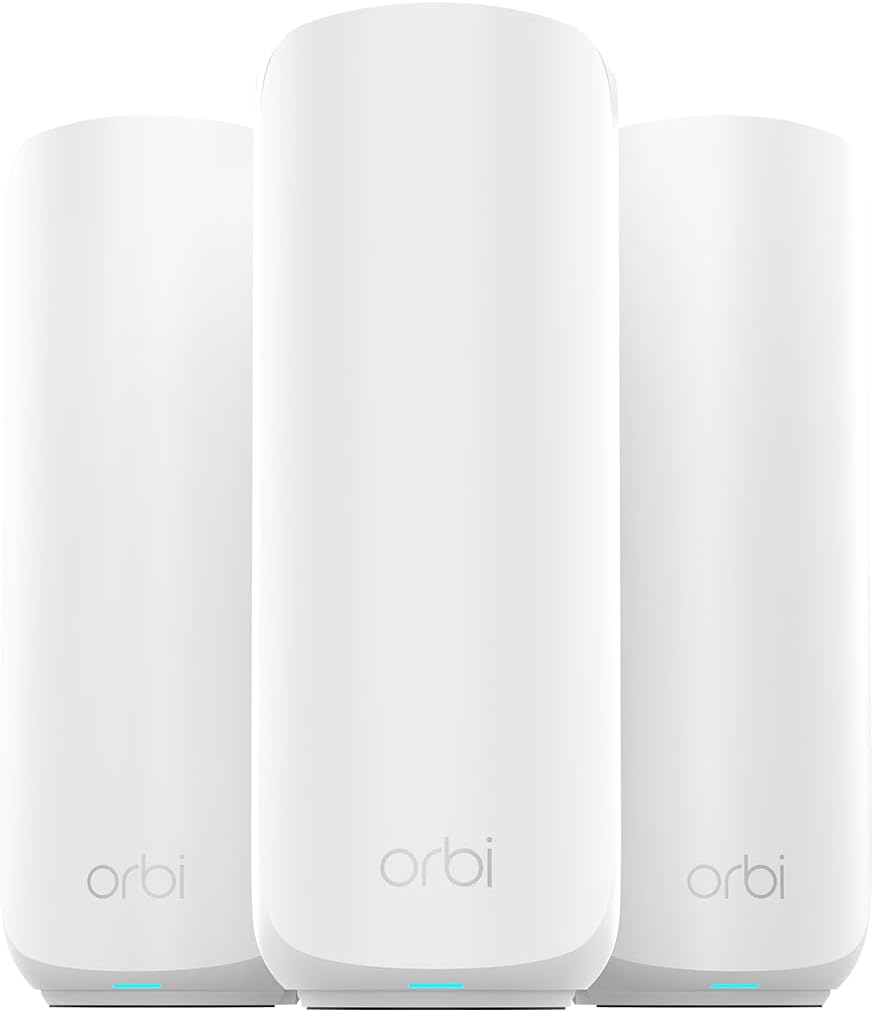
The Orbi 370 series offers unmatched coverage for very large homes. Its 4.2 rating reflects strong performance across expansive areas without signal loss.
We may earn a commission when you buy through this link, at no additional cost to you.
A router plus two satellites creates a seamless mesh up to 6000 sq ft. Enhanced backhaul keeps WiFi fast across every device simultaneously without slowdowns.
Setup is guided by the Orbi app for quick installation. Compatible with most ISPs it adapts to your existing modem for whole-home performance.
Buy this if you need whole-home coverage without dead zones. It is the premium choice for large estates wanting reliable connectivity everywhere.
The mesh system creates one single network so you move between rooms without dropping calls or needing to reconnect manually.
You can add extra satellites to expand coverage further allowing the system to adapt to multi-story or unusually large layouts.
We may earn a commission when you buy through this link, at no additional cost to you.
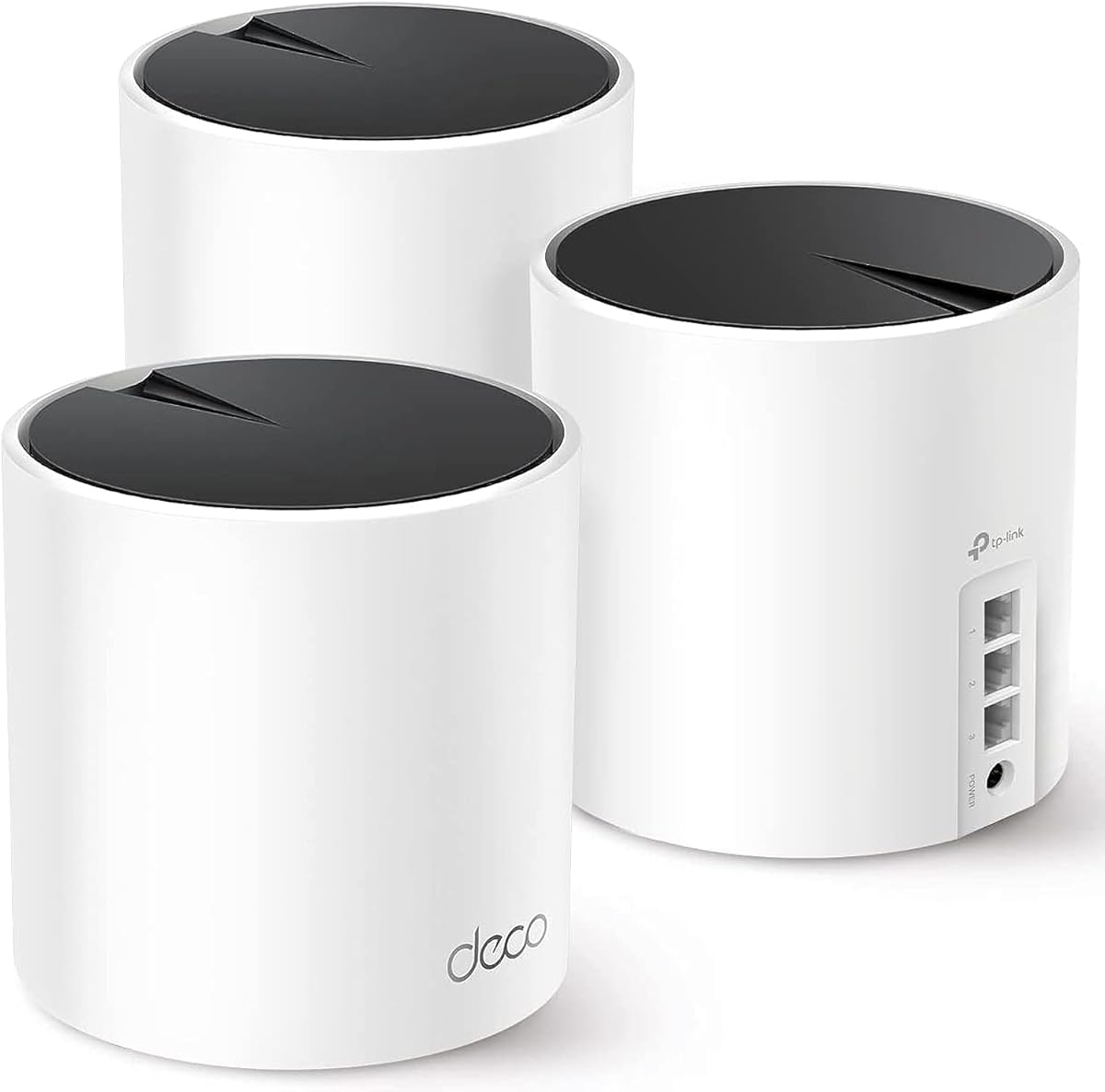
The Deco X55 mesh system provides excellent value for large homes. Its 4.4 rating confirms reliable connectivity and simple setup for most families.
We may earn a commission when you buy through this link, at no additional cost to you.
Three units cover up to 6500 sq ft eliminating dead zones and buffering. AI-driven mesh learns your environment to optimize connections for your specific home.
Each unit has three Gigabit ports for wired connections or backhaul. Wired backhaul ensures maximum speed when you run Ethernet cables between units.
Choose this if you need simple whole-home coverage on a budget. It is a strong choice for families wanting seamless WiFi without complex configuration.
AI-driven mesh technology learns your network environment to provide ideal WiFi paths tailored to your home layout and device needs.
Multiple Gigabit ports on each unit allow wired connections to devices and support for Ethernet backhaul for better wired performance.
We may earn a commission when you buy through this link, at no additional cost to you.
The BE550 delivers exceptional speeds for power users needing maximum throughput. Its 4.0 rating reflects solid performance for those who push its capabilities.
We may earn a commission when you buy through this link, at no additional cost to you.
Tri-band WiFi 7 with 320 MHz channels delivers nearly 10 Gbps total throughput. Five 2.5G ports enable full multi-gigabit speeds across wired devices.
Private IoT networks isolate smart devices for better security. Full VPN server and client support offer robust security options without third-party tools.
Choose this if you need extreme speed and wired flexibility. It is ideal for power users wanting top-tier WiFi 7 performance for demanding tasks.
With five 2.5G ports the router supports multiple wired devices at full speed ideal for homes with several PCs or storage needs.
Setting up a separate WiFi network for IoT devices isolates them from main traffic protecting your home network from potential threats.
We may earn a commission when you buy through this link, at no additional cost to you.
The Archer A6 is a classic budget router for smaller homes. Its 4.5 rating shows it performs reliably for streaming and everyday tasks despite older tech.
We may earn a commission when you buy through this link, at no additional cost to you.
Four external antennas with beamforming concentrate signal strength for better range. Full Gigabit LAN ports allow wired connections for gaming consoles or PCs.
OneMesh compatibility lets you expand coverage with extenders if needed. It supports AP mode turning wired connections into wireless networks for flexibility.
Choose this if you need a simple affordable router. It is ideal for small apartments or users who want decent range without spending much.
Despite being a budget model it delivers consistent 1200 Mbps speeds with beamforming antennas to improve signal range and reliability.
Access Point Mode and OneMesh compatibility offer flexibility to expand your network or use the router as an extender for broader coverage.
We may earn a commission when you buy through this link, at no additional cost to you.
Selecting a router that covers your entire home requires understanding key specs and features that affect signal strength and stability.
WiFi 7 offers the fastest speeds and lowest latency with features like Multi-Link Operation. WiFi 6E adds a dedicated 6 GHz band reducing congestion. WiFi 6 is still solid for general use.
For future-proofing pick WiFi 7 or 6E if your devices support it. Otherwise a quality WiFi 6 model provides excellent performance for most households.
Look for coverage ratings that match your home's square footage. High-gain antennas and beamforming technology direct signals to devices reducing dead zones in distant rooms.
If your home exceeds standard router limits consider a mesh system instead. Mesh nodes extend coverage seamlessly across multiple floors or large estates.
Modern routers often include 2.5G ports to support multi-gigabit internet plans. Ensure you have enough Gigabit ports for gaming consoles TVs and PCs needing wired connections.
Prioritize models with 2.5G ports if you want full wired speeds. It prevents bottlenecks when your internet plan exceeds standard 1 Gbps limits.
Top routers include advanced security suites to block malware and protect smart home devices. WPA3 encryption provides stronger protection than older WPA2 standards.
Check for built-in parental controls if you manage a family network. Some models require subscriptions for advanced features but basic security is usually included free.
Mobile apps simplify setup and network management from anywhere. Guided setup steps help you install quickly and run speed tests or pause devices easily.
Choose a router with a well-rated app for daily control. Good interfaces make guest network setup and firmware updates simple for all users.
Some routers support Mesh networks allowing you to add extenders for broader coverage. Ensure any extenders or satellites are compatible with your main router.
If you anticipate needing more coverage later pick a mesh-compatible system. This allows flexible expansion without replacing the entire network later.
Modern homes connect dozens of devices including smart bulbs and cameras. Look for MU-MIMO and OFDMA technologies that handle multiple simultaneous connections without lag.
High device capacity ensures stable performance even when many gadgets are online. It is crucial for large families with heavy streaming and gaming needs.
Prices vary widely from budget to premium models. Balance your needs against cost ensuring you get essential features like speed and security without overpaying.
Consider long-term value including warranty and software support. A slightly pricier router with better longevity may save money over time compared to frequent replacements.
Place your router in a central elevated location away from obstructions. Avoid placing it inside cabinets or near metal objects that can block signals and reduce range.
Keep firmware updated through your router app or web interface. Regular updates patch security vulnerabilities and improve performance for connected devices automatically.
Restart your router occasionally to clear temporary glitches and optimize connections. Unplugging it for 30 seconds resets the network and can restore lost speed.
Long range routers use high-gain antennas and beamforming to direct signals effectively. They also feature powerful amplifiers and mesh support to reach distant rooms without signal loss.
Yes WiFi 7 routers are backward compatible with older WiFi 6 and 5 devices. You will still benefit from improved network management features even if only some devices support the latest standard.
Choose a mesh system for homes larger than 2500 sq ft or multiple stories. For smaller homes a powerful single router with high-gain antennas is often more cost-effective.
Check your provider's plan details for speeds above 1 Gbps. If your plan is slower a standard Gigabit router is sufficient unless you need future-proofing for faster plans later.
Most models include multiple Gigabit or 2.5G Ethernet ports for wired connections. You can connect PCs consoles and TVs directly for stable speeds without wireless interference.
Yes most top routers offer basic parental controls for free. Advanced content filtering and time limits may require a subscription depending on the specific model and brand.
Yes WPA3 offers stronger encryption and protection against brute-force attacks. Ensure your router and devices support WPA3 for the highest level of network security available.
Restarting your router once a month helps clear memory and fix minor connection issues. You can do this manually or use an app to schedule automated restarts for maintenance.
The top picks cover every need from budget-friendly options to premium mesh systems. The TP-Link BE6500 leads overall while the RS90 offers great value for most users.
Prioritize speed and coverage based on your home size and device count. Mesh systems are best for large homes while powerful single routers work well for smaller layouts.
Always check current prices and promotions before buying as deals change frequently. Matching the right router to your internet plan ensures you get the most value possible.