
TP-Link ER605
4.4Editor score
Five Gigabit Ports
Robust VPN Support
Simple Web Interface
Discover the top load balancing routers for business and home. This guide compares features, performance, and security to help you choose the right dual WAN
Finding the right load balancing router ensures your network stays online even if one internet connection fails. These devices manage multiple WAN connections to optimize speed and reliability for any size network.
We evaluated ten top models based on port flexibility, security features, and ease of management. Each product offers unique strengths for different business needs and technical requirements.
Every pick includes detailed pros and cons to help you decide quickly. Keep in mind that product availability and pricing can change frequently across major online retailers.
4.4Editor score

4.5Editor score

4.7Editor score
The following table provides a side-by-side look at every router we reviewed. Compare key specifications to find the model that fits your network size and performance needs best.



The Omada ER7412-M2 stands out as a top choice for businesses needing robust multi-WAN capabilities. With a 4.5 rating and extensive port options, it delivers reliable performance for demanding network environments.
We may earn a commission when you buy through this link, at no additional cost to you.
This router supports up to eleven WAN ports for load balancing, ensuring optimal bandwidth usage across multiple connections. Advanced security features like IPS and IDS provide enterprise-grade protection against modern threats.
While the initial setup requires some technical knowledge, the Omada controller simplifies long-term management. The price reflects its high-end features, which may be overkill for very small home offices.
If you need a scalable solution with top-tier security and Multi-Gigabit speeds, this router is an excellent investment. It is ideal for growing businesses that require consistent uptime and flexible network control.
The ten Gigabit LAN/LAN ports and two 2.5G ports allow for diverse network configurations without needing additional switches.
Built-in intrusion prevention and detection systems ensure your network remains secure from external attacks and malware threats.
We may earn a commission when you buy through this link, at no additional cost to you.
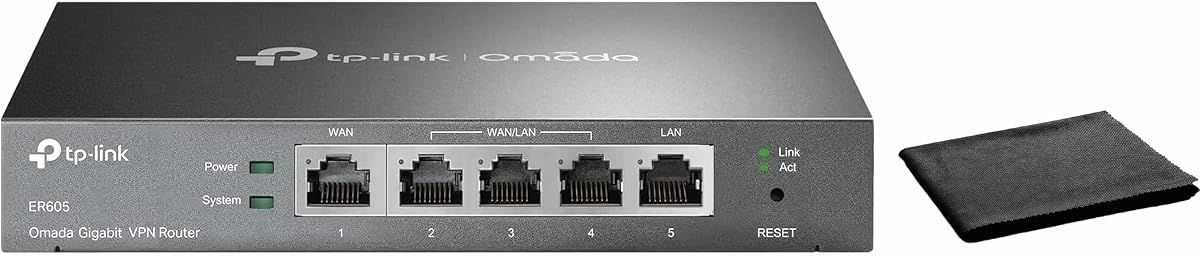
The TP-Link ER605 offers incredible value for small businesses looking to add redundancy to their internet connection. Its 4.4 rating reflects a balance of performance and simplicity that many users appreciate.
We may earn a commission when you buy through this link, at no additional cost to you.
This router supports up to three WAN ports, allowing you to balance traffic effectively across different ISPs. It also includes a USB port for mobile broadband backup, ensuring you stay online even if wired connections fail.
While it lacks the VPN capacity of higher-end models, its twenty IPsec tunnels are sufficient for most small office needs. The lack of advanced QoS settings means you might not have granular control over specific applications.
For anyone needing a reliable, easy-to-manage load balancer without breaking the bank, the ER605 is a fantastic option. It is particularly well-suited for cafes, small offices, or remote work setups.
Users can configure failover and load balancing rules through a straightforward web interface without needing complex command-line skills.
The USB port supports 4G/3G modems, providing a critical lifeline for internet access when primary ISP lines go down.
We may earn a commission when you buy through this link, at no additional cost to you.
The Omada Fusion 2.5G brings a unique approach to load balancing with its built-in touchscreen and 2.5G ports. With a high 4.7 rating, it appeals to users who want modern connectivity and hands-on monitoring.
We may earn a commission when you buy through this link, at no additional cost to you.
Its quad-core CPU ensures fast packet processing, making it suitable for networks with heavy traffic loads. The touchscreen allows for quick troubleshooting on-site without needing a laptop connected to the device.
This device does not broadcast Wi-Fi, so it must be paired with access points for wireless coverage. While the Omada app makes setup easy, users need to rely on the cloud portal for remote management.
If you are building a future-proof wired network with high-speed internet, this router is a strong choice. It is perfect for small businesses that want advanced features without complex enterprise hardware.
The 2.5-inch touchscreen displays real-time traffic stats and health scores, allowing admins to troubleshoot issues instantly without logging in remotely.
Five 2.5G ports provide faster speeds than standard Gigabit routers, accommodating high-bandwidth needs like cloud backups and 4K streaming.
We may earn a commission when you buy through this link, at no additional cost to you.
The TP-Link ER7206 is a professional-grade router designed for businesses that need extensive network control. With a 4.5 rating, it excels in environments where security and scalability are top priorities.
We may earn a commission when you buy through this link, at no additional cost to you.
Its ability to support up to four WAN ports ensures excellent bandwidth optimization. The router can handle up to seventy thousand clients, making it suitable for large office spaces or public venues.
While the price is higher than the ER605, the extended capacity justifies the cost for larger deployments. Managing such a large network requires some technical expertise, which might be a hurdle for smaller teams.
For businesses using the Omada ecosystem, this router integrates seamlessly with other network devices. It is a reliable choice for organizations that need high capacity and professional features.
Support for up to fifteen thousand associated client devices ensures the network remains stable even during peak usage times.
Advanced firewall policies and extensive IP filtering keep sensitive data safe from external threats and unauthorized access.
We may earn a commission when you buy through this link, at no additional cost to you.
The Cudy R700 is an excellent choice for tech-savvy users who want open-source flexibility. With a 4.4 rating, it offers robust hardware capabilities that can be enhanced with community-developed packages.
We may earn a commission when you buy through this link, at no additional cost to you.
It supports OpenWRT, allowing for VLAN segmentation and custom firewall rules that typical routers cannot handle. The five Gigabit ports enable automatic failover and load balancing across multiple ISPs seamlessly.
Because it relies on community support for some features, setup might be challenging for beginners. Users need to be comfortable with web interfaces and network protocols to get the most out of this device.
If you enjoy tinkering with your network to maximize performance and security, the R700 is a great tool. It is also ideal for home labs or remote offices that need customizable network controls.
OpenWRT support allows advanced users to install custom scripts and modify system behaviors to fit unique networking scenarios.
WireGuard and OpenVPN support enable secure remote access tunnels directly from the router without needing extra hardware.
We may earn a commission when you buy through this link, at no additional cost to you.
The Alta Labs Route10 targets power users who need 10G speeds without sacrificing load balancing features. Its 4.0 rating suggests solid performance for those willing to invest in high-end networking hardware.
We may earn a commission when you buy through this link, at no additional cost to you.
Equipped with SFP+ ports, this router handles massive bandwidth requirements for data centers or heavy media workflows. The Quad-Core Qualcomm processor ensures low latency even under heavy traffic loads.
While it includes PoE+ to power access points, it does not broadcast Wi-Fi itself, requiring separate APs for coverage. The high price point means it is not suitable for small home offices with standard internet plans.
For professionals needing reliable 10G connectivity and advanced traffic management, this router delivers. It is best suited for advanced home labs or small businesses with high-speed fiber connections.
SFP+ ports support ten-gigabit speeds, allowing for rapid data transfer between servers and clients on a local network.
Dedicated hardware accelerates VPN traffic processing, ensuring secure remote access does not slow down overall network performance.
We may earn a commission when you buy through this link, at no additional cost to you.
The TP-Link TL-R470T+ is designed for cost-effective solutions in small office environments. With a 4.2 rating, it provides essential features for managing multiple internet lines without advanced modern capabilities.
We may earn a commission when you buy through this link, at no additional cost to you.
It supports up to four WAN ports, which helps distribute traffic load across different providers. Portal authentication allows for user login portals, making it a great fit for internet cafes or guest networks.
The main limitation is its 10/100M Ethernet ports, which may bottleneck high-speed connections. While lightning protection is a strong feature for durability, the hardware feels dated compared to newer Gigabit models.
For very small offices needing basic load balancing and cost efficiency, this router works well. It is a practical choice where speed requirements are moderate and budget is a primary concern.
Portal authentication ensures that guests or employees must log in to access the network, helping track usage and enforce policies.
Built-in lightning protection guards the device against electrical surges, extending the lifespan of your network hardware.
We may earn a commission when you buy through this link, at no additional cost to you.
The TP-Link TL-R480T+ offers a compact solution for small spaces needing multiple internet connections. Its 4.2 rating indicates that it performs its basic tasks reliably for straightforward network setups.
We may earn a commission when you buy through this link, at no additional cost to you.
It features five configurable ports, allowing you to adjust the balance between WAN and LAN connections as needed. This flexibility makes it a handy tool for small offices with changing layout needs.
However, security features are quite basic compared to modern standards, and throughput is limited by older technology. Users needing high speeds or strong firewalls will likely find this model insufficient for their requirements.
For legacy setups or very small networks with minimal requirements, this router is a viable option. It is best used where basic redundancy is the only goal and budget is tight.
The ability to configure ports as either WAN or LAN gives users control over how they connect different parts of their network.
Its small case design fits easily into tight server racks or desk spaces, making it ideal for space-constrained environments.
We may earn a commission when you buy through this link, at no additional cost to you.
The TP-Link ER-605 focuses on ease of use and remote monitoring for small businesses. With a 4.3 rating, it appeals to users who prefer cloud-based control and straightforward configuration without deep technical steps.
We may earn a commission when you buy through this link, at no additional cost to you.
Its dual WAN ports handle load balancing effectively for two connections, ensuring uptime even if one line fails. The included bandwidth management helps prioritize critical traffic like VoIP or business applications.
With fewer WAN ports than other models, flexibility is somewhat limited for large setups. However, the intuitive web interface makes it easy for admins with less experience to manage network security and settings.
If you want a reliable router that you can manage remotely via an app, this is a great choice. It is well-suited for small businesses that need simple, secure internet redundancy.
Cloud monitoring allows you to check network status and settings from anywhere, keeping you updated even when you are away from the office.
Bandwidth management ensures that critical business applications get the speed they need over less important traffic during busy hours.
We may earn a commission when you buy through this link, at no additional cost to you.
The Ubiquiti EdgeRouter 4 is a favorite among network enthusiasts for its powerful CLI capabilities. With a 4.6 rating, it offers high reliability and flexibility for users who prefer command-line configuration over GUI.
We may earn a commission when you buy through this link, at no additional cost to you.
Its fanless design ensures silent operation, which is perfect for quiet home offices or server rooms. The included serial console port provides a direct way to manage the device without network connectivity.
While powerful, the steep learning curve may deter those who are not comfortable with command-line interfaces. Additionally, it has only four Ethernet ports, which limits its scalability without external switches.
For advanced users who want total control over their network configuration, this router is an excellent tool. It is best suited for professionals or hobbyists who value performance and customization.
A fanless cooling system ensures the device runs silently, eliminating noise issues in residential or quiet office environments.
Advanced CLI options allow detailed configuration and scripting, giving expert users full control over routing protocols and firewall rules.
We may earn a commission when you buy through this link, at no additional cost to you.
Choosing the right load balancing router depends on your network size, traffic volume, and security needs. This guide breaks down the essential factors to consider before making a purchase.
The number of WAN ports determines how many internet connections you can balance simultaneously. For small offices, two to three ports are usually sufficient, while larger enterprises may need four or more to spread traffic across multiple ISPs.
Ensure the router supports enough WAN ports to meet your redundancy and speed goals.
Check the Ethernet port speeds to ensure they match your internet plan. Standard Gigabit ports are common, but newer models offer 2.5G or 10G ports for faster data transfer and future-proofing.
Select a router with port speeds that will not bottleneck your current or planned internet bandwidth.
Modern routers include firewalls, intrusion detection, and VPN support to protect your network. Look for models that offer SPI firewalls and options for IPsec or OpenVPN to secure remote connections effectively.
Prioritize routers with advanced security suites to keep your data safe from external threats.
If you need remote access for employees, the number of supported VPN tunnels matters. Basic routers may support only a few connections, whereas enterprise models can handle hundreds for larger workforces.
Choose a router with enough VPN capacity to support all your remote users without performance loss.
Ease of management is key for daily operations. Some routers offer cloud portals or mobile apps, while others rely on local web interfaces or command lines. Consider your technical comfort level when choosing.
Pick a management interface that fits your workflow and technical expertise for efficient network administration.
Automatic failover ensures your network stays online if one internet line goes down. Look for routers that support instant switching to backup connections to maintain uptime for business-critical tasks.
Ensure the router has reliable failover capabilities to keep your business running during internet outages.
Price often reflects the features and performance capabilities of the router. Decide how much you are willing to spend now versus later as your business grows and network demands increase.
Balance your budget with the scalability features you need for future network expansions.
To start using your load balancing router, connect your modem cables to the WAN ports and your local network to the LAN ports. Power on the device and access the web interface to configure load balancing and failover rules.
Regularly update the firmware to ensure you have the latest security patches and performance improvements. Check the admin dashboard for traffic stats and adjust bandwidth settings to prioritize critical applications.
Keep the router in a well-ventilated area to prevent overheating. Avoid dust buildup by cleaning the vents periodically and ensure cables are secure to prevent accidental disconnects.
A load balancing router distributes internet traffic across multiple connections to improve speed and reliability. If one connection fails, the router automatically switches to another to keep your network online.
If you run a business that depends on constant internet access, a load balancing router is essential. It provides redundancy so you do not lose connectivity if your primary ISP has an outage.
The number of WAN ports depends on how many internet providers you use. Most small businesses need two to three ports, while larger offices might require four or more for better traffic distribution.
Load balancing routers usually work alongside your modem rather than replacing it. They sit behind your modem(s) to manage traffic across multiple internet lines effectively.
Yes, most load balancing routers include VPN support for secure remote access. This allows employees to connect to the office network from home or while traveling.
Failover is the automatic switch to a backup internet connection when the primary one fails. It ensures continuous uptime without requiring manual intervention from IT staff.
We reviewed ten top routers for load balancing to help you find the best fit for your needs. Models like the Omada ER7412-M2 and TP-Link ER605 offer excellent value and performance for different business sizes.
When choosing, prioritize port speed, security features, and ease of management. These factors will determine how well your network handles traffic and protects data over the long term.
Prices and availability can change, so check current listings before making your final decision. A reliable load balancing router is a smart investment for keeping your business connected.