
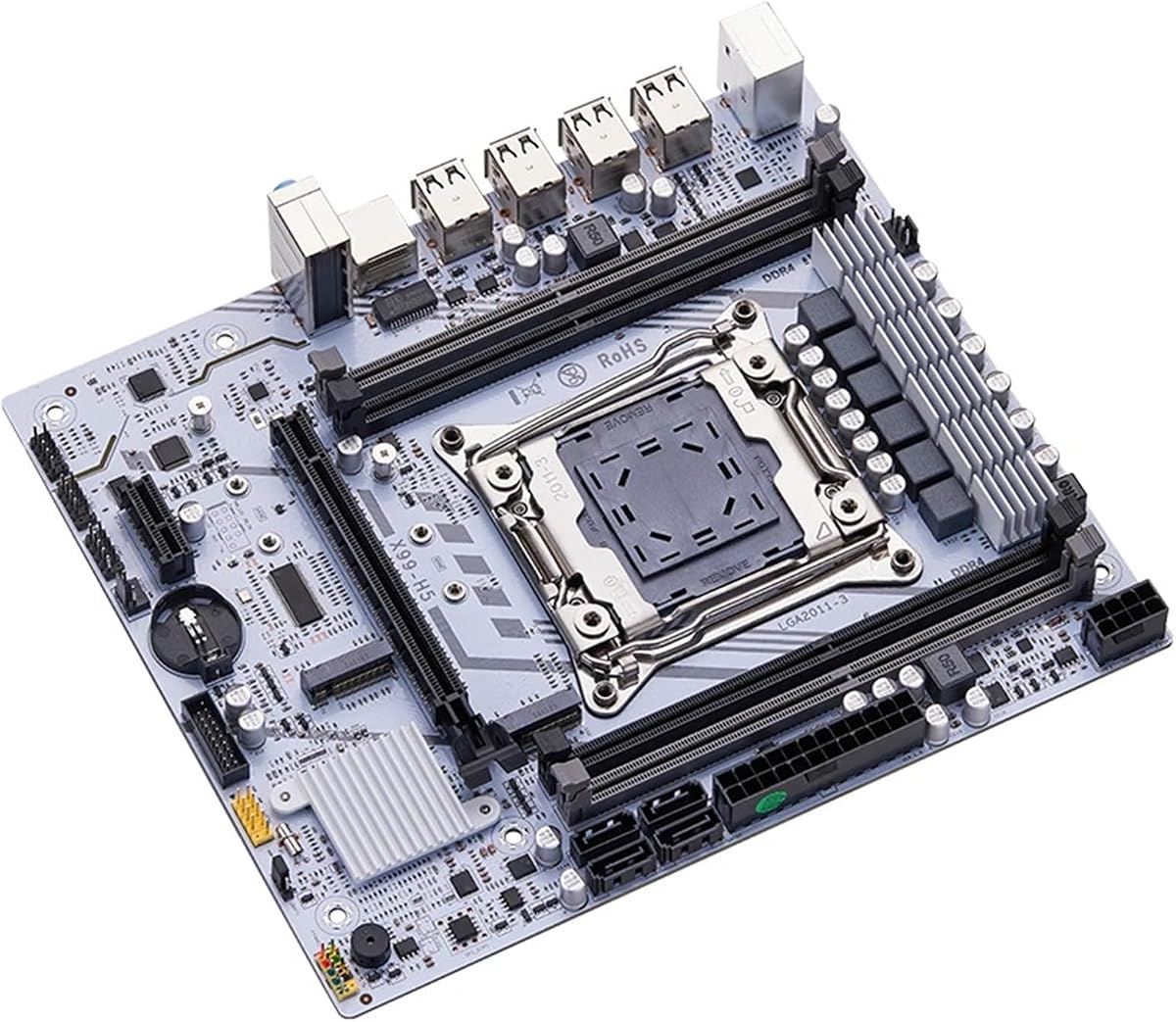
X99 PR9-H White
3.9Editor score
Supports E5 V3 V4 CPUs
4 Channel DDR4 Memory
NVME M.2 Support
This guide compares the top Lga 3 X99 Motherboard options for Xeon E5 and Core i7 processors, focusing on features and performance.
Finding the right Lga 3 X99 Motherboard is crucial for building a powerful workstation or server. These boards support high core count Xeon E5 and Core i7 processors, enabling demanding tasks like video editing and virtualization.
We evaluated ten top models based on socket compatibility, memory support, expansion slots, and build quality. Our analysis highlights key differences in chipset features, power delivery, and connectivity options available to builders today.
Each pick showcases specific strengths for different budgets and needs. Note that prices fluctuate frequently, so verify current listings before purchasing. This guide helps you select the perfect foundation for your next high performance computing project.
3.9Editor score

3.7Editor score

4.1Editor score
The following table provides a side by side comparison of all ten Lga 3 X99 Motherboard models evaluated in this guide to help you choose quickly.



The MACHINIST X99 V9S Mainboard offers a robust foundation for high core count builds. With a 3.7 rating, it balances performance and value effectively for workstation users seeking expansion capabilities.
We may earn a commission when you buy through this link, at no additional cost to you.
It features three NVME M.2 slots utilizing PCIe 3.0 bandwidth for fast storage access. The Intel C612 chipset ensures stable bus communication while the 6-phase power supply delivers consistent power to your CPU.
Users note that the package lacks a user manual and the CR2032 battery. Clearing CMOS may be required for first boot. These minor drawbacks are acceptable given the board's strong feature set.
This board is ideal for builders needing multiple high-speed storage options without breaking the bank. It stands out as a top choice for those prioritizing storage speed and CPU compatibility.
Three NVME M.2 slots provide ample room for multiple high speed SSDs in a single build.
The 6-phase power supply combined with VRM cooling ensures stable operation under heavy loads.
We may earn a commission when you buy through this link, at no additional cost to you.
The X99 PR9-H White provides a cost effective solution for entry level workstation builds. Its 3.9 rating reflects solid performance for basic server and gaming needs.
We may earn a commission when you buy through this link, at no additional cost to you.
It supports the full range of LGA 2011-3 processors including E5 V3 and V4 series. The 6-layer PCB design with full solid capacitors ensures stable power delivery to your components.
While it lacks a manual and battery, the included I/O shield simplifies installation. The Realtek ALC897 audio codec delivers decent sound quality for daily tasks.
Ideal for budget conscious builders, this board offers essential features without unnecessary extras. It is a strong starting point for those new to Xeon based systems.
The Micro ATX form factor fits in smaller cases while still offering four DDR4 slots.
A Realtek 8111H Gigabit LAN port ensures reliable wired network performance for server use.
We may earn a commission when you buy through this link, at no additional cost to you.
The ASUS X99-E WS/USB 3.1 is a premium option for professionals needing maximum performance. Its 4.1 rating highlights reliability and advanced features for demanding workflows.
We may earn a commission when you buy through this link, at no additional cost to you.
It supports 4-Way PCI-E Gen3 for multi GPU setups and includes USB 3.1 for faster data transfer. The Q Code Logger helps diagnose issues quickly during maintenance.
The EATX size may not fit standard cases but offers extensive expansion capabilities. Thunderbolt II support adds versatility for high speed external peripherals.
Best for workstation users requiring top tier connectivity and stability. This board justifies its cost with enterprise grade components and support features.
Support for NVidia SLI and AMD CrossFireX enables powerful graphics rendering capabilities.
The Q Code Logger provides visual feedback on system status for easier troubleshooting.
We may earn a commission when you buy through this link, at no additional cost to you.
The ASUS X99-A delivers reliable performance for mainstream builds. With a 3.9 rating, it offers a balance of features suitable for enthusiasts and professionals alike.
We may earn a commission when you buy through this link, at no additional cost to you.
ASUS OC Socket enhances performance beyond expectations while 5-Way Optimization simplifies tuning. Crystal Sound 2 provides clear audio for media consumption.
It includes SATA Express which adds storage flexibility but lacks multiple NVME slots. The Intel Gigabit Ethernet ensures stable network connections for file transfers.
A solid choice for users preferring a proven brand with stable features. It works well for general computing tasks requiring moderate expansion.
5-Way Optimization allows one click system tuning for cooling and performance.
PCI Express 3.0 M.2 and SATA Express support various storage configurations.
We may earn a commission when you buy through this link, at no additional cost to you.
This model supports dual CPUs allowing for extreme multi threading performance. With 8 DDR4 slots it can handle massive memory configurations up to 256GB total.
We may earn a commission when you buy through this link, at no additional cost to you.
The 2x PCI-E X16 slots allow for multiple GPUs or specialized expansion cards. Integrated RTL8111H Gigabit NIC provides network connectivity right on the board.
While details are limited, the hardware specs indicate a focus on raw computing power. It is suitable for specialized server or rendering workloads.
Ideal for advanced users needing maximum core and memory counts. This board is a niche solution for heavy computational tasks.
Dual CPU sockets allow for significant increases in processing power for server applications.
Eight memory slots enable extensive RAM expansion for virtualization and data processing.
We may earn a commission when you buy through this link, at no additional cost to you.
The Tangxi X99 Gaming targets enthusiasts looking for stability in a compact size. Its 2.9 rating suggests some quality control issues but offers high hardware specs.
We may earn a commission when you buy through this link, at no additional cost to you.
An 8 layer PCB and 6 phase power supply aim for stable power delivery under load. The 24+8 pin connector ensures robust power connection to the CPU.
Support for NVME and NGFF offers flexible storage options. The build quality attempts to ensure longevity despite the lower user satisfaction score.
Best for builders willing to accept minor risks for specific hardware features. It provides a gaming oriented layout with decent expansion options.
An 8 layer PCB with full solid capacitors aims to improve stability and lifespan.
The 24+8 pin power connector ensures reliable power delivery to critical components.
We may earn a commission when you buy through this link, at no additional cost to you.
This model offers dual CPU support similar to its counterpart. With 8 DDR4 DIMM slots it supports heavy memory loads for server tasks.
We may earn a commission when you buy through this link, at no additional cost to you.
Two PCI-E X16 slots enable GPU or expansion card installations. The 6 SATA3.0 interfaces allow for multiple traditional storage drives.
Low user ratings suggest potential reliability concerns. It remains a potential option for those needing specific server hardware features.
Suitable for specialized server builds where CPU count is critical. Buyers should test thoroughly before committing to long-term use.
Dual CPU sockets allow for significant core counts suitable for rendering or virtualization.
Six SATA ports provide ample room for multiple hard drives or SSDs.
We may earn a commission when you buy through this link, at no additional cost to you.
This board supports both DDR3 and DDR4 memory offering flexibility for upgrades. Dual M.2 NVME slots ensure fast storage performance for system drives.
We may earn a commission when you buy through this link, at no additional cost to you.
Optimized power design and passive heatsinks help maintain stable temperatures. Memory routing optimization improves overclocking potential.
With no rating available details are based on general product descriptions. It aims for a balance between performance and cost.
Ideal for users with existing DDR3 memory needing an LGA 2011-3 board. It provides versatile options for memory and storage upgrades.
Support for both DDR3 and DDR4 allows users to utilize existing RAM investments.
Passive chipset heatsinks and aluminum heatsinks help manage heat effectively.
We may earn a commission when you buy through this link, at no additional cost to you.
A compact M-ATX solution for those needing smaller case compatibility. It supports LGA 2011 3 CPUs and DDR4 RAM.
We may earn a commission when you buy through this link, at no additional cost to you.
The NVME M.2 slot provides a fast storage option while PCIe3.0 16X ensures GPU performance. It is a straightforward board for basic workstation use.
Limited details make it hard to assess specific quality features. However the core specs cover essential needs.
Best for space constrained builds needing high CPU performance. It offers necessary expansion in a smaller footprint.
The M-ATX form factor fits in smaller cases without sacrificing core capabilities.
PCIe3.0 16X slot ensures your graphics card runs at full speed.
We may earn a commission when you buy through this link, at no additional cost to you.
This board offers a standard ATX size with solid power cooling. It supports Xeon E5 V3 V4 processors and DDR4 memory.
We may earn a commission when you buy through this link, at no additional cost to you.
NVME M.2 support and USB3.0 ports ensure modern connectivity. Multiple safety protections make it suitable for office and gaming builds.
Without specific ratings it is a general option for basic needs. The high frequency memory support aids in multitasking.
A viable choice for users wanting a standard size board with modern storage support. It balances features and reliability for general use.
Multiple safety protections help safeguard your hardware during operation.
USB3.0 ports and NVME support keep your system up to date.
We may earn a commission when you buy through this link, at no additional cost to you.
Selecting the right motherboard requires understanding socket compatibility, memory type, and expansion options to match your specific workload.
Ensure the board supports LGA 2011-3 socket CPUs like Xeon E5 V3 V4 or Core i7 5th/6th gen.
Check specific model support lists before buying to avoid incompatibility.
Most X99 boards support 4 or 8 DDR4 slots with capacities up to 128GB or 256GB.
Decide between ECC/RECC server memory or non-ECC desktop RAM based on stability needs.
Look for NVME M.2 slots for fast boot drives and SATA 3.0 for bulk storage.
Multiple M.2 slots allow for RAID configurations and better throughput.
ATX boards offer more slots while M-ATX saves space in compact cases.
Confirm your case size supports the motherboard dimensions before purchasing.
High core count CPUs require robust VRM cooling and solid capacitors for stability.
Adequate power phases prevent throttling under heavy loads.
Check for USB3.0, Gigabit LAN, and audio codecs that meet your peripheral needs.
Some models offer advanced ports like USB 3.1 or Thunderbolt.
Premium boards often have better PCB layers and heatsinks for durability.
Brands like ASUS provide better software and maintenance tools.
Budget models offer basic features while premium boards include better support and features.
Choose based on your specific workload needs to avoid overspending.
Install the motherboard in a static-free environment to prevent electrical damage to components.
Ensure proper cooling by mounting CPU coolers and case fans correctly during setup.
Regularly clean dust from slots and heatsinks to maintain stable operating temperatures.
These boards support Intel Xeon E5 V3 V4 series processors and Core i7 5th and 6th generation CPUs. Models like E5-2680 V3 or i7-5960X work best for performance.
Most X99 boards support both ECC and non-ECC DDR4 memory. Check specific model documentation to confirm RECC compatibility for server stability.
Yes many models include M.2 slots supporting NVME SSDs. Look for PCIe 3.0 x4 bandwidth for maximum drive speed and performance.
Typically boards offer two to three PCIe x16 slots for multi GPU setups. Check slot bandwidth to ensure all GPUs operate at expected speeds.
ATX boards require full tower cases while M-ATX boards fit in compact cases. Always verify physical dimensions before buying to ensure compatibility.
Check power connections ensure RAM is seated properly and clear CMOS. Many boards also offer diagnostic LEDs to identify specific failure points.
We highlighted the MACHINIST X99 V9S for its balance of features and value for workstation users. The X99 PR9-H White offers a budget friendly entry point for basic needs.
Consider your CPU and memory needs before selecting a model. High end boards like the ASUS X99-E WS provide premium features for specialized professional workflows.
Prices change frequently so verify current listings before purchase. Use this guide to match your requirements with the right board for your build.