
HP OmniBook 3 17 inch FHD Laptop
5.0Editor score
WiFi 7 connectivity
17.3 inch display
Long battery life
Discover the 10 best laptop with WiFi 7 models for 2026. This guide compares performance, connectivity, and features to help you choose the right device.
Finding the right laptop with WiFi 7 ensures you stay connected at lightning-fast speeds. These devices offer seamless streaming, reduced latency, and improved multitasking for modern workflows.
We evaluated each model based on processor power, display quality, and wireless capabilities. Our comparisons focus on real-world performance for professionals, students, and creatives alike.
Each pick highlights key strengths and ideal use cases to simplify your decision. Note that pricing and availability may change, so check current listings before purchasing.
5.0Editor score

5.0Editor score

4.7Editor score
This table provides a quick side-by-side view of key specifications across all ten models. Use it to compare processing power, memory, and connectivity features at a glance.




This laptop offers a rare budget-friendly option featuring the latest WiFi 7 connectivity. It earns top marks for providing next-gen wireless speeds without breaking the bank.
We may earn a commission when you buy through this link, at no additional cost to you.
The 17.3-inch display provides ample space for multitasking. Combined with an AMD Ryzen 5 processor, it handles office tasks and streaming efficiently.
The 8GB RAM might limit heavy multitasking compared to higher-end models. However, for general use, the storage and battery life remain strong points.
Students or home office users seeking cost-effective connectivity will appreciate this model. It balances price and performance well for entry-level WiFi 7 adoption.
WiFi 7 ensures faster downloads and stable connections for video calls.
With up to 12 hours of battery life, you can work away from outlets.
We may earn a commission when you buy through this link, at no additional cost to you.
This model combines high-end specs with WiFi 7 for professional use. The Intel Core Ultra 7 processor delivers exceptional speed and AI capabilities.
We may earn a commission when you buy through this link, at no additional cost to you.
16GB of DDR5 RAM ensures smooth multitasking for demanding applications. The 1TB SSD offers plenty of room for files and media.
The lack of a touchscreen may deter users who prefer touch input. The higher price reflects the premium components included in this package.
Professionals needing robust power and connectivity should consider this device. It is ideal for business tasks and creative workflows.
The Ultra 7 processor brings efficient AI features to daily tasks.
The 17.3-inch screen is perfect for spreadsheets and presentations.
We may earn a commission when you buy through this link, at no additional cost to you.
The HP OmniBook 7 stands out with powerful specs and a responsive touchscreen. It earns our editor's choice for balancing performance and versatility effectively.
We may earn a commission when you buy through this link, at no additional cost to you.
With 32GB of RAM and Thunderbolt 4, it handles heavy workloads effortlessly. The battery life supports long days without constant charging.
The size and weight may not suit everyone for travel. High-end features come at a cost that exceeds budget-friendly alternatives.
Users needing professional-grade power and a modern interface will love this. It is excellent for creators and power users.
Thunderbolt 4 allows ultra-fast transfers and docking capabilities.
The touchscreen enhances navigation and multimedia interaction.
We may earn a commission when you buy through this link, at no additional cost to you.
This portable model focuses on mobility with strong AI capabilities. While it uses WiFi 6E, its speed remains excellent for most users.
We may earn a commission when you buy through this link, at no additional cost to you.
The lightweight aluminum chassis and long battery life make it great for travel. The WUXGA display offers sharp visuals in a compact form.
Those strictly requiring WiFi 7 might find this limiting. The smaller screen reduces space for complex spreadsheets.
Students and travelers needing portability will appreciate this choice. It offers a great mix of power and convenience.
Up to 22 hours of battery life supports extended work sessions.
Copilot+ PC features enhance productivity and search capabilities.
We may earn a commission when you buy through this link, at no additional cost to you.
The IdeaPad Slim 3 brings a sharp touchscreen to a slim design. It offers solid performance despite using the standard WiFi 6.
We may earn a commission when you buy through this link, at no additional cost to you.
The 2K display provides vivid colors and sharp text. Combined with 16GB DDR5 RAM, multitasking is smooth and responsive.
WiFi 6 is reliable but lacks the peak speed of WiFi 7. Storage might need upgrades for larger file collections.
General users preferring touch input will find this suitable. It balances visual quality with everyday performance well.
The 2K touchscreen ensures crisp detail for media and work.
AMD Ryzen 7 ensures fast boot and app loading times.
We may earn a commission when you buy through this link, at no additional cost to you.
This business-grade laptop features top-tier specs including WiFi 7. The Intel Core Ultra 9 processor makes it a powerhouse for productivity.
We may earn a commission when you buy through this link, at no additional cost to you.
With 32GB of LPDDR5X, it handles heavy workloads seamlessly. Security features ensure safe data handling for corporate environments.
Its weight and cost make it less ideal for casual travelers. However, performance and connectivity are unmatched in its class.
Professionals needing maximum power and security should choose this. It is perfect for demanding business tasks.
Built-in security features protect sensitive corporate data effectively.
Durable construction ensures longevity in busy work environments.
We may earn a commission when you buy through this link, at no additional cost to you.
This model prioritizes raw power with 32GB RAM for multitasking. While it lacks WiFi 7, it still offers stable connectivity.
We may earn a commission when you buy through this link, at no additional cost to you.
The 1TB SSD provides ample space for large datasets. Touchscreen capabilities enhance navigation through documents and apps.
Connectivity is reliable but slightly older than newest standards. Brightness is adequate indoors but might struggle in direct sunlight.
Power users needing memory without breaking the bank will like this. It is great for local data processing.
32GB RAM allows running many apps without lag.
Windows 11 Pro offers advanced tools for remote work.
We may earn a commission when you buy through this link, at no additional cost to you.
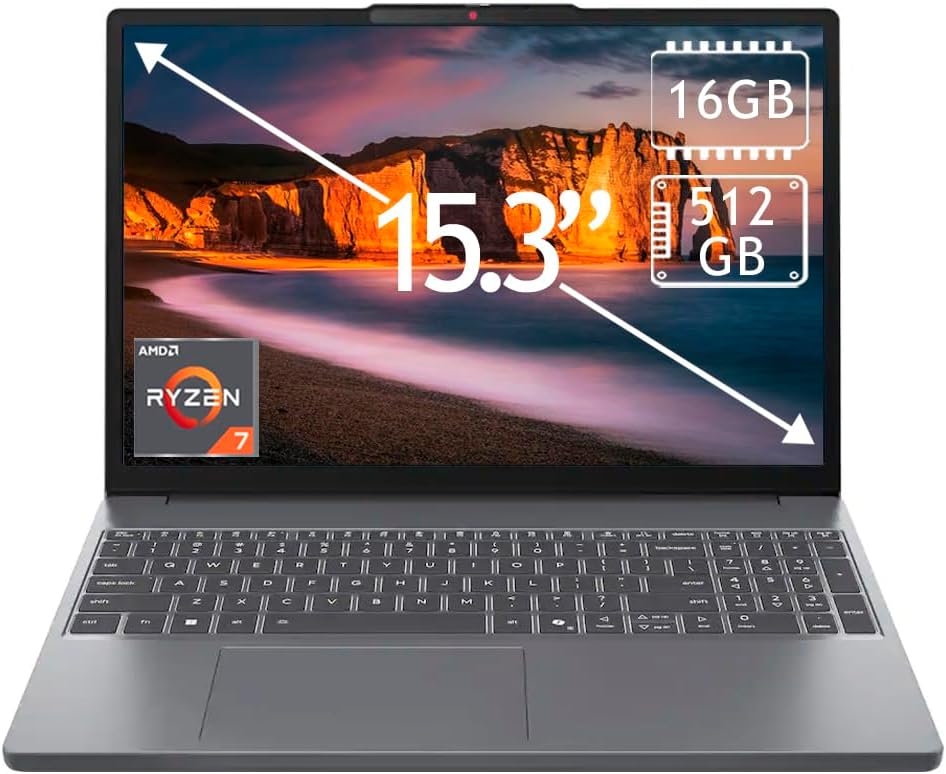
This laptop targets everyday users seeking reliable performance. While not WiFi 7, it handles web browsing and media smoothly.
We may earn a commission when you buy through this link, at no additional cost to you.
Its slim design makes it easy to carry to classes or cafes. The Ryzen 7 processor ensures apps load quickly.
Build quality is functional but lacks premium feel. Advanced users might want more robust connectivity options.
Casual users and students will find it perfect for daily tasks. It offers great value for standard computing needs.
Lightweight chassis allows easy transport in backpacks.
AMD Ryzen 7 offers balanced power and battery savings.
We may earn a commission when you buy through this link, at no additional cost to you.
The Air brings premium Apple quality with WiFi 7 support. Its M5 chip ensures incredible speed and efficiency.
We may earn a commission when you buy through this link, at no additional cost to you.
Battery life lasts all day, making it perfect for travel. The Liquid Retina display is stunning for creative work.
Price is higher than many Windows rivals. Limited ports may require adapters for some peripherals.
Mac users needing power and portability will love this. It balances performance and battery unmatched.
The M5 chip handles AI tasks with ease and speed.
Integration with iPhone allows smooth workflow switching.
We may earn a commission when you buy through this link, at no additional cost to you.
This budget option offers solid performance for home use. It includes AI features via Copilot to assist tasks.
We may earn a commission when you buy through this link, at no additional cost to you.
The Gen4 SSD ensures fast data access speeds. Its blue light filter helps reduce eye strain during reading.
Memory generation is older, limiting peak speeds. Connectivity is reliable but not future-proof for WiFi 7.
Budget buyers needing a reliable workhorse will find it useful. It is great for basic school or office work.
Copilot integration helps automate repetitive daily tasks.
Blue light filter protects eyes during long study hours.
We may earn a commission when you buy through this link, at no additional cost to you.
Choosing the right laptop requires looking beyond just the wireless standard. Consider these factors to match the device to your needs.
Look for modern processors like Intel Core Ultra or AMD Ryzen 7. These chips handle daily tasks efficiently and support AI features.
Prioritize CPUs that match your workload complexity for smooth operation.
At least 16GB of RAM ensures smooth multitasking. Higher speeds like DDR5 improve responsiveness in apps.
Choose 32GB if you work with large files or many browser tabs.
Aim for 512GB or more to store your data locally. SSDs provide fast boot times and quick file access.
Select larger drives if you store many photos or videos.
A Full HD or higher screen is essential for comfort. Look for IPS panels for wide viewing angles and brightness.
Touchscreens add convenience but may reduce battery life.
Check rated battery hours if you work away from home. Aim for 10 hours or more for all-day use.
Efficient processors help extend runtime significantly.
Ensure enough USB-C and HDMI ports for your devices. Thunderbolt 4 offers superior speed for external drives.
More ports reduce the need for extra adapters.
Lightweight laptops are better for commuting or travel. Consider the size relative to where you will use it.
Balance screen size with ease of carrying in a bag.
Biometric login like fingerprint readers enhance privacy. Privacy shutters on cameras prevent unwanted viewing.
Professional models often include hardware security chips.
Keep your laptop updated with the latest drivers to ensure WiFi 7 compatibility. Check manufacturer websites for firmware improvements.
Avoid exposing the device to extreme heat or moisture. Using a hard case helps protect it during travel.
Clean the screen gently with a microfiber cloth. Regularly update your software to maintain security and speed.
WiFi 7 offers faster speeds and lower latency than previous standards. This leads to smoother streaming and more reliable video calls.
Most support backward compatibility with older routers. However, you need a WiFi 7 router to use its full speed.
While 8GB works for basic browsing, 16GB is recommended. It prevents slowdowns when switching between multiple programs.
Most modern devices last between 8 to 12 hours on a charge. Heavy usage like gaming reduces this time significantly.
Focus on Full HD resolution and IPS technology. These ensure clear text and vibrant colors for comfortable viewing.
Some models allow upgrades while others do not. Check the specs before buying if you need more memory later.
Touchscreens are useful for navigating menus quickly. If you rarely touch the screen, it may not be necessary.
Students benefit from lightweight laptops with long battery life. Look for good keyboards and reliable connectivity for online learning.
Our top picks range from budget-friendly options to premium business models. Each offers strong performance tailored to different user needs.
Prioritize features like RAM and battery life for your daily workflow. High-end processors will serve you better for long-term use.
Remember to check current availability before finalizing your purchase. Prices and specs may shift as new models arrive in stores.