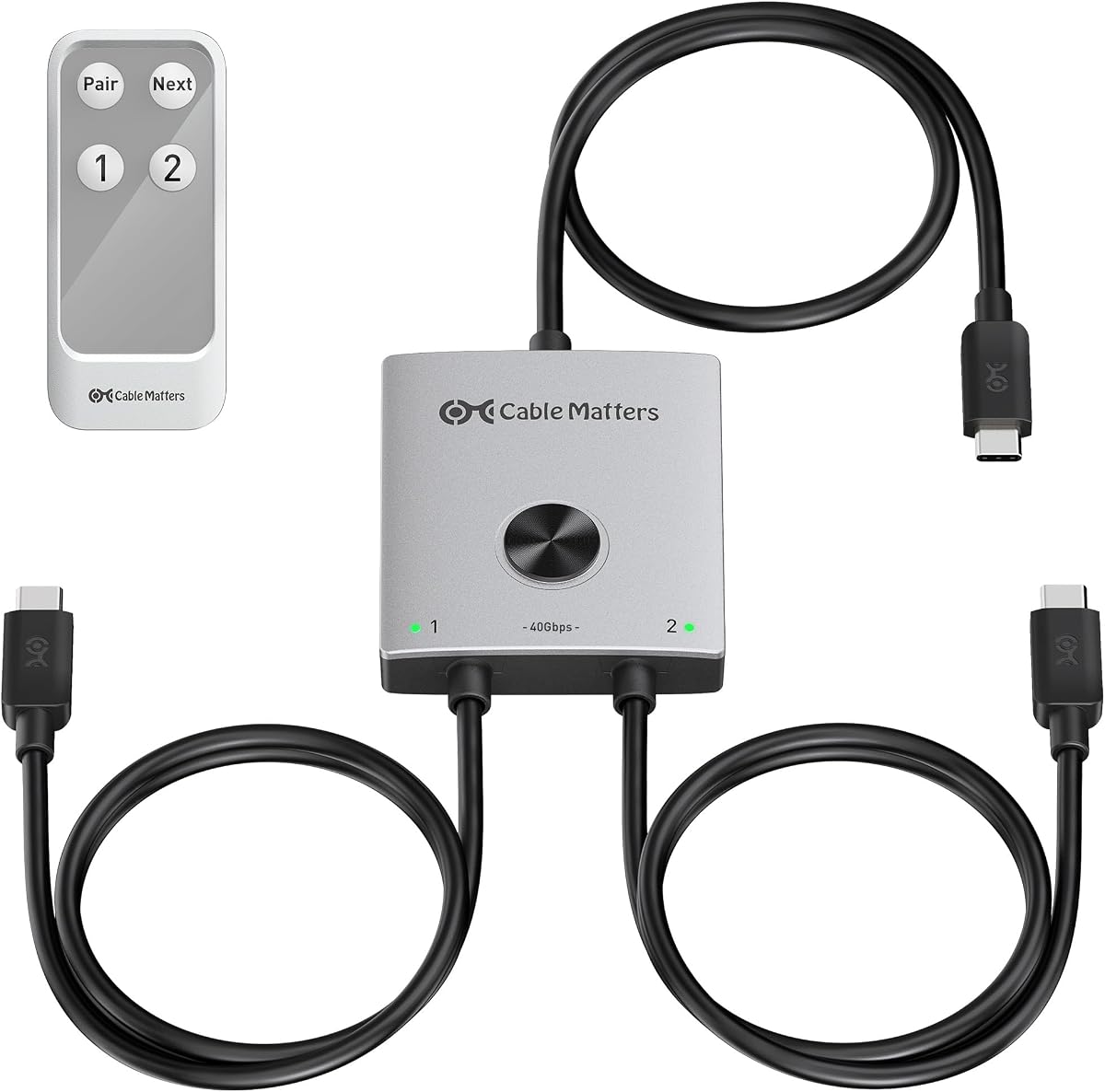
Cable Matters 40Gbps USB C KVM Switch for 2 Laptops Thunderbolt Compatible
4.6Editor score
40Gbps bandwidth
Thunderbolt 4 compatible
140W charging pass-through
This guide compares ten top-rated laptop with KVM support solutions to help you choose the best docking station or switch for seamless multi-device productivity
Finding the right laptop with KVM support is essential for professionals managing multiple systems. A quality solution lets you share monitors and peripherals across devices efficiently without constant cable swaps or setup hassles.
We evaluated ten leading KVM docking stations and switches based on compatibility, video quality, data transfer speeds, and ease of use. Our comparisons focus on real-world workflows for hybrid work and creative environments.
Each pick highlights key strengths and ideal use cases so you can match a device to your specific laptop ports and display needs. Prices and availability change frequently so verify current listings before purchasing.
4.6Editor score

4.9Editor score

4.0Editor score
The following table compares all ten laptop with KVM support options side by side focusing on core specifications like video output channels USB speed and power delivery capabilities to help you decide quickly.


The AV Access KVM Switch 3 Monitors 2 Computers earns top marks as the best overall laptop with KVM support solution. It delivers stunning 8K@60Hz visuals and supports high refresh rates for demanding workflows like content creation or gaming.
We may earn a commission when you buy through this link, at no additional cost to you.
Its standout feature is the ability to keep both computers online even when you switch control. The shared 1Gb Ethernet connection means downloads and syncs continue on the unselected machine. This ensures your background tasks never interrupt your active work session.
While it requires an external power adapter and comes at a premium cost the performance justifies the investment for power users. The extensive USB 3.2 ports and SD card readers add docking station value beyond simple switching.
This device is ideal for professionals managing a laptop and desktop who need triple displays and reliable network connectivity. If you value seamless multitasking and high-fidelity video this KVM docking station is the top recommendation.
Connect one USB-C laptop and one desktop to share three displays without constant re-cabling. This setup lets you keep reference materials on side screens while focusing on the main monitor.
The built-in Ethernet passthrough ensures both PCs stay connected to your LAN. This is critical for cloud syncing or remote access tasks that run in the background on the idle machine.
We may earn a commission when you buy through this link, at no additional cost to you.
Cable Matters 40Gbps USB C KVM Switch stands out as the best premium option for users with high-end Thunderbolt setups. It supports full 40Gbps bandwidth which is essential for fast data transfer and high-resolution video across two laptops.
We may earn a commission when you buy through this link, at no additional cost to you.
Unlike many switches this device works seamlessly with USB4 and Thunderbolt docks like CalDigit or Satechi. This allows you to share all dock peripherals including storage and monitors between two MacBook Pro or Windows laptops without re-plugging cables.
The 140W pass-through charging ensures powerful laptops stay charged even while docked to the switch. This is a major upgrade for modern thin-and-light notebooks that require high wattage for optimal performance.
Choose this switch if you have premium Thunderbolt gear and need uncompromising speed. It bridges the gap between powerful docks and multiple devices better than almost any other laptop with KVM support solution available.
You can connect a compatible Thunderbolt 4 dock to the output side and share its entire ecosystem between two laptops. This saves money by avoiding the need for two separate docks.
With 40Gbps throughput transferring large video files or working with external NVMe drives happens without bottlenecks. This speed is future-proof for next-gen storage devices.
We may earn a commission when you buy through this link, at no additional cost to you.
The Hearvo USB 3.0 HDMI KVM Switch is the top budget choice for users who need basic switching between two devices. It supports 4K@60Hz and offers fast USB 3.0 speeds which is impressive at this price point.
We may earn a commission when you buy through this link, at no additional cost to you.
Its design is straightforward: two HDMI inputs for your laptop and desktop and one HDMI output for your monitor. The USB hub functionality lets you share a keyboard and mouse without extra dongles or receivers.
While it lacks the advanced features of expensive docking stations it solves the core problem of sharing a screen efficiently. The remote switch button helps manage access if the unit is hidden behind a desk.
If you just need to connect two computers to one monitor this is the most cost-effective laptop with KVM support option. It is perfect for home offices where high-end features are not strictly necessary.
This switch is plug and play requiring no software installation. You connect the cables and use the button to toggle between your work laptop and home desktop instantly.
With four USB 3.0 ports you can connect a mouse, keyboard, webcam, and flash drive to the switch. This reduces cable clutter and keeps your workspace tidy.
We may earn a commission when you buy through this link, at no additional cost to you.
This hybrid KVM switch is unique because it accepts inputs from four different computers simultaneously. It supports a mix of USB-C DP and HDMI ports making it versatile for mixed fleets of laptops and desktops.
We may earn a commission when you buy through this link, at no additional cost to you.
The dual monitor support allows you to see more content across your screens regardless of which computer is active. EDID emulation helps prevent display resets when switching between machines which is a common annoyance.
Cable management can be tricky since you need to connect video and data lines to four separate devices. However the flexibility is unmatched if you need to access multiple machines from a single workstation.
Ideal for small businesses or IT professionals who manage several computers this unit offers the most connectivity options. It is a powerful laptop with KVM support tool for environments where four devices are common.
You can connect PCs using different ports like USB-C HDMI or DisplayPort without needing individual adapters. This hybrid approach simplifies setup when your computers have different video outputs.
The built-in 100W PD port ensures your laptop charges while docked. This removes the need to plug in a separate charger which keeps the desk area clean and efficient.
We may earn a commission when you buy through this link, at no additional cost to you.
This USB-C docking KVM switch turns two laptops into a triple-monitor workstation. It uses MST to split the signal across two HDMI and one DisplayPort output so you can expand your workspace significantly.
We may earn a commission when you buy through this link, at no additional cost to you.
The 10Gbps USB transfer speeds ensure that data moves quickly between your laptop and connected drives. With 100W power delivery you can keep your laptop powered up even while running heavy tasks on multiple screens.
Note that macOS has limitations with MST so Mac users might see mirrored displays instead of extended ones. Windows laptops generally work well provided they have a compatible USB-C port with DP alt mode.
For Windows users wanting three screens this is one of the strongest laptop with KVM support options. It combines the utility of a dock with the convenience of switching between two laptops effortlessly.
Connecting three monitors gives you ample space for coding or data analysis. You can have chat apps on one screen code on the second and a browser on the third.
With USB 3.1 Gen 2 ports you can connect fast external SSDs. This helps when moving large datasets between your personal and work laptops quickly.
We may earn a commission when you buy through this link, at no additional cost to you.
This docking station pushes visual fidelity further than most competitors with support for 8K@60Hz and high refresh rates up to 480Hz. It serves as a complete workstation hub replacing multiple peripherals.
We may earn a commission when you buy through this link, at no additional cost to you.
The ability to share a single Ethernet connection across two computers is a major productivity boost. You can download files on one PC while editing on the other without losing network connectivity.
Mac users will find that it only supports mirrored displays which limits flexibility on Apple devices. However for Windows workstations this device offers incredible power and versatility for demanding creative professionals.
If you need the absolute highest resolution and a full dock in one package this is the top laptop with KVM support choice. It delivers a premium experience for those who demand sharp visuals and robust connectivity.
The 8K support is ideal for professional video editing or detailed CAD work. You get every pixel sharp and clear which reduces eye strain during long sessions.
Keeping both computers online ensures smooth cloud workflows. This feature is particularly useful for teams who need constant access to remote servers or shared drives.
We may earn a commission when you buy through this link, at no additional cost to you.
This KVM docking station simplifies dual-laptop setups by allowing you to control two computers through one dual-monitor setup. It supports 4K video and fast switching so you can work seamlessly between personal and work machines.
We may earn a commission when you buy through this link, at no additional cost to you.
It includes a wide array of ports including USB 3.0 USB-C and Ethernet. This means you rarely need extra hubs because the dock handles all your peripheral needs efficiently.
The switching speed is fast so you spend less time waiting for displays to wake up. This keeps your workflow uninterrupted which is important for hybrid work environments.
Best for professionals who need two monitors and two laptops this device offers a balanced solution. It is a reliable choice for laptop with KVM support needs that demand dual screens and robust connectivity.
You can have two independent monitors working on your active laptop. This is perfect for multitasking where you need a document on one screen and a chat on the other.
With multiple USB ports and a card reader you can connect all your tools without dongles. This keeps the desk neat and ensures everything is ready when you switch laptops.
We may earn a commission when you buy through this link, at no additional cost to you.
This docking station offers a complete triple-monitor solution for laptop and desktop users. It supports 8K@60Hz and high refresh rates making it ideal for gamers or designers who need fluid visuals.
We may earn a commission when you buy through this link, at no additional cost to you.
The shared Ethernet connection ensures both computers stay online. You can download updates on one PC while working on the other without interruptions or disconnects.
Build quality is premium with clear indicators showing which device is active. This design helps prevent accidental switches or confusion when managing multiple computers.
It is a strong laptop with KVM support option for users who want a seamless triple-screen experience. If you need high fidelity and robust connectivity this device delivers professional grade results.
Connecting three screens allows you to see more data at once. This is crucial for monitoring markets or managing complex development environments efficiently.
The 8K support ensures every detail is clear. This helps reduce eye strain and improves productivity when working on detailed projects.
We may earn a commission when you buy through this link, at no additional cost to you.
This docking station provides a compact solution for managing two laptops on two monitors. It supports 4K@60Hz and includes a wide range of ports to keep your workspace connected.
We may earn a commission when you buy through this link, at no additional cost to you.
The shared Ethernet port ensures both laptops stay online simultaneously. This is vital for maintaining internet access even when one computer is not active.
Switching is fast and supported by a remote which reduces physical effort. The docking station keeps your desk organized by reducing the need for multiple chargers and hubs.
For users seeking a balanced and reliable laptop with KVM support solution this is a top pick. It offers strong performance without the bulk of larger docking stations.
The smaller footprint helps keep desks tidy. This is useful for home offices where space is limited but functionality is essential.
You can share one internet cable across both laptops. This simplifies network setup and ensures you never lose connection during a switch.
We may earn a commission when you buy through this link, at no additional cost to you.
This KVM switch focuses on delivering high-quality video via DisplayPort supporting up to 8K@60Hz. It is perfect for users who need a single monitor but want crisp visuals across two computers.
We may earn a commission when you buy through this link, at no additional cost to you.
With four USB 3.0 ports you can connect a keyboard mouse and other peripherals easily. The wired remote makes switching quick and convenient without reaching behind the desk.
The price is affordable compared to docking stations making it a great choice for simple setups. It ensures smooth performance without needing extra drivers or software.
If you need a reliable single-monitor solution this is an excellent laptop with KVM support option. It balances cost and performance well for everyday users.
The high resolution support ensures sharp images. This is ideal for professionals who need precise details on a single screen.
The wired remote simplifies switching. This helps keep the desk clean and allows for quick changes between devices.
We may earn a commission when you buy through this link, at no additional cost to you.
This USB C switch provides a robust solution for users needing to switch between two USB-C devices. With 20Gbps speeds it ensures fast data transfer which is critical for modern workflows.
We may earn a commission when you buy through this link, at no additional cost to you.
The 140W power delivery pass-through means you can keep devices fully charged. This is essential for power users who need constant energy during long sessions.
A wireless remote allows for convenient switching without touching the switch. This reduces wear and tear on the unit over time.
It is a solid laptop with KVM support option for those who value speed and charging. Ensure your dock meets the pigtail length requirements to avoid compatibility issues.
The 20Gbps bandwidth supports large file transfers. This speeds up work when using external drives or network storage.
High wattage charging keeps devices ready. This eliminates the need for multiple chargers on your desk.
We may earn a commission when you buy through this link, at no additional cost to you.
This switch delivers top-tier performance for Thunderbolt users needing to share docks between laptops. With 40Gbps speeds it supports high-resolution video and rapid data transfers.
We may earn a commission when you buy through this link, at no additional cost to you.
It supports charging up to 140W ensuring devices stay powered during use. This makes it ideal for high-performance laptops that require significant energy.
Built-in cables reduce clutter and simplify setup. The RF remote adds convenience allowing switching without line of sight.
It is the best laptop with KVM support choice for Thunderbolt ecosystems. It bridges powerful docks and multiple devices efficiently and reliably.
Sharing a Thunderbolt dock between two laptops saves money. This avoids buying duplicate docks for different machines.
The switch ensures your setup remains tidy. Built-in cables reduce the mess often found with external adapters.
We may earn a commission when you buy through this link, at no additional cost to you.
Choosing the right laptop with KVM support solution requires matching technical specs to your workflow. This guide breaks down the key factors to consider when comparing switches and docks.
Check how many monitors you need to connect. Single monitor setups are simpler while dual or triple monitor setups require more advanced MST or DisplayPort features.
Ensure the device supports your desired resolution. Most modern options support 4K@60Hz but only a few offer 8K or high refresh rates for gaming.
Look for USB 3.0 or higher for fast peripheral data transfers. USB-C with Power Delivery is essential if you want to charge laptops through the switch.
Higher wattage like 100W or 140W ensures powerful laptops stay charged. This reduces cable clutter and keeps your workspace organized.
Verify compatibility with your OS. Windows usually supports extended displays better than Mac which often limits dual monitors to mirroring only.
Check for OS-specific limitations like MST support on macOS. This ensures your multi-screen setup works as expected.
Evaluate the switching method. Some devices use physical buttons on the unit while others include wired or wireless remotes.
Remote switching is useful if the KVM is hidden behind a desk. This saves time and keeps your setup efficient.
Determine if the KVM needs an external power adapter. Powered units ensure stable performance for peripherals like hard drives.
Check cable lengths and included connectors. Built-in cables simplify setup while external cables allow for flexible desk layouts.
If you need internet access on both computers look for a shared Ethernet port. This keeps both machines connected even when switched.
Some docking stations include Gigabit Ethernet which is crucial for high-speed downloads and remote access tasks.
Opt for sturdy materials that can withstand daily use. Aluminum or robust plastic casings protect internal components.
Check the manufacturer's warranty policy. A solid warranty provides peace of mind for expensive professional setups.
Consider the mix of ports. USB-A USB-C HDMI and DisplayPort ports allow connecting various peripherals without extra adapters.
Some docks include SD card readers and audio jacks which replace the need for additional hubs.
Connect your computers to the KVM inputs using compatible cables. Ensure you link the USB peripherals to the hub ports so keyboards and mice work on both systems.
Use the front button or remote to toggle between active computers. The device will automatically switch video and USB signals so you can continue working instantly.
Regularly inspect cables for wear to maintain signal integrity. Avoid bending USB-C cables sharply as this can damage internal wires over time.
Yes but macOS has limitations with extended displays. Many KVM switches support mirroring on Mac but may not support extended multi-monitor modes. Always check the product specs for macOS compatibility.
Depends on the model. Some basic switches work without external power while higher-end ones require a 12V adapter to drive USB devices properly. Check the product details for specific power requirements.
It provides sharper visuals and smoother motion. This is vital for creative work or gaming where clarity and fluidity impact productivity and experience.
Many modern USB-C KVM switches support Power Delivery. You can plug in your laptop charger to the switch which will pass power to the active device.
It varies by device. Basic models support one monitor while advanced docking stations support two or three displays. Choose based on your workspace needs.
No. Most switches with shared Ethernet ports maintain full network speeds. You can stay connected on both machines without losing bandwidth.
We recommend the AV Access KVM Switch 3 Monitors as the top choice for overall performance and features. It delivers triple displays and 8K support which is perfect for power users.
For those with Thunderbolt setups the Cable Matters 40Gbps USB C KVM offers unmatched speed and compatibility. It ensures your high-end dock works seamlessly between laptops.
Remember to verify your current laptop ports and monitor specs before buying. Prices and availability change so check the latest product details to ensure the best deal.