
Anti Slip Laptop Rubber Feet Pad Replacement
4.4Editor score
Strong self-adhesive backing
Fits most flat surfaces
Includes fifteen pieces
Laptop rubber feet are small but vital components that keep your device stable and cool. When they wear out, sliding and overheating can become common issues affecting your workflow.
We evaluated ten top-rated replacement strips based on material quality, adhesive strength, and model compatibility to help you find the right fit for your device.
Each pick highlights key features and pros to simplify your choice. Note that availability and pricing may shift, so check current listings before purchasing.
4.4Editor score

4.5Editor score

4.5Editor score
As an Amazon Associate we earn from qualifying purchases.
The following table offers a side-by-side look at the top contenders. Use it to quickly compare compatibility, size, and overall ratings before deciding.


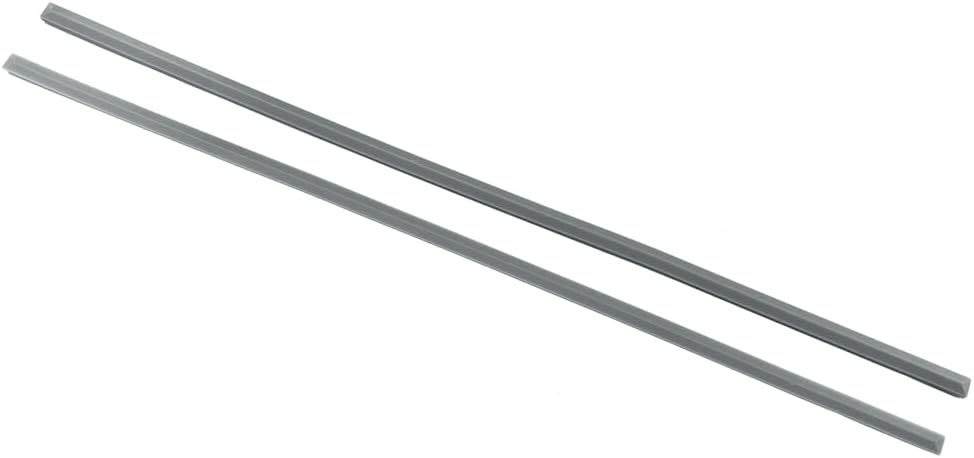


This replacement kit stands out for its precise fit on HP Envy x360 models. With a solid 4.5 rating, users praise its durability and ease of use.
We may earn a commission when you buy through this link, at no additional cost to you.
The grey rubber strips maintain the original look while restoring grip. They come with adhesive already applied, making installation straightforward for most users.
Some buyers note the need to clean old residue before applying. This is a minor trade-off for ensuring a long-lasting bond.
If your HP laptop is slipping, this kit offers a reliable fix. It restores stability without requiring technical repair skills.
The strips match the original dimensions, ensuring your laptop sits flat and stable on any surface.
Peel and stick design means you can fix your laptop in minutes without tools.
We may earn a commission when you buy through this link, at no additional cost to you.
The X-Protector strip is a versatile option for those needing a universal grip solution. Its high rating reflects strong performance across various devices.
We may earn a commission when you buy through this link, at no additional cost to you.
Made from premium rubber foam, these strips provide excellent traction. The adhesive is tenacious, keeping laptops and appliances firmly in place.
Since it is universal, you may need to cut the strips to fit smaller laptops. This flexibility comes with a slight compromise on exact fit.
For users seeking a flexible and durable grip fix, this is a top choice. It works well on laptops, keyboards, and more.
The rubber foam combination offers durability and flexibility that outlasts standard plastic feet.
Use it on laptops, cutting boards, or speakers to keep anything from sliding around.
We may earn a commission when you buy through this link, at no additional cost to you.
This pack of fifteen rubber feet offers exceptional value for budget-conscious buyers. It is ideal for MacBooks and other flat devices needing extra grip.
We may earn a commission when you buy through this link, at no additional cost to you.
The self-adhesive backing makes application simple. Each foot is slightly taller than original ones, which helps lift the device for better cooling.
While the height aids cooling, some may find it changes the laptop profile. This is a small trade-off for the included quantity and cost.
If you need multiple replacements or spares, this pack is perfect. It provides a reliable anti-slip fix at a low price.
With fifteen pieces, you have plenty for full replacement and future repairs without buying more.
The added height raises the laptop slightly, improving airflow underneath to keep it cooler.
We may earn a commission when you buy through this link, at no additional cost to you.
Designed for HP 15 series laptops, this kit offers dual thickness options to suit different needs. Users value its durability and heat resistance.
We may earn a commission when you buy through this link, at no additional cost to you.
The thick and thin pads allow you to adjust the laptop height if needed. This flexibility helps with stability and airflow control.
The product is not officially sponsored by HP, so verify the fit before buying. Most users find the size matches their devices well.
For HP owners needing a reliable replacement, this kit delivers strong performance. It restores grip without compromising on quality.
Choose between thick or thin pads to customize stability and cooling for your setup.
The material handles high temperatures, ensuring it lasts even under heavy laptop use.
We may earn a commission when you buy through this link, at no additional cost to you.
This replacement is tailored for HP 15-EF and related series, ensuring a precise fit. Its tested quality gives buyers confidence in durability.
We may earn a commission when you buy through this link, at no additional cost to you.
Each strip comes with adhesive already applied, ready for quick installation. The part numbers help you confirm compatibility before purchase.
Some users may need to double-check their model against the list. The fit is reliable once confirmed, providing stable support.
HP 15-EF owners will find this a convenient and effective repair. It restores the laptop bottom cover functionality with ease.
Part numbers like L63597-001 help you confirm the strips match your specific laptop model.
The pre-applied adhesive means you just peel and stick without extra glue.
We may earn a commission when you buy through this link, at no additional cost to you.
Tailored for the Surface Laptop Studio, these grey strips match the device aesthetic. The rating suggests mixed results, so verify dimensions carefully.
We may earn a commission when you buy through this link, at no additional cost to you.
The nonskid rubber provides reliable grip on flat surfaces. If issues arise, the vendor offers a full refund for unsatisfied buyers.
Some users might find the thickness differs slightly from original parts. Checking images before buying helps avoid fit issues.
For Surface Studio owners, this is a targeted repair option. Ensure your model matches before ordering to get the best result.
These strips are cut to fit the Surface Laptop Studio bottom case specifically.
A full refund policy reduces risk if the fit or quality does not meet expectations.
We may earn a commission when you buy through this link, at no additional cost to you.
This silicone set works with Surface Book 1 through 3, making it versatile for owners of older models. The material offers flexibility and strong grip.
We may earn a commission when you buy through this link, at no additional cost to you.
Nonskid silicone keeps the laptop stable during typing. If the fit is not right, the seller offers a full refund.
Some buyers must confirm their exact model version to avoid issues. Most find the silicone pads fit well and feel solid.
Surface Book users looking for a flexible grip fix should consider this. It combines durability with a reliable refund policy.
Silicone resists wear better than standard rubber, ensuring a longer lifespan.
A full refund option provides peace of mind if the strips do not fit correctly.
We may earn a commission when you buy through this link, at no additional cost to you.
These strips target the HP Envy x360 series specifically, restoring bottom grip efficiently. Users report good results with the included adhesive.
We may earn a commission when you buy through this link, at no additional cost to you.
The black color matches the laptop cover well. It is important to check model compatibility before ordering to ensure a proper fit.
Some users advise cleaning the old adhesive residue first. Doing so ensures the new strips stick firmly and last longer.
Envy x360 owners seeking a straightforward fix will appreciate this kit. It brings back stability with minimal effort.
Designed for Envy x360 models, ensuring the size aligns with the bottom cover slots.
Each strip comes with adhesive so you can install it right away.
We may earn a commission when you buy through this link, at no additional cost to you.
These parts are made for the HP Elitebook X360 1030 G3, offering a specific repair solution. The double-sided adhesive helps with secure attachment.
We may earn a commission when you buy through this link, at no additional cost to you.
The rubber strips provide reliable grip on desks. Users are advised to clean the surface thoroughly for the best bonding results.
Manual measurements might vary slightly from listed sizes. Always check physical dimensions if possible to avoid fit issues.
For Elitebook G3 owners, this is a practical repair option. It restores stability with a strong adhesive bond.
The double-sided adhesive ensures a secure bond between the strip and the laptop.
Cleaning old glue before installation ensures the new strips stick firmly without slipping.
We may earn a commission when you buy through this link, at no additional cost to you.
This kit includes two sets of rubber feet and adhesive strips for general laptop use. It is ideal for notebooks needing basic grip repair.
We may earn a commission when you buy through this link, at no additional cost to you.
The universal design fits many laptops, though exact sizes vary. Users should measure their needs before buying to ensure proper fit.
It offers a complete set for reattaching feet, saving time searching for parts. This makes repairs accessible for non-experts.
For generic laptop repairs, this kit provides a solid solution. It is a practical choice for restoring bottom cover stability.
Includes both feet and adhesive strips for a full repair without extra purchases.
Designed to work across most notebooks, offering broad compatibility for repairs.
We may earn a commission when you buy through this link, at no additional cost to you.
Selecting the right replacement requires considering fit, material, and adhesive quality. Here are key factors to evaluate before buying.
Ensure the strips match your laptop model. Most listings specify exact series like HP 15 or Surface Book. Check product descriptions for precise matches before purchasing.
Compatibility prevents wasted money and installation issues.
Premium rubber or silicone resists wear better than cheap plastic. High-temp materials ensure the strips last under heavy laptop use.
Choose durable material for long-term stability.
Strong adhesive backing keeps strips from peeling. Pre-applied adhesive saves time. Some kits include double-sided tape for extra hold.
Look for tenacious adhesive for secure attachment.
Thickness affects laptop height and airflow. Measure your old strips if possible. Some kits offer thick and thin options for flexibility.
Verify dimensions to match your device needs.
Most kits include two strips. Some packs offer more pieces for multiple laptops or spares. Consider how many you need before buying.
Check count to ensure you have enough.
Grey or black finishes blend with the laptop cover. Matching the original color keeps the look clean. Verify the finish matches your device.
Select color that matches your laptop.
Some sellers offer full refund policies. This reduces risk if the fit is off. Check vendor policies before ordering.
Look for refund guarantees to protect your purchase.
Peel-and-stick designs simplify the process. Avoid kits needing extra glue if possible. Clear instructions help ensure success.
Pick easy-to-install options for quick repairs.
First, clean the laptop bottom thoroughly. Remove old adhesive with a soft cloth or alcohol wipe to ensure a smooth surface.
Next, peel the adhesive backing from the new strips. Align them with the original foot positions and press firmly for a few seconds.
Finally, let the adhesive set for an hour before using the laptop. Clean the surface regularly to maintain grip over time.
Check the product listing for your exact model series like HP 15 or Surface Book. Measuring the old strips helps confirm dimensions. Contact the seller if unsure.
Universal strips work on speakers, keyboards, or appliances. Model-specific ones may be too small. Always check dimensions before applying to non-laptop gear.
The strips come with strong adhesive. If adding more, use double-sided tape. Avoid super glue as it may damage the case.
Elevated designs lift the laptop slightly. This can help airflow underneath. Check the product specs for cooling claims before buying.
Quality rubber or silicone lasts years. Adhesive may weaken over time. If they peel, reapply with fresh tape.
No. Each kit targets specific series like Envy or Elitebook. Verify your model number matches the listing. Universal kits fit more but lack precision.
Our top picks like the HP Envy and X-Protector strips offer the best balance of fit and durability. They restore stability without complicating repair.
Prioritize compatibility and material quality when choosing. Ensure the adhesive is strong enough to handle daily use and movement.
Check current prices and availability before buying. Listings change often, so confirm details match your needs for a successful repair.