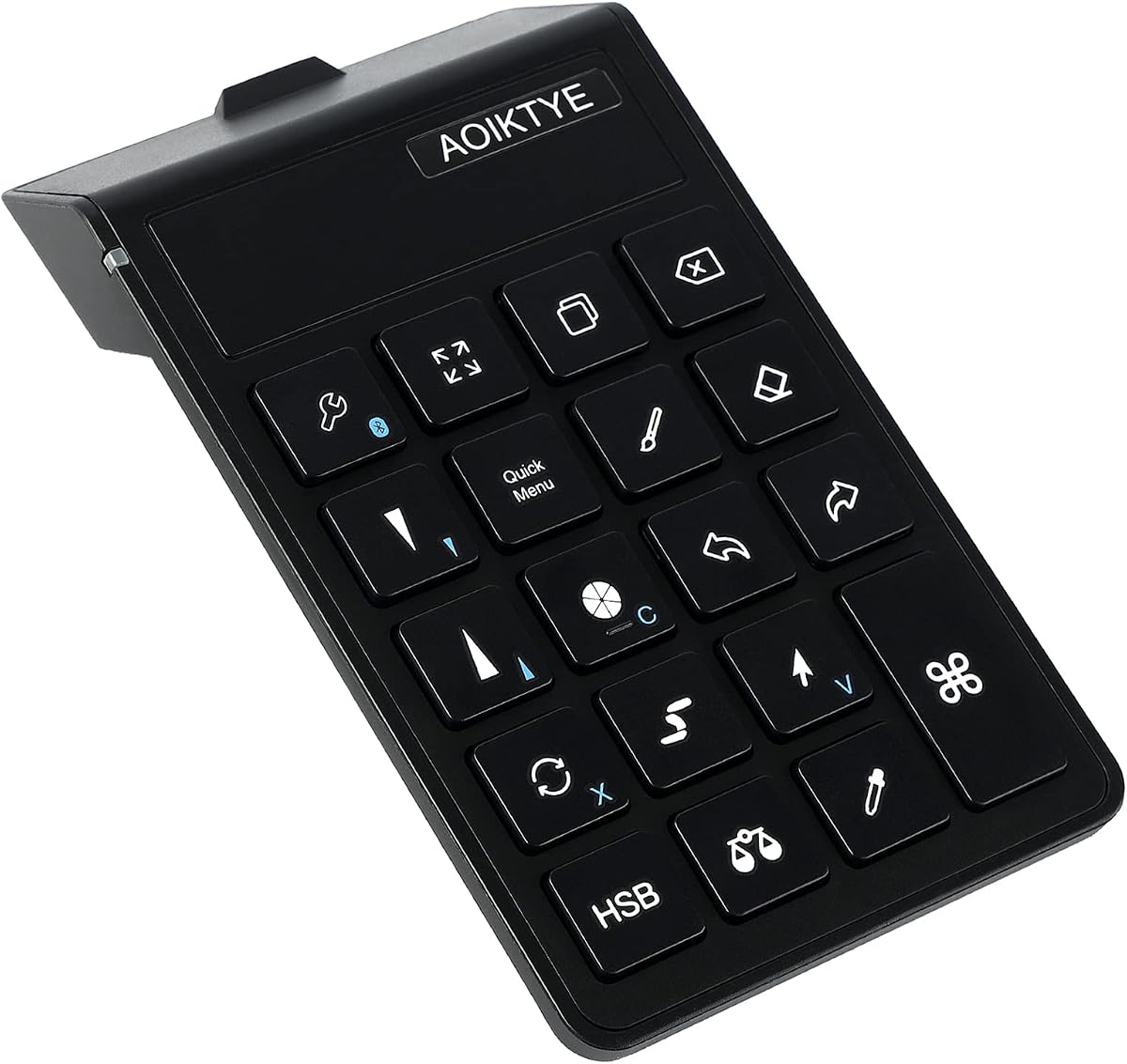
AOIKTYE 2 Keyboard
4.5Editor score
22 dedicated shortcut keys
84 hour battery life
Optimized for Procreate
This guide compares the top ten iPad drawing Bluetooth controllers for digital artists, evaluating key features, compatibility, and performance.
Artists seeking efficiency need reliable tools to streamline their digital workflow on tablets. A dedicated controller can transform how you interact with creative software, reducing reliance on touch gestures. These devices offer physical shortcuts that enhance precision and speed during complex drawing sessions.
We evaluated ten highly rated Bluetooth controllers designed for iPad and tablet use. Our analysis focused on connectivity stability, shortcut customization, battery life, and overall build quality. Each product offers unique features tailored to different artistic needs and software environments.
Each selection highlights specific strengths and ideal use cases for various creators. Prices and availability may change frequently, so verify current details before purchasing. This guide aims to help you find the perfect accessory to elevate your digital art experience.
4.5Editor score

4.3Editor score

4.4Editor score
This side by side comparison outlines the key specifications and capabilities of each selected controller to help you make an informed decision.


The XPPen Mini Keydial ACK05 stands out as a versatile wireless shortcut keyboard designed for creative professionals. It holds a strong rating of 4.3 stars based on user feedback, reflecting its reliable performance. Its standout quality is the combination of a rotary dial and programmable keys that streamline common actions.
We may earn a commission when you buy through this link, at no additional cost to you.
Key strengths include its massive 1000 mAh battery which supports approximately 300 hours of continuous work. The dial allows precise adjustments for zooming or brush sizes without lifting your hand from the workspace. Anti ghosting technology ensures that pressing multiple keys simultaneously registers accurately for complex shortcuts.
However, full customization requires downloading drivers for desktop or the Shortcut Remote app on iPad. This adds a setup step but ensures deep integration with applications like Photoshop or Illustrator. The trade off is worth the gain in workflow efficiency once configured.
Artists seeking a portable, high capacity controller should choose this model. It balances affordability with advanced features like one handed use and long battery life. For those needing consistent performance during long drawing sessions, this is a top recommendation.
The rotary dial provides tactile feedback for adjusting canvas rotation or brush size smoothly without menu diving.
Support for Bluetooth, dongle, and cable connections ensures you can use it across various devices seamlessly.
We may earn a commission when you buy through this link, at no additional cost to you.
The AOIKTYE 2 Keyboard is designed specifically to enhance the Procreate experience on iPad. It boasts a high 4.5 rating from users who appreciate its focus on drawing apps. This model offers 22 shortcut functions mapped to key tasks like color picking and layer management.
We may earn a commission when you buy through this link, at no additional cost to you.
Its main advantage is the balance between cost and functionality. The 250 mAh battery delivers up to 84 hours of use on a single charge which is impressive for its size. Upgraded ergonomics place frequently used keys in accessible positions for comfortable one hand operation.
While it lacks the deep customization of other models, it works out of the box for Procreate. Users cannot modify functions as freely as with other keyboards but saves time on setup. This makes it ideal for artists who want immediate results without technical hurdles.
If you prioritize budget and simplicity, this keyboard is an excellent choice. It reduces the need to reach for the iPad keyboard constantly. For Procreate enthusiasts looking for an essential tool at a low price, this is a smart buy.
Pre mapped keys handle essential Procreate actions like undo, color adjustment, and layer switching instantly.
With up to 84 hours of continuous use, you can work for days before needing a recharge via USB-C.
We may earn a commission when you buy through this link, at no additional cost to you.
The TourBox Lite Bluetooth offers a premium creative control experience with a refined design. It maintains a 4.4 rating due to its high quality build and user friendly interface. This device simplifies complex workflows by replacing keyboard shortcuts with physical dials and buttons.
We may earn a commission when you buy through this link, at no additional cost to you.
Its unique layout focuses on an 8 key system that adapts to your active application automatically. The knob and wheel provide precise control for color tuning and timeline navigation. This tactile feedback allows creators to keep their eyes on the canvas while working.
The main drawback is the cost compared to standard keyboards. It is an investment that pays off in long term workflow efficiency. Additionally, it supports a wide range of software but requires console setup for full customization which may confuse new users.
Professional creators who value ergonomics and precision should consider this controller. It is designed for illustration and light creative work daily. For those seeking a stylish and efficient addition to a workspace, this model delivers superior comfort and control.
The device detects active apps and switches control settings automatically to maintain uninterrupted creative flow.
Shaped from ergonomic data, the design supports long drawing sessions with clear tactile feedback for every button.
We may earn a commission when you buy through this link, at no additional cost to you.
The HUION Keydial Mini is a powerful programmable keypad that supports over 18 shortcut keys. It has a 4.2 rating reflecting its utility for digital artists and editors. A standout feature is its dial controller which allows quick changes to brush sizes or timelines.
We may earn a commission when you buy through this link, at no additional cost to you.
Its strength lies in its ability to map almost any shortcut you need. The anti ghosting technology ensures multiple keys can be pressed together without missing commands. This makes it useful for complex tasks in software like Photoshop or Premiere Pro.
However, setting up custom shortcuts requires installing the Huion driver on your device. This extra step might deter users looking for instant plug and play solutions. Despite this, the functionality gained justifies the time investment for power users.
If you need a versatile tool that adapts to your specific software needs, choose this model. It works with Mac and Windows devices alike. For creatives who rely heavily on keyboard shortcuts, this mini keypad is a highly effective addition.
18 buttons can be set to any shortcut allowing you to tailor the device exactly to your workflow needs.
Bluetooth 5.0 ensures a stable connection up to 10 meters without worrying about drop offs during use.
We may earn a commission when you buy through this link, at no additional cost to you.
The DIGIDRAW K30 is a unique remote controller featuring two precision dials and 11 custom keys. With a perfect 5.0 rating, it offers exceptional performance for artists. The dual dial system allows simultaneous control of different parameters like opacity and size.
We may earn a commission when you buy through this link, at no additional cost to you.
Its key strength is the tactile positioning of keys which aids blind operation. You can feel where each key is located without looking away from your screen. This design keeps your focus on the creative work rather than the device itself.
While highly rated, it requires downloading specific drivers to utilize the full custom functions. Users must ensure compatibility with their software before purchasing. The trade off is minimal considering the unique dual dial interface it offers compared to others.
Artists who value tactile feedback and precision will find this controller invaluable. It is extremely light at 82 grams making it easy to carry. For those needing quick access to multiple functions without reaching for a keyboard, this is a top pick.
Two dials allow you to adjust two different values simultaneously for faster workflow adjustments in creative apps.
Weighing just 82 grams, it sits naturally in one hand allowing you to work anywhere without fatigue.
We may earn a commission when you buy through this link, at no additional cost to you.
The TNP iPad Remote Control offers a trackpad and media control features for general use. It has a 3.6 rating which suggests it serves as a general remote rather than a dedicated art tool. It allows you to move cursors and control media playback remotely.
We may earn a commission when you buy through this link, at no additional cost to you.
Its main feature is the trackpad which lets you navigate iOS screens like a computer. This can help access menus without tapping the iPad screen repeatedly. It also includes a Home button and volume controls for broader device interaction.
However, it lacks specific drawing shortcuts or customizable keys for artists. It is better suited for presentations or media consumption rather than digital art creation. The utility is limited for those seeking a tool to enhance drawing speed.
If you need a general remote to control your iPad remotely this fits the bill. It works well for switching apps or playing videos without touch. For artists, it offers less value than dedicated drawing controllers but is useful for general tasks.
The trackpad allows you to move the cursor on the screen just like a desktop computer for precise navigation.
Built in iOS Home button lets you switch between apps and activate Siri easily without touching the device.
We may earn a commission when you buy through this link, at no additional cost to you.
The ShanWan Portable Controller is primarily a gaming device that supports some drawing functions. It holds a 3.4 rating indicating mixed experiences across different use cases. Its versatility allows connection to multiple platforms including iPad and Android tablets.
We may earn a commission when you buy through this link, at no additional cost to you.
Key strengths include its ergonomic design which reduces fatigue during long use. The analog sticks and triggers provide precise input which can be mapped for creative tasks. This makes it a dual purpose tool for artists who also game on their devices.
However, it lacks dedicated creative shortcuts like brushes or layers. Users may need to map game buttons manually to function as drawing controls. This complexity might not appeal to those seeking a ready made art solution out of the box.
If you want a single controller for both games and casual drawing, this is a viable option. Its rechargeable battery and comfortable grip are major benefits. For serious artists, dedicated tools will offer better performance but this is a flexible choice.
Wireless connectivity offers a responsive and cable free experience across many platforms without hassle.
Comfortable grip and intuitive button layout allow for extended gaming sessions without fatigue.
We may earn a commission when you buy through this link, at no additional cost to you.
The Modded Tablet Controller G8 PLUS is a robust option designed for advanced tablet users. It has a 5.0 rating for its precision and durability features. It is specifically modified to work better with tablets than standard gaming controllers.
We may earn a commission when you buy through this link, at no additional cost to you.
Its Hall Effect sticks and triggers ensure smooth control without drift over time. The 6 axis gyroscope provides motion controls that can be adapted for creative tasks. Dual motors offer feedback that enhances the feeling of interaction.
Some users may find the need for holders on certain tablets inconvenient. While it is not specifically an art controller, its precision can be useful for navigation. The high cost may be justified by its modular and durable design.
Advanced users who want a controller with high durability and precision should choose this. It works well across various tablets without extra accessories. For those who value a tactile and precise input device, this is a strong candidate.
Hall Effect sticks provide smooth accurate long lasting control without the wear common in traditional controllers.
A 6 axis gyroscope enables precise motion controls that can be utilized for various interactive tasks.
We may earn a commission when you buy through this link, at no additional cost to you.
The CSP Clip Studio Tabmate 2 is a handheld shortcut device designed specifically for Clip Studio Paint. It has a 4.0 rating reflecting its niche focus. This controller is ideal for users who rely heavily on Clip Studio for their digital art work.
We may earn a commission when you buy through this link, at no additional cost to you.
Its primary benefit is the deep integration with the software allowing quick access to tools. It even includes a license for the software which adds value to the purchase. Bluetooth 5.1 ensures a fast connection to your device without delay.
However, it is not compatible with other software like Photoshop or Procreate. Users must purchase AA batteries separately which is an added cost. This limits its versatility but makes it perfect for specific workflows.
If you work exclusively with Clip Studio Paint, this controller offers unmatched efficiency. It reduces the time spent navigating menus. For dedicated CSP users, it is a highly recommended tool to speed up production speed.
This device is built to support Clip Studio Paint providing enhanced production speed for its users.
Includes a 12 month license for Clip Studio Paint Debut single device adding extra value to the hardware.
We may earn a commission when you buy through this link, at no additional cost to you.
The Wacom Intuos Small is a Bluetooth drawing tablet that includes a pen and software. It has a 4.4 rating due to its high quality pen performance. This device offers precision control for artists who prefer drawing with a stylus on a surface.
We may earn a commission when you buy through this link, at no additional cost to you.
Its main strength is the industry leading pen technology which feels natural on paper. It includes wireless connectivity which makes setup flexible in any workspace. The battery free pen ensures you never stop drawing to charge it.
This is a drawing tablet rather than a keyboard shortcut controller. It requires a computer or tablet to function which adds to the setup complexity. For artists needing a full tablet experience this is the best option.
If you need a tool to draw directly rather than use shortcuts, choose this tablet. It provides professional level precision in a compact package. For those starting their digital journey, this is a reliable and trusted tool.
Wacom's battery free technology feels like pen on paper giving superior control and precision for your art.
Wacom gives you software with every purchase granting access to creative tools and online training resources.
We may earn a commission when you buy through this link, at no additional cost to you.
Choosing the right controller depends on your specific workflow needs and software preferences.
Bluetooth stability is critical for uninterrupted drawing. Look for Bluetooth 5.0 or newer to ensure low latency and reliable connections over distances up to 10 meters. Avoid older versions that may cause lag.
Prioritize controllers with strong Bluetooth specs to prevent drop offs during intense work sessions.
The ability to map shortcuts determines how well the device fits your software. Models with programmable keys allow you to assign functions like layers or brush sizes to single presses.
Check if the device supports deep customization via drivers or apps to match your workflow.
Long battery life ensures you can work for extended periods without interruptions. Aim for models offering 40 to 84 hours of continuous use to support full workdays.
High capacity batteries reduce the need for frequent recharging and keep your workflow efficient.
Comfort is essential for long sessions. Choose a device that feels natural in your hand with tactile buttons to reduce strain.
Ergonomic designs help prevent fatigue and keep your focus on creativity rather than discomfort.
Ensure the controller supports your preferred apps like Procreate or Photoshop. Some models are optimized for specific software while others offer broader support.
Verify software compatibility before purchasing to avoid limitations in functionality.
Durable materials ensure the device withstands daily use. Look for robust build quality and anti ghosting features to maintain reliability.
High quality construction extends the lifespan of the controller and maintains performance.
Plug and play models save time compared to those requiring drivers. Simple setup processes allow you to start using the device immediately.
Consider how much effort is needed to configure the controller for your system.
Set a budget that aligns with your needs. Affordable options work for basic tasks while premium models offer advanced features.
Balance cost with the features that will most impact your daily work routine.
Pair your controller with your iPad via Bluetooth settings. Ensure the device is charged and in pairing mode before connecting. Verify connection stability by testing basic functions.
Customize keys using the provided software or app. Map frequently used shortcuts to improve workflow efficiency. Save different profiles for different applications if supported.
Keep the controller clean by wiping it with a soft dry cloth. Store it in a protective case when not in use to prevent damage. Charge regularly to maintain battery health.
Most Bluetooth controllers are compatible with most modern iPads running iOS or iPadOS. Always check specific OS requirements before purchasing to ensure full functionality.
Yes, several controllers are optimized for Procreate. Others work generally but require custom mapping to achieve full compatibility with specific features.
Many devices require downloading drivers or apps for full customization. Check the product details to see what software is included or needed.
Battery life varies from 40 to 84 hours depending on the model. Higher capacity batteries allow for longer continuous use without needing to recharge.
Many controllers support Photoshop through custom key mapping. Always verify software support lists to confirm specific compatibility.
Yes, most work with Windows and Mac systems as well. Check compatibility details to ensure cross platform support for your needs.
Most devices offer a connection range of up to 10 meters. This allows flexibility to move around while maintaining a stable connection.
This guide reviewed ten top options for iPad drawing Bluetooth controllers. The XPPen Mini Keydial and AOIKTYE 2 stand out for different needs.
Prioritize battery life and customization if you work long hours. Choose ergonomic designs to maintain comfort during intense sessions.
Prices and availability change regularly so check current offers before buying. Verify compatibility with your specific devices and software needs.