
GIGABYTE B650 Eagle AX
4.6Editor score
Cost Effective AM5 Platform
Triple M.2 Slots
WiFi 6E Included
This guide compares the top 10 Gigabyte Motherboard models for performance and value, covering AM5 AM4 and Intel LGA 1700 socket options with detailed specs
Finding the right Gigabyte Motherboard can define your entire system build. Whether you need gaming power or workstation stability these boards deliver reliable performance and modern features for every budget.
We compared ten top models using technical specs user feedback and build quality. Each board was evaluated for power delivery thermal management and connectivity to ensure you get the best value today.
Each pick shows key strengths and target users so you can decide quickly. Keep in mind that prices change often so check current listings before you finalize your purchase decision.
4.6Editor score

4.4Editor score

4.2Editor score
This side by side comparison helps you see key differences across all ten models at a glance so you can identify which board matches your CPU socket budget and feature needs.



The GIGABYTE B650 AORUS Elite AX stands out as a top choice for modern AMD builds. It supports the latest Ryzen processors and offers DDR5 memory and PCIe 5.0 storage speed which ensures your system stays relevant for years.
We may earn a commission when you buy through this link, at no additional cost to you.
Its power design uses 14+2+1 phases with high current stages to handle demanding CPUs. The thermal system includes covered heatsinks and thermal guards to keep performance stable under load. Connectivity is future ready with USB4 and fast networking.
While the price is higher than budget boards the features justify it. The EZ Latch system makes installing hardware simple and Q Flash allows BIOS updates without a CPU. Some users might find RGB lighting setup a bit complex.
This board is best for enthusiasts who want reliability and modern features. If you plan to use high end Ryzen chips and need fast storage this model delivers balanced performance and longevity for serious builders.
With PCIe 5.0 and USB-C Gen 2 you can connect next generation storage and peripherals without bottlenecks.
Fully covered MOSFET heatsinks and thermal guards keep components cool during intensive gaming or rendering tasks.
We may earn a commission when you buy through this link, at no additional cost to you.
The X870 AORUS Elite WIFI7 brings the latest networking standards to AM5 builds. It supports Wi-Fi 7 which promises faster wireless speeds and lower latency. For users with high speed internet this board removes wireless bottlenecks.
We may earn a commission when you buy through this link, at no additional cost to you.
It features four M.2 slots for massive storage expansion and USB4 ports for high bandwidth peripherals. The power design is robust enough for top tier Ryzen chips. Thermal protection ensures stable performance during long sessions.
The main drawback is the high price which may not suit budget builds. Since Wi-Fi 7 is new compatibility with routers is still limited. However early adopters will benefit from the latest tech without upgrading soon.
This board is ideal for users who want the newest features and plan to upgrade their network later. If you value future proofing and need multiple fast storage slots this model is a strong investment.
Wi-Fi 7 delivers significantly higher throughput than previous standards for seamless streaming and gaming.
Four M.2 slots allow you to install multiple high speed NVMe drives without needing add on cards.
We may earn a commission when you buy through this link, at no additional cost to you.
The X870E AORUS PRO ICE offers a premium white aesthetic for builders who want a clean look. It includes all the latest AM5 features like Wi-Fi 7 and USB4. The design matches white cases and components beautifully.
We may earn a commission when you buy through this link, at no additional cost to you.
Its power design uses 16+2+2 phases with smart stages for stable performance. Thermal guards protect M.2 drives and heatsinks keep VRMs cool. Connectivity includes front and rear USB-C for modern peripherals.
While it looks great the white finish may show dust more easily. The price is high compared to standard boards but you pay for the design and top tier specs. It is worth it for custom builds.
This board is best for users building a high end white themed system. If you want top performance and a unique look this model stands out in a sea of black boards.
The white color scheme creates a striking visual appeal for open case or white case builds.
Beyond looks it delivers top tier power and connectivity for demanding workloads and gaming.
We may earn a commission when you buy through this link, at no additional cost to you.
The Z890 AORUS Master is designed for Intel Core Ultra processors and offers premium features. It includes Thunderbolt 4 and 10GbE LAN which are rare on consumer boards. This makes it ideal for pros and power users.
We may earn a commission when you buy through this link, at no additional cost to you.
With five M.2 slots you can install massive storage arrays without extra cards. The power system handles high end CPUs with ease. EZ features make building simpler and debugging faster.
The cost is significant and the new platform may have early bugs. However for users who need fast networking and storage this board is unmatched. It supports future CPUs and interfaces well.
This board is best for workstations and enthusiasts who need maximum speed. If you rely on fast data transfer and professional peripherals this model delivers the performance you need.
10GbE LAN and Thunderbolt 4 allow fast data transfer for creative and business workflows.
Five M.2 slots give you room for multiple drives without sacrificing other PCIe slots.
We may earn a commission when you buy through this link, at no additional cost to you.
The B650 Eagle AX brings AM5 performance to a budget friendly price. It supports Ryzen 7000 8000 and 9000 series processors. The power design is stable and the thermal guard helps SSDs stay cool.
We may earn a commission when you buy through this link, at no additional cost to you.
You get three M.2 slots which is generous for this price. WiFi 6E ensures fast wireless connection. EZ Latch and Q Flash make building and maintenance easy for first time builders.
There are fewer USB ports compared to premium boards and audio is basic. But for most users this does not impact daily use. The value and performance make it a top budget choice.
This board is best for gamers and builders watching their budget. If you want modern features without paying extra this model offers great performance and reliability for entry level AM5 systems.
You get AM5 support and modern connectivity at a price that fits most budgets.
Features like EZ Latch and Q Flash make installing hardware and updating BIOS simple.
We may earn a commission when you buy through this link, at no additional cost to you.
The B550 AORUS Elite AX V2 is ideal for users upgrading older AM4 systems. It supports Ryzen 5000 series CPUs which are still powerful. The board provides solid performance and modern connectivity like WiFi 6.
We may earn a commission when you buy through this link, at no additional cost to you.
Power delivery is stable with 12+2 phases ensuring CPU longevity. Thermal guards protect M.2 SSDs and the front USB-C allows modern device charging. RGB Fusion adds customizable lighting to your build.
Since it uses DDR4 and AM4 it lacks future CPU support. However for existing DDR4 users or budget upgrades it offers great value. The board is reliable and well built for its class.
This board is best for users upgrading from older Ryzen chips. If you want to keep DDR4 memory and get a performance boost this model provides a stable and efficient platform.
For users with DDR4 memory and older Ryzen CPUs this board extends system life cost effectively.
Front USB-C and WiFi 6 bring current features to an older platform.
We may earn a commission when you buy through this link, at no additional cost to you.
The Z790 Eagle AX offers a balanced option for Intel users. It supports 14th 13th and 12th gen Core processors. The board uses DDR5 memory and supports PCIe 5.0 for future storage.
We may earn a commission when you buy through this link, at no additional cost to you.
Three M.2 slots provide plenty of storage for most users. Thermal design keeps the system stable during gaming. EZ features like Q Flash and EZ Latch simplify installation and maintenance tasks.
It is not designed for extreme overclocking but fits most gaming and workloads. The lack of Thunderbolt is a trade off for the lower price. Still it offers solid performance and connectivity.
This board is best for mainstream users wanting modern features. If you want DDR5 and PCIe 5.0 without premium pricing this model provides great value for Intel builds.
You get DDR5 and PCIe 5.0 support at a price that fits most budgets.
EZ Latch and Q Flash make building and updating BIOS simple for all skill levels.
We may earn a commission when you buy through this link, at no additional cost to you.
The Z790 AORUS Elite AX provides strong power delivery for Intel Core CPUs. It supports DDR5 memory and offers four M.2 slots for plenty of storage. WiFi 6E ensures fast wireless connections for gaming.
We may earn a commission when you buy through this link, at no additional cost to you.
The thermal design includes M.2 Thermal Guard III and covered heatsinks to keep components cool. USB-C ports are available on front and back for modern devices. The board is easy to build with EZ features.
While the price is higher than basic boards the features justify it. You get extra storage slots and better power than typical options. It is a strong choice for performance users.
This board is best for gamers who want room to expand storage. If you plan to use multiple NVMe drives this model provides the performance and connectivity you need.
Four M.2 slots let you add multiple drives without needing extra adapters.
Strong VRM design ensures stable power for gaming and productivity tasks.
We may earn a commission when you buy through this link, at no additional cost to you.
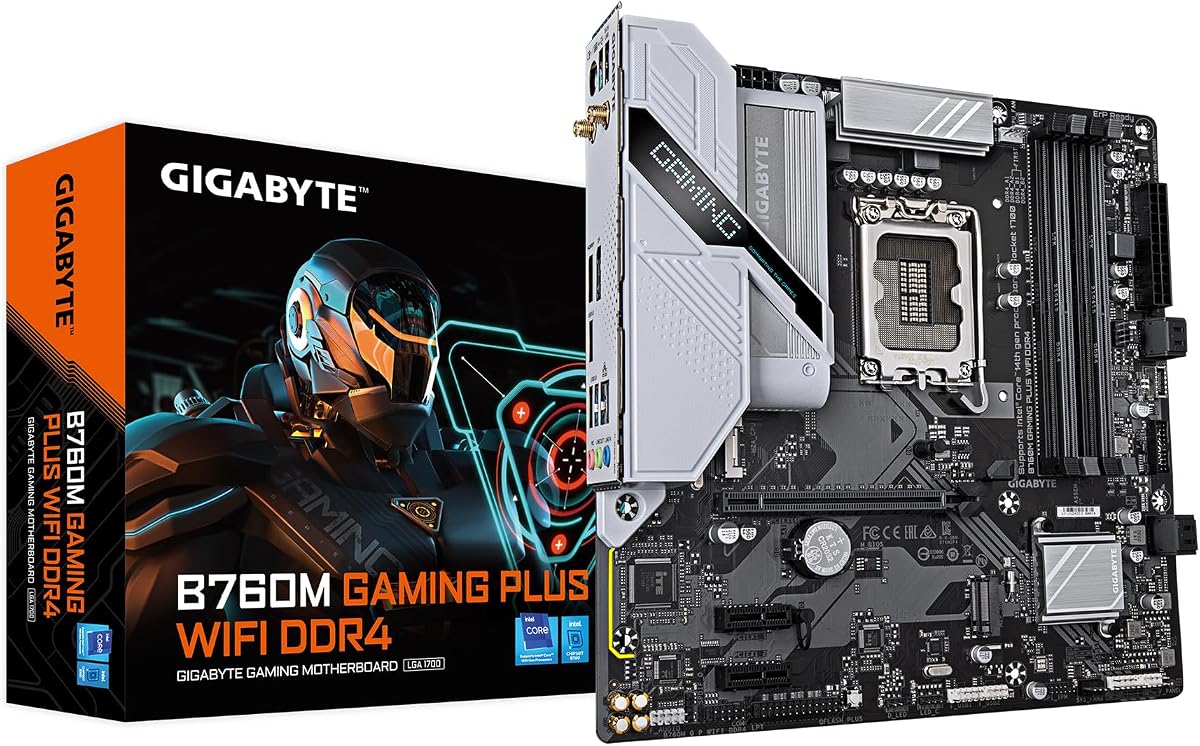
The B760M Gaming Plus WiFi fits in smaller cases while supporting Intel Core CPUs. It uses DDR4 memory to keep costs low. WiFi is included which is rare at this price for Micro ATX boards.
We may earn a commission when you buy through this link, at no additional cost to you.
Two M.2 slots are enough for most users. The thermal design ensures stability during gaming. Front USB-C allows easy access for modern devices. Q Flash Plus makes BIOS updates simple without a CPU.
You lose expansion slots due to the small size but it saves space. For compact builds this board offers the best features. It is reliable and easy to use for beginners.
This board is best for compact home or office PCs. If you want a small system with solid performance and wireless this model is a practical and affordable choice.
The Micro ATX size fits in smaller cases without sacrificing essential features.
Included WiFi removes the need for extra cards in compact builds.
We may earn a commission when you buy through this link, at no additional cost to you.
The B550 Gaming X V2 is one of the most affordable AM4 boards. It supports Ryzen 5000 series CPUs. PCIe 4.0 support ensures you can use modern SSDs without limits. It fits budget builds well.
We may earn a commission when you buy through this link, at no additional cost to you.
Power delivery is solid for mid range CPUs. The thermal design keeps components cool. Q Flash Plus allows BIOS updates without a CPU which is rare at this price. USB-C front adds convenience.
It lacks WiFi and advanced features but covers basics well. For users who want simple reliable performance this board is a top pick. It delivers stability without extra costs.
This board is best for entry level users building a first PC. If you want to keep costs low while getting modern speeds this model offers great value and reliability.
This board offers modern speeds at a price that fits tight budgets.
Q Flash Plus makes BIOS updates simple even for first time builders.
We may earn a commission when you buy through this link, at no additional cost to you.
Choosing a Gigabyte Motherboard requires matching your CPU socket budget and desired features to ensure your system runs smoothly and stays relevant for years.
The first step is confirming your CPU socket type. Gigabyte offers AM5 AM4 and LGA 1700 LGA 1851 options. Using the wrong socket will prevent your CPU from fitting or functioning correctly.
Always check your processor generation before buying to avoid compatibility issues.
Modern boards support DDR5 memory while older models use DDR4. DDR5 offers higher speeds but costs more. Ensure your motherboard supports the memory type you want to install.
Choose DDR5 for future proofing or DDR4 for budget savings.
Strong power delivery ensures your CPU runs stable under load. Look for boards with enough power phases for your CPU. Higher end boards use more phases for better overclocking.
Match VRM quality to your CPU tier to avoid throttling.
Check the number of M.2 slots for NVMe SSDs. Some boards offer three or four slots which is great for storage heavy users. PCIe slots matter if you use GPU or expansion cards.
Ensure enough storage slots for your current and future needs.
Modern boards include USB-C and fast network options. USB-C allows modern device charging. Ethernet speed like 2.5GbE or 10GbE helps with fast data transfer.
Look for enough USB ports for your peripherals.
WiFi 6E and WiFi 7 are available on newer models. These standards offer faster speeds and lower latency. If you plan to use a router without cables check wireless support.
WiFi reduces cable clutter and adds convenience to your setup.
Heat can slow down performance over time. Good boards use heatsinks and thermal guards to protect components. VRM and M.2 thermal guards are common features.
Better thermal design ensures stable performance for years.
Features like EZ Latch and Q Flash make building and updating easier. A five year warranty covers defects. These factors reduce frustration during setup.
Prioritize boards with user friendly features and strong support.
Install your motherboard in a clean static free area. Use proper tools to avoid bending pins on the CPU socket. Connect power and data cables carefully to avoid loose connections.
Keep your BIOS updated using the Q Flash tool. This ensures compatibility with new CPUs and fixes bugs. Do not force updates if your system is stable.
Clean dust from heatsinks and fans regularly. Overheating can reduce component life. Ensure your case has good airflow to help the thermal design work properly.
The B650 AORUS Elite AX is the best balance for AMD Ryzen 7000 series users. It supports AM5 socket and DDR5 memory with PCIe 5.0. It offers great power and thermal design.
The X870 AORUS Elite WIFI7 has the latest WiFi 7 support. It offers higher speeds and lower latency. For most users WiFi 6E is sufficient.
No AM4 CPUs only fit AM4 boards and AM5 CPUs only fit AM5 boards. You need a new motherboard to change socket types. Ensure your memory matches too.
The B650 Eagle AX is the most affordable AM5 board. It includes modern features like DDR5 and WiFi. It is great for budget builds.
Most AORUS models have RGB Fusion but some budget models do not. Check the product details before buying to confirm lighting support.
Q Flash Plus lets you update BIOS without installing CPU or RAM. You only need power and a USB drive. This is useful for new builds.
Gigabyte offers solid build quality and features. They are reliable and competitive with other brands. Choose based on features and price.
With proper cooling and care they last many years. Quality parts ensure stability. A five year warranty covers defects for peace of mind.
The B650 AORUS Elite AX is the top pick for most users. It balances performance and features well. Other choices depend on your budget and CPU type.
Prioritize socket type and memory support first. Then look for features like WiFi and USB-C. Choose a board that fits your needs.
Prices change often so check current listings before buying. This guide helps you choose the right board for your system. Happy building.