
ASRock Steel Legend SL-850G
4.5Editor score
Native 12V-2×6 connector
Japanese capacitors included
135mm fluid bearing fan
This guide compares the top fully modular power supplies for gaming pcs featuring high efficiency native ATX 3.1 support and reliable cable management for
Selecting the right power supply is critical for gaming pc stability and performance. A fully modular unit offers unmatched flexibility by allowing you to connect only the cables needed for your specific build.
We evaluated ten top rated models based on efficiency certifications power delivery standards and acoustic performance. Each unit supports modern ATX 3.1 requirements and includes robust protection features.
This list highlights the strengths of each power supply to help you find the perfect match. Please note that availability and pricing may vary over time so check current details before purchasing.
4.5Editor score

4.7Editor score

4.8Editor score
The following table provides a side by side comparison of all ten power supplies examined in this guide. You can quickly view key specifications and certifications for each model to identify the best fit.


The CORSAIR RM850x stands out as a top choice for modern gaming rigs. It earned a high rating for its reliability and adherence to new power standards. The native connector ensures clean installation without adapters.
We may earn a commission when you buy through this link, at no additional cost to you.
Its Cybenetics Gold certification means it wastes very little energy as heat. The embossed cables are flexible and easy to route. This helps keep the inside of your case tidy.
The main trade-off is the cost compared to some entry-level options. You are paying for premium components and better acoustic tuning. Most users will find the upgrade worth the extra investment.
Buy this unit if you want a balanced mix of performance and silence. It supports future GPUs while remaining quiet enough for home offices. It is a safe bet for long-term use.
This connector is built directly into the power supply. You do not need to daisy chain multiple cables for your graphics card.
The cables use an embossed style that lays flat. This makes routing them around corners much easier than stiff braided wires.
We may earn a commission when you buy through this link, at no additional cost to you.
The ASRock Steel Legend offers impressive specs for the price point. It brings high-end features like native 12V-2×6 support to a budget segment. The use of Japanese capacitors adds confidence in durability.
We may earn a commission when you buy through this link, at no additional cost to you.
Efficiency is rated at Cybenetics Platinum which is rare for this price tier. This means lower electricity bills and cooler operation. The fan includes iCool control to stop at low loads.
While it is great value the fan can be a bit loud when pushing hard limits. Cable lengths might be tight for larger cases. These are minor issues given the low cost.
Choose this if you need a powerful unit without spending a lot. It handles modern gaming hardware well and provides a clean build path. It is a smart buy for frugal builders.
Platinum efficiency certification ensures maximum power conversion. You get premium energy savings usually found only in expensive units.
The unit uses high-quality capacitors from Japan. These components are known for long lifespans and stable voltage under stress.
We may earn a commission when you buy through this link, at no additional cost to you.
The ASUS ROG Strix 1000W Platinum represents top tier engineering. It features GaN MOSFETs which improve efficiency and reduce heat. The GPU-First voltage stabilizer ensures your graphics card gets steady power.
We may earn a commission when you buy through this link, at no additional cost to you.
Acoustic performance is exceptional thanks to the silent mode technology. The large heatsinks cover critical components to keep temperatures low. It looks great in high-end builds with premium styling.
The main downside is the cost. Most standard gaming PCs do not need this much refinement. If budget is a concern you might find better value elsewhere.
This unit is ideal for enthusiast builds where quality is paramount. It offers peace of mind with extreme stability and silence. Buy it if you want the absolute best power delivery.
This feature prioritizes power delivery to the graphics card. It enhances stability during demanding gaming sessions or rendering tasks.
Gallium Nitride components are smaller and more efficient. They allow for better airflow and less internal heat buildup.
We may earn a commission when you buy through this link, at no additional cost to you.
The CORSAIR RM850e is designed for efficiency and quiet operation. It uses 105C capacitors to ensure longevity and steady performance. The rifle bearing fan keeps noise levels very low under most loads.
We may earn a commission when you buy through this link, at no additional cost to you.
It meets ATX 3.1 standards out of the box. This supports the latest GPUs with native cabling. The compact form factor helps in smaller cases where space is tight.
One minor point is that the cables are not fully sleeved. This is common for eco-friendly models but looks less premium. The flexibility is still good for routing.
Select this unit for silent builds in small spaces. It balances performance with acoustic comfort well. It is a great fit for home theater PCs or offices.
This fan design reduces friction and noise. It ensures smooth operation even when the power supply is under heavy stress.
Capacitors rated for 105 degrees Celsius offer better stability. They help maintain consistent voltage even in warmer environments.
We may earn a commission when you buy through this link, at no additional cost to you.
The CORSAIR RM1000x provides ample power for high-end multi GPU setups. It retains the quality of the RM850x but with more headroom. The native connector ensures compatibility with new generation cards.
We may earn a commission when you buy through this link, at no additional cost to you.
It uses low profile combs on the cables for neat routing. The Cybenetics Gold rating means good efficiency without the premium cost. Operation is quiet thanks to optimized fan curves.
The main trade-off is the added weight and cost. For most single GPU systems this much power is not strictly necessary. It is best for future-proofing or heavy workloads.
Buy this if you plan to upgrade your GPU later. It handles high transient spikes effectively. It is a reliable choice for powerful workstation or gaming rigs.
These combs organize cable wires neatly. They make the installation process smoother and improve airflow inside the case.
This high wattage supports power hungry hardware. It provides plenty of room for multiple drives and powerful graphics cards.
We may earn a commission when you buy through this link, at no additional cost to you.
The be quiet! Pure Power 13 M lives up to its name. It features a zero RPM fan mode that stops the fan at low loads. This makes it perfect for quiet systems.
We may earn a commission when you buy through this link, at no additional cost to you.
Efficiency reaches Cybenetics Platinum levels. This reduces power waste and keeps heat low. The transient support handles sudden GPU power spikes without issues.
The price is higher than standard gold units. You are paying for better acoustic tuning and higher efficiency. For noise sensitive users this is a minor compromise.
Choose this if silence is your top priority. It delivers clean power without disturbing your environment. It is a great choice for home media centers.
The fan stops completely when power draw is low. This creates total silence during browsing or light office tasks.
The unit handles power surges up to double its rating. This ensures your GPU remains stable during intense gaming moments.
We may earn a commission when you buy through this link, at no additional cost to you.
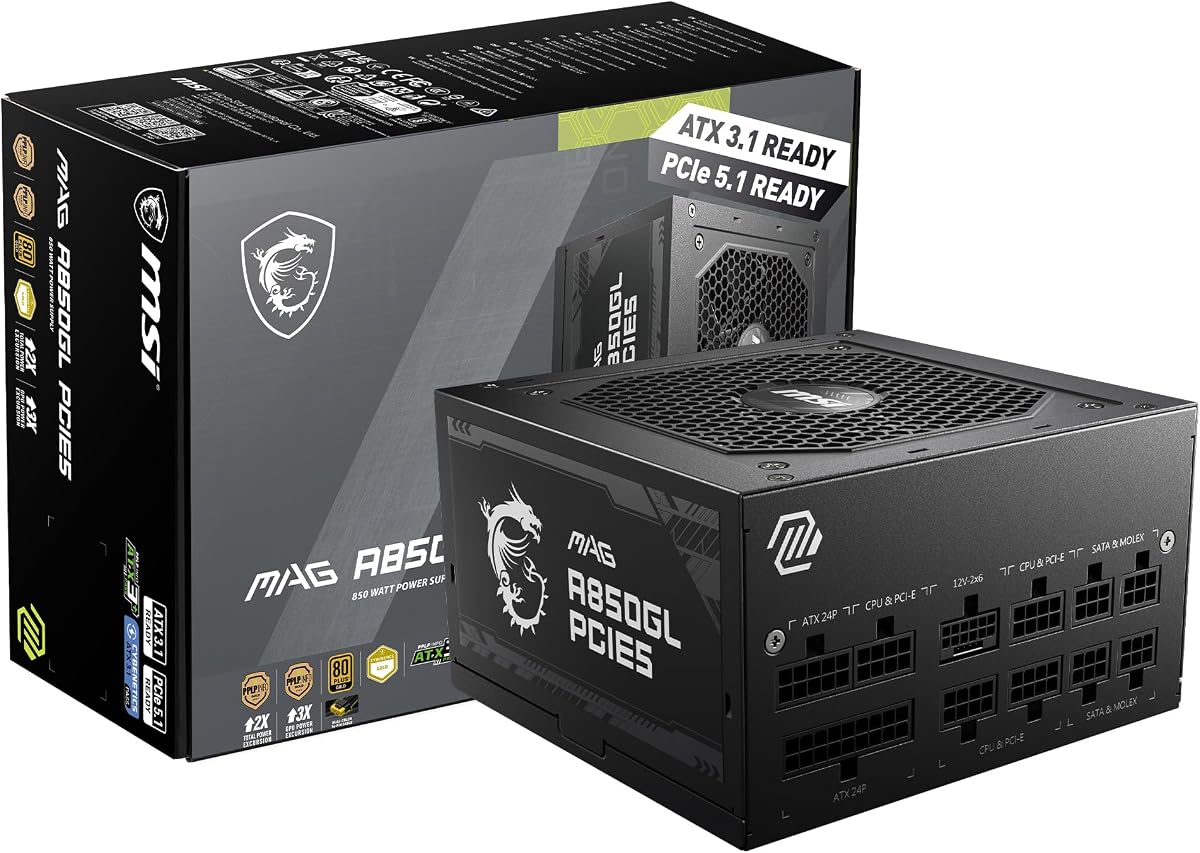
The MSI MAG A850GL PCIE5 offers a compact solution for gamers. It is designed to fit well in standard cases without taking up extra space. The dual-color cable helps identify the connector easily.
We may earn a commission when you buy through this link, at no additional cost to you.
It meets ATX 3.1 standards for modern GPUs. This provides peace of mind regarding compatibility. The 10 year warranty shows the brand stands behind the product.
The fan noise can be noticeable under load. Cable quality is decent but not as flexible as premium options. These issues are acceptable given the price point.
Buy this for solid gaming builds on a budget. It delivers stable power without breaking the bank. It is a smart choice for value focused builders.
The connector features distinct colors for easy identification. This reduces the chance of incorrect connection during setup.
The design saves space inside your case. This improves airflow and makes it easier to fit larger graphics cards.
We may earn a commission when you buy through this link, at no additional cost to you.
The ASUS TUF Gaming 1000W Gold focuses on durability. It uses military-grade capacitors and chokes to survive tough conditions. The protective PCB coating guards against moisture and dust.
We may earn a commission when you buy through this link, at no additional cost to you.
It provides strong power for high-end systems. The dual ball bearings ensure the fan lasts a long time. This unit is built to withstand heavy daily use.
The weight is significant and might be hard to lift. Cable lengths are average so check your case size. These are minor drawbacks for a tough unit.
Choose this for reliability in harsh environments. It is great for systems that run often. It offers a balance of power and long-term strength.
These parts undergo strict quality testing. They ensure the unit can handle stress better than standard consumer parts.
The coating protects the internal circuit board. It helps prevent damage from humidity or dust accumulation.
We may earn a commission when you buy through this link, at no additional cost to you.
The Thermaltake GF1 is an affordable option for standard gaming. It includes a Smart Zero Fan feature that turns off the fan when idle. This keeps noise levels very low during light tasks.
We may earn a commission when you buy through this link, at no additional cost to you.
It uses a large fluid bearing fan for smooth airflow. The single plus 12V rail provides stable power to your components. It is a solid choice for basic builds.
Features are basic compared to modern units. The warranty is shorter than competitors. You may not get the latest ATX 3.1 native cables.
Buy this for budget-friendly silent builds. It is great for office or light gaming PCs. It offers good value for those who need silence.
The fan stops when heat output is low. This saves energy and reduces noise significantly during idle periods.
A larger fan moves air quietly. Fluid bearings reduce friction for a longer lifespan and quieter spin.
We may earn a commission when you buy through this link, at no additional cost to you.
The CORSAIR HX1500i offers massive power for extreme rigs. It handles multiple GPUs or heavy workloads with ease. The iCUE software lets you monitor power use directly.
We may earn a commission when you buy through this link, at no additional cost to you.
Zero RPM mode ensures silence during low load. The native connector supports the latest GPUs easily. It is built for longevity with high quality internal parts.
The price is high and not needed for most users. You must have a high wattage system to justify it. For standard gaming this is more than required.
Select this for workstation or enthusiast builds. It provides a foundation for years of upgrades. It is the best choice if money is no object.
This software allows detailed power monitoring. You can customize fan curves and check performance in real time.
This massive power supports extreme hardware. It is ideal for systems with multiple graphics cards or heavy render tasks.
We may earn a commission when you buy through this link, at no additional cost to you.
Choosing the right power supply involves several key factors. Below are the most important aspects to consider before making a purchase.
Ensure the power supply can handle your CPU and GPU. Most gaming systems need at least 850W for modern high-end cards. Calculate your total system wattage before buying to avoid issues.
Aim for 20% headroom to handle transient spikes safely.
Look for ATX 3.1 compliance to support new GPUs. This standard ensures the unit handles power spikes better than older models. It also guarantees a native 12V-2×6 connector.
Prioritize certified units for future compatibility and safety.
Higher efficiency ratings save energy and reduce heat. Gold and Platinum rated units are generally better for most users. They cost slightly more but pay off in lower bills.
Choose Gold or Platinum for the best balance of cost and efficiency.
Fully modular units allow you to plug in only what you need. This keeps the case clean and improves airflow. Look for flat cables that are easy to route around corners.
Flexible cables make installation much easier in tight cases.
If you want a quiet PC check the fan size and control. Larger fans with fluid bearings tend to be quieter. Units with zero RPM modes stop the fan during light use.
Zero RPM modes are excellent for silent home or office builds.
Check if the unit has the connectors you need. Modern GPUs use the 12V-2×6 connector directly. Older adapters can be bulky and prone to damage.
Prioritize units with native connectors for your graphics card.
A long warranty indicates manufacturer confidence. Most quality units offer 10 years of coverage. Check the terms to ensure you can claim it easily if needed.
Aim for at least a 10 year warranty for peace of mind.
Look for built-in protections like OVP and SCP. These protect your components from power surges or shorts. Reliable units include these safety features as standard.
Always choose a unit with multiple safety protection mechanisms.
Connect the main 24-pin cable to the motherboard first. Then plug in the CPU and GPU cables. Ensure the 12V-2×6 is fully seated to avoid connection issues.
Keep the intake area of the power supply free of dust. Clean it every few months with compressed air. This prevents overheating and maintains quiet operation.
Avoid bending cables sharply near the unit. Flexible cables are durable but sharp bends can damage internal wires. Plan your cable routing before securing them in place.
Yes fully modular power supplies allow you to connect only the cables needed for your build. This reduces clutter and improves airflow inside your case. They also offer a cleaner look which is important for visible builds.
ATX 3.1 is a new power standard that handles high transient spikes. It ensures your power supply can support the latest GPUs without shutting down. It also includes a native connector for newer graphics cards.
You need to calculate the power draw of your CPU and GPU plus other parts. Use an online calculator to sum the watts. Add about 20% extra to handle power spikes safely.
No you should never mix modular cables from different brands. The wiring order often varies between manufacturers. Using the wrong cable can permanently damage your components.
Newer high-end GPUs require a 12V-2×6 cable. Older models use standard PCIe connectors. If you have an older GPU you can use adapters provided with the power supply.
Gold efficiency is better because it wastes less energy as heat. This leads to lower electricity bills and quieter operation. Bronze units are cheaper but less efficient overall.
The 12V-2×6 is a new cable for modern GPUs. It combines power into one connector without an adapter. It is safer and cleaner than using multiple separate cables.
We covered ten top units that balance quality and features. The CORSAIR RM850x and ASRock Steel Legend are great for most users. The ASUS ROG Strix is ideal for those seeking premium performance.
Prioritize native ATX 3.1 support for future safety. Make sure the wattage fits your system and the cables are flexible. A quiet fan is also important for comfortable use.
Always check current prices and availability before buying. Power supply costs can change frequently based on demand. Verify your case compatibility and component needs again.