
Motherboard USB 2.0 to Type C Front Panel Cable
4.8Editor score
Affordable USB 2.0 conversion
Plug and play installation
Compact 17cm cable length
Front Panel USB C Headers allow you to add modern connectivity to your desktop computer case. These adapters connect internal motherboard headers to external ports for easy access to devices like phones and drives.
We compared ten models based on speed support, build quality, and ease of installation. Our analysis focuses on real-world performance and compatibility with common motherboard headers to ensure you get a reliable upgrade.
Each pick highlights specific strengths and potential limitations for different users. Prices and availability can change frequently, so verify details before purchasing to ensure the best value for your specific build needs.
4.8Editor score

4.6Editor score

4.6Editor score
As an Amazon Associate we earn from qualifying purchases.
The following table provides a side-by-side comparison of all ten models analyzed in this guide. Use this overview to quickly identify key specifications and features that match your specific connectivity requirements.


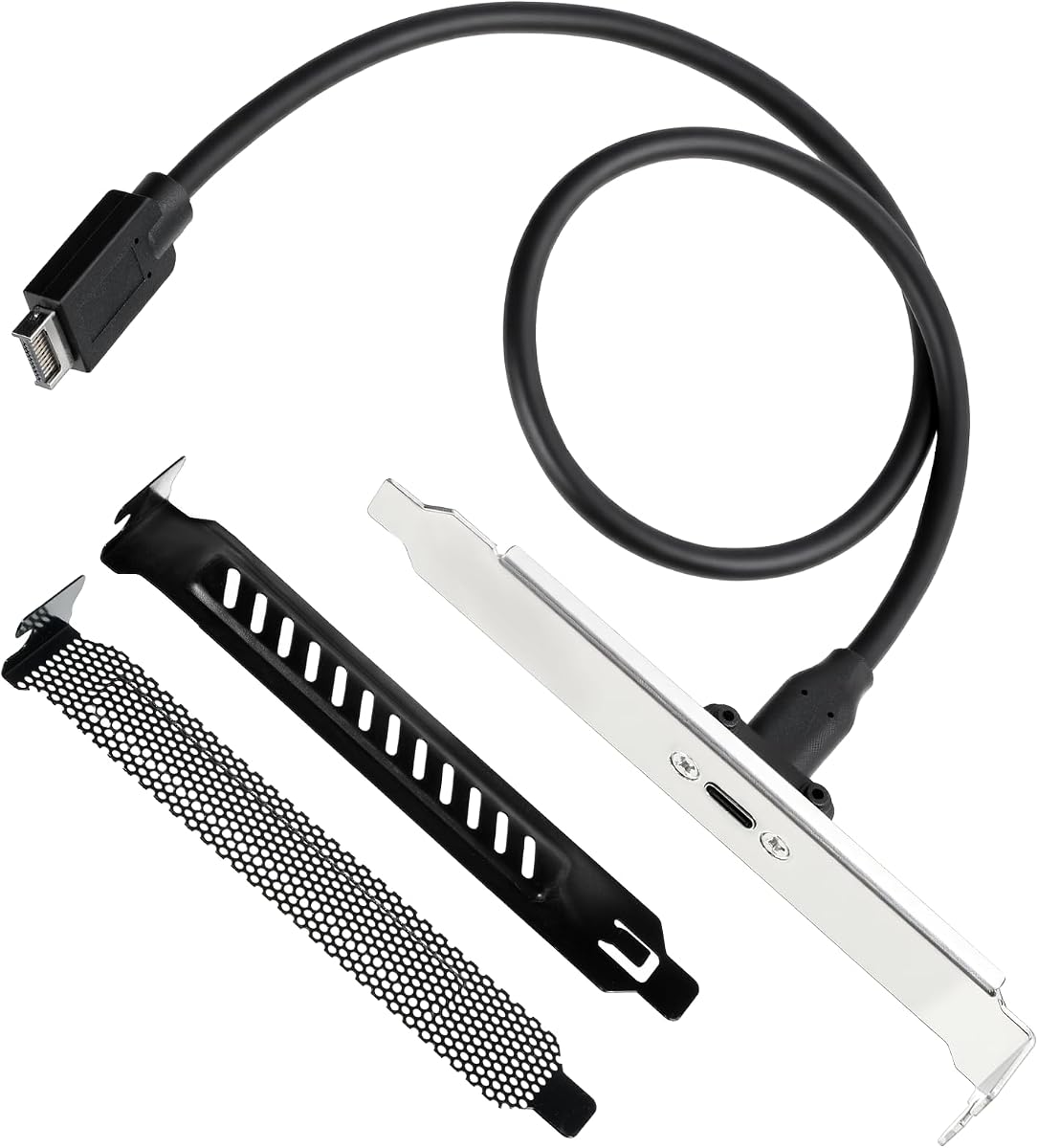


This GRAUGEAR adapter is the top choice for users needing high-speed connectivity. It supports USB 3.2 Gen 2×2 for speeds up to 20Gbps. The build quality is solid with metal components ensuring longevity.
We may earn a commission when you buy through this link, at no additional cost to you.
The adapter connects internal Type-E headers to a front panel USB-C port. It includes a bracket for mounting on the case back. This setup keeps the internal layout clean and accessible.
While it offers great speed, it requires a specific 20-pin Type-E header on your motherboard. Older boards may need an additional adapter. The cable length is generous but may need careful routing.
Buyers seeking maximum data transfer speeds will find this model ideal. It is perfect for modern PCs with the right motherboard headers. The inclusion of a bracket adds significant value to the package.
This adapter enables up to 20Gbps transfer speeds compatible with fast external SSDs and devices.
The metal bracket provides a stable mounting point for the USB-C port at the back of the case.
We may earn a commission when you buy through this link, at no additional cost to you.
This adapter is a close second in performance and build quality. It offers the same 20Gbps speeds as the top pick. The design focuses on stability and durability for long-term use.
We may earn a commission when you buy through this link, at no additional cost to you.
It connects to the Type-E header on your motherboard to provide a front panel USB-C port. The included bracket helps secure the cable at the rear. This prevents accidental disconnections during use.
Installation is straightforward with plug and play support. However, ensure your motherboard has the required header. The cable is well-shielded to minimize interference with internal components.
Choose this if you want reliable high-speed connectivity for your build. It is suitable for users who prioritize build quality and speed. The packaging includes all necessary components for setup.
Metal construction ensures durability and a long service life for daily usage.
Double shielded EMI wires prevent noise interference for cleaner data transmission.
We may earn a commission when you buy through this link, at no additional cost to you.
This model offers unique versatility by providing both USB-A and USB-C ports. It supports high speeds for both output types. This flexibility is great for users with mixed device needs.
We may earn a commission when you buy through this link, at no additional cost to you.
It utilizes both Type-E and USB 3.0 headers to power the ports. The bracket ensures a clean installation at the back of the case. This expands connectivity options significantly.
Be aware that it requires both headers on your motherboard. Check your board specs before purchasing to ensure compatibility. The double shielding helps maintain signal integrity across ports.
Ideal for users needing diverse port types on their front panel. It balances speed and variety effectively. The extra ports make it a strong contender for complex setups.
Features both USB-C and USB-A connectors for broader device compatibility.
Leverages Type-E and USB3.0 headers for expanded functionality.
We may earn a commission when you buy through this link, at no additional cost to you.
This hub replaces the floppy drive bay with four modern ports. It provides two USB-C and two USB-A ports for maximum connectivity. The metal housing adds to its durability.
We may earn a commission when you buy through this link, at no additional cost to you.
It requires a Type-E header and a SATA power connector to operate. This power requirement ensures stable performance for high power devices. The safety features protect against overloads.
Installation involves connecting both data and power cables internally. Ensure your case has the necessary SATA power available. The 10Gbps speed is fast for most everyday tasks.
Best for users who need multiple ports in a single slot. It is a great upgrade for older cases with floppy bays. The included screws ensure a secure fit.
Converts a single slot into four high-speed USB ports for multiple devices.
Includes over-current and over-voltage protection to safeguard connected devices.
We may earn a commission when you buy through this link, at no additional cost to you.
This PCIe card adds front panel USB headers without relying on motherboard headers. It is ideal for older boards lacking USB 3.0 headers. The card fits into a standard PCIe x1 slot.
We may earn a commission when you buy through this link, at no additional cost to you.
It provides a 19pin USB 3.0 socket and a Type-C header. You can connect cables from these sockets to your front panel. This is a workaround for limited motherboard options.
Installation requires an empty PCIe slot and some basic knowledge. The card is plug and play on Windows 10 and 11. Drivers are not required for most modern systems.
Great for extending connectivity on older systems. It is a flexible solution if internal headers are unavailable. The price is reasonable for the added functionality.
Uses PCIe slot to generate headers independent of motherboard internal connectors.
Supports plug and play on Windows 10 and 11 without extra drivers.
We may earn a commission when you buy through this link, at no additional cost to you.
This premium hub offers top tier 20Gbps speeds on its USB-C port. It also includes standard USB-A ports for variety. The build quality matches the high-end features it offers.
We may earn a commission when you buy through this link, at no additional cost to you.
It connects using both Type-E and USB 3.0 headers. This dual requirement allows for multiple ports on one unit. The safety features protect your expensive peripherals from power surges.
Ensure your board has both headers before buying. The package includes all necessary cables for connection. Installation is simple but requires careful routing of wires.
Recommended for users wanting maximum speed and variety. It is a complete solution for front panel needs. The protection measures add peace of mind for valuable data.
The USB-C port supports up to 20Gbps transfer for the fastest external drives.
Includes short circuit and over-voltage protection for safer operation.
We may earn a commission when you buy through this link, at no additional cost to you.
This cable is the most affordable way to get a USB-C port. It converts an old USB 2.0 header to a Type-C connector. It is perfect for adding modern ports to older systems.
We may earn a commission when you buy through this link, at no additional cost to you.
It supports USB 2.0 speeds of up to 480Mbps. This is enough for phones and keyboards but not fast drives. The short cable keeps internal space tidy.
Check your motherboard for a 9pin USB 2.0 header. Do not use this with USB 3.0 19pin headers as it will not fit. Installation requires no software or drivers at all.
Ideal for users on a tight budget. It solves the problem of missing USB-C ports cheaply. For modern high-speed needs, consider the 20Gbps options instead.
Converts standard USB 2.0 headers to USB-C connectors at a low cost.
Requires no drivers or software installation to function correctly.
We may earn a commission when you buy through this link, at no additional cost to you.
This adapter offers a mix of high speed and practical features. It supports 20Gbps speeds for fast data transfer. The inclusion of PCI slot covers is a nice addition for clean builds.
We may earn a commission when you buy through this link, at no additional cost to you.
The cable uses durable PVC insulation and metal connectors. It is flexible enough to route easily inside tight cases. The labeling helps ensure correct orientation during installation.
Ensure your motherboard has the correct Type-E header for this model. The covers protect internal connectors from debris over time. While affordable, check reviews for consistency.
Good for users who want 20Gbps speeds at a lower price. The bracket and covers provide extra value for system aesthetics. Verify header compatibility before purchasing.
Includes PCI slot covers to maintain a neat interior appearance.
Connector orientation is clearly labeled to prevent connection errors.
We may earn a commission when you buy through this link, at no additional cost to you.
This cable offers a balance of speed and flexibility. It uses a flat TPE cable that is easy to bend and route. The silver plated connectors help reduce impedance for better performance.
We may earn a commission when you buy through this link, at no additional cost to you.
It supports up to 100W power delivery for charging laptops. The double shielding ensures stable signal transmission. The included screw helps secure the panel mount effectively.
Check your motherboard has a USB 3.1 Type-E port before buying. The cable is designed for 10Gbps speeds which are fast for many tasks. It is a solid mid range option.
Best for users needing reliable 10Gbps connectivity. The flexible cable is good for tight spaces. Power delivery support adds extra utility for modern devices.
Supports up to 100W power supply for charging high demand devices.
Flat TPE material allows bending without damage for easy routing.
We may earn a commission when you buy through this link, at no additional cost to you.
This adapter combines Type-E and USB 3.0 headers for multiple outputs. It supports 20Gbps speeds on the USB-C port. The design is robust with metal materials for durability.
We may earn a commission when you buy through this link, at no additional cost to you.
It provides a mix of port types for versatile connectivity. The bracket ensures secure mounting at the case back. The high user rating suggests strong satisfaction with its function.
Ensure you have both required headers on your motherboard. The package includes all necessary cables and instructions. Setup is plug and play once connected properly.
Excellent for users wanting both speed and variety. It is a reliable choice for modern PC builds. The high rating reflects its consistent performance.
Uses both Type-E and 19-pin headers for expanded port options.
Users report reliable performance and build quality with this adapter.
We may earn a commission when you buy through this link, at no additional cost to you.
Choosing the right Front Panel USB C Header involves understanding your motherboard capabilities and your desired port speed. This guide covers the essential factors to help you make an informed decision.
Speed is a primary factor when selecting a header adapter. Options range from 480Mbps for USB 2.0 to 20Gbps for USB 3.2 Gen 2×2. Faster speeds are essential for external SSDs and large file transfers.
Prioritize models supporting 20Gbps if you use high-performance devices. Ensure your motherboard matches this speed to avoid bottlenecks.
Check your motherboard manual to see which headers are available. Common types include 19-pin USB 3.0 and 20-pin Type-E Key-A. Adapters are specific to these connectors and not interchangeable.
Verify the pin count and keying before buying. Incompatible headers will not fit and may cause connection issues.
The length of the internal cable matters for case fit. Some cases are deep and require longer cables. Others have limited space requiring shorter cables to avoid blocking components.
Measure the distance from your motherboard header to the front panel. Ensure the cable length allows for a neat installation without tight bends.
Look for metal brackets and shielded cables for durability. Shielding prevents interference from other internal components like graphics cards. Metal construction adds rigidity to the front panel mount.
Double shielded cables are preferred for high-speed data transmission. This reduces signal loss and improves reliability over time.
Some options like hubs provide multiple ports instead of a single cable. These are useful if you need many connections but have limited space. They often require extra power like SATA connectors.
Decide between a single port extension or a multi-port hub based on your needs. Hubs offer more convenience but cost more and require power.
Consider the difficulty of installation for your setup. Simple cables plug and play while expansion cards may need drivers. Ensure you can access the internal case easily.
Check if the adapter requires additional screws or brackets. Clear labeling on cables helps prevent connection errors during setup.
Prices vary significantly based on speed and features. Basic adapters are affordable while high-speed hubs cost more. Determine your budget and prioritize the features that matter most.
Balance the cost with the expected performance gains. Sometimes spending a little more ensures better build quality and longevity.
Modern USB-C devices often require power delivery for charging. Check if the adapter supports high wattage like 100W. This is important for charging laptops or power-hungry peripherals.
Ensure the motherboard header provides sufficient power. Some adapters limit power output depending on the internal connection.
Install the adapter by connecting the internal cable to the motherboard header. Align the notch on the connector with the key on the board. Secure the front panel bracket to the case using screws.
Route the cable neatly to avoid blocking airflow or fans. Do not bend the cable at sharp angles. This maintains signal integrity and prevents physical damage over time.
Plug devices into the front USB-C port regularly. Avoid forcing connectors if they feel tight. Clean the ports with compressed air to remove dust and debris.
Yes but some adapters convert USB 2.0 headers to USB-C connectors. These will run at slower 2.0 speeds. For high speed you need a motherboard with a USB 3.0 or Type-E header.
Type-E headers are often used for higher speeds up to 20Gbps. USB 3.0 headers usually support 5Gbps or 10Gbps. Check your manual to see which type your board supports.
Standard USB-C headers transmit data and power not audio signals. If you need audio you must use a dedicated front panel audio connector instead.
Check that the header is connected correctly and not reversed. Ensure your OS supports the connection and no driver is needed. Restart your PC to refresh USB detection.
Refer to your motherboard manual for the header map. Look for labels like USB_C or Type-E. If unsure search the manual online using your model number for exact locations.
Risks are minimal but always power off the PC before touching internals. Avoid pressing cables against sharp metal edges. Ensure they do not block airflow paths inside the case.
Yes you can add ports using header adapters or PCIe cards. These options expand existing connectivity without replacing the main board. Ensure your case has space for the front port.
Most do not require external power as they draw from the motherboard. Hubs may need SATA power for multiple ports. Check the specific requirements in the product description.
This guide reviewed ten models ranging from simple adapters to multi-port hubs. The top picks focus on speed, durability, and ease of installation for different build needs.
Prioritize compatibility with your motherboard headers before purchasing. High-speed ports need matching internal connectors to function at their full potential.
Prices and availability change frequently so check current deals before buying. Select the model that offers the best balance of speed and value for your specific setup.