
Lexar ES3 1TB Portable SSD
4.4Editor score
Affordable price point
Lightweight compact design
Wide device compatibility
This guide compares the top external SSDs for Mac Mini M4, evaluating speed, compatibility, durability, and value for creators and professionals in 2026.
Choosing the right external SSD for your Mac Mini M4 is essential for expanding storage and maintaining high performance. Whether you need speed for video editing or reliability for backups, a quality drive ensures seamless workflow integration.
We analyzed ten top-rated external SSDs based on speed, durability, compatibility with Apple devices, and real-world performance. Each product was evaluated for its ability to handle heavy workloads and integrate smoothly with macOS systems.
Each pick highlights key strengths and ideal use cases to help you find the perfect match for your needs. Please note that product availability and pricing can change frequently, so always check current details before purchasing.
4.4Editor score
4.8Editor score

3.9Editor score
The following table provides a side-by-side comparison of all ten external SSDs to help you quickly identify key specifications and features that matter most for your Mac Mini M4 setup.






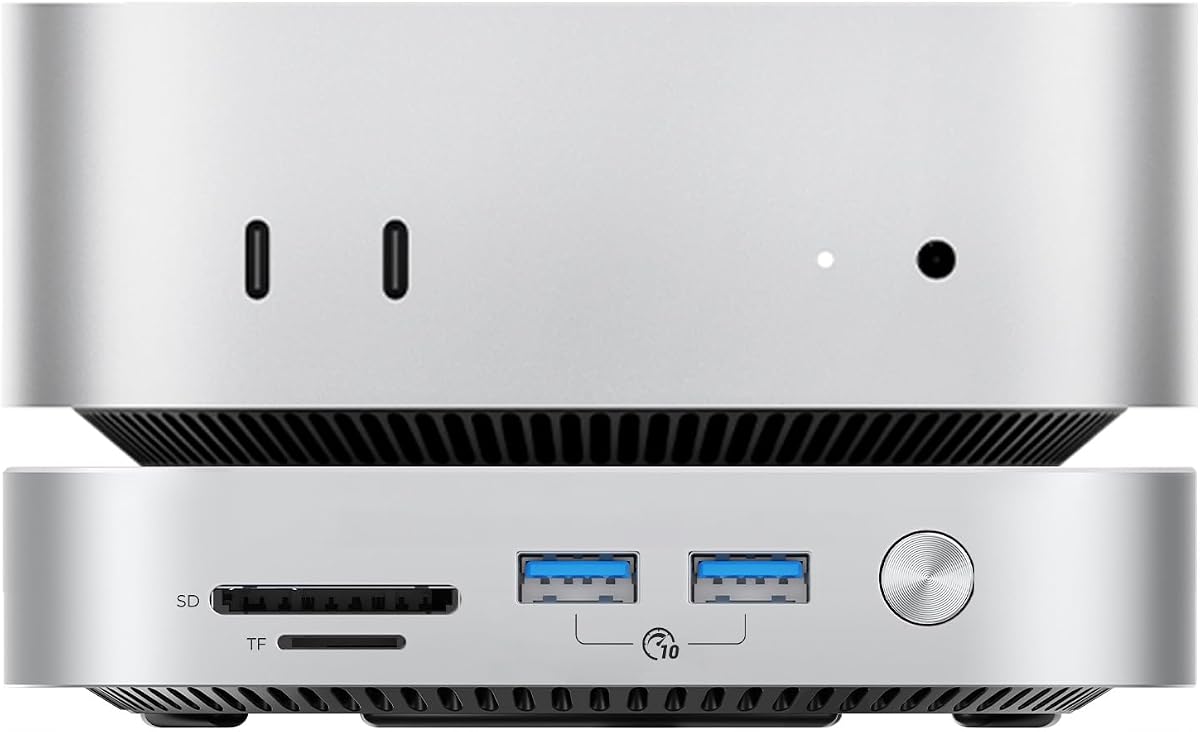
The ORICO 2TB External SSD stands out as the top choice for Mac Mini M4 users who need reliable storage expansion without compromising on performance or aesthetics. With its seamless integration and high-speed capabilities, it handles demanding workflows effortlessly.
We may earn a commission when you buy through this link, at no additional cost to you.
This drive offers dual-SSD expansion capabilities that double your storage while maintaining the sleek desktop elegance of your Mac Mini. The included USB-C and USB-A ports allow you to connect multiple peripherals simultaneously, making it a versatile hub for your workspace.
While the unit is slightly larger than typical portable SSDs, its aerospace-grade aluminum body ensures effective heat dissipation during intense tasks like 4K video editing. The smart sleep mode also helps reduce power consumption when the drive is idle.
If you prioritize compatibility and performance for creative professional tasks, this ORICO model delivers everything you need. It is ready to use right out of the box with a solid three-year warranty for peace of mind.
Certified for macOS Sonoma and M-series chips to ensure plug-and-play setup without driver hassles.
Thermal channels in the aluminum body sustain peak speeds during long editing sessions without throttling.
We may earn a commission when you buy through this link, at no additional cost to you.
Samsung is known for producing reliable flash memory, and the T7 Portable SSD lives up to this reputation with solid performance and durability features. It is an excellent choice for users who need consistent speed and rugged protection.
We may earn a commission when you buy through this link, at no additional cost to you.
With read and write speeds reaching up to 1050MB/s, this drive handles large file transfers efficiently. Its aluminum unibody construction provides shock resistance up to six feet, making it suitable for travel and field work.
The compact design fits easily into pockets or small bags without taking up much space. While it lacks the advanced port multiplier features of some competitors, it remains a straightforward and dependable option for daily use.
If you seek a balance between performance and durability from a trusted manufacturer, the Samsung T7 is a strong contender. It supports 4K video recording and works across multiple platforms including Mac and Windows systems.
Solid aluminum unibody design withstands drops and rough handling during travel or office use.
Designed to work seamlessly with PCs, mobile phones, and Mac devices for flexible file access.
We may earn a commission when you buy through this link, at no additional cost to you.
The Lexar 2TB ES3 External SSD offers a generous amount of storage combined with respectable transfer speeds for everyday creative tasks. Its focus on heat dissipation makes it suitable for sustained use without overheating issues.
We may earn a commission when you buy through this link, at no additional cost to you.
Equipped with double layer graphite sheets, this drive conducts heat effectively to keep internal temperatures low during blazing fast transfers. It also provides drop resistance up to two meters, adding an extra layer of protection for your data.
The sleek and sturdy build complements modern workspace aesthetics while providing enough durability for office or home use. The included 2-in-1 USB-C/USB-A cable simplifies connectivity across different devices and platforms.
If you need more storage space at a reasonable price while maintaining reliable performance, this Lexar model is worth considering. It balances capacity and speed well for users who do not require extreme Thunderbolt speeds.
Built-in double layer graphite sheets enhance heat dissipation to prevent performance drops during heavy use.
Two terabytes of space provides ample room for large media files, backups, and project archives.
We may earn a commission when you buy through this link, at no additional cost to you.
The SanDisk 1TB Extreme Portable SSD delivers impressive transfer speeds that are nearly twice as fast as its previous generation. It is an ideal choice for photographers and videographers who need to move large files quickly.
We may earn a commission when you buy through this link, at no additional cost to you.
With an IP65 rating and drop protection up to three meters, this drive is built to withstand spills and drops during field work. The pocket-sized design ensures it fits easily into bags or pockets without adding bulk to your setup.
Security is addressed with 256-bit AES encryption to keep your private files safe from unauthorized access. The solid construction and reliable performance make it a strong companion for professionals on the go.
If speed and durability are your top priorities for storing high-resolution photos and videos, this model is an excellent investment. It offers a robust package that balances rugged protection with fast data access.
256-bit AES encryption with password protection helps safeguard sensitive files from unauthorized access.
IP65 rating protects against dust and water while drop protection ensures resilience in tough conditions.
We may earn a commission when you buy through this link, at no additional cost to you.
The Lexar ES3 1TB Portable SSD offers an affordable entry point for users seeking fast external storage without breaking the bank. Its lightweight design makes it incredibly easy to carry around in any pocket.
We may earn a commission when you buy through this link, at no additional cost to you.
With read speeds up to 1050MB/s, it provides efficient file transfers for everyday tasks and light creative work. The thin and stylish form factor weighs just 42 grams, making it smaller than a typical credit card.
Included DataShield software adds a layer of security with 256-bit AES encryption to protect your personal files. The Type-C cable supports plug-and-play convenience across laptops, cameras, and mobile devices like iPhones.
If you are looking for a cost-effective solution that still delivers solid speed and portability, this Lexar drive is a smart pick. It is perfect for students or casual users who prioritize value and ease of use.
Weighing only 42 grams and 10.5mm thick, it fits easily in pockets for effortless travel storage.
Designed to work with recent iPhone models and Android devices for flexible on-the-go file management.
We may earn a commission when you buy through this link, at no additional cost to you.
The SSK Portable SSD 1TB provides a lightweight and functional option for users who need fast access to files on the go. Its design focuses on maintaining speed through smart caching and thermal management.
We may earn a commission when you buy through this link, at no additional cost to you.
Featuring SLC caching, this drive delivers steady 10Gbps speeds for transfers within its cache capacity. The aluminum alloy case peaks at low temperatures during use, ensuring reliable performance without overheating concerns.
An LED light indicates instant activity so you always know when transfers are happening. It comes with both USB-C and USB-A cables to bridge devices and enable seamless cross-platform file transfers.
If you appreciate a lightweight drive that includes thoughtful features like SLC caching and dual cables, this SSK model is worth a look. It balances portability with practical design choices for everyday storage needs.
SLC caching allocates part of the capacity as high-speed cache to maintain consistent write speeds.
Both USB-C and USB-A cables are included to bridge connections between various computers and mobile devices.
We may earn a commission when you buy through this link, at no additional cost to you.
The Crucial X10 2TB Portable SSD delivers ultra-fast speeds designed for creators, students, and PC gamers who need quick access to large game libraries. Its rugged design ensures it can handle travel and diverse weather conditions.
We may earn a commission when you buy through this link, at no additional cost to you.
With read speeds reaching up to 2100MB/s, it offers significantly faster performance than traditional hard drives. The IP65 rating provides protection against dust and water, while drop resistance up to three meters ensures durability.
Bonus software such as Mylio Photos plus and Acronis True Image adds extra value for managing and backing up your data. It connects via USB-C or USB-A to work with a wide range of systems and gaming consoles.
If you need a durable drive that supports high-speed gaming and creative workloads, this model provides a robust solution. It balances performance and reliability well for users who demand fast load times and secure storage.
Includes three months of Mylio Photos plus and Acronis True Image for enhanced photo management and backups.
Works with PS4, PS5, and Xbox via USB-C and USB-A for easy file transfer on gaming platforms.
We may earn a commission when you buy through this link, at no additional cost to you.
The Samsung T9 Portable SSD is engineered for creators who need nonstop speed during long processes without thermal throttling. Its advanced thermal solution keeps the drive at ideal temperatures even under heavy use.
We may earn a commission when you buy through this link, at no additional cost to you.
With read and write speeds up to 2000MB/s, this drive performs at high levels across various project types. The Magician Software ensures firmware stays up-to-date with extra encryption options and drive health monitoring.
Designed to last through heavy use, it offers a stable and reliable experience for file saving and editing tasks. The T9 adapts to your needs whether you are using a desktop, camera, or gaming console.
If you demand sustained high performance without overheating issues, this Samsung model is a top choice. It combines speed with durability to serve as a reliable workhorse for professional creative workflows.
Advanced thermal solution withstands heat to keep SSD at ideal temperatures during heavy workloads.
Magician Software provides firmware updates, encryption, and monitoring to keep the drive running optimally.
We may earn a commission when you buy through this link, at no additional cost to you.
The SABRENT Rocket Nano XTRM leverages Thunderbolt 3 to deliver uninterrupted 4K and 6K video editing speeds in a compact form. It is ideal for professionals who cannot afford to wait on transfers.
We may earn a commission when you buy through this link, at no additional cost to you.
With speeds up to 2700MB/s, this drive ensures rapid project transfers and RAW file backups. The solid aluminum chassis improves heat dissipation while the included silicone sleeve provides extra drop and scratch protection.
Both Thunderbolt and USB-C to USB-A cables are included so you can connect to any compatible device without extra purchases. It is bus-powered and plug-and-play, requiring no drivers for Mac, PC, or Linux systems.
If you need maximum speed for professional video work and value portability, this model offers significant benefits. The three-year warranty with a free five-year extension option adds further assurance for your investment.
Intel Thunderbolt 3 delivers up to 2700MB/s for uninterrupted high-resolution video editing and file backup.
Comes with both Thunderbolt and USB-C to USB-A cables so no extra purchases are needed for setup.
We may earn a commission when you buy through this link, at no additional cost to you.
The SanDisk Professional 4TB PRO-G40 SSD offers ultra-fast speeds and massive capacity for professionals who need to move huge datasets in minutes. Its rugged design is built to survive harsh conditions and protect valuable data.
We may earn a commission when you buy through this link, at no additional cost to you.
With Thunderbolt 3 speeds up to 3000MB/s, you can move 50GB of data in one minute or less. The IP68 rating ensures resistance against dust and water, while crush resistance up to 4000lb adds extreme durability.
The cool aluminum core pulls heat away from internal components to maintain super-fast transfer speeds during prolonged use. It arrives formatted for Mac with APFS, making it ready to use with your workflow right away.
If you need extreme durability and the highest possible speeds for professional projects, this model is the premium choice. It serves as a robust solution for users who prioritize data integrity and maximum performance above all.
IP68 dust and water resistance along with crush resistance ensures reliability in extreme environments.
Thunderbolt 3 interface provides speeds up to 3000MB/s for moving large volumes of data efficiently.
We may earn a commission when you buy through this link, at no additional cost to you.
Selecting the right external SSD involves considering several key factors to ensure it meets your specific needs and integrates smoothly with your Mac Mini M4 setup.
Transfer speed determines how quickly you can move files between your Mac Mini M4 and the external drive. Look for drives that support USB 3.2 Gen 2 or Thunderbolt 3 for the fastest performance especially when handling large media files or 4K video editing workflows.
Higher speeds reduce wait times and improve overall workflow efficiency for professional tasks.
Storage capacity depends on how much data you need to keep off your internal drive. For creative professionals, 2TB or more is recommended to accommodate large project files backups and media libraries without frequent management.
Choose a capacity that allows room for growth while staying within your budget constraints.
The Mac Mini M4 primarily uses USB-C ports so ensure the drive supports USB-C for direct connection. Some drives offer Thunderbolt 3 which provides faster speeds than standard USB but requires compatible ports on your system.
Consider drives with multiple port options if you need to connect additional peripherals like card readers or other devices simultaneously.
If you travel frequently or work in varying environments, look for drives with rugged features such as shock resistance drop protection and water or dust ratings like IP65 or IP68. These features safeguard your data against physical damage.
A durable enclosure ensures longevity and reliability regardless of where you use the drive.
Ensure the drive is compatible with macOS Sonoma and the Apple Silicon chips in the Mac Mini M4. Plug-and-play functionality saves time and avoids the need for additional drivers or complex setup procedures.
Check for explicit mentions of macOS support to guarantee seamless integration with your system.
Bus-powered drives that draw power from the USB port are more convenient as they do not require external power adapters. Efficient power management helps maintain performance while reducing energy usage especially for portable scenarios.
Look for drives with smart sleep modes to minimize power draw during idle periods.
Some drives include encryption software hardware keys or additional cables for expanded connectivity. These extras can enhance security and convenience depending on how you plan to use the drive daily.
Evaluate which features provide real value for your workflow before making a purchase decision.
A solid warranty and responsive customer support offer peace of mind in case of hardware issues. Three-year coverage is common among reputable brands with some offering extendable options through registration.
Prioritize brands with a track record of reliable support to protect your investment over time.
Connect your external SSD to a USB-C or Thunderbolt port on your Mac Mini M4 and wait for the system to recognize it. You can then drag and drop files to transfer data or configure it as a backup destination in System Settings.
Avoid ejecting the drive while data is still writing to prevent corruption or data loss. Always use the Eject option in Finder or safely remove the drive through the system tray before unplugging it from your Mac.
Keep the drive in a cool dry place away from direct sunlight to maintain optimal performance and longevity. If you notice reduced speeds or unexpected heat, clean the connectors and allow the drive to cool down before resuming heavy use.
Yes most external SSDs that use USB-C or Thunderbolt connections work seamlessly with the Mac Mini M4. Ensure the drive is compatible with macOS Sonoma and supports the native file system for plug-and-play functionality without drivers.
USB 3.2 Gen 2 supports speeds up to 10Gbps while Thunderbolt 3 offers up to 40Gbps and faster data transfer rates. Thunderbolt 3 is ideal for high-bandwidth tasks like 4K video editing whereas USB is sufficient for general file storage.
Many drives arrive pre-formatted for Mac or can be easily reformatted using Disk Utility. If you need to share data between Windows and Mac consider using the exFAT file system for cross-platform compatibility.
External SSDs generally last several years depending on usage intensity and storage conditions. Proper care such as avoiding drops and maintaining cool temperatures extends their lifespan significantly compared to traditional hard drives.
Yes you can use an external SSD as a destination for Time Machine backups which improves backup and restore speeds compared to hard drives. Ensure the drive has enough capacity to store multiple backup versions comfortably.
Yes external SSDs with USB-C connectivity and sufficient power can support iPhone 15 Pro video recording. The drive should be bus-powered and formatted correctly to record high-resolution video directly onto the external storage.
The ORICO 2TB External SSD stands out as the best overall choice for Mac Mini M4 users due to its seamless integration high speed and multi-port functionality. It offers the best balance of performance and convenience for professional workflows.
If you need a more affordable option without sacrificing speed the Lexar ES3 1TB Portable SSD provides excellent value for everyday users. On the other end of the spectrum the SanDisk Professional 4TB PRO-G40 SSD delivers top-tier durability and massive capacity.
Remember to check current availability and pricing as these factors can change frequently. Choosing a drive that fits your specific storage needs and budget will ensure your Mac Mini M4 setup remains efficient and powerful for years to come.