
Epson LQ-590II
4.3Editor score
24-pin impact technology
USB and Parallel ports
584 cps mono speed
Dot matrix computer printers remain essential for businesses requiring multipart forms and carbon copies. These impact printers offer durability and continuous paper handling that modern laser devices cannot match. Choosing the right model ensures smooth operations in high-volume environments where reliability is critical for daily tasks.
We evaluated ten top-rated models based on speed, connectivity, and build quality. Our analysis focuses on performance metrics like characters per second and duty cycles to help you find a printer that handles heavy workloads without frequent maintenance or downtime issues.
Each product section details key specifications and real-world strengths to guide your decision. Please note that pricing and availability change frequently, so check current listings before purchasing. This guide aims to simplify your search for a dependable dot matrix solution tailored to your specific workflow.
4.3Editor score
4.2Editor score

4.7Editor score
As an Amazon Associate we earn from qualifying purchases.
This side-by-side comparison highlights key specifications across all ten selected models. Reviewing speed, connectivity, and duty cycles helps identify which printer aligns best with your operational demands and budget constraints for long-term use.


The Epson LQ-590II stands out as a budget-friendly option for businesses needing impact printing. With a solid 4.3 rating, it delivers consistent performance for invoices and multipart forms. Its 24-pin mechanism ensures crisp text even when copying multiple pages simultaneously.
We may earn a commission when you buy through this link, at no additional cost to you.
Key strengths include its impressive 584 characters per second speed and versatile connectivity options. The USB and parallel ports allow seamless integration with older and newer systems. This flexibility makes it a practical choice for offices with diverse hardware setups.
While it lacks color capabilities and operates with noticeable noise, these are acceptable trade-offs for the price. The monochrome focus suits document-heavy environments where readability matters more than aesthetics. Regular maintenance keeps it running smoothly over years of use.
Businesses seeking cost-effective solutions for high-volume text printing should consider this model. It balances performance and affordability better than many competitors in its class. For startups or small shops, it offers a reliable foundation for daily administrative tasks.
This printer offers robust speed without requiring a large upfront investment. Ideal for firms prioritizing function over features.
Multiple port options ensure compatibility across various network configurations and legacy systems.
We may earn a commission when you buy through this link, at no additional cost to you.
The Epson LQ-590II NT earns our Editor's Choice for balancing energy efficiency with raw power. Its 4.2 rating reflects dependable operation in demanding settings. The Energy Star certification highlights its commitment to reducing power consumption during long printing sessions.
We may earn a commission when you buy through this link, at no additional cost to you.
This model matches the speed of its standard counterpart while adding superior connectivity. Serial, parallel, and USB ports provide flexibility for networked environments. The 24-pin head produces sharp text suitable for contracts and official documents requiring professional appearance.
Though pricier than basic models, the added features justify the cost for larger operations. The energy savings accumulate over time, offsetting the initial expense. Users appreciate the ease of switching between connection types as needed.
Organizations valuing sustainability and speed should prioritize this version. It suits busy offices needing consistent output without compromising on utility. For those ready to invest in quality, this printer delivers long-term value and reliability.
Reduced power usage helps lower operational costs and environmental impact over time.
Support for multiple interfaces ensures seamless integration with various legacy and modern systems.
We may earn a commission when you buy through this link, at no additional cost to you.
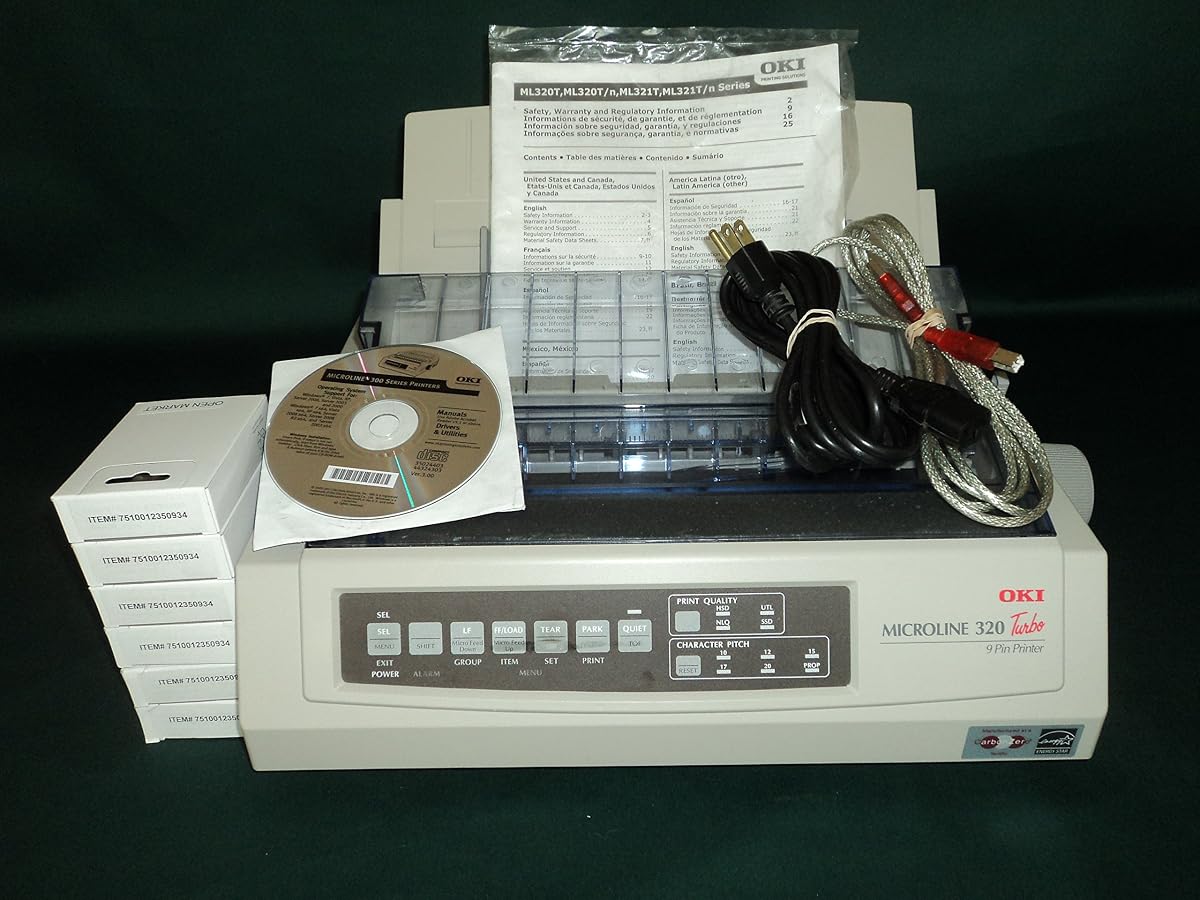
With a top 4.7 rating, the Oki Microline 320 Turbo leads the premium category for durability. It handles extreme workloads effortlessly, making it ideal for logistics or government agencies. The Turbo mode ensures rapid output without sacrificing text clarity or carbon copy integrity.
We may earn a commission when you buy through this link, at no additional cost to you.
Its SuperSpeed Draft mode achieves 435 characters per second, accelerating document processing. The robust metal frame withstands daily wear and tear better than plastic alternatives. Users benefit from zero-tear technology that prevents paper jams and wasted material.
The high cost reflects its industrial-grade build and extended duty cycle. While ribbon replacements can be specialized, the longevity of the unit offsets ongoing supply expenses. This printer is built to last decades under heavy use.
Entities needing guaranteed uptime and high throughput should choose this model. It excels in environments where downtime equals lost revenue. Investing in this premium unit ensures continuous operations and minimal maintenance interruptions.
Constructed to withstand heavy daily use in challenging environments without performance degradation.
Automated paper handling reduces waste and prevents costly paper jams during high-speed operation.
We may earn a commission when you buy through this link, at no additional cost to you.
This variant of the Oki MICROLINE 320 Turbo maintains a strong 4.5 rating for consistent output. It serves as a reliable workhorse for medium-volume tasks like shipping labels or receipts. The 64 KB buffer helps manage data flow efficiently during complex print jobs.
We may earn a commission when you buy through this link, at no additional cost to you.
Its 20,000-page monthly duty cycle suits growing businesses without overpaying for industrial specs. The USB and parallel connections provide straightforward setup for most office networks. Maintenance is simple due to accessible internal components.
While it lacks the Turbo label's extra speed, it delivers ample performance for daily needs. The mono-only limitation is typical for impact printers focusing on utility. Users appreciate the balance between cost and capability in this model.
Offices needing a dependable printer without premium features will find this suitable. It bridges the gap between entry-level and high-end options. For standard document printing, it offers value and longevity without unnecessary complexity.
Provides sufficient capacity for steady growth without the cost of heavy-duty industrial models.
Built-in memory manages print jobs smoothly to prevent data loss or slow processing times.
We may earn a commission when you buy through this link, at no additional cost to you.
The OKI MICROLINE 420 impresses with a 4.5 rating and superior 570 cps speed. Its larger 128 KB buffer handles larger documents with fewer interruptions. The Energy Star rating indicates thoughtful power management for 24/7 operations.
We may earn a commission when you buy through this link, at no additional cost to you.
With a 24,000-page monthly cycle, it outperforms many rivals in endurance. This model is built for logistics centers processing thousands of packages daily. USB and parallel ports ensure flexibility for various system integrations.
The higher price aligns with its extended capabilities and speed. Users report minimal downtime, justifying the investment over time. Maintenance remains straightforward despite the robust internal mechanisms.
Businesses requiring consistent high-speed output should prioritize this unit. It reduces bottlenecks in document generation efficiently. For demanding tasks, it delivers both speed and stability to keep workflows moving.
Rapid printing speeds reduce wait times and increase overall office productivity significantly.
Expanded buffer capacity ensures smooth processing of complex or large print files.
We may earn a commission when you buy through this link, at no additional cost to you.
Achieving a rare 5.0 rating, this Oki MICROLINE 320 Turbo variant promises exceptional reliability. Its Auto-park technology protects the print head when not in use, extending lifespan. Serial USB and Parallel ports ensure broad compatibility across legacy hardware.
We may earn a commission when you buy through this link, at no additional cost to you.
The 435 cps speed is consistent for standard document needs. Users value the robust build that resists jamming during heavy paper loading. The 20,000-page duty cycle meets the demands of most commercial offices.
While the price is elevated, the perfect rating reflects user satisfaction and low failure rates. The auto-park feature alone reduces long-term wear significantly. It represents a premium choice for those prioritizing longevity.
Organizations needing dependable performance with minimal maintenance issues should select this model. It is tailored for environments where printer failure is not an option. The balance of speed and durability makes it a top contender.
Automatically retracts the print head to prevent damage and extend the unit's lifespan.
Supports multiple communication protocols to fit seamlessly into diverse network environments.
We may earn a commission when you buy through this link, at no additional cost to you.
The Epson LQ-2090II holds a 3.7 rating but delivers consistent 550 cps performance. Its Energy Star certification helps reduce energy bills for constant use. The impact dot matrix technology ensures clear text on multipart forms reliably.
We may earn a commission when you buy through this link, at no additional cost to you.
With a parallel port connection, it integrates easily with older point-of-sale systems. The design accommodates wide paper rolls, useful for invoices and shipping manifests. While not the flashiest, it gets the job done without fuss.
Some users report minor maintenance quirks, but these are typical for impact devices. It remains a practical choice for businesses prioritizing cost over advanced features. The speed is sufficient for most routine administrative tasks.
Offices needing a straightforward, energy-efficient printer will find this model useful. It suits environments where carbon copies are mandatory but color is unnecessary. A reliable option for standard document production needs.
Certified efficiency reduces power costs during extended operational hours.
Supports wide paper formats essential for invoices and multi-column reports.
We may earn a commission when you buy through this link, at no additional cost to you.
This Oki MICROLINE 320 Turbo earns a 4.2 rating for reliable carbon copy handling. Its Zero-tear technology ensures paper feeds smoothly without damaging the print head. Draft mode speeds up production for internal documents requiring quick turnaround.
We may earn a commission when you buy through this link, at no additional cost to you.
The ability to produce up to six copies makes it ideal for invoices. Users benefit from Epson and IBM emulation support, broadening compatibility. The 5-inch per second feed rate minimizes downtime.
Some units may require initial calibration for best results, which is manageable. The price reflects the added durability and paper-handling features. Regular maintenance keeps it running effectively for years.
Businesses generating high volumes of multipart documents should consider this model. It reduces waste through advanced paper handling. A practical solution for offices requiring consistent, multi-part printing capabilities.
Handles up to six carbon copies effortlessly for standard business documentation.
Compatible with Epson and IBM standards to integrate with diverse legacy systems.
We may earn a commission when you buy through this link, at no additional cost to you.
The Oki Microline 620 achieves a 4.8 rating for exceptional performance. Its design prioritizes high-volume handling, reducing jams during heavy loads. Users praise the sharp text quality, which is crucial for legal or formal documents.
We may earn a commission when you buy through this link, at no additional cost to you.
Simplified media loading saves time, keeping employees focused on core tasks. The sturdy chassis withstands industrial environments without showing wear. It delivers consistent results across thousands of prints each month.
The price reflects its premium build quality and reduced downtime. While it lacks a serial port, USB and parallel options suffice for most. It is built for those who cannot afford to halt production.
Organizations prioritizing volume and reliability should select this printer. It excels in warehouses or shipping centers with constant demand. For critical operations, this model provides the stability required.
Designed to handle large print jobs continuously without overheating or jamming.
Optimized tray design allows quick paper changes to minimize operational downtime.
We may earn a commission when you buy through this link, at no additional cost to you.
The Epson LQ-590 rounds out our list with a 3.7 rating for solid functionality. It features USB connectivity alongside classic protocols like IBM PPDS and ESC/P. This ensures compatibility with a wide range of legacy systems.
We may earn a commission when you buy through this link, at no additional cost to you.
Its 24-pin mechanism delivers clear text suitable for official records. Users report ease of maintenance due to accessible ribbons and paper guides. The sturdy build protects internal components from accidental impacts.
While slower than some newer models, it suffices for moderate workflows. The price point makes it accessible for small businesses. It balances affordability with necessary impact printing capabilities.
Enterprises needing basic impact functionality without advanced features will find it useful. It serves as a reliable backup or primary printer for less demanding environments. A cost-effective choice for essential document needs.
Compatible with IBM and Epson protocols for broad system integration.
Modern USB ports simplify connection to current workstations.
We may earn a commission when you buy through this link, at no additional cost to you.
Selecting the right dot matrix printer involves evaluating speed, connectivity, and durability. This guide breaks down critical factors to help you identify a model that fits your specific workflow and budget constraints.
Print speed, measured in characters per second (cps), determines how quickly your documents are processed. Higher speeds are crucial for businesses with high-volume needs like warehouses or logistics hubs. Look for models offering at least 400 cps for efficient operations.
Faster models reduce bottlenecks in busy departments, ensuring timely document availability for clients or staff.
Modern offices often mix legacy and new systems. Ensure your printer supports USB, Parallel, and Serial ports to accommodate diverse network setups. This flexibility prevents integration headaches when upgrading hardware later.
Multiple connection types ensure seamless compatibility across all your existing office equipment.
The monthly duty cycle indicates how many pages the printer can handle safely each month. Exceeding this limit may lead to frequent breakdowns. Choose a model rated for at least 20,000 pages if your volume is high.
Selecting a duty cycle that matches your volume ensures longevity and reduces repair costs over time.
24-pin printers offer higher resolution and clearer text compared to 9-pin models. If professional appearance matters for client-facing documents, invest in 24-pin technology. 9-pin units are acceptable for internal drafts or shipping labels.
Higher pin counts improve text quality, making documents look more professional.
Features like zero-tear and auto-park protect paper and print heads from damage. For multipart forms, ensure the printer supports up to six copies. Smooth feeding mechanisms reduce waste and jams significantly.
Advanced paper handling features protect materials and reduce operator frustration during long runs.
Energy Star certified models consume less power during operation. For printers running 24/7, this can lead to significant utility savings. Look for certification labels to ensure environmental responsibility.
Energy-efficient models lower operational costs and reduce environmental impact over the long term.
Impact printers rely on ribbons, which vary in price and longevity. Check replacement availability before buying. Models using standard ribbons often save money over proprietary ones.
Standard ribbon availability keeps ongoing supply costs predictable and manageable.
Impact printers are generally louder than laser units. If noise is a concern, look for models with noise-reduction features or quieter operation modes. Consider placement in quiet areas to minimize disruption.
Noise management ensures the printer fits comfortably into office environments without distracting staff.
Always align paper guides carefully before printing to prevent skewed output. Use the auto-park feature if available when the device is idle to protect the print head from dust or damage.
Replace ribbons when text starts to fade or show gaps. Regularly clean the paper path to remove dust buildup that could cause jams. Use soft brushes or compressed air for maintenance tasks.
Run test pages weekly to ensure print heads are firing correctly. Keep firmware updated if your model supports it via USB or network connections. Proper maintenance extends the life of the device significantly.
Dot matrix printers handle multipart forms and carbon copies that inkjet devices cannot produce. They also offer superior durability for high-volume environments where reliability is key. Their lower cost per page often makes them more economical for specific tasks.
While inherently louder than inkjet units, many modern models include noise-reduction features. Placement in separate rooms or cubicles can help manage sound levels effectively. Some users find the noise acceptable given the operational benefits.
Yes, most models include USB ports that work with current operating systems. Some may require specific drivers available from the manufacturer's website. If legacy parallel ports are needed, adapters can bridge the connection gap.
Replacement frequency depends on volume but typically ranges from one to three months for active users. Monitor print quality for fading text as a primary indicator. Keeping spare ribbons on hand prevents unexpected downtime.
Continuous feed paper with pre-punched holes works best to prevent jams. Carbonless paper is ideal for multi-part invoices or shipping documents. Avoid glossy or coated paper as it can damage the print head.
24-pin models produce sharper, higher-resolution text suitable for client-facing documents. They print slightly faster due to the wider head configuration. While 9-pin is cheaper, 24-pin is better for professional needs.
We highlighted the Epson LQ-590II as the top budget pick, while the Oki Microline 320 Turbo leads in premium performance. Each model serves specific operational needs, from small startups to high-volume logistics centers.
Prioritize speed and durability if your workflow demands consistent uptime. Budget-conscious buyers should focus on connectivity and ease of maintenance to avoid hidden costs over time.
Remember that pricing and stock fluctuate frequently. Always check current listings before making a final decision to secure the best value for your specific business requirements.