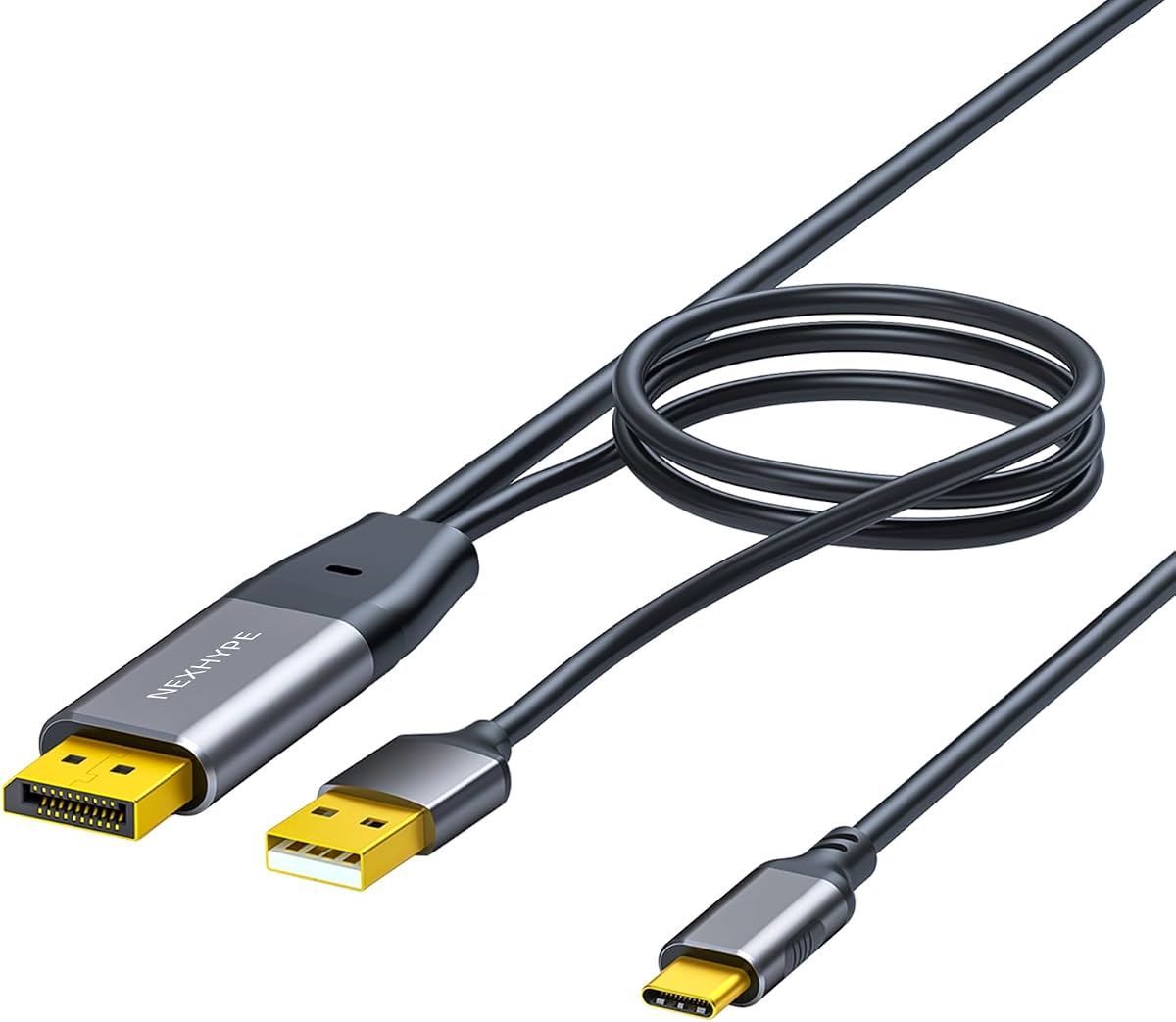
DisplayPort to USB-C Cable with Power 6.6ft
4.7Editor score
Integrated USB power and data design
6.6ft length for flexible setup
Gold-plated connectors and durable PVC jacket
This guide compares the top Displayport Adapter for AR Glasses options for immersive visuals, gaming, and productivity with detailed specs and ratings for
Discover the best Displayport Adapter for AR Glasses to unlock immersive visuals and seamless connectivity. Whether for gaming or work, finding the right adapter ensures stable high-definition output and reliable power delivery for your portable display setup.
We analyzed ten top-rated adapters based on resolution support, refresh rates, power delivery capabilities, and build quality. Each product was evaluated for compatibility with popular AR glasses brands and its ability to handle demanding video tasks without signal loss.
Every pick highlights key features, pros, cons, and specific use cases to help you choose wisely. Prices and availability can change frequently, so verify current details before purchasing to ensure you get the best value for your needs.
4.7Editor score
4.5Editor score

4.8Editor score
This comparison table presents all ten products side by side with essential specifications like resolution support, length, power delivery, and compatibility notes to help you quickly identify the right fit for your AR glasses and source devices.


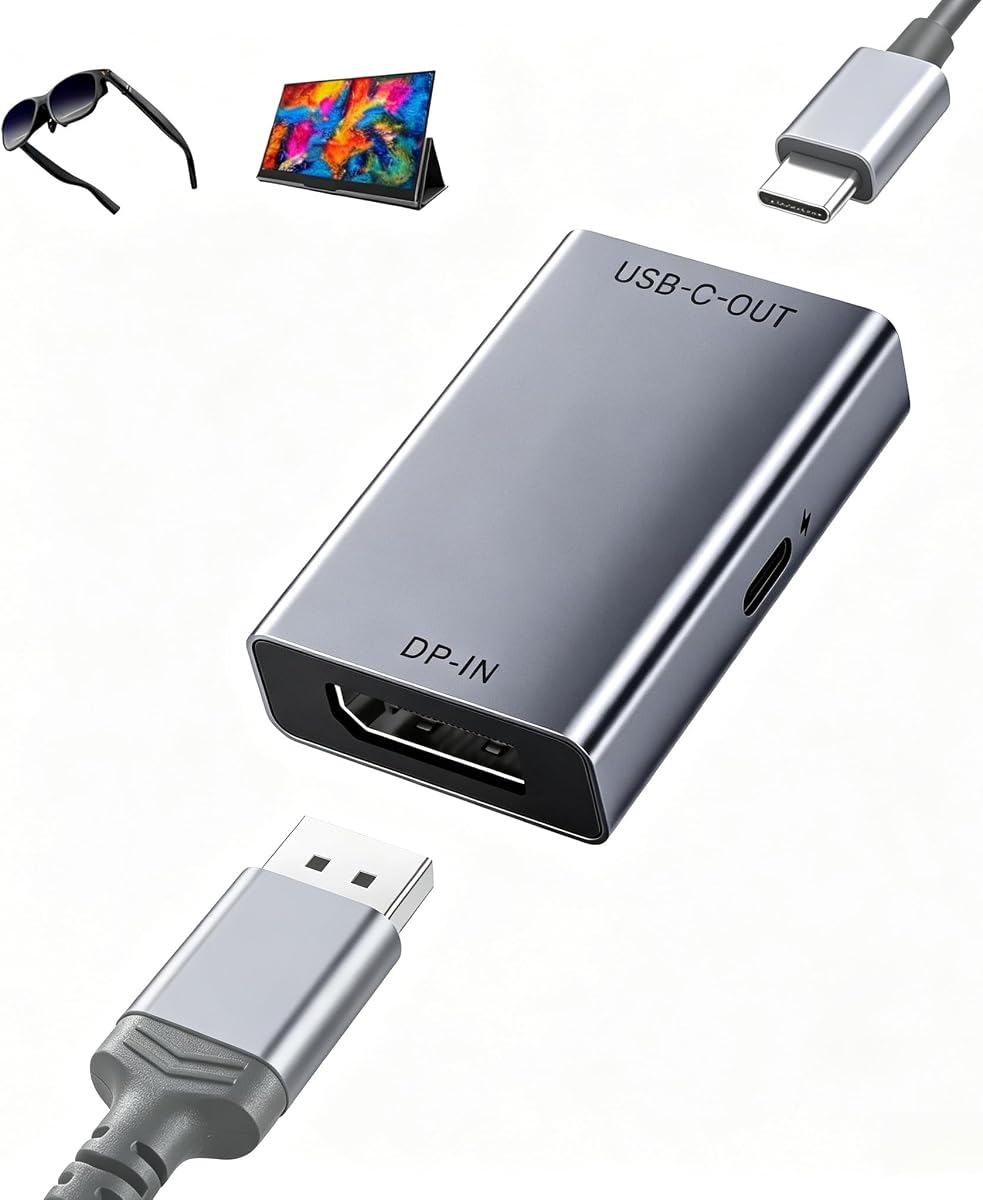
This DisplayPort to USB-C adapter stands out with a 4.5 star rating for its ability to deliver ultra-high definition 4K@120Hz visuals to AR glasses. It supports a wide range of devices including XREA, Roki-d, and RayNe-o models making it versatile for different setups.
We may earn a commission when you buy through this link, at no additional cost to you.
Its standout quality lies in the ultra-low latency and smooth refresh rates ideal for gaming and movies. The aluminum alloy housing provides durability while keeping heat levels manageable during extended sessions ensuring consistent performance without signal degradation.
While it performs exceptionally well note that a separate USB-C cable is needed to charge the adapter which adds a slight bulk to your setup. Also it only supports one-way transmission from DisplayPort source to USB-C display limiting reverse connectivity options.
If you prioritize smooth visuals and broad compatibility with AR glasses this adapter is highly recommended. Its plug-and-play nature and stable connection make it an excellent choice for users seeking an immersive visual experience without complex configurations.
Supports up to 120Hz refresh rates minimizing motion blur in fast-paced games for immersive responsive visuals.
Premium aluminum alloy housing ensures excellent heat dissipation and durability for reliable long-term use.
We may earn a commission when you buy through this link, at no additional cost to you.
With a 4.7 star rating this cable offers exceptional value for budget-conscious users seeking reliable connectivity for AR glasses. It includes an integrated USB cable that provides both power and data transmission eliminating the need for separate power sources in many cases.
We may earn a commission when you buy through this link, at no additional cost to you.
The standout feature is its length combined with integrated power support making setup easier for portable monitors and glasses. The gold-plated connectors and aluminum casing enhance durability while the PVC jacket offers flexibility to prevent wear during daily use.
However the power output is limited to devices under 15.6 inches and 1080P resolution which may not suffice for larger portable monitors. Additionally connecting to HDMI devices like PS5 requires an extra adapter adding slight complexity to your setup.
For those prioritizing cost-effectiveness and ease of use this cable is a top pick. Its plug-and-play functionality and robust build make it ideal for casual users and travelers who need a dependable solution without overspending.
The integrated USB cable delivers both power and data simplifying connections for battery-free displays and AR glasses.
At 6.6 feet the cable offers generous length for comfortable placement without straining connections in tight spaces.
We may earn a commission when you buy through this link, at no additional cost to you.
This cable earns a 4.8 star rating for its premium build and specialized optimization for creative professionals and Apple ecosystems. It delivers pristine 4K@60Hz video with full touch and audio synchronization making it ideal for content creators and designers.
We may earn a commission when you buy through this link, at no additional cost to you.
Its standout quality is the graphene shielding that minimizes interference and ensures clear high-resolution transmission. The aluminum casing supports heat dissipation while the included USB-A power tail stabilizes signals for smooth touch interaction on supported portable monitors.
Despite its strengths compatibility with Apple Studio Display requires specific GPU DSC support which may limit users with older systems. Also it does not support bidirectional use or certain VR headsets restricting versatility in some scenarios.
For professionals who need reliable high-fidelity connections for AR glasses or monitors this cable is unmatched. Its robust design and extensive warranty make it a worthwhile investment for those prioritizing performance and long-term reliability.
Tailored for Mac Mini MacBook Pro and Studio Display connections ensures accurate color and video transmission for professionals.
Graphene shielding reduces signal interference maintaining high-definition quality during extended use in demanding environments.
We may earn a commission when you buy through this link, at no additional cost to you.
This adapter holds a 4.2 star rating and appeals to gamers needing high refresh rates and extra connectivity. It supports DP 1.4 bandwidth enabling 4K@120Hz output while also including USB hub ports for keyboards and mice enhancing peripheral management.
We may earn a commission when you buy through this link, at no additional cost to you.
Its standout feature is the ability to deliver HDR and 10-bit color depth ensuring vivid accurate visuals for design and media consumption. The aluminum housing with silicone pad provides stability and effective cooling during long sessions of gaming or video playback.
However activating the USB hub requires a separate data cable which adds complexity to setup. The auxiliary power output is also limited meaning larger monitors need separate power supplies reducing portability for desktop setups.
Ideal for gamers and streamers this adapter balances performance with additional connectivity options. If you need smooth visuals and extra USB ports this solution provides versatility for demanding applications despite minor setup requirements.
Achieves up to 4K@120Hz and 2K@240Hz with low latency minimizing motion blur for responsive gameplay.
Includes three USB 2.0 ports for connecting peripherals though a separate data cable activates full hub functionality.
We may earn a commission when you buy through this link, at no additional cost to you.
With a 4.2 star rating this adapter is designed for high-performance setups needing 8K support and strong power delivery. It includes a 65W PD port that powers compatible monitors reducing cable clutter while delivering ultra-smooth 4K@144Hz video to AR glasses.
We may earn a commission when you buy through this link, at no additional cost to you.
Its standout quality is the combination of high resolution capability with built-in power delivery making it versatile for professional workstations. The graphene-coated cable offers exceptional flexibility and durability despite the compact 0.5m length suited for portable configurations.
The short cable length limits desk setups where longer reach is needed and lack of touchscreen support reduces functionality for interactive monitors. Also displays with built-in batteries may require separate external power sources complicating some usage scenarios.
If you prioritize high resolution and power delivery this adapter delivers robust performance. Its compact design makes it ideal for travelers or those needing powerful connectivity without extensive power accessories.
Integrated 65W PD port powers portable monitors reducing the need for separate power adapters and simplifying setups.
Graphene-coated cable resists bending and tangles ensuring durability in a lightweight 0.5m length for portability.
We may earn a commission when you buy through this link, at no additional cost to you.
This adapter has a 4.4 star rating and provides a compact solution for AR glasses connectivity with reliable 4K/60 output. It includes a USB-A power supply cable to support USB-C displays and features gold-plated connectors for stable signal transmission.
We may earn a commission when you buy through this link, at no additional cost to you.
Its standout quality lies in its portability and broad compatibility with brands like Xreal and Viture making it versatile for travelers. The aluminum housing helps manage heat while the unidirectional design simplifies connectivity for DisplayPort source devices.
However users may encounter audio issues with certain glasses like Xreal One requiring firmware updates to switch modes correctly. Also mobile phone connectivity depends on wired screen casting support limiting use with unsupported devices.
For portable use with AR glasses this adapter offers solid performance in a small form factor. Its reliable connection and wide compatibility make it suitable for users seeking an uncomplicated display solution.
The female adapter design and USB-A power cable provide a portable setup ideal for travelers and mobile use.
Gold-plated connectors and aluminum housing ensure stable transmission and resistance to corrosion during frequent use.
We may earn a commission when you buy through this link, at no additional cost to you.
Rated 4.6 stars this cable offers reliable connectivity for AR glasses and portable monitors with support for 4K@60Hz output. Its USB power supply ensures stable signal transmission while the 6FT length provides flexibility for various desk and travel setups.
We may earn a commission when you buy through this link, at no additional cost to you.
Its standout feature is touch support on compatible screens allowing interaction without direct cable connection to the screen. The aluminum casing and gold-plated connectors enhance durability ensuring consistent performance over time in daily use scenarios.
Note that the cable does not provide power to the portable screen itself which may require a separate power adapter for monitors without built-in batteries. This limits true plug-and-play convenience for certain display types.
For users needing touch capability and stable connectivity at a reasonable price this cable delivers well. Its build quality and length make it practical for home and office environments where portability is key.
USB power input enables touch functionality on compatible portable monitors enhancing interactivity during presentations or work.
Gold-plated connectors housed in aluminum casing prevent rust and ensure smooth plugging for extended usage longevity.
We may earn a commission when you buy through this link, at no additional cost to you.
This adapter holds a 4.5 star rating and excels for gamers connecting handheld consoles to AR glasses with high refresh support. It enables Switch 2 dock casting and pass-through PD3.0 charging ensuring uninterrupted gameplay without battery interruptions.
We may earn a commission when you buy through this link, at no additional cost to you.
Its standout quality is the optimized chip design for broader compatibility with consoles and AR devices. The aluminum alloy body aids heat dissipation while the compact size makes it highly portable for on-the-go entertainment setups.
Users should note it generates more heat during use and requires specific power levels for full functionality which may demand careful setup. Proper ventilation is necessary to maintain performance during extended gaming sessions.
For mobile gamers this adapter provides reliable high-performance connectivity ideal for AR glasses. Its focus on console compatibility and charging passthrough makes it a top choice for portable gaming setups.
Optimized chip enables seamless Switch 2 dock mode casting and broader support for handheld consoles.
PD3.0 support allows devices to charge while casting video preventing interruptions during extended use.
We may earn a commission when you buy through this link, at no additional cost to you.
With a 4.3 star rating this cable is well-suited for Mac users connecting to portable monitors with reliable 4K@60Hz output. It includes a USB power tail to stabilize touch functionality and offers broad compatibility with MacBooks and iPads.
We may earn a commission when you buy through this link, at no additional cost to you.
Its standout quality is the generous 6.6ft length allowing flexible placement while maintaining signal quality for interactive monitors. The aluminum casing ensures effective heat dissipation during extended use making it practical for home offices.
Users should note it may not work with VR glasses or Studio Display requiring DP Alt Mode verification before purchase. Also it does not support HDMI sources limiting versatility for console connectivity without extra adapters.
For Mac users seeking a touch-enabled portable display solution this cable provides reliable performance. Its length and compatibility make it ideal for interactive work sessions.
Optimized for MacBook Pro Air iPad Pro ensuring smooth connectivity and stable video transmission.
USB power tail actively stabilizes signals enabling reliable touch interaction on compatible monitors.
We may earn a commission when you buy through this link, at no additional cost to you.
This adapter has a 4.2 star rating and is built specifically for VITURE users needing a magnetic connection solution for Neckband setups. It supports high-speed data transfer enabling 4K@60fps output for immersive viewing experiences.
We may earn a commission when you buy through this link, at no additional cost to you.
Its standout quality is the magnetic connector providing secure easy attachment ideal for users frequently connecting and disconnecting devices. With Mobile Dock compatibility it enables dual display setups enhancing productivity and entertainment options.
However compatibility is restricted to VITURE products which may limit broader utility. Users also need the Mobile Dock accessory for dual display functionality adding extra cost and setup steps.
For VITURE owners this adapter delivers seamless connectivity with convenient magnetic attachment. Its performance and portability make it a practical choice for portable AR setups within the ecosystem.
Signature magnetic connector ensures quick secure connections ideal for frequent device docking.
Compatible with Mobile Dock accessory to power two displays simultaneously for expanded productivity.
We may earn a commission when you buy through this link, at no additional cost to you.
Selecting the right Displayport adapter for AR glasses involves evaluating several technical factors to ensure compatibility and performance. Understanding these elements helps you choose a product that fits your specific devices and usage needs.
Look for adapters supporting 4K resolution and high refresh rates like 60Hz or 120Hz to ensure smooth visuals for gaming and movies. Higher refresh rates reduce motion blur and improve responsiveness which is essential for fast-paced content.
Verify that the adapter's specifications match both your source device and AR glasses capabilities to avoid performance bottlenecks.
Choose an adapter with integrated power delivery or USB power support to ensure your AR glasses or portable monitors receive adequate energy. Many displays require external power which can be managed through built-in USB tails on adapters.
Check if the adapter supports the wattage needed by your devices to prevent connectivity issues or frequent disconnections during use.
Ensure the adapter supports DisplayPort Alt Mode for USB-C input which is required by most AR glasses. Compatibility with popular brands like Xreal Rokid and Viture is crucial for seamless integration with your existing gear.
Confirm whether the adapter is unidirectional since most only transmit from DisplayPort to USB-C limiting reverse compatibility with other devices.
Consider the cable length to accommodate your desk setup or travel needs. Longer cables provide flexibility but may introduce signal interference while shorter ones are more portable but limit placement options.
Flexible materials like graphene shielding can help maintain signal integrity over longer distances without compromising durability.
Select adapters with durable materials such as aluminum alloy housings that dissipate heat effectively during extended use. Heat buildup can degrade performance and shorten the adapter lifespan so thermal management is key.
Gold-plated connectors and reinforced jackets add longevity and protect against corrosion wear and daily bending stress.
Check if the adapter supports audio transmission especially if you plan to use AR glasses without external speakers. Some models require firmware updates or specific settings to enable sound correctly.
For interactive displays prioritize adapters with touch functionality support which typically requires additional power input for stable operation.
Look for products with at least a 12-month warranty and responsive customer support to address potential issues promptly. Longer warranties indicate manufacturer confidence in product reliability.
Research vendor reputation and support availability to ensure help is accessible if you encounter compatibility or performance problems.
Some adapters include USB hubs for connecting peripherals like mice or keyboards which adds versatility to your setup. Ensure these ports support data transfer speeds that match your device requirements.
Additional features like PD charging or multi-monitor support enhance utility but may come at a higher cost or complexity.
To begin connect the DisplayPort end of the adapter securely to your computer or graphics card output and plug the USB-C end into your AR glasses or portable monitor. Ensure all connections are snug to avoid signal interruptions or flickering during use.
Next connect the included USB power tail to a reliable power source like a wall adapter or high-power USB port to stabilize transmission. For touch-enabled displays this power input is critical to maintain functionality without signal drops.
For care avoid bending the cable sharply and store it loosely coiled in a dry place to prevent internal damage. Regularly check connectors for dust and wipe gently with a soft cloth to maintain optimal connection performance.
Most adapters are unidirectional designed to transmit video from DisplayPort source devices to USB-C displays only. Reverse functionality from USB-C to DisplayPort is typically not supported so check product specifications before purchasing.
This often occurs if your AR glasses lack DisplayPort Alt Mode support or require a firmware update. Also ensure the USB power tail is connected to a reliable power source as unstable power can interrupt transmission.
Direct connection to HDMI devices usually requires an additional HDMI to DisplayPort adapter since most products lack HDMI input. Verify compatibility with your specific console before purchasing to ensure proper connectivity.
Only adapters with USB power tail connections support touch on compatible displays as touch requires stable signal stabilization. Check product descriptions to confirm touch capability is included for your specific use case.
Yes many models are compatible with MacBooks and iPads provided they have DisplayPort output. Some optimized models work better with Apple Studio Display but verify GPU DSC support for full functionality.
No these adapters are plug-and-play requiring no additional driver installation for most operating systems. This simplicity makes setup easy and helps avoid compatibility issues with different device configurations.
Ensure the aluminum housing is not enclosed and keep it in well-ventilated areas during use. Avoid using under heavy loads for extended periods without breaks to allow heat dissipation and maintain performance.
Most high-performance adapters recommend keeping cable lengths under 6.6 feet to maintain signal integrity without interference. Longer cables may degrade video quality especially at higher resolutions so verify specs before purchase.
This guide highlighted ten top Displayport adapters for AR glasses each offering distinct advantages for gaming productivity and portable displays. The Editor's Choice delivers high refresh rates while budget options provide solid value with integrated power solutions.
Prioritize resolution refresh rates and power compatibility based on your primary use case to avoid mismatches that compromise performance. Consider build quality and warranty terms for long-term reliability especially if you plan heavy daily usage.
Prices and availability change frequently so review current product listings before purchasing to ensure you get the best fit. Verify compatibility with your specific AR glasses and source devices to confirm seamless integration and optimal experience.