
SSYA Dementia Clock for Seniors
4.6Editor score
Large 11 5 inch HD display
Non-abbreviated full day spells out
Automatic daylight saving time adjustment
We compare the top digital clock with date and day of week models for seniors and households, focusing on large displays, alarms, and ease of use features.
Finding the right digital clock with date and day of week can transform daily routines for seniors and households. These devices offer clarity with large fonts and clear date displays that reduce confusion about time and schedules.
Our team analyzed ten highly rated models based on screen size, alarm flexibility, voice support, and ease of setup. We prioritized features that help users with memory loss or vision challenges navigate their day confidently.
Each product review highlights key specs, pros, and cons to help you choose quickly. Prices and availability change frequently, so please verify details on the manufacturer site before finalizing your purchase decision.
4.6Editor score

4.7Editor score

4.7Editor score
This side-by-side comparison highlights key specs for all ten selected models. Use these details to match each clock with your specific needs for visibility, alarms, and home decor.


The SSYA Dementia Clock offers a massive 11.5 inch screen that clearly spells out the full day of the week and date without abbreviations. With a 4.6 rating users praise its clarity for seniors or those with memory issues. This model combines functionality with high visibility.
We may earn a commission when you buy through this link, at no additional cost to you.
Its standout features include seven display modes and automatic daylight saving time adjustment. The clock also provides sun and moon icons along with soft light to protect eyes. Users appreciate the plug-and-play setup that simplifies daily use.
While the screen is excellent it does require an AC adapter which might limit placement options. The price is higher than other models but the large display justifies the investment. Setup remains straightforward for most users.
Buyers seeking maximum visibility and clear date details will find this clock ideal. It is a solid choice for households needing reliable timekeeping with minimal confusion.
Full words for day and date eliminate confusion for users with vision or memory challenges.
Icons show time of day to reinforce routines without relying solely on numbers.
We may earn a commission when you buy through this link, at no additional cost to you.
Mitoart clock clock stands out with a voice announcement feature that speaks time and date when prompted. With a 4.7 rating seniors find it helpful for weak vision or memory loss. The 7 inch screen displays date info clearly without abbreviations.
We may earn a commission when you buy through this link, at no additional cost to you.
Users appreciate the one-click setup and automatic dimming that adjusts brightness day and night. The multiple alarm function supports medication reminders which adds practical value. Soft light ensures comfort during night checks.
The remote control is necessary for voice activation which may be tricky if misplaced. Lacking a USB port limits charging convenience compared to other models. However the voice aid compensates well for many.
This clock is perfect for users who benefit from hearing information aloud. It balances affordability with thoughtful features designed for elderly independence and daily routine support.
Press a button to hear time and date spoken aloud in multiple languages.
Screen brightness adjusts automatically at set times to reduce eye strain.
We may earn a commission when you buy through this link, at no additional cost to you.
The Nimukol clock offers similar voice capabilities to higher end models at a more accessible price. With a 4.7 rating it provides clear large font display and date visibility. The 7 inch screen ensures info is easy to read from across the room.
We may earn a commission when you buy through this link, at no additional cost to you.
Users highlight the simple interface that requires no complex settings to operate. Voice timing supports nine languages and multiple alarm types help manage daily schedules. Automatic dimming protects eyes during night use.
This model lacks a USB port for charging devices which limits utility for some. Customization options are fewer than premium models but sufficient for basic needs. The value remains strong for budget conscious buyers.
Buyers seeking voice alerts and affordability should consider this clock. It delivers core features that support routine and independence without breaking the bank.
Press the OK button to hear the time and date spoken aloud clearly.
One click setup ensures elderly users can start using it immediately.
We may earn a commission when you buy through this link, at no additional cost to you.
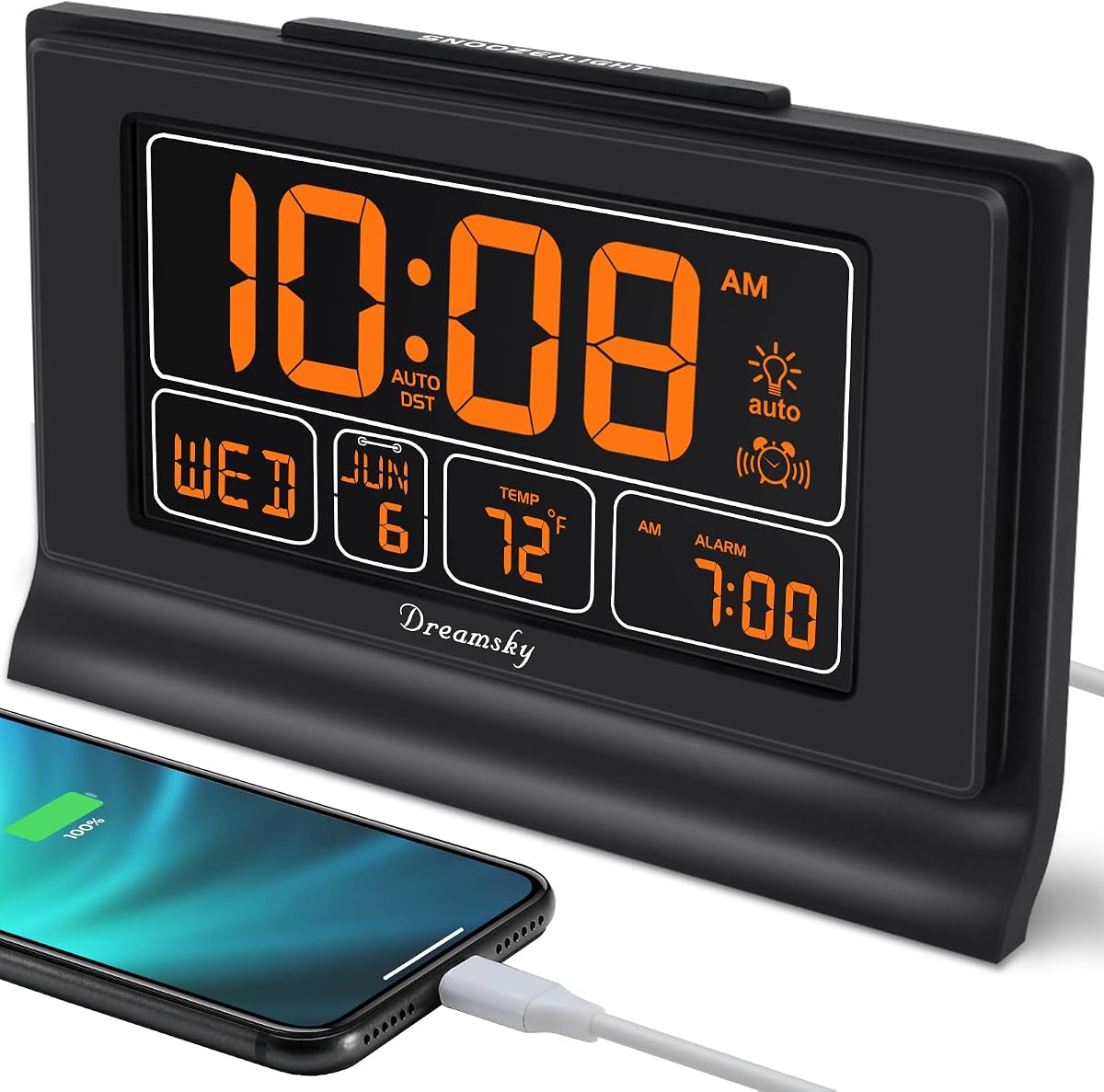
DreamSky clock provides a solid 7.6 inch screen that includes indoor temperature and date info. With a 4.6 rating users like the USB charging port that keeps devices powered nearby. Battery backup ensures time remains accurate after outages.
We may earn a commission when you buy through this link, at no additional cost to you.
The auto dimmer and DST features simplify setup while maintaining accuracy. Four level dimmable brightness adapts to room conditions easily. Plug in design offers consistent power for reliable operation.
Without voice features it relies purely on visual clarity for users. The screen size is smaller than premium options which might limit viewing distance. Still it serves well as a functional bedside clock.
This clock suits users who need device charging alongside timekeeping. It balances practical features like temperature display with affordability for most households.
Charges your phone while you sleep saving outlet space at bedside.
Backup battery keeps settings safe during power cuts without resets.
We may earn a commission when you buy through this link, at no additional cost to you.
This clock offers extensive customization with 20 alarms and reminders plus 12 display themes. With a 4.4 rating users value the ability to personalize colors and time periods. Photo playback turns it into a frame for family pictures.
We may earn a commission when you buy through this link, at no additional cost to you.
The HD LCD screen clearly shows six time periods with icons for day and night. Volume control allows adjusting alarms from whisper to loud. Themes help accommodate different vision needs and room styles.
Menu complexity can be challenging for those with severe memory loss. Power adapter requirements limit placement flexibility compared to battery only models. Customization is a benefit but requires setup patience.
Buyers wanting personalization and reminders will appreciate this model. It blends timekeeping with decor and photo features for a unique bedside option.
Insert USB or SD drive to display photos from memory devices.
Set up to 20 reminders for medications and appointments easily.
We may earn a commission when you buy through this link, at no additional cost to you.
American Lifetime clock features a clean calendar layout with high contrast numbers for clarity. With a 4.6 rating users praise its readability in low light. The 5 daily alarms support medication and appointment tracking.
We may earn a commission when you buy through this link, at no additional cost to you.
Auto-dimming adapts brightness to room light while backup ensures reliability after power outages. Compact design fits on small nightstands without losing visibility. Simple setup ensures users can start using it quickly.
Cost exceeds other models and lacks voice features found in similar price clocks. Still clarity and calendar visibility make it useful for seniors. Warranty and support add peace of mind.
This clock suits buyers needing clear date visibility without extra features. It focuses on core timekeeping and calendar needs with premium build quality.
High contrast display spells out full dates and days for quick reading.
Fits well on small surfaces while maintaining readable display size.
We may earn a commission when you buy through this link, at no additional cost to you.
DIWAKREM clock uses an IPS screen for wide 175 degree viewing without distortion. With a 4.5 rating users note its clarity from different angles. The 7 inch display shows date time and week info clearly.
We may earn a commission when you buy through this link, at no additional cost to you.
Auto dimming and time memory features ensure convenience without complex resets. Eight language support and 12 alarms help manage schedules. Wall or desk placement adds flexibility for various rooms.
Lack of battery power limits movement after outages. Voice features are absent so visual reading remains primary. Still the screen quality stands out among peers.
Buyers wanting flexible viewing and reliable display should choose this model. It balances affordability with IPS tech for consistent readability.
175 degree IPS screen ensures text remains clear from most angles.
Automatic time restore after power cuts saves manual setup effort.
We may earn a commission when you buy through this link, at no additional cost to you.
KOSUMOSU clock offers dual alarms and seconds display for precise tracking. With a 4.1 rating it serves general use with temperature info. The 6.7 inch LED screen is stylish but smaller than others.
We may earn a commission when you buy through this link, at no additional cost to you.
Auto and manual dimming give users control over brightness. Dual alarms support workdays and weekends separately. Sleek design fits modern decor well in living rooms.
Lower rating suggests potential reliability or usability issues. The screen is small for users with vision loss. Still it provides basic date time and temp info.
This clock suits younger users needing alarms and modern style. For seniors requiring large displays other models may be more suitable.
Set separate alarms for workdays and weekends for better planning.
Indoor temperature shown on screen helps with daily comfort.
We may earn a commission when you buy through this link, at no additional cost to you.
Peakeep clock offers five volume levels to suit hearing needs. With a 4.6 rating users like the USB port and large screen. Date and week info displays clearly for daily routines.
We may earn a commission when you buy through this link, at no additional cost to you.
Auto DST simplifies seasonal updates and brightness adjusts for comfort. Plug-in design ensures consistent timekeeping. Compact size fits most surfaces without clutter.
Without voice aids or themes it relies on visual clarity. Volume customization is a strong feature for diverse user needs. Price remains competitive for the features provided.
Buyers needing adjustable volume and USB charging should consider this model. It delivers reliable timekeeping with practical convenience features.
Adjust alarm loudness to match hearing needs and sleep habits.
Charge phones while sleeping without losing extra outlets.
We may earn a commission when you buy through this link, at no additional cost to you.
DreamSky clock features auto set time and full range dimmer for comfort. With a 4.6 rating users note battery backup and USB port. The 5 inch LCD shows time date and temp clearly.
We may earn a commission when you buy through this link, at no additional cost to you.
Auto DST and selectable time zones ensure accuracy. Ascending alarms wake users naturally. Plug in power provides reliability with backup support.
Lack of day of week display limits calendar clarity. Smaller screen may challenge vision impaired users. Convenience features like auto setup help offset this.
This clock suits tech aware buyers who prefer simple time settings. It balances automation and battery backup for dependable bedside use.
Clock sets date and time instantly when plugged in saving setup time.
Backup battery keeps settings during power outages to avoid resets.
We may earn a commission when you buy through this link, at no additional cost to you.
Selecting the right clock involves considering screen size, voice options, and extra features like alarms or USB ports. This guide explains key factors to help you find a model that fits your needs.
Larger displays with clear fonts reduce eye strain and make reading easier for seniors. Look for screens that spell out full days without abbreviations to prevent confusion about time and schedules.
Prioritize models with large text that are readable from your bedroom or living room distance.
Voice features allow users to press a button to hear the time and date spoken aloud. This is especially helpful for those with weak vision or memory loss who benefit from auditory information.
Check how many languages are supported and if the voice is clear enough for your needs.
Multiple alarms let you set reminders for medications and appointments at different times. Some models offer specific weekday or weekend options to match daily routines.
More alarms mean better organization and fewer missed tasks throughout the day.
Automatic dimming adjusts brightness based on time of day so light is not too bright at night. This reduces eye strain and helps maintain sleep routines without manual adjustments.
Look for models that brighten in the morning and darken at night automatically.
Plug in power keeps the clock running consistently but battery backup ensures time is saved during outages. This avoids resetting time and date every time power cuts.
Ensure the model you choose has backup to keep settings secure.
Built-in USB ports let you charge phones or devices while the clock runs. This saves outlets and keeps devices powered near the bedside or desk.
Consider models with USB if you need to keep devices powered nearby.
Simple setup with intuitive buttons ensures users can start using the clock quickly. Avoid models with complex menus that require too many steps to configure.
One-click setup or clear manuals make daily use easier for everyone.
Features like sun moon icons or time period labels help reinforce whether it is morning or night. These cues help users stay oriented during the day.
Visual indicators are helpful for those with cognitive challenges.
Plug the clock into a power outlet and select your time zone using the menu buttons. Confirm the date and day of week display is correct before placing it in your desired location.
If voice features are needed enable them through the settings menu. Adjust brightness manually or let auto dimming take over based on your room's lighting.
Clean the screen with a soft dry cloth to avoid scratches. Place the clock where it is visible from your main daily areas to reduce confusion about time.
Most models spell out the full day of week without abbreviations to prevent confusion. This is especially helpful for seniors or those with memory loss who need clear date information.
Yes voice features allow patients to hear time and date aloud without reading. This supports independence and reduces confusion when eyesight is limited.
They adjust screen brightness based on time of day or light sensor input. This keeps the display comfortable for night use without manual adjustments.
Many models include USB ports that let you charge phones while the clock runs. This saves outlets and keeps devices powered near the bedside.
Most have battery backup to keep settings saved when power is lost. This prevents needing to reset time and date after an outage.
Yes many compact models fit on small nightstands while maintaining clear displays. Choose one that balances screen size with available space.
The top picks include the SSYA model for large display, the Nimukol for budget voice features, and Mitoart for balanced voice and alarms. Each offers unique strengths for different user needs.
Prioritize display clarity and voice features if vision or memory is a concern. Alarms and dimming options add practical value for daily routines.
Always check current prices and availability before purchasing to ensure you get the best deal for your chosen model.