
Logitech MX Keys Mini
4.4Editor score
Smart illuminated backlit keys
Multi-device connectivity
USB-C rechargeable battery
Discover the top compact editing keyboards for creators and professionals. This guide compares features, compatibility, and ergonomics to help you choose the
Finding the right compact editing keyboard can transform your workflow, especially when space is limited or mobility is key. These devices offer the perfect blend of portability and functionality, ensuring you stay productive whether you are at your desk or on the go.
We have evaluated ten top-rated models based on design, connectivity, battery life, and specific features tailored for creative work. Our analysis focuses on how well each keyboard integrates into modern editing setups without compromising comfort or performance during long sessions.
Each pick highlights unique strengths, from programmable shortcuts to ergonomic layouts, helping you match the device to your specific needs. Please note that availability and pricing can fluctuate, so checking current listings is always recommended before making your final decision.
4.4Editor score

4.7Editor score

4.5Editor score
This side-by-side comparison provides a clear overview of the top compact editing keyboards available today. We highlight key specifications to help you quickly identify which model best suits your specific editing needs and workspace requirements.



The Blackmagic Design Davinci Resolve Speed Editor stands out as the premier choice for video editors seeking a dedicated compact solution. With its specialized layout and high rating, it offers unmatched efficiency for DaVinci Resolve workflows.
We may earn a commission when you buy through this link, at no additional cost to you.
Its built-in search dial and keys that match edit functions streamline complex tasks significantly. Whether trimming clips or adjusting color grades, the tactile feedback reduces reliance on mouse clicks, enhancing precision during intensive sessions.
While the price reflects its professional niche, the included studio activation card adds substantial value. The main trade-off is its specificity, making it less versatile for general typing compared to standard keyboards.
Professional video editors and colorists should prioritize this keyboard for its workflow optimization. It remains the top recommendation for those deeply invested in the DaVinci ecosystem.
Every key is mapped to specific editing commands, reducing mental load during projects.
The built-in dial allows quick scrubbing and searching without touching the mouse.
We may earn a commission when you buy through this link, at no additional cost to you.
The Logitech MX Keys Mini delivers a premium typing experience tailored for editors who value precision and aesthetics. Its smart illumination and ergonomic design make it a standout choice for professional environments.
We may earn a commission when you buy through this link, at no additional cost to you.
Key shaping follows your fingertip contours, improving accuracy during long editing sessions. The smart backlighting adjusts to ambient light, ensuring visibility without draining the battery unnecessarily.
Although the price is higher than standard options, the build quality and features justify the investment. The limited number pad may inconvenience users requiring frequent number entry.
Editors seeking a polished, high-performance wireless keyboard will appreciate this model. It balances functionality with style exceptionally well for modern workspaces.
Dished key caps conform to your fingers for faster, more accurate typing.
Switch seamlessly between three devices, ideal for managing multiple projects.
We may earn a commission when you buy through this link, at no additional cost to you.
The ProtoArc XK04 offers exceptional portability and affordability, making it ideal for travelers and mobile creators. Its foldable design and strong rating highlight its practicality for on-the-go editing tasks.
We may earn a commission when you buy through this link, at no additional cost to you.
Equipped with a PU leather cover, the keyboard stays protected and stylish. Bluetooth 5.1 ensures stable connections up to three devices, allowing seamless transitions between phones and tablets.
While typing comfort is good, the compact layout may feel cramped for extended use. The trade-off for portability is a slightly less robust typing feel compared to full-sized options.
Budget-conscious editors who prioritize mobility will find this keyboard perfect. It brings essential functionality to any location without breaking the bank.
Folds into a small size, fitting easily into pockets or small bags.
Auto-sleep standby extends battery life for months of intermittent use.
We may earn a commission when you buy through this link, at no additional cost to you.
The Microsoft Designer Compact Keyboard blends style and functionality for creators who appreciate minimalism. Its low-profile design and optimized spacing provide a comfortable typing experience without cluttering the desk.
We may earn a commission when you buy through this link, at no additional cost to you.
The expressive input key offers quick access to emojis and symbols, streamlining creative communication. Key travel is designed for fluid typing, reducing fatigue during moderate use sessions.
However, it lacks some specialized editing shortcuts found in higher-end models. Battery reliance instead of rechargeability might be a minor inconvenience for some users.
Design-focused users looking for a clean, efficient keyboard will enjoy this option. It balances form and function well for everyday creative tasks.
One press unlocks symbols and emojis, speeding up creative workflows.
Compact footprint allows for a closer mouse position, improving ergonomics.
We may earn a commission when you buy through this link, at no additional cost to you.
The Logitech Pebble Keys 2 K380s is a reliable portable keyboard known for its extraordinary battery life. With a slim design and strong ratings, it suits users needing a low-maintenance typing solution.
We may earn a commission when you buy through this link, at no additional cost to you.
Easy-Switch buttons allow instant transitions between up to three devices, enhancing productivity across platforms. The scooped round keys provide a familiar laptop-like feel, ensuring comfort without noise.
While it lacks advanced editing macros, its simplicity and efficiency are commendable. The recycled plastic construction appeals to environmentally conscious consumers.
Mobile users and students seeking a durable, efficient keyboard will find this ideal. It delivers consistent performance over long periods with minimal intervention.
Auto-sleep and 50% more battery life ensure years of use per charge.
Instantly toggle between devices for a seamless multi-device workflow.
We may earn a commission when you buy through this link, at no additional cost to you.
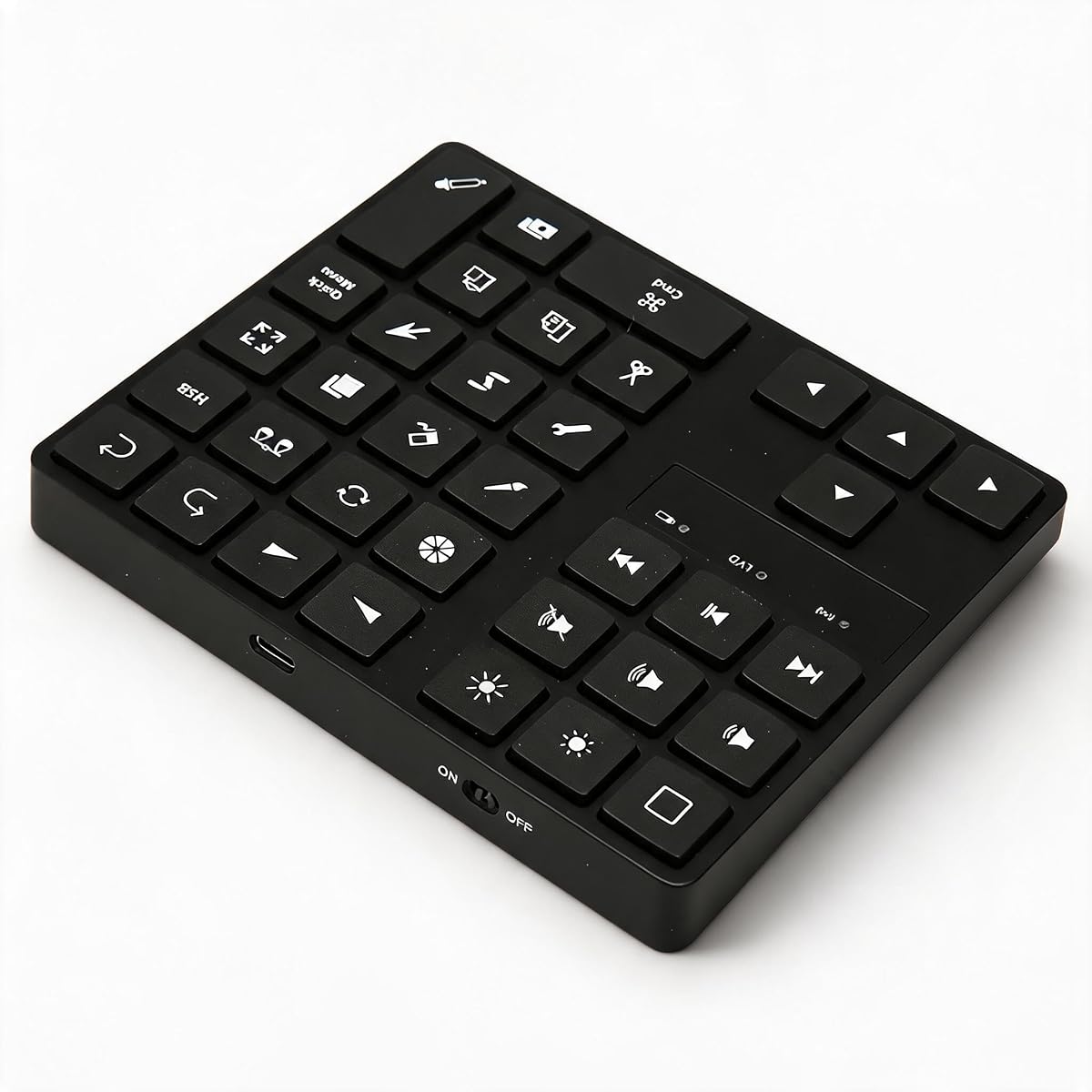
The XPPen Mini Keydial ACK05 excels as a specialized tool for artists and editors needing custom shortcuts. Its programmable keys and rotary dial significantly enhance workflow efficiency in creative applications.
We may earn a commission when you buy through this link, at no additional cost to you.
Users can assign up to forty shortcuts across four sets, streamlining repetitive tasks. The tactile dial provides precise control for zooming or adjusting brush sizes, which is essential for digital art.
Setup requires downloading a driver, which adds initial complexity. As a dedicated control device rather than a full keyboard, it complements existing setups rather than replacing them.
Digital artists and editors using design software will benefit most from its features. It offers tangible speed improvements for complex creative processes.
Scroll and zoom quickly with a dial designed for precise creative adjustments.
Switch between application-specific key sets with a single button press.
We may earn a commission when you buy through this link, at no additional cost to you.
The Macally Compact Wireless Keyboard is a straightforward, reliable option for basic editing needs. With a slim design and high rating, it provides essential functionality without unnecessary complexity.
We may earn a commission when you buy through this link, at no additional cost to you.
Its 2.4G wireless connection ensures stability, and the compact 78-key layout saves desk space. Users can immediately connect and start typing without installing drivers.
While it lacks advanced features, its simplicity is a strength for general tasks. Battery reliance may be less convenient for users preferring rechargeable models.
Basic users and those prioritizing simplicity will find this keyboard effective. It delivers consistent performance for everyday editing at a budget-friendly price.
Connect via USB dongle and start typing instantly without drivers.
Compact design allows more room for mouse movement and workspace.
We may earn a commission when you buy through this link, at no additional cost to you.
The Logitech K250 offers a rare blend of compact size and a full number pad, ideal for editors handling data. Its deep-profile keys and ergonomic tilt provide a comfortable typing experience.
We may earn a commission when you buy through this link, at no additional cost to you.
Spill resistance protects against accidents, while Bluetooth connectivity reduces desk clutter. The twelve-month battery life ensures minimal interruptions during daily use.
However, the build feels more functional than premium. While practical, it may not match the tactile quality of higher-end models.
Users needing a number pad in a compact form will appreciate this choice. It balances utility with reliability for everyday office editing.
Retains essential number input while saving space compared to full boards.
Spill-resistant construction and durable keys ensure longevity in daily use.
We may earn a commission when you buy through this link, at no additional cost to you.
The One-Handed Ergonomic Keyboard offers a unique approach for artists and editors seeking to minimize wrist strain. Its sculpted design and programmable keys enhance comfort and workflow efficiency.
We may earn a commission when you buy through this link, at no additional cost to you.
Thirty-five customizable shortcuts allow rapid access to frequently used commands. The angled layout promotes a neutral wrist posture, reducing fatigue during long sessions.
Switching to one-handed typing requires adaptation, which may deter some users. The wired connection ensures reliability but limits wireless flexibility.
Creators prone to repetitive strain injuries will benefit most from this specialized tool. It prioritizes health without sacrificing control.
Designed to reduce wrist strain during prolonged creative work sessions.
Program macros to launch tools instantly, improving creative speed.
We may earn a commission when you buy through this link, at no additional cost to you.
The Cherry Stream Wired Keyboard delivers a dependable, high-quality typing experience for editors valuing stability. Its whisper-quiet SCissor switches provide comfort without disrupting the environment.
We may earn a commission when you buy through this link, at no additional cost to you.
The compact TKL design balances portability with functionality, offering essential keys without bulk. Rubberized feet and a metal plate ensure stability during active use.
While the cable limits mobility, it guarantees consistent performance. Users preferring wireless may find this a drawback for mobile workflows.
Desk-bound editors seeking a reliable, quiet solution will appreciate this keyboard. It combines German engineering with practical design for consistent results.
Low-noise keys allow quiet typing even in shared workspaces.
Metal plate and rubber feet prevent slipping and maintain stability.
We may earn a commission when you buy through this link, at no additional cost to you.
Selecting the ideal compact editing keyboard involves balancing portability, functionality, and ergonomic comfort. This guide breaks down the essential factors to consider before making your purchase.
Consider whether you prefer Bluetooth, wireless dongles, or wired connections. Bluetooth offers flexibility for multiple devices, while wired ensures zero latency for precision tasks.
Match the connectivity type to your primary editing devices to ensure seamless integration without signal interruptions.
Evaluate the keyboard's footprint against your desk space and travel needs. Compact layouts save room but may sacrifice dedicated function keys or a number pad.
Prioritize layouts that support your specific editing shortcuts while maintaining a comfortable typing distance.
Long battery life or rechargeable options reduce downtime for mobile editors. Some models offer months of use per charge, while others require frequent replacements.
Choose a power solution that fits your usage patterns to avoid interruptions during critical work sessions.
Comfort is crucial for long editing sessions, so look for ergonomic designs, key travel, and adjustable tilt. Poor ergonomics can lead to strain over time.
Test typing feel and posture support to ensure the keyboard aligns with your physical comfort needs.
Software-based shortcuts or hardware macros can significantly boost workflow efficiency in creative applications. Some keyboards allow custom key mapping for apps like Photoshop or DaVinci Resolve.
If automation is important, select a keyboard with robust software support for customizing key functions.
Materials like aluminum, recycled plastics, or spill-resistant coatings extend the keyboard's lifespan. A sturdy build ensures reliability for daily professional use.
Invest in models with proven durability to withstand travel and regular handling.
Ensure the keyboard works seamlessly with your operating system and editing software. Cross-platform compatibility is key if you switch between Windows, macOS, or Linux.
Check for specific OS compatibility to avoid driver or layout issues during setup.
Balance cost with features to find the best value for your needs. Premium options offer advanced features but may be unnecessary for basic tasks.
Determine your priority features to narrow down models that deliver the best return on investment.
Begin by pairing your keyboard via Bluetooth or plugging in the USB receiver, following the manufacturer's setup guide for optimal connectivity. Ensure your device recognizes the input before proceeding with customization.
Take time to map frequently used editing shortcuts to programmable keys if supported. This reduces mouse dependency and accelerates your creative workflow over time.
Maintain the keyboard by keeping it clean, using soft cloths to wipe surfaces and avoiding spills. Store it in a protective case when traveling to prevent physical damage.
Most compact keyboards support both operating systems via Bluetooth or wired connections. However, check for specific OS compatibility to ensure key layout matches your preferences.
Many models allow key customization using dedicated software. Advanced users can remap keys for specific editing tasks to streamline their workflow.
Yes, most are compatible with tablets and mobile devices via Bluetooth. This enables physical typing for apps on iPads or Android tablets.
Battery life varies by model, ranging from weeks to years depending on usage. Rechargeable models often offer several months of continuous use per charge.
Yes, especially specialized models with editing shortcuts or programmable macros. They enhance efficiency by reducing reliance on mouse-based commands.
Prioritize weight, foldable design, and battery life. A protective case and durable build are also essential for safe transportation.
Some compact models include a number pad, while others omit it to save space. Choose based on your need for frequent numeric input.
While designed for editing, these keyboards handle general typing well. Gaming suitability depends on key response and anti-ghosting capabilities.
The Blackmagic Speed Editor, Logitech MX Keys Mini, and ProtoArc XK04 stand out as top choices across different needs. Each offers unique strengths that cater to professional, premium, or budget-conscious editors.
Prioritize factors like ergonomics, programmability, and connectivity to find the right fit. Matching the keyboard to your workflow ensures a seamless and efficient editing experience.
Remember to check current availability and pricing before purchasing. This guide helps you make an informed decision tailored to your creative requirements.