
Lian Li O11D Mini V2 Compact ATX Mid-Tower PC Case
4.7Editor score
Slanted bottom airflow design
Anti-sag GPU brackets included
Pillar-less glass panels
Discover the top Compact E ATX Case options for powerful builds in small spaces. We compare airflow, compatibility, and portability across ten leading models.
Finding a Compact E ATX Case that balances size and performance is crucial for modern builders. You need ample room for high-end components without sacrificing desk space or aesthetics in your setup.
We evaluated ten leading models based on thermal efficiency, motherboard support, and build quality. Each entry offers unique features like mesh airflow or portable handles to suit specific gaming needs.
Every pick highlights standout specs and real-world usability for your next system. Keep in mind that product availability and pricing fluctuate frequently, so always verify current details before purchasing.
4.7Editor score

4.4Editor score

3.9Editor score
This table breaks down the key specifications of each Compact E ATX Case to help you find the right fit for your hardware and space requirements.



This unit stands out for its rare ability to support E-ATX motherboards up to 11 inches wide within a compact footprint. It scores a solid 4.4 rating from users who value build flexibility and cooling efficiency.
We may earn a commission when you buy through this link, at no additional cost to you.
The front mesh panel maximizes ventilation, while the movable handles and reversible I/O panel let you customize the layout to fit your desk or shelf perfectly. This ensures high-performance graphics cards fit without hassle.
While it offers great value, the price point might be slightly higher than standard cases. The size is also a consideration if you have very tight space constraints compared to micro-ATX only models.
Buy this if you need a versatile chassis that balances high-end component support with a unique, user-friendly design. It is ideal for enthusiasts who want a fresh take on the traditional tower format.
You can position the case horizontally or vertically, thanks to the movable handles and adjustable I/O panel. This flexibility makes it easier to integrate into any room setup or workspace.
A full mesh front panel paired with a pre-installed fan ensures cool air reaches components directly. This helps maintain stable temperatures even under heavy gaming or rendering loads.
We may earn a commission when you buy through this link, at no additional cost to you.
The Lian Li O11D Mini V2 delivers a premium experience with its sleek design and optimized airflow. Users rate it highly at 4.7 stars for its robust construction and elegant aesthetic appeal.
We may earn a commission when you buy through this link, at no additional cost to you.
Its slanted bottom design enhances cold air intake for the GPU, while the anti-sag brackets protect heavy graphics cards from damage. The pillar-less glass panels provide an unobstructed view of your components.
One drawback is that fans are not included, requiring an additional purchase for optimal cooling. Additionally, the back-connect focus might need specific motherboards and careful planning for standard cable setups.
Choose this case if you prioritize aesthetics and performance in a compact form. It suits builders who want a clean look with excellent thermal potential for modern hardware configurations.
The slanted bottom allows cold air to reach the graphics card more directly. This design feature helps prevent heat soak and keeps GPU temperatures lower during intense sessions.
Pillar-less tempered glass panels remove visual clutter and showcase your build. This ensures every component is visible and contributes to a high-end, professional look.
We may earn a commission when you buy through this link, at no additional cost to you.
This model is built for portability and power, featuring a carry handle and ample space for large components. It earns a 3.9 rating from users who value its unique combination of strength and mobility.
We may earn a commission when you buy through this link, at no additional cost to you.
The aluminum shell provides robust protection, while the 420mm GPU clearance supports even the largest graphics cards. Multiple PSU mounting options allow for custom cooling and cable management strategies.
Some users note that assembly can be tricky and the finish may show scratches. The weight is also a factor if you plan to transport it frequently without proper cushioning.
Buy this if you need a durable, portable case for LAN events or travel. It works well for builders who want big component support in a smaller footprint without compromising on portability.
An integrated carry handle makes moving your PC much easier than standard cases. This feature is perfect for LAN parties or relocating your workstation to different rooms.
A 2mm aluminum shell protects your hardware from damage during transport. This material choice ensures longevity and a premium feel compared to thin steel alternatives.
We may earn a commission when you buy through this link, at no additional cost to you.
The Q300L V1 is an excellent choice for budget builders looking for airflow and a clean look. It holds a strong 4.5 rating from users who appreciate its practical design and value.
We may earn a commission when you buy through this link, at no additional cost to you.
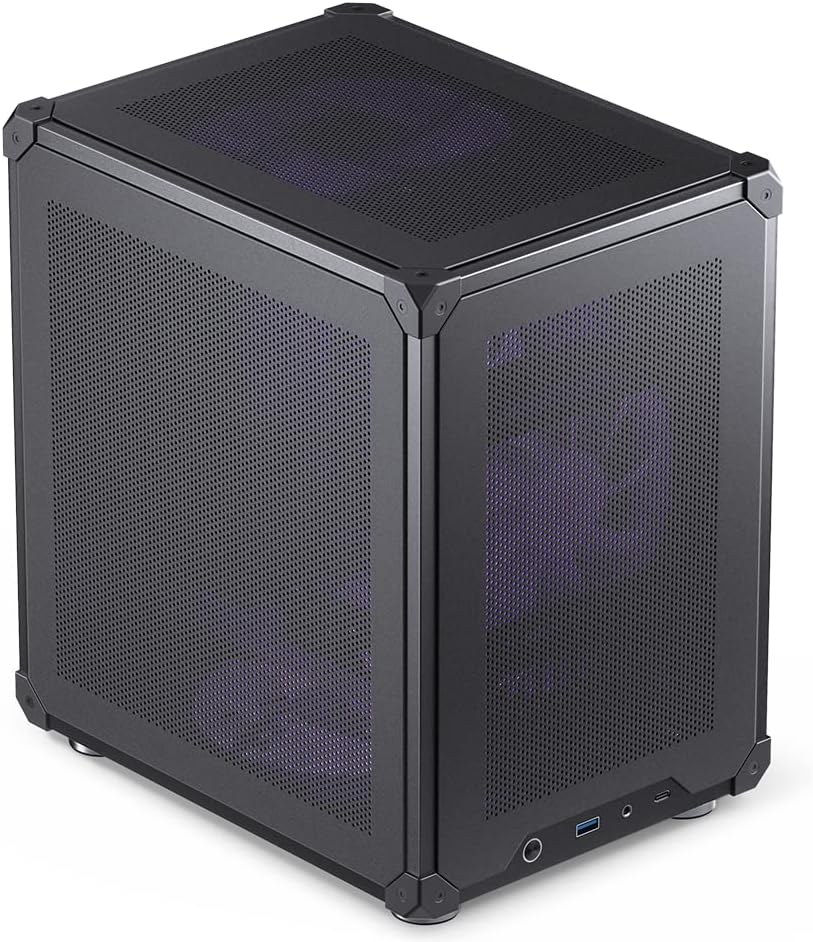
Its perforated design on all sides promotes optimal airflow, and the I/O panel can be moved to front, top, or bottom positions. The transparent panel lets you show off your components easily.
However, it only supports Micro-ATX boards, which limits upgrade paths. The materials are also standard, so it may not feel as premium as higher-end cases in a long-term build.
This case is ideal for entry-level builds where cost and cooling matter most. Choose it if you are building your first system and want a reliable foundation for gaming or daily use.
You can move the I/O panel to suit your monitor and peripheral setup. This flexibility helps you route cables more efficiently and reach ports easily.
Perforated sides and fans help dissipate heat quickly. This ensures your CPU and GPU stay cool during extended use without needing extra liquid cooling.
We may earn a commission when you buy through this link, at no additional cost to you.
This Ultra-Compact ATX case supports full-size boards and power supplies while including a carry handle. Its 4.6 rating reflects strong user satisfaction with its build quality and thoughtful design features.
We may earn a commission when you buy through this link, at no additional cost to you.
The metal front I/O panel offers modern ports, and the interior is optimized to simplify installation. It fits 240mm liquid coolers, making it a strong candidate for high-performance portable builds.
Some users note that cable management can be tight with certain components. The cost is also higher than standard ATX cases, which might be a consideration for strict budgets.
Buy this if you want a premium portable experience without sacrificing standard ATX hardware compatibility. It fits well for professionals and gamers who move their PC often but need raw power.
The integrated handle makes it easy to move your PC between rooms or locations. This design balances compact size with the ability to handle larger components like full ATX boards.
Cable management space and layout simplify the build process. Using an SFX/L power supply is recommended for the cleanest result and easiest assembly.
We may earn a commission when you buy through this link, at no additional cost to you.
The AP201 offers impressive airflow with its quasi-filter mesh panels and robust support for radiators. Users rate it 4.7 stars for its balance of cooling performance and compact spatial efficiency.
We may earn a commission when you buy through this link, at no additional cost to you.
It supports up to six fans and large radiators, ensuring high-performance hardware stays cool. The tool-free side panels and extended tray with cutouts make assembly and maintenance straightforward.
One limitation is that it supports only Micro-ATX boards, which may not suit all needs. Also, while the mesh is great for cooling, it might let in more dust if filters are not used.
Choose this case if you prioritize cooling in a small space. It is perfect for builds that rely on large fans or liquid coolers to manage heat without needing a full tower.
Over 57,000 precision-machined holes increase airflow significantly. This mesh design helps your system breathe and maintain lower temperatures during demanding tasks.
Side panels clip in securely and can be removed without tools. This simplifies access for upgrades and cleaning while keeping the case stable during use.
We may earn a commission when you buy through this link, at no additional cost to you.
This V3 model provides high-airflow cooling and flexible hardware support without sacrificing quality. It holds a 4.6 rating from builders who value its versatility and builder-friendly features.
We may earn a commission when you buy through this link, at no additional cost to you.
It supports up to six fans and has plenty of space for modern GPUs. The movable I/O panel and magnetic dust filters add convenience and make assembly easier for all skill levels.
While versatile, it remains limited to Micro-ATX motherboards. The build materials are standard for the price point, so it might lack the premium feel of more expensive custom cases.
Buy this if you need a reliable, high-airflow case for a mid-range build. It fits well for gamers who want excellent cooling and a clean aesthetic without spending too much.
Movable I/O panels and magnetic filters give you control over your build. This modularity helps you tailor the case to your specific cable routing needs.
Support for six fans allows for powerful cooling setups. This ensures your system stays cool even when running demanding applications or games.
We may earn a commission when you buy through this link, at no additional cost to you.
The CUBIX M-ATX is a tiny, durable case that fits on any desk. It earns a 4.5 rating from users who need a compact solution for everyday office or home computing tasks.
We may earn a commission when you buy through this link, at no additional cost to you.
Its perforated front and pre-installed fan help maintain airflow in a small box. Steel construction ensures durability, while standard ATX PSU support adds flexibility for power choices.
Limited GPU and cooler clearance means you must choose parts carefully. The small size might make cable management tight for those used to larger towers.
Choose this if you want a small, simple PC case for light tasks. It is ideal for budget builds where space is at a premium and performance needs are moderate.
With only 17.1 liters of volume, it fits easily on desks or shelves. This small size saves space while still supporting standard ATX power supplies.
0.8T steel construction provides a robust and sturdy structure. This ensures your PC stays protected from everyday bumps and wear.
We may earn a commission when you buy through this link, at no additional cost to you.
This mesh case supports Micro-ATX boards with tool-free access for easy builds. Users rate it 4.6 stars for its simplicity and efficient airflow design for small form factor PCs.
We may earn a commission when you buy through this link, at no additional cost to you.
All sides are meshed, and the cover and side panels open without tools. The front features a Type-C port and USB 3.0 for modern connectivity in a minimal footprint.
GPU and CPU cooler clearance are limited to 255mm and 75mm respectively. This restricts high-end hardware choices and may require careful component selection for upgrades.
Buy this if you prioritize simplicity and airflow in a tiny box. It suits builders who want a straightforward setup with quick access to components for maintenance.
Upper and side panels open easily without tools. This makes building and upgrading your PC faster and more convenient for everyday users.
All sides of the chassis are meshed for maximum airflow. This design helps dissipate heat effectively from small components in tight spaces.
We may earn a commission when you buy through this link, at no additional cost to you.
The H5 Flow is designed for exceptional GPU cooling and easy cable management in a compact form. It holds a 4.6 rating for its sleek look and ready-to-go performance with pre-installed fans.
We may earn a commission when you buy through this link, at no additional cost to you.
Ultra-fine mesh on top, front, and side panels ensures maximum airflow. The perforated PSU shroud and support for large radiators make this a strong choice for liquid cooling setups.
Dust filtration could be more robust, and the internal layout is standard. While good for many users, some might find cable management a bit basic compared to premium cases.
Choose this case if you want a sleek, ready-to-build ATX solution. It fits well for those seeking a balance of modern design, cooling, and ease of use in one package.
Pre-installed quiet fans provide solid airflow immediately. This saves time and money since you do not need to buy extra fans right away.
Wide channels and hooks let you conceal cables effortlessly. This keeps the build looking tidy and helps airflow by reducing clutter.
We may earn a commission when you buy through this link, at no additional cost to you.
Choosing the right Compact E ATX Case requires understanding your hardware needs and how you plan to use your PC.
Ensure the case supports your motherboard size like ATX or E-ATX as well as your GPU and CPU cooler dimensions. Check clearance limits carefully to avoid buying a case that is too small for your planned components.
Always match board and GPU sizes to the case specs before purchasing to prevent assembly issues.
Look for mesh panels and enough fan mounts to keep your hardware cool. A good airflow design helps reduce noise and heat, which extends the lifespan of your PC.
Prioritize cases with full mesh fronts and flexible fan mount options for better thermal management.
Material thickness and construction quality affect the case's durability and weight. Steel offers strength while aluminum provides a lighter, premium feel that may suit travel needs.
Check materials and panel thickness to ensure the case can withstand regular use or transport.
If you plan to move your PC often, look for integrated handles or lightweight materials. Portable cases are ideal for LAN events or sharing your setup between locations.
Opt for models with built-in handles and sturdy but lightweight construction for easier transport.
Good cable management keeps your build clean and improves airflow. Look for wide routing channels, tie points, and room behind the motherboard tray.
Choose cases with generous cable space and tie points to maintain a tidy internal layout.
Check for extra drive bays or mounting options that allow future upgrades. A flexible design ensures you can add storage or replace components without buying a new case.
Consider storage bays and expansion slots to support your long-term hardware needs.
Modern ports like USB Type-C provide fast data transfer for peripherals. Ensure the front panel meets your connectivity needs without needing adapters.
Prioritize cases with USB Type-C and multiple USB ports for convenience.
Transparent panels or mesh designs affect how your build looks. Decide if you prefer full visibility of parts or a sleek, minimal style.
Pick a design that matches your room setup and personal taste for the best result.
Always install your motherboard and GPU before sliding them into the case to avoid strain on connectors. Use the provided standoffs and screws to secure components firmly.
Keep dust filters clean to maintain airflow and prevent heat buildup. Regularly check fan operation to ensure your system stays cool during heavy use.
If transporting the case, secure all internal components and avoid placing heavy objects on it. Use the included carry handle when available to prevent accidental drops.
Most Compact E ATX Cases support ATX, Micro-ATX, and Mini-ITX boards. Some models also allow larger E-ATX boards up to 11 inches wide for expanded compatibility.
Some models come with pre-installed fans, but others do not. Always check product details to see if fans are included or must be purchased separately.
Yes, many Compact E ATX Cases support radiators up to 360mm in size. This allows for powerful liquid cooling setups in small chassis.
Absolutely, most Compact E ATX Cases provide enough room for high-end GPUs and CPUs. Look for models with mesh panels to support cooling demands during gaming sessions.
Remove the dust filters using the side panels or front slots. Wash them with warm water or vacuum to remove dust before reinstalling.
Weights vary but usually range between 4 kg and 7 kg. Portable models may be lighter, while steel-heavy cases weigh more.
The top picks in this guide highlight excellent options for performance and portability. Each model offers unique benefits to suit different build needs.
Prioritize airflow and compatibility when selecting your case to ensure stable system performance. A well-chosen case supports long-term reliability and ease of use.
Always verify current prices and availability before making a purchase. Deals can change quickly, so compare options to get the best value for your setup.