
OMTech K40+ 45W Desktop CO2 Laser Engraver & Cutter
4.4Editor score
45W laser performance
12×8 inch workspace
LightBurn software support
This comprehensive guide compares the top 10 CO2 laser cutters for 2026, evaluating power, speed, safety, and software compatibility to help you choose the
CO2 laser cutters are powerful tools designed to cut and engrave non-metallic materials with precision. They use a focused laser beam to vaporize material, making them ideal for woodworking, acrylic cutting, and custom signage creation.
To compile this list, we analyzed technical specifications, user feedback, and real-world performance data. We focused on power output, working area, safety features, and software compatibility to ensure a balanced selection for various users.
Each pick highlights key strengths and potential trade-offs to help you make an informed decision. Please note that availability and pricing can change frequently, so check the latest details on the product pages before purchasing.
4.4Editor score

4.5Editor score

The following table provides a side-by-side overview of the top CO2 laser cutters available this month. Compare key specifications like power, working area, and software compatibility to find the best fit for your project requirements.



The xTool P3 represents a flagship option for those seeking professional-grade performance in a desktop-friendly form factor. With a 4.5 rating, it stands out for its automated features and powerful 80W laser, making it ideal for demanding production tasks.
We may earn a commission when you buy through this link, at no additional cost to you.
Its standout quality lies in the Automated Creation System which integrates LiDAR for autofocus and dual cameras for precise positioning. This setup simplifies workflow significantly, allowing users to focus on design rather than manual adjustments. The Class 1 safety rating ensures a secure environment even during operation.
While the performance is exceptional, the price point is higher than many competitors. Additionally, some advanced accessories like the conveyor feeder are sold separately. These are acceptable trade-offs given the industrial-grade capabilities and safety features it offers.
This machine is best suited for small businesses or serious makers who need reliability and speed. If you prioritize safety and automation in your cutting process, the xTool P3 is a top recommendation to consider.
The dual HD camera system allows for distortion-free previews and microscopic alignment accuracy, ensuring that every cut meets exact specifications without manual intervention.
Fully enclosed with lid interlocks and active detection systems, the P3 offers peace of mind with a Class 1 safety rating suitable for various environments.
We may earn a commission when you buy through this link, at no additional cost to you.
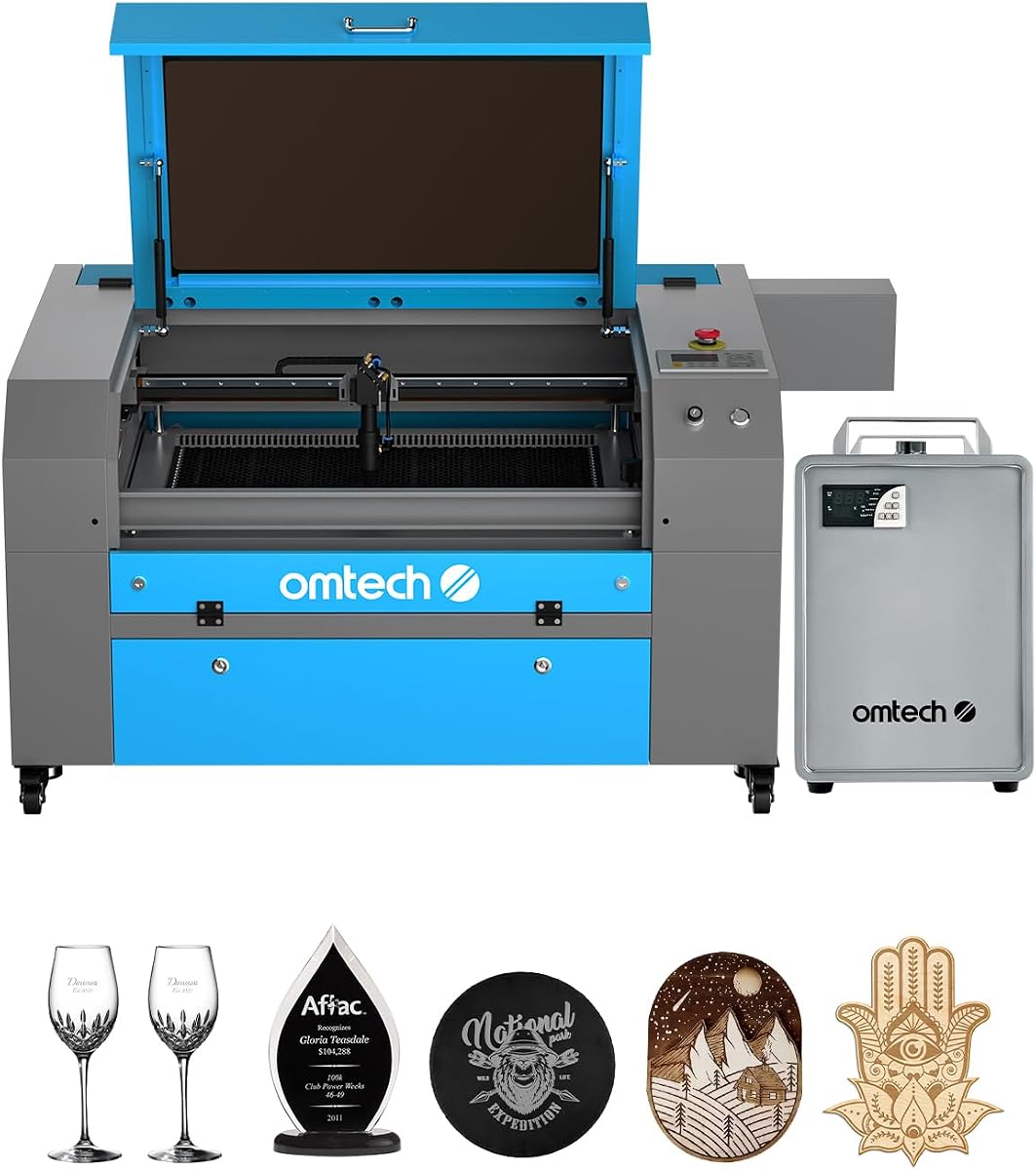
The OMTech K40+ offers a compelling entry point for beginners or hobbyists looking to explore CO2 laser cutting. With a 4.4 rating, it balances cost and performance effectively, providing essential features without the high price tag of industrial models.
We may earn a commission when you buy through this link, at no additional cost to you.
Key strengths include the upgraded 45W laser which delivers decent cutting power for acrylic and wood. The integrated air assist system helps maintain lens cleanliness and reduce fire risks. It also supports popular software like LightBurn, making it versatile for various design needs.
However, the workspace is relatively compact at 12×8 inches which may limit larger projects. Users may also need to perform manual adjustments for focus. These limitations are common in budget-friendly desktop units and are acceptable for the price.
Ideal for DIY enthusiasts or small businesses starting out, this model provides a solid foundation. If you need a reliable machine for smaller projects at a lower cost, the OMTech K40+ is a strong choice.
Supporting both LightBurn and LaserGRBL ensures that users can choose their preferred interface for seamless control from design to finished product.
Includes door and water protection along with an emergency stop function to prioritize user safety during operation.
We may earn a commission when you buy through this link, at no additional cost to you.
The VEVOR 100W CO2 Laser Engraver has garnered a perfect 5.0 rating, reflecting strong user satisfaction. It offers a spacious 24×35 inch workspace which is rare at this price point, making it ideal for larger projects or production runs.
We may earn a commission when you buy through this link, at no additional cost to you.
Its intelligent laser head ensures smooth incisions without burrs, while the digital control panel supports major software like LightBurn and AutoCAD. The front and back pass-through doors provide added flexibility for handling long materials.
While the size is a major benefit, the unit is heavy and may require significant floor space. Setup can also be complex for beginners. These factors are manageable if you prioritize workspace and performance over portability.
For those needing to cut larger items like furniture or signs, this machine is a top contender. It combines power and size effectively, making it a valuable tool for professional or advanced hobbyist use.
The front and back pass-through design allows for processing materials longer than the machine itself, expanding project possibilities.
Includes a transparent tinted window for monitoring progress and an emergency stop for immediate action in case of issues.
We may earn a commission when you buy through this link, at no additional cost to you.
The OMTech Maker 90W is designed for commercial use with a focus on high-speed cutting and durability. It features a 90W tube capable of engraving up to 0.4 inches deep, backed by a water chiller for consistent performance.
We may earn a commission when you buy through this link, at no additional cost to you.
The four-way pass-through doors allow easy access for large items, while the widened viewing window ensures safety during operation. The bundled water chiller is a significant advantage for long sessions, reducing downtime.
Since this product is newer, user ratings may not yet be available. It also requires proper ventilation to handle the exhaust efficiently. These considerations are standard for machines of this power level.
Ideal for small businesses needing speed and reliability, this unit offers a robust configuration. If you require a machine that can handle extended workloads without overheating, the OMTech Maker 90W is worth considering.
The bundled water chiller helps maintain optimal tube temperature, extending lifespan and ensuring consistent laser output.
Four-way pass-through doors simplify the handling of larger or longer items without moving the machine.
We may earn a commission when you buy through this link, at no additional cost to you.
The OMTech Maker 60W is distinguished by its autofocus system which simplifies setup for users. With a 4.7 rating, it offers a reliable commercial bundle that includes essential accessories like a water chiller and LightBurn software.
We may earn a commission when you buy through this link, at no additional cost to you.
The autofocus feature adjusts the workbed automatically, eliminating guesswork for focal distance. Combined with an integrated air assist, it ensures clean cuts and protects the lens. The included software saves on additional costs.
While it has many strengths, it lacks the pass-through doors found on some other models. The price may also be higher than basic 60W units. These trade-offs are acceptable for the convenience it provides.
This machine is great for users who prioritize ease of use and setup speed. If you value an automated workflow and need a solid mid-power solution, the OMTech Maker 60W is a solid recommendation.
The workbed adjusts up and down with a button press, allowing the autofocus to find the right focal distance quickly.
Comes with LightBurn preinstalled, providing intuitive navigation and control without extra software costs.
We may earn a commission when you buy through this link, at no additional cost to you.
Another version of the OMTech K40+ is available with a strong 4.5 rating, highlighting its reliability as a value option. It maintains the core strengths of the 45W performance and compact design suitable for desktop use.
We may earn a commission when you buy through this link, at no additional cost to you.
The integrated air assist system helps clear smoke and debris during operation, ensuring cleaner cuts. It also supports rotary axis attachment for cylindrical objects which adds versatility. Global support is available for technical guidance.
The compact workspace limits it to smaller projects which might not suit larger production needs. Manual focusing is also required which adds a step to setup. These are minor issues for the price and performance.
Best for hobbyists or small workshops needing a reliable entry-level cutter. If you want a machine that balances cost and functionality well, the OMTech K40+ is a consistent choice.
The detachable base and optional rotary axis allow engraving on cylindrical or taller objects expanding creative potential.
24/7 global support and local demos help ensure peace of mind and personalized care.
We may earn a commission when you buy through this link, at no additional cost to you.
The OMTech Pronto 100W is designed for speed and efficiency, featuring a 100W laser tube. It is 37% faster than traditional models, allowing you to transform creative visions into reality quickly.
We may earn a commission when you buy through this link, at no additional cost to you.
It includes advanced autofocus technology to simplify setup and ensure consistent results. The large air pump improves cut quality by reducing burn marks. Safety features like temperature alarms and emergency stops add security.
As a newer model, user ratings are not yet available. The machine is quite large and requires ample space for operation. These factors should be considered when planning your workspace.
Ideal for production environments where time is critical. If you need a machine that balances speed and precision effectively, the OMTech Pronto 100W is a strong contender.
Experience revolutionary engraving speeds of up to 39.4 inches per second with the powerful laser tube.
Equipped with a powerful air pump and fan for precise and clean cuts, reducing material burn.
We may earn a commission when you buy through this link, at no additional cost to you.
The OMTech Pronto 130W has received a perfect 5.0 rating from users, indicating high satisfaction. It offers a massive 51×35 inch workspace, making it suitable for large-scale industrial applications.
We may earn a commission when you buy through this link, at no additional cost to you.
The 130W laser provides deep engraving capabilities and high speeds up to 39.8 inches per second. Autofocus simplifies setup, ensuring precise results. The design prioritizes safety with water protection and emergency stops.
The high price and large footprint are the main considerations. It requires a dedicated space and budget. However, the performance and user feedback make it a top tier option.
Best for large businesses or industrial workshops needing maximum capacity. If you need a machine for heavy-duty tasks, the OMTech Pronto 130W is highly recommended.
Transforms artistic visions into realities with speeds up to 1000 mm/s and deep engraving on various materials.
Comprehensive protection features including water protection, air assist, and temperature alarms prioritize user safety.
We may earn a commission when you buy through this link, at no additional cost to you.
The OMTech K40+ 45W is available in another configuration emphasizing its compact nature. It serves as an accessible entry point for those new to laser cutting or working in limited spaces.
We may earn a commission when you buy through this link, at no additional cost to you.
It supports standard materials like wood and acrylic, making it versatile for small projects. The design is straightforward and easy to maintain. It is particularly useful for hobbyists learning the basics.
The workspace is very limited at 12×8 inches restricting project size. It also lacks advanced features like autofocus. These limitations are acceptable for a compact entry-level unit.
Ideal for beginners or those with tight space constraints. If you want a simple machine to start with, this model is a practical choice.
A great machine for beginners to learn laser engraving and cutting without a large financial investment.
Designed for desktop use, fitting easily into smaller workspaces without sacrificing performance.
We may earn a commission when you buy through this link, at no additional cost to you.
The OMTech Pro 130W is a professional-grade machine designed for industrial use. It features a 130W laser and a built-in water chiller to maintain consistent cooling during operation.
We may earn a commission when you buy through this link, at no additional cost to you.
It achieves speeds up to 1200 mm/s with servo motors for precision. The large workspace accommodates extensive production runs. WiFi connectivity allows for effortless control via touchscreen.
The price and complexity require a dedicated budget and technical knowledge. However, the performance and speed are unmatched in this list. These trade-offs are worth it for production environments.
Best for industrial or professional use cases needing high throughput. If you require maximum performance and reliability, this model is a top choice.
WiFi connectivity allows you to control the laser cutter effortlessly using the Ruida touchscreen.
Servo motors and ball-bearing rails ensure precise and rapid engraving over extended periods.
We may earn a commission when you buy through this link, at no additional cost to you.
Selecting the right CO2 laser cutter involves understanding specific factors that impact performance and safety. This guide outlines key considerations to help you find the machine that suits your workflow and space.
Laser power measured in watts determines how quickly and deeply a machine can cut or engrave. Higher wattage allows for cutting thicker materials and faster speeds, making it essential for production environments.
For hobbyists, 40-60W is often sufficient. For commercial work, aim for 80W or higher to maximize efficiency and capability.
The working area defines the maximum size of material you can process in one pass. It is critical to measure your intended projects to ensure the machine accommodates your needs.
Desktop models offer 12×8 inches while industrial ones can exceed 40×30 inches. Always consider future project sizes when choosing a workspace.
Safety is paramount when using laser equipment. Look for features like Class 1 safety ratings, lid interlocks, and emergency stop buttons to protect against accidental exposure.
Enclosed designs with tinted windows are standard. Ensure the machine meets your local safety regulations before purchasing.
Software compatibility ensures you can import designs and control the machine easily. Most modern cutters support LightBurn or LaserGRBL for seamless operation.
Check if the machine comes with software or requires a purchase. Open-source support offers more flexibility for advanced users.
Engraving and cutting speed affects overall productivity. Faster speeds are ideal for high-volume work but ensure the machine maintains precision at high velocities.
Look for machines with adjustable speed settings to balance quality and efficiency for different materials.
A proper cooling system prevents the laser tube from overheating during extended use. This extends the lifespan of the tube and ensures consistent performance.
Water chillers are often included in commercial models. Verify the cooling method suits your usage frequency.
Air assist helps blow away smoke and debris, protecting the lens and improving cut quality. It also reduces fire risks during operation.
Built-in systems are more convenient than external attachments. Ensure the system is adjustable for different materials.
Reliable customer support and a good warranty provide peace of mind. Technical issues can arise, and timely help is crucial for minimizing downtime.
Check the warranty duration and the availability of local or online support resources before purchasing.
Start by setting up the machine in a well-ventilated area. Ensure all safety interlocks are functional and the area is free from flammable materials before powering on.
Before each use, inspect the mirrors and lens for dust or debris. Clean them gently with appropriate solutions to maintain beam focus and prevent damage. Adjust the focal height based on material thickness.
After operation, allow the machine to cool down and turn off the laser source. Clean the honeycomb bed or knife bed of any residue. Store the machine covered to prevent dust accumulation.
CO2 laser cutters are designed for non-metallic materials such as wood, acrylic, leather, fabric, and paper. They cannot cut metals directly but can engrave them with special coating techniques.
Power needs depend on your projects. Hobbyists can manage with 40-60W, while cutting thick acrylic or wood requires 80W or higher. Higher power generally means faster cutting speeds.
Yes, a water chiller is essential for machines operating for long periods. It keeps the laser tube at a safe temperature, preventing damage and ensuring consistent performance during long jobs.
It is generally not recommended to leave a laser unattended due to fire risks. Always use models with safety features like emergency stops and fire detection systems if you plan extended runs.
Clean the lens regularly with a soft cloth and lens cleaner. Check for scratches and replace if damaged. A clean lens ensures the beam focuses correctly for precise cuts.
Many CO2 laser cutters support third-party software like LightBurn or LaserGRBL. Verify compatibility in the product manual before purchasing external software solutions.
We have reviewed 10 top CO2 laser cutters ranging from budget-friendly options to professional-grade machines. The xTool P3 offers excellent automation, while OMTech models provide solid performance across various price points.
Prioritize factors like power, workspace, and safety features when making your decision. Determine your primary use case to select a model that fits your workflow without unnecessary extras.
Remember that availability and pricing can change frequently. Check current details and reviews on the product pages to confirm the latest specifications before finalizing your purchase.