
amCase Chromebook Case 11.6 to 12 inch
4.6Editor score
Neoprene impact foam padding wrap
Convenient top carrying handle included
Front storage space for cables
Fits most 11 to 12 inch devices
Finding the right Chromebook Sleeve Case is essential for keeping your device safe during daily commutes or travel. A quality sleeve provides cushioning against bumps while offering a sleek look that fits easily into backpacks or briefcases. Whether you need basic protection or advanced features like water resistance, the right case ensures your laptop stays secure.
We evaluated ten top-rated sleeves based on durability, compatibility, and user feedback to create this comprehensive list. Each option was scrutinized for its material quality, zipper strength, and ability to protect against scratches or accidental drops. Our analysis ensures you can compare features side by side to find the perfect fit for your specific laptop model.
Each pick in this guide highlights key strengths and potential trade-offs to help you make an informed decision. We focus on real-world usability and long-term value rather than just initial appearance. Please note that pricing and availability can fluctuate, so checking current details before purchase is always recommended for the best deal.
4.6Editor score

4.7Editor score

4.6Editor score
As an Amazon Associate we earn from qualifying purchases.
This side-by-side comparison reviews all ten selected sleeves to highlight their unique features and specifications for easy decision making.



The Lacdo Chromebook Case stands out with its commitment to sustainability while delivering high protection. It carries a strong rating from users who appreciate the durable materials and thoughtful design elements. This sleeve is built to handle daily use without compromising on eco-friendly production methods.
We may earn a commission when you buy through this link, at no additional cost to you.
Its anti-static barrier prevents electrical damage to your device while the soft lining cushions against scratches. The hydrostatic resistance means accidental spills won't seep inside to ruin your laptop. Front pockets keep chargers and mice organized so you never lose small items in a bag.
The gray fabric may show scuffs over time compared to darker colors. Also, the reinforced construction adds a bit of weight which might matter for ultralight travel. These are minor trade-offs given the excellent protection and ethical sourcing of the materials used.
Buy this if you value sustainability and want robust protection for your Chromebook or small laptop. It is ideal for students or professionals who carry accessories daily and need reliable water resistance.
Made from discarded textiles with GRS certification to reduce waste and environmental impact.
Anti-static barrier and soft velvet lining shield your device from static and physical damage.
We may earn a commission when you buy through this link, at no additional cost to you.
The amCase Chromebook Case offers reliable protection at an entry-level price that fits tight budgets. Users consistently praise its practical design which includes a handle for quick transport without extra bulk. It balances essential features with cost effectiveness making it a top pick for students.
We may earn a commission when you buy through this link, at no additional cost to you.
Neoprene foam wrapping cushions your laptop from bumps while the front pocket holds adapters neatly. The handle adds convenience when grabbing your device on the fly. Despite the low cost, the material feels substantial enough for daily commuting or classroom use.
The handle stitching might loosen if you carry heavier loads frequently. Design-wise it is functional but not stylish for formal settings. These issues are acceptable given the value proposition and core protective performance of the sleeve.
Choose this for basic protection and convenience if you are shopping on a budget. It works well for casual users who need a simple reliable sleeve for school or home office use.
The built-in handle and front pocket simplify carrying and accessory organization without added cost.
Neoprene foam delivers solid shock absorption at a price point accessible to all users.
We may earn a commission when you buy through this link, at no additional cost to you.
FINPAC hard laptop sleeve case provides top tier protection with its rigid shell design. It earns high marks for durability and water resistance which are critical for travelers. The hard shell ensures your device stays safe even if placed under other items in a suitcase.
We may earn a commission when you buy through this link, at no additional cost to you.
Five millimeters of padding shield against drops and bumps effectively. The 1600D polyester outer repels water and resists wear from frequent use. A hand strap adds an extra layer of security when you carry the sleeve separately from a bag.
The hard shell makes the sleeve stiffer and heavier compared to soft fabric options. It may not slide as easily into tight compartments of smaller backpacks. These are reasonable trade-offs for users who prioritize maximum physical protection over flexibility.
Invest in this if you need maximum durability for travel or rugged environments. It is perfect for those who want to ensure their Chromebook survives rough handling during transit.
The semi-hard EVA shell prevents crushing and provides 360 degree physical barrier for your device.
1600D high density polyester offers superior water repellency and wear resistance over standard nylon.
We may earn a commission when you buy through this link, at no additional cost to you.
RAINYEAR 14 inch laptop sleeve case targets larger Chromebooks with a universal fit design. Users report it works well for standard 14 inch models and offers reliable basic protection. The lightweight build ensures it adds minimal bulk to your bag while keeping your device safe.
We may earn a commission when you buy through this link, at no additional cost to you.
Polyester fabric and EPE padding protect against scratches and minor impacts. The top-loading zipper allows quick access without stressing the seams. It is an excellent inner layer to prevent dust buildup on your laptop when stored in a suitcase.
It is not recommended for thicker 14 inch MacBooks due to fit issues. The fit is snug so you must verify dimensions before buying. These limitations do not detract from its value as a standard sleeve for most Chromebook users.
Pick this for standard 14 inch Chromebooks that need reliable basic protection. It suits users who prioritize affordability and lightweight design for daily commuting.
Designed for most 14 inch laptops though always check dimensions for specific models before purchase.
EPE padding and polyester fabric work together to shield against dust scratches and minor bumps.
We may earn a commission when you buy through this link, at no additional cost to you.
Arvok 11 inch laptop sleeve case uses water resistant neoprene to guard against spills. It is designed to slide into backpacks easily without adding bulk to your carry-on. Users appreciate its sleek look and reliable protection for 11 to 12 inch devices.
We may earn a commission when you buy through this link, at no additional cost to you.
The neoprene material cushions against bumps while resisting moisture from rain or coffee. Top loading zipper allows you to grab your device quickly. The slim profile means it fits easily inside larger bags or under airplane seats comfortably.
Neoprene can retain odor if not aired out regularly. The light green color might show signs of wear after prolonged use. These are minor drawbacks considering the overall water resistance and slim utility of the sleeve.
Select this for its water resistance and slim design for daily use. It is ideal for commuters who want a simple stylish option that fits tight spots in bags.
Neoprene material offers multi-dimensional protection against spills and moisture for your laptop.
Lightweight design slides easily into briefcases backpacks or luggage for convenient daily use.
We may earn a commission when you buy through this link, at no additional cost to you.
Voova 13.3 inch laptop sleeve features a unique retractable handle for easy transport. It protects 13 inch laptops with durable oxford fabric that resists water spills. Users value the organized pockets and strong construction for travel and work use.
We may earn a commission when you buy through this link, at no additional cost to you.
The waterproof oxford outer keeps your device dry even on rainy days. Front pockets hold chargers and phones so you have all essentials together. The retractable handle means you can carry the sleeve alone without needing a separate bag.
The handle adds a little bulk when retracted inside the bag. The gray fabric may scuff visibly with heavy daily use. These trade-offs are acceptable for the convenience and extra storage this sleeve provides.
Buy this for the handle convenience and waterproof protection during travel. It suits professionals who carry multiple accessories and need a secure way to grab their laptop quickly.
Retractable handle allows you to carry the sleeve securely without worrying about slipping.
High quality oxford fabric resists water and spills to keep your laptop dry.
We may earn a commission when you buy through this link, at no additional cost to you.
Ferkurn laptop case sleeve delivers maximum slimness without sacrificing protection. It is designed for users who want minimal bulk in their bag. The waterproof and anti-static features add value for those worried about spills and electrical damage.
We may earn a commission when you buy through this link, at no additional cost to you.
Two pockets help organize mouse and cables while keeping them accessible. The anti-static lining prevents electrical discharge that could harm your device. Waterproof fabric gives you confidence when using the sleeve in various weather conditions.
The slim fit may make inserting a thick laptop difficult. Pockets are shallow so they might not hold larger adapters securely. These limitations are minor given the sleek profile and protective qualities of the sleeve.
Choose this if you need the slimmest option for daily travel. It works well for minimalist users who want light protection without adding bulk to their carry.
Ultra-slim design allows easy portability in briefcases or backpacks for travel.
Waterproof fabric and anti-static lining protect your laptop from moisture and electrical damage.
We may earn a commission when you buy through this link, at no additional cost to you.
CCPK 11.6 inch laptop case offers a precise tailored fit for specific models. It emphasizes protection with padded insulation to guard against scratches. Users like the simple design and reliable zipper construction for daily use.
We may earn a commission when you buy through this link, at no additional cost to you.
Heavy-duty zipper pulls resist breaking even with frequent use. The padded insulation keeps your laptop safe from bumps. It is tailored to fit snugly so your device does not shift inside the sleeve.
Sizing can be tight for devices with bulky cases or covers. There is limited room for accessories so you might need another bag. These are acceptable trade-offs for a secure snug fit that protects your laptop.
Pick this for a snug tailored fit for your specific Chromebook model. It suits users who want a simple protective layer with reliable zipper durability.
Tailored shape provides a precise fit for specific models to keep device secure.
Heavy-duty custom zipper pulls ensure reliable long term operation without breaking.
We may earn a commission when you buy through this link, at no additional cost to you.
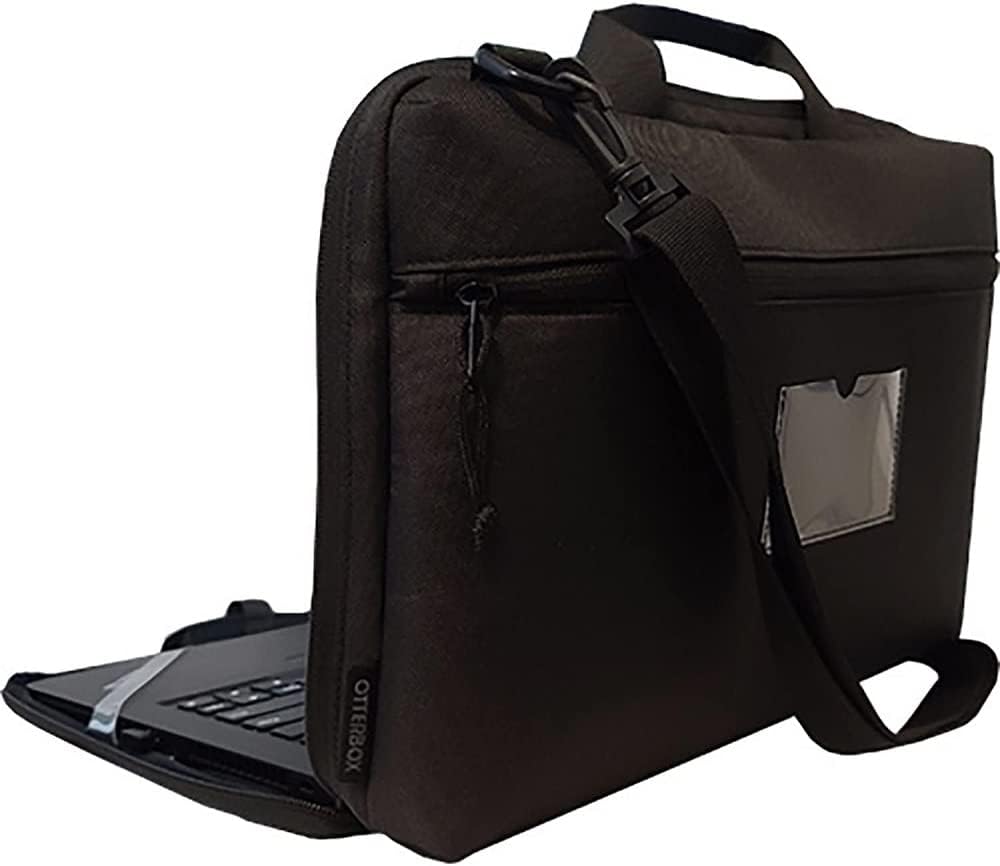
OtterBox OTTERSHELL series offers peace of mind with a lifetime warranty. It includes a shoulder strap for hands-free carrying when you are in a hurry. The asset tag window helps identify your laptop quickly in a crowded office or school.
We may earn a commission when you buy through this link, at no additional cost to you.
Splash-proof polyester protects against accidental spills. The zippered pocket holds chargers securely. OtterBox reputation ensures quality material that stands up to daily wear and tear.
User ratings are lower than other options suggesting fit may vary. The sleeve material feels basic compared to premium options. These are minor cons given the strong warranty and brand support behind it.
Buy this for the warranty and strap convenience for daily commuting. It suits users who value brand reliability and simple hands-free carrying options.
Limited lifetime warranty covers material defects to guarantee quality and customer service.
Asset tag window prominently displays device or student details for easy identification.
We may earn a commission when you buy through this link, at no additional cost to you.
LANDICI 11.6 inch sleeve focuses on storage with multiple pockets for accessories. It protects against spills and scratches with a durable outer and soft lining. Users enjoy the organized design that keeps everything together while traveling.
We may earn a commission when you buy through this link, at no additional cost to you.
Two front pockets hold chargers and earbuds for easy access. The spill-resistant polyester reduces damage from accidental bumps or liquids. The soft velvet lining ensures your device stays scratch-free even with frequent insertion.
Extra pockets add bulk which might not fit in very small bags. You must verify dimensions as the fit can be snug. These are minor issues considering the organizational benefits and protection it offers.
Select this for maximum storage and organization on the go. It is ideal for those who carry many accessories and need to keep them tidy in one sleeve.
Multiple accessory pockets keep chargers and peripherals organized and accessible when traveling.
Spill-resistant outer and soft inner lining protect against damage and scratches effectively.
We may earn a commission when you buy through this link, at no additional cost to you.
Selecting the right Chromebook Sleeve Case depends on various factors including size material protection needs and lifestyle requirements.
Always verify the internal dimensions of the sleeve against your Chromebook physical measurements. Screen size alone is not enough since chassis dimensions vary by brand and model. A snug fit prevents movement while too much space reduces protection against bumps.
Check internal dimensions before buying to ensure your laptop fits securely without being too tight.
Common materials include neoprene polyester and oxford fabric each offering different levels of water resistance and shock absorption. Neoprene is flexible and soft while harder shells offer maximum impact protection. Look for reinforced seams and quality zippers to ensure longevity.
Prioritize reinforced seams and quality zippers for long-term durability in daily use.
Water resistant or waterproof materials are critical if you commute or travel outdoors regularly. Spills from drinks or rain can damage electronics quickly without proper protection. Look for sleeves with treated fabrics or hard outer shells to keep moisture out effectively.
Choose treated fabrics or hard shells to keep moisture out during travel or outdoor use.
Extra pockets help organize chargers mice and cables so you do not lose them in a bag. However too many pockets may add bulk to the sleeve. Decide if you need a minimalist design or extra organization for accessories.
Decide between minimalist design and extra organization based on your daily accessory needs.
Some sleeves include handles or straps which simplify carrying without a separate bag. Retractable handles save space when not in use. If you carry your laptop alone often look for ergonomic handles that do not strain your hand.
Look for ergonomic handles or straps if you carry the sleeve separately from a bag often.
Consider how much protection you need based on your environment. Soft sleeves work for office use while hard shells are better for travel. Ensure the lining is soft enough to prevent scratches but thick enough to absorb shocks effectively.
Ensure the lining is soft enough to prevent scratches but thick enough to absorb shocks.
Brands with warranties provide peace of mind against manufacturing defects. A good customer service team can replace a faulty zipper or seam. Check product details for warranty terms before finalizing your purchase decision.
Check product details for warranty terms to ensure support against manufacturing defects.
Price varies widely but expensive does not always mean better. Set a budget and find the best features within that range. Often mid-range options offer the best balance of durability and price for average users.
Set a budget and find the best balance of durability and price within your range.
Place your laptop gently into the sleeve ensuring it sits flat and centered to avoid unnecessary pressure on edges. Check that zippers are fully closed before placing the sleeve in a larger bag to prevent scratches.
Clean the exterior of the sleeve regularly using a damp cloth to remove dust and debris. For stubborn stains mild soap can be used but avoid soaking the material which may damage padding or waterproof coatings.
Avoid storing heavy items directly on top of the laptop inside the bag. If traveling frequently inspect the seams and zippers regularly to catch wear early and extend the lifespan of your sleeve.
You need to measure the physical dimensions of your Chromebook including width height and depth. Compare those numbers with the internal dimensions of the sleeve listed in product details. Do not rely solely on screen size since chassis sizes vary significantly between models.
A sleeve offers good protection against scratches and minor bumps inside a backpack. For rough travel or heavy cargo consider adding a hard case or placing the sleeve in a padded compartment. Soft sleeves alone may not stop major impacts if dropped from height.
Most sleeves are sized for specific laptop ranges so swapping between devices may lead to fit issues. If your devices differ significantly in size check universal options but expect a looser fit. It is best to use a dedicated sleeve for one primary device.
Neoprene offers better shock absorption and water resistance than plain fabric but may retain moisture longer. Fabric sleeves like oxford or polyester are lighter and dry faster. Choose based on whether you prioritize cushioning or quick drying for your use case.
Wipe the outside with a damp cloth and mild soap avoiding soaking the material. For interiors gently brush out dust or air them out occasionally. Always let the sleeve dry completely before storing your laptop inside to prevent mold.
Some premium brands like OtterBox offer limited warranties while others do not. Check the product details for warranty terms before buying to ensure support against defects. Most standard sleeves are sold without long term warranty coverage.
This guide highlights the top 10 Chromebook Sleeve Case options including top picks like Lacdo amCase and FINPAC for specific needs. Each model was evaluated on protection size and extra features to help you find the right match for your device.
Prioritize fit and material quality over brand name to ensure your laptop stays safe. Whether you want budget friendly or premium waterproof protection these options cover most scenarios for students and professionals alike.
Prices and availability can change quickly so always verify current details before purchasing. Use the comparison table to narrow down your choice and ensure your selected sleeve meets your daily requirements perfectly.