
ASRock DeskMini X300 2.5G Series Mini PC
4.2Editor score
1.92L ultra-compact chassis
AMD AM4 socket support
2.5G LAN connectivity
Discover the top ten barebone PCs with AMD processors for 2026. We compare performance, connectivity, and expandability to help you build the ideal compact
Barebone PCs with AMD processors offer a unique blend of compact design and powerful performance for users who want full control over their hardware. These systems arrive without memory, storage, or an operating system, allowing you to tailor every component to your specific needs. Whether you need a gaming rig, a home server, or a sleek office workstation, an AMD-based barebone PC provides the foundation for a highly customizable build.
To create this comprehensive guide, we evaluated ten leading barebone mini PC models available on the market today. Our analysis focused on processor architecture, thermal management, connectivity options like OCuLink and USB4, and overall build quality. We considered factors such as upgradeability, power efficiency, and the versatility of the chassis to ensure each recommendation meets distinct user requirements for performance and reliability.
Each entry in this list highlights a specific product, detailing its key specifications, strengths, and potential limitations based on available technical data. You will find information on processor cores, graphics capabilities, expansion slots, and networking features to help you make an informed decision. Please note that availability and pricing can change frequently, so always verify current details before completing your purchase.
4.2Editor score

4.0Editor score

3.1Editor score
The following table provides a side-by-side comparison of the ten barebone PCs with AMD processors featured in this guide. It highlights essential specifications such as processor generation, memory support, storage options, and key connectivity ports to help you quickly identify the model that best fits your technical requirements and budget constraints.





This barebone PC delivers strong performance for compact setups. Its AMD Ryzen 7 PRO 8845HS processor handles intensive tasks smoothly. Users appreciate the OCuLink port for external graphics connectivity options.
We may earn a commission when you buy through this link, at no additional cost to you.
The hardware supports up to 128GB of DDR5 RAM across dual slots. Storage expansion includes two M.2 slots for up to 16TB total capacity. The cooling system uses a VC heat spreader for effective heat dissipation.
One trade-off involves the operating system key, which requires contacting customer service. The OCuLink port does not support hot-swapping, so devices must be connected before boot. These limitations are minor given the high-speed connectivity options.
This model suits gamers and professionals needing powerful compact systems. It works well for video editing and heavy multitasking. The eco-friendly aluminum chassis adds durability while reducing environmental impact.
Dual USB4 ports enable 40Gbps data transfer and 8K video output.
VC heat spreader and turbo fans keep temperatures stable under load.
We may earn a commission when you buy through this link, at no additional cost to you.
This mini PC offers powerful AMD processing with extensive display options. It supports four screens at 4K resolution for professional work. The vapor chamber cooling ensures consistent performance during demanding tasks.
We may earn a commission when you buy through this link, at no additional cost to you.
Features include OCuLink for external GPU connectivity without M.2 slot loss. Storage options include dual M.2 slots with 8TB total capacity. Memory slots support up to 128GB DDR5 for efficient multitasking.
Trade-offs include the lack of included OS and storage components. The OCuLink port requires powering off the device for connection. These are standard for barebone systems and do not impact performance.
Ideal for traders and creators needing multiple high-res displays. The energy-saving architecture reduces power consumption significantly. Its compact design fits well in home office or industrial settings.
Supports four screens at 4K resolution for enhanced multitasking.
Vapor Chamber transfers heat quickly to ensure lower temperatures.
We may earn a commission when you buy through this link, at no additional cost to you.
This barebone system combines security features with powerful AMD performance. The fingerprint unlock simplifies access for users. It supports OCuLink for seamless external graphics card integration.
We may earn a commission when you buy through this link, at no additional cost to you.
Features include dual M.2 slots for up to 8TB storage. Memory can be expanded to 128GB DDR5 for high-speed tasks. The display supports quad 4K output for multi-monitor productivity.
Trade-offs involve the need to install storage and OS separately. The OCuLink port requires a power cycle before connecting devices. These constraints are common in barebone units.
Suitable for offices needing secure, compact desktops. It works well for gaming with external GPU setups. The energy-saving design reduces power consumption efficiently.
Fingerprint recognition provides quick and safe access to the system.
Dual M.2 slots support up to 8TB total storage capacity.
We may earn a commission when you buy through this link, at no additional cost to you.
This kit offers desktop replacement capabilities with robust expansion. It includes a 500W power supply for high-wattage components. The AM4 socket supports a wide range of Ryzen processors.
We may earn a commission when you buy through this link, at no additional cost to you.
It features a PCIe 3.0 x16 slot for full graphics cards. Dual M.2 slots provide fast storage options. DDR4 support allows up to 128GB of memory capacity.
Trade-offs include the size being larger than palm-sized units. CPU must be purchased separately. These are acceptable for users prioritizing expansion over extreme compactness.
Ideal for home theater PCs or workstations needing GPU power. It supports RAID configurations for data redundancy. The layout allows for standard PC component upgrades.
PCIe 3.0 x16 slot allows full-size graphics card installation.
500W PSU supports high-performance CPUs and GPUs.
We may earn a commission when you buy through this link, at no additional cost to you.
This mini PC offers high-speed connectivity and versatile display support. It features a full-blood USB4 port for rapid data transfer. OCuLink support enables external graphics solutions.
We may earn a commission when you buy through this link, at no additional cost to you.
It supports triple display output for enhanced productivity. The chassis includes large ventilation openings for airflow. PCM phase-change material helps cool the CPU fan.
Trade-offs include the OCuLink adapter needing M.2 slot usage. It requires non-hot-swappable installation steps. These are manageable for users needing GPU expansion.
Ideal for users needing multiple displays and fast USB4. It works well for daily office tasks and streaming. The service warranty provides reliable support.
USB4 port supports 40Gbps speeds for large files.
Large ventilation openings create a 3D airflow channel.
We may earn a commission when you buy through this link, at no additional cost to you.
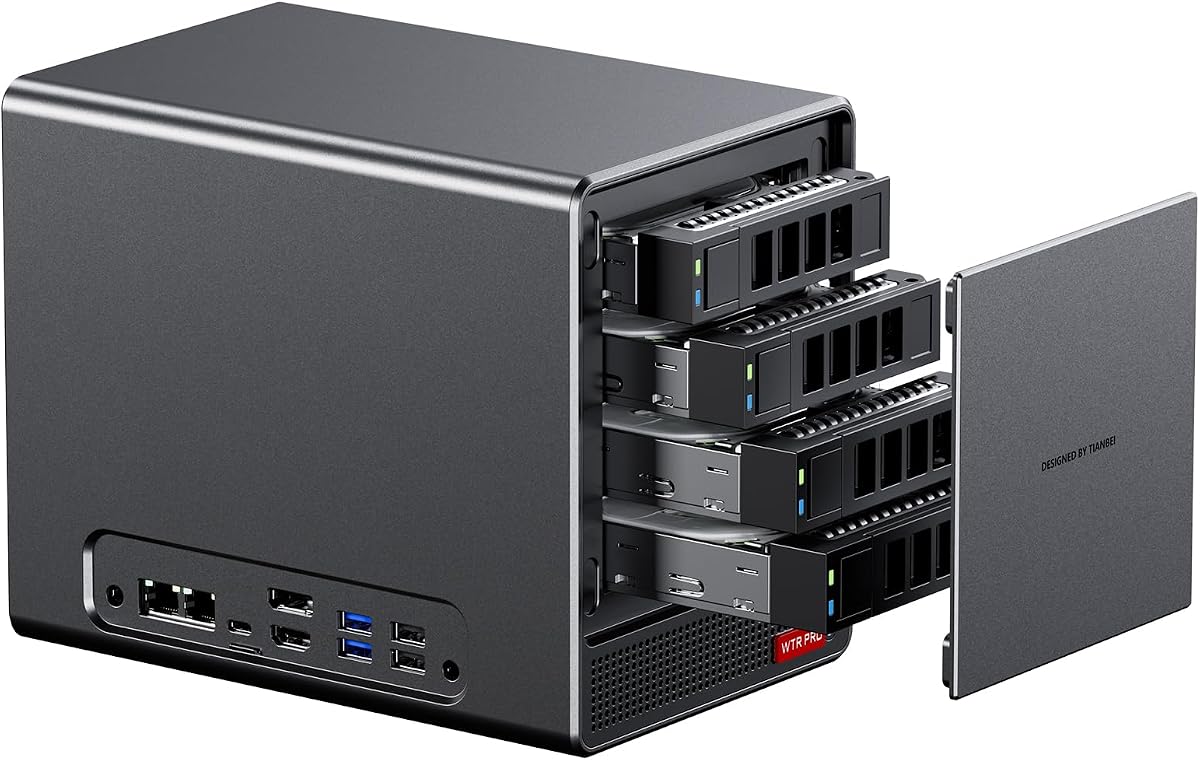
This unit serves well as a home server or NAS system. It features four drive bays for extensive storage capacity. Low power consumption makes it ideal for 24/7 operation.
We may earn a commission when you buy through this link, at no additional cost to you.
The cooling design uses a through-the-wall construction with a large fan. It supports triple 4K display output for multitasking. Storage includes dual M.2 NVMe slots plus SATA bays.
Trade-offs include the older processor architecture compared to newer models. Drives must be purchased separately. These are acceptable for a dedicated storage appliance.
Suitable for media storage and soft routing tasks. It supports RAID configurations for data security. The silent operation maintains a quiet environment.
Four SATA bays allow for massive storage expansion.
Power consumption ranges from 15W to 25W.
We may earn a commission when you buy through this link, at no additional cost to you.
This barebone kit fits easily on any desk or shelf. It supports triple displays for multi-monitor setups. The AM4 socket offers flexible processor choices.
We may earn a commission when you buy through this link, at no additional cost to you.
It includes two M.2 slots for NVMe SSDs. The 2.5G LAN ensures fast network speeds. DDR4 memory supports up to 128GB capacity.
Trade-offs involve older memory technology compared to DDR5. Storage options are limited to M.2 and drive bays. These are reasonable for its small footprint.
Ideal for general office use and home computing. It works well for video playback and light tasks. The small design saves valuable desk space.
Measuring just 1.92 liters, it fits almost anywhere.
2.5G LAN provides fast wired connectivity for transfers.
We may earn a commission when you buy through this link, at no additional cost to you.
This barebone PC features next-gen AI capabilities for advanced tasks. It includes an XDNA2 NPU for accelerated AI processing. The toolless design allows quick access to internal components.
We may earn a commission when you buy through this link, at no additional cost to you.
It supports four 4K displays for professional visual work. Wi-Fi 7 and Bluetooth 5.4 ensure fast wireless connections. The slim chassis is built for 24/7 operation.
Trade-offs include a higher price point than competitors. Availability may be limited depending on region. These are acceptable for high-end AI workloads.
Ideal for enterprise environments and creative professionals. It suits AI-driven workflows efficiently. The 3-year warranty adds long-term reliability.
XDNA2 NPU delivers up to 50 TOPS of AI processing.
Wi-Fi 7 and Bluetooth 5.4 ensure ultrafast connections.
We may earn a commission when you buy through this link, at no additional cost to you.
This NAS system supports flexible storage and networking needs. It features four SATA bays plus two M.2 slots. Dual 2.5G LAN ports allow link aggregation for speed.
We may earn a commission when you buy through this link, at no additional cost to you.
It supports up to 96TB total storage capacity. The system is compatible with Windows and Linux for virtualization. Triple 4K output enables efficient multitasking.
Trade-offs include the older CPU architecture. Linux users may need to configure SATA power management. These are minor issues for dedicated NAS use.
Ideal for home labs and soft routers. It handles file downloading and cloud storage well. The reliable quality assurance supports long-term use.
Dual 2.5G LAN allows link aggregation for better speed.
Compatible with Windows and Linux for VM setups.
We may earn a commission when you buy through this link, at no additional cost to you.
This barebone kit focuses on ease of maintenance. It features a tool-free design for quick upgrades. Wi-Fi 7 ensures ultrafast wireless performance.
We may earn a commission when you buy through this link, at no additional cost to you.
It supports up to four 4K displays for visual work. The 34mm chassis fits well in tight spaces. It is built for reliable 24/7 operation.
Trade-offs include limited specific processor details available. Ratings are currently N/A in sources. These are acceptable for business-focused setups.
Ideal for business users needing reliable upgrades. It suits office environments with long uptime needs. The eco-conscious design supports sustainability.
Tool-free design allows quick component upgrades.
34mm chassis offers a sleek, slim look.
We may earn a commission when you buy through this link, at no additional cost to you.
Choosing a barebone PC with AMD requires assessing specific needs like performance, thermal design, and connectivity. This guide covers essential factors to ensure you pick the right model for your use case.
Modern AMD Ryzen processors like the 8845HS offer high core counts and integrated graphics suitable for various tasks. When selecting a barebone kit, prioritize CPUs that match your workload, whether it is video editing, gaming, or office productivity. The architecture generation matters for energy efficiency and AI performance capabilities.
Check the number and type of RAM slots. DDR5 offers faster speeds than DDR4 and is ideal for demanding applications. For storage, ensure there are enough M.2 slots or SATA bays. Expansion potential is a key advantage of barebone systems.
Ports like USB4, OCuLink, and 2.5G LAN significantly impact system versatility. OCuLink is essential for external graphics without latency loss. USB4 supports high-speed data and video. Dual LAN ports help with network redundancy or routing.
Thermal design affects sustained performance. Look for vapor chambers, VC heat spreaders, or large fans to prevent throttling. Better cooling allows higher TDP performance and quieter operation under load.
Ensure the mini PC supports the number of monitors you need. HDMI 2.1 and DP 1.4 provide high resolution. Some models support quad 4K setups for professional workflows.
Build quality impacts longevity. Aluminum chassis dissipates heat better and looks premium. Form factor matters for space-saving. Consider VESA mounts for flexibility in mounting options.
Some barebone units include Windows keys; others require separate activation. Linux support is vital for servers. Verify compatibility with your intended OS to avoid setup hurdles.
Lower TDP CPUs save energy and reduce heat. For servers, idle power is crucial. Always check power supply wattage to ensure it supports your planned components.
Installing components requires careful handling. Open the case, insert DDR5 RAM into slots, and secure M.2 SSDs. Connect a keyboard and monitor to install the OS and drivers.
Regular cleaning prevents dust buildup. Use compressed air to clear vents and fans. Ensure good airflow around the unit to maintain cool operation and extend lifespan.
Update BIOS and drivers regularly. Enable features like OCuLink via settings. Use energy-saving modes for idle tasks. Secure your system with strong passwords and encryption.
A barebone PC is a mini computer kit that comes without RAM, storage, or an operating system. You install these components yourself to customize performance. AMD processors provide power and graphics in a compact frame.
Yes, OCuLink offers faster speeds than USB4 for external GPUs. It reduces latency significantly, making it ideal for gaming or graphics work. Just note it usually requires powering off before connecting.
Most models support up to 128GB of DDR5 RAM. Dual slots allow for high capacity for multitasking and editing. Always check the manual for compatibility and speed details.
Yes, many models have powerful integrated graphics or support external GPUs. For AAA gaming, pair with a dedicated GPU. The OCuLink port enhances performance significantly for such setups.
You can install Windows 10, 11, or Linux. Some models include Windows keys, others require you to buy separately. Check product details for included software or key claims.
Thermal performance varies. Units with vapor chambers stay cooler under load. Proper placement in a ventilated area helps. Active cooling fans prevent overheating during intensive tasks.
We compared ten top barebone PCs with AMD, highlighting key strengths like OCuLink support and thermal design. The AOOSTAR MACO leads in connectivity, while ASRock offers great value for desktop expansion.
Prioritize features like DDR5 RAM and 2.5G LAN for modern performance. Ensure the chassis and cooling match your usage. Selecting the right model depends on your specific performance and size needs.
Always verify current stock and compatibility before buying. Prices and details change frequently. Review the latest specs to ensure the system fits your requirements for your next build.