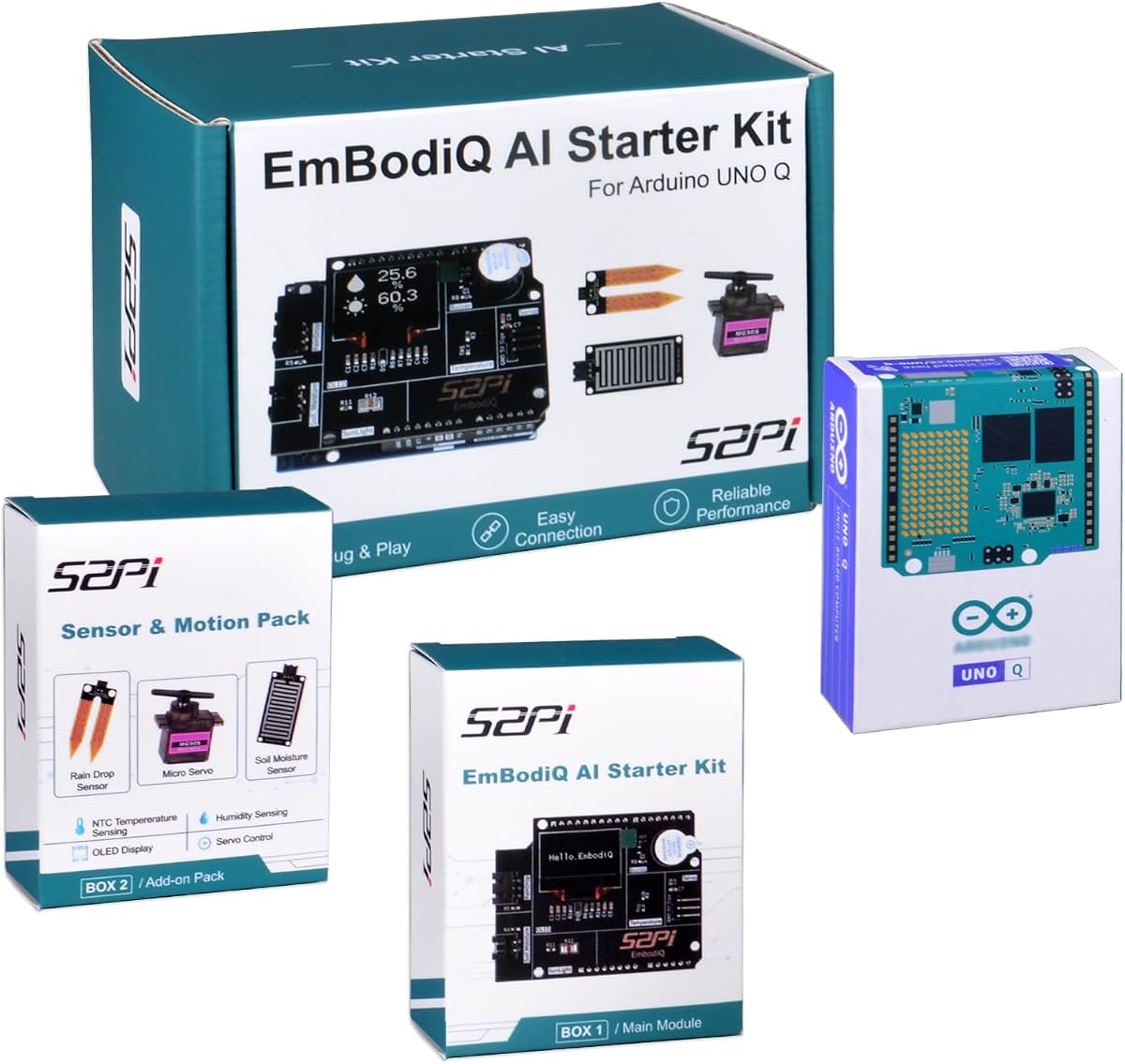
GeeekPi EmbodiQ AI Starter Kit
3.7Editor score
Natural Language Control HAT
AI Agent Onboard
Sensor Suite Included
This guide compares the best Arduino Uno Q boards and kits for AI robotics and Linux development featuring hybrid processing and connectivity options for
The Arduino Uno Q represents a significant leap forward in embedded development by combining classic microcontroller simplicity with modern processing power. It supports Linux Debian and AI workloads while keeping the familiar form factor.
We evaluated each board based on processor capabilities, memory configuration, connectivity options, and ecosystem support. Our analysis focuses on real-world performance for robotics AI vision and industrial IoT use cases.
Each selection highlights unique strengths whether you need raw AI power or a complete starter kit. Prices and availability vary so verify current details before purchasing for your specific project requirements.
3.7Editor score

4.4Editor score

4.7Editor score
This table provides a side-by-side overview of all selected products highlighting key specifications and unique features to help you make an informed decision.


The Arduino UNO Q 4GB stands out as the top choice for developers who need AI capabilities without sacrificing the classic Arduino experience. It earns a 4.4 rating for its unique ability to run Linux Debian while maintaining full compatibility with Arduino libraries and sketch code.
We may earn a commission when you buy through this link, at no additional cost to you.
Its dual-brain architecture combines a Qualcomm MPU for heavy AI processing with an STM32 MCU for real-time control. This setup allows you to run Python scripts for object recognition while simultaneously managing motor drivers or sensors with low latency.
The main trade-off is complexity. You must decide whether to use the board as a microcontroller in Arduino IDE or as a full single-board computer. For users seeking maximum flexibility for IoT and robotics projects this is a worthwhile compromise.
This board is best for professional engineers and advanced hobbyists building autonomous robots or smart devices. If you need to deploy machine learning models on the edge while keeping familiar development tools this is the strongest option available.
Combining an MPU and MCU lets you handle complex AI tasks alongside real-time hardware control without external computers.
Running Debian OS unlocks Python scripting and powerful libraries for vision and audio processing right on the board.
We may earn a commission when you buy through this link, at no additional cost to you.
This kit offers the same powerful AI board as the standard Uno Q but includes a dedicated 45W USB-C power supply for stability. It is a practical choice for users who want to ensure reliable operation during heavy workloads without sourcing extra cables.
We may earn a commission when you buy through this link, at no additional cost to you.
The high-performance RAM enables advanced AI models and multitasking directly on the edge. This is crucial for robotics and automation where consistent power prevents crashes during critical motion control or data logging tasks.
The lack of a user rating means you should rely on the official specs for evaluation. However, the inclusion of a regulated power adapter addresses a common concern for developers running multiple peripherals or high-current motors.
Buy this if you are building scalable AI systems and want a streamlined setup. It ensures your board has enough power for heavy computing tasks and wireless communication without voltage drops.
The 45W supply ensures your board runs smoothly even when connected to multiple high-power sensors or motor drivers.
Designed for industrial IoT this kit supports wireless communication and complex data processing reliably.
We may earn a commission when you buy through this link, at no additional cost to you.
The GeeekPi Starter Kit provides everything needed to use the Uno Q as a full single-board computer. With a rugged aluminum case and USB-C hub with Ethernet this solution addresses physical protection and connectivity gaps for desktop environments.
We may earn a commission when you buy through this link, at no additional cost to you.
While it uses a 2GB RAM variant the included accessories make it ideal for prototyping AI tasks where visual output and stable network access are needed. The Ethernet support is particularly useful for industrial applications that require wired reliability.
The aluminum case helps with heat dissipation which is critical when running Linux or high CPU workloads. This makes it safer for unattended projects compared to a bare board setup exposed to dust or static.
Choose this kit if you need a ready-to-use system for embedded development. It saves time on sourcing cables and cases and ensures your board is protected during transport and testing.
The USB-C hub with Ethernet expands the board options for professional applications beyond standard wireless setups.
The aluminum housing protects the board from physical damage while keeping it cool during extended operation.
We may earn a commission when you buy through this link, at no additional cost to you.
The Uno REV3 remains the gold standard for beginners entering electronics and programming. With a 4.8 rating it is widely used in education for learning basic I/O logic and sensor interfacing.
We may earn a commission when you buy through this link, at no additional cost to you.
While it lacks the AI power of the Q series it provides a solid foundation for understanding how microcontrollers work. Its compatibility with thousands of libraries and shields means you can add functionality without writing low-level code.
The limitation is that it requires external modules for wireless communication or complex data handling. However for simple automation or educational projects this reliability makes it a safer choice than newer complex boards.
Pick this if you are just starting or need a stable controller for basic tasks. It ensures you spend less time debugging and more time building functional projects quickly.
Used globally in schools this board simplifies learning electronics with clear documentation and examples.
The ATmega328P offers stable performance for everyday DIY projects without the complexity of Linux.
We may earn a commission when you buy through this link, at no additional cost to you.
This kit introduces natural language control which is unique among Arduino products. It uses an AI Agent HAT to interpret commands like turn on servo or check soil moisture without complex coding.
We may earn a commission when you buy through this link, at no additional cost to you.
The 4GB RAM supports the heavy processing needed for local or cloud AI reasoning. It supports multiple API providers allowing you to switch models depending on cost or privacy needs.
The lower rating suggests some complexity in setup for novice users. However for those who want to experiment with voice interfaces or smart automation without writing parsing code this is a powerful tool.
Ideal for makers interested in smart gardening or weather stations. It simplifies interaction by letting you speak or type commands instead of writing traditional programming loops.
Talk to your hardware to control sensors and motors without writing complex conditionals in code.
Includes soil moisture and rain sensors to demonstrate real-world environmental monitoring capabilities easily.
We may earn a commission when you buy through this link, at no additional cost to you.
The UNO R4 WiFi offers a powerful dual-core design at an affordable price. It combines a Renesas MCU for logic and an ESP32 for wireless connectivity making it great for IoT projects.
We may earn a commission when you buy through this link, at no additional cost to you.
With Bluetooth 5.0 and WiFi support it connects easily to phones or home networks. The built-in LED matrix allows for visual feedback without adding extra screens.
While it does not run Linux like the Q series it is efficient for data logging or smart home automation. Its 4.7 rating reflects high reliability and ease of use for connected projects.
Choose this for budget-conscious projects requiring wireless features. It balances performance and cost better than any other board in this list.
Built-in ESP32-S3 ensures robust communication for IoT projects without needing shield modules.
The LED matrix displays status updates or messages directly on the board for user interaction.
We may earn a commission when you buy through this link, at no additional cost to you.
This kit is designed for learning electronics step-by-step. It includes an UNO R3 along with sensors motors and an LCD to teach core concepts like timing and input handling.
We may earn a commission when you buy through this link, at no additional cost to you.
The PDF tutorials guide you through real-world results like reading temperature or moving motors. This structured approach is ideal for classrooms or family projects where you need a clear path forward.
Since it is based on the classic R3 it lacks modern WiFi or AI features. However for teaching fundamentals and understanding hardware logic it is one of the most complete kits available.
Buy this if you are teaching someone else or need a comprehensive set of parts. It provides everything you need to start coding and building without hunting for extra components.
The 22 lessons build your skills gradually from simple LED blinking to complex motor control.
Includes resistors LEDs sensors and motors so you can build multiple projects with one purchase.
We may earn a commission when you buy through this link, at no additional cost to you.
This single board provides a reliable and affordable option for basic projects. It includes the necessary USB cable to upload code directly to a computer.
We may earn a commission when you buy through this link, at no additional cost to you.
The ATmega328P core handles everyday tasks like controlling LEDs or reading buttons. Its high rating indicates consistent quality for users needing a simple controller.
It lacks modern connectivity features like WiFi or Bluetooth. If your project does not need internet access this is a practical and easy to find alternative.
Choose this for simple automation or educational setups where budget is key. It offers all the essential features without extra cost for unused technology.
The ATmega328P has been tested in millions of projects ensuring consistent performance and support.
Includes a USB cable for immediate connection so you can start uploading code right away.
We may earn a commission when you buy through this link, at no additional cost to you.
This board offers the classic Arduino experience with standard I/O pins and communication protocols. It is a versatile choice for hobbyists who need a basic controller.
We may earn a commission when you buy through this link, at no additional cost to you.
It includes the necessary USB cable for programming. While ratings are slightly lower than other R3 versions the core functionality remains identical.
The lack of wireless connectivity limits its use to wired projects. However for simple logic control or prototyping this is a standard reliable option.
Pick this for straightforward robotics or home automation projects. It provides the essential pins you need to connect sensors and motors easily.
Supports UART SPI and I2C to connect with a wide range of displays and sensors easily.
Works with most Arduino shields so you can expand functionality without redesigning your circuit.
We may earn a commission when you buy through this link, at no additional cost to you.
This board offers compatibility with both Arduino and Raspberry Pi ecosystems making it flexible for mixed setups. It supports the standard voltage range for most hobby projects.
We may earn a commission when you buy through this link, at no additional cost to you.
It is an affordable option for users who need multiple controllers for testing. The inclusion of a USB cable simplifies initial setup and programming.
As a generic board documentation may be less detailed. However the specs match the official UNO R3 ensuring it works with standard libraries.
Choose this for projects requiring many boards or tight budgets. It provides the necessary hardware to run your sketches without premium pricing.
Designed to work with both Arduino and Raspberry Pi setups for mixed environment integration.
Accepts 7 to 12 volts input which is standard for most power supplies and battery packs.
We may earn a commission when you buy through this link, at no additional cost to you.
Choosing the right board depends on your project requirements regarding AI needs connectivity and budget.
The Arduino Uno Q features a hybrid architecture with a Qualcomm MPU and STM32 MCU. This dual-brain setup is ideal for projects that need both real-time control and complex AI processing. If you only need basic automation consider the classic R3 or R4 for simplicity.
Look for hybrid processors if you plan to run local machine learning models. They provide the necessary power for edge computing without external servers.
Memory size directly impacts how much data your board can handle. The Q models offer 4GB RAM and 32GB storage which supports multitasking and large libraries. Lower models like the Starter Kit have 2GB RAM which is sufficient for lightweight tasks.
Select higher RAM for complex vision or audio projects. For simple sensor reading standard microcontrollers are more than adequate.
Linux Debian support on the Uno Q unlocks Python development and full desktop tools. This is crucial for developers who need a robust software environment alongside hardware control. Other boards rely on Arduino IDE and C++ code.
Choose Linux support if you need Python scripting or containerized models. It simplifies debugging and allows for complex application logic.
Wireless capabilities like Wi-Fi and Bluetooth are essential for IoT applications. The R4 WiFi offers built-in wireless features while the Q boards provide dual-band Wi-Fi 5. Wired options like Ethernet are available via USB-C hubs.
Ensure your board matches your network needs. Built-in wireless saves space while wired connections offer better stability for industrial sensors.
Physical durability matters for outdoor or mobile robots. Kits that include aluminum cases protect against dust and impacts. The standard Q board is bare so you may need to source an enclosure separately.
Prioritize boards with protective cases for outdoor use. This reduces maintenance and prevents short circuits from debris.
Access to libraries and community support speeds up development. All Arduino boards support the standard IDE but the Q adds Linux support for Python. This expands your options for third-party tools.
Check if your favorite libraries are compatible. The Q supports both Arduino Sketches and Python scripts offering maximum flexibility.
Modern boards require stable power for high processing loads. The Q series benefits from USB-C power supplies to prevent brownouts during AI tasks. Some kits include specific adapters for this purpose.
Invest in a quality power supply to avoid data loss. Stable power ensures consistent performance for long running projects.
Cost varies significantly between basic R3 boards and premium AI kits. Determine if you need AI capabilities or just basic logic. High-end kits offer better value if you need a complete solution.
Balance your budget with required features. For simple learning the R3 is unbeatable but for AI the Q is a worthwhile investment.
To get started with the Uno Q install the Arduino App Lab on your computer. This provides the interface to upload code whether you are using C++ Sketches or Python scripts.
For AI tasks connect a display and keyboard to the USB-C port to boot into Debian. This allows you to manage files and run Python models directly on the board.
Store your boards in a dry cool place to prevent overheating. Use a protective case when transporting the Q board to avoid physical damage to the sensitive pins.
Yes the Arduino Uno Q features support for Linux Debian OS. You can boot into a full desktop environment to run Python scripts or other applications. This makes it unique compared to standard microcontrollers that run only embedded code.
Yes the Uno Q maintains full compatibility with the Arduino IDE. You can use standard Sketches alongside Linux scripts. This hybrid approach lets you reuse existing libraries while adding new capabilities.
Yes the Uno Q includes dual-band Wi-Fi 5 and Bluetooth 5.1. It connects directly to networks without extra modules. This is essential for IoT projects that need to send data wirelessly.
The Arduino Uno REV3 is best for beginners due to its simplicity and vast community support. It is affordable and easy to learn. Once you master basics you can move to the more powerful Uno Q for complex tasks.
Yes you can use Python on the Arduino Uno Q since it runs Linux Debian. This allows you to write scripts for vision or audio processing. You can also mix Python with C++ for maximum flexibility.
The Q model has a dual-processor design and runs Linux allowing for heavy AI. The R4 uses a single microcontroller with WiFi. Q is for advanced edge AI while R4 is for standard IoT and home automation.
The Arduino Uno Q series introduces hybrid processing that changes what embedded boards can do. The Editor's Choice stands out for its balance of Linux support and real-time control.
For those needing specific features like natural language interaction the EmbodiQ Kit offers a specialized solution. Beginners may prefer the classic R3 or R4 for simpler and more affordable projects.
Prices and availability change frequently so check the latest details before buying. Choose the board that matches your specific AI and connectivity needs.