
HP OmniBook 3 14 inch Next Gen AI PC
4.4Editor score
Snapdragon X X1-26-100 Processor
Up to 41 hours battery life
2K OLED Display
AI laptops are transforming how we work and create by integrating powerful neural processing units directly into the hardware. These devices offer smarter performance, longer battery life, and seamless integration with intelligent assistants that adapt to your workflow without slowing you down.
We evaluated the top models based on processor efficiency, display quality, memory capacity, and real-world AI capabilities. Each selection balances speed and portability, ensuring you get reliable performance for multitasking, creative projects, or everyday productivity on the go.
Every pick highlights key strengths like battery endurance, screen clarity, or specialized AI tools designed to streamline your day. Prices and availability change frequently, so check current listings before buying to ensure you get the best value for your specific needs and budget today.
4.4Editor score
4.8Editor score

5.0Editor score
As an Amazon Associate we earn from qualifying purchases.
The following comparison table outlines the core specifications of every selected AI laptop. Use this side-by-side view to quickly assess processor types, memory size, storage capacity, and display features before making your final decision.


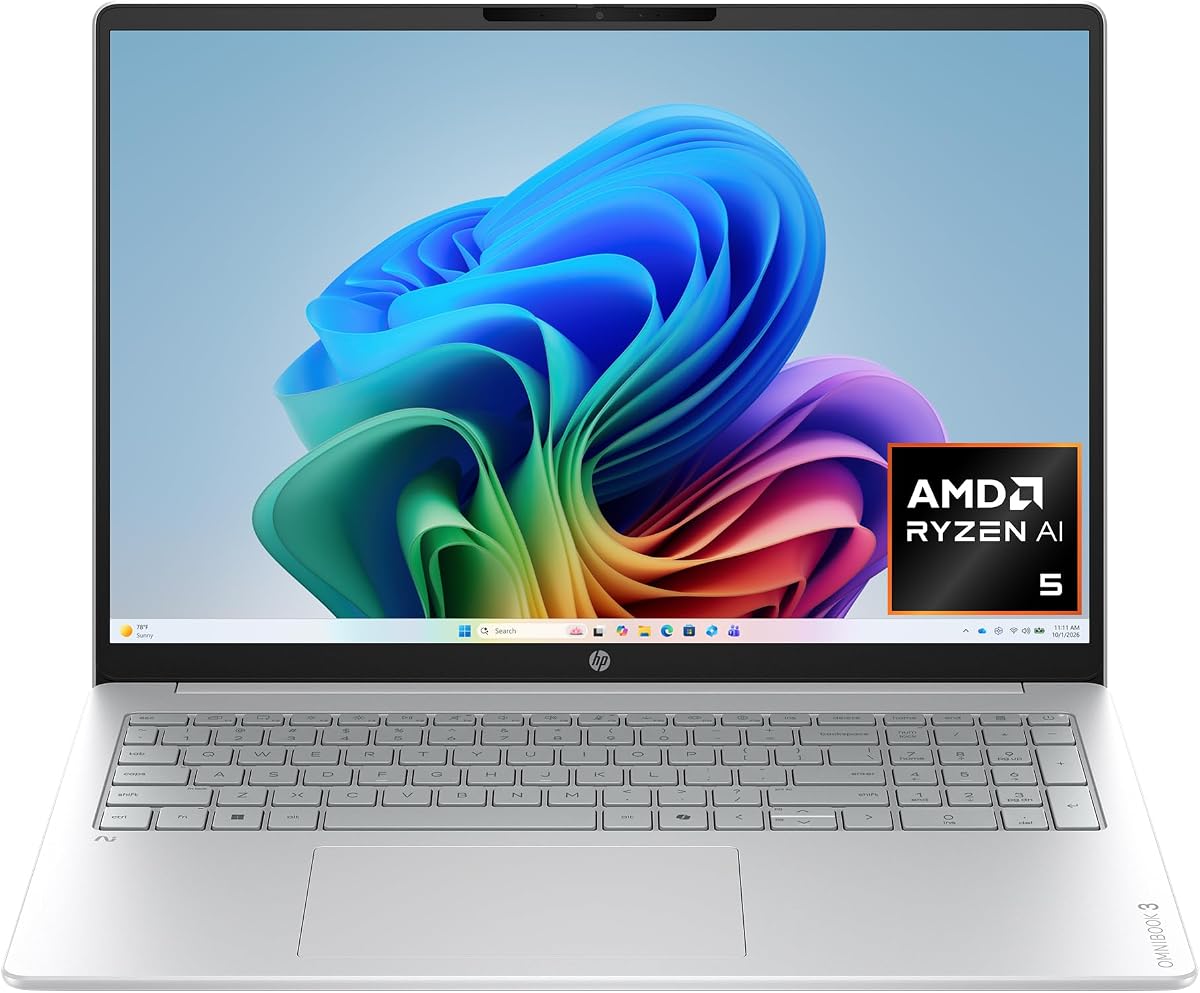
The HP OmniBook 3 16 inch Next Gen AI PC stands out as a top performer in the AI laptop category with a 4.8 rating. Its AMD Ryzen AI 5 430 processor delivers powerful AI-driven experiences while maintaining excellent efficiency throughout the workday.
We may earn a commission when you buy through this link, at no additional cost to you.
Key strengths include the advanced AI noise reduction feature that isolates your voice during calls and the massive battery life promising up to 19 hours of use. The 2K IPS touchscreen offers vibrant colors and wide viewing angles ideal for creative tasks.
Trade-offs include the lack of a discrete graphics card which may limit heavy gaming and the fixed storage capacity of 512 GB. These are acceptable for most users focused on productivity and general creative work rather than high-end rendering.
This laptop is perfect for students and professionals who need reliable performance without breaking the bank. If you value long battery life and smart features, this model offers the best balance available today.
The Copilot key provides quick access to AI features that streamline daily tasks and simplify your workflow efficiently.
With a 2K resolution and IPS technology, the screen delivers lifelike color reproduction essential for content creators.
We may earn a commission when you buy through this link, at no additional cost to you.
The Lenovo ThinkBook 16 Gen 8 Business AI PC is engineered for demanding enterprise tasks with an Intel 16-Core Ultra 7 255H processor. Its robust configuration ensures complex spreadsheets and video calls run smoothly without lag.
We may earn a commission when you buy through this link, at no additional cost to you.
The 32 GB of DDR5 RAM allows you to run multiple applications simultaneously while the 1 TB SSD provides ample space for large files. Security features like a fingerprint reader and Windows 11 Professional add essential layers of data protection.
While the price is higher than consumer models and the weight might be a concern for frequent travelers, the performance is unmatched for business environments. This trade-off is worth it for those needing reliable enterprise-grade hardware.
Buy this if you manage large datasets or run virtual machines regularly. It is a solid investment for professionals who prioritize speed and security above portability.
Built-in security features protect sensitive business data and ensure compliance with corporate IT policies effortlessly.
WiFi 6E ensures stable high-speed connections for video conferencing and file sharing across teams.
We may earn a commission when you buy through this link, at no additional cost to you.
The HP OmniBook X 14 inch Next Gen AI PC delivers a premium experience with a 3K OLED touchscreen that offers deeper blacks and richer contrast. The Intel Core Ultra 7 processor powers advanced AI features effectively.
We may earn a commission when you buy through this link, at no additional cost to you.
Battery life is exceptional with up to 27 hours of usage and HP Fast Charge capability. The Smart Sense feature uses AI to optimize performance and adjust fan noise automatically based on your activity.
The premium price might be a barrier for budget-conscious buyers and port selection is somewhat limited compared to larger models. However, the display quality and battery efficiency make up for these drawbacks significantly.
Choose this model if you value stunning visuals and extreme battery life for travel. It is ideal for creative professionals who need color accuracy on the go.
The 3K OLED display provides enhanced color depth and power efficiency compared to standard LED screens.
Poly Studio Audio ensures clear voice capture during calls and high-quality sound for media consumption.
We may earn a commission when you buy through this link, at no additional cost to you.
The HP OmniBook 5 16 inch AI Laptop is designed for everyday use with a large touchscreen and solid performance. The Intel Core Ultra 7 processor provides fast intelligent performance for various workloads.
We may earn a commission when you buy through this link, at no additional cost to you.
Features like 1 TB of SSD storage ensure you have plenty of room for files and the 16 GB of RAM handles multitasking well. The design is sleek and modern making it suitable for both work and casual use.
While the RAM is standard and build materials are average, this laptop offers great value for the price. It is a reliable choice for users who want a large screen and AI features without complexity.
This model is perfect for students and home users looking for a versatile machine. It offers a balanced mix of performance and usability for general tasks.
Copilot AI support helps you work smarter with intelligent suggestions and enhanced security features.
WiFi 6E connectivity ensures fast speeds and improved performance for modern wireless networks.
We may earn a commission when you buy through this link, at no additional cost to you.
The HP OmniBook 5 16 inch Next Gen AI PC leverages the Snapdragon X processor to deliver incredible battery life up to 34 hours. This makes it a top choice for travelers who need all-day performance without charging.
We may earn a commission when you buy through this link, at no additional cost to you.
Features like Otter.ai for meeting summaries and the 2K OLED display enhance productivity and visual experience. The Qualcomm Adreno GPU provides decent graphics performance for everyday tasks and media consumption.
Some users may encounter limited software compatibility due to the ARM architecture and the storage cannot be upgraded. These limitations are worth considering if you rely on legacy x86 applications heavily.
This laptop is ideal for mobile professionals prioritizing battery life and efficiency. It offers a unique experience for those wanting to step into the future of mobile computing.
Otter.ai automatically transcribes meetings and generates summaries saving you valuable time and effort.
The Snapdragon processor optimizes power consumption to keep the device cool and running longer.
We may earn a commission when you buy through this link, at no additional cost to you.
The HP OmniBook 3 14 inch Next Gen AI PC offers exceptional value with a 2K OLED display and impressive battery life up to 41 hours. It brings AI capabilities to a budget-friendly package suitable for students.
We may earn a commission when you buy through this link, at no additional cost to you.
The Snapdragon X processor ensures efficient performance and long-lasting battery life. The inclusion of Otter.ai adds significant value for students and professionals needing meeting assistance without extra cost.
Storage is limited to 256 GB and the 14 inch screen might be small for detailed editing work. However for the price and battery performance make these compromises acceptable for basic users.
This is the best choice for those looking to enter the AI laptop market affordably. It is perfect for students needing long battery life and a high-quality display.
High-end features like OLED and AI are accessible at a much lower price point than competitors.
The 14 inch form factor is lightweight and easy to carry in any bag for daily use.
We may earn a commission when you buy through this link, at no additional cost to you.
The Dell 16 Plus Touchscreen Laptop is a premium option featuring the powerful Intel Core Ultra 9 processor. It provides top-level performance for demanding tasks with 32 GB of high-speed RAM for seamless multitasking.
We may earn a commission when you buy through this link, at no additional cost to you.
Wi-Fi 7 connectivity ensures future-proof fast internet speeds and the modular design enhances durability. The 16 inch display offers a productive workspace with touch interaction for versatile control.
The higher price and weight are trade-offs for this level of power and durability. It remains a strong choice for professionals who need maximum reliability and performance at work.
Buy this if you require top performance for business applications and media editing. It is a reliable machine for those who want the latest connectivity standards.
Wi-Fi 7 support delivers faster speeds and lower latency for modern internet demands.
The modular design enhances durability and ensures the device withstands frequent travel.
We may earn a commission when you buy through this link, at no additional cost to you.
The ASUS Vivobook S16 Laptop earns a perfect 5.0 rating thanks to its premium features and refined design. The AMD Ryzen AI 9 465 processor offers impressive performance while the OLED display is stunning for media.
We may earn a commission when you buy through this link, at no additional cost to you.
With 32 GB of RAM and 1 TB storage, multitasking is effortless and storage is ample. The battery life is also strong at 23 hours ensuring you can work away from the charger comfortably.
The price is on the higher side and the port selection is somewhat limited requiring a hub for multiple peripherals. These are minor issues for a device that offers such a high-quality experience.
This is the top pick for those who want a premium machine with excellent build quality. It is ideal for professionals and students seeking performance and style.
The OLED display offers deep contrast and vivid detail making it perfect for content creation.
The minimalist look is ultra-portable at just 3.75 lbs and 0.7 inches thin.
We may earn a commission when you buy through this link, at no additional cost to you.
The acer Aspire 16 AI Copilot+ PC features a standout 120Hz multi-touch display that makes interactions smooth and vibrant. It delivers strong performance for content creation with 100% sRGB accuracy.
We may earn a commission when you buy through this link, at no additional cost to you.
AI features are optimized with a 45 TOPS NPU ensuring fast local AI processing. Wi-Fi 7 provides ultra-fast connectivity for seamless file sharing and streaming without lag.
The price is higher than standard models and users must be aware of ARM-based software limitations. These trade-offs are justified for those needing smooth touch interactions and rich colors.
This is the best choice for designers and creatives who value display quality. It offers a unique combination of touch speed and AI power.
The 120Hz refresh rate makes scrolling and drawing feel incredibly smooth and responsive.
Built-in AI solutions optimize settings and video presence for better productivity.
We may earn a commission when you buy through this link, at no additional cost to you.
The HP Omnibook 16 inch 2K Touchscreen delivers enterprise-grade performance with Windows 11 Pro and 32 GB of RAM. It handles heavy multitasking efficiently and is designed for professional workflows.
We may earn a commission when you buy through this link, at no additional cost to you.
The 50 TOPS NPU provides strong AI capabilities for local processing and security features ensure data safety. The display offers crisp detail with anti-glare finish ideal for long working hours.
The cost is higher and it lacks some extra ports found on specialized workstations. These trade-offs are worth it for the reliability and software capabilities it provides.
This model is perfect for business users needing secure and powerful hardware. It is a reliable choice for demanding professional environments.
Windows 11 Pro offers enterprise-grade security and management tools essential for business.
The 50 TOPS NPU handles complex AI workloads smoothly without slowing down your system.
We may earn a commission when you buy through this link, at no additional cost to you.
Selecting the right AI laptop requires balancing processor power, memory capacity, and specific AI features. This guide breaks down the essential factors to help you make an informed decision.
The processor is the heart of any AI laptop. Look for chips with strong Neural Processing Units (NPUs) like Intel Core Ultra or AMD Ryzen AI. These dedicated components handle AI tasks without draining battery life.
A strong NPU ensures smooth performance for Copilot features and other AI tools.
Memory is crucial for running multiple applications simultaneously. Aim for at least 16 GB of RAM to ensure your system remains responsive during complex workflows.
16 GB or more ensures seamless multitasking for all users.
A high-quality display enhances your visual experience whether working or watching media. OLED panels offer vibrant colors and deep blacks while high refresh rates make scrolling smoother.
Choose a screen resolution of 1920×1200 or higher for sharp visuals.
Portability means you need a laptop that lasts throughout the day. Look for models promising 12 hours or more of battery life to avoid carrying chargers everywhere.
Prioritize models with efficient processors and large battery capacities.
AI applications and creative files can take up significant space. Opt for at least 512 GB of SSD storage to ensure you have room for your projects without needing external drives.
512 GB or 1 TB provides ample space for files.
Future-proof connectivity like Wi-Fi 6E or Wi-Fi 7 ensures fast and stable connections. USB-C ports with DisplayPort support are essential for connecting external monitors.
Ensure the laptop has the ports you need for your peripherals.
Operating system features like Windows 11 Professional or Home impact your experience. Pro versions offer better security and management tools suitable for business environments.
Select the OS that aligns with your professional or personal needs.
A durable chassis ensures your device withstands travel and daily wear. Look for materials like aluminum that provide a premium feel and better heat dissipation.
Choose a build that suits your lifestyle and travel needs.
To maximize your laptop's performance keep the software and drivers updated regularly. This ensures AI features work smoothly and security patches protect your data from threats.
Maintain battery health by avoiding extreme temperatures and not letting the device stay at 0% charge too often. Use the fast charge features wisely to extend the overall lifespan of the battery.
Clean the screen gently with a microfiber cloth to avoid scratches. Regular maintenance helps keep the display clear and the keyboard free of debris that could damage keys.
AI laptops feature specialized Neural Processing Units (NPUs) that handle machine learning tasks locally. This allows for faster processing of AI features like noise cancellation and image editing without slowing down the system.
Most AI features are built into the operating system like Windows Copilot. You typically do not need to install extra software to access core AI capabilities on supported devices.
For standard AI features 16 GB of RAM is usually sufficient. However for professionals running complex AI models or heavy multitasking workloads 32 GB is recommended for better performance.
While some models have decent integrated graphics AI laptops are primarily optimized for productivity. Dedicated GPU models are better for high-end gaming but integrated GPUs handle casual gaming well.
Yes most AI laptops run standard operating systems supporting traditional x86 applications. Some newer ARM-based models may have limited compatibility with specific legacy software.
Yes AI chips often manage power more efficiently than traditional processors. This results in longer battery life especially during tasks like video streaming or productivity work.
This guide has highlighted the top AI laptops available in November 2026 offering options for various needs and budgets. Whether you choose the budget-friendly HP model or the premium ASUS option all these devices bring powerful AI features to the table.
Prioritize what matters most to you such as battery life or display quality when making your final selection. The right balance ensures you get the best experience for your daily workflow.
Remember to check current prices and availability as they may change frequently. Finding a deal on the right model can make your purchase even more valuable for your specific use case.