
AKASO EK7000 4K30FPS 20MP WiFi Action Camera
4.4Editor score
4K 30fps video
Built-in EIS
Waterproof to 131ft
This guide compares the top action cameras for filming pickleball games, focusing on stabilization, tracking, and video quality for players and coaches.
Finding the right action camera for filming pickleball games requires attention to stabilization and tracking. Players need clear footage to analyze techniques and share moments with friends. Modern cameras offer features that make recording easy without extra operators.
We compared ten top models based on video resolution, battery life, and ease of use. Each option brings unique strengths for capturing fast rallies and court dynamics. Our list covers budget-friendly picks and premium devices for serious athletes.
Each pick shows key specs and real-world performance notes for your needs. Prices and availability may change so check links for current deals before buying. These tools help you capture every serve and smash with professional clarity.
4.4Editor score

4.7Editor score

4.6Editor score
This side-by-side comparison highlights the core capabilities of each camera for pickleball recording. Review the specs to find the model that matches your budget and filming style.


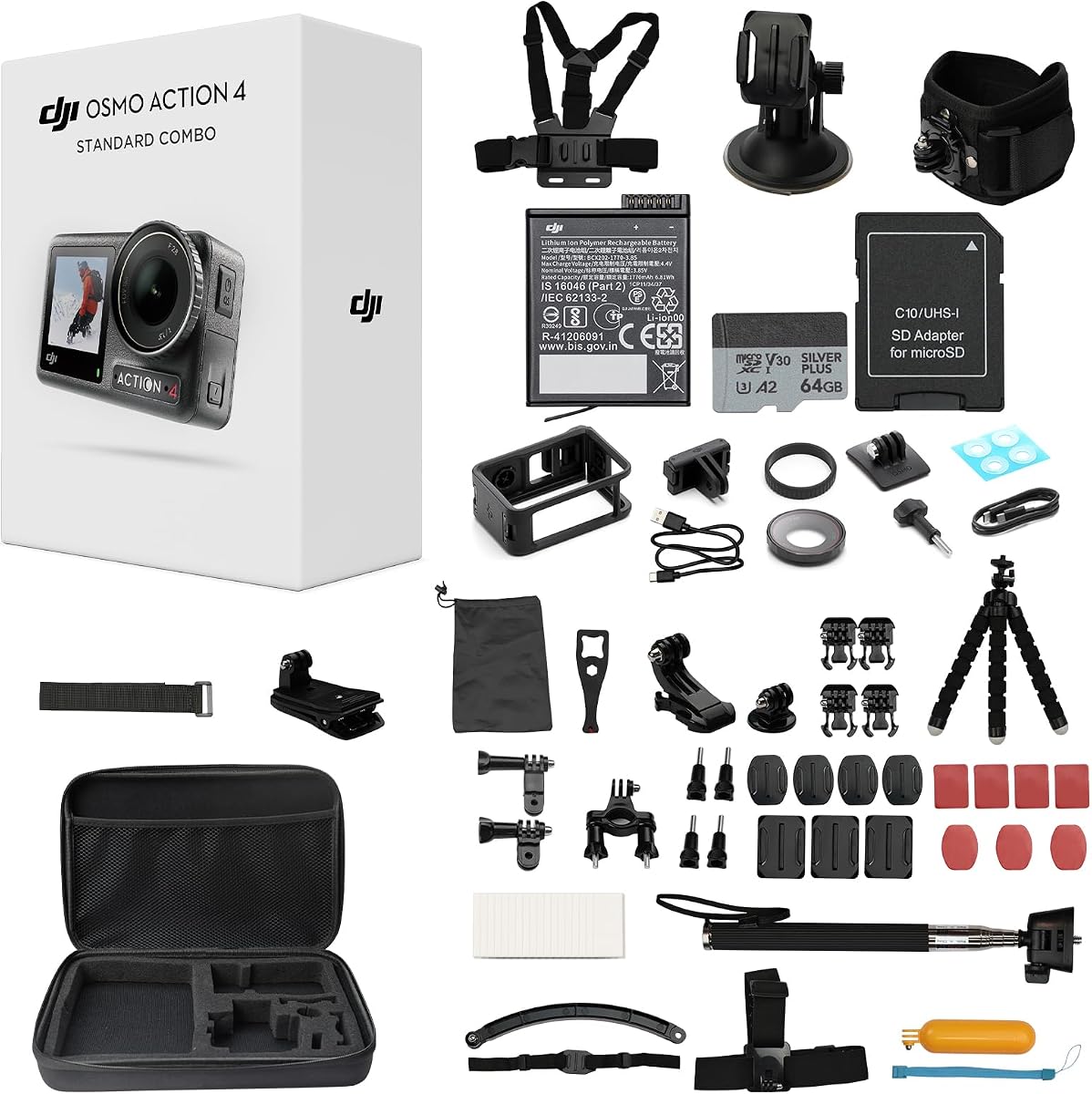
The DJI Osmo Action 4 delivers outstanding performance for filming dynamic court sports. It offers crisp 4K video and a magnetic mount that simplifies setup for matches. Its stabilization keeps footage smooth even during rapid dinks and smashes.
We may earn a commission when you buy through this link, at no additional cost to you.
This camera excels in low light and color accuracy thanks to its large sensor and 10-bit depth. The dual screens make framing easy and battery life is reliable for full tournaments. Magnetic mounts allow quick angle changes without tools.
While it lacks internal storage and costs more than budget options, its video quality justifies the price. The pre-rec feature helps capture unexpected rallies without missed starts. It is a balanced choice for serious players and coaches.
Anyone needing reliable footage without constant monitoring should consider this model. It suits teams wanting to analyze form or record highlights for social media. The durability and stabilization make it a trusted tool for active courts.
The magnetic quick-release system lets you swap angles or go vertical in seconds. This saves time between serves and keeps your focus on the game flow.
With a 1/1.3-inch sensor and 2.4um pixels, it handles evening indoor matches well. You avoid grainy footage even under dim court lighting.
We may earn a commission when you buy through this link, at no additional cost to you.
The AKASO EK7000 provides a budget-friendly way to capture pickleball matches with solid 4K quality. It is lightweight and includes a waterproof case for outdoor play. While stabilization is basic, it works well for steady setups.
We may earn a commission when you buy through this link, at no additional cost to you.
You get decent color and frame rates for highlights and practice sessions. The included remote lets you start recording from a distance. It is a simple tool for casual users who prioritize cost over pro features.
Stabilization struggles with fast motion and the app connectivity can be inconsistent. Still, for the price, it delivers acceptable video for learning and fun. Many users find it sufficient for club-level recording needs.
Ideal for beginners or teams on tight budgets needing multiple cameras. It is a practical entry point for documenting games without heavy investment. Expect good results with fixed angles and moderate movement.
At a fraction of premium costs, this camera offers a viable entry into action recording. It covers core needs without advanced editing features.
The wrist remote helps start stops without touching the camera. This is useful when the camera is mounted on a fence or bench.
We may earn a commission when you buy through this link, at no additional cost to you.
The Insta360 X5 offers unmatched flexibility with its 360-degree capture and 8K resolution for detailed replays. It excels at reframing footage after the match. This makes it ideal for tracking players across the court.
We may earn a commission when you buy through this link, at no additional cost to you.
Its stabilization and AI chips ensure smooth video even in low light. The invisible selfie stick effect creates dynamic angles without hardware in shot. You can edit to focus on any player post-match.
Storage needs are high and editing takes time to reframe shots properly. Battery life is decent but frequent swaps help for long events. It suits those wanting cinematic results and creative control.
Best for content creators and coaches needing versatile angles. It transforms how you view matches by letting you choose viewpoints later. For high-quality analysis and sharing, it stands out among peers.
Capture everything and frame shots later using AI tools. This reduces setup errors and helps focus on specific plays.
Scratched lenses can be swapped quickly to avoid downtime. This feature extends the camera's life on dusty courts.
We may earn a commission when you buy through this link, at no additional cost to you.
The XbotGo Falcon offers AI tracking to keep action centered without operators. It combines 4K recording and live streaming in one unit. This simplifies recording for teams without dedicated camera staff.
We may earn a commission when you buy through this link, at no additional cost to you.
Its dual-lens setup aims to optimize both recording and tracking. The package includes tools for flexible mounting. Users benefit from AI that aims to frame players during games.
Tracking performance on tennis courts needs validation and the price is steep for casual users. Still it reduces the need for extra people during matches. It is best for clubs wanting automated coverage.
Suits groups aiming for hands-free game documentation. The tech promise is compelling though real-world accuracy varies. For automation seekers it is a notable option worth watching.
No operator needed to follow the ball. Just set it up and focus on your game.
Share matches instantly with fans via built-in Wi-Fi. It connects the court to your community.
We may earn a commission when you buy through this link, at no additional cost to you.
The DJI Osmo Action 5 Pro brings advanced tracking and low-light capabilities for diverse court conditions. It captures sharp footage even in challenging light. Its stabilization ensures steady views during intense rallies.
We may earn a commission when you buy through this link, at no additional cost to you.
Voice commands and a large battery help record longer matches. The dual screens aid framing in sun or shade. It is reliable for users needing consistent performance.
It lacks high frame rates for slow motion and carries a price premium. However, the dynamic range and weather resistance are strong. It fits those prioritizing clarity and reliability over speed.
Recommended for players filming at any time of day. Its tools help reduce setup friction. Expect solid results for practice and competition alike.
Start recording with voice commands. This keeps hands free for rackets or drinks.
High dynamic range preserves detail in bright courts and shadows. It handles glare and contrast well.
We may earn a commission when you buy through this link, at no additional cost to you.
The GoPro HERO12 Black is known for its Emmy-winning stabilization and HDR video for vivid shots. It handles fast motion well. This makes it great for crisp action capture.
We may earn a commission when you buy through this link, at no additional cost to you.
Its durability and webcam mode add versatility beyond recording. HDR helps in bright outdoor courts. It remains a trusted choice for many sports.
Battery life can drop in cold and it lacks high frame rate 4K. Still, the video quality is robust. It suits users valuing brand reputation and ecosystem.
A solid pick for fans of GoPro tools. It works for matches and vlogs. Expect reliable footage across conditions.
Stabilization keeps footage silky smooth. It minimizes shake during camera movement.
HDR captures details in highlights and shadows. It improves visibility in bright sun.
We may earn a commission when you buy through this link, at no additional cost to you.
The DJI Osmo Action 6 Bundle provides 8K video and ample storage for long matches. Its variable aperture adjusts to light. This is useful for outdoor courts with changing shadows.
We may earn a commission when you buy through this link, at no additional cost to you.
Built-in storage and cloud upload ease workflow. The accessory kit covers most needs. It reduces downtime during events.
Large files need fast storage. Some modes limit 8K usage. Still the quality is top-tier for highlights.
Best for pros needing highest resolution. It simplifies management with storage. Expect crisp analysis-ready footage.
Adjust aperture to handle bright sun. It avoids blown-out highlights.
50GB built-in reduces card swaps. Cloud backup protects footage.
We may earn a commission when you buy through this link, at no additional cost to you.
The DJI Osmo Action 6 Combo targets creators with 8K and gesture controls. It simplifies start and stops. Pro audio and cold resistance suit outdoor games.
We may earn a commission when you buy through this link, at no additional cost to you.
It supports dual mic transmitters and cloud options. This fits content-focused users. It streamlines capture and editing.
Complexity can be high. Battery drains with 8K. Still it is powerful for highlights.
Recommended for social creators. It balances quality and tools. Expect polished footage.
Start recording with hand gestures. It avoids touching the device.
Connect mics for clear audio. It captures calls and noise well.
We may earn a commission when you buy through this link, at no additional cost to you.
The DJI Osmo Action 4 Bundle includes accessories and a card for immediate use. It simplifies setup. The 1/1.3 sensor handles low light well.
We may earn a commission when you buy through this link, at no additional cost to you.
D-Log M aids grading. Magnetic mounts are fast. It suits those wanting a one-box solution.
The bundle adds cost. Some items may be unused. Still it is convenient.
Best for all-in-one buyers. It reduces sourcing. Expect full readiness.
A large kit covers many mounts. It avoids extra purchases.
D-Log M offers grading flexibility. It suits editors.
We may earn a commission when you buy through this link, at no additional cost to you.
The GoPro HERO12 Black offers trusted performance with stable 5.3K video. It is rugged and versatile. Many users find it simple.
We may earn a commission when you buy through this link, at no additional cost to you.
Its webcam and streaming add value. Durability stands out. It covers most sports needs.
Tech is mature. Battery varies. Still it is consistent.
Good for GoPro loyalists. It is a safe bet. Expect steady results.
Many mounts and accessories exist. It simplifies setup.
Live stream matches. It connects viewers.
We may earn a commission when you buy through this link, at no additional cost to you.
Selecting a camera requires weighing video quality stabilization and battery life. Each factor affects how well you capture rallies and review play. The following points help you find the right fit.
Resolution determines clarity while frame rate affects motion smoothness. For fast court action, 4K at 60fps is ideal. Higher options like 8K help but need strong editing tools.
Prioritize 4K for most needs to balance file size and quality.
Stabilization prevents shaky footage during movement. Look for EIS or advanced modes like HorizonSteady. It ensures steady shots even on rough courts.
Smooth video improves analysis and shareability for all users.
Long matches require lasting power. Aim for 2+ hours or hot-swap batteries. Charging speed matters if you record multiple sessions.
Carry spares to avoid missing key points.
Versatile mounts help position cameras on fences or stands. Magnetic systems enable quick changes. Standard threads fit tripods.
Flexible mounting adapts to court setups and angles.
Indoor courts often have dim lighting. Larger sensors and wider apertures help reduce noise. Check specs for low-light modes.
Better sensors ensure clear footage at any time.
MicroSD capacity and speed impact recording. Wi-Fi enables quick transfers. Cloud or built-in storage adds security.
Fast cards and connectivity streamline your workflow.
Clear audio captures calls and commentary. Built-in mics with wind guards help. External mic support is a plus for coaches.
Good audio complements video for review.
Outdoor play risks water and dust. IP ratings and rugged bodies protect the camera. Waterproof options simplify cleaning.
Durable design ensures longevity on the court.
Mount the camera on a stable surface at a height that captures the whole court. Use a wide lens to cover serves and rallies. Ensure the mount is tight to prevent shifting.
Start recording before the match begins to capture warm-ups. Use voice or remote triggers for control. Check battery and storage levels before each session.
Clean the lens after each game to remove dust and moisture. Store the camera in a dry case. Remove the battery if not used for weeks to prevent leaks.
For most courts, 60fps at 4K provides smooth motion without huge files. It allows decent slow motion. If storage is tight, 30fps works but may look less fluid on fast dinks.
No, many cameras offer auto-tracking or wide-angle static setups. Use a fixed position on a fence. This frees players to focus on the game.
Models with larger sensors and HDR perform better indoors. Look for 1/1.3-inch sensors or equivalent. This reduces noise when lights are dim.
Use a case or cover when not filming. Avoid direct sun on the lens. Mount it away from direct impact zones to prevent damage.
High-speed microSD cards like V30 or V60 are best. Aim for 64GB minimum per hour. Cloud or extra cards help for long events.
They help with weather and cleaning but may not be required indoors. Outdoor clubs benefit from water resistance to handle rain or splashes.
Our top picks cover a range from budget-friendly to pro-grade needs. Each offers clear video and stable footage for court review.
Focus on stabilization and battery for consistent results. The right choice depends on your budget and setup complexity.
Check current availability and prices before buying. Tools evolve quickly so verify features for your goals.