
Anycubic Kobra 3 Camera
4.5Editor score
DIY replaceable frame
Ultra clear resolution
Wide printer compatibility
This guide compares the top 3D printer cameras for remote monitoring to help you choose the best model for real-time viewing and time-lapse recording.
Remote monitoring has become essential for modern 3D printing enthusiasts who want to track progress without being physically present. A quality camera allows you to detect issues early and capture time-lapse videos of your prints evolving layer by layer.
We evaluated ten leading camera solutions based on compatibility, resolution, ease of installation, and app functionality. Each option was selected for its ability to provide clear visuals and reliable connectivity across various printer models and ecosystems.
Every recommendation below highlights specific strengths and ideal use cases for different users. Please note that availability and pricing may change over time, so checking current listings before purchasing is always advisable for the best deal.
4.5Editor score

4.3Editor score

4.1Editor score
The following table provides a side-by-side look at key specifications and features across all ten models to help you quickly identify which camera fits your specific printer setup and monitoring needs.



The Creality Official Nebula Camera stands out for its user-friendly design and robust feature set. With a rating of 4.3 stars, it delivers reliable performance for users seeking real-time access without complex configuration steps.
We may earn a commission when you buy through this link, at no additional cost to you.
Its standout feature is the automatic time-lapse generation which captures each layer without extra settings. The 940 nm infrared fill light ensures clear visibility even during overnight prints, making it easy to spot filament jams or layer adhesion issues.
While the setup is effortless, compatibility is restricted to specific Creality pads like Sonic or Nebula Pad. Users with older models may need adapters. Additionally, manual focus is limited compared to some adjustable lens options.
This camera is ideal for Creality users who value convenience and automation. If you own a compatible printer and want seamless monitoring with minimal hassle, this model provides excellent value and reliability.
The camera automatically captures images per layer to create videos without manual intervention, saving time and effort for creators.
Built-in infrared light illuminates the print area clearly at night, ensuring visibility regardless of ambient lighting conditions.
We may earn a commission when you buy through this link, at no additional cost to you.
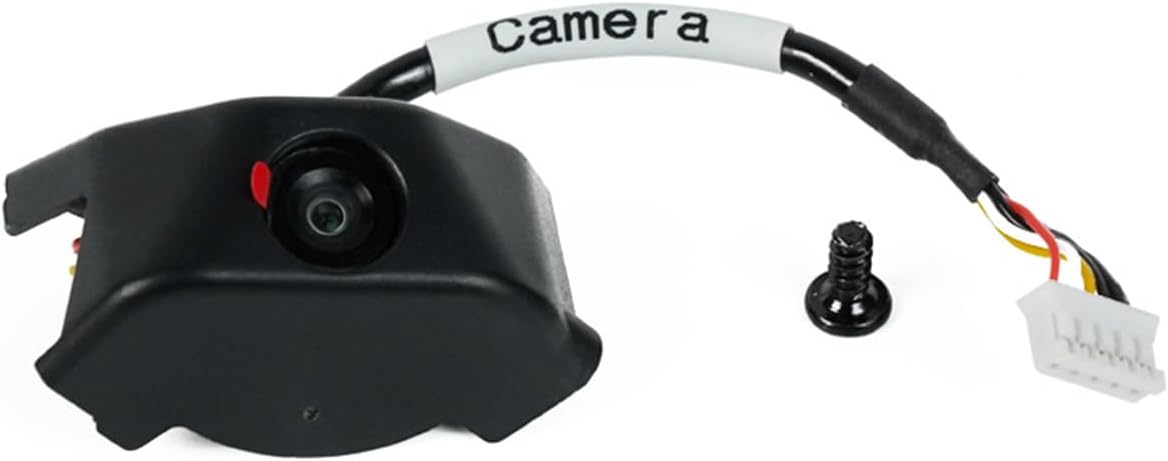
This camera offers an excellent balance of affordability and features with a 4.5 rating. It allows users to monitor progress via the Anycubic APP and supports DIY frames for unique looks.
We may earn a commission when you buy through this link, at no additional cost to you.
The ultra-clear resolution ensures detailed images of prints, helping identify potential issues early. Its compatibility with Kobra 3, Kobra 2 series, and klipper printers makes it versatile for many users seeking remote access.
However, the frame requires DIY assembly which may not suit those wanting plug-and-play convenience. Users must ensure their printer model matches compatibility lists before purchase to avoid connection issues.
For hobbyists who enjoy customization and want a cost-effective monitoring solution, this camera is a top pick. It delivers strong performance and flexibility for a fraction of premium costs.
The replaceable frame allows users to create unique designs adding personality and creativity to their printer setup.
Works with multiple printer series ensuring broad usability across different models and ecosystems within the brand.
We may earn a commission when you buy through this link, at no additional cost to you.
This kit is designed specifically for Flashforge printers delivering seamless integration and high-quality visuals. A 4.1 rating reflects its solid performance for users invested in the Flashforge ecosystem.
We may earn a commission when you buy through this link, at no additional cost to you.
The HD image quality ensures detailed visuals, while the Flash Maker APP allows control from anywhere. Recording the printing process enables easy review and sharing of exciting moments during the print run.
Its limitation lies in strict compatibility with only Adventure 5M Pro and AD5X models. Owners of other brands will need different cameras. The price point is higher compared to third-party alternatives.
Owners of compatible Flashforge printers will find this kit the most reliable and polished option. It delivers professional results and official support that generic cameras often lack.
Designed specifically for Flashforge printers ensuring stable connection and optimized performance within the original system.
Automatically records print processes allowing users to save and share time-lapse videos of their creations easily.
We may earn a commission when you buy through this link, at no additional cost to you.
Rated 4.4 stars this camera excels with its night vision function and manual focus capability. It supports 24-hour monitoring ensuring you can check prints anytime without missing critical moments.
We may earn a commission when you buy through this link, at no additional cost to you.
The adjustable focus lens allows precise image framing ensuring high-definition quality. Connection via USB simplifies setup, making it a reliable tool for continuous monitoring of prints throughout the day or night.
While the focus is manual, this offers control over framing and sharpness. However compatibility is restricted to specific Ender models and pads limiting its use to newer Creality devices.
This model is perfect for those who need reliable night monitoring and detailed control over image quality. It balances performance and ease of use for dedicated Creality users.
Built-in infrared light ensures clear visibility during overnight prints without needing additional lighting fixtures.
Adjustable lens allows users to fine-tune image clarity for optimal framing and detail on prints.
We may earn a commission when you buy through this link, at no additional cost to you.
This kit provides a straightforward way to monitor Flashforge printers using the Flash Maker APP. A 4.0 rating indicates solid reliability for users prioritizing integration over advanced features.
We may earn a commission when you buy through this link, at no additional cost to you.
Installation is designed for simplicity with all components included for quick setup. Users can view and control printers remotely, offering convenience for checking status while away from home.
The main constraint is limited compatibility to only Adventurer 5M Pro and AD5X models. Advanced features like auto time-lapse may not be as robust as other options.
For Flashforge owners seeking a native solution without third-party workarounds this kit delivers essential monitoring. It ensures stable connectivity and official support for daily use.
Allows users to view and manage printers from anywhere using the Flash Maker APP for maximum flexibility.
Kit includes all necessary components for a quick and easy setup process without complex steps.
We may earn a commission when you buy through this link, at no additional cost to you.
This camera focuses on providing real-time access via the Anycubic APP with a strong 4.4 rating. It allows timely identification of issues like filament jams to save materials.
We may earn a commission when you buy through this link, at no additional cost to you.
The ultra-clear resolution ensures detailed images helping verify print quality remotely. Its wide compatibility with Kobra series and klipper printers makes it a versatile choice for many users.
Frame customization requires some effort which may deter users wanting instant setup. Also reliance on the APP means internet connectivity is required for full functionality.
For those seeking a dependable monitoring tool with broad compatibility this camera is a strong option. It balances performance and customization well for hobbyists and professionals.
Real-time viewing helps catch potential failures early improving success rates and saving valuable filament.
Works with multiple printer series including Kobra and Klipper for versatile use across setups.
We may earn a commission when you buy through this link, at no additional cost to you.
This camera captures images in 1080P HD ensuring clear visuals for K1 series printers. Its 4.5 rating highlights excellent performance and efficiency for users tracking prints remotely.
We may earn a commission when you buy through this link, at no additional cost to you.
Automatic time-lapse generation after printing makes sharing results convenient. Login to Creality Cloud enables seamless viewing on phones ensuring you never miss critical print moments.
Compatibility is strictly limited to K1 K1 SE and K1 Max models. Older printers or other brands will not work with this camera without adapters which adds complexity.
K1 owners will find this camera the perfect companion for detailed monitoring and high-quality video. Its integration and performance deliver a smooth and reliable experience.
Captures detailed images ensuring every layer is clearly visible for precise monitoring and review.
Automatically creates videos post-print allowing easy sharing and evaluation of the entire process.
We may earn a commission when you buy through this link, at no additional cost to you.
Rated 4.4 stars this camera offers compact design with real-time monitoring and anomaly detection. It helps identify errors early preventing waste and ensuring print success through constant observation.
We may earn a commission when you buy through this link, at no additional cost to you.
Manual focus allows precise framing to ensure high-definition image quality. The 940 nm infrared fill light ensures clear night vision allowing 24-hour monitoring without extra equipment.
Users must connect via USB and set up the Creality Cloud APP which may require initial configuration. Manual focus also means users need to adjust settings periodically for best results.
This camera is ideal for users wanting reliable monitoring with detection features. It provides essential tools for maintaining quality and preventing costly print failures effectively.
System alerts users to anomalies in printing process to avoid waste and pause prints if needed.
Rotatable lens allows precise adjustment to achieve high-definition image quality for detailed reviews.
We may earn a commission when you buy through this link, at no additional cost to you.
This camera offers 24-hour monitoring with spaghetti detection to eliminate waste. A 4.3 rating reflects strong performance in capturing process and identifying errors quickly during prints.
We may earn a commission when you buy through this link, at no additional cost to you.
WiFi connection allows remote access via Creality Cloud app for monitoring anywhere. Time-lapse photography feature enables visualization of progress while manual focus ensures detailed HD quality.
Spaghetti detection requires system support which may not work on all firmware. Setup involves connecting cable and WiFi app which could take time for new users.
For users prioritizing smart error detection and continuous monitoring this model is excellent. It combines essential features to protect investments and ensure print success.
Advanced feature identifies printing errors or misprints to eliminate waste and alert users immediately.
Seamlessly connects to cloud app for remote monitoring using Wi-Fi on phone or computer.
We may earn a commission when you buy through this link, at no additional cost to you.
This kit offers real-time remote monitoring for Adventurer 5M and AD5X printers. A 4.1 rating indicates it performs well for users who want an official accessory with essential features.
We may earn a commission when you buy through this link, at no additional cost to you.
High definition images provide detailed views while process recording allows export to USB for viewing. Installation is designed to be a breeze with longer cables fitting enclosures.
The limitation is strict compatibility with only AD5M series models. Export to USB means cloud access may not be available depending on firmware which restricts remote viewing options.
For Flashforge owners who value official support and stability this kit is a sound choice. It delivers dependable monitoring and recording without third-party complications.
Video files generated after printing can be exported to USB drive for viewing and sharing.
Longer cables fit 3D printed enclosures making installation simple and hassle free.
We may earn a commission when you buy through this link, at no additional cost to you.
Choosing the right camera requires balancing features, compatibility, and ease of use for your specific printer model.
Ensure the camera matches your printer model or supports a compatible hub like Sonic or Nebula Pad.
Always verify compatibility lists before purchasing to avoid connection issues or need for adapters.
Look for cameras offering at least 720P resolution with HD 1080P preferred for detailed inspections.
Higher resolution ensures clearer images helping spot filament jams or layer issues accurately.
Infrared fill lights allow monitoring during dark hours which is essential for long or overnight prints.
Check for built-in infrared capability to avoid needing separate lighting solutions for 24-hour tracking.
The companion app should offer remote viewing and alerts via smartphone or web browser.
Stable app performance ensures you can check prints from anywhere without connection interruptions.
Auto time-lapse generation saves effort by capturing every layer without manual intervention.
Automatic creation makes sharing your progress with friends or community easier and faster.
Smart features like spaghetti detection can stop prints before they ruin your materials or time.
This feature adds a layer of safety reducing waste and saving valuable filament during errors.
Quick and simple installation reduces setup time and frustration when adding a camera to your printer.
Plug-and-play kits or clear instructions help avoid complex wiring or firmware modifications.
Cameras from official brands often provide better warranty and customer support for troubleshooting issues.
Look for products with clear return policies and responsive engineering support for long-term reliability.
First, connect the camera to your printer via the provided USB or dedicated port and ensure stable physical mounting inside the enclosure.
Next, download the companion app on your device and connect the camera to your WiFi network following the on-screen setup instructions carefully.
Finally, adjust focus manually if needed and enable time-lapse or detection features in the app settings to start monitoring your prints remotely.
Some cameras require specific hubs like Sonic Pad or Nebula Pad for full functionality while others connect directly via USB. Always check product compatibility lists before purchasing to ensure proper operation.
Most modern cameras offer automatic time-lapse generation which requires no manual settings. Simply ensure the feature is enabled in the app and let the camera capture each layer automatically.
Yes, most cameras support remote viewing via WiFi or cloud apps allowing you to check prints from anywhere using your phone or computer browser.
Many cameras include built-in infrared night vision that illuminates the print area in darkness ensuring clear visibility even during overnight prints.
Spaghetti detection identifies when filament gets tangled or extruded incorrectly and alerts or stops the print to prevent wasting material and time.
Installation typically involves connecting the USB cable, mounting the camera inside the enclosure, and configuring the software via the app or browser.
The top picks highlighted in this guide offer reliable monitoring solutions with distinct strengths for different printer ecosystems and user needs.
Prioritize features like night vision and anomaly detection if you run long prints or want automated safety during unsupervised sessions.
Always check current availability and compatibility before purchasing to ensure the camera works perfectly with your existing printer setup.