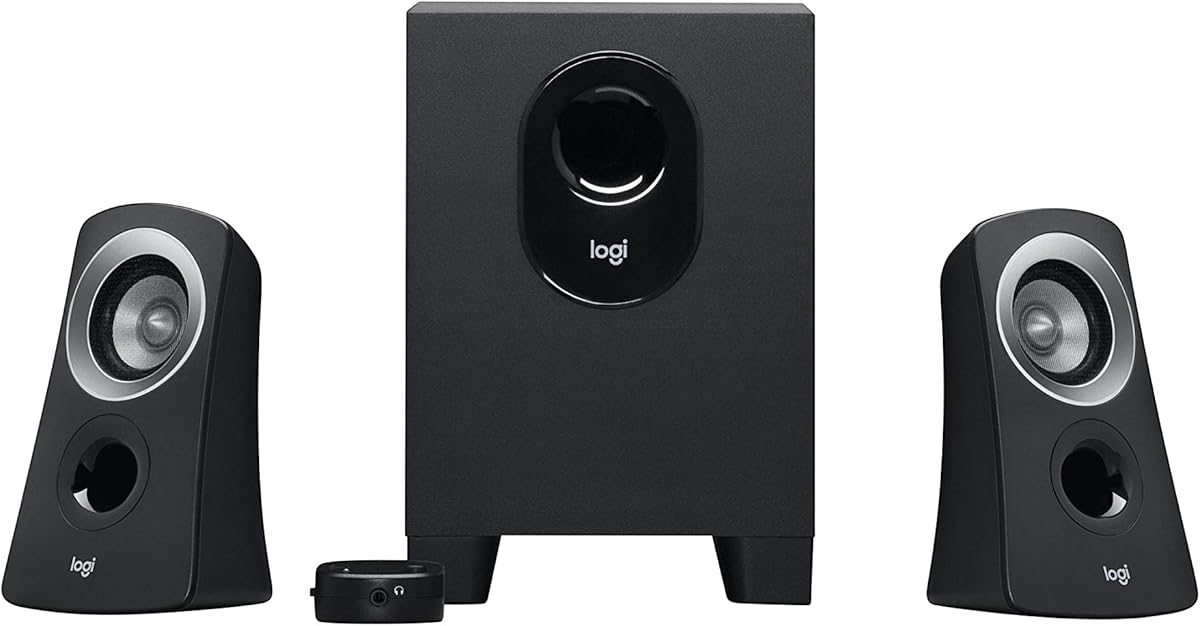
Logitech Z313 2.1 Multimedia Speaker System with Subwoofer – Black
4.4Editor score
25 Watts RMS output
Compact subwoofer design
Convenient control pod
This guide compares the top 2.1 channel desktop speakers for sound quality, power, and features to help you choose the best system for your setup.
Finding the right audio solution for your desk can transform your daily computing experience. A 2.1 channel desktop speaker system offers a balanced mix of clear mids and highs from satellites paired with deep, punchy bass from a dedicated subwoofer.
We evaluated ten leading models based on sound clarity, power output, connectivity options, and design. Our analysis covers everything from budget-friendly options to high-end THX certified systems to ensure you find a match for your specific needs and space.
Each product listing below includes key specifications, pros, cons, and detailed insights. Please note that pricing and availability can change frequently, so verify current details on the retailer site before making a purchase decision.
4.4Editor score

4.5Editor score
4.2Editor score
The following table provides a side-by-side overview of all ten selected speaker systems. Review the specifications and key details to quickly compare power, connectivity, and design features across the lineup.


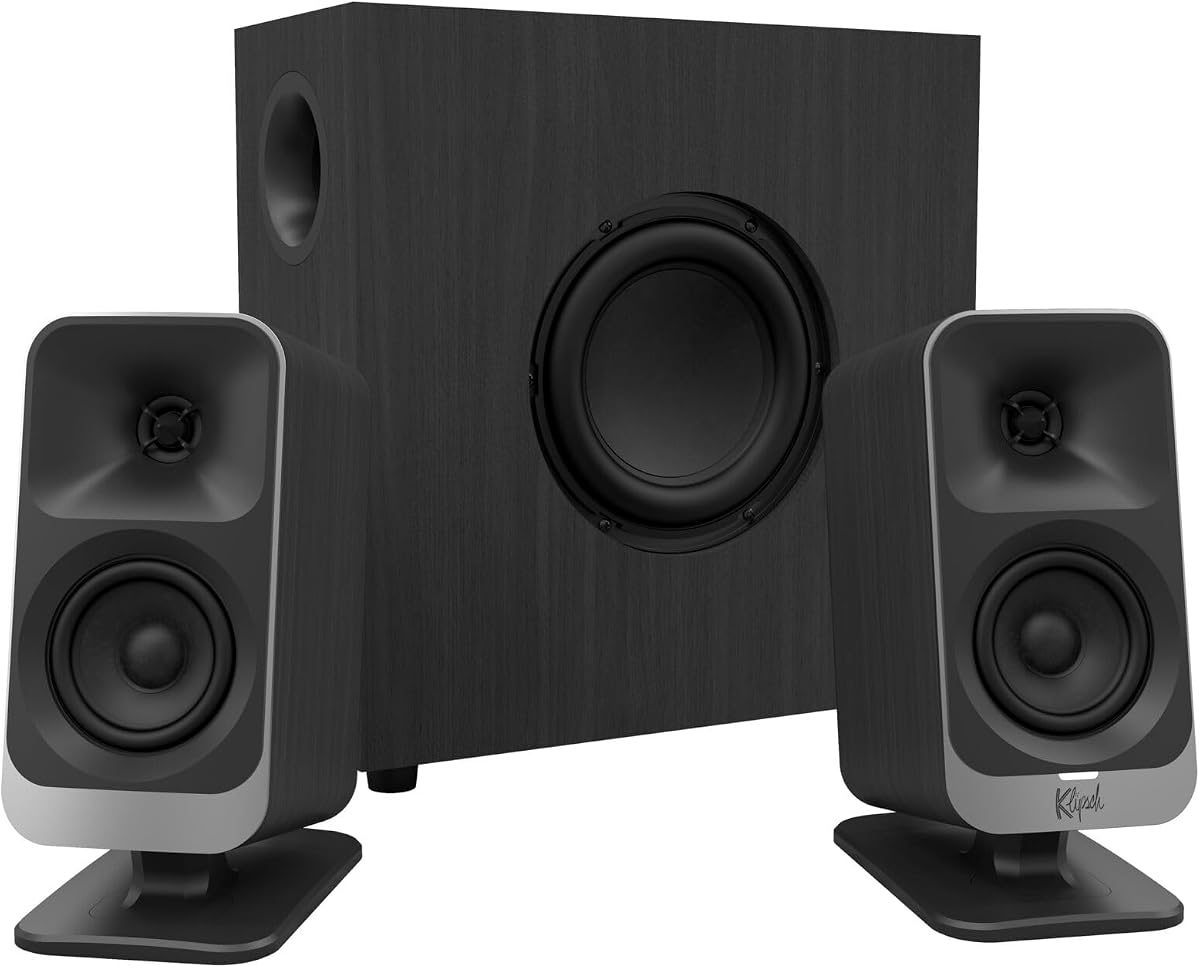
The Klipsch ProMedia 2.1 THX Certified system stands out as a top choice for users seeking immersive audio. With a 4.5 rating, it delivers legendary sound that fills the room with incredible clarity.
We may earn a commission when you buy through this link, at no additional cost to you.
Its MicroTractrix horn technology ensures efficient sound reproduction, directing audio straight to your ears. The side-firing subwoofer provides full bandwidth bass that you can actually feel during movies or games.
While the system is powerful, it requires a significant amount of desk space. The size might be a trade-off for those with compact setups, but the audio performance is well worth it for most enthusiasts.
This system is ideal for gamers and movie lovers who prioritize audio quality. If you want a reliable speaker system that enhances your desktop experience, this is a strong recommendation.
THX certification ensures the system meets high standards for sound quality and consistency across different media.
The horn design amplifies sound naturally, reducing distortion and improving clarity at higher volumes.
We may earn a commission when you buy through this link, at no additional cost to you.
The Logitech Z313 offers excellent value for users needing basic multimedia speakers. It achieves a 4.4 rating by delivering clear sound in a compact package.
We may earn a commission when you buy through this link, at no additional cost to you.
With 25 watts RMS output, it is sufficient for casual listening and office use. The convenient control pod makes adjusting volume and power straightforward during daily tasks.
The main limitation is the lack of high-power output for large rooms. For small spaces, this is not a significant issue, but audiophiles might desire more depth.
This system is perfect for students or office workers seeking affordability. If you need a no-fuss speaker system that works well for calls and light media, this is a top pick.
The small subwoofer fits easily under desks or on shelves without taking up much floor space.
A dedicated control pod allows for quick volume adjustments without digging through software menus.
We may earn a commission when you buy through this link, at no additional cost to you.
The Klipsch ProMedia Lumina brings a modern twist to a classic brand. It features built-in RGB lighting and USB-C connectivity for a sleek, futuristic look.
We may earn a commission when you buy through this link, at no additional cost to you.
Its low-profile subwoofer saves floor space while still delivering impactful bass. The adjustable gain knob allows for precise control over bass levels to suit your listening habits.
The high price point might be a barrier for budget-conscious buyers. Additionally, the RGB lighting could be distracting in dim environments if not customized carefully.
This system is best for gamers and creators who value style and sound. If you want a premium system that blends into a modern setup, the Lumina is an excellent choice.
Support for USB-C and Bluetooth 5.3 ensures compatibility with the latest laptops and mobile devices.
The built-in RGB effects allow you to personalize your desk setup with vibrant color options.
We may earn a commission when you buy through this link, at no additional cost to you.
The Creative Pebble X Plus offers versatile connectivity options like USB-C and Bluetooth 5.3. It has a 4.2 rating for its balanced audio performance and sleek design.
We may earn a commission when you buy through this link, at no additional cost to you.
It features upgraded drivers and a compact subwoofer for punchy bass. You can also enhance volume by using a higher wattage USB PD adapter for amplified playback.
To reach peak power, you need a specific adapter which is not included. This adds a step to setup, but the flexibility of wired and wireless connections is valuable.
This system suits modern users needing flexible connection types. If you want a speaker system that works seamlessly with both wired and wireless devices, this is a smart buy.
Upgraded drivers provide clearer sound reproduction and better dynamic range than previous models.
Customizable RGB presets allow you to match speaker colors with your desk aesthetic or mood.
We may earn a commission when you buy through this link, at no additional cost to you.
The Bluedee Computer Speakers deliver robust sound with 80W peak power and Bluetooth 5.4 support. They achieve a 4.4 rating for their balanced audio and clear vocals.
We may earn a commission when you buy through this link, at no additional cost to you.
Built-in DSP tuning reduces distortion for smoother sound. The all-in-one control knob simplifies volume and lighting adjustments without needing multiple buttons.
The unit is somewhat large for tight desks. However, the power and wireless convenience make it a strong contender for home office setups.
This system is ideal for users wanting wireless convenience. If you need a speaker system that handles music and calls well with good bass, this is a reliable option.
DSP tuning optimizes audio frequencies to ensure crisp highs and balanced mids for all content.
Bluetooth and wired options let you switch between devices easily based on your current task.
We may earn a commission when you buy through this link, at no additional cost to you.
The Cyber Acoustics CA-3090 is a simple system with a 3.9 rating. It offers a flat panel design that sits well on limited desk surfaces.
We may earn a commission when you buy through this link, at no additional cost to you.
With 18W peak power, it is suited for basic tasks. The side-firing subwoofer adds decent low-end for its size, though it lacks high-end precision.
Audio quality is functional but not exceptional. For those on a tight budget, it serves as a basic audio solution without frills.
This system is good for entry-level needs. If you need a cheap replacement that works for simple audio, this is a viable option.
The four-inch subwoofer provides enough bass for small rooms without dominating the space.
A control pod on the main unit allows easy access to volume and power functions.
We may earn a commission when you buy through this link, at no additional cost to you.
The Creative Pebble Plus is designed for USB power, eliminating the need for an extra outlet. It has a 4.3 rating for its clever design and clear sound.
We may earn a commission when you buy through this link, at no additional cost to you.
The 45-degree elevated drivers aim sound directly at you. The down-firing subwoofer provides more depth than typical desktop speakers.
Power is limited by USB standards. While the High Gain Mode boosts output, it still may not fill a large room effectively.
This system is perfect for portable setups. If you use a laptop often and want better audio without cables, this is an ideal choice.
Angling the drivers improves stereo imaging and ensures you hear the audio clearly without tilting speakers.
A simple switch increases power output for a more immersive listening experience when plugged into a stronger source.
We may earn a commission when you buy through this link, at no additional cost to you.
The Cyber Acoustics CA-3610 delivers strong bass with 62 watts peak power. It scores 4.2 for its ability to handle movies and music well.
We may earn a commission when you buy through this link, at no additional cost to you.
Dual 2-inch titanium drivers ensure crisp highs. The 5.25-inch subwoofer puts out deep bass, though it may dominate if not tuned.
It requires an AC adapter, which reduces portability. The headphone jack is a handy addition for private listening without disturbing others.
This system is great for media consumption. If you want a speaker system with strong bass and good value, this is a strong contender.
Titanium drivers provide durability and clear high-frequency reproduction for better vocal clarity.
A front headphone jack allows quick switching to private listening without unplugging the speakers.
We may earn a commission when you buy through this link, at no additional cost to you.
The Logitech Z407 features a unique wireless control dial for easy volume adjustment. It achieves a 4.3 rating for its immersive audio performance.
We may earn a commission when you buy through this link, at no additional cost to you.
With 80W peak power and digital signal processing, bass is deep and clear. The speakers can be positioned vertically or horizontally to suit your setup.
The wireless control needs a USB connection to work, which adds a cable requirement. This might complicate a fully wireless setup for some users.
This system is ideal for home theater users. If you want remote control convenience and immersive sound, this is a top choice for your desk.
A 30-meter range dial lets you control sound wirelessly without touching your keyboard or mouse.
Flexible speaker orientation allows you to optimize sound distribution based on your room layout.
We may earn a commission when you buy through this link, at no additional cost to you.
The Logitech Z623 offers massive power with 400 watts peak. It holds a 4.6 rating as a high-end desktop audio powerhouse.
We may earn a commission when you buy through this link, at no additional cost to you.
THX certification ensures studio-quality audio. The 130-watt subwoofer delivers significant depth for a truly immersive experience.
The size and weight can be challenging for small desks. It is best suited for dedicated gaming setups or larger home offices.
This system is ideal for enthusiasts. If you want high-fidelity sound and don't mind the space, this is a top-tier option.
THX certification guarantees that audio meets strict standards for fidelity and consistency.
RCA and 3.5mm inputs allow connecting multiple devices like consoles and laptops easily.
We may earn a commission when you buy through this link, at no additional cost to you.
Choosing the right 2.1 speaker system involves balancing audio performance, power, and physical size. Here are the key factors to consider before buying.
Power output determines how loud and clear your audio can be. Higher wattage generally means better sound in larger rooms but consumes more energy.
Look for systems with at least 20 watts RMS for casual use and 50 watts or more for immersive media consumption.
Connectivity options ensure your speakers work with your devices. 3.5mm and USB are standard, but Bluetooth adds wireless flexibility.
If you connect multiple devices, look for systems with multiple inputs or Bluetooth switching capabilities for seamless transitions.
The subwoofer handles bass frequencies. Down-firing subwoofers provide room-filling bass, while side-firing units project sound directly.
Ensure the subwoofer size fits your space. Smaller desks benefit from compact units without sacrificing low-end punch.
Desk space is a major consideration. Satellite speakers should fit without crowding your workspace, and the subwoofer should fit under the desk if possible.
Measure your available area to ensure the system fits comfortably without obstructing peripherals or view.
Build quality affects durability and sound consistency. Look for sturdy materials and well-finished casings to ensure longevity.
High-quality cabinets reduce unwanted vibrations and improve overall sound clarity.
Extra features like RGB lighting, control pods, or headphone jacks enhance user experience. Consider what adds value to your daily workflow.
Avoid features that distract from audio performance unless they serve a specific purpose for your setup.
Budget determines what you can afford. Entry-level systems cost less but may lack power or clarity. Premium systems offer better quality but at a higher price.
Set a price limit and compare options that offer the best performance within that range.
User reviews provide real-world insights. Look for feedback on sound quality, reliability, and customer support.
Prioritize systems with consistent positive ratings for the features you value most.
To set up your speakers, connect the subwoofer to the main unit and plug it into a power source. Connect the 3.5mm or USB cable to your device.
Adjust the volume using the control pod or software settings. Ensure the subwoofer gain is set correctly to avoid distortion.
Keep speakers clean with a soft cloth and avoid placing them in humid areas. Check cables regularly for wear to maintain optimal performance.
A 2.1 system includes a dedicated subwoofer for enhanced bass, while 2.0 only uses two satellites. This makes 2.1 better for immersive media and gaming experiences.
Most desktop speakers require AC power for the subwoofer. USB-powered models exist but usually have lower power output. Check specifications for power requirements.
Bluetooth-enabled speakers allow wireless connections. Ensure your laptop has Bluetooth capability and supports the required profile for audio streaming.
Position the subwoofer close to a wall or in a corner to enhance bass. Adjust the gain knob or use equalizer settings to fine-tune low frequencies.
Most speakers use standard 3.5mm or USB inputs, making them compatible with both Mac and PC. Verify specific port requirements before purchase.
THX certification ensures the speaker meets high standards for sound quality. It guarantees consistent audio performance across different volumes and content types.
We explored ten top 2.1 channel desktop speakers ranging from budget-friendly options to premium THX certified systems. The Klipsch ProMedia and Logitech Z623 stand out for performance, while budget models offer value.
Prioritize power output and connectivity based on your needs. Ensure the physical size fits your desk before purchasing to avoid complications.
Always check current pricing on the retailer site as deals can change. This guide helps you make an informed decision for your unique desktop setup.