
Corded Landline for Seniors
4.2Editor score
Photo speed dial buttons
No batteries required
Loud visual ringer alerts
Discover the top captioned telephone models for 2026. Our guide compares real-time captioning, amplified sound, and ease of use for hearing impaired seniors.
Captioned telephones provide a vital bridge for seniors with hearing loss, allowing them to read real-time text while listening to conversations. These devices combine traditional phone functionality with advanced transcription technology to ensure no word is missed during important calls with family or healthcare providers.
We evaluated ten leading models based on clarity, ease of setup, accessibility features, and reliability. Our comparison includes options ranging from dedicated captioned services to amplified landlines designed for cognitive and visual impairments, ensuring you find the perfect fit for your specific needs.
Each pick highlights unique strengths such as touchscreen interfaces, photo dialing, or voice commands. Prices and availability may change over time, so verify current details before purchasing to ensure you get the latest features and support plans available for these essential communication tools.
4.2Editor score

4.3Editor score
4.5Editor score
This side-by-side comparison highlights key specifications across all ten models to help you quickly identify the right device for your home or care facility needs.


The Hamilton CapTel 2400iSPNBT stands out as the leading choice for seniors who need reliable real-time captioning. With a 4.3 rating from users, it offers a large touchscreen that displays text while you listen, making conversations clear and confident.
We may earn a commission when you buy through this link, at no additional cost to you.
This device transforms phone calls by providing captions in real time, ensuring you never miss a word. It supports both auto and assisted caption modes, so you can choose fully automated text or live operator help. The built-in answering machine also captions voicemails directly on the screen.
While the phone requires high-speed internet and registration for the US captioning service, this dependency ensures high-quality transcription. Some users may find the setup process involves paperwork, but the free 24/7 service availability makes it a worthwhile investment for clear communication.
Ideal for users with hearing loss who want to maintain independence, this phone balances advanced tech with simplicity. We recommend it for households with stable internet access and those who prioritize reading text alongside audio to stay connected with loved ones.
The large touchscreen ensures every caption is easy to read even in bright environments.
Volume control up to 40dB and tone adjustments help match your specific hearing comfort level.
We may earn a commission when you buy through this link, at no additional cost to you.
This corded landline phone is an excellent budget option for seniors with memory or cognitive impairments. It replaces traditional dialing with 8 customizable photo buttons, making it effortless for users to contact family without memorizing numbers.
We may earn a commission when you buy through this link, at no additional cost to you.
The device features a programmable SOS button and a high-volume receiver with adjustable ringtone. It works without Wi-Fi or cellular signals, relying entirely on a standard phone line. This ensures reliability during power outages or bad weather when other systems might fail.
While it does not offer text captioning like dedicated captioned phones, its visual and audio alerts compensate for hearing difficulties. The large buttons are easy to press for those with arthritis or tremors, and the hands-free function avoids the need to hold the handset.
We recommend this for seniors who need simplicity and reliability over advanced text features. It is perfect for care facilities or homes where staying connected is vital without the complexity of internet-based systems.
Seeing a family member's photo simplifies dialing for those with memory loss or dementia.
Powered by the phone line alone, so it works even when electricity is out.
We may earn a commission when you buy through this link, at no additional cost to you.
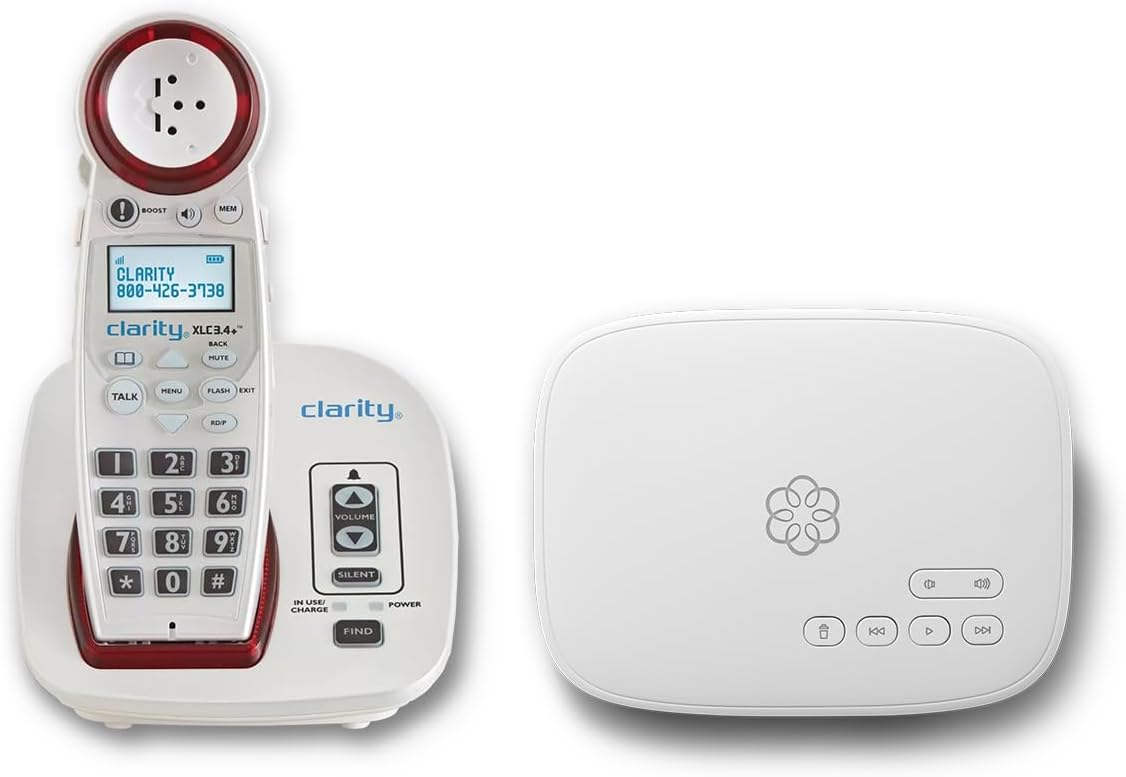
The Ooma Telo bundle combines a high-quality phone with a robust service plan, offering a premium communication solution. Rated 4.5 stars, it includes a talking keypad, visual ringer, and adjustable volumes to accommodate hearing impairments effectively.
We may earn a commission when you buy through this link, at no additional cost to you.
This system provides unlimited nationwide calling and includes personal setup assistance. It sends your exact address to 911 dispatchers and offers SMS alerts to family members when an emergency call is made. Advanced robocall blocking keeps unwanted calls at bay.
The main drawback is the monthly subscription fee, which covers the unlimited calling and support services. However, for users seeking a reliable all-in-one package with concierge support, the cost is justified by the peace of mind it offers.
We suggest this bundle for households wanting a comprehensive replacement for traditional landlines. It suits those who value advanced safety features and clear communication without dealing with separate phone and service providers.
Registered address transmission to dispatchers ensures quick emergency response when 911 is dialed.
24/7 concierge plan provides white glove setup and assistance whenever you need help.
We may earn a commission when you buy through this link, at no additional cost to you.
The VTech SN5147 offers a hybrid system combining a corded base with a cordless handset. It delivers a 90dB ringer and a one-touch volume boost up to 50dB, making it highly effective for hard-of-hearing users.
We may earn a commission when you buy through this link, at no additional cost to you.
This phone includes a digital answering machine with slow playback and visual ring indicators. It allows you to block up to 1,000 robocalls and features photo speed dial slots for quick access to loved ones.
While the expandability to four handsets is great for larger homes, the menus can be complex for tech-averse seniors. However, the visual alerts and loud ringer ensure that calls are never missed even in noisy environments.
We recommend this model for households needing mobility and amplification. It suits those who want a mix of wired reliability and wireless convenience with strong audio support features.
The base works during power outages, ensuring you stay connected even when electricity fails.
Full-duplex speakerphones on both base and handset enable natural two-way conversations.
We may earn a commission when you buy through this link, at no additional cost to you.
This home telephone uses voice commands exclusively to dial, answer, and end calls. It is designed for those with significant mobility or vision difficulties, removing the need to press buttons or hold a handset during use.
We may earn a commission when you buy through this link, at no additional cost to you.
The device stays active and ready to listen for commands like dial, answer, or end. It uses your home phone line to maintain a standard connection while simplifying the interaction process significantly for users with disabilities.
Since it relies solely on voice, it might struggle with strong accents or background noise. However, the convenience it offers for those who cannot physically manipulate small buttons is unmatched in traditional landline categories.
We suggest this for users with mobility challenges who want a hands-free experience. It is a modern solution to classic telephony, focusing on accessibility through voice interaction.
Answering and dialing with your voice only removes physical barriers for users with weak grip strength.
Continuous listening mode ensures no delay when you need to place an urgent call.
We may earn a commission when you buy through this link, at no additional cost to you.
This big button phone meets the needs of seniors with hearing and vision impairments. It offers up to 40dB amplified volume and large buttons that are easy to see and press for those with arthritis or tremors.
We may earn a commission when you buy through this link, at no additional cost to you.
The phone includes three replaceable picture buttons for favorite contacts, ensuring stored numbers are protected even if the phone line is unplugged. It can be mounted on a wall or placed on a desktop with nonskid feet.
While it lacks sophisticated digital features, its simplicity and robust amplification make it reliable. The focus is purely on making basic calls easier without overwhelming the user with complex menus.
We recommend this for those who need straightforward accessibility features. It suits nursing homes or apartments where a simple, durable phone is required for daily communication.
Stored numbers do not disappear if the phone line is unplugged, preserving your contacts safely.
Wall mount or desktop options allow you to place the phone where it is most reachable.
We may earn a commission when you buy through this link, at no additional cost to you.
The FLYINGVOICE FIP12WP is a specialized VoIP phone designed for seniors with dementia or hearing loss. It features customizable image keys where family photos can be inserted, making it easier to recognize who you are calling.
We may earn a commission when you buy through this link, at no additional cost to you.
This phone supports volumes exceeding 110dB for speakerphone calls, ensuring clarity in noisy environments. It includes a dedicated HELP key for emergency assistance and a bright red light that flashes to alert users to incoming calls.
Note that this is a VoIP device requiring an internet connection and SIP server, not a standard telephone jack. While setup may be complex, the visual and safety features make it ideal for care facilities or assisted living homes.
We suggest this for users in environments where VoIP is available. It excels for those needing photo recognition and emergency support features in a single reliable device.
A dedicated HELP key allows instant access to emergency numbers with just one press.
Inserting photos in slots helps users with memory loss recall contacts quickly without reading numbers.
We may earn a commission when you buy through this link, at no additional cost to you.
This model focuses on high-quality audio to ensure clear conversations. It is designed specifically for performance, offering amplified sound features tailored for seniors who struggle with low-quality lines.
We may earn a commission when you buy through this link, at no additional cost to you.
While specific feature lists are minimal, the phone is built to deliver clear sound. It suits those who prioritize audio fidelity above other digital features like screens or complex menus.
Users have rated it lower, which may indicate issues with ease of use or reliability. However, for those needing pure audio improvement without extra frills, it remains an option to consider.
We recommend this only for users seeking basic amplification without advanced features. Verify compatibility with your home setup before purchase.
The focus on high definition audio ensures conversations are clear even with slight hearing impairments.
We may earn a commission when you buy through this link, at no additional cost to you.
This voice dialer allows you to make, answer, and end calls using just three voice commands. It stores 17 programmable voice-activated memories and includes a visual LED ring indicator for users with hearing difficulties.
We may earn a commission when you buy through this link, at no additional cost to you.
The phone features 40dB earbud volume options and speaks the caller ID name. It supports hands-free volume control and lifetime memory backup, ensuring your contacts are safe from accidental erasure.
User reviews are limited, suggesting mixed experiences with setup or recognition. While the concept is strong for those unable to press buttons, practical use may require precise voice conditions.
We suggest this for tech-savvy seniors needing hands-free control. Verify the voice recognition sensitivity in your specific environment before committing.
Three simple words control the phone, making it accessible for those with mobility challenges.
Bright LED rings ensure you notice calls even if the ringtone is too quiet for you.
We may earn a commission when you buy through this link, at no additional cost to you.
This corded landline phone simplifies dialing with nine photo memory keys. It is designed for seniors with cognitive impairments, allowing family members to press a photo to make a call instantly without searching for numbers.
We may earn a commission when you buy through this link, at no additional cost to you.
The device offers hands-free calling, loud ringers over 110dB, and LED flash alerts. It requires no batteries or power supply, relying on the phone line for operation. This makes it highly reliable in emergencies or during power outages.
While it lacks modern internet features like caller ID or voicemail, its focus on simplicity and connectivity is beneficial for care facilities. Programming takes just 4 steps, ensuring quick setup for staff or family.
We recommend this for nursing homes or home care settings. It ensures seniors stay connected with loved ones through visual and tactile accessibility features.
Photo dialing encourages seniors to call family members frequently without frustration.
No battery dependency means the phone works whenever the phone line is active.
We may earn a commission when you buy through this link, at no additional cost to you.
Choosing the right telephone requires understanding your hearing needs and home environment. This guide explores key factors to consider before making a purchase.
Ensure your model supports real-time captioning services if you need text to accompany audio. Most dedicated captioned phones require a high-speed internet connection and a registration process to activate free nationwide services.
Verify that the service covers your region and that your internet provider meets the necessary speed requirements.
Look for devices offering adjustable volume control, ideally ranging up to 50dB or more. Amplification helps those with hearing loss distinguish speech from background noise without needing headphones.
Choose a model that lets you adjust both earpiece and speaker volumes independently.
Some models require complex registration or internet configuration. Select options with simple plug-and-play setups if you want immediate use without technical help.
Check if the manufacturer offers phone support or step-by-step guides for installation.
Visual indicators like flashing lights are essential for users who might miss a loud ringtone. These alerts signal incoming calls clearly even in noisy environments.
Prioritize phones with high-contrast LEDs that stand out on walls or desks.
Large, high-contrast buttons help seniors with low vision or arthritis dial accurately. Avoid complex keypads with too many sub-buttons.
Opt for models with dedicated large numeric keys and clear labels.
Memory impairments benefit from photo speed dial options where family photos replace numbers. This reduces confusion and encourages independent calling.
Ensure the model supports storing at least a few contacts visually.
Phones with hearing aid compatibility reduce feedback loops caused by magnetic interference. This makes calls clearer when using devices behind your ears.
Look for HAC ratings to confirm the model supports your specific aids.
Decide between standard landlines, VoIP, or cordless hybrids based on your infrastructure. Traditional lines work during outages, while VoIP may offer more features but rely on internet.
Ensure the device matches your existing phone wiring or internet setup.
Read the manual carefully to understand the caption service registration process. Many devices require online or phone activation to enable real-time text features.
Place the phone on a stable surface away from direct sunlight to prevent screen glare. Ensure the power cord and phone line are not tangled to avoid accidental unplugging.
Regularly clean the touchscreen and buttons with a dry cloth. Avoid using harsh chemicals that could damage the screen or plastic casing.
The hardware cost varies, but the captioning service itself is often provided free of charge by government programs in the US. You may need to cover shipping or registration fees depending on your provider.
Most modern captioned phones require high-speed internet to transmit text data. Older or non-digital models may not offer real-time captioning but still provide amplified sound.
Look for phones marked as hearing aid compatible (HAC). These models reduce interference and work well with most hearing aids for clear sound.
Yes, many services allow you to port your number. Check with your provider if you need to transfer to a new line for captioning features.
Traditional landline phones work during power outages. However, internet-based models will need backup power or a generator to function when the grid fails.
Real-time transcription is generally accurate for English conversations. Background noise or heavy accents may affect clarity, but most services include human operators for difficult calls.
We found the Hamilton CapTel 2400iSPNBT to be the top choice for its reliable captioning and large display. It balances modern features with ease of use for seniors needing text support.
For budget-conscious buyers, the Corded Landline with Photo Dialing offers essential accessibility without internet requirements. Prioritize features like amplification and visual alerts to ensure daily usability.
Check current prices and service availability before finalizing your purchase. Technology evolves quickly, so confirming that the model meets your specific needs today is essential.