
TNP 4-Port HDMI Ethernet Coax and Phone Wall Plate, Cat6 RJ45, White
4.7Editor score
Multi-port connectivity option
18Gbps HDMI throughput
No soldering required
This guide compares the top HDMI wall plate options for home theaters and offices, evaluating features like 4K support, 8K bandwidth, and installation ease.
Finding the right HDMI wall plate ensures clean cable management and reliable signal transmission for your home theater setup. A good plate supports high bandwidth and fits standard brackets seamlessly.
We evaluated ten leading models based on their HDMI version support, build quality, and ease of installation. Each option offers unique features tailored to different AV needs and budgets.
Each pick below highlights specific strengths and ideal use cases. Note that prices and availability may change, so verify current listings before purchasing to ensure the best value.
4.7Editor score

4.4Editor score

4.4Editor score
The following table presents a side-by-side comparison of all ten HDMI wall plates, highlighting key specifications and capabilities to help you choose the right model for your setup.


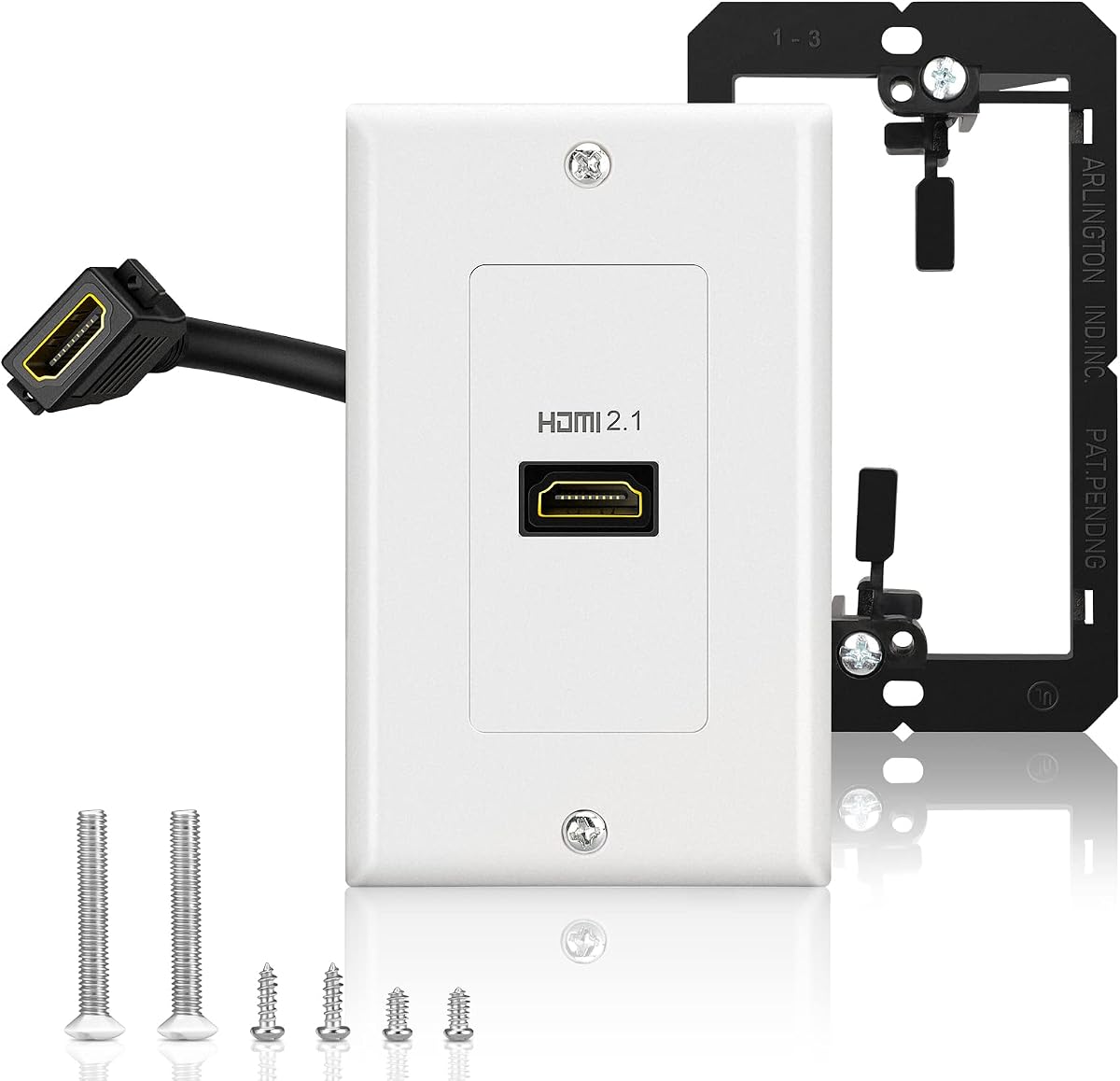
The Cable Matters 2-Pack 1-Port 8K HDMI Wall Plate stands out as the top choice for high-performance AV setups. With a strong 4.4 rating and support for 8K content, it ensures your wiring won't become obsolete anytime soon.
We may earn a commission when you buy through this link, at no additional cost to you.
Its HDMI 2.1 certification means it handles 48Gbps bandwidth, enabling features like VRR and ALLM for gaming. The 7.1-inch pigtail simplifies connections to in-wall cables, and the standard low-voltage design fits most home wall frames.
While it is a single-port solution and costs more than basic plates, the investment is worth it for users with 4K or 8K displays. The included 2-pack offers value for multi-room installations.
If you need reliable 8K support and premium signal quality, this plate is the ideal pick. It balances performance, ease of use, and modern features better than any other option in its class.
Supports 48Gbps for next-gen 8K content and gaming features like VRR and ALLM.
The built-in pigtail allows you to connect directly to in-wall cables without extra adapters.
We may earn a commission when you buy through this link, at no additional cost to you.
The Cable Matters 4K HDMI Wall Plate offers reliable performance for users who do not need 8K capabilities. Its 4.5 rating reflects strong satisfaction with its build and signal stability for mainstream displays.
We may earn a commission when you buy through this link, at no additional cost to you.
Featuring HDMI 2.0 support, it delivers up to 18Gbps bandwidth and handles 4K@60Hz effortlessly. The pigtail connects easily to in-wall cabling, and the faceplate fits standard low-voltage brackets perfectly.
This option is cost-effective and includes a 2-pack for additional flexibility. However, it lacks the bandwidth needed for future 8K displays or advanced gaming features like 120Hz refresh rates.
For home theaters limited to 4K, this plate is a dependable and affordable choice. It provides a clean finish and solid performance without the premium price of 2.1 models.
Designed for standard high-speed HDMI needs with clear 4K@60Hz video quality.
The pigtail design keeps cable management tidy behind the wall without external adapters.
We may earn a commission when you buy through this link, at no additional cost to you.
The VCELINK 4K HDMI Outlet Wall Plate is ideal for DIY installs because it includes everything needed for setup. Its 4.6 rating confirms strong user satisfaction with its design and ease of use.
We may earn a commission when you buy through this link, at no additional cost to you.
This kit comes with a low-voltage bracket, saving you a trip to the store. The HDMI 2.0 support handles 4K@60Hz, and the detachable cable makes repairs or replacements easier in the future.
The ABS material is impact-resistant, ensuring durability in high-traffic areas. However, if you plan to upgrade to 8K later, this model will need replacement as it caps at 4K performance.
If you need a complete kit ready to install, this VCELINK option is highly practical. It balances affordability with essential features and includes the bracket many other sellers omit.
Includes the mounting bracket and all screws for a quick wall setup.
Impact-resistant ABS casing protects against wear and damage over time.
We may earn a commission when you buy through this link, at no additional cost to you.
The TNP 4-Port HDMI Wall Plate offers unique versatility by combining HDMI, Ethernet, and other ports. Its 4.7 rating highlights exceptional reliability and utility for office or media room setups.
We may earn a commission when you buy through this link, at no additional cost to you.
While it supports HDMI 2.0 up to 18Gbps, the addition of Cat6 Ethernet makes it perfect for streaming boxes that need both video and internet. The coupler design avoids soldering, making installation simple.
This is the most affordable option on our list, ideal for budget-conscious buyers. However, if you need 8K bandwidth, the HDMI section is limited to 4K standards.
For users needing both video and network connectivity from one plate, this TNP model is unmatched. It provides great value and a clean solution for mixed AV and data cables.
Combines HDMI and Ethernet to power both your display and network needs.
No soldering required means you can connect cables quickly and safely.
We may earn a commission when you buy through this link, at no additional cost to you.
This generic HDMI Wall Plate is a straightforward solution for basic 4K connections. With a 4.5 rating, it performs reliably for simple setups without extra frills or high costs.
We may earn a commission when you buy through this link, at no additional cost to you.
The keystone jack allows for flexibility if you need to replace the port later. It supports 4K@60Hz and features a fully assembled faceplate to save time during installation.
However, you must purchase a low-voltage bracket separately, which adds a small step to the process. It is best suited for users who already have mounting hardware available.
If you just need a clean, white outlet for a 4K TV, this plate does the job well. It offers simplicity and decent signal quality at a budget-friendly price point.
Fully assembled out of the box to reduce setup time.
The jack can be detached if you need to swap connectors later.
We may earn a commission when you buy through this link, at no additional cost to you.
The TENINYU Single HDMI Wall Plate is a solid entry-level choice for connecting a single display. It holds a 4.4 rating and offers essential HDMI 2.0b features at an affordable cost.
We may earn a commission when you buy through this link, at no additional cost to you.
With gold-plated contacts, it resists corrosion and ensures steady signal quality. The ARC support is handy if you need to connect a soundbar through the same line as the video.
This model is designed for simple tasks and works well for standard rooms. It does not include advanced features like 8K support, but it fulfills basic connectivity needs reliably.
For anyone needing a quick, no-fuss outlet for a projector or TV, TENINYU delivers value. It is a good fit for standard home setups that do not require advanced specs.
Gold-plated contacts ensure better signal stability and longer component life.
Supports ARC to simplify audio connections to your sound system.
We may earn a commission when you buy through this link, at no additional cost to you.
This 2-Port HDMI Wall Panel allows you to connect two devices through a single wall plate. Its 4.4 rating indicates reliable performance for users needing dual video inputs.
We may earn a commission when you buy through this link, at no additional cost to you.
It supports 4K HDR and ARC, making it suitable for connecting a TV and a gaming console. The female-to-female coupler ensures you can use your own cables for in-wall runs.
While the double ports add versatility, the HDMI bandwidth is still limited to 4K standards. It is a good middle-ground for small theaters that do not have space for multiple plates.
If you need to hide cables for two devices but want one clean panel, this model works well. It balances port count with reasonable price and decent build quality.
Two ports allow you to connect multiple consoles or players to one wall outlet.
Easily connect cables to the back without requiring soldering tools or skills.
We may earn a commission when you buy through this link, at no additional cost to you.
The TNP 1-Port HDMI Wall Plate is a basic option designed for straightforward 4K connections. It holds a 4.2 rating, reflecting decent performance for standard home use cases.
We may earn a commission when you buy through this link, at no additional cost to you.
It features a 4-inch pigtail to connect easily to in-wall cabling. The faceplate fits standard brackets, and the coupler style makes it simple to install without tools.
While reliable for everyday use, it lacks advanced specs like 8K or gaming features. However, it offers a budget-friendly way to organize cables behind your media console.
If you need a simple outlet and do not plan on upgrading to 8K soon, this TNP plate works well. It provides a clean look at a very accessible price.
The pigtail simplifies connections and removes the need for extra adapters.
One of the more affordable choices for basic 4K cable management.
We may earn a commission when you buy through this link, at no additional cost to you.
The ELECTOP 8K HDMI Wall Plate is designed for users who require modern high-speed connectivity. With a 4.3 rating, it offers solid performance for 4K and 8K AV setups.
We may earn a commission when you buy through this link, at no additional cost to you.
It supports HDMI 2.1 with 48Gbps bandwidth and comes with a metal low-voltage bracket. This is ideal for gaming setups that need features like ALLM and VRR.
While the metal bracket is sturdy, some may prefer a standard low-voltage option. However, the included hardware ensures you can mount the plate without buying additional items.
For those building a gaming console station or 8K home theater, this plate is a strong contender. It delivers future-proof specs at a fair price with convenient included hardware.
Provides sturdy mounting and eliminates the need to buy a bracket separately.
Supports 8K and variable refresh rates for smoother gaming experiences.
We may earn a commission when you buy through this link, at no additional cost to you.
The VCE UL Listed 8K HDMI Keystone Wall Plate stands out for its safety certifications and premium build. With a 4.4 rating, it offers top-tier materials for users prioritizing reliability.
We may earn a commission when you buy through this link, at no additional cost to you.
It features UL-listed flame-retardant ABS and gold-plated connectors. These materials reduce the risk of damage and ensure clean signal transmission even under heavy load.
The main trade-off is that you may need to purchase a keystone jack separately. While this increases the total cost, it allows for greater customization and modularity.
If safety and build quality are your main concerns, this plate is the safest choice. It combines modern 8K specs with rigorous safety standards for a professional-grade installation.
UL-listed and flame-retardant materials provide added security for in-wall wiring.
The keystone design allows you to swap ports or add other connections easily.
We may earn a commission when you buy through this link, at no additional cost to you.
Choosing the right HDMI wall plate involves more than just aesthetics. Consider bandwidth, compatibility, and installation requirements to ensure your setup works seamlessly.
The HDMI version dictates the maximum bandwidth the plate can handle. HDMI 2.0 supports up to 18Gbps, ideal for 4K content, while HDMI 2.1 supports 48Gbps for 8K and advanced gaming features like VRR and ALLM. If you have high-end displays, prioritize 2.1 models.
Always match the plate version to your devices to avoid bottlenecks.
Decide whether you need a single outlet or a panel that can handle multiple connections. Single-port plates are simpler and cheaper, but 2-port panels let you connect a TV and a console without extra hardware. Some plates even mix HDMI with Ethernet for extra utility.
Choose the port count based on how many devices you plan to mount behind the wall.
HDMI plates come with or without built-in pigtail cables. Plates with tethers make it easier to connect to in-wall cables but limit cable length. Keystone models allow you to detach the jack for custom routing but may require separate purchasing.
Pigtails simplify setup, while keystone jacks offer flexibility for complex runs.
Most plates fit standard low-voltage brackets. Check if the plate includes the bracket or requires you to buy it separately. Some high-end models include metal brackets for extra strength, while others assume you have the standard wall frame already installed.
Verify bracket inclusion to avoid hidden costs or installation delays.
Plates are typically made of ABS plastic, but premium options may use metal or UL-listed flame-retardant materials. Safety certifications like UL ensure the product resists heat and fire, which is critical for enclosed in-wall wiring.
For in-wall installations, always prefer UL-listed or flame-resistant materials.
Prices vary widely based on features like HDMI version and included accessories. A simple 4K plate may cost under $10, while 8K models with brackets can reach $20 or more. Buying a 2-pack often offers better long-term value if you need multiple outlets.
Balance your feature needs with your budget to find the best value.
Start by ensuring you have the proper tools, such as a screwdriver and a low-voltage bracket. If your plate comes with a pigtail, connect it to the in-wall HDMI cable before securing the plate. For keystone models, insert the jack before mounting the faceplate.
After installation, test the connection with your source and display devices. If signal issues arise, check the cable length; long runs over 25 feet may require active extenders or fiber cables to maintain 4K or 8K quality.
To care for your plate, gently wipe the faceplate with a dry cloth. Avoid using harsh chemicals or abrasive cleaners that could scratch the finish. Periodically check the connections behind the plate to ensure they remain secure.
A high-quality plate should not degrade signal quality if it meets the required HDMI specifications. Ensure the plate supports the same bandwidth as your HDMI version, such as 18Gbps for 4K or 48Gbps for 8K, to maintain full performance.
Most HDMI wall plates are designed to fit standard single-gang low-voltage brackets. However, always check the dimensions of the plate and bracket to ensure compatibility. Some models may include the bracket, while others require separate purchase.
Yes, it is safe if you use cables rated for in-wall use, such as CL2 or CL3 fire-rated HDMI cables. Never use standard HDMI cables inside walls unless they are specifically rated to meet local fire codes and safety standards.
HDMI 2.0 plates support up to 18Gbps bandwidth, which handles 4K resolution. HDMI 2.1 plates support up to 48Gbps, enabling 8K resolution and advanced gaming features like Variable Refresh Rate (VRR) and Auto Low Latency Mode (ALLM).
Many modern HDMI wall plates support ARC or eARC, allowing you to send audio back to a receiver or soundbar. Check the product description for ARC support if you plan to connect audio devices through the wall outlet.
To install a keystone plate, snap the HDMI keystone jack into the back of the faceplate first. Then connect your cables to the jack, place the faceplate into the low-voltage bracket, and secure it with screws.
The Cable Matters 8K plate leads the pack for future-proof high-performance setups. It balances bandwidth, installation ease, and reliability better than any other option on this list.
If you are working with a tighter budget or just need basic 4K connections, the TNP 4-Port Combo or the Cable Matters 4K 2-Pack are excellent alternatives. Consider your specific needs when making your final decision.
Remember to verify current pricing and availability before buying. The HDMI market evolves quickly, and checking the latest specs ensures you get the best value for your home theater or office setup.