
Canon MegaTank G3270
4.1Editor score
Wireless print copy scan
Up to 2 years ink
Single sided printing
1.35 inch LCD
Save up to 1000
Ink tank printers offer a modern solution for high-volume printing without the burden of expensive cartridges. These devices use refillable reservoirs that hold significantly more ink than traditional models, allowing users to print thousands of pages on a single fill. If you need cost-effective printing for home or office use, this technology provides substantial savings over time.
We evaluated ten leading ink tank printers based on print quality, speed, connectivity options, and long-term ink costs. Our analysis includes models from major brands like Canon, Epson, and HP, each offering unique features such as auto duplex printing, mobile apps, and touchscreen interfaces. We focused on reliability and user feedback to ensure these picks meet diverse printing demands.
Each product entry details key specifications, pros, cons, and real-world performance notes to help you make an informed decision. Prices and availability change frequently, so please verify current offers on the linked retailer pages before purchasing. Our goal is to provide a comprehensive overview that balances upfront costs with ongoing value for your specific workflow.
4.1Editor score

4.2Editor score

4.1Editor score
As an Amazon Associate we earn from qualifying purchases.
This comparison table outlines the core specifications and standout features of each ink tank printer to help you quickly identify which model fits your budget and performance requirements.




The Epson EcoTank ET-2803 stands out as a top choice for home users needing reliable, high-volume printing. With a rating of 4.2 stars, it offers a compelling mix of cost savings and modern features. The Supertank system eliminates the need for traditional cartridges, replacing them with large, refillable ink reservoirs.
We may earn a commission when you buy through this link, at no additional cost to you.
This printer includes enough ink to last up to two years, covering thousands of black and white or color pages. The Micro Piezo Heat-Free technology ensures sharp text and vibrant color photos on various paper types. Connectivity is robust, supporting wireless printing, AirPrint, and the Epson Smart Panel app for mobile access.
While it lacks automatic duplex printing, the mess-free ink refill design prevents spills and simplifies maintenance. The EcoFit bottles are keyed to prevent mix-ups, making refilling stress-free. For those prioritizing long-term value and environmental impact, this model delivers significant benefits over standard cartridge printers.
Ideal for households or small offices with moderate printing needs, the ET-2803 balances performance with ease of use. Its ability to reduce cartridge waste makes it an eco-friendly option. We recommend it for anyone seeking a dependable, cost-effective solution that minimizes ongoing ink expenses.
Each replacement ink bottle set is equivalent to about 80 individual cartridges, offering dramatic savings on replacement ink compared to traditional models.
Wireless plus hands-free voice-activated printing allows you to print from your smart device using AirPrint or the intuitive Epson Smart Panel app.
We may earn a commission when you buy through this link, at no additional cost to you.
The Canon MegaTank G3270 is an excellent entry point for those seeking an affordable ink tank printer. With a 4.1 rating, it delivers solid performance for basic home printing tasks. The included ink supply supports up to two years of printing, reducing the frequency of refills significantly.
We may earn a commission when you buy through this link, at no additional cost to you.
Capable of printing up to 6,000 black and white pages on a single set of inks, this model offers substantial volume at a competitive price point. The wireless capabilities allow easy printing from computers and mobile devices, while the 1.35-inch LCD provides essential navigation controls.
Though it lacks advanced features like auto duplex printing, the G3270 focuses on core functionality and cost efficiency. The design prioritizes ease of use, making it suitable for users who print documents and occasional photos without needing complex settings.
Best for budget-conscious buyers, the G3270 minimizes upfront investment while delivering long-term ink savings. It is a reliable choice for students or home offices with light to moderate printing needs. We suggest this model for those wanting to switch from cartridges without spending much.
Print up to 6,000 black and white or 7,700 color pages using a single set of inks, providing up to two years of ink included.
The 1.35-inch square LCD display offers straightforward navigation for print, copy, and scan functions without clutter.
We may earn a commission when you buy through this link, at no additional cost to you.
The HP Smart Tank 5003 represents a premium option in the ink tank category, designed for users needing high-volume printing. Rated 4.1, it promises a long ink supply of up to three years, covering thousands of pages right out of the box. The AI-capable features suggest enhanced usability and smart workflow integration.
We may earn a commission when you buy through this link, at no additional cost to you.
Its mess-free refill system makes replenishing ink easy, using easy-access bottles that drain without squeezing or spilling. Borderless printing adds versatility for photos and documents, while wireless printing ensures seamless connection across devices. HP emphasizes reliable operation without complicated maintenance.
While the initial investment is higher, the extended ink life reduces long-term costs significantly. The Smart Tank brand focuses on simplicity, avoiding the hassle of traditional cartridges. Users benefit from sharp text and rich colors, suitable for both office and creative tasks.
Ideal for those prioritizing convenience and capacity, the 5003 suits busy households or small businesses. Its AI capabilities may streamline print jobs through smarter management. We recommend this for anyone ready to invest in a long-lasting, high-performance printing solution.
Get up to 3 years of HP Ink included, offering best for low-cost, high-volume printing with up to 6,000 color or black pages.
Replenish ink with HP's easy-access, mess-free refill system; simply plug the ink bottles into this cartridge-free ink tank and let them drain.
We may earn a commission when you buy through this link, at no additional cost to you.
The Epson EcoTank ET-2903 targets users needing faster speeds and a better interface. With a 4.2 rating, it delivers 11 pages per minute for black text, aided by zero warmup time. The 1.44-inch color screen simplifies navigation compared to smaller displays on other models.
We may earn a commission when you buy through this link, at no additional cost to you.
Included ink lasts up to three years, covering thousands of pages to minimize refill interruptions. The Heat-Free technology ensures professional-grade reliability with a duty cycle more robust than its predecessor. Photos benefit from high 5760 x 1440 dpi resolution for exceptional quality.
Wireless and mobile printing are enhanced through the Epson Smart Panel app, supporting AirPrint and Mopria services. While the unit is slightly larger, the productivity features justify the space for active workspaces. Refilling remains simple with EcoFit bottles to prevent mix-ups.
Best for home offices needing efficiency, the ET-2903 combines speed with cost savings. Its advanced features cater to users printing frequently without compromising on quality. We recommend it for those seeking a balance between performance and long-term ink economy.
Features 11 black/6 color ISO ppm print speeds with zero warmup time and a 1.44-inch color display for simple navigation.
High 5760 x 1440 dpi print resolution allows for exceptional photos and text on a wide range of media types.
We may earn a commission when you buy through this link, at no additional cost to you.
The Canon Megatank G3290 enhances convenience with auto 2-sided printing, reducing paper use and time spent on duplex tasks. Rated 4.2, it features a larger 2.7-inch LCD touchscreen for easier control. Ink supply supports up to two years, aligning with typical household usage patterns.
We may earn a commission when you buy through this link, at no additional cost to you.
Print quality remains sharp with up to 7,700 color pages per ink set. The wireless capabilities ensure seamless integration with mobile devices and laptops. Users save up to $1,000 on ink over time compared to cartridge models, a significant long-term benefit.
While the color speed is moderate, the ability to print both sides automatically adds substantial value for document-heavy users. The interface is intuitive, making setup and routine tasks straightforward. It is a versatile option for those needing more than basic print functions.
Best for users valuing efficiency and paper savings, the G3290 balances features and cost. Its touchscreen makes operation user-friendly. We suggest this model for home offices needing automatic duplex without stepping up to premium tiers.
Features auto 2-sided printing to save paper and reduce manual intervention during document production tasks.
The 2.7-inch LCD color touchscreen provides easy navigation for print, copy, and scan functions with intuitive controls.
We may earn a commission when you buy through this link, at no additional cost to you.
The Epson EcoTank ET-4800 focuses on compact performance for smaller spaces. Rated 3.8, it still offers the core benefits of EcoTank technology like cartridge-free printing and high capacity tanks. The Micro Piezo Heat-Free technology ensures sharp text and vibrant photos on various media types.
We may earn a commission when you buy through this link, at no additional cost to you.
Included ink allows for thousands of pages, reducing frequent refills. Zero cartridge waste aligns with eco-friendly goals, making it a responsible choice. The wireless connectivity ensures easy printing from multiple devices around the home or office.
While it may lack advanced features found in higher models, it delivers reliable core performance. The design fits well in limited workspace without sacrificing functionality. Refilling remains straightforward with the dedicated EcoFit bottle system.
Best for small spaces, the ET-4800 provides essential ink tank benefits without bulk. Its simplicity makes it a practical option for light to moderate users. We recommend it for those prioritizing space efficiency and cost savings.
Designed to fit in virtually any workspace while still offering high capacity ink tanks and wireless connectivity.
By using an EcoTank printer, you can help reduce the amount of cartridge waste ending up in landfills.
We may earn a commission when you buy through this link, at no additional cost to you.
The Epson EcoTank ET-2980 is designed for high-volume needs with up to 6,600 black pages on initial ink. Rated 4.0, it provides enough ink to last up to three years, reducing interruptions for refills. The simple refilling process uses supersized tanks and unique EcoFit bottles.
We may earn a commission when you buy through this link, at no additional cost to you.
Wireless printing ensures convenience, allowing scans and prints from smartphones via the Epson Smart Panel app. It is a robust choice for households printing frequently without needing expensive consumables. The sleek black finish integrates well into modern home setups.
While it does not offer automatic duplex printing, the capacity makes up for this limitation in volume-heavy environments. Genuine ink is recommended for optimal quality and performance. It supports modern connectivity standards for seamless operation.
Best for frequent printing, the ET-2980 minimizes ongoing ink costs. Its design focuses on efficiency and ease of refilling. We suggest this for users needing substantial output and long-term savings without complex features.
Print up to 6,600 pages black and 5,500 color for worry-free printing and fewer out-of-ink frustrations.
Supersized ink tanks and unique EcoFit bottles make refilling your printer's ink simple without the worry of drying out.
We may earn a commission when you buy through this link, at no additional cost to you.
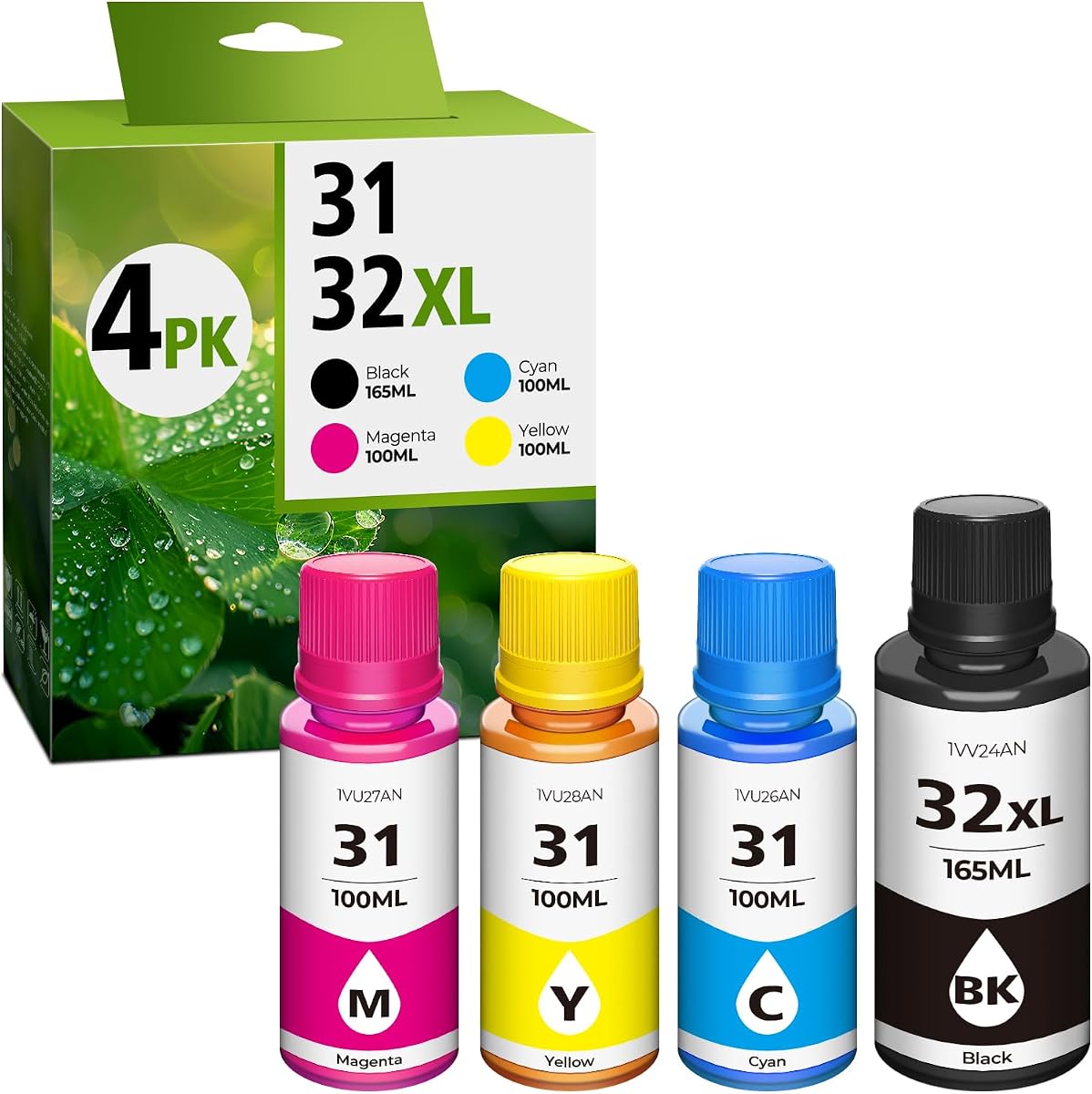
For owners of HP Smart Tank printers, the 31 Ink 32XL Black Ink Bottle set offers a cost-effective refill alternative. Rated 4.4, each 32XL black bottle provides up to 9,500 pages. This set is compatible with a wide range of HP Smart Tank models.
We may earn a commission when you buy through this link, at no additional cost to you.
Designed for easy refilling, the bottles ensure minimal effort and no leakage during replenishment. The dye inks provide crisp, professional-quality printouts with vibrant colors. It serves as a practical choice for users seeking to maximize the lifespan of their ink tanks.
Note that these are dye inks and differ from OEM black pigment ink; cleaning heads is recommended before refilling. Mixing with OEM black pigment ink may affect print quality. This makes it suitable for standard documents and photos rather than specialized needs.
Best for extending printer utility, these bottles offer high capacity and value. They fit seamlessly into existing Smart Tank workflows. We recommend them for users looking to save on replacement costs without compromising basic print quality.
The page yield of a 32XL black ink bottle is up to 9,500 pages at 5% coverage on A4 paper.
Designed for easy refilling, ensuring seamless refills with minimal effort and no leakage into your tank.
We may earn a commission when you buy through this link, at no additional cost to you.
This HP Smart Tank 5003 configuration provides similar benefits to the other variant, rated 3.8. It promises up to 3 years of HP Ink included, covering up to 6,000 pages. The AI-capable features and mess-free refill system enhance usability for home users.
We may earn a commission when you buy through this link, at no additional cost to you.
Borderless prints add flexibility for photos, while wireless capabilities keep devices connected. The cartridge-free refillable design reduces waste and simplifies maintenance. It is positioned as the last printer you'll ever need, emphasizing ease and reliability.
While ratings show some variation, the core value lies in long-term savings. The setup is designed to be straightforward, avoiding complicated maintenance tasks. Sharp text and richer colors are highlighted as key benefits for document and photo printing.
Best for HP users seeking reliability, this model offers robust ink capacity. It suits those prioritizing long-term operation over quick fixes. We suggest this for anyone wanting to minimize printer maintenance and ink replacement frequency.
Set it up once and print with confidence; no complicated maintenance, just easy, reliable printing you can count on.
Replenish ink with HP's easy-access, mess-free refill system; simply plug the ink bottles into this cartridge-free ink tank and let them drain.
We may earn a commission when you buy through this link, at no additional cost to you.
The Epson EcoTank ET-2988 Renewed offers advanced features at a lower cost. Rated 3.9, it delivers 15 pages per minute for black printing and auto 2-sided capabilities. The included ink supports up to three years, with 6,600 black pages for high volume.
We may earn a commission when you buy through this link, at no additional cost to you.
Its 1.44-inch color screen simplifies navigation and settings management. Wireless mobile printing ensures seamless operation from smartphones. The renewed status provides access to high-end features without the full retail price, though warranty may vary.
While it is not brand new, performance is engineered for reliability with Heat-Free technology. Zero cartridge waste and high resolution printing remain core benefits. It is a practical choice for users comfortable with renewed electronics.
Best for budget-savvy buyers, the ET-2988 brings premium features within reach. It suits those needing speed and duplex printing without high costs. We recommend it for users prioritizing performance and savings in a refreshed unit.
Fast 15 black/8 color ISO ppm print speeds and auto duplex printing streamline productivity with zero warmup time.
High 4800 x 1200 dpi print resolution for exceptional photos and text on a wide range of media.
We may earn a commission when you buy through this link, at no additional cost to you.
Selecting the right ink tank printer requires balancing upfront cost with long-term value and feature needs.
Ink capacity determines how many pages you can print before refilling. Look for models that include enough ink for at least 1,000 pages, with high-yield bottles for larger volumes. The better ink capacity reduces the frequency of refills and saves time.
Prioritize printers offering thousands of pages per ink set to maximize value and minimize interruptions.
Print speed affects how quickly documents are produced, measured in pages per minute (PPM). Quality depends on resolution, with high DPI settings ensuring sharp text and photos. Faster models suit busy offices needing quick turnaround times.
Check PPM and DPI ratings to match the printer with your document complexity and volume needs.
Modern printers offer wireless connectivity for printing from smartphones and laptops. Look for AirPrint or Mopria support to avoid extra drivers. Some models support voice commands or cloud printing for added flexibility.
Ensure the printer supports your preferred devices and network setup for seamless integration.
A good refill system prevents messes and spills. EcoFit or keyed bottles help prevent mix-ups, while spill-free designs simplify maintenance. Easy refilling is crucial for users with limited technical experience.
Choose a model with a straightforward, mess-free refill process to reduce frustration.
Auto duplex printing saves paper by printing on both sides automatically. This feature is vital for large document jobs and reducing material costs. Manual duplexing requires user intervention and can slow down the workflow.
Prioritize auto duplex if you frequently print multi-page reports or drafts.
A touchscreen or larger display makes navigation easier. Color screens provide visual cues for settings and error messages. Simpler models may have basic LCDs sufficient for standard tasks.
Select a display size that matches your preference for on-device control and setup.
Established brands like Epson, Canon, and HP offer reliable support and spare parts. Warranty terms can vary by model. Check customer reviews and support resources for troubleshooting assistance.
Choose a brand with strong service backing to ensure longevity and peace of mind.
Set up the printer on a flat, stable surface away from direct sunlight. Connect it to your network following the manual, then install the necessary drivers or mobile app. Print a test page to confirm connectivity.
Refill ink tanks carefully using the provided bottles. Align the nozzle and let gravity drain the ink until full. Avoid mixing different ink types or brands to prevent clogging.
Run a print head cleaning if print quality drops. Keep the printer covered when not in use to avoid dust accumulation. Regular maintenance ensures consistent output and extends the printer's lifespan.
Yes, ink tank printers generally offer lower per-page costs. The included ink lasts for thousands of pages compared to dozens with cartridges. Over time, this leads to substantial savings despite higher upfront costs.
Most models come with ink sufficient for 1,000 to 6,000 pages. Depending on usage, this can last months or even years. High-capacity models may provide enough for two to three years of home printing.
Some users use third-party ink to save costs, but manufacturers often recommend genuine ink. Third-party options may void warranties or cause print quality issues. Always check the user manual for compatibility guidelines.
Yes, most ink tank printers support color photo printing. They use cyan, magenta, and yellow tanks to create a wide color gamut. For best results, use high-quality photo paper and proper settings.
Use the printer at least once a week to keep ink flowing. Cover it when not in use to avoid dust and evaporation. Modern models often have auto-cleaning cycles to maintain printhead health.
Most modern ink tank printers support wireless connectivity via Wi-Fi. They often allow printing from smartphones and tablets using apps or cloud services. Check for AirPrint or Mopria support if you rely on mobile printing.
The top picks in this guide offer a range of options from budget-friendly to high-performance models. The Epson EcoTank ET-2803 stands out for reliability, while the HP Smart Tank 5003 leads in capacity. Each model delivers significant savings over traditional cartridges.
Prioritize ink capacity, speed, and connectivity based on your printing volume. If you print often, features like auto duplex and large tanks will save time and money. For light users, cost-effective models suffice for basic needs.
Prices and availability change frequently. Verify current offers on the retailer links before purchasing. Choosing the right model today ensures years of efficient and affordable printing for your home or office.