
Hamile for iPad 9/8/7th Generation Case with Keyboard
4.5Editor score
Long 180 hour battery life
7 color backlit keyboard
Detachable magnetic design
Compare top keyboard cases for 8th Gen iPad to find the perfect blend of typing comfort, protection, and battery life for your daily workflow.
Choosing the right keyboard case for your iPad can transform it into a versatile laptop alternative. Whether you are a student, professional, or creative, finding a model with comfortable keys and strong protection is essential for productivity.
We have compared ten leading options based on compatibility, battery life, typing experience, and build quality. Our analysis covers budget-friendly picks and premium models with trackpads to help you make an informed decision quickly.
Each product selection highlights key features and potential drawbacks to ensure you find the best fit for your needs. Please note that availability and pricing may fluctuate over time so verify details before purchasing.
4.5Editor score

4.5Editor score

4.4Editor score
This side-by-side comparison highlights the unique strengths of each model so you can evaluate features like trackpads, battery life, and backlights to find the ideal companion for your tablet.

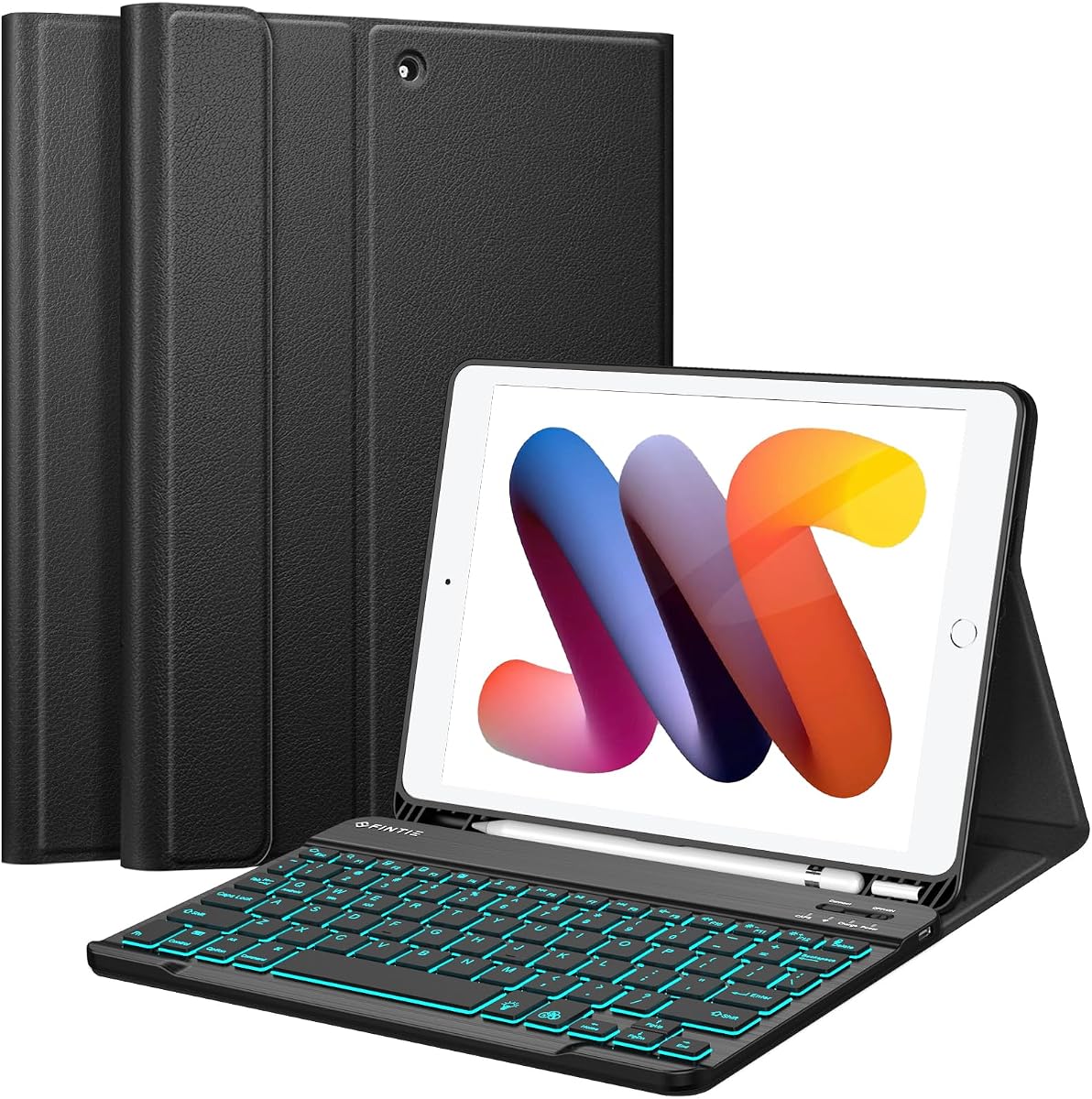


This keyboard case is a comprehensive solution for iPad users seeking a laptop-like experience. With a rating of 4.4 stars it stands out for including a Bluetooth mouse alongside the detachable keyboard. This bundle makes it a strong contender for those who need extra peripherals without extra costs.
We may earn a commission when you buy through this link, at no additional cost to you.
The magnetic detachable keyboard attaches firmly to the case and allows for easy repositioning. Users appreciate the 7-color backlit options which enhance typing in low light. The adjustable viewing angles provide versatility for different tasks like reading or writing.
One trade-off is ensuring the tablet model matches the case exactly as compatibility is specific. The included mouse adds utility but may slightly increase the bulk when packed. Still the overall protection and convenience make it a solid buy.
This is ideal for students or professionals who need a portable typing solution with extra tools. The auto sleep and wake function helps save battery while the honeycomb grid pattern protects against overheating. We recommend it for its complete package offer.
The inclusion of a Bluetooth mouse transforms your iPad into a more complete workstation for navigation and productivity.
Seven backlight colors ensure you can type clearly even in dim environments without straining your eyes.
We may earn a commission when you buy through this link, at no additional cost to you.
The FINTIE keyboard case is known for its impressive battery longevity which can last up to 230 hours of continuous use. With a 4.5 rating it appeals to users who need reliable power for long trips. The built-in 420mAh battery ensures you stay connected without constant recharging.
We may earn a commission when you buy through this link, at no additional cost to you.
Typing comfort is a highlight thanks to the ergonomic mechanical scissor keys that reduce noise during use. The 7-color backlight adds a touch of style while ensuring visibility. The magnetic detachable keyboard is thin and lightweight making it easy to handle.
While it lacks a trackpad the magnetic keyboard is versatile and works well across iOS Android and Windows systems. The pencil holder ensures you have easy access to your stylus. It is a practical choice for daily work or study sessions.
If you prioritize battery life and quiet typing this case is an excellent option. The fast charging capability reduces downtime so you can return to your tasks quickly. We suggest this model for frequent travelers.
The energy-efficient design delivers exceptional battery life that supports days of typing without needing a recharge.
Mechanical scissor keys provide a tactile feel that reduces finger fatigue during long writing sessions.
We may earn a commission when you buy through this link, at no additional cost to you.
This typecase model offers a premium experience with a built-in precision trackpad and vibrant RGB lighting. Rated at 4.4 stars it is designed for users who want laptop-like control over their iPad. The multi-gesture trackpad allows for smooth navigation and editing.
We may earn a commission when you buy through this link, at no additional cost to you.
The 360-degree rotating hinge provides seven distinct modes allowing for versatile usage from typing to watching videos. The laser-etched keys enhance the backlight effect creating a visually appealing typing environment. The hard-shell design protects all sides of the device effectively.
The added weight of the trackpad and extra features may be a consideration for those seeking minimalism. However the functionality gained is significant for productivity tasks. It is a robust option for creatives and power users alike.
If you value advanced features like a trackpad and customizable lighting this case is worth the investment. The auto sleep wake function ensures battery efficiency while you work. We recommend it for those needing precise control.
The patented 360-degree hinge lets you adjust your iPad into seven modes for any task or viewing preference.
A precision trackpad brings cursor control to your iPad making browsing and editing documents much faster.
We may earn a commission when you buy through this link, at no additional cost to you.
Hamile offers a reliable keyboard case at a budget-friendly price without compromising essential features. With a 4.5 rating it is a favorite for value-conscious buyers. The built-in 400mAh battery supports up to 180 hours of use ensuring long-term reliability.
We may earn a commission when you buy through this link, at no additional cost to you.
The laser-etched backlit keys add a nice visual touch while the scissor keys provide a comfortable typing experience. The keyboard is magnetically detachable allowing you to remove it when not needed. This flexibility is great for reading or creative work.
While it lacks advanced features like a trackpad it covers the basics perfectly with strong protection and good battery. The heat dissipation design helps prevent overheating during extended sessions. It is a practical choice for daily use.
For those looking to save money while still getting a quality keyboard and protection this case is a winner. The pencil holder ensures you have your stylus within reach. We suggest it for students and budget buyers.
You get a full keyboard and case experience without paying a premium price making it ideal for tight budgets.
A large capacity battery ensures you can type for days on end without needing to plug into a charger.
We may earn a commission when you buy through this link, at no additional cost to you.
This Divufus case is designed for versatility supporting iOS Android and Windows systems seamlessly. It has a 4.4 rating and includes full shortcut keys for efficient workflow. The magnetic wireless keyboard can be removed freely which adds convenience for different setups.
We may earn a commission when you buy through this link, at no additional cost to you.
With a 2-3 hour charge time the keyboard provides over 80 hours of active use. The mechanical scissors keyboard design ensures quick rebound and smooth presses. The honeycomb grid on the back helps keep your device cool during heavy use.
While it does not include a trackpad the shortcut keys make up for it by allowing quick access to media and controls. The non-slip rubber lining provides a secure grip and protection. It is a smart pick for cross-platform users.
If you use your iPad across multiple platforms this keyboard case adapts to your needs with ease. The included warranty and responsive support add to its appeal. We recommend it for its flexibility and efficiency.
Simple key switches let you use this keyboard with iOS Android or Windows systems effortlessly.
The honeycomb grid design helps dissipate heat keeping your iPad safe during long typing sessions.
We may earn a commission when you buy through this link, at no additional cost to you.
Logitech brings its reputation for quality with the Slim Folio keyboard case. Rated at 4.4 stars it uses two coin cell batteries that last up to four years. This feature is perfect for users who do not want to worry about frequent recharging.
We may earn a commission when you buy through this link, at no additional cost to you.
The keys are well-spaced and stretch edge-to-edge for a comfortable typing experience. With a full row of iOS shortcut keys you can control volume and media easily. The pencil holder keeps your stylus secure and within reach.
While the batteries need replacing every few years the long life is still a benefit over rechargeable models. The slim profile adds minimal bulk making it easy to carry. It is a sturdy choice for daily productivity.
For those who prefer a traditional battery setup and a trusted brand this is a great option. The protection against spills and bumps is reliable for travel. We suggest it for users who value simplicity and durability.
Coin cell batteries provide years of usage without needing a charge so you are always ready to work.
Dedicated iOS shortcut keys streamline your workflow by letting you control apps and media with one tap.
We may earn a commission when you buy through this link, at no additional cost to you.
KBCASE delivers an ultra-thin lightweight keyboard case that fits easily into a briefcase or backpack. With a 4.5 rating it is known for portability and comfort. The detachable Bluetooth keyboard combines with a slim case for easy transport anywhere you go.
We may earn a commission when you buy through this link, at no additional cost to you.
The wave shock absorption design helps protect your iPad from minor drops and impacts. The pencil holder allows you to carry your stylus with ease. Slot fixing ensures the tablet stays secure at your preferred viewing angle.
While it lacks extra features like a trackpad the typing experience is relaxing with spacious scissor keys. The heat dissipation grid keeps your device safe from overheating. It is a great pick for travelers and commuters.
If you need a case that is easy to carry and provides good protection this model fits well. The design balances weight and function nicely. We recommend it for those who are always on the move.
The slim profile ensures you can slip this case into any bag without adding bulk to your load.
Slot fixing keeps your tablet steady at different angles so you can view content comfortably.
We may earn a commission when you buy through this link, at no additional cost to you.
The Dexnor keyboard case stands out with a unique floating cantilever stand design. With a 4.3 rating it offers a modern look and solid functionality. The built-in trackpad brings cursor control to your iPad for efficient navigation and multitasking.
We may earn a commission when you buy through this link, at no additional cost to you.
With a 650mAh battery you get up to 200 hours of working time and 1200 hours standby. The scissor-switch keys ensure quiet typing without missing characters. The aluminum alloy hinge guarantees a sturdy magnetic connection that feels premium.
While the price is higher than some options the included trackpad and premium materials justify the cost. The pencil holder and portrait mode support add to its versatility. It is a great choice for professionals.
If you appreciate a modern design and need precise control with a trackpad this case delivers. The lifetime technical support adds confidence to your purchase. We suggest it for users who want a premium feel.
The cantilever stand gives your iPad a floating look while providing a comfortable typing angle.
A large battery ensures you can work for days without needing to plug in for a charge.
We may earn a commission when you buy through this link, at no additional cost to you.
INFILAND combines excellent response and precision into one sleek package. Rated at 4.5 stars it features a zero-lag magnetic keyboard that feels like a real laptop. The built-in trackpad makes browsing and selecting items smooth and efficient.
We may earn a commission when you buy through this link, at no additional cost to you.
With 7 backlight colors and 3 brightness levels you can adapt to any lighting condition. The magnetic keyboard locks firmly into place so it stays secure during use. The pencil holder keeps your stylus ready for quick sketches or notes.
This model is versatile with multiple modes for typing reading or viewing. The form-fitting case shields your iPad from scratches and bumps. It is a solid pick for those who want top-tier typing performance.
If you need a fast responsive keyboard with a trackpad this is a strong candidate. The intuitive setup without manuals makes it easy to start using immediately. We recommend it for its all-around quality.
The magnetic keyboard ensures instant key response so you never miss a beat while typing.
Fold the cover or detach the keyboard to switch between typing reading and watching modes easily.
We may earn a commission when you buy through this link, at no additional cost to you.
KBCASE offers a light purple keyboard case that adds a stylish touch to your iPad. With a 4.4 rating it supports a 360-degree swivel for flexible viewing. The touchpad allows you to control your cursor like a laptop without tapping the screen.
We may earn a commission when you buy through this link, at no additional cost to you.
The hardshell design protects all sides of your tablet from scratches and dust. The precise cutouts allow full access to all ports and cameras. A built-in pencil holder ensures your stylus is secure and easy to carry.
The keyboard layout includes shortcut switches for easy trackpad control. This model is great for those who want both protection and portability with a unique color. It is suitable for creatives who appreciate aesthetics.
If you prefer a colorful option with solid protection and a trackpad this case is a good choice. The swivel hinge offers comfort for different tasks. We suggest it for its balance of style and function.
The swivel hinge lets you rotate the keyboard for comfortable typing or reading angles.
Light purple finish makes this case stand out while offering a practical hardshell protection.
We may earn a commission when you buy through this link, at no additional cost to you.
Selecting the right keyboard case requires weighing several factors to ensure it meets your productivity needs and budget.
Ensure the case matches your iPad model number exactly as many cases are specific to certain generations like 8th or 9th. Always check the model number on the back of your device before purchasing to avoid fit issues.
Double check your model number to guarantee a perfect fit and access to all ports and buttons.
Look for a keyboard with a long battery life ranging from 80 to 200 hours to avoid frequent recharging. Models with fast charging features are also beneficial for saving time during daily use.
Prioritize models with at least 100 hours of work time for uninterrupted productivity.
A backlit keyboard with adjustable brightness and colors helps you type comfortably in low light environments. This feature is essential for students or professionals who work in dimly lit settings like libraries or planes.
Choose a keyboard with at least 7 color options and adjustable brightness levels for versatility.
Decide if you need a built-in trackpad for easier navigation or if a standard keyboard suffices. Trackpads add functionality but may increase cost and weight slightly.
Consider a trackpad model if you prefer mouse-like control without an external device.
Slimmer cases are easier to carry in bags and are less likely to add bulk to your device. Lightweight materials help reduce strain when holding the iPad for long periods.
Select a slim lightweight design if you travel often or carry your iPad daily.
A good case should provide full coverage and features like shock absorption or anti-slip lining to protect against drops. Hardshell or honeycomb designs can prevent overheating and physical damage effectively.
Look for full edge coverage and heat dissipation features to ensure device safety.
A built-in pencil holder ensures your Apple Pencil is always with your device and less likely to be lost. This feature is crucial for creatives who switch between typing and sketching regularly.
Ensure the case has a dedicated slot for your pencil for convenience.
Some keyboards support iOS Android and Windows systems allowing you to switch between devices easily. This flexibility is useful if you use multiple operating systems for work or school.
Check for system compatibility if you use multiple devices beyond just an iPad.
To start using your case align the iPad with the cutouts and secure it in place using the provided slots or magnets. Once attached the keyboard should connect automatically via Bluetooth or magnetic charging.
Clean the keyboard regularly with a dry cloth to remove dust and debris that might affect typing performance. Avoid using liquid cleaners directly on the keys to prevent internal damage.
Store the case in a cool dry place when not in use to preserve the battery life and materials. If you are not using it for a long time ensure the battery is partially charged to maintain health.
Most cases include a pencil holder slot designed for the Apple Pencil 1st Gen. You can store it securely when not in use though the pencil itself is usually sold separately from the case.
No drivers are needed as these keyboards connect via Bluetooth or magnetic interface automatically. They support standard iOS shortcuts so setup is usually instant after pairing or attaching to the case.
Battery life varies by model ranging from 80 hours to over 200 hours on a single charge. Many include fast charging and sleep modes to maximize usage time between charges.
Yes many models feature a detachable keyboard that can be used separately for typing on other devices. This flexibility allows you to use the keyboard as a standalone peripheral if needed.
Most models offer adjustable backlight settings including brightness levels and color options. This lets you customize the keyboard to suit different lighting environments or personal preferences.
Yes several premium models include a built-in trackpad for cursor control and gestures. These models allow you to navigate your iPad more efficiently without touching the screen.
Most cases use a USB-C cable for charging which is often included in the package. You can plug the keyboard into your computer or a wall adapter to recharge it when needed.
We have reviewed ten top-rated keyboard cases that offer a mix of budget-friendly and premium options for your iPad. Whether you need a trackpad or just a solid typing experience there is a model here to fit your needs.
Prioritize features like battery life and protection level based on how you use your device daily. A case that matches your workflow will improve productivity and keep your device safe from damage.
Please check current prices and availability before making a decision as deals may change over time. We hope this guide helps you find the perfect keyboard case for your 8th Generation iPad.