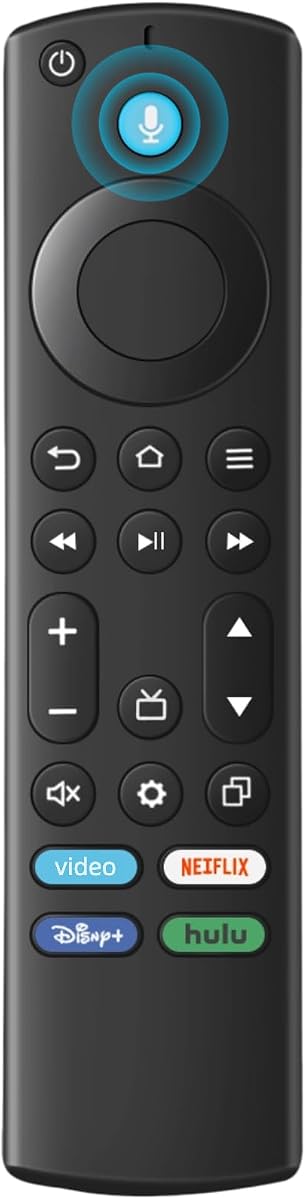
Replacement Voice Remote for Fire Stick
4.2Editor score
Compatible with 4K Max devices
Voice command functionality included
Works with smart TV brands
This comprehensive guide compares the top Fire Stick Replacement Remote options available in October 2026 to help you find the perfect voice remote replacement
Finding a reliable Fire Stick Replacement Remote is essential when your original controller fails or gets lost. A good replacement should offer seamless voice control, accurate button response, and broad compatibility with your specific streaming device model to ensure uninterrupted entertainment.
We evaluated ten top-rated replacement remotes based on user feedback, feature sets, and compatibility data. Our analysis focuses on voice functionality, pairing ease, build quality, and additional features like backlighting or customizable shortcuts to help you make an informed decision.
Each product review highlights key strengths, potential limitations, and ideal use cases for every model. Please note that product availability and pricing can change frequently, so verify current details before purchasing to ensure the best fit for your setup and budget needs.
4.2Editor score
4.5Editor score

4.5Editor score
This side-by-side comparison outlines the core specifications and compatibility details for each of the ten selected Fire Stick Replacement Remote models. Reviewing these factors helps you quickly identify which remote aligns best with your specific Fire TV device generation and feature requirements.


This replacement remote offers a cost-effective solution for users needing a reliable Fire Stick Replacement Remote without breaking the bank. It supports a broad range of devices including the Fire TV Stick 3rd Gen and various smart TV models.
We may earn a commission when you buy through this link, at no additional cost to you.
The voice function allows you to search for content quickly, making navigation faster than manual input. Its compatibility extends to popular brands like Insignia and Toshiba, ensuring versatility across different setups.
While the remote works well for basic navigation and voice commands, users should note that batteries are not included in the package. Additionally, compatibility is limited for older first and second-generation sticks.
Ideal for budget-conscious buyers who need a straightforward replacement, this remote delivers core functionality effectively. It is a solid choice for those with compatible third-generation devices looking for value.
Supports Fire Stick 3rd Gen, 4K Max, and Cube models along with smart TVs from Insignia and Toshiba.
Use voice commands to find favorite content quickly, enhancing the streaming experience with hands-free control.
We may earn a commission when you buy through this link, at no additional cost to you.
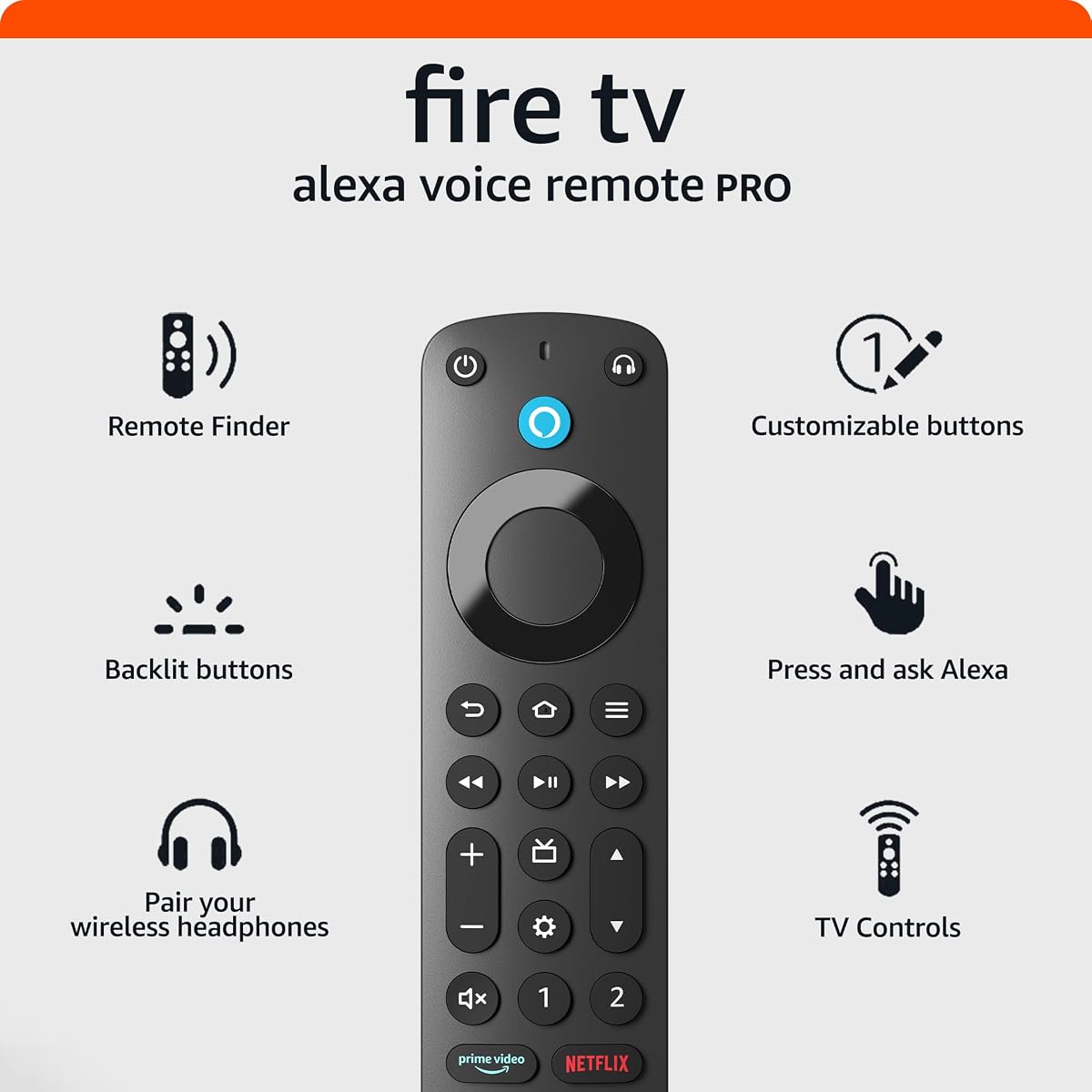
The Amazon Fire TV Alexa Voice Remote Pro stands out as a premium Fire Stick Replacement Remote with features designed for convenience and control. Its remote finder capability ensures you never lose track of it again.
We may earn a commission when you buy through this link, at no additional cost to you.
Motion-activated backlight illuminates buttons in dim light, making it perfect for movie nights. The dedicated headphone button simplifies Bluetooth pairing, while customizable buttons offer quick access to favorite apps.
Though it comes at a higher cost, the added features justify the investment for power users. However, it is not compatible with older first and second-generation Fire TV devices or specific smart TV editions.
This remote is ideal for those seeking enhanced functionality and ease of use. It provides a seamless experience for modern Fire TV setups needing advanced control options.
Use Alexa to make the remote emit a ring sound, eliminating the need to search through cushions or furniture.
Motion-activated backlight ensures buttons are visible in dark environments, improving navigation during evening viewing.
We may earn a commission when you buy through this link, at no additional cost to you.
This replacement remote is designed to work with a wide array of Fire TV devices including Cube models and various smart TV series. It provides essential navigation and voice capabilities for everyday streaming needs.
We may earn a commission when you buy through this link, at no additional cost to you.
The remote includes four shortcut buttons for quick access to favorite apps, streamlining your content discovery. Voice function allows for hands-free content search once activated via the provided manual.
While it offers solid performance and broad compatibility, users must follow the activation instructions carefully for voice features to work properly. It is not compatible with Roku devices or specific older models.
It is a strong option for users needing a reliable replacement with shortcut convenience. The preset buttons help reduce navigation steps for frequently used services.
Four preset buttons allow instant access to popular streaming services, reducing the time spent navigating menus.
Compatible with Fire TV Cube, Stick 4K Max, and various Fire TV branded smart TV series.
We may earn a commission when you buy through this link, at no additional cost to you.
This remote delivers robust performance with a control range extending up to twelve meters. It is compatible with Fire TV Stick 4K Max and select models from 2020 to 2026.
We may earn a commission when you buy through this link, at no additional cost to you.
Four shortcut buttons provide quick access to your favorite apps, while the built-in microphone enables voice commands for hands-free control. The manufacturer offers a 60-day satisfaction guarantee for peace of mind.
Users should note that it does not support older Fire TV models or specific editions. Pairing requires following the instruction manual to activate voice features correctly after connecting new batteries.
It is a reliable choice for modern Fire TV setups requiring extended range and voice functionality. The satisfaction guarantee adds value for cautious buyers.
Precisely control your device from up to twelve meters away, offering flexibility in larger rooms.
Built-in microphone supports voice commands for searching content and controlling playback hands-free.
We may earn a commission when you buy through this link, at no additional cost to you.
This replacement remote offers seamless syncing with compatible Fire TV devices, eliminating complex configuration steps. It supports models like the Fire Stick 4K Max and Cube 3rd Gen along with Insignia smart TVs.
We may earn a commission when you buy through this link, at no additional cost to you.
The remote features four pre-programmed buttons for instant access to popular apps, enhancing user convenience. Voice control allows for quick searches and adjustments without needing to navigate through menus.
While it syncs automatically, users must note that batteries are not included in the package. It is not compatible with soundbars or older generations of Fire TV sticks.
It is an excellent choice for users seeking a hassle-free replacement with app shortcuts. The automatic sync feature makes setup quick and straightforward.
The remote automatically syncs with your streaming device upon battery insertion, requiring no manual configuration.
Four pre-programmed buttons provide one-tap access to popular streaming channels, saving navigation time.
We may earn a commission when you buy through this link, at no additional cost to you.
This replacement remote supports a wide range of Fire TV devices including Smart TVs 3rd Gen and Stick 4K Max. Voice functionality enables control over content and smart home devices seamlessly.
We may earn a commission when you buy through this link, at no additional cost to you.
Pairing is achieved by holding the Home button for ten to fifteen seconds until the LED indicator flashes. The remote provides standard navigation controls and allows jumping to favorite scenes quickly.
Users should follow the provided manual carefully for voice activation and pairing. It is not compatible with older 1st or 2nd Gen smart TV models.
It is suitable for users needing a versatile remote with smart home capabilities. The voice control adds significant convenience for hands-free operation.
Use voice commands to control compatible smart home devices alongside entertainment content.
An LED indicator flashes rapidly during pairing mode, confirming successful connection to the device.
We may earn a commission when you buy through this link, at no additional cost to you.
As an official Amazon model, this remote offers reliable performance and broad compatibility with modern Fire TV devices. It supports Fire TV Stick 3rd Gen and later versions along with Fire TV Cube 2nd Gen.
We may earn a commission when you buy through this link, at no additional cost to you.
The remote includes preset app buttons for quick access and a guide button to view live TV app listings. It also features dedicated power and volume buttons for controlling compatible TVs.
Unlike third-party options, this package includes two AAA batteries for immediate use. However, it is not compatible with older first and second-generation Fire TV sticks or editions.
It is the top choice for users preferring an official replacement with full feature support. The included batteries make it ready to use right out of the box.
Designed by Amazon, it ensures seamless integration with Fire TV Stick 3rd Gen and later devices.
The package includes two AAA batteries, allowing immediate use without additional purchases.
We may earn a commission when you buy through this link, at no additional cost to you.
This compact remote fits easily in hand while providing full voice control capabilities. It supports Fire TV Stick Lite, 4K, and Cube 2nd Gen models along with 3rd Gen smart TVs.
We may earn a commission when you buy through this link, at no additional cost to you.
Voice commands allow easy control of volume and channel switching. The pairing process involves holding the Home button until the LED flashes rapidly, confirming the connection.
Users must follow the manual matching steps carefully to ensure proper setup. It does not support older smart TV generations or specific editions.
It is ideal for users needing a compact remote with voice support. The clear LED pairing indicator helps troubleshoot connection issues effectively.
Issue voice commands to adjust volume or switch channels quickly without reaching for buttons.
LED light flashes rapidly during pairing mode to indicate successful connection to the device.
We may earn a commission when you buy through this link, at no additional cost to you.
This remote offers compatibility with a variety of TV brands including Hisense, Insignia, and Pioneer alongside Fire TV devices. It provides voice control and four app shortcuts for enhanced navigation.
We may earn a commission when you buy through this link, at no additional cost to you.
Users must remove the old remote batteries before pairing the new one to avoid connection conflicts. The manual pairing process involves holding the Home button until the LED flashes rapidly.
While it is not compatible with older smart TV generations, it works well for 3rd Gen and modern Fire TV setups. It delivers solid performance at a reasonable price point.
It is suitable for users with compatible brand-specific smart TVs needing a reliable remote. The app shortcuts streamline access to popular streaming services.
Compatible with Hisense, Insignia, and Pioneer smart TVs alongside Fire TV sticks and cubes.
Preset buttons provide quick access to favorite apps, reducing navigation steps.
We may earn a commission when you buy through this link, at no additional cost to you.
This remote supports a wide range of smart TVs including Omni, QLED, and Insignia along with Fire TV sticks. It offers full voice control and four shortcut buttons for quick app access.
We may earn a commission when you buy through this link, at no additional cost to you.
The LED indicator blinks rapidly during pairing, and support teams are available to assist with setup. It is not compatible with first-generation smart TV models.
Batteries are not included, requiring users to purchase AAA batteries separately. However, the dedicated support provides valuable assistance for any pairing issues.
It is a strong option for Omni and QLED owners needing a reliable remote replacement. The support team ensures help is accessible when needed.
Supports Omni, Insignia, and QLED Fire-Series smart TVs alongside Fire TV streaming devices.
A dedicated support team offers assistance for pairing and setup issues anytime needed.
We may earn a commission when you buy through this link, at no additional cost to you.
Selecting the right Fire Stick Replacement Remote involves considering compatibility, features, and build quality to ensure seamless integration with your current streaming device.
Ensure the replacement remote lists your specific Fire TV model generation. Older remotes may not pair with newer devices or vice versa so check the manufacturer compatibility list before purchasing.
Always verify your exact model number against the remote's supported list to avoid returns or pairing issues.
Voice control allows hands-free searching and content discovery which significantly improves usability. Look for remotes that support full Alexa commands like finding shows or controlling smart home devices.
Check if voice activation requires manual setup as some models need specific steps to enable the microphone.
A durable remote withstands daily handling and accidental drops. Look for units with robust button mechanisms and reliable battery compartments to ensure long-term use.
Prioritize remotes with positive user feedback regarding physical durability to avoid frequent replacements.
Remotes with preset shortcut buttons allow quick access to favorite streaming apps like Netflix or Prime Video. Customizable buttons offer further flexibility to launch specific services or commands with one press.
Count the available shortcut buttons to ensure they match your most frequently used services for better convenience.
Some remotes include batteries while others require separate purchase. Consider models that support standard AAA batteries for easier replacement and availability.
Verify battery life expectations if possible as efficient power usage reduces replacement frequency and cost.
Easy pairing ensures you can start using the remote quickly without technical frustration. Look for remote with clear instructions and automatic sync features if available.
Check for LED indicators that confirm successful pairing to avoid confusion during setup.
Premium remotes may offer features like backlighting or remote finders which add significant value in specific scenarios. Consider if these extras justify the potential price increase for your usage habits.
Evaluate whether you need advanced features like dedicated headphone buttons or TV control integration.
Reliable customer support can resolve pairing or compatibility issues quickly after purchase. Look for brands offering warranties or satisfaction guarantees to protect your investment.
Read reviews regarding support responsiveness to gauge post-purchase assistance quality.
After inserting fresh batteries, hold the Home button for ten to fifteen seconds until the LED indicator flashes rapidly to initiate pairing mode. This syncs the remote with your Fire TV device automatically.
Clean the remote periodically with a dry microfiber cloth to remove dust and oils. Avoid using harsh chemicals or spraying liquids directly on the buttons to prevent internal damage.
Store the remote in a consistent environment away from extreme heat or moisture. If not used for long periods, remove batteries to prevent leakage and corrosion on internal components.
To pair your replacement remote, insert two AAA batteries and hold the Home button for ten to fifteen seconds. Watch for the LED indicator to flash rapidly which indicates pairing mode. Once connected the light will stabilize allowing immediate use with your Fire TV device.
Voice functionality often requires manual activation via the instruction manual. Ensure you have completed the voice setup steps after pairing. Also verify that the remote model specifically lists voice support as some basic remotes lack this feature entirely.
Most replacement remotes are designed for newer generations like 3rd Gen or later. Older models such as 1st or 2nd Gen sticks often require different remotes so always check the compatibility list provided by the manufacturer before purchasing.
Many replacement remotes offer TV control buttons for brands like Insignia or Toshiba but functionality varies. Ensure the product description explicitly lists your smart TV brand and model to confirm compatibility for volume and power control.
Most models require two AAA batteries which are often not included in the package. Some premium models may include batteries but always verify the contents before purchasing to ensure you have the correct power source ready.
If multiple Fire devices are nearby the remote may pair with the wrong one. To resolve this disconnect power from all other Fire devices except the intended one before initiating pairing to force correct device selection.
Yes some premium replacement remotes feature motion-activated backlighting for button visibility in dark rooms. These models usually come at a higher price point but provide added convenience for evening viewing without additional lighting.
Many third-party manufacturers offer limited warranties ranging from 30 days to one year. Check the product description for satisfaction guarantees or warranty details to understand the level of support provided after purchase.
Choosing the right Fire Stick Replacement Remote depends heavily on your device generation and desired features. The Amazon Fire TV Alexa Voice Remote Pro stands out for premium features while budget options offer solid core functionality for most users.
Prioritize compatibility and voice support to ensure a seamless streaming experience. Models with shortcut buttons and automatic pairing provide added convenience that enhances daily use across various entertainment setups.
Always verify current product details and availability as specifications may change over time. Select a remote that balances your specific needs with budget considerations for the most practical and efficient streaming experience.