
MINISFORUM NAB9S
4.5Editor score
i9-13900HK Hybrid Architecture
Quad Screen Display Support
Dual 2.5G Ethernet Ports
This guide compares the top Intel Core i9 Mini PC models for performance, connectivity, and design to help you choose the right compact desktop for your needs.
Finding the right compact desktop requires balancing power with size. Intel Core i9 Mini PC models offer flagship performance in a fraction of the space of traditional towers.
We evaluated ten leading models based on processing speed, thermal management, expansion options, and real-world usability for work and entertainment.
Each pick highlights key strengths and trade-offs. Note that availability and pricing fluctuate regularly, so verify current listings before purchasing.
4.5Editor score

4.5Editor score

4.6Editor score
The following table provides a side-by-side comparison of all ten models, highlighting processor generations, memory configurations, storage options, and unique connectivity features.


The MINISFORUM M1-1390 stands out as a top choice for users needing flagship performance in a tiny footprint. With a 4.5 rating, it balances raw power and practicality effectively for office and home environments.
We may earn a commission when you buy through this link, at no additional cost to you.
Its Core i9-13900HX processor delivers up to 5.4GHz speed across 24 cores and 32 threads. The included 32GB DDR4 RAM and 1TB PCIe 4.0 SSD provide ample capacity and speed for multitasking and creative workloads.
While DDR4 is slightly older than DDR5, the performance remains strong for most users. The triple 4K display capability is a major win for productivity-focused setups that need multiple screens.
If you need a reliable machine for editing, gaming, or heavy multitasking without the bulk of a tower, this model is an excellent recommendation.
The mix of performance and efficiency cores ensures tasks are distributed optimally for speed and power savings.
Five USB ports and dual M.2 slots allow easy expansion and connection of multiple peripherals.
We may earn a commission when you buy through this link, at no additional cost to you.
The Beelink GTi13 impresses with its support for Thunderbolt 4, offering high-speed data transfer and versatile charging options. Its 4.6 rating reflects its high build quality and performance.
We may earn a commission when you buy through this link, at no additional cost to you.
Equipped with 32GB of DDR5 RAM and a 1TB NVMe SSD, it handles demanding tasks like 3D modeling and video editing smoothly. The hybrid architecture optimizes workloads between efficiency and performance cores.
Features like a fingerprint sensor and voice interaction add unique touches for security and convenience. However, the cost is higher than many competitors.
This model is ideal for professionals who need top-tier connectivity and speed for data-intensive workflows and professional setups.
Thunderbolt 4 supports 40Gbps data transfer and up to 100W charging for attached devices.
The dust-proof design and MSC2.0 cooling system maintain stable performance under heavy loads.
We may earn a commission when you buy through this link, at no additional cost to you.
KAMRUI Hyper H2 is a powerful choice for gamers and creators wanting the latest 14th Gen technology. It scores a 4.5 rating due to its robust thermal management and raw performance.
We may earn a commission when you buy through this link, at no additional cost to you.
The i9-14900HX reaches up to 5.8GHz, providing significant speed for gaming and rendering. The upgraded cooling system with dual copper pipes ensures stability even during extended use.
While it lacks dual high-speed LAN ports, its WiFi 6E and Bluetooth 5.2 offer reliable wireless connectivity. The VESA mount allows seamless integration behind monitors.
If your priority is raw gaming power in a compact chassis, this model delivers exceptional value and performance.
The all-copper structure enhances thermal conductivity for better heat dissipation and consistent speeds.
Dual M.2 slots allow for easy storage upgrades up to 4TB total capacity.
We may earn a commission when you buy through this link, at no additional cost to you.
For budget-conscious buyers, the NAB9S offers a rare chance to own an i9-powered mini PC without a premium price tag. Its 4.5 rating highlights its value and solid features.
We may earn a commission when you buy through this link, at no additional cost to you.
While it ships with 16GB RAM and 500GB storage, the i9-13900HK processor still delivers excellent multitasking capabilities. The quad-screen display support is a standout feature for productivity.
Dual 2.5G Ethernet ports are uncommon at this price point, making it a great choice for networking or home lab use.
If you need core performance without breaking the bank, this model is a smart and practical investment.
Dual LAN ports allow for network aggregation or separate management and data networks.
Tool-free top cover makes upgrades to memory and storage straightforward and easy.
We may earn a commission when you buy through this link, at no additional cost to you.
The MS-01 is a true workstation designed for professionals needing extreme connectivity and expandability. With a 4.5 rating, it proves that mini PCs can handle serious enterprise-grade tasks.
We may earn a commission when you buy through this link, at no additional cost to you.
It features 10Gbps SFP+ ports and PCIe expansion slots for high-speed data transfer or GPU attachments. The support for U.2 drives provides massive storage potential for data-heavy work.
While expensive, its features justify the cost for power users and developers. The 32GB DDR5 RAM ensures smooth performance across multiple demanding applications.
This device is perfect for data centers, home labs, or creative studios requiring top-tier networking.
vPro support enables remote management and security features ideal for business environments.
Three M.2 slots plus U.2 support allow for complex storage setups and RAID configurations.
We may earn a commission when you buy through this link, at no additional cost to you.
GEEKOM IT13 MAX brings AI-specific hardware to the mini PC market with its Ultra 9 processor. The 4.6 rating reflects its innovation and reliability for modern workflows.
We may earn a commission when you buy through this link, at no additional cost to you.
The built-in NPU accelerates AI tasks like model training and local LLMs without relying on cloud resources. The IceBlast 3.0 cooling system keeps it whisper-quiet even under load.
While the 16GB RAM is fixed, the performance is sufficient for most creative and office work. The 3-year warranty offers peace of mind for long-term use.
This is the top pick for developers and creators wanting AI capabilities in a quiet, efficient package.
Local AI processing enhances privacy and speed for developers and creative professionals.
Rigorous reliability testing and precision engineering ensure long-term durability.
We may earn a commission when you buy through this link, at no additional cost to you.
The MS-01 Barebone is ideal for enthusiasts who want full control over their system components. It retains the powerful MS-01 workstation chassis while omitting memory and storage.
We may earn a commission when you buy through this link, at no additional cost to you.
With PCIe expansion slots and dual 10Gbps ports, you can customize it for specific high-performance needs like virtualization or GPU compute tasks. The 4.5 rating suggests solid hardware quality.
This option requires more technical skill to assemble and install the OS. It is best for experienced users familiar with system integration.
If you prefer a tailored setup for specific workloads, this barebone version offers maximum flexibility.
PCIe x16 slots allow for external graphics cards to boost rendering performance.
SFP+ ports support fiber connections for ultra-fast data transfer and server use.
We may earn a commission when you buy through this link, at no additional cost to you.
GEEKOM XT13 Pro stands out with its 2TB SSD and 32GB RAM, making it a powerhouse for data storage. The 4.1 rating suggests users value its specs despite some mixed feedback.
We may earn a commission when you buy through this link, at no additional cost to you.
Its AI-assisted workflow tools allow users to manage content while multitasking efficiently. The large storage capacity eliminates the need for frequent external drive upgrades.
While the rating is slightly lower, the warranty and technical support are strong selling points for long-term reliability.
This model is excellent for creators who store large media libraries and need consistent performance.
Integrated AI tools help organize content and assist in writing and research tasks.
Expandable RAM and large storage ensure longevity for evolving professional needs.
We may earn a commission when you buy through this link, at no additional cost to you.
The GT13 MAX focuses on professional AI workflows with local LLM support and privacy features. Its 4.4 rating reflects its strong build and unique capabilities.
We may earn a commission when you buy through this link, at no additional cost to you.
Equipped with Wi-Fi 7 and Arc graphics, it provides future-proof connectivity and decent graphical performance for creative apps. The reinforced ABS housing ensures durability.
Users can run local AI models without uploading sensitive data to the cloud. The 3-year warranty further adds confidence.
For businesses and professionals prioritizing AI privacy and modern connectivity, this is a compelling choice.
Local processing keeps sensitive documents and prompts secure from cloud leaks.
Wi-Fi 7 support ensures ultra-fast wireless speeds as networks evolve.
We may earn a commission when you buy through this link, at no additional cost to you.
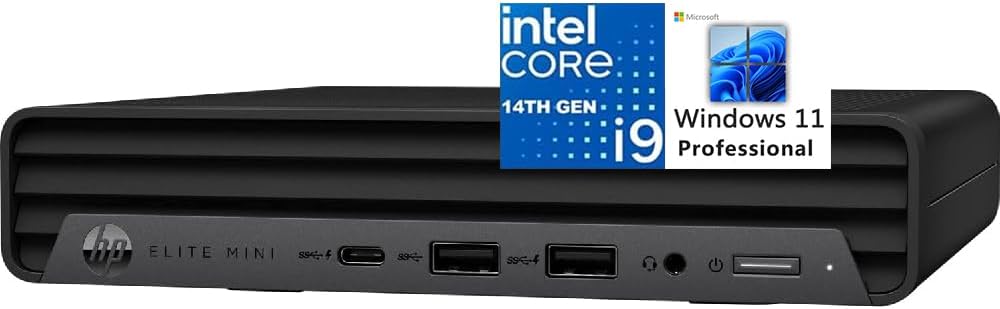
HP Elite Mini 800 G9 targets enterprises with Windows 11 Pro and professional support. Its 4.6 rating speaks to its reliability and seamless integration into office environments.
We may earn a commission when you buy through this link, at no additional cost to you.
The T-series processor balances power and thermal efficiency, making it incredibly quiet. The kit includes keyboard and mouse, simplifying immediate deployment.
While power is slightly lower than H-series chips, it is sufficient for most office tasks. The build quality and support are unmatched.
If you need a trustworthy machine for corporate deployment, this HP model is the standard for quality.
Windows 11 Pro offers security features essential for business environments.
Ultra-quiet operation ensures minimal disruption in shared office spaces.
We may earn a commission when you buy through this link, at no additional cost to you.
Choosing the right mini PC involves balancing processing power, memory, and connectivity for your specific use case.
Newer generations like the 14th Gen offer better efficiency and speed for demanding tasks. Always check the specific model number to match your needs.
Look for H-series processors for performance and U or T-series for efficiency.
For multitasking and creative work, 32GB is recommended to avoid bottlenecks. Ensure the RAM is expandable if possible.
Choose DDR5 for faster speeds if your budget allows.
PCIe 4.0 SSDs provide fast load times and responsive performance. Check if the device has additional M.2 slots for future expansion.
Aim for at least 1TB storage to accommodate files and software.
Multiple 4K display support is crucial for productivity workflows. Check the HDMI and USB-C ports for compatible video standards.
Ensure the model supports your desired number of screens.
Gigabit Ethernet and Wi-Fi 6E ensure stable internet connections. Thunderbolt 4 adds versatility for high-speed peripherals.
Verify the number of USB-A and USB-C ports for your devices.
Efficient cooling prevents throttling during long sessions. Look for models with dual fans or copper heat pipes.
Quiet operation is essential for home or shared workspaces.
A 3-year warranty offers peace of mind for long-term use. Check if local support is available for repairs.
Reliable brands usually provide better technical assistance and firmware updates.
Windows 11 Pro is standard for business and advanced features. Verify if the OS is included or if it is a barebone version.
Some models offer Linux support for developers needing flexibility.
Always place the mini PC in a well-ventilated area to ensure proper airflow and cooling. Avoid covering the vents with objects or placing it in enclosed spaces.
Regularly update drivers and firmware to maintain security and performance. Using an SSD with ample space prevents slow system speeds over time.
Use high-quality power adapters and cables to avoid electrical issues. Keep the exterior clean with a soft cloth to prevent dust buildup.
Yes, many models support AAA gaming and 3D rendering, especially those with high-performance GPUs. However, gaming performance depends on the specific graphics capabilities included.
Most models allow RAM and SSD upgrades via accessible slots. Check the manufacturer specs for the maximum supported memory and storage capacity.
Yes, most mini PCs support up to three or four displays via HDMI and USB-C ports. Verify the resolution limits for each port on your chosen model.
Many models come with Windows 11 pre-installed, but barebone versions may require a separate purchase. Always check the product listing details.
Most mini PCs operate quietly due to efficient cooling systems. Some high-performance models may produce more noise under heavy loads.
H-series processors prioritize performance and speed, while T-series focus on energy efficiency. Choose based on whether you need raw power or battery life.
The top picks range from budget-friendly options to high-end AI workstations. Each offers unique strengths depending on your needs.
Prioritize processing speed, memory capacity, and cooling for performance. Check connectivity options for your peripherals.
Always review current listings for any changes in specifications or pricing before purchasing.