
Sound Blaster Play! 3
4.5Editor score
Plug and play design
24-bit 96kHz support
Compatible with all headsets
This guide compares the top audio converters for Mac to help you find the best DAC, adapter, or interface for high-resolution sound and reliable recording.
Audio converters for Mac bridge the gap between digital files and high-quality sound. They transform your laptop into a powerful audio hub for music, gaming, and recording.
We evaluated ten real products based on compatibility, sound quality, features, and user feedback. Each pick offers a distinct solution for different Mac audio needs and budgets.
Every review highlights key strengths and trade-offs to guide your decision. Prices and availability change frequently, so check current listings before purchasing your next device.
4.5Editor score

4.6Editor score

4.5Editor score
The table below provides a side-by-side overview of all ten selected audio converters. It highlights their primary input and output formats, audio resolution support, and intended use cases.
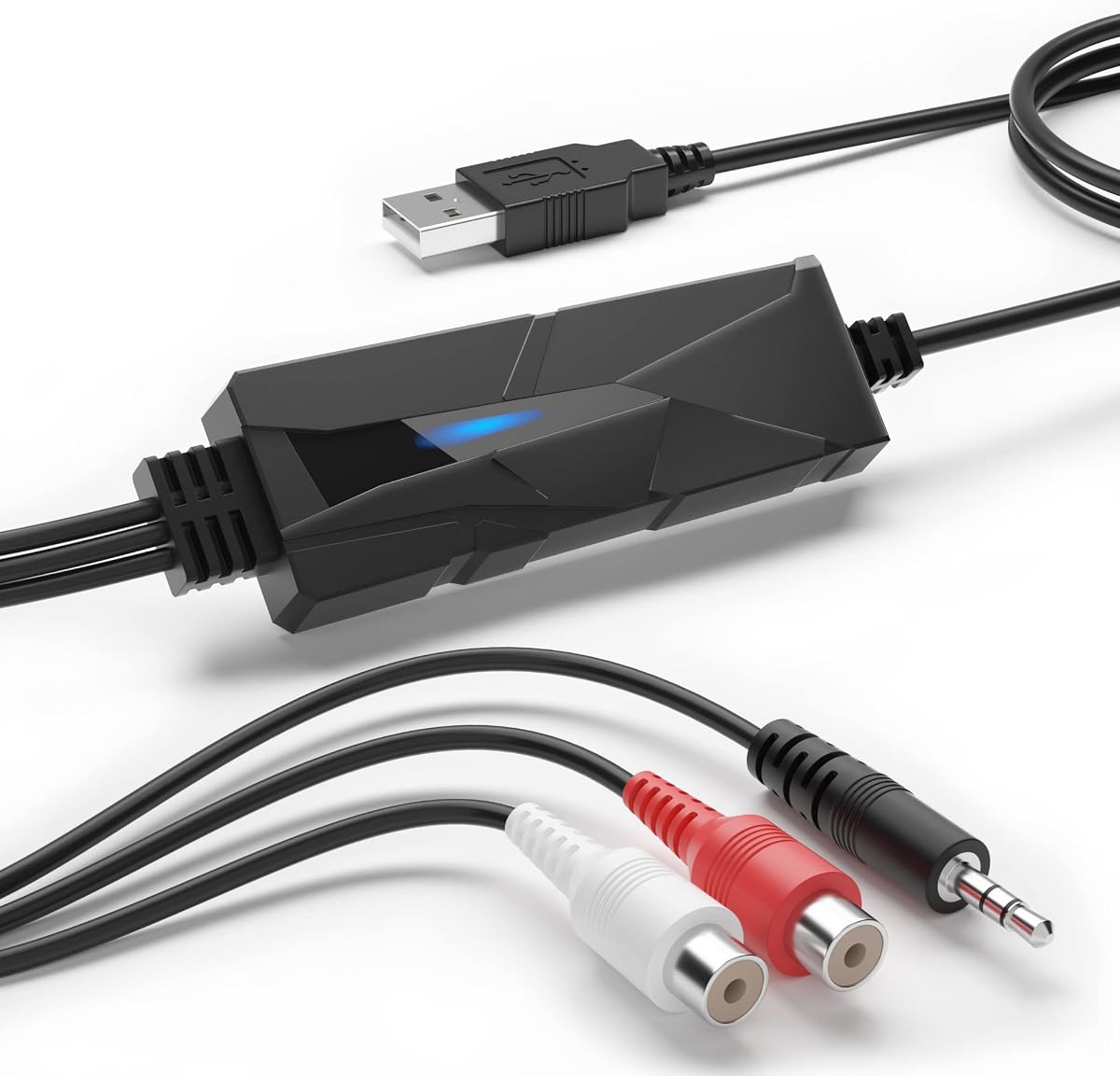


The DriverGenius AudioXfer is a specialized audio converter designed to help Mac users digitize analog recordings. It captures live audio from cassette tapes or radios and saves them as MP3 or WAV files. With a 4.2 rating, it serves as a practical tool for preserving old media.
We may earn a commission when you buy through this link, at no additional cost to you.
Its primary strength lies in its ability to breathe new life into forgotten tapes. The included Audacity software allows for editing and organizing tracks directly. The LED indicator ensures you know when recording is active. This makes it ideal for families or collectors restoring archives.
Users should note that 64-bit Mac users must use Audacity version 2.3.1 or higher. The device is limited to 44.1 and 48kHz sample rates. While sufficient for MP3 creation, it does not support high-resolution audio output for modern listeners.
This converter is best for those needing to archive analog media quickly. It is not a high-fidelity DAC for streaming music. If your goal is digital preservation of physical media, this device delivers the necessary functionality at a low cost.
Capture audio from cassettes and turn them into digital files you can enjoy forever on your Mac or mobile devices.
Requires Audacity 2.3.1 on 64-bit systems but offers robust editing tools for DIY music projects and personal archiving.
We may earn a commission when you buy through this link, at no additional cost to you.
The Fosi Audio K5 Pro is a versatile audio converter that doubles as a headphone amplifier. It converts digital signals from USB or optical sources into analog output. Rated 4.3, it excels at delivering clear sound for both gaming and music listening on Mac systems.
We may earn a commission when you buy through this link, at no additional cost to you.
Its design integrates Texas Instruments op-amp chips for low noise and wide dynamic range. The 2-in-1 USB Type C port supports charging and audio input. Users can drive headphones up to 300 Ohm. This flexibility makes it a strong desktop addition.
The combined volume and power button requires a long press to turn on, which some may find less intuitive. The optical coaxial inputs allow connection to non-USB devices. It lacks a dedicated physical switch for modes but covers most needs.
Choose this device if you need both amplification and conversion. It is perfect for gamers and streamers needing mic support. For Mac users seeking a compact Hi-Fi solution, it provides excellent value and performance without bulky external hardware.
Experience deep bass and clean treble thanks to the NE5532 op-amp chip optimized for low-noise performance.
Input options include USB-C and optical, allowing connection to phones, consoles, and computers seamlessly.
We may earn a commission when you buy through this link, at no additional cost to you.
The PROZOR 192KHz Digital to Analog Audio Converter transforms optical signals into analog RCA and 3.5mm audio. With a 4.4 rating, it is popular for connecting Apple TVs and game consoles to external speakers. It supports high-resolution PCM formats effectively.
We may earn a commission when you buy through this link, at no additional cost to you.
Its upgraded amplifier chipset delivers cleaner audio with lower distortion. The aluminum alloy case helps with heat dissipation during long use. The detachable box design allows users to replace cables without changing the whole unit. This durability suits professional environments.
Installation requires setting your TV to PCM or LPCM output. Some users report needing to adjust volume via TV settings rather than the remote. Ensure you use a 5V 1A adapter to avoid noise issues. These steps are straightforward once understood.
This DAC is ideal for audiophiles and home theater enthusiasts. It handles high sample rates well without introducing artifacts. If you need to bridge digital TV audio to analog speakers or headphones, this converter offers reliable performance and build quality.
Enjoy uncompressed 2-channel LPCM at rates up to 192kHz for superior clarity in music and movie soundtracks.
The aluminum housing provides better shielding and cooling than standard plastic, ensuring consistent output during use.
We may earn a commission when you buy through this link, at no additional cost to you.
The Douk Audio U2PRO acts as a USB to optical adapter that prioritizes signal purity. Using the XMOS XU316 chip, it reduces jitter for stable transmission. Rated 4.1, it is a niche choice for audiophiles seeking to upgrade digital signal paths on Macs.
We may earn a commission when you buy through this link, at no additional cost to you.
Its expandable oscillator design allows DIY upgrades for further jitter reduction. The UAC mode switch ensures compatibility with PS5 and Switch in plug-and-play mode. Real-time indicators display sample rates, helping users verify high-resolution playback is active.
This device is not just a cable but a digital converter that improves stability. However, the small size and dense features might be overwhelming for casual users. It requires a good external DAC to realize the full benefit of the clean signal.
Buy this if you own a high-end DAC that lacks USB input. It is perfect for those chasing the cleanest possible digital stream. For Mac users with complex audio chains, this tool offers significant sonic improvements through technical design.
Convert USB signals to optical coaxial and I2S outputs while maintaining pristine lossless audio quality.
Adjustable UAC modes and internal space for oscillator upgrades provide deep control for advanced audio setups.
We may earn a commission when you buy through this link, at no additional cost to you.
The SMSL SU-1 is a compact DAC optimized for MQA decoding. It uses the AK4493S chip to achieve ultra-low distortion. Rated 4.2, it appeals to streamers who listen to MQA Masters or MQA CDs. It is fully compatible with macOS without extra drivers.
We may earn a commission when you buy through this link, at no additional cost to you.
Its USB input supports sample rates up to 768kHz and DSD512. This ensures high-resolution playback from modern streaming services. The device is small enough to carry anywhere. It brings studio-quality audio to Mac users who value authenticity.
While excellent for streaming, it lacks coaxial or optical inputs. Users with external CD players must rely on internal outputs. The MQA feature requires a compatible source. For most, this is a minor limitation given the strong decoding capabilities.
This DAC is best for streaming-focused listeners. If you use Tidal or MQA CDs, it unlocks the full resolution. For Mac users prioritizing MQA support and high sample rates in a portable form factor, this unit is a solid investment.
Restore the original high-resolution signal of MQA CDs by decoding the authentication signature for true audio fidelity.
Achieve distortion lower than 0.00013% with the AKM AK4493S chip for accurate sound reproduction.
We may earn a commission when you buy through this link, at no additional cost to you.
The SMSL PO100 PRO is a miniature interface that supports MQA and DSD. It accepts Type-C USB input and outputs to optical or coaxial. Rated 4.6, it is favored for its portability and high-resolution support. Mac users can use it directly without drivers.
We may earn a commission when you buy through this link, at no additional cost to you.
It offers I2S output which is rare for portable devices. This connects to DACs that require clock signals. MQA playback works automatically without extra software. This makes it simple for Tidal users to get full resolution instantly.
The switches for mode selection must be set correctly. If you connect to PS5, ensure DOP output is selected. It does not output to I2S if the wrong mode is chosen. This learning curve is manageable for tech-savvy users.
Choose this for travel or when you need high-res conversion. It fits easily in bags for on-the-go listening. If you want a compact DAC for your Mac or phone that supports modern audio formats, the PO100 PRO delivers quality and convenience.
Play MQA files directly without additional apps, allowing you to focus on listening rather than settings.
Store high-resolution files and play them with DSD and MQA support wherever you go with a small footprint.
We may earn a commission when you buy through this link, at no additional cost to you.
The Sound Blaster Play! 3 is a budget-friendly USB audio adapter. It provides 24-bit 96kHz playback for Mac users. With a 4.5 rating, it is a top choice for those needing simple audio expansion. It works without requiring driver installation.
We may earn a commission when you buy through this link, at no additional cost to you.
Its compatibility with all analog headsets makes it versatile. You can connect standard earbuds or studio-grade headphones. Downloadable software adds audio enhancements. This gives you control over sound profiles. The device is small and stays out of the way.
Build quality is basic plastic. It does not offer premium materials like aluminum. Also, volume must be controlled via software or system settings. These are acceptable trade-offs given the low price. It is a practical solution for daily tasks.
This adapter is ideal for students or basic home use. If you need to add a reliable audio port to your Mac cheaply, this is the pick. It delivers good sound for calls and media without breaking your budget.
Work straight out of the box with plug-and-play compatibility across various operating systems.
Use downloadable control panel software to optimize audio for different earphone brands.
We may earn a commission when you buy through this link, at no additional cost to you.
The iFi Audio Go Link Max is a premium portable DAC and amp. It uses dual ESS Sabre chips for balanced sound. Rated 4.5, it supports PCM up to 384kHz and DSD256. It connects directly to USB-C ports on MacBooks.
We may earn a commission when you buy through this link, at no additional cost to you.
Its 4.4mm output allows for balanced headphones. The Dynamic Range Enhancement improves clarity in quiet tracks. Gold-plated connectors ensure longevity. The flexible cable reduces stress on the port during travel. It is built to last.
The dongle does not support optical inputs. It is strictly for USB sources. Some users may find the cable stiff. However, the sound quality outweighs these minor issues. It is an upgrade over standard headphone jacks.
Buy this for travel or mobile listening. It is perfect for MacBook users who want audiophile sound in a small package. If you value balanced audio and high resolution on the go, this device is a top choice.
Improve the sound of any recording with Dynamic Range Enhancement technology.
Durable gold-plated connectors and flexible cables ensure a robust connection for daily use.
We may earn a commission when you buy through this link, at no additional cost to you.
The Fosi Audio Q6 is a compact desktop DAC that delivers high fidelity. It uses the AK4493S DAC for low noise. Rated 4.6, it is a favorite for home stereo setups. It connects to Macs via USB-C and other devices via optical.
We may earn a commission when you buy through this link, at no additional cost to you.
It supports DSD512 and offers RCA and subwoofer outputs. This makes it great for home theater or music. The aluminum build feels premium. It stays cool during long sessions. The sound is clean and accurate.
Users cannot drive passive speakers directly. You need an external amplifier. This limits standalone use. Also, there are no volume buttons on the unit. But these are typical for DACs. The sound quality compensates for this.
This is the best pick for desktop users. If you want to upgrade your Mac's sound system without clutter, choose this. It provides audiophile quality in a small footprint.
Enjoy crystal-clear audio with an SNR of 121dB for detailed sound across genres.
Link to CD players, streamers, and computers easily with versatile input options.
We may earn a commission when you buy through this link, at no additional cost to you.
The Shure MVX2U Gen 2 is a professional XLR-to-USB-C interface. It includes DSP features like noise reduction. Rated 4.5, it is designed for serious podcasters. Mac users can plug in any XLR mic directly for clean recording.
We may earn a commission when you buy through this link, at no additional cost to you.
Auto Level Mode adjusts gain automatically. This ensures consistent output during streams. The interface provides 48V phantom power for condenser mics. Apps allow for advanced EQ and compression. It is a complete studio tool.
It is pricier than standard DACs. Its size is larger than portable dongles. However, the quality is unmatched. If you need professional vocal quality, this is the tool. It simplifies complex setups.
Choose this for streaming or recording. If you want to elevate your Mac setup to professional standards, this interface is ideal. It offers reliability and features you cannot find in consumer converters.
Instantly convert dynamic or condenser microphones for professional podcasting or livestreaming.
Features onboard DSP with denoiser and popper stopper for zero-latency audio processing.
We may earn a commission when you buy through this link, at no additional cost to you.
Selecting the right audio converter depends on your specific needs. Consider input types, output quality, and your usage scenario.
Ensure the converter supports your source devices. Optical, coaxial, and USB are common. Check if it has the outputs you need like RCA or 3.5mm.
Match inputs to your existing gear to avoid needing extra adapters.
High sample rates like 768kHz or DSD512 offer better fidelity. For streaming or archiving, higher rates ensure detail.
Look for specs that match your listening preferences and file formats.
The DAC chip impacts sound quality. Chips like AK4493S or ESS Sabre are known for low distortion.
Invest in models with reputable chips for cleaner audio reproduction.
Desktop DACs offer more features but take space. Portable dongles are great for travel but may lack inputs.
Choose based on whether you need mobility or a stationary setup.
Some converters need external power. Bus-powered models are simpler but have limits.
Check if you need a wall adapter or if USB power suffices.
Many modern converters are plug-and-play. Some require drivers or specific apps.
Verify macOS compatibility and driver-free status if possible.
Aluminum housings reduce noise and dissipate heat. Plastic builds are lighter but less robust.
Prioritize build quality for durability over time.
Converters range from basic adapters to professional interfaces. Determine your spending limit.
Balance cost with needed features to get the best value.
Connect the converter to your Mac's USB port. Use high-quality cables for the best signal. Ensure the converter is powered if required.
Set your Mac's audio output to the external device. In System Settings, select the converter as the default output. Adjust volume via the system or device controls.
Keep the device clean and dry. Avoid placing it near heat sources. Check connections regularly to prevent wear.
Most modern converters are plug-and-play. Some may require specific software like Audacity for recording. Check product specs for driver needs.
Many USB-C converters work directly. Older iPhones need a Lightning to USB adapter. Ensure your device supports the output format.
MQA decoding restores studio-quality sound from compressed files. It is used by Tidal and other streaming services. Converters with MQA support unlock this.
Use RCA outputs on the converter. Connect to stereo inputs. Adjust levels on the system for clean sound.
Some support analog input. Others are output-only. Check if the device has recording capabilities before buying.
Most work on Windows too. Check driver support for specific OS versions. Many offer cross-platform compatibility.
We reviewed ten excellent converters for Mac users. Each offers unique strengths. From budget adapters to premium interfaces.
Prioritize sound quality and compatibility. Choose based on your primary use. Consider your budget for the best fit.
Prices fluctuate frequently. Always check current listings before purchasing. Verify specs match your needs.