
ScreenBeam ECB7250K02 Network Adapter Starter Kit Bonded MoCA 2.5
4.4Editor score
Delivers 2.5Gbps wired speeds
Supports up to 16 nodes
Includes coax and ethernet cables
This guide compares the top ten coax to ethernet adapter kits for 2026 to help you choose the best MoCA and G.hn solution for home networking.
Finding a reliable coax to ethernet adapter is essential for modern home networks that need speed without new wiring. These devices turn existing coaxial cables into high-speed ethernet links for gaming and streaming.
We evaluated ten top-rated kits based on speed, compatibility, and ease of setup. Our analysis covers MoCA 2.5 and G.hn technologies to help you find the right fit for your ISP.
Each pick highlights key features and limitations to save you time. Prices and availability change frequently so verify details before purchase to ensure you get the best value for your network upgrade.
4.4Editor score

4.6Editor score
4.6Editor score
This table provides a side-by-side view of all ten models to help you compare features at a glance. Check the specs to see which adapter matches your home wiring and speed needs.


The ScreenBeam ECB7250K02 is a top tier coax to ethernet adapter that delivers 2.5Gbps wired speeds using your existing coax cabling. With a rating of 4.4 this kit stands out for its carrier grade reliability and comprehensive starter kit that includes everything you need to begin.
We may earn a commission when you buy through this link, at no additional cost to you.
Its standout quality is the bonded MoCA 2.5 technology which ensures you get maximum throughput without interference. This is ideal for heavy bandwidth tasks like 4K streaming or remote work where lag is not an option. The kit supports up to 16 nodes on one network which makes it scalable for larger homes.
The main trade-off is the higher price point compared to basic adapters. Additionally some users have reported random disconnects with certain DOCSIS 3.1 modems due to frequency overlap so you should check with your ISP before installing.
This adapter is best for users who demand the fastest possible wired speeds without drilling walls. If you need a robust and reliable network backbone for streaming and gaming this kit is highly recommended for its performance and completeness.
Built with high end components this adapter ensures consistent performance even during peak usage times for uninterrupted streaming.
Includes two adapters coax cables and ethernet cables so you can set up immediately without buying extra accessories.
We may earn a commission when you buy through this link, at no additional cost to you.
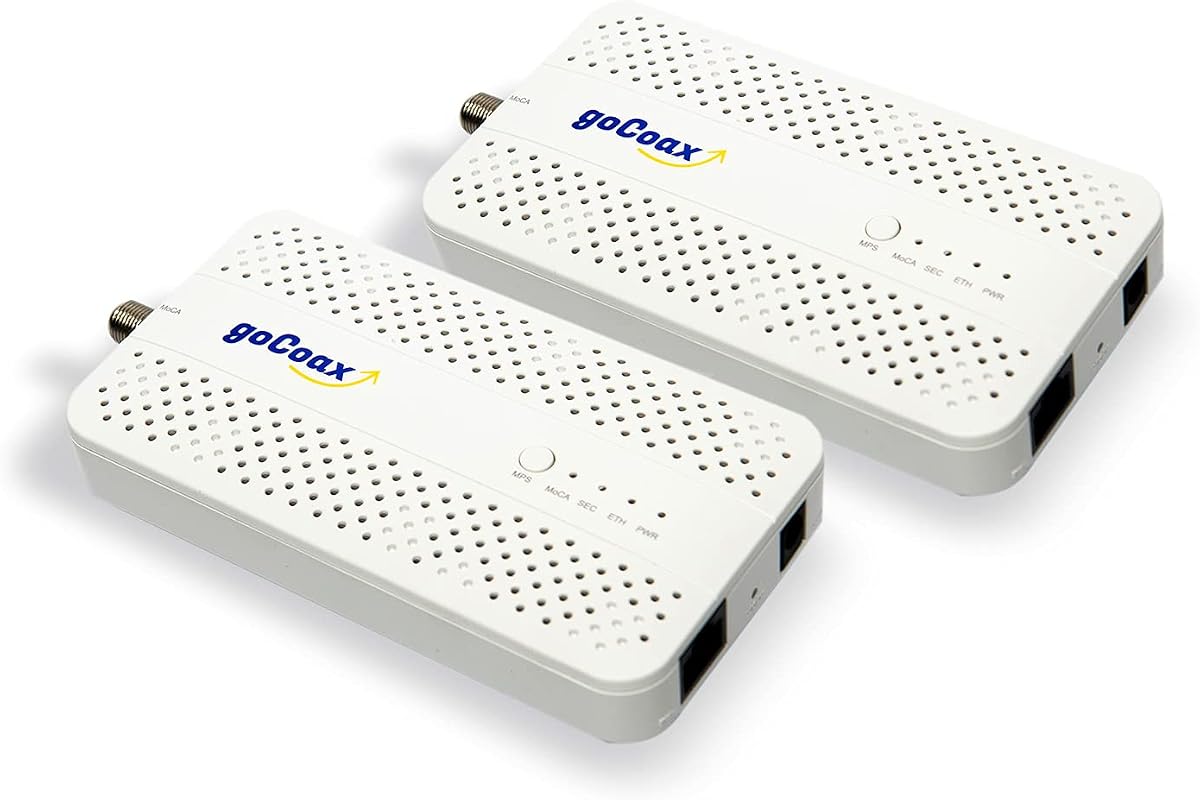
The goCoax MA2500D 2-Pack offers a fantastic balance of speed and affordability making it our pick for the best budget option. With a high rating of 4.6 it is known for delivering full 2.5 Gbps bandwidth reliably for homes with coax wiring.
We may earn a commission when you buy through this link, at no additional cost to you.
Its key strength is the incredibly low latency under 3ms which is critical for competitive gaming and video conferencing. The kit includes everything you need for setup including coax and ethernet cables so you can get started immediately.
While it is a budget friendly option you should note that a PoE filter is not included which is recommended for optimal security and performance. Also it does not work with satellite TV systems so check your wiring before buying.
This adapter is perfect for gamers and streamers who want high speeds without overspending. If you want a reliable wired connection for gaming and 4K streaming this kit provides great performance for the price.
Achieves under 3ms latency which is significantly better than Wi-Fi for competitive gaming and real time video calls.
Works with major ISPs like Comcast and Spectrum and supports up to 16 nodes for whole home coverage.
We may earn a commission when you buy through this link, at no additional cost to you.
The Kiwee KB-M3-02 Dual Port is an exceptional choice that stands out for its unique dual 2.5GbE ports allowing you to connect multiple devices at full speed. It has a strong 4.6 rating for its reliability and next gen network features.
We may earn a commission when you buy through this link, at no additional cost to you.
Its exclusive dual port design means you can connect two wired devices to one coax outlet without needing an extra switch. This makes it ideal for setups with multiple gaming consoles or PCs in the same room.
The main consideration is that you must verify your ISP supports MoCA 2.5 as some providers may require specific configurations. However the included cables and plug and play setup make installation straightforward for most users.
This adapter is best for users who need to connect multiple devices in one room without buying a switch. If you want a versatile and future proof solution for your home network this dual port kit is a great investment.
Connect multiple devices at full 2.5Gbps speed to a single coax outlet without needing additional switches.
Includes all coax and ethernet cables so you can set up immediately without extra purchases.
We may earn a commission when you buy through this link, at no additional cost to you.
The TRENDnet TMO-313C2K is a highly rated option with a 4.8 score reflecting its solid performance and build quality. This 2-pack delivers 2.5Gbps speeds and is compliant with strict NDAA and TAA standards for government customers.
We may earn a commission when you buy through this link, at no additional cost to you.
Its key strength is the reliable packet error rate technology which ensures consistent voice and video bandwidth. This makes it excellent for video conferencing and streaming where stability is more important than raw speed.
The compact design fits well in entertainment centers but the kit does not include coax splitters which you may need to purchase separately. Also each unit has a single port which may require a switch for multiple devices.
This adapter is perfect for users who need government compliant networking or prioritize reliability over cost. If you want a stable connection for critical work from home needs this model is a strong and trusted choice.
Meets strict NDAA and TAA standards making it suitable for government and professional network installations.
Uses improved packet error rate technology to ensure consistent bandwidth for video and voice traffic.
We may earn a commission when you buy through this link, at no additional cost to you.
The Hitron HTEM5 2-Pack is a straightforward solution for extending your network using existing coax wiring. With a 4.3 rating it is valued for its clear documentation and ease of setup for standard cable and fiber homes.
We may earn a commission when you buy through this link, at no additional cost to you.
Its key strength is the comprehensive compatibility guide that helps you avoid common issues like satellite wiring conflicts. This ensures you know exactly what you need before purchasing to avoid installation problems.
The main trade-off is that it does not support AT&T Fiber and requires interconnected coax wiring which you must verify. It is not a modem or router so you must have an existing internet connection to use it.
This adapter is best for users with cable or fiber internet who need a simple and affordable way to add wired ports. If you have verified your wiring this kit offers a quick and effective way to boost your home network.
Detailed guide helps you check wiring requirements before buying to avoid issues with satellite or isolated coax.
Includes adapters and cables for easy plug and play installation once your coax network is verified.
We may earn a commission when you buy through this link, at no additional cost to you.
The LNOVISION EoC Converter is a specialized adapter designed for upgrading analog systems to IP surveillance using existing coax. With a 4.4 rating it is known for its industrial design and PoE standards support for professional use.
We may earn a commission when you buy through this link, at no additional cost to you.
Its key strength is the ability to carry power and data over coax which simplifies installations for IP cameras. The built in heat sink ensures reliability even in continuous operation environments like elevators or industrial sites.
The main trade-off is the limited 100Mbps bandwidth which is not suitable for high speed home internet. It also works in point to point connections only so it is not ideal for whole home networking.
This adapter is perfect for security installers who need to run power and data over coax. If you are setting up a surveillance system this model offers the specialized features you need for reliable operation.
Supports PoE standards allowing you to power devices over the coax cable without extra power supplies.
Built-in heat sink and robust housing ensure reliable operation in demanding or continuous use environments.
We may earn a commission when you buy through this link, at no additional cost to you.
The Nexuslink G.hn Adapter Kit is a unique solution for homes with unused dark coax wiring. With a 4.3 rating it is praised for turning empty ports into a reliable 1.2Gbps network without interfering with existing cable TV.
We may earn a commission when you buy through this link, at no additional cost to you.
Its key strength is the G.hn technology which allows for long range transmission up to 800 meters for extended areas. This is ideal for large properties where other options might not reach effectively.
The main limitation is that it only works on dark coax not shared with TV or internet. If you try to use it with active cable signals it will not work so you must ensure your lines are unused.
This adapter is best for users with dedicated coax lines who want a secure connection. If you have dark wiring this kit offers a simple way to expand your network without affecting your existing internet service.
Delivers fast speeds over dark coax without interfering with active cable TV signals for clean separation.
Supports connections up to 800 meters making it perfect for large homes or properties with long wiring runs.
We may earn a commission when you buy through this link, at no additional cost to you.
The PowerBridge KB-M3-03 PoE Kit is an advanced adapter that combines MoCA 2.5 speeds with PoE Plus power output for connected devices. It has a 4.4 rating and is ideal for powering Wi-Fi access points or cameras over coax.
We may earn a commission when you buy through this link, at no additional cost to you.
Its key strength is the 30W PoE Plus support which can power high demand devices without extra outlets. This simplifies installs by combining data and power into a single coax cable.
The main trade-off is that it is specialized for PoE devices rather than general home PCs. It works best when you need to add Wi-Fi mesh nodes or cameras to hard to reach areas.
This adapter is best for users needing to power access points or cameras over coax. If you want to expand your network with Wi-Fi 6E points this kit provides a streamlined and powerful solution.
Provides up to 30W of power to run access points or cameras without additional power outlets.
Supports MoCA 2.5 speeds ensuring fast and stable connections for modern Wi-Fi 6E devices.
We may earn a commission when you buy through this link, at no additional cost to you.
The TRENDnet TMO-312C is a compact and affordable option for adding an ethernet port to your coax wiring. With a 4.3 rating it is valued for its reliability and solid three year manufacturer protection.
We may earn a commission when you buy through this link, at no additional cost to you.
Its key strength is its small size which fits easily in tight spaces like behind a TV. It delivers up to 1Gbps which is sufficient for most standard streaming and browsing needs.
The main limitation is that it does not support MoCA 2.5 so speeds are capped at 1Gbps. If you need faster than gigabit speeds this model may not be the right choice.
This adapter is best for users who want a simple and affordable way to add a wired port. If you have standard speed internet and need to avoid Wi-Fi congestion this model is a practical and cheap choice.
Lightweight housing fits easily in entertainment centers without taking up much space.
Backed by a three year warranty to ensure long term reliability for your network connection.
We may earn a commission when you buy through this link, at no additional cost to you.
The ScreenBeam ECB6200S02 is an add-on adapter designed to expand your existing MoCA 2.0 network. With a 4.2 rating it is a cost-effective way to add more wired connections without buying a new full kit.
We may earn a commission when you buy through this link, at no additional cost to you.
Its key strength is its compatibility with MoCA 2.0 networks and FiOS routers which makes it useful for existing setups. It delivers up to 1Gbps which is sufficient for standard streaming needs.
The main limitation is that it is an add-on only so you cannot use it as a starter kit. It also supports older 2.0 standards which are slower than 2.5 options available today.
This adapter is best for users with an existing MoCA 2.0 system who need to add more ports. If you already have a network and just need extra connections this kit is a convenient and affordable option.
Adds extra wired ports to your existing MoCA network without needing to replace your current setup.
Provides a low cost solution for adding connections to your current home network efficiently.
We may earn a commission when you buy through this link, at no additional cost to you.
Selecting the right adapter depends on your ISP and wiring setup. This guide explains the key factors to help you choose the best model for your home.
MoCA 2.5 adapters offer faster speeds up to 2.5Gbps compared to MoCA 2.0 which caps at 1Gbps. If your router supports MoCA 2.5 you should choose that version for future proofing. Older routers may only work with 2.0 which is still sufficient for most users.
Check your router or modem for MoCA support before buying to ensure compatibility. If in doubt consult your ISP for guidance on which version works best.
Most cable ISPs like Xfinity and Spectrum support MoCA adapters but AT&T Fiber and satellite TV providers do not. Verify your wiring is not cut for satellite which will prevent MoCA from working. You must have an interconnected coax network.
Use a quick test by checking if coax outlets in different rooms connect to a single splitter. If you have satellite history ask your ISP to confirm your coax is reconnected for internet.
Look for adapters with 2.5GbE ports to match MoCA 2.5 speeds and avoid bottlenecks. A 1Gbps port will limit your speeds even if the MoCA standard is higher. This is key for high bandwidth tasks like large file transfers.
Ensure the Ethernet port speed matches your internet plan to maximize performance. If you have a gigabit plan a 1Gbps port is fine but for higher speeds you need a 2.5GbE port.
MoCA adapters support up to 16 nodes on one network allowing for whole home coverage. This means you can add adapters to every room with coax outlets. Check your network needs to see if this capacity is enough for all devices.
Each adapter counts as a node so plan your setup accordingly for your home size. If you have many rooms ensure the kit supports the number of connections you need.
Most modern adapters offer plug and play setup without needing special software. This saves time during installation and reduces technical errors. Look for kits that include all necessary cables like coax and ethernet to avoid extra purchases.
Check if a PoE filter is included or needed for security. This small device helps prevent data leaks at the entry point and is recommended for many systems.
If you plan to power Wi-Fi access points or cameras you may need an adapter with PoE support. This allows you to send power and data over the same Ethernet cable. Standard adapters do not provide power and need a separate outlet.
Determine if your devices need PoE before buying to save time. If you have cameras look for adapters that explicitly mention PoE or PoE Plus capabilities for installation.
A good warranty of three years or more ensures long term reliability for your network. Some brands offer strong technical support to help with wiring issues. Check reviews for feedback on customer service before buying.
Investing in a brand with solid support can prevent downtime if issues arise. Look for products that come with clear setup guides and responsive support teams for help.
Budget adapters can provide excellent value if they meet your speed needs. Kits with two adapters are often cheaper than buying single units separately. Compare what is included to get the best price for your setup.
Balance your budget with the features you need to avoid overspending. Sometimes a slightly more expensive kit includes cables that save you money in the long run.
Start by verifying your home has interconnected coax wiring. Check that each room you plan to use has an active coax outlet connected to a main splitter. If your home has satellite wiring you may need to ask your ISP to reconnect it.
Plug one adapter near your router and connect it with coax and Ethernet cables. Then plug the second adapter near your device and connect it similarly. The devices will auto configure and create a network in seconds.
Care for your adapters by keeping them in a cool dry place with good airflow. Do not block the vents on the device as it can overheat during use. Ensure cables are not bent tightly to avoid signal loss or damage.
No MoCA adapters do not work with AT&T Fiber because their network interferes with MoCA signals. You should use standard Ethernet or a different solution like G.hn instead. Check with your ISP for alternative options.
A PoE filter is recommended to keep your network secure from outside interference. It is usually not included so check the kit details before buying. This helps optimize performance and security for your setup.
Yes MoCA adapters are excellent for gaming as they provide low latency and stable connections. Many kits support under 3ms latency which is better than Wi-Fi. This ensures smooth online play without lag.
MoCA 2.5 is a networking standard that delivers speeds up to 2.5Gbps over coax cables. It is faster than older versions and future proof for high bandwidth needs. Most new adapters use this version.
No these adapters do not work with satellite wiring as the signals are different. If you have satellite TV your coax may be disconnected or incompatible. You need to verify your coax is interconnected for internet.
No adapters are network extenders not modems or routers. You still need an existing modem and router to provide internet. They only extend the connection to other rooms using coax.
We reviewed ten top coax to ethernet adapters to help you find the best fit. The goCoax and Kiwee kits offer great value with high speeds for most homes.
Prioritize MoCA 2.5 and ISP compatibility when buying to avoid setup issues. Ensure your wiring supports the adapter you choose for reliable performance.
Prices and stock change quickly so check current availability before you buy. Verify your home setup to ensure the adapter will work correctly in your space.