
2×2 4k Video Wall Controller
4.6Editor score
HDMI and DVI Input
11 Splicing Modes
180 Degree Rotation
This guide compares the top HDMI Video Wall Controller models for 2026, evaluating features like resolution support, display modes, and connectivity options to
A high quality HDMI Video Wall Controller allows you to transform multiple displays into a single cohesive visual experience. Whether you need a digital signage solution or a powerful media center, selecting the right processor ensures seamless splitting and scaling of your video sources across various screen configurations.
We analyzed the market to find the most reliable units capable of handling 4K inputs and delivering stable outputs. Our comparison focuses on critical aspects such as supported resolutions, splicing modes, audio extraction capabilities, and ease of control through remote or serial interfaces for professional installations.
Each pick below highlights specific strengths and limitations to help you match a device to your unique spatial and technical requirements. Please note that product availability and pricing may fluctuate over time, so verifying current details on the retailer site is always recommended before finalizing your purchase decision today.
4.6Editor score

4.8Editor score

4.2Editor score
The following table provides a side-by-side comparison of the top ten HDMI Video Wall Controller units available this month, highlighting their core specifications and unique selling points to assist in your selection process.



This J-Tech Digital unit is an outstanding choice for creating a seamless 4K video wall using four displays. It earns our editor's choice award for its high rating and robust feature set that includes critical tools like audio extraction and image rotation.
We may earn a commission when you buy through this link, at no additional cost to you.
The processor accepts a single HDMI source and divides it across four outputs, offering eight different display configurations such as 2×2 or 1×4. The inclusion of SPDIF optical and 3.5mm audio outputs ensures you can route sound to external speakers easily.
While the input supports 4K at 30Hz, the individual outputs are fixed at 1080P, which is acceptable for most signage but limits ultra high definition details on each screen. The edge masking feature helps reduce bezel gaps effectively for a cleaner look.
It is ideal for users who need reliable performance for digital signs or control rooms without needing complex matrix switching. The free lifetime technical support from the manufacturer adds significant value for long term professional installations.
You can toggle between eight display modes to suit horizontal or vertical screen arrangements, making it flexible for various mounting scenarios.
The device separates audio from video signals allowing you to connect external sound systems via optical or analog ports for better sound quality.
We may earn a commission when you buy through this link, at no additional cost to you.
For those seeking an affordable entry point into video wall technology, this controller offers exceptional value. It transforms four screens into a single dynamic wall using either HDMI or DVI inputs, making it versatile for older equipment as well.
We may earn a commission when you buy through this link, at no additional cost to you.
The unit supports eleven different splicing modes and allows 180 degree rotation for each output to minimize bezel interference. A memory function remembers your settings when power cycled which ensures consistent operation without reconfiguration.
While DVI input does not support 4K resolution, the HDMI input handles up to 4K at 30Hz which is sufficient for most standard use cases. The plug and play design means no drivers are required for immediate setup.
This is a strong choice for small businesses or hobbyists needing a budget friendly solution. The inclusion of button press control and IR remote adds convenience for basic operations without needing advanced software.
Support for both HDMI and DVI inputs allows you to integrate older monitors or projectors into your video wall setup seamlessly.
The built-in memory function stores your last settings so the system reverts to your preferred display mode automatically on power up.
We may earn a commission when you buy through this link, at no additional cost to you.
This premium controller is designed for high-end applications requiring 4K60Hz input support and professional-grade control features. It acts as both a video wall processor and a matrix switcher allowing for seamless routing of multiple sources.
We may earn a commission when you buy through this link, at no additional cost to you.
Key features include LAN control which allows you to manage the unit over a network, and the ability to upscale or downscale resolutions to match your display needs. The multiviewer presets let you view all sources on one screen simultaneously.
While the price reflects its advanced capabilities, it is a worthwhile investment for critical installations where reliability and flexibility are paramount. The output supports 4K30Hz which balances performance with bandwidth requirements for most setups.
Ideal for broadcast environments or large conference rooms, this unit delivers stable performance. The comprehensive support options ensure you have assistance whenever configuration challenges arise during complex multi-screen deployments.
Control the matrix over LAN allows for remote management and integration into larger control systems without needing physical access to the device.
The ability to upscale or downscale output resolution ensures compatibility with various display resolutions from 720P up to 4K.
We may earn a commission when you buy through this link, at no additional cost to you.
The OREI 4K 2×2 controller stands out for its support of USB-C inputs and robust audio extraction features. It allows you to connect modern laptops directly and split the image across four displays for effective presentations.
We may earn a commission when you buy through this link, at no additional cost to you.
With 4K 60Hz input support, it handles high bandwidth video sources smoothly. The RS-232 control enables integration into automated control systems which is essential for large installations requiring remote management.
Audio is extracted via optical and L/R outputs ensuring you can route sound independently of the video feeds. While it lacks HDR10 support, it is sufficient for most commercial signage and general content viewing scenarios.
This model is recommended for users who need USB-C connectivity alongside traditional HDMI inputs. The dual voltage power supply makes it a versatile option for international travel or installations.
Native USB-C input allows modern laptops and media players to connect without additional adapters simplifying your setup significantly.
RS-232 control integration allows this device to be managed by central control systems for automated switching and configuration.
We may earn a commission when you buy through this link, at no additional cost to you.
This OREI model is another strong contender that emphasizes versatility with both HDMI and USB-C inputs. It is designed for multi-screen displays and includes essential features like bezel adjustment to enhance the viewing experience.
We may earn a commission when you buy through this link, at no additional cost to you.
Supporting 4K at 60Hz input, it ensures your source material arrives with maximum fidelity. The EDID management feature helps the system communicate with connected displays to prevent resolution issues during setup.
While the outputs are fixed at 1080p, the input capability allows you to accept high-resolution sources and downscale them effectively. The 180-degree rotation is handy for mounting screens upside down or in portrait modes.
It is suitable for digital signage or conference setups where input flexibility is key. The included international power adapter adds to its convenience for global use cases without needing extra converters.
Support for both HDMI and USB-C allows you to mix legacy devices with modern computers seamlessly within a single controller.
Bezel adjustment and EDID management features help optimize the visual output and ensure stable communication with your display monitors.
We may earn a commission when you buy through this link, at no additional cost to you.
This unit is a powerhouse that combines a full 4×4 matrix switch with video wall capabilities. It allows you to route any of the four inputs to any of the four outputs with seamless switching to prevent interruptions.
We may earn a commission when you buy through this link, at no additional cost to you.
Web control functionality means you can manage the matrix through a browser interface which simplifies setup and adjustments in professional environments. It supports various resolutions including 4K at 60Hz for high-quality visuals.
The device handles multiple audio formats including Dolby TrueHD and DTS-HD which ensures audio integrity across your display wall. Advanced EDID features help maintain stability across different connected sources.
It is best suited for advanced users needing maximum routing flexibility. If your setup requires multiple sources to be displayed simultaneously or switched frequently, this matrix approach offers the ultimate control and reliability.
The 4×4 matrix allows any source to be routed to any output enabling complex display setups that go beyond simple wall splitting.
Web control provides a user-friendly interface to manage switching and video wall settings from any computer on the network.
We may earn a commission when you buy through this link, at no additional cost to you.
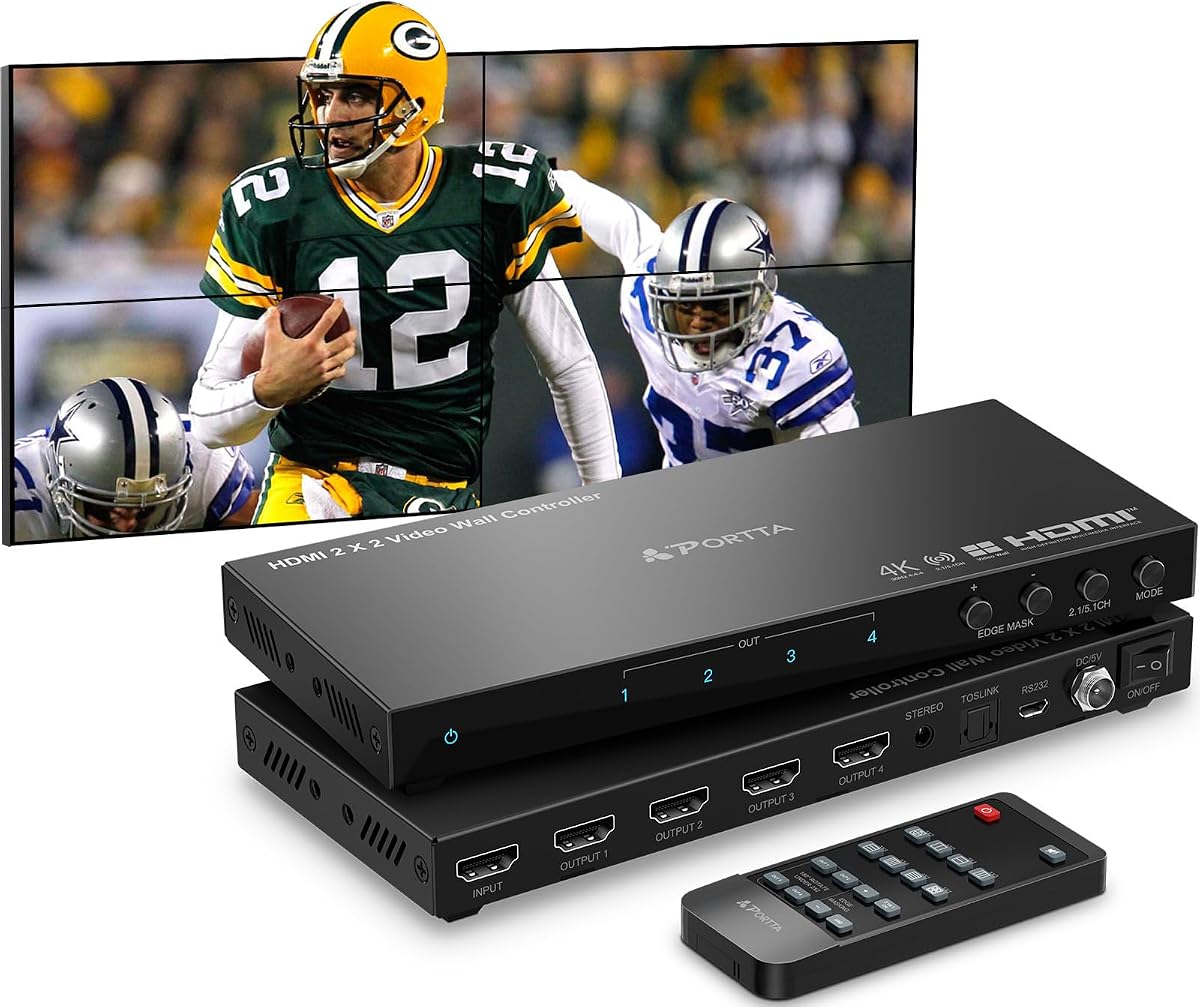
The PORTTA controller impresses with its eleven splicing modes and strong support options. It is designed to distribute a single HDMI input to four outputs with various configurations including portrait modes.
We may earn a commission when you buy through this link, at no additional cost to you.
Edge masking prevents image distortion by cutting or adding pixels to the output picture edge. This feature ensures a clean look on multi-screen setups where bezels might otherwise break the visual flow.
While the 4K input is limited to 30Hz and outputs are fixed at 1080p, the flexibility in modes makes it great for advertising or information displays. The RS232 control allows for integration into larger automation systems.
This is a reliable choice for commercial displays needing varied layouts. The hassle-free warranty and lifetime technical support provide peace of mind for professional deployments in retail or public venues.
Edge masking adjusts output picture edges to reduce distortion and ensure a seamless appearance across multiple physical screens.
By setting your PC in portrait mode you can utilize vertical display configurations like 1×2 or 1×4 for tall video walls.
We may earn a commission when you buy through this link, at no additional cost to you.
ISEEVY offers a robust controller that supports 4K60Hz inputs and outputs for a truly UHD video wall experience. It accepts both HDMI and USB-C inputs making it compatible with modern media players and laptops.
We may earn a commission when you buy through this link, at no additional cost to you.
The eight splice modes cover most common configurations such as 2×2 or 1×4 to arrange your screens effectively. It supports 180-degree rotation for each output port to adjust the image for any installation angle.
Designed for stable 24×7 operation, this unit is suitable for continuous monitoring or signage environments. The plug and play design ensures that setup is quick and straightforward without needing complex drivers.
This model is great for users needing high resolution performance. If your content relies on smooth 60Hz refresh rates, this controller delivers the bandwidth needed to maintain quality across your four displays.
Support for 4K60Hz inputs and outputs ensures that video motion remains smooth and detailed across all connected screens.
The device is professionally designed to run continuously 24×7 which is essential for commercial signage or security monitoring.
We may earn a commission when you buy through this link, at no additional cost to you.
This controller distinguishes itself with USB auto display functionality allowing you to play files directly from a USB drive without a PC. It supports a wide range of video formats ensuring compatibility with most content files.
We may earn a commission when you buy through this link, at no additional cost to you.
It supports max resolution of 3840×2160@60Hz which delivers high quality visuals on your video wall. The device allows image cropping and brightness adjustment giving you control over the visual presentation.
Audio extraction via 3.5mm and optical outputs ensures you can manage sound independently. IR extension allows for remote control over longer distances which is helpful in large rooms.
Ideal for self-contained digital signage, this unit removes the need for a connected computer when playing local files. The high rating reflects its reliability and ease of use for standalone multimedia projects.
The USB auto display feature allows direct playback from storage media enabling simple setups without a dedicated media server.
Image cropping and border adjustment functions help you optimize the display content to fit your physical screen layout perfectly.
We may earn a commission when you buy through this link, at no additional cost to you.
For larger installations requiring six screens, this controller provides the necessary output channels. It supports six HDMI outputs and multiple splice modes including 2×3 and 6×1 to maximize your display area.
We may earn a commission when you buy through this link, at no additional cost to you.
The unit supports 4K60Hz inputs via HDMI and USB-C ensuring high-quality signal transmission. Each output port can rotate the image by 180 degrees allowing you to physically mount screens in any orientation.
Plug and play design ensures easy connection and setup. Professional design ensures stability for continuous 24×7 operation which is essential for large video walls in public spaces.
This model is recommended for extensive video walls where six displays are required. The flexibility in modes and high resolution support makes it a powerful tool for creating large visual canvases.
With six HDMI outputs you can connect and control up to six displays making it suitable for large video wall projects.
Supporting 4K60Hz inputs ensures that even with multiple outputs the video quality remains sharp and detailed.
We may earn a commission when you buy through this link, at no additional cost to you.
Selecting the right video wall controller depends on several technical factors. This guide outlines the key elements you should evaluate to ensure your chosen device meets your display and connectivity requirements.
Ensure the controller supports the input resolution you need such as 4K at 60Hz or 30Hz. While some devices accept 4K inputs they may downscale outputs to 1080P which affects detail.
Verify that the input and output resolution specs align with your content requirements to avoid bottlenecks in your video signal chain.
Look for a controller that supports multiple splicing modes like 2×2, 1×4, or vertical configurations. The more modes available the more flexible your layout options will be.
Check if the device allows for portrait mode or 180-degree rotation to accommodate different mounting orientations effectively.
If you need to route audio to external speakers look for optical or analog audio outputs. Not all controllers separate audio from video feeds.
Choose a model with SPDIF or 3.5mm outputs if you plan to connect an external sound system to your video wall setup.
Decide whether you need remote control, RS-232, or web-based management. Basic units use IR remotes while professional ones offer serial or network control.
For large installations select a controller with RS-232 or LAN support to integrate it into centralized control systems.
Modern setups may benefit from USB-C inputs in addition to HDMI. This allows direct connection to laptops without adapters.
Check if the unit supports DVI or HDMI 2.0 for compatibility with legacy devices or high bandwidth signals.
Features like edge masking and bezel adjustment are essential for minimizing the visual gaps between screens. These ensure the image looks continuous.
Prioritize units with advanced image processing tools to reduce distortion and align the display boundaries accurately.
If you need to switch between multiple sources rather than splitting one look for a matrix switcher with video wall functions. This adds flexibility to signal routing.
Matrix controllers allow any input to be sent to any output which is useful for dynamic content management.
Consider units with dual voltage power supplies if you plan to use them internationally or in varied environments. Reliability is key for 24×7 operation.
Check the warranty terms and support options to ensure you have assistance if the device requires service or troubleshooting.
Connect your source device to the HDMI or USB-C input on the controller using a high-quality cable. Then connect the HDMI outputs to each of your display screens ensuring the connections are secure to prevent signal loss.
Power on the controller and displays then use the remote or menu buttons to select your desired splicing mode such as 2×2 or 1×4. Adjust the bezel settings if available to optimize the alignment of the image across screens.
To ensure longevity keep the controller in a well-ventilated area to prevent overheating. Avoid placing heavy objects on top and clean the ports periodically with compressed air to maintain optimal performance.
An HDMI Video Wall Controller splits a single video source signal into multiple outputs allowing you to display the image across several screens. It also supports various layouts and audio extraction to create a unified visual experience.
Yes many modern controllers support 4K inputs up to 60Hz. However some units may downscale the output to 1080P so check the specific output resolution before buying.
Absolutely many controllers support USB-C or HDMI inputs making them compatible with laptops. You can connect your laptop directly to split the screen across four external monitors.
Most units come with an IR remote for basic control. Professional models also support RS-232 serial or LAN web control for advanced remote management and integration.
Edge masking is a feature that adjusts the edges of the output image to compensate for bezels. It helps create a seamless look by cropping or stretching pixels around the borders.
Some budget-friendly models support both HDMI and DVI inputs. Check the product specifications carefully as not all HDMI controllers include DVI support for legacy equipment.
Basic video wall processors split one source. If you need to switch between multiple sources you will need a matrix switcher which combines video wall and switching capabilities.
Most controllers come with a one-year manufacturer warranty. Some brands offer lifetime technical support which helps with setup and troubleshooting over the device's lifespan.
We hope this guide helps you find the perfect HDMI Video Wall Controller for your setup. The top picks cover a range of needs from budget friendly options to premium matrix controllers.
Prioritize features like resolution support and control methods that match your specific use case. Whether you need simple splitting or advanced routing the right processor will ensure your video wall looks its best.
Remember to verify current availability and features before purchasing. Prices and stock levels can change so checking the product page for the latest details is always a good practice.