
Upgraded Watt Power Meter Plug
4.6Editor score
7 Modes Display Parameters
Adjustable Backlight Time
Overload Protection Included
This guide compares the top 10 energy consumption monitors for PC and home use, detailing features, accuracy, and smart capabilities to help you save on
Understanding your energy consumption is vital for managing household costs and reducing environmental impact. Energy monitors provide real-time data on how much power your devices use, helping you identify inefficiencies. Whether you need to track a single PC or your entire home grid, choosing the right monitor ensures accurate insights.
We evaluated ten leading energy monitors based on accuracy, ease of installation, and smart features. Our selection includes plug-in meters for individual devices and whole-home systems for comprehensive tracking. Each product was assessed for reliability, data retention, and compatibility with modern smart home ecosystems.
This roundup highlights the strengths and weaknesses of each monitor to guide your purchase. You will find options ranging from simple watt meters to advanced smart home integrations. Please note that product availability and pricing can change frequently, so verify current details before buying.
4.6Editor score

4.6Editor score

4.3Editor score
This side-by-side comparison highlights the key specifications and capabilities of each monitored to help you decide quickly. We focus on accuracy, connectivity, and ease of use to ensure you find the best fit for your specific needs.


The Emporia Vue 3 stands out as a top choice for detailed home energy monitoring. It offers UL certification for safety and provides real-time electricity usage data through a dedicated app. The system is designed to track solar production and net metering effectively.
We may earn a commission when you buy through this link, at no additional cost to you.
Its accuracy and comprehensive monitoring capabilities make it ideal for homeowners seeking to reduce costs. The app allows you to automate energy management based on peak demand and solar usage. Users appreciate the detailed reporting features which help identify energy hogs quickly.
While installation requires accessing your circuit panel, the benefits of granular data outweigh the effort. The system supports various electrical configurations including split-phase and three-phase systems. The warranty provides peace of mind for long-term reliability.
Buy this if you want precise data and smart automation for your entire home. It is perfect for those integrating solar or monitoring specific appliances. The investment pays off through better energy awareness and bill reduction.
The UL Listing ensures the device meets rigorous safety standards for electrical products. This certification prevents hazards like overheating or short-circuiting during operation.
You can monitor solar production alongside consumption. The app helps manage excess solar and optimize usage for cost savings.
We may earn a commission when you buy through this link, at no additional cost to you.
This upgraded watt meter plug offers excellent value for tracking individual appliance energy use. It monitors parameters like volts, amps, and kWh with a clear backlight display. The 7 display modes allow you to toggle through different metrics easily.
We may earn a commission when you buy through this link, at no additional cost to you.
Users find the adjustable backlight useful for reading data in low light. The overload protection feature warns you if power exceeds safe limits. Data memory ensures you do not lose readings if the plug is removed or power fails.
It lacks smart connectivity which means you must check it manually. However, for simple tracking without subscriptions this is a strong choice. The design is compact and fits standard outlets without blocking the second socket.
Choose this if you need a simple and cheap tool to check specific appliances. It is great for occasional checks and learning energy habits. The protection features add safety to your home electrical monitoring.
The large screen and 180-degree viewing angles make it easy to read from any position. The backlight ensures visibility during the night.
The device retains cumulative data even when unplugged. This helps track usage over time without constant reconnection.
We may earn a commission when you buy through this link, at no additional cost to you.
The Meross Smart Home Energy Monitor combines reliability with advanced privacy features. It is ETL certified and supports local data storage which protects your privacy. Integration with Home Assistant allows for deep automation without cloud dependency.
We may earn a commission when you buy through this link, at no additional cost to you.
It tracks solar surplus automatically to power high-use appliances like water heaters. The ability to export hourly reports helps with detailed analysis. Most users report significant savings by identifying energy hogs through the clear charts.
Installation involves connecting to the circuit panel which may need professional help. The system supports various configurations including split-phase and three-phase setups. The 2-year warranty adds value for a premium product.
Buy this if you prioritize privacy and smart home automation. It is ideal for tech-savvy users with solar installations. The cost savings and control make it a top premium option.
All energy data stays local on your network. There are no cloud delays or privacy concerns with this setup.
The monitor detects solar surplus and routes power to high-use devices. This maximizes your solar investment and cuts bills.
We may earn a commission when you buy through this link, at no additional cost to you.
The SURAIELEC Outlet Watt Meter handles a wide voltage range from 90 to 250V. It meets Class 1.0 accuracy standards for precise readings of power and energy. The compact design leaves the lower outlet accessible when plugged in.
We may earn a commission when you buy through this link, at no additional cost to you.
It includes a rechargeable battery backup that retains data for up to 90 days. This ensures you do not lose tracking during power outages. The backlight helps with visibility in darker rooms.
While it lacks smart notifications the reliability is strong. The reset button makes it easy to start fresh tracking for new appliances. It is a simple tool for those who need basic cost tracking.
Select this if you need a reliable plug-in meter for various outlets. It is great for international use due to the voltage range. The long data hold period supports seasonal monitoring.
Measures from 90 to 250V ensuring compatibility with different electrical systems. This makes it versatile for various appliances.
The rechargeable battery backup stores data for up to 90 days. This ensures continuous tracking even without power.
We may earn a commission when you buy through this link, at no additional cost to you.
The SEM-Meter Home Monitor is designed for detailed circuit-level tracking. It comes with 16 sensors to monitor specific appliances or rooms. This is perfect for rental properties where cost allocation is necessary.
We may earn a commission when you buy through this link, at no additional cost to you.
You can set customized electricity rate templates for peak and off-peak pricing. The app provides historical data for every meter and month. It also supports local operation via MQTT for privacy focused users.
Installation involves circuit panel access which requires basic electrical knowledge. The flexible sensors allow for installation on various panel types. Accuracy is high with a range of 1% for reliable data.
Buy this if you manage shared apartments or need granular billing data. It helps reduce disputes over utility costs. The privacy mode allows for local server integration easily.
The system allows for transparent electricity allocation per room. This helps landlords bill tenants fairly based on usage.
You can run the monitor without cloud access using MQTT. This ensures data privacy and local control.
We may earn a commission when you buy through this link, at no additional cost to you.
The HBN Watt Meter Plug simplifies energy monitoring with a user-friendly interface. It tracks 9 data types including power frequency and apparent power. The backlight turns off automatically to conserve energy after 15 seconds.
We may earn a commission when you buy through this link, at no additional cost to you.
It is designed to be simple for basic usage tracking. The 160-degree viewing angle ensures readability from any spot. Resetting data is straightforward with a simple button hold.
It does not calculate cost which limits financial analysis. However it is excellent for checking specific device power draw. The build quality is reliable for plug-in use.
Choose this for quick checks on TV or PC power usage. It is a solid basic tool for everyday homes. The simplicity makes it accessible for anyone.
The display allows reading from a wide angle. You do not need to stand directly in front of it to read data.
The backlight turns off automatically to save power. This prevents the device from consuming unnecessary energy while idle.
We may earn a commission when you buy through this link, at no additional cost to you.
The KETOTEK Watt Meter offers robust protection features with multiple alarms. You can set alerts for overload and cost thresholds to monitor limits. One-click switching buttons make navigating parameters fast and simple.
We may earn a commission when you buy through this link, at no additional cost to you.
It tracks active and apparent power alongside voltage and current. The display is clear and allows viewing from any angle. Data storage retains info during power failures without loss.
It is a manual tool so it lacks smart notifications. However the alarm features give peace of mind. The build quality supports safe operation with various appliances.
Buy this if you want safety alerts for your devices. It is great for monitoring high-power tools or heaters. The simplicity and accuracy make it a reliable choice.
Set alarms for overload and cost to stay within limits. The LED light flashes continuously to warn you.
Buttons allow immediate access to key parameters. This reduces the time needed to check specific metrics.
We may earn a commission when you buy through this link, at no additional cost to you.
This bundle includes two meters for tracking multiple devices simultaneously. It monitors power voltage and cost with 8 display modes. The ABS material ensures durability and fire resistance for safe use.
We may earn a commission when you buy through this link, at no additional cost to you.
Data memory is strong keeping settings and cumulative data safe. You can reset easily with a single button press. The backlight turns off automatically to save energy when not in use.
It does not support smart connectivity but is useful for basic checks. The two-pack offers better value for households needing multiple monitors. The setup is plug and play for any standard outlet.
Choose this to track several appliances at a low cost. It is practical for checking efficiency across different rooms. The durability ensures long-term use in various spots.
Getting two units allows monitoring of separate devices. This helps compare energy use between different appliances easily.
High-quality ABS material ensures fire resistance and long life. The build protects internal components from damage.
We may earn a commission when you buy through this link, at no additional cost to you.
The P4400 Kill A Watt is a well-known device for assessing appliance efficiency. It tracks usage by day week or year to show long trends. It is compatible with inverters for backup power setups.
We may earn a commission when you buy through this link, at no additional cost to you.
The large LCD display counts consumption by kilowatt-hour clearly. It calculates expenses to help you understand cost implications. The simplicity makes it easy to use for any household.
It lacks modern connectivity features found in newer models. However it remains a reliable tool for basic power checks. The brand is trusted for accuracy and safety.
Buy this if you need a simple manual monitor. It is ideal for checking usage of small electronics. The inverter compatibility adds value for off-grid users.
Monitor usage by day week month or year. This helps understand seasonal or daily power consumption patterns.
Designed for use with AC inverters and backup systems. This ensures compatibility with portable power stations.
We may earn a commission when you buy through this link, at no additional cost to you.
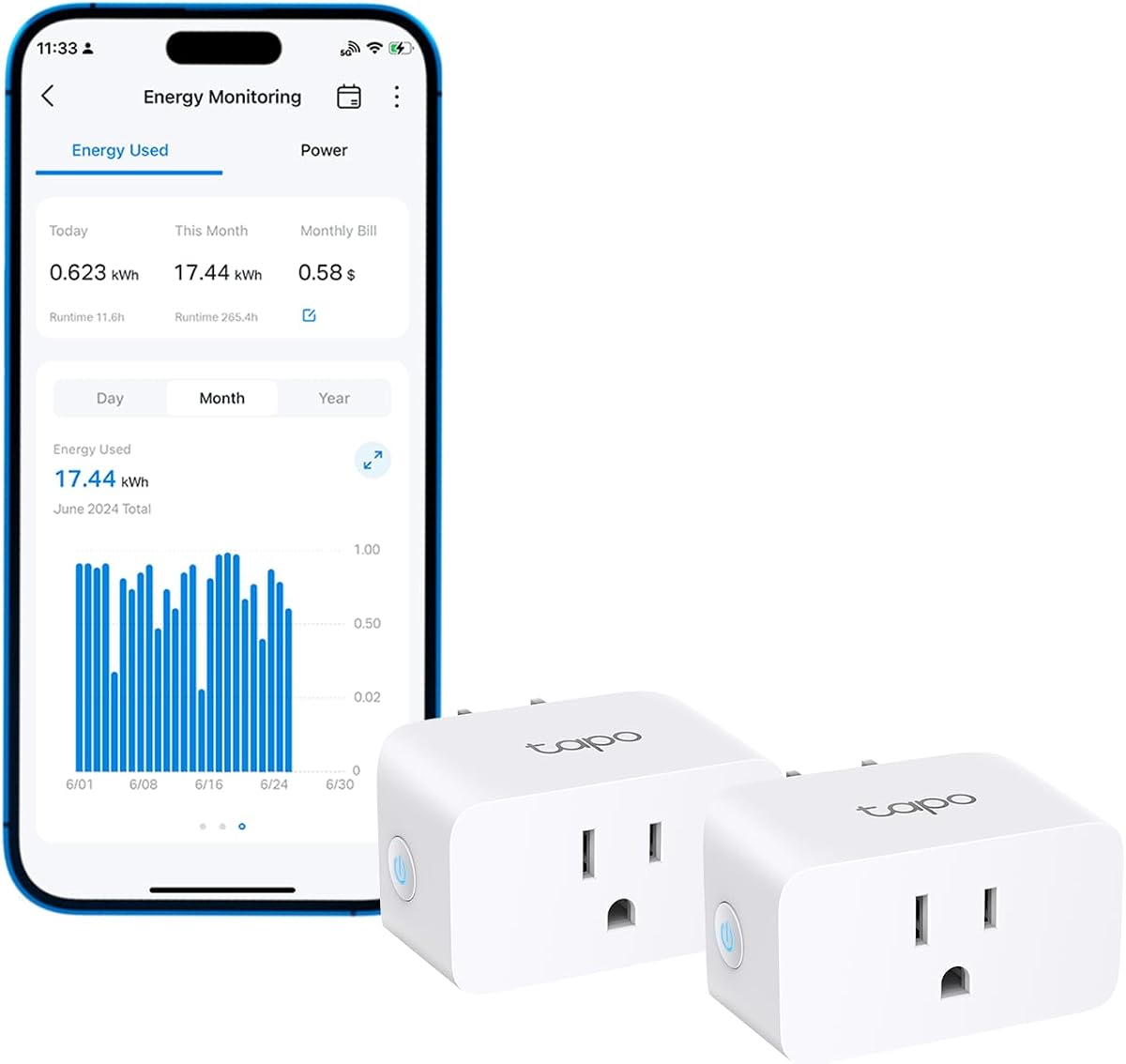
The Tapo P115 Smart Plug connects via Wi-Fi for remote energy tracking. You can view usage stats through the app and estimate costs. It supports voice commands with Alexa and Google Assistant for easy control.
We may earn a commission when you buy through this link, at no additional cost to you.
It includes auto-shutoff features to prevent electrical overload. Scheduling allows devices to run during off-peak hours automatically. This helps reduce costs by taking advantage of cheaper rates.
It is designed for smart home integration and remote management. The 2-pack offers value for monitoring multiple devices. It is perfect for lamps or small electronics.
Choose this for remote control and smart automation. It is great for managing devices from anywhere. The cost estimation helps optimize your usage habits.
Program operation during off-peak hours for savings. This ensures high-consumption devices run when rates are low.
Auto-shutoff prevents overload by cutting power automatically. This protects your devices and home electrical system.
We may earn a commission when you buy through this link, at no additional cost to you.
Selecting the right energy monitor depends on your specific goals and budget. Understanding key factors like connectivity, accuracy, and ease of use will help you make an informed choice.
Accuracy determines how close your readings are to actual power use. Look for devices with at least 1% accuracy for reliable data. High precision helps you identify small savings that add up over time.
Prioritize monitors with high accuracy ratings for critical loads.
Smart connectivity allows you to view data remotely via apps. WiFi enabled models send alerts for unusual usage spikes. Manual meters are cheaper but require physical checks for updates.
Choose smart models if you want automation and alerts.
Plug-in meters are the easiest to install requiring no tools. Whole-home systems need access to your circuit panel which may require a professional. Decide based on your technical skill and need for detail.
Match the installation type to your comfort level and needs.
Some devices store data locally while others save to the cloud. Check how long data is retained during power outages. Local storage is useful if you have privacy concerns.
Ensure the device saves data securely for long-term tracking.
Many monitors allow you to input your electricity rate to calculate costs. This feature helps you visualize how much money each appliance costs to run. Look for units that support custom rate settings.
Select a meter with cost calculation for better budgeting.
If you use smart home systems check if the monitor integrates with them. Some units work with Home Assistant while others use proprietary apps. Ensure it fits your existing ecosystem.
Check smart home compatibility before purchasing to avoid friction.
Always choose devices with safety certifications like UL or ETL. These ensure the product meets electrical safety standards. A solid warranty protects your investment against defects.
Prioritize certified devices for safe and reliable operation.
Prices range from simple plug-in meters to complex whole-home systems. Determine how much you want to spend based on the value you get. Higher cost often brings more detailed data and automation.
Balance cost with the features you need for your goals.
For plug-in meters simply plug the device into the wall and then plug your appliance into the meter. Press the buttons to cycle through the display modes to check usage. Ensure you set the electricity rate if you want cost calculations.
Whole-home monitors require installation in the electrical panel. If you are not comfortable doing this hire a licensed electrician. Follow the app instructions to pair the device with your Wi-Fi network for remote access.
Keep the device clean and free of dust to ensure safety. Avoid overloading the outlet which can cause the meter to fail. Regularly update the firmware for smart models to get the best performance and security.
Yes many whole-home monitors support solar power tracking. They can measure the energy your panels produce and compare it to usage. This helps you maximize your savings from renewable energy sources.
Most modern monitors do not require a monthly subscription. You can view data and alerts directly in the app. Some premium features might be in the app but basic monitoring is free.
Yes as long as they have safety certifications like UL. They are designed to handle standard electrical loads safely. Ensure you do not exceed the maximum wattage rating of the device.
Absolutely plug-in monitors are great for gaming PCs. They show the real power draw which can vary significantly between idle and gaming. This helps you understand how much energy your setup consumes.
Most devices have internal memory to save data during outages. Some models use battery backups to ensure tracking continues. Always check the specific data retention specs before buying.
Whole-home systems need installation in the breaker box. Plug-in meters do not and are much easier to use. Choose based on whether you want whole home or individual device data.
We have reviewed the top 10 energy monitors ranging from budget plugs to premium smart systems. Each offers unique benefits depending on whether you want simple data or advanced automation.
Prioritize safety and accuracy when making your decision. If you want detailed control consider a smart model with local privacy features.
Always check current availability and pricing before purchasing. Technology and prices change often so verify the details on the retailer site.