
Crucial P310 1TB SSD
4.7Editor score
Up to 7100MB/s read speeds
Broad compatibility with laptops and desktops
Includes Acronis Data Recovery Software
This guide compares the top ten Crucial Internal NVME SSD models for performance, reliability, and value to help you choose the right storage solution for your
Choosing the right internal storage can dramatically impact your system speed and overall responsiveness. The Crucial Internal NVME SSD lineup offers a wide range of options tailored for gamers, creators, and everyday users seeking reliable performance.
We evaluated each model based on read and write speeds, compatibility across platforms, thermal management, and included software bundles. Our goal is to help you navigate the technical specifications and find the drive that matches your specific workload requirements.
Each pick highlights key strengths and potential limitations so you can make an informed decision. Keep in mind that pricing fluctuates based on market demand and availability, so check current listings before finalizing your purchase decision.
4.7Editor score
4.8Editor score

4.6Editor score
The following table provides a side-by-side comparison of all ten Crucial Internal NVME SSD models. It highlights key specifications and features to help you quickly identify the drive that best fits your performance needs and budget constraints.


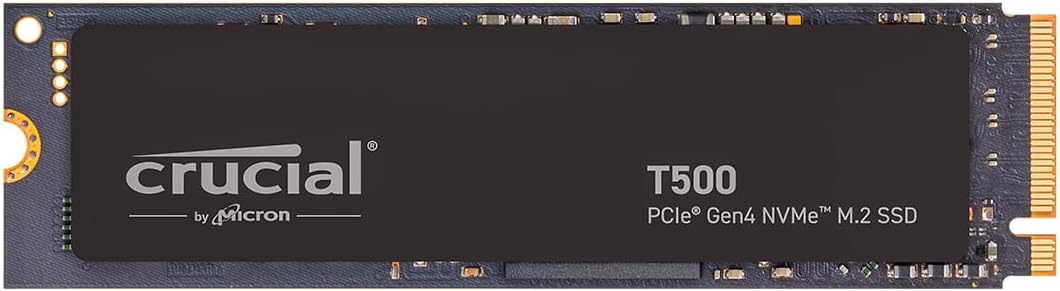
The Crucial T500 stands out as the top pick for users seeking a balance between speed and software benefits. With a high rating of 4.8 stars, it delivers exceptional PCIe 4.0 performance suitable for demanding creative workflows and gaming.
We may earn a commission when you buy through this link, at no additional cost to you.
Its standout quality lies in the combination of fast read and write speeds paired with a generous software bundle. The included one-month Adobe Creative Cloud subscription adds significant value for designers and video editors who need reliable storage and tools.
While it does not come with a heatsink, the drive maintains stable performance under typical workloads. The trade-off is acceptable for users who already have cooling solutions or prefer the flexibility of choosing their own thermal management.
This drive is ideal for creatives and gamers who want top-tier Gen4 performance. If you need fast storage for rendering and gaming, this model offers the best overall package in the Crucial lineup.
The included Adobe Creative Cloud trial allows users to start professional projects immediately without extra software costs.
With read speeds up to 7300MB/s, the drive significantly reduces load times for large files and applications.
We may earn a commission when you buy through this link, at no additional cost to you.
The Crucial P310 offers outstanding value for users seeking high-speed storage without a premium price tag. It holds a solid 4.7 rating and delivers Gen4 speeds that make daily tasks and gaming much faster compared to older drives.
We may earn a commission when you buy through this link, at no additional cost to you.
Its key strengths include broad compatibility and included data recovery software. The drive works seamlessly with laptops, desktops, and handheld gaming consoles, making it a versatile choice for upgrading various systems.
While it lacks a heatsink, most users will not notice thermal throttling under normal usage. The acceptable trade-off is a lower cost that makes high performance accessible to budget-conscious buyers.
This model is perfect for home users and casual gamers who want reliable upgrades. If you need a balance of speed and price, this drive provides the best budget option available.
Included Acronis software helps protect your data with easy recovery tools in case of accidental deletion.
The drive supports handheld gaming consoles like ROG Ally, expanding its use beyond traditional PCs.
We may earn a commission when you buy through this link, at no additional cost to you.
The Crucial T710 pushes the limits of storage speed with PCIe 5.0 technology. It holds a 4.6 rating and offers read speeds that are nearly double those of Gen4 drives, making it ideal for professional workflows.
We may earn a commission when you buy through this link, at no additional cost to you.
Its standout quality is the combination of top-tier performance and security features. Hardware encryption ensures sensitive data remains protected while the drive handles massive 8K video files without lag.
While it requires a compatible motherboard to reach full speeds, the performance benefits are significant. The trade-off is a higher cost, but professionals will appreciate the reliability and speed for demanding tasks.
This drive is best for tech enthusiasts and professionals who need the fastest storage. If you want future-proof performance and security, this model stands out as the top premium choice.
AES-256-bit hardware encryption with TCG Opal support keeps your files secure against unauthorized access.
Read speeds of 14900MB/s drastically reduce wait times when working with large assets and databases.
We may earn a commission when you buy through this link, at no additional cost to you.
The Crucial P310 2TB variant offers double the capacity for users with extensive media libraries or game collections. It maintains the same high speeds as the 1TB model, making it a great choice for heavy storage needs.
We may earn a commission when you buy through this link, at no additional cost to you.
Its key strength is the ability to store AAA games and creative assets without filling up the drive quickly. The reliable performance ensures that loading large files remains fast even as the drive fills up.
While it costs more than smaller capacities, the extra space is worth it for power users. The trade-off is manageable for those who value having all their files on a single fast drive.
This model is perfect for gamers and editors who need vast storage. If you prioritize capacity alongside speed, this drive offers the best balance for high-volume storage.
With 2TB of space, you can store multiple large titles without needing external storage solutions.
The drive maintains fast speeds even with larger file transfers, thanks to advanced NAND technology.
We may earn a commission when you buy through this link, at no additional cost to you.
The Crucial P510 brings Gen5 performance to a more accessible price point. With a 4.7 rating, it delivers impressive speeds for users looking to upgrade to the next generation of storage technology.
We may earn a commission when you buy through this link, at no additional cost to you.
Its key strengths include the combination of speed and included software. The drive works well for gamers and creatives, offering enough throughput to handle heavy workloads without breaking the bank.
While it requires a Gen5-compatible motherboard for full speed, it remains fast on Gen4 systems. The trade-off is slightly less potential speed compared to top-tier Gen5 models, but it is still excellent for most users.
This model is ideal for early adopters who want Gen5 speed affordably. If you want future-proofing and value, this drive is a strong contender in the high-speed category.
Read speeds of 11000MB/s offer a significant leap forward from Gen4 drives for large file transfers.
Included Adobe Creative Cloud access adds extra value for designers and video editors using the drive.
We may earn a commission when you buy through this link, at no additional cost to you.
The Crucial E100 is an excellent choice for users seeking an affordable upgrade from older SATA drives. With a 4.5 rating, it provides Gen4 performance at a lower price, making it accessible for budget-conscious buyers.
We may earn a commission when you buy through this link, at no additional cost to you.
Its key strengths are reliability and simplicity. The drive installs easily in most laptops and desktops, offering a noticeable boost in system responsiveness for everyday tasks like booting and file transfers.
While it has a lower capacity than other models, it serves well as a system drive. The trade-off is limited space, but it is sufficient for operating systems and essential applications.
This model is perfect for budget builds or secondary PCs. If you want to modernize an older system without spending much, this drive offers the best entry-level Gen4 performance.
Follow step-by-step instructions for simple installation and cloning to migrate your existing data easily.
Backed by a limited 3-year warranty, this drive provides peace of mind for everyday users.
We may earn a commission when you buy through this link, at no additional cost to you.
The Crucial P310 QLC variant offers a balance of capacity and affordability. With a 4.6 rating, it uses QLC NAND to keep costs down while still delivering Gen4 performance for standard storage needs.
We may earn a commission when you buy through this link, at no additional cost to you.
Its key strengths include reliable Micron quality and a high read speed. This makes it suitable for users who need a large secondary drive for media storage and general data archiving.
While endurance is lower than TLC drives, it remains suitable for typical usage patterns. The trade-off is acceptable for those who prioritize space and price over heavy write workloads.
This model is ideal for budget upgrades where capacity matters most. If you need a reliable and affordable storage drive, this QLC option delivers solid value for general use.
QLC technology allows for high capacity at a lower price, making it great for media and file storage.
Micron quality control ensures the drive remains stable during everyday read operations and file access.
We may earn a commission when you buy through this link, at no additional cost to you.
The Crucial T500 PS5 Edition is designed specifically for gamers who need a guaranteed upgrade. With a 4.8 rating, it meets PlayStation 5 specifications and includes a heatsink for stable performance in consoles.
We may earn a commission when you buy through this link, at no additional cost to you.
Its key strengths are compatibility and thermal management. The built-in heatsink ensures the drive runs cool during long gaming sessions, preventing throttling and maintaining fast load times.
While it costs a bit more than the standard version, the convenience is worth it. The trade-off is a slightly higher price, but the ready-to-use design saves time and effort for console owners.
This model is perfect for PlayStation 5 owners seeking an easy upgrade. If you want to expand your console storage without worry, this drive offers the best dedicated solution.
Meets PlayStation 5 specs exactly, ensuring a plug-and-play experience without needing extra adapters.
Integrated heatsink ensures stable performance even during intense gaming sessions and heavy loading.
We may earn a commission when you buy through this link, at no additional cost to you.
The Crucial P310 offers a solid standard option for users needing fast storage. With a 4.7 rating, it delivers consistent Gen4 speeds that make daily tasks faster and more efficient for typical workloads.
We may earn a commission when you buy through this link, at no additional cost to you.
Its key strengths include broad compatibility and included software. The drive works with many systems, ensuring you can upgrade almost any PC or handheld console without compatibility issues.
While it lacks a heatsink, it remains stable for most use cases. The trade-off is minimal for users who do not push the drive to extreme limits during constant heavy workloads.
This model is perfect for general PC upgrades and gaming. If you want a reliable drive for standard use, this model offers the best combination of performance and value.
Improve productivity with faster boot times and quicker application starts for daily computing tasks.
Included Acronis recovery tools provide peace of mind for data safety and backup needs.
We may earn a commission when you buy through this link, at no additional cost to you.
The Crucial T700 delivers high-performance Gen5 capabilities for advanced users. With a 4.6 rating, it offers read speeds that surpass older generations, making it a strong choice for demanding tasks.
We may earn a commission when you buy through this link, at no additional cost to you.
Its key strengths include reliability and software. The included Adobe Creative Cloud bundle adds extra utility for creatives, enhancing the overall value of the storage drive.
While it requires specific hardware to run at full speed, the potential performance is significant. The trade-off is a higher price, but enthusiasts will appreciate the capability for future-proofing their systems.
This model is perfect for gamers and professionals with modern systems. If you need the fastest speeds for hardcore gaming or editing, this drive offers the best high-speed performance available.
With speeds over 11000MB/s, the drive prepares your system for the next generation of software and games.
Included software bundle makes it easy to start creating content immediately after installation.
We may earn a commission when you buy through this link, at no additional cost to you.
Choosing the right SSD involves balancing speed, capacity, and price. This guide walks you through the most important factors to consider before buying.
PCIe Gen4 and Gen5 drives offer significantly faster speeds than older SATA or Gen3 options. Higher read and write speeds mean faster load times for games and quicker file transfers for professionals.
Always check your motherboard compatibility to ensure you can utilize the full speed of the drive you choose.
Storage needs vary based on your use case. Gamers and video editors typically need 1TB or 2TB to store large libraries, while basic users may find 480GB sufficient for OS and apps.
Consider future needs when choosing capacity, as upgrading later can be more costly than buying more space now.
TLC NAND is generally more durable and faster than QLC NAND. TLC is better for heavy workloads, while QLC is a cost-effective option for lighter usage.
For most users, TLC offers a better balance of reliability and performance over the lifespan of the drive.
High-speed drives generate heat during sustained use. Drives with integrated heatsinks or thermal control prevent throttling and maintain performance during long sessions.
If your system lacks cooling, choose a drive with a heatsink to ensure stability and longevity.
Many Crucial drives include software like Acronis for cloning or Adobe Creative Cloud for creatives. These bundles add value beyond just the hardware itself.
Consider these add-ons as part of the total value proposition when comparing different models.
Most Crucial drives are compatible with standard M.2 slots. However, PS5 users should verify specific models support console requirements with appropriate heatsinks.
Ensure your device supports the required PCIe generation to avoid bottlenecks and performance loss.
Crucial drives often come with a limited warranty of 3 to 5 years depending on the model. This coverage provides peace of mind against hardware failure.
A longer warranty often indicates better quality assurance and endurance for the specific drive model.
Prices vary based on capacity and speed. Entry-level drives offer good value for basic users, while premium models offer top-tier performance for professionals.
Determine your performance needs before looking at price to avoid overspending or underbuying.
Install the drive into an available M.2 slot on your motherboard. Secure it with the screw provided by the motherboard manufacturer and ensure it is firmly in place.
Boot into your system and initialize the drive using the Disk Management tool in Windows or Disk Utility on macOS. This step prepares the storage for file allocation.
Keep firmware updated through Crucial's software tools to maintain performance and stability. Avoid extreme temperatures and ensure airflow in your case to extend the life of the drive.
Gen5 SSDs offer nearly double the bandwidth of Gen4 drives, resulting in faster data transfer speeds. However, they require a compatible motherboard to reach full potential. For many users, Gen4 offers a better balance of speed and affordability.
Specific Crucial models like the T500 PS5 Edition are certified for use with PlayStation 5. These include the required heatsink and meet Sony's speed specifications. Always check the product title for console compatibility before buying.
You can clone your existing drive using included software like Acronis to transfer all your files to the new SSD. This process is straightforward and helps preserve your system settings and data without manual reinstallation.
The bundle provides a one-month free subscription to Adobe Creative Cloud All-Apps. This includes popular tools like Photoshop and Premiere Pro. It allows users to start creative projects immediately after setup.
Some models include an integrated heatsink, while others rely on motherboard thermal pads. Check the product details before purchasing to see if cooling is already included. Installing a heatsink yourself can prevent thermal throttling.
Yes, all Crucial models are built with quality NAND and undergo rigorous testing. They come with limited warranties that cover manufacturing defects. The drives are designed to withstand typical daily workloads reliably.
The Crucial Internal NVME SSD lineup provides excellent options for every type of user from budget builders to professional creatives. The T500 leads as the top all-around choice while the P310 offers the best value.
Prioritize speed and capacity based on your specific needs. If you need future-proofing look to Gen5 models but ensure your system supports the interface required to run them effectively.
Prices for these drives fluctuate based on market conditions. Always check current listings to confirm the best deal before completing your purchase decision today.