
SABRENT USB 3.0 to 2.5in SATA Adapter Cable for SSD & HDD, UASP
4.7Editor score
2.5 inch SATA only
USB bus powered design
5Gbps with UASP support
Finding a reliable laptop hard drive adapter kit is essential for anyone needing to access data from old drives quickly. These tools bridge the gap between internal storage and modern computers, allowing seamless file retrieval without opening the device.
We evaluated ten top-rated adapters based on compatibility, transfer speeds, and build quality. Each product was assessed for its ability to handle various drive types, ensuring you can choose the right tool for your specific hardware needs efficiently.
Each pick highlights key features like USB 3.0 support and external power options to ensure stable connections. Prices fluctuate regularly, so check current listings before purchasing to secure the best deal for your data recovery project today.
4.7Editor score

4.6Editor score
4.6Editor score
As an Amazon Associate we earn from qualifying purchases.
This side by side comparison details the specifications of all ten reviewed adapters. Use this table to quickly identify which kit supports your specific drive type and interface requirements.


This Unitek adapter stands out as a versatile solution for connecting both IDE and SATA drives to modern computers. With a strong rating of 4.4 stars it offers reliable performance for data migration tasks without needing additional drivers.
We may earn a commission when you buy through this link, at no additional cost to you.
The key strength lies in its ability to handle dual drives at once which saves time when comparing or backing up files from older hardware. The USB 3.0 interface ensures fast transfer speeds up to 6Gbps via SATA III making it efficient for large datasets.
Users should note that it requires an external power supply for stable operation especially with 3.5 inch drives which may be cumbersome for fieldwork. The USB A connection limits use to computers with legacy ports but ensures wide compatibility with desktops.
Ideal for IT professionals needing to access legacy data quickly this adapter provides the flexibility to connect mixed drive types without switching hardware. Its durable design and included cables make it a solid choice for home and office storage recovery.
Connects one IDE and one SATA drive simultaneously for efficient data comparison and transfer operations.
Supports USB 3.0 and SATA III for rapid file transfers that reduce wait times during recovery.
We may earn a commission when you buy through this link, at no additional cost to you.
This data transfer kit is designed for users needing a straightforward way to access old files from various drive types. It holds a rating of 4.1 stars and provides a universal interface that works with Windows Mac and Linux systems seamlessly.
We may earn a commission when you buy through this link, at no additional cost to you.
The inclusion of a USB-C adapter makes it highly adaptable to modern laptops that lack traditional USB-A ports. It supports massive drive capacities up to 20TB ensuring you can recover data from high volume storage devices without compatibility issues.
While the IDE transfer speed is limited to 133Mbps it remains adequate for standard document recovery tasks. The drive is not as robust as premium models but it delivers consistent results for basic retrieval needs without breaking the bank.
Best suited for casual users or those with mixed drive collections this adapter offers the convenience of hot swapping and broad system support. Its professional technical support team adds value by helping resolve connection issues efficiently.
Supports both USB-C and USB-A devices to bridge the gap between legacy and modern laptops.
Handles drives up to 20TB for extensive archival data recovery projects without limitations.
We may earn a commission when you buy through this link, at no additional cost to you.
The YINNCEEN adapter offers a compact solution for connecting SATA and IDE drives with a focus on speed and convenience. Rated at 4.3 stars it supports data transfer rates up to 5Gbps which accelerates the process of moving large files from old storage.
We may earn a commission when you buy through this link, at no additional cost to you.
It comes with a dedicated 12V power supply that ensures stable operation for desktop drives which is crucial for preventing data loss during transfer. The design includes a simple on off switch and LED lights to monitor power status effectively.
Some older IDE drives may require manual jumper adjustments to function correctly which adds a slight complexity for novice users. The body is small enough to store easily but the cables are somewhat short which limits desk placement flexibility.
For users needing a reliable tool to duplicate or backup data this reader strikes a good balance between performance and affordability. Its plug and play nature means you can start working immediately without complex software installation.
Delivers speeds up to 5Gbps for rapid data migration from legacy drives to modern storage.
Includes a 12V adapter to ensure consistent performance with power hungry 3.5 inch drives.
We may earn a commission when you buy through this link, at no additional cost to you.
This data recovery kit earns top marks for its ability to resolve common drive incompatibility issues faced by IT enthusiasts and professionals. With a high rating of 4.6 stars it is built to handle various drive types including Blu ray options for expanded utility.
We may earn a commission when you buy through this link, at no additional cost to you.
The extended body design specifically addresses the challenge of connecting 3.5 inch IDE drives by providing better access to ports. It includes a flexible power cable and a stable 12V supply to prevent power shortages during critical recovery tasks.
While it does not support M.2 drives it excels in bridging the gap between older IDE and modern USB systems efficiently. The included USB-C adapter ensures you can use it with the latest laptops without needing extra dongles.
For those recovering critical data from failed computers this kit offers a reliable path to retrieving files safely. Its robust support and safety features make it a trusted choice for handling sensitive or valuable storage media.
Designed to fix unreadable old IDE and SATA drives with stable power and connection upgrades.
Features a longer body to ease connection access for bulky 3.5 inch IDE ports.
We may earn a commission when you buy through this link, at no additional cost to you.
This docking station is a robust choice for users focused on SATA drives who need a simple tool-free way to access data. It holds a rating of 4.4 stars and delivers real-world speeds that match the drive limits rather than just interface math.
We may earn a commission when you buy through this link, at no additional cost to you.
The included 12V power adapter is essential for 3.5 inch drives ensuring they spin up reliably without dropouts. It supports hot-swapping so you can change drives quickly without restarting the computer which streamlines backup workflows.
It only supports SATA drives so users with IDE equipment will need a different adapter for their legacy hardware. The USB A connection means you may need an extra adapter for modern laptops with only USB-C ports available.
Best for frequent backups of SATA drives this station offers simplicity and reliability in equal measure. Its lay-flat bay accepts bare drives easily and the LED indicator provides clear feedback on activity status.
Lay-flat bay accepts bare drives without tools for quick access and replacement.
Transfers data at actual drive speeds ensuring consistent performance without bottlenecks.
We may earn a commission when you buy through this link, at no additional cost to you.
This adapter cable is the most affordable option for accessing laptop drives directly without a bulky enclosure. With a top rating of 4.7 stars it is perfect for quick data access from 2.5 inch SATA SSDs and HDDs on the go.
We may earn a commission when you buy through this link, at no additional cost to you.
It is USB bus powered so it works directly from the laptop port without needing an extra outlet. The inclusion of UASP support ensures faster transfer speeds on compatible systems which helps keep workflows efficient.
The limitation is that it only works with 2.5 inch drives so it cannot handle desktop drives or M.2 options. Some older high capacity drives might draw too much power and require a powered hub to function correctly.
For casual users needing to access old laptop drives this simple cable offers excellent value and portability. It is lightweight enough to keep in a bag and ready for instant file retrieval anywhere.
Draws power directly from USB port for maximum portability without external adapters.
Enhances transfer speeds for compatible drives to reduce wait times during access.
We may earn a commission when you buy through this link, at no additional cost to you.
This enclosure is a sleek and user friendly way to turn a spare laptop drive into a portable external drive. It rates 4.6 stars and features a tool free design that lets you snap the cover and drive together quickly.
We may earn a commission when you buy through this link, at no additional cost to you.
The dual USB-C and Type-A plug provides flexible connection options for both modern and older computers. It supports transfer rates up to 5Gbps and uses UASP to optimize speeds especially for SSDs for faster access.
It is designed specifically for 2.5 inch drives so it will not fit larger desktop drives. The compact body makes it easy to carry in a laptop bag which is ideal for travelers needing backup storage.
Best for users wanting a permanent portable drive solution this enclosure offers durability and ease of use. The 18-month warranty adds confidence to your purchase and ensures long-term protection for your setup.
Simple snap cover design requires no screws for quick drive setup and access.
Includes USB-C and USB-A connectors to fit any laptop or desktop computer easily.
We may earn a commission when you buy through this link, at no additional cost to you.
This reader kit offers a versatile 2-in-1 interface that connects to both USB-A and USB-C ports on laptops. With a rating of 4.3 stars it handles multiple drive types including IDE and SATA for flexible data access options.
We may earn a commission when you buy through this link, at no additional cost to you.
The design allows simultaneous connection of one IDE and one SATA drive but not two IDE drives at once. It includes a 12V power adapter and LED indicator to ensure stable operation during recovery tasks.
New drives may require initialization in Disk Management before they are recognized by the system which is a common step. The dual interface design reduces the need for extra adapters and keeps your setup clutter free.
For users with mixed storage collections this reader provides an economical and convenient solution for data recovery. It balances speed and connectivity to meet the needs of home users and small office environments.
Includes USB-A and USB-C connections to match various laptop ports without extra gear.
Allows working with one IDE and one SATA drive at the same time for efficiency.
We may earn a commission when you buy through this link, at no additional cost to you.
This adapter features a humanized 2-in-1 design that makes it easy to plug into various laptop USB ports. Rated at 4.5 stars it supports a wide range of drives including optical drives for comprehensive data recovery capabilities.
We may earn a commission when you buy through this link, at no additional cost to you.
It delivers high speeds up to 5Gbps and includes a dedicated power adapter for 3.5 inch drives to ensure they stay powered. The on-off switch protects drives from electrical damage and the LED light helps monitor activity status.
New drives must be initialized in Disk Management before they can be recognized by your computer system. The hot swapping feature allows you to change drives without restarting the computer which saves valuable time.
Ideal for general users needing a simple and effective recovery tool this kit offers broad compatibility and safety features. It is well suited for those who want a reliable solution without technical complexity.
Works with CD and DVD drives to access archived media and legacy discs.
Includes on-off switch to prevent electrical damage during connection and data transfer.
We may earn a commission when you buy through this link, at no additional cost to you.
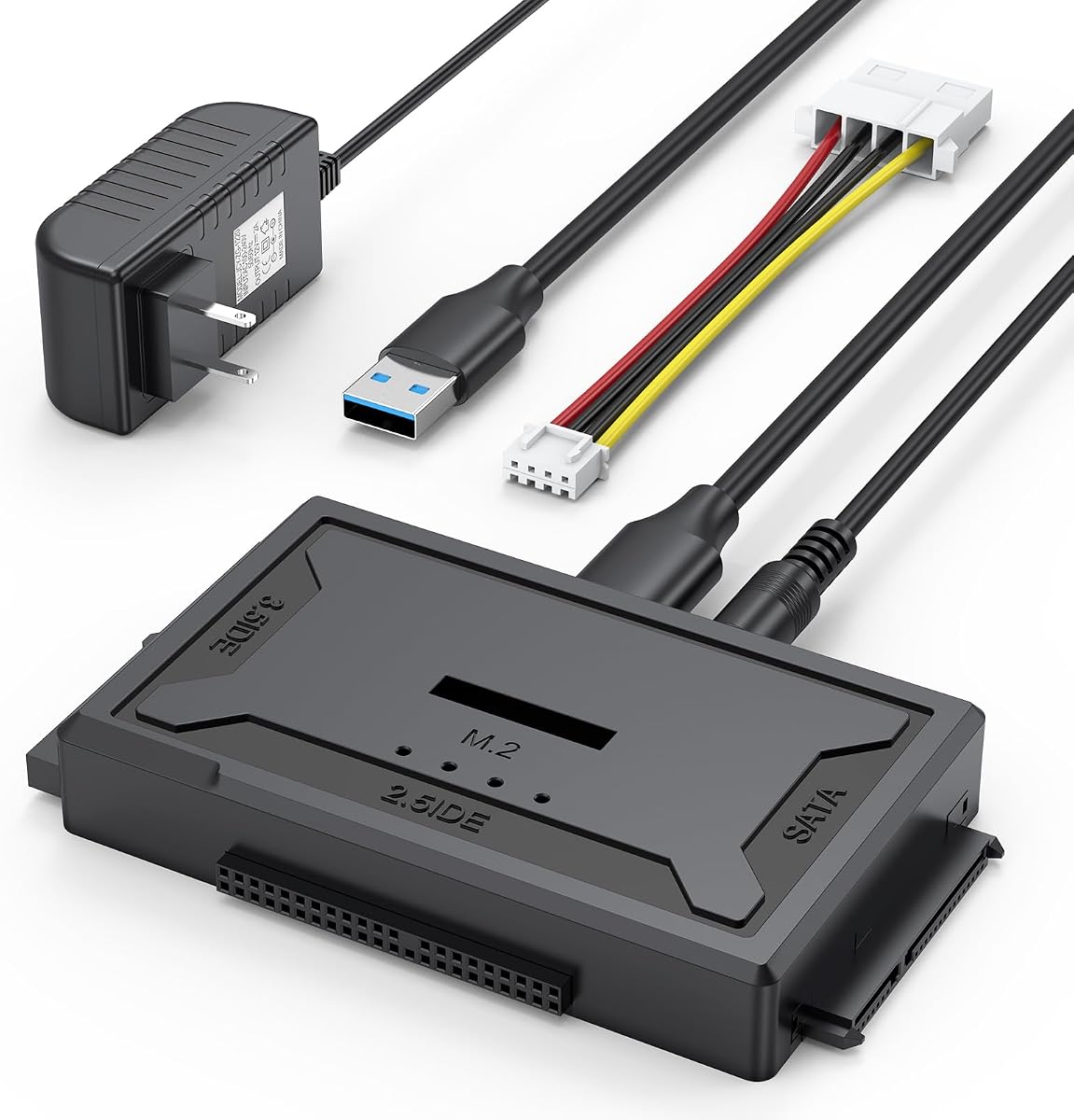
This premium dock stands out by supporting M.2 drives alongside traditional IDE and SATA interfaces. With a rating of 4.6 stars it delivers ultra-fast speeds up to 10Gbps for NVMe drives which accelerates data access significantly.
We may earn a commission when you buy through this link, at no additional cost to you.
The upgraded design features a softer and more flexible power cable for 3.5 inch IDE drives to improve usability. It supports various drive sizes and formats making it a universal solution for modern and legacy hardware.
It requires the file system format to match the computer terminal format for proper recognition which can confuse users. The open design allows for any M.2 size to be connected without additional hardware or enclosures.
Best for tech enthusiasts needing access to NVMe drives this dock offers unmatched versatility and speed. Its comprehensive support ensures that even complex drive configurations can be retrieved reliably.
Connects M.2 SATA and NVMe drives with speeds up to 10Gbps for modern storage.
Soft flexible power cables improve access to difficult IDE ports during recovery.
We may earn a commission when you buy through this link, at no additional cost to you.
Choosing the right adapter kit depends on your specific drive types and connectivity needs.
The most critical factor is ensuring the adapter supports your specific drive interface such as IDE or SATA. Older laptops often used IDE drives while newer ones use SATA or M.2. Verify the connector type on your drive before purchasing to avoid incompatibility issues.
Always check if the adapter covers both IDE and SATA if you have mixed legacy drives.
Modern laptops often lack traditional USB-A ports which require adapters with USB-C or included USB-C adapters. Ensure the kit provides the correct host connection to match your computer. Some kits offer dual interfaces to handle both port types conveniently.
Look for USB-C compatibility if you own a modern ultra-thin laptop.
Desktop drives like 3.5 inch models require external power to spin up which is not provided by USB alone. Kits that include a 12V power adapter ensure stability during data recovery. Always check if the power adapter is included before relying on bus power.
External power is mandatory for 3.5 inch drives to prevent failure.
Faster transfer speeds reduce wait times during large data migrations. USB 3.0 provides up to 5Gbps while USB 3.1 offers even higher speeds. If you are moving large volumes of data choose an adapter with high speed standards.
Prioritize USB 3.0 or higher for efficient recovery.
Durable materials and sturdy cables extend the lifespan of your adapter kit especially if you use it frequently. Look for adapters with reinforced connectors that resist wear and tear. Poor build quality can lead to connection issues or data loss.
Choose kits with robust cables for regular use.
Plug-and-play functionality without driver installation saves time and avoids software conflicts. Hot-swappable support allows you to change drives without rebooting which improves workflow efficiency. User friendly features like LED indicators add value by showing status clearly.
Select adapters that require no extra software for simplicity.
Some kits offer extra tools like optical drive support or dual drive connections which add versatility. Features like on-off switches protect drives from electrical damage. Consider if these extras justify a higher price for your specific needs.
Extra features are useful for advanced recovery tasks.
A reliable warranty and accessible customer support can help resolve connection issues quickly. Look for kits with at least a one-year warranty. Professional technical support teams are valuable when dealing with unrecognized drives or data errors.
Check support options before buying to ensure peace of mind.
To begin use remove the drive from the laptop carefully and identify the connector type. Connect the appropriate adapter cable to the drive and plug the other end into your computer. If using a 3.5 inch drive connect the external power adapter before turning it on.
Wait for the system to detect the drive and access files via the file explorer. Avoid unplugging the drive abruptly to prevent data corruption. Use the on-off switch if available to safely power down before disconnecting.
Store the adapter and cables in a dry place away from sharp objects. Check connections periodically for dust or damage. Handle drives by their edges to avoid static discharge which can harm internal components.
No you do not need an external power adapter for 2.5 inch laptop drives as they run on USB power. However 3.5 inch desktop drives require a dedicated 12V power adapter to function properly and avoid errors.
Yes most adapters support macOS but you may need a USB-C to USB-A adapter if your MacBook only has USB-C ports. Check the product specifications for Mac compatibility before purchasing to ensure smooth operation.
IDE uses a wide ribbon cable connector and is older technology while SATA uses a smaller flat connector and offers faster speeds. Adapters must match the specific connector type on your drive to function correctly.
The drive may not be initialized or formatted for your operating system. Go to Disk Management to initialize it. Also check if the power adapter is connected correctly for larger drives.
Most adapters are designed for data access and not booting. Some systems may allow booting but it depends on BIOS settings. They are best used for transferring files rather than running operating systems.
Adapters with USB 3.0 support offer fast transfer speeds up to 5Gbps which is suitable for large files. The actual speed also depends on the drive capacity and condition of the storage media.
Choosing the right adapter kit depends on your specific needs and drive types. The Unitek dual-drive kit offers excellent versatility while the SABRENT cable provides a simple budget option.
Prioritize compatibility and power supply to ensure your data recovery is smooth. Always verify your drive connector and computer port type before making a purchase decision.
Check current prices and availability before buying as deals change often. The right tool can make accessing old data easier and save valuable time.