
Smart Caregiver Wireless Motion Sensor Alarm System
4.4Editor score
300 foot range
Mountable motion detector
Affordable entry point
This guide compares the top 10 elderly monitoring systems for safety and peace of mind, featuring bed alarms, video monitors, and fall detection devices.
Ensuring the safety of aging loved ones requires reliable technology. Elderly monitoring systems provide caregivers with tools to track movement and receive alerts during emergencies without constant physical presence.
We evaluated ten leading solutions based on ease of use, range, and reliability. Our comparison includes wireless bed alarms, video monitors, and wearable pagers designed for home safety.
Each pick highlights unique features like fall detection or two-way audio. Prices and availability change frequently, so verify details before purchasing to ensure the best fit for your needs.
4.4Editor score

4.4Editor score

4.1Editor score
The following table offers a side-by-side comparison of all ten systems. It highlights key specifications like connectivity, range, and specific features to help you decide quickly.






The Lunderg system stands out for prioritizing user dignity while maintaining safety. It uses a wireless pager that caregivers carry, avoiding the loud bedside alarms that can cause agitation in patients. This approach aligns with modern caregiving standards that discourage restrictive devices.
We may earn a commission when you buy through this link, at no additional cost to you.
Its patented pre-rise technology alerts you when weight shifts at hip level rather than shoulder level. This means you are notified before the loved one actually stands up, giving you time to assist proactively. The system connects without Wi-Fi, ensuring privacy and ease of setup.
A potential drawback is the need for the pressure pad to be positioned correctly under the hips. If the patient shifts significantly during sleep, the alarm might trigger unnecessarily. However, the pad is durable and designed to last much longer than competing models.
This system is ideal for caregivers who want an unobtrusive way to monitor bed exits. It balances safety with comfort effectively. For those looking to prevent falls without constant physical supervision, this is a top recommendation.
The hip-level sensor triggers alarms before a user stands up fully, allowing intervention before a fall risk occurs.
With a 400-foot range and no internet connection, the system keeps data private and alerts reliable even in large homes.
We may earn a commission when you buy through this link, at no additional cost to you.
The Nomo system offers a comprehensive security approach similar to home alarm systems. It uses a Smart Hub and range extenders to cover large spaces effectively. This is ideal for seniors who move around the house frequently rather than staying in one room.
We may earn a commission when you buy through this link, at no additional cost to you.
The tags detect falls and send alerts directly to a Care Circle via the app. Two-way voice communication allows caregivers to check in instantly. The system is designed for quick plug-and-play installation, which reduces setup stress for families.
However, the reliance on a subscription for emergency services adds an ongoing cost. If the Wi-Fi connection drops, the system may lose connectivity unless extenders are placed perfectly. Users must balance the convenience of the app with the recurring fees.
This choice fits households already invested in smart home ecosystems. The ability to track movement and get instant alerts through a single hub is powerful. For families wanting a unified security and health solution, this system is a strong contender.
The central hub connects with range extenders to ensure coverage throughout the entire home without signal dead zones.
Tags can be worn by the senior or placed on key items like a purse to monitor movement patterns and detect falls.
We may earn a commission when you buy through this link, at no additional cost to you.
This monitor provides a reliable way to see and speak with a senior without using the internet. It is designed specifically for elderly care, including features like a call button and temperature alerts. The lack of Wi-Fi ensures that the video stream is secure from external hacking.
We may earn a commission when you buy through this link, at no additional cost to you.
The 1000-foot range allows caregivers to be in another room or yard and still receive alerts. The night vision ensures visibility during late-night checks. The temperature sensor adds an extra layer of safety by alerting if the room becomes too cold or hot.
A limitation is that it does not connect to smartphones via an app. You are tied to the physical monitor unit. For those who prefer to carry a phone, this might be restrictive. However, the dedicated unit offers simplicity that many seniors appreciate.
It is best for families who prioritize privacy and simplicity over smart home features. The ability to see the senior clearly in the dark and communicate instantly is vital. If you want a plug-and-play video monitor without monthly fees, this is a solid option.
Using FHSS technology means the video stays private and secure without relying on vulnerable internet connections.
The monitor includes temperature alerts to ensure the room climate is safe, and soothing melodies to help with sleep.
We may earn a commission when you buy through this link, at no additional cost to you.
This system allows caregivers to receive alerts directly on their smartphones via Wi-Fi. It includes a wearable wristband panic button which adds mobility for seniors who walk around. The app allows for customization of ring tones and volume to fit different preferences.
We may earn a commission when you buy through this link, at no additional cost to you.
The design is versatile enough for homes or clinical settings. You can label devices in the app so you know exactly where an alert came from. It is an essential component for those who want to keep their mobile phones close during the day.
The Wi-Fi connection can be less stable than a direct radio frequency signal in large houses. If the internet goes down, the app might not work immediately. Users need to ensure their network is stable for the system to function optimally.
This is a great choice for caregivers who are tech-savvy and want to use their phone as the receiver. The ability to track battery levels and signal status in the app adds convenience. If you want a cost-effective solution with modern app features, consider this.
The receiver connects to home Wi-Fi to send instant notifications to the caregiver's phone without extra hardware.
A wristband panic button is included for seniors who move around the house, ensuring they can call for help anywhere.
We may earn a commission when you buy through this link, at no additional cost to you.
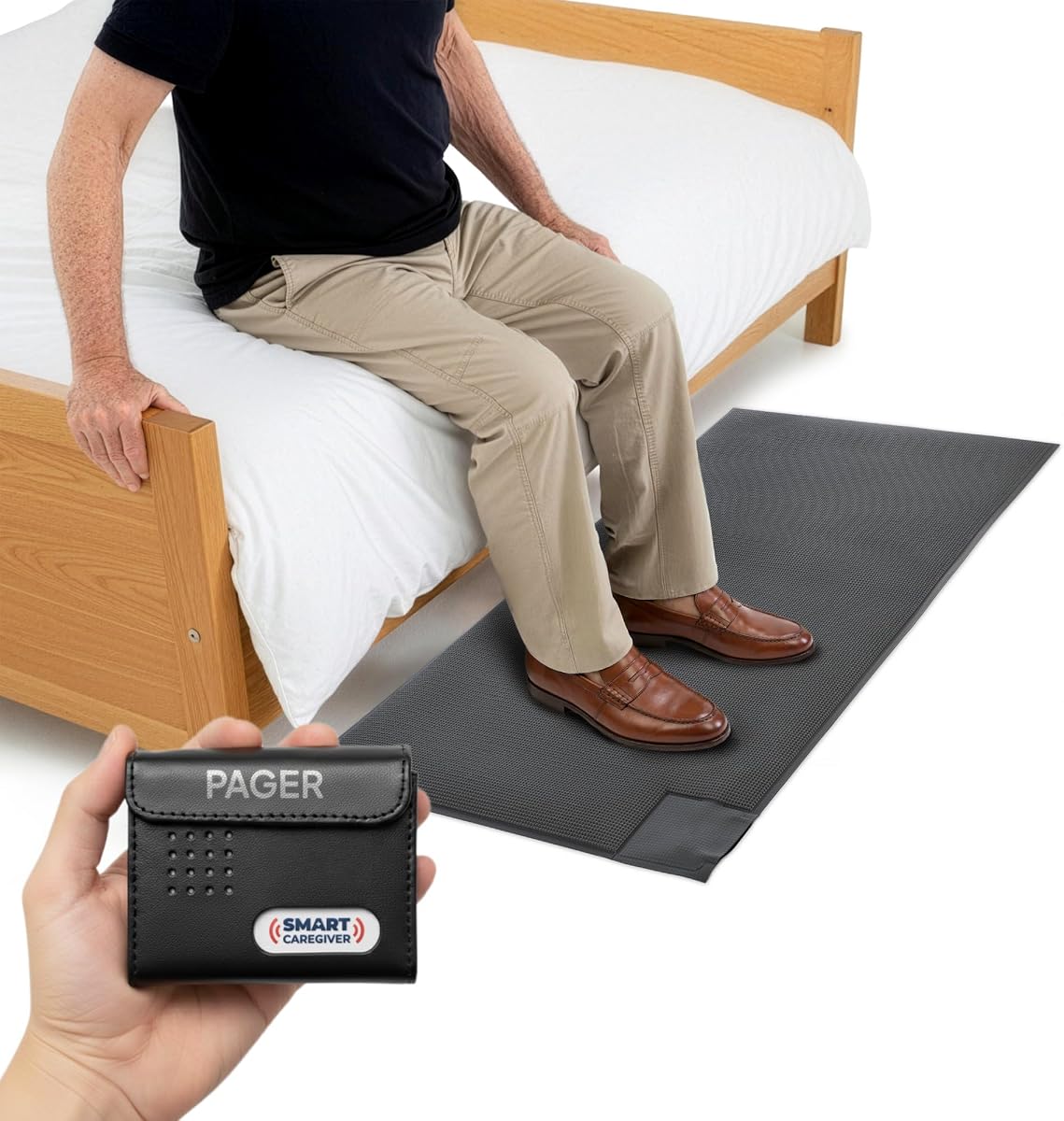
This floor mat alarm provides a simple physical way to monitor exits. When the senior steps on the mat, the pager alerts the caregiver up to 300 feet away. The large size of the mat ensures it is easy to step on without requiring perfect precision.
We may earn a commission when you buy through this link, at no additional cost to you.
Caregivers can choose between sound and vibration alerts on the pager. This means the senior is not startled by noise while the caregiver remains informed. It is particularly useful for preventing wandering in dementia patients who might try to leave at night.
The system requires batteries for the pager which are not included. While this is a small inconvenience, it ensures the device is ready for immediate customization. Users need to place the mat correctly to avoid false triggers from pets or household items.
For those seeking an affordable and proven solution, this system delivers high reliability. It has been trusted by many for years to enhance safety. If you need a straightforward way to know when someone leaves bed or a room, this mat is effective.
The vibration option allows the caregiver to be alerted without disturbing the senior or other family members.
The mat is built to withstand repeated use and is designed to fit under a bed or in a doorway easily.
We may earn a commission when you buy through this link, at no additional cost to you.
This pendant is designed for seniors who are active and need protection outside the home. It sends alerts directly to family members rather than a call center. This ensures that loved ones are informed immediately about falls or distress situations.
We may earn a commission when you buy through this link, at no additional cost to you.
The device includes GPS tracking so you can see where the senior is located in real time. This is invaluable for those who might wander or get lost. The water resistance means it can be worn during daily activities without worry.
It requires a monthly subscription for cellular service and tracking. Without this, the device cannot function. The user interface is simple with a large button, making it accessible. However, the battery life varies based on how often tracking is used.
This is the best option for caregivers who want to track movement and communicate directly. If your loved one spends time outside the house, the GPS and mobile connectivity provide security. It is a modern take on traditional medical alert bracelets.
Notifications go straight to your phone, bypassing third-party centers to speed up response times.
You can set safe zones and get alerts if the senior leaves designated areas, helping prevent wandering.
We may earn a commission when you buy through this link, at no additional cost to you.
This portable monitor offers a simple way to check on a senior without setting up a network. The rechargeable camera allows you to move it to different rooms as needed. The lack of Wi-Fi ensures that the connection is secure and private.
We may earn a commission when you buy through this link, at no additional cost to you.
The system comes with a call button so the senior can request help without shouting. The monitor has a small screen that clips to a belt for convenience. Night vision ensures you can see clearly even when lights are off.
The camera quality is functional but not high definition. This means fine details may be harder to see. Additionally, the range is limited to a few hundred feet, so it works best in smaller apartments or when you are close to the room.
It is ideal for temporary needs or for those who dislike smart home gadgets. The portability makes it useful for visiting family members who need to monitor a room temporarily. If you want a simple visual check-in tool, this is effective.
The rechargeable design allows the camera to be moved around freely without needing constant power access.
A wireless button is included so the senior can signal for help without needing to speak loudly.
We may earn a commission when you buy through this link, at no additional cost to you.
This camera allows family members to connect with seniors through a simple button press. It is designed to make video calls feel like a standard phone call. The screen displays the family face clearly, reducing loneliness without requiring technical skills.
We may earn a commission when you buy through this link, at no additional cost to you.
The auto-tracking feature follows the senior as they move, keeping them in the frame. A privacy mode physically rotates the lens to ensure no footage is captured when not in use. This balance of visibility and privacy is crucial for ethical monitoring.
Recording requires a memory card which is not included. However, this keeps monthly costs low. The reliance on Wi-Fi means you need a stable internet connection. If the network is unstable, the call quality may degrade.
This device is perfect for reducing isolation in elderly parents. It bridges the gap between being together and being apart. For families who want to see each other regularly without apps on the senior's end, this is an excellent choice.
The camera physically rotates to block the lens, giving seniors confidence when they want privacy.
Family photos can be uploaded to the screen to make the device feel personal and welcoming for the senior.
We may earn a commission when you buy through this link, at no additional cost to you.
This monitor focuses on basic communication and safety without complex settings. It uses a secure signal to transmit video and audio. The system includes reminders for daily tasks like drinking water or using the toilet which helps manage routine care.
We may earn a commission when you buy through this link, at no additional cost to you.
The camera is sensitive enough to detect movement and sound. Night vision allows for checks without turning on lights. The SOS button provides a way to call for help if the senior is unable to get to a phone.
The screen resolution is standard and may not show fine details. It is best used for general monitoring rather than detailed medical observation. The lack of Wi-Fi ensures reliability but limits remote access from outside the home.
It serves well as a primary tool for caregivers who are often in the same house. The ability to talk directly to the senior adds a personal touch. If you need a simple tool to keep in touch with a senior in the next room, this works well.
Built-in reminders help caregivers prompt seniors to take medication or stay hydrated regularly.
Using a dedicated signal ensures that the video feed cannot be intercepted by outside parties.
We may earn a commission when you buy through this link, at no additional cost to you.
This sensor system is designed to detect movement in specific areas like doorways. When motion is detected, the caregiver pager is alerted immediately. This is highly effective for preventing wandering by alerting caregivers when a senior approaches an exit.
We may earn a commission when you buy through this link, at no additional cost to you.
The range allows caregivers to be anywhere in the house or yard and still receive alerts. It does not include a camera, making it purely a motion detection tool. This keeps costs lower and setup minimal for those who do not need video.
The detector requires batteries which are sold separately. Caregivers need to monitor battery life to ensure continuous coverage. However, the simplicity of the device reduces maintenance compared to complex smart home systems.
It is ideal for seniors with dementia who are at risk of leaving the house. By placing the sensor at the door, you gain a safety net against wandering. If you want to focus on exit prevention rather than visual monitoring, this sensor is effective.
Placing the detector at exit points ensures caregivers are warned if a senior tries to leave the home.
The system allows caregivers to monitor rooms freely without needing to carry a heavy receiver device.
We may earn a commission when you buy through this link, at no additional cost to you.
Choosing the right system depends on the senior's needs and your home setup. Consider these factors to find a solution that fits your budget and safety requirements.
Decide if you need video, audio, or motion detection. Video provides visual confirmation while motion sensors are cheaper and privacy friendly.
For maximum safety choose a system that combines motion alerts with video verification.
Wi-Fi systems offer remote access via apps but require internet. Non-Wi-Fi systems work over radio frequencies and are more private.
If your senior has limited internet access choose a non-Wi-Fi option to avoid connection issues.
Pager alerts are reliable for caregivers at home while app alerts allow you to check from anywhere.
Ensure the alert volume is audible enough for your home size.
Auto fall detection is useful for active seniors who live alone. It sends alerts if a fall occurs without pressing a button.
Consider this feature if your loved one is at high risk of falling.
Systems should be simple for the senior to wear or use. Avoid complex menus or small buttons.
Choose devices with large SOS buttons and intuitive interfaces.
For video monitors ensure the connection is encrypted. Non-Wi-Fi systems are often more secure against hacking.
Review privacy policies if using cloud-based apps.
Check how long the battery lasts between charges. A longer battery life ensures fewer interruptions.
Look for systems that alert you when battery levels are low.
Some systems have monthly fees for emergency services or apps. Others are one-time purchases.
Factor in ongoing costs when comparing value.
Start by installing the base unit in a central location. Place sensors near the bed or exit doors for maximum coverage. Ensure the range covers the entire area where the senior spends time.
Test the system regularly by walking in front of sensors. Adjust volume settings to ensure the alert is heard clearly. Keep the receiver charged or near a power source for continuous operation.
Clean the camera lens and sensors with a soft cloth. Check batteries every month to avoid failures. Review the user manual for firmware updates that improve security and performance.
Not all systems require Wi-Fi. Many use radio frequencies which work without internet. However smart systems with app access need a stable Wi-Fi connection.
Fall detectors use accelerometers to sense sudden movements typical of a fall. They verify the event before sending an alert to prevent false alarms.
Some systems like Nomo and SecuLife have monthly fees for monitoring services. Others like Lunderg or floor mats are one-time purchases with no recurring costs.
Yes many systems are designed specifically for dementia care. Floor mats and motion sensors help prevent wandering while video monitors help caregivers check on the senior.
Ranges vary from 300 feet to over 1000 feet depending on the model. Check the specific product details to ensure coverage for your home size.
Most systems have low battery indicators. If the battery dies the device will stop working so you should replace or recharge it regularly.
Yes many pagers and apps allow multiple users to receive alerts. This ensures that someone is always available to respond to a call.
The top picks like Lunderg and Nomo offer excellent balance of safety and features. Your choice should depend on whether you prioritize motion alerts or visual monitoring.
Focus on simplicity and reliability when selecting a system. A device that is easy to use will be used consistently for better protection.
Prices and availability can change so verify the current offers on Amazon before buying.