
SCRIB3D P1 3D Printing Pen
4.4Editor score
Includes three starter colors
Stepless speed control slider
Ceramic nozzle design
Explore our expert guide to the best 3D printing pens for kids in October 2026. We compare top models for safety, ease of use, and creative potential.
3D printing pens offer a unique way for children to transform flat drawings into three-dimensional creations. These tools combine art and technology, allowing young minds to build physical objects from imagination. Choosing the right pen involves considering safety features, ease of operation, and the variety of projects it supports.
To compile this list, we evaluated ten leading models available in the market. Our analysis focused on factors like temperature control, filament compatibility, and included accessories. We prioritized products that balance affordability with performance, ensuring they meet the needs of both beginners and experienced young creators.
Each product in this guide highlights specific strengths and ideal use cases. Whether you seek a budget-friendly option or a premium kit with extensive refills, our picks cover the spectrum. Please note that prices and availability may change over time, so verify details before purchasing.
4.4Editor score
4.4Editor score
4.5Editor score
This side-by-side comparison highlights the key specifications of each model to help you decide quickly. We have organized the data to show essential features like filament type, display options, and accessory bundles at a glance.


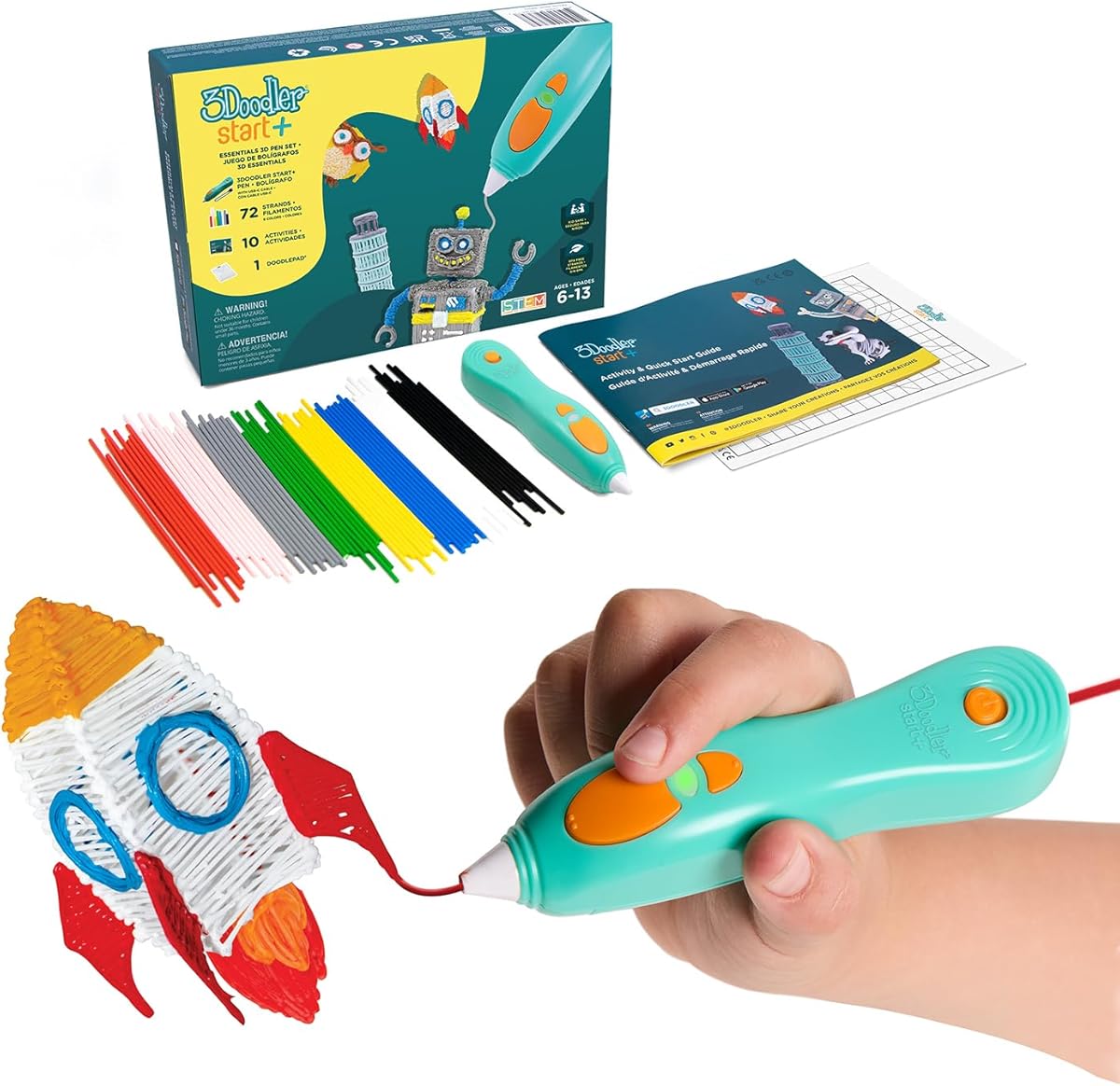
The 3Doodler Start+ Essentials set is designed specifically for children aged six and up. It holds a strong rating for its safety features, eliminating the risk of burns during use. This model stands out by combining educational value with pure creative fun.
We may earn a commission when you buy through this link, at no additional cost to you.
Its standout quality is the lack of hot parts, making it safe for younger hands to touch the nozzle. The kit includes a DoodlePad and stencils to guide initial projects. It also features a safety stand-by mode that ensures the pen remains cool when not in active use.
One trade-off is the price, which is higher than basic plastic pens. Additionally, the filament is proprietary, limiting third-party options. These are acceptable given the safety engineering and included learning materials that justify the cost for families.
Parents seeking a safe introduction to 3D art should buy this set. It is ideal for school projects or home creativity sessions. The warranty policy adds confidence to the purchase decision for long-term use.
The pen uses low-temperature plastic that does not burn skin. This allows children to touch the pen during operation safely.
Kids learn spatial reasoning by turning flat ideas into physical objects. The included activity guide reinforces STEM concepts.
We may earn a commission when you buy through this link, at no additional cost to you.
The SCRIB3D P1 is a high-value option that balances cost with functionality. It receives high marks for its display and versatile filament compatibility. This pen is suitable for families wanting a reliable tool without a premium price tag.
We may earn a commission when you buy through this link, at no additional cost to you.
Its key strength lies in the stepless speed slider which allows precise control over flow. The ceramic nozzle helps prevent clogging during extended use. The display provides visual feedback, which helps users monitor temperature changes easily.
While cheaper than top-tier models, it lacks the advanced safety features of child-specific pens. Users must manage hot parts carefully. This trade-off is acceptable for older kids or adults who prioritize budget and versatility over built-in safety.
For cost-conscious buyers looking for quality, this pen is a solid choice. It works well for hobbyists or older children. The included stencil book helps new users get started immediately.
The stepless slider allows infinite speed variations. This gives users better control over line thickness.
It supports both PLA and ABS plastics. This expands creative possibilities compared to single-material pens.
We may earn a commission when you buy through this link, at no additional cost to you.
This professional pen offers precise control through its OLED display. It is favored by users who need exact temperature settings for different materials. The design supports detailed work that requires steady hand movement.
We may earn a commission when you buy through this link, at no additional cost to you.
The adjustable feed system lets you regulate speed and flow for optimal control. Temperature adjusts in single degree increments, allowing fine-tuning. This precision ensures consistent output for complex 3D models.
It lacks the safety features of pens designed strictly for young children. Users need to be comfortable managing the heat manually. This is a reasonable trade-off for professionals needing detailed control over their medium.
Buyers seeking advanced features should choose this model. It is best for older teens or hobbyists. The warranty coverage ensures reliability for serious creative work.
The pen supports 1 degree increments for temperature. This allows fine-tuning for different plastic types.
The OLED display shows real-time temperature. This helps avoid overheating during long sessions.
We may earn a commission when you buy through this link, at no additional cost to you.
The MYNT3D Super pen is built for longevity with its ultrasonic sealed nozzle. This feature makes it nearly clog-proof, which is critical for frequent use. It is a reliable tool for artists and engineers of various ages.
We may earn a commission when you buy through this link, at no additional cost to you.
Its strength lies in the durable construction that withstands heavy usage. The nozzle design prevents jams, reducing downtime. The pen is lightweight, making it comfortable to hold during long drawing sessions.
It does not have a display, relying on physical indicators. This may confuse new users expecting visual feedback. However, the simplicity helps experienced users focus entirely on the creative process.
Artists needing a robust tool should buy this pen. It offers high performance at a reasonable price. The ergonomic design ensures comfort during detailed work.
The ultrasonic sealed nozzle prevents clogs. This maintains consistent extrusion over time.
It accepts both ABS and PLA plastics. This allows for stronger and more flexible projects.
We may earn a commission when you buy through this link, at no additional cost to you.
The Advanced pen offers a comprehensive feature set for creating accurate models. Its LCD screen provides clear heat monitoring to ensure correct settings. It is ideal for users ready to move beyond basic drawings.
We may earn a commission when you buy through this link, at no additional cost to you.
Key strengths include the ergonomic soft-touch surface and multiple speed options. These features allow precise control over line thickness. The included filament variety supports a wide range of creative projects.
The interface may be complex for beginners without prior experience. It requires a learning curve to master the settings. This is acceptable for users aiming for professional-quality results.
Advanced hobbyists should choose this pen for its precision. It supports complex structures and detailed art. The guide helps users maximize the pen's capabilities.
The pen fits comfortably in the hand. This reduces fatigue during extended use.
Eight speed options allow fine regulation. This ensures consistency in thick or thin lines.
We may earn a commission when you buy through this link, at no additional cost to you.
This kit delivers a complete pro experience with ten colors and a mat. It receives top marks for its high-quality vacuum-sealed refills and replaceable nozzle. It is perfect for serious creators needing professional-grade materials.
We may earn a commission when you buy through this link, at no additional cost to you.
The premium feature is the DesignPad, which helps create perfect geometric shapes. The nozzle is replaceable, ensuring long-term operation without degradation. This level of completeness justifies the higher price point.
The cost is high compared to entry-level pens. Storage for ten colors requires more space. These are acceptable for dedicated users who value quality and variety over budget.
Professional artists should buy this bundle for comprehensive tools. It offers everything needed to start complex projects immediately. The support access adds further value for troubleshooting.
The mat includes channels for shapes. This aids in tracing and geometric accuracy.
Filaments are vacuum sealed for freshness. This prevents degradation before use.
We may earn a commission when you buy through this link, at no additional cost to you.
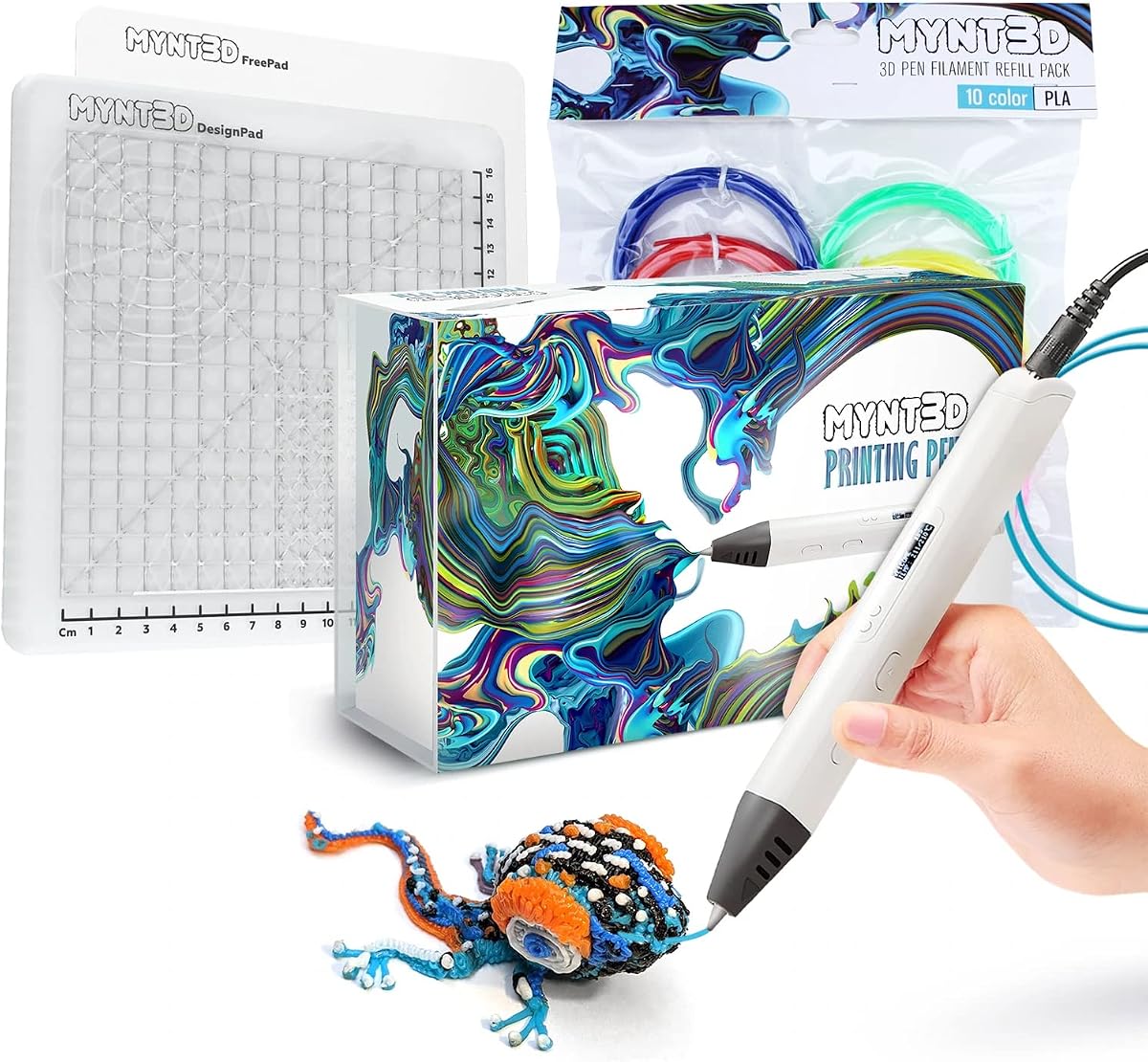
This bundle combines the durable Super pen with extensive refills and mats. It is favored for its ability to handle both ABS and PLA easily. The kit supports versatile workflows with various color options.
We may earn a commission when you buy through this link, at no additional cost to you.
Key strengths include the high-quality PLA refills and the dual-sided silicone mat. The transparent FreePad allows tracing favorite patterns easily. These elements support a broad range of creative tasks.
The price is substantial for a Super model. Lack of digital display requires manual heat adjustment. This trade-off is acceptable for users prioritizing material options and durability.
Users needing diverse material support should choose this bundle. It serves artists working with multiple plastic types. The included pads ensure immediate usability.
The kit includes two types of pads. This supports different drawing needs effectively.
Compatible with ABS and PLA. This expands project strength options significantly.
We may earn a commission when you buy through this link, at no additional cost to you.
The Flow pen is designed for creators needing multi-material compatibility. It accepts various 1.75mm filaments including wood. Its LCD screen provides real-time temperature monitoring for smooth operation.
We may earn a commission when you buy through this link, at no additional cost to you.
Its strength is the ease of use without complicated setup. It includes enough filament for 80 feet of work. This makes it practical for both learning and household repairs.
User ratings are slightly lower than premium models. This may reflect a steeper learning curve for specific filaments. However, the versatility remains a strong draw for DIY enthusiasts.
Teens and adults should buy this for its broad compatibility. It supports creative projects beyond standard plastic. The guide ensures quick adoption of the tool.
Compatible with wood, PLA, and ABS. This allows textured creative possibilities.
The LCD provides real-time feedback. This ensures consistent extrusion quality.
We may earn a commission when you buy through this link, at no additional cost to you.
This bundle adds a silicone mat to the standard P1 pen. It is designed to ensure cleaner projects by preventing messes. The mat is heat-resistant and reusable for long-term practice.
We may earn a commission when you buy through this link, at no additional cost to you.
The silicone surface provides a smooth experience for tracing designs. Its built-in shapes help guide new users effectively. This accessory significantly improves the workflow for daily creative sessions.
The bundle cost is higher than the pen alone. This is acceptable if you need workspace protection immediately. The convenience of a ready-to-use setup is a major benefit.
Users wanting a complete kit should buy this bundle. It protects work surfaces and supports practice. The guide helps users master the pen faster.
The mat protects surfaces from heat. This prevents damage during drawing.
Built-in shapes guide new users. This improves early project consistency.
We may earn a commission when you buy through this link, at no additional cost to you.
This bundle offers over 1250 feet of filament for extended use. It is a top choice for families committed to frequent 3D art. The kit includes all accessories needed for a complete experience.
We may earn a commission when you buy through this link, at no additional cost to you.
Its major strength is the sheer volume of plastic and stencils. The app integration provides templates and instructions. This ensures children have endless opportunities to learn and create.
The cost is high compared to standard sets. Storage for such a large filament supply requires space. These trade-offs are acceptable for dedicated users planning long-term creative play.
Families buying for school or club use should choose this kit. It minimizes future refill needs. The guide supports long learning sessions.
The app provides templates and instructions. This extends learning beyond physical kits.
Over 1250 feet of plastic is included. This supports months of creative play.
We may earn a commission when you buy through this link, at no additional cost to you.
Choosing the right pen involves balancing safety, ease of use, and creative potential. This guide explains key factors to consider for making an informed decision.
For young children, pens with no hot parts are essential to prevent burns. Look for designs that allow touching the nozzle safely. Some models include safety stand-by modes that reduce heat when idle.
Check if the pen supports standard 1.75mm PLA or proprietary plastic. PLA is generally safer and easier to use. Proprietary plastic ensures safety but limits color choices and cost.
Adjustable temperature helps match different plastic types. Some pens offer digital displays while others use physical buttons. Precise control ensures smooth extrusion and fewer clogs.
Variable speed settings allow better management of line thickness. Stepless sliders provide more precision than fixed buttons. This helps users create detailed or solid structures effectively.
Kits with stencils, mats, and guides help beginners start quickly. A good mat protects surfaces from melted plastic. Stencils provide structure for those learning basic shapes.
A comfortable grip prevents hand fatigue during long sessions. Lightweight pens are easier for children to handle. Soft-touch surfaces improve hold and precision.
USB-C or rechargeable pens offer more portability than AC adapters. Look for fast charging times to minimize downtime. Ensure the cable length suits your workspace.
A strong warranty protects against manufacturing defects. Responsive customer service helps troubleshoot technical issues. Ensure the brand offers clear guides for maintenance.
Begin by plugging the pen into a power source and waiting for it to heat up. Most models show a light or display indicating readiness. Always supervise children during this initial heating phase for safety.
Load the filament into the back of the pen and press the forward button until plastic emerges from the nozzle. This ensures the material flow starts smoothly before drawing. Adjust speed settings based on your project needs.
After use, turn off the pen and store it on a stand away from flammable materials. Clean the nozzle if material dries inside to prevent future clogging. Regularly check the nozzle tip for wear.
Many pens are designed specifically for kids with no hot parts to prevent burns. However, adult supervision is recommended for younger users. Always check the age rating before purchasing.
PLA plastic is the safest and most common choice for children. It melts at lower temperatures and produces less odor. Avoid using ABS for very young users due to fumes.
Most rechargeable pens take 30 to 60 minutes to fully charge. Some models support USB-C for faster power delivery. Check the manual for specific charging times.
Proprietary pens require specific plastic brands for safety and performance. Open systems allow more brands but need careful matching. Always check compatibility before buying refills.
Most pens have a reverse button to retract filament when clogged. You can also gently heat the nozzle to soften trapped plastic. Regular cleaning prevents most clogging issues.
Yes, many pens allow creative play without using digital screens. The focus is on hands-on building and tactile learning. Check product descriptions for screen-free marketing.
Silicone mats can be wiped clean with a damp cloth. Avoid using harsh chemicals that might damage the surface. Ensure it is dry before the next use.
Yes, pens are useful for fixing small plastic cracks or parts. However, they are not structural repair solutions for heavy-duty items. Use only for light aesthetic or cosmetic fixes.
We have reviewed the top ten models including the safe Start+ and versatile SCRIB3D P1. Each pen offers unique features depending on the needs of the user and age group.
Prioritize safety features for younger children and durability for older users. Ensure the kit includes enough filament to start creative projects immediately without extra purchases.
Always check current prices and availability before making a final decision. Models may vary over time, so verify the latest specifications for the best choice.