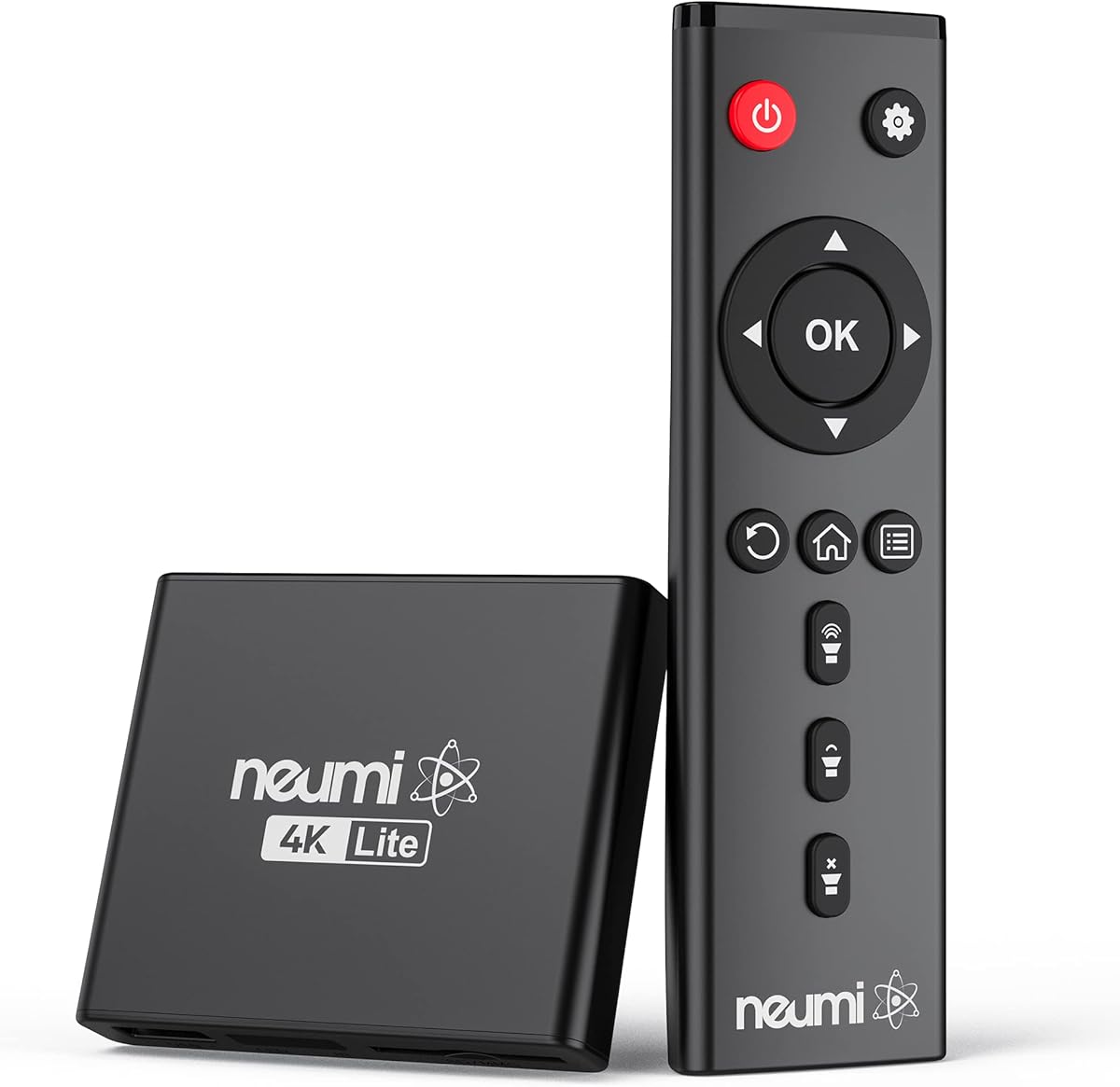
NEUMI Atom 4K Lite Digital Trigger Media Player
4.3Editor score
Compact design smaller than cards
Trigger sensor input capability
Supports up to 8TB drives
This guide compares the top external hard drive media players for 2026, evaluating 4K playback, file support, and connectivity options for home and business
Finding the right external hard drive media player can transform your entertainment setup into a versatile hub for photos, music, and high definition videos. These devices allow you to play content directly from storage without relying on streaming services or internet connections.
We analyzed ten top rated models based on playback quality, format compatibility, storage options, and ease of use. Our evaluation focused on devices that support 4K resolution, multiple file systems, and reliable connectivity for various display types.
Each product in this list offers unique strengths for different needs ranging from simple home use to professional digital signage applications. Prices and availability change frequently so please verify current details before making your final purchase decision.
4.3Editor score

4.1Editor score

5.0Editor score
The following table provides a side by side comparison of all ten products reviewed in this guide. Each entry highlights key specifications to help you quickly identify the device that best fits your storage and display requirements.


The Micca 4K Ultra-HD Media Player stands out as a versatile solution for making any TV smarter without requiring a full smart TV setup. With a solid rating of 4.1 stars from users, it delivers reliable performance for playing videos, music, and photo slideshows directly from USB or MicroSD cards. Its ability to handle 4K resolution ensures crisp visuals on modern displays while maintaining backward compatibility with older analog TVs.
We may earn a commission when you buy through this link, at no additional cost to you.
One of its strongest features is the dual USB and MicroSD reader configuration which allows you to access media from multiple sources simultaneously. The device supports file systems like FAT, FAT32, exFAT, and NTFS ensuring broad compatibility with drives up to 8TB in size. Additionally, the composite AV output provides a practical bridge for connecting to older equipment or external audio systems without needing adapters.
While the player excels in media playback it lacks modern connectivity options like Ethernet or Wi-Fi which limits its utility for streaming applications. Users should also note that wireless air mouse remotes require non-line-of-sight control which may necessitate hiding the player away from direct view. These trade-offs are acceptable given the device focuses on simplicity and local playback efficiency.
This device is ideal for families wanting to upgrade existing TVs or for small businesses needing basic digital signage. Its affordable price and compact size make it easy to deploy across multiple rooms or locations. We recommend it for anyone prioritizing straightforward local media playback over internet connectivity features.
The combination of HDMI and composite AV outputs ensures the player works seamlessly with both modern 4K televisions and older analog CRT models without extra hardware.
Automatic video playback with looping and rotation settings makes this device suitable for restaurant menus or lobby videos that need unattended continuous display.
We may earn a commission when you buy through this link, at no additional cost to you.
Designed for portability this black mini media player fits easily into a pocket or small bag making it perfect for travel or temporary setups. It maintains a solid 4.1 star rating by delivering consistent 1080p full HD playback for users who do not strictly need 4K resolution. The aluminum alloy housing protects the internal components from damage during transit which adds significant value for frequent movers.
We may earn a commission when you buy through this link, at no additional cost to you.
Despite its small size it supports a wide range of video decoding formats including MKV, AVI, and MP4 ensuring most personal media files play without conversion. The included composite AV cable allows connection to older displays while the USB 3.0 compatibility speeds up data transfer from external drives. File management features like loop playback and breakpoint resume enhance the viewing experience for long video libraries.
The primary limitation is its cap at 1080p resolution which may not satisfy owners of larger 4K TVs seeking maximum sharpness. Additionally file navigation relies on a remote that may feel basic compared to modern smart TV interfaces. However for users prioritizing size and durability over ultra high definition output these compromises are reasonable.
We recommend this player for travelers or users with older TVs who need a reliable secondary display solution. Its rugged build and included accessories make it a hassle free choice for short term use. Consider this if 1080p quality meets your needs and portability is your main priority.
The aluminum alloy casing is designed to withstand the rigors of travel ensuring the device remains functional after repeated packing and unpacking.
Support for numerous codecs like RMVB and DIVX ensures that older video files from digital archives can be played without requiring conversion software.
We may earn a commission when you buy through this link, at no additional cost to you.
The NEUMI Atom 4K Lite offers an impressive feature set for its price point earning a 4.3 star rating for its balance of performance and versatility. Its most distinctive feature is the trigger sensor input which allows users to create interactive displays that respond to motion or button presses. This capability sets it apart from standard players by enabling dynamic content delivery for galleries or museums.
We may earn a commission when you buy through this link, at no additional cost to you.
Physically it is smaller than a deck of playing cards yet still supports 4K UHD video playback via HDMI. The device handles H.265 HEVC encoding efficiently reducing storage needs while maintaining high visual quality. Support for drives up to 8TB ensures you can load extensive media libraries without worrying about space constraints during playback sessions.
While the trigger functionality is powerful it requires purchasing optional sensors separately which adds to the total cost. The player also focuses on simplicity so advanced customization options for scheduling or complex playlists are limited. These trade-offs are acceptable for users who value interactive features over deep configuration control.
This unit is perfect for DIY digital signage projects or home entertainment setups wanting interactivity. Its compact size allows for discreet placement near displays or on shelves. We recommend it for those seeking unique functionality on a budget without sacrificing 4K video quality.
The trigger input port enables custom interactive experiences such as playing specific videos when motion is detected without needing a full computer setup.
Support for H.265 HEVC allows playback of high resolution files that take up less space than older codecs improving overall storage efficiency.
We may earn a commission when you buy through this link, at no additional cost to you.
The ACEMAX 4K@60Hz player distinguishes itself by combining a media player with a 2.5-inch SATA HDD enclosure in one unit. This design reduces cable clutter and allows you to install a drive directly inside the device for internal storage. With a metal aluminum housing it effectively dissipates heat during long playback sessions ensuring stable performance for extended use.
We may earn a commission when you buy through this link, at no additional cost to you.
It supports 4K@60Hz output and H.265 10-bit decoding delivering smooth and sharp visuals on compatible displays. The device is designed for offline use meaning it does not require Wi-Fi or subscriptions to play content from the internal drive or connected USB devices. Auto-play and resume features simplify operation for unattended signage scenarios.
Users may find the initial setup challenging if they need to format the internal drive to match supported file systems like NTFS or exFAT. Additionally the lack of modern connectivity means it is strictly an offline device. These factors might lower the rating for some but are necessary for a dedicated local playback device.
We recommend this player for businesses needing a self-contained signage system without external drive dependencies. Its robust construction supports reliable 24/7 operation in commercial environments. Choose this if you prefer internal storage integration over external drive connectivity.
The built-in enclosure allows you to install an SSD or HDD directly into the player eliminating the need for external power adapters or bulky cases.
Support for 4K@60Hz ensures smoother video playback particularly useful for motion heavy content or large displays where stuttering is noticeable.
We may earn a commission when you buy through this link, at no additional cost to you.
This media player focuses heavily on audio and video integration making it a strong contender for home theater enthusiasts. It supports HDMI output with 7.1 surround sound allowing you to connect to high-end receivers for immersive listening experiences. A rating of 4.0 stars reflects consistent performance for playing local files with high fidelity audio and video outputs.
We may earn a commission when you buy through this link, at no additional cost to you.
The dual USB ports offer flexibility for connecting two drives though only one reads at a time. H.265 decoding reduces bandwidth usage and improves loading speeds for 4K files. Additional outputs like optical audio provide options to route sound directly to speakers without relying on TV speakers which often lack clarity.
The primary limitation is that 4K playback is capped at 30Hz rather than 60Hz which may affect smoothness for fast motion videos. The aluminum body also conducts heat which can make the device warm during long sessions. These issues are minor for most users but might deter competitive video viewers.
We recommend this player for home theaters where audio quality is as important as video. Its vertical screen support adds utility for digital art displays or specific presentation needs. Choose this if surround sound integration is a priority for your setup.
Support for 7.1 surround sound via HDMI allows you to leverage your home theater receiver for full immersive audio playback.
The ability to output vertically rotated video supports specialized uses like digital signage on vertical monitors or art installations.
We may earn a commission when you buy through this link, at no additional cost to you.
This HDMI media player is optimized for advertising and multimedia playback with a robust 4.2 star rating from users. It offers an extensive list of supported formats including ISO and Blu-ray direct decode which simplifies playback of disc backups. The inclusion of VGA and fiber optic outputs makes it versatile for connecting to older projectors or specialized audio systems.
We may earn a commission when you buy through this link, at no additional cost to you.
The device supports 4K@30Hz output with H.265 decoding ensuring high quality visuals. It can handle large files and multiple formats seamlessly making it suitable for running advertisements or promotional content continuously. The remote control and loop functions facilitate unattended operation in commercial settings.
While the VGA output is useful for older projectors modern TVs rely solely on HDMI so this port may go unused. Additionally ISO files must be placed in the first level directory to play automatically which can be a minor inconvenience during setup. These constraints do not significantly impact core performance.
We recommend this player for businesses needing reliable advertising playback across different display types. Its broad connectivity ensures it fits into existing AV setups easily. Choose this if you require VGA or optical audio connections alongside standard HDMI.
The inclusion of VGA and fiber optic outputs allows integration with legacy projectors and high-end audio systems without needing extra converters.
Loop playback and extensive format support make this device ideal for running continuous ads or promotional content in stores or offices.
We may earn a commission when you buy through this link, at no additional cost to you.
While not a media player itself the WD Elements portable drive is an essential companion for users building an external hard drive media setup. With a high 4.7 star rating it delivers reliable storage for large media libraries. Its plug and play functionality allows for easy connection to compatible media players via USB 3.0 ports.
We may earn a commission when you buy through this link, at no additional cost to you.
The drive supports capacities up to 6TB providing ample space for thousands of hours of video and audio content. Its USB 3.2 Gen 1 interface ensures quick data transfer speeds which is critical for loading 4K files smoothly on supported players. The compact design makes it easy to transport alongside media players.
Because this is just a storage device it does not handle decoding or display output. You must pair it with a dedicated media player to view content. Additionally it lacks ruggedized protection which means you should handle it carefully during travel. These factors limit its standalone use.
We recommend this drive for users expanding their media player storage or archiving backups. Its reliability and speed make it a standard choice for storing large files. Choose this if you need extra storage capacity for your playback device.
The USB 3.2 Gen 1 interface ensures files load quickly from the drive to compatible media players reducing wait times.
Works seamlessly with both PC and Mac systems ensuring you can manage files across different operating systems easily.
We may earn a commission when you buy through this link, at no additional cost to you.
This player stands out with a perfect 5.0 star rating for its seamless 2-in-1 design combining media playback with a SATA HDD enclosure. It supports 4K@60Hz output ensuring smooth high resolution video playback on modern displays. The inclusion of a Type-C cable allows you to easily transfer data to laptops without needing a separate dock.
We may earn a commission when you buy through this link, at no additional cost to you.
It handles high bit rates up to 200Mbps which is ideal for lossless or high quality 4K video files. Compatibility with Mac formatted drives ensures flexibility for users working across different operating systems. Shuffle and resume modes add convenience for personal home entertainment setups.
Users must purchase the internal hard drive separately which adds to the initial cost. Additionally the enclosure only supports 2.5-inch SATA drives limiting options to smaller capacity portable drives rather than larger desktop ones. These limitations are acceptable for those prioritizing integrated design.
We recommend this player for premium home theater setups seeking clean cable management. Its flawless rating indicates high reliability and user satisfaction. Choose this if you value internal storage integration and high bitrate performance.
The 2-in-1 unit reduces clutter by housing your storage drive directly inside the player rather than relying on external connections.
Support for data rates up to 200Mbps ensures smooth playback of high fidelity video files without stuttering or buffering.
We may earn a commission when you buy through this link, at no additional cost to you.
This player offers an integrated HDD enclosure similar to premium models but at a competitive price point. A rating of 3.8 stars suggests mixed feedback on reliability but users appreciate the convenience of internal storage. H.265 decoding ensures efficient playback of high quality video files without excessive bandwidth usage.
We may earn a commission when you buy through this link, at no additional cost to you.
The one year warranty provides additional peace of mind for buyers concerned about device longevity. Shuffle modes for music and video make it user friendly for casual home use. Its compact design allows it to fit easily on media shelves or behind TVs.
Some users reported issues with drive recognition requiring specific formatting which can be frustrating. Additionally the remote may not always align perfectly with modern remote layouts. These inconsistencies keep the overall rating moderate compared to top competitors.
We recommend this player for budget conscious buyers needing internal storage capabilities. The warranty and features offer good value despite potential reliability variability. Choose this if you want an affordable integrated storage solution.
The included one year warranty gives buyers added security regarding the device's longevity and manufacturer support.
Shuffle modes for music and video add variety to playback sessions making it suitable for casual home entertainment.
We may earn a commission when you buy through this link, at no additional cost to you.
This 4K player supports 2-in-1 functionality for internal storage while maintaining a compact footprint. With a rating of 3.0 stars it shows potential for basic use but lacks the refinement of higher rated models. Configurable video rotation allows flexible installation orientations for portrait or landscape displays.
We may earn a commission when you buy through this link, at no additional cost to you.
It supports a wide array of formats including MP4, MKV, and various subtitle types. The analog AV output ensures compatibility with older equipment while MicroSD support adds another layer of versatility. It is suitable for basic home entertainment or small scale digital signage projects.
Users note that the remote functionality can be basic compared to smart TV remotes. Additionally some reports suggest drive recognition requires specific formatting steps which adds complexity to setup. These factors contribute to the lower overall rating.
We recommend this player for users with specific rotation needs or budget constraints. Its flexible storage options make it a viable choice for simple setups. Choose this if video rotation is a priority for your display needs.
The configurable video rotation feature allows the screen to be displayed in portrait or landscape modes depending on your setup needs.
Extensive support for video and subtitle files ensures most personal media can be played without needing conversion software.
We may earn a commission when you buy through this link, at no additional cost to you.
Selecting the right media player requires balancing resolution support, storage compatibility, and connectivity options. This section outlines the key factors to consider before purchasing.
Look for players that support at least 1080p resolution, though 4K is becoming standard for modern TVs. Ensure the device supports H.265 HEVC decoding which allows for smoother playback of high quality files without excessive storage usage.
Prioritize models that advertise 4K@60Hz output if you have high refresh rate displays to avoid motion blur or stuttering.
Check the maximum external drive size supported by the player, as many handle up to 8TB. Also verify file system support such as NTFS, exFAT, or FAT32 to ensure your drives are recognized correctly.
If you prefer an all-in-one setup, consider models that include a built-in HDD enclosure for internal drive installation.
Ensure the player has HDMI output for modern TVs. If you own older displays, verify it includes composite AV outputs. Additional ports like USB 3.0, Type-C, or optical audio enhance flexibility.
For legacy setups, VGA or coaxial outputs may still be relevant to match existing equipment.
A good player should support common video containers like MKV, MP4, AVI, and MOV. Subtitle support for SRT or PGS files is essential if you watch international films.
Check audio format compatibility including FLAC, AAC, or Dolby to ensure surround sound works with your receiver.
If you need to run ads or menus, look for auto-loop, resume, and scheduling capabilities. Remote control functionality should be simple for unattended operations.
Some models offer trigger inputs for interactive displays which are useful for museums or retail.
Aluminum or metal housings dissipate heat better than plastic during long playback sessions. This is critical for 24/7 commercial use.
Ensure the device has adequate ventilation slots to prevent overheating.
While most players operate independently, a remote with basic navigation keys is essential. Some models allow mouse or keyboard input for easier file browsing.
Check if the remote requires line of sight or uses Bluetooth for convenience.
A one-year warranty is standard and protects against early failures. Review user feedback for common issues regarding drive recognition or firmware updates.
Choose brands with accessible customer support for troubleshooting complex setups.
Start by connecting your external hard drive to the USB port on the media player. Ensure the drive is formatted to a supported file system like NTFS or exFAT to avoid recognition issues.
Plug the HDMI cable from the player into your TV and connect the power adapter. Turn on your TV and select the correct HDMI input source to see the media player interface.
Use the remote to navigate the menu and select your desired files. Regularly check the device for firmware updates to maintain compatibility with new file formats.
No, most external hard drive media players operate offline and only require a power source and video output connection. Wi-Fi is only necessary if you want to stream content from a network drive or online service.
This usually happens if the player or TV does not support the specific video codec or bitrate. Check that your device supports H.265 and 4K@60Hz output to match your TV capabilities.
Most players support drives up to 8TB but you must format them to compatible file systems like NTFS or exFAT. Some older models may only support FAT32 which limits file size to 4GB.
Media players focus on local file playback from external storage, while streaming sticks focus on online apps. Media players usually offer more file format support and better audio output options.
Yes, most models support external subtitle files like SRT and PGS. Ensure the subtitle file has the same name as the video file and is stored in the same folder.
Ensure the player has adequate airflow and is not covered by other objects. Metal enclosures dissipate heat better than plastic so choose models with aluminum housing for extended use.
The top picks in this guide offer a range of options from budget-friendly models to premium integrated storage solutions. The Micca 4K remains a strong choice for home use while the NEUMI Atom stands out for interactive signage projects.
Consider your primary needs such as resolution, storage capacity, and display connectivity when making a decision. Integrated models like the 4K@60Hz players provide convenience but cost more than standard external drive setups.
Prices and stock availability change frequently so verify the latest details on product pages before purchasing. Ensure the device meets your file format and resolution requirements to avoid unnecessary returns.