
NIMO 15.6'' AI Ready Laptop
4.8Editor score
Silent efficient power
180 degree hinge
Physical webcam shutter
Finding the right laptop for karaoke gear requires balancing processing power with audio fidelity and reliable connectivity for seamless live performances and home entertainment setups.
We evaluated ten top-rated models focusing on processor speed, RAM capacity, display quality, and port selection to ensure smooth software handling and crisp audio output.
Each pick highlights unique strengths for specific karaoke needs while reminding readers that prices and availability fluctuate so always verify current deals before purchasing your ideal machine.
4.8Editor score

4.5Editor score

4.5Editor score
As an Amazon Associate we earn from qualifying purchases.
This side by side comparison highlights key specifications across all ten models to help you quickly identify the device that best fits your karaoke performance needs.






The HP 17 inch Business Laptop stands out as the top choice for karaoke setups due to its massive display and robust processing capabilities.
We may earn a commission when you buy through this link, at no additional cost to you.
Its AMD Ryzen 5 CPU paired with 16GB RAM ensures that karaoke software runs smoothly without lag even when streaming tracks and displaying lyrics simultaneously.
While the laptop is a bit heavier than ultrabooks its long battery life makes it reliable for extended sessions without constantly searching for power outlets.
Anyone looking to set up a home karaoke station or portable DJ rig will find this machine offers the perfect balance of screen real estate and performance.
The 17.3 inch FHD anti-glare display provides sharp text and vivid colors making it easy to read lyrics in bright or dim environments.
With long battery life and HP Fast Charge you can keep performing for hours without interruption and quickly top up power between sets.
We may earn a commission when you buy through this link, at no additional cost to you.
This HP OmniBook 3 model delivers a premium experience with its stunning 2K touchscreen and advanced AI features designed for clear communication.
We may earn a commission when you buy through this link, at no additional cost to you.
The built-in Advanced AI Noise Reduction is particularly useful for karaoke sessions as it filters out background noise during voice checks or conference calls.
Although it has less RAM than some competitors the efficient Ryzen 3 processor and fast SSD make it responsive for most karaoke software applications.
Users seeking a stylish lightweight laptop with a high quality screen for viewing visuals while singing will appreciate this premium machine.
Advanced AI noise reduction tracks your voice and filters out other sounds ensuring clear audio during setup or online karaoke calls.
HP Fast Charge restores the battery to fifty percent in just forty five minutes so you can return to your performance quickly.
We may earn a commission when you buy through this link, at no additional cost to you.
The NIMO laptop offers an excellent entry point for karaoke enthusiasts who need a reliable device without spending a fortune on high end specs.
We may earn a commission when you buy through this link, at no additional cost to you.
Its silent Intel N150 processor ensures that fan noise does not interfere with your singing or microphone input during live recording sessions.
The inclusion of a physical webcam shutter adds a layer of privacy which is great for home users who value security during video calls.
Students or casual users looking for a budget friendly machine to run karaoke apps will find this laptop provides solid performance and durability.
The energy efficient processor runs quietly so you can focus on your performance without distracting background fan noise.
A physical webcam shutter gives you total control over your privacy by blocking the camera lens when you are not using it.
We may earn a commission when you buy through this link, at no additional cost to you.
Dell Pro laptop brings robust daily performance to your karaoke setup with fast DDR5 memory and a smooth 120Hz display for fluid visuals.
We may earn a commission when you buy through this link, at no additional cost to you.
The 120Hz refresh rate ensures that animations and video lyrics play without stuttering which is crucial for maintaining rhythm during performances.
With multiple ports including HDMI and USB-C you can easily connect external speakers or mixers to enhance your audio output.
This model is ideal for users who need a dependable workhorse that can handle both work tasks and entertainment with equal efficiency.
The 120Hz refresh rate provides smooth motion for video lyrics and backgrounds making your karaoke experience more engaging.
A variety of ports including HDMI and USB-C allow you to connect various audio devices and displays without extra adapters.
We may earn a commission when you buy through this link, at no additional cost to you.
This HP OmniBook model prioritizes screen real estate which is essential for karaoke where reading large lyrics and watching videos is the main task.
We may earn a commission when you buy through this link, at no additional cost to you.
The 17.3 inch display with wide viewing angles allows multiple people to gather around the screen and sing along comfortably from different positions.
Battery life is a strong point allowing you to enjoy up to fourteen hours of use on a single charge during long parties or events.
It is a perfect choice for home entertainment setups where portability is less important than having a big bright screen for your group.
The IPS display provides vibrant colors and clear text even when viewed from the side helping everyone in the group see the lyrics.
With up to fourteen hours of battery life you can host long events without needing to plug the laptop into a power source constantly.
We may earn a commission when you buy through this link, at no additional cost to you.
The HP Ultrabook 14 stands out with its generous total storage capacity combining internal SSD and an external drive for extensive song libraries.
We may earn a commission when you buy through this link, at no additional cost to you.
Having 628GB of storage means you can store thousands of MP3s and video tracks locally without relying on internet connections during your shows.
The Windows 11 Pro OS offers enhanced security and management tools which can be useful for business users managing karaoke events professionally.
If you need a compact laptop that can handle a large music collection and professional software this model provides a practical solution.
With a total of 628GB storage including an external drive you can keep a vast library of songs ready for any occasion.
The anti-glare display reduces reflections allowing you to watch videos or read lyrics clearly in bright room conditions.
We may earn a commission when you buy through this link, at no additional cost to you.
This HP 255 model strikes a balance between affordability and performance making it a solid contender for home karaoke enthusiasts.
We may earn a commission when you buy through this link, at no additional cost to you.
The combination of 16GB RAM and a modern Ryzen processor ensures that multitasking between music players and lyrics displays remains smooth.
Its thin and light design makes it easy to move around the house or take to a friend's place for a party session.
Users who want a reliable machine that looks good and performs well without breaking the bank will find this laptop appealing.
The Ryzen 3 7330U processor handles daily tasks efficiently ensuring your music software runs without interruption.
A thin and light chassis means you can carry this laptop easily wherever you need to host your karaoke night.
We may earn a commission when you buy through this link, at no additional cost to you.
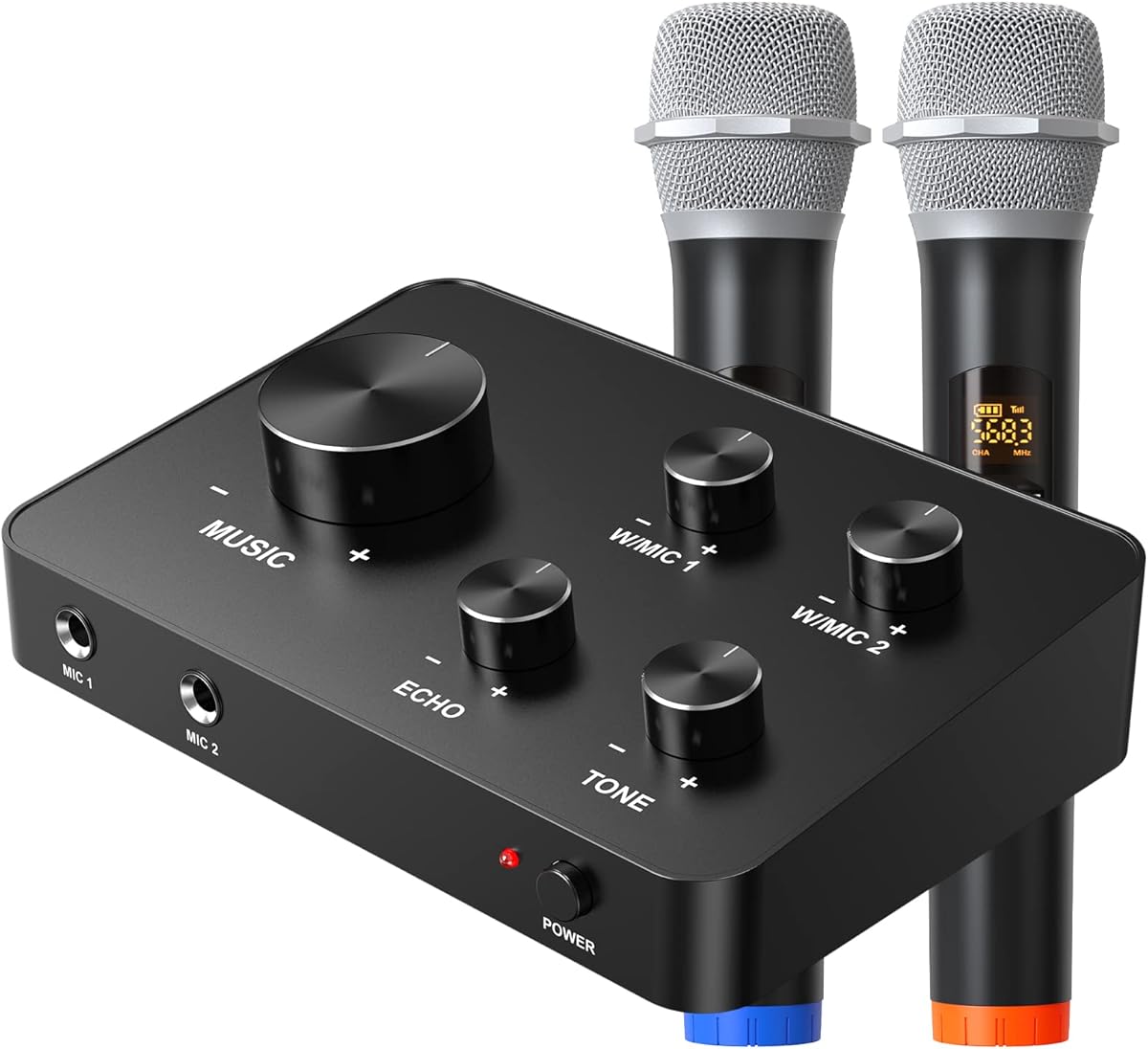
While not a laptop this mixer system is a crucial accessory that enhances the audio experience when using a laptop for karaoke.
We may earn a commission when you buy through this link, at no additional cost to you.
It allows you to connect your laptop to speakers or TVs via HDMI or AUX providing better sound quality than built-in speakers.
The dual handheld microphones give everyone a chance to sing along and the adjustable frequencies reduce interference during performances.
If you are building a full karaoke setup this mixer acts as the bridge between your computer and your audio output devices.
Connect to Smart TVs home theater systems or amplifiers using HDMI or 3.5mm Aux in/out for flexible audio routing.
Use the five rotatable dials to adjust volume echo and tone to match your specific style and environment perfectly.
We may earn a commission when you buy through this link, at no additional cost to you.
This mixer offers advanced features like HD Audio Return Channel which extracts audio from your smart TV to blend with vocals smoothly.
We may earn a commission when you buy through this link, at no additional cost to you.
The vocal cut mode is a special feature that removes original vocals from tracks allowing you to practice or perform over the instrumental.
With optical and Bluetooth support you can connect a wide range of devices including media boxes and soundbars for rich sound output.
For those who want more control over their audio environment this mixer provides professional features at a consumer friendly price point.
Switch to vocal cut mode to remove original vocals from tracks making it easy to practice singing over instrumentals.
Use the HD Audio Return Channel to extract audio from your TV to the mixer for seamless blending with your voice.
We may earn a commission when you buy through this link, at no additional cost to you.
This portable microphone is a fun addition for casual karaoke sessions especially when you need a quick setup without complex wiring.
We may earn a commission when you buy through this link, at no additional cost to you.
It features a built-in speaker and dynamic lights that add to the entertainment value making it perfect for parties and kids.
With six different sound effects like chipmunk or alien voices it offers a playful twist that engages younger users and guests.
Ideal as a gift or for impromptu singing this mic pairs with your laptop or smartphone for instant fun wherever you go.
Voice changing effects and dynamic lights make every sing along session entertaining and interactive for all ages.
Up to ten hours of battery life ensures you can sing throughout the party without needing to recharge often.
We may earn a commission when you buy through this link, at no additional cost to you.
Selecting the right laptop for karaoke requires attention to key hardware and software factors that impact performance and usability.
A multi-core processor is essential for running karaoke software smoothly while handling audio processing and screen rendering simultaneously.
Look for at least a quad-core CPU to prevent lag when loading large media files during performances.
Memory determines how many applications can run at once without slowing down your system.
At least 8GB of RAM is recommended but 16GB ensures smoother multitasking between music apps and browsers.
Solid State Drives (SSD) provide faster boot times and quicker access to your music library compared to traditional hard drives.
A minimum of 256GB is advisable to store your collection of tracks and software locally.
A clear and large display makes it easier to read lyrics and navigate software menus.
Full HD resolution and an anti-glare panel help maintain visibility in different lighting conditions.
Ensure your laptop has enough ports to connect external speakers mixers or microphones.
HDMI USB-C and audio jacks are vital for flexible setup options during events.
Portability is key for events so a long lasting battery ensures you are not tethered to a power outlet.
Look for models offering at least eight hours of use on a single charge.
Most karaoke software is optimized for Windows so ensuring you have a compatible OS is critical.
Windows 11 provides good security and modern app support for your entertainment needs.
The quality of built-in speakers varies but most setups will rely on external devices for sound.
Check if the laptop supports high quality audio formats and has reliable audio drivers for crisp output.
Set up your laptop on a stable surface to prevent accidental drops and ensure the screen is visible to all participants.
Keep your system clean by regularly updating drivers and clearing unused files to maintain optimal performance.
Store your device in a protective case when transporting it to avoid damage from bumps or spills.
Not necessarily. Integrated graphics are usually sufficient for running karaoke apps and playing videos. However if you plan on using heavy visual effects or gaming simultaneously a dedicated GPU may help.
For a moderate library of MP3s 256GB is a good starting point. If you have thousands of high quality tracks or video files consider 512GB or use an external drive.
Most modern laptops have a combined audio jack that works with wired microphones. For wireless mics you may need a receiver that connects via USB or Bluetooth.
Windows 11 offers better security and supports newer software versions more efficiently. It is generally more stable for modern applications.
Use external speakers or a mixer system. Ensure your drivers are updated and avoid using built-in speakers for high volume sessions.
Prioritize size and resolution for easy reading of lyrics. Anti-glare coatings help if you plan to use the device in bright rooms.
We have explored ten top models ranging from budget options to premium machines ensuring there is a fit for every level of karaoke enthusiast.
Prioritize a balance of display size RAM and connectivity to ensure your setup supports both performance and entertainment without technical hiccups.
Remember to check the current availability and specifications before making a final decision as models and features are updated frequently by manufacturers.