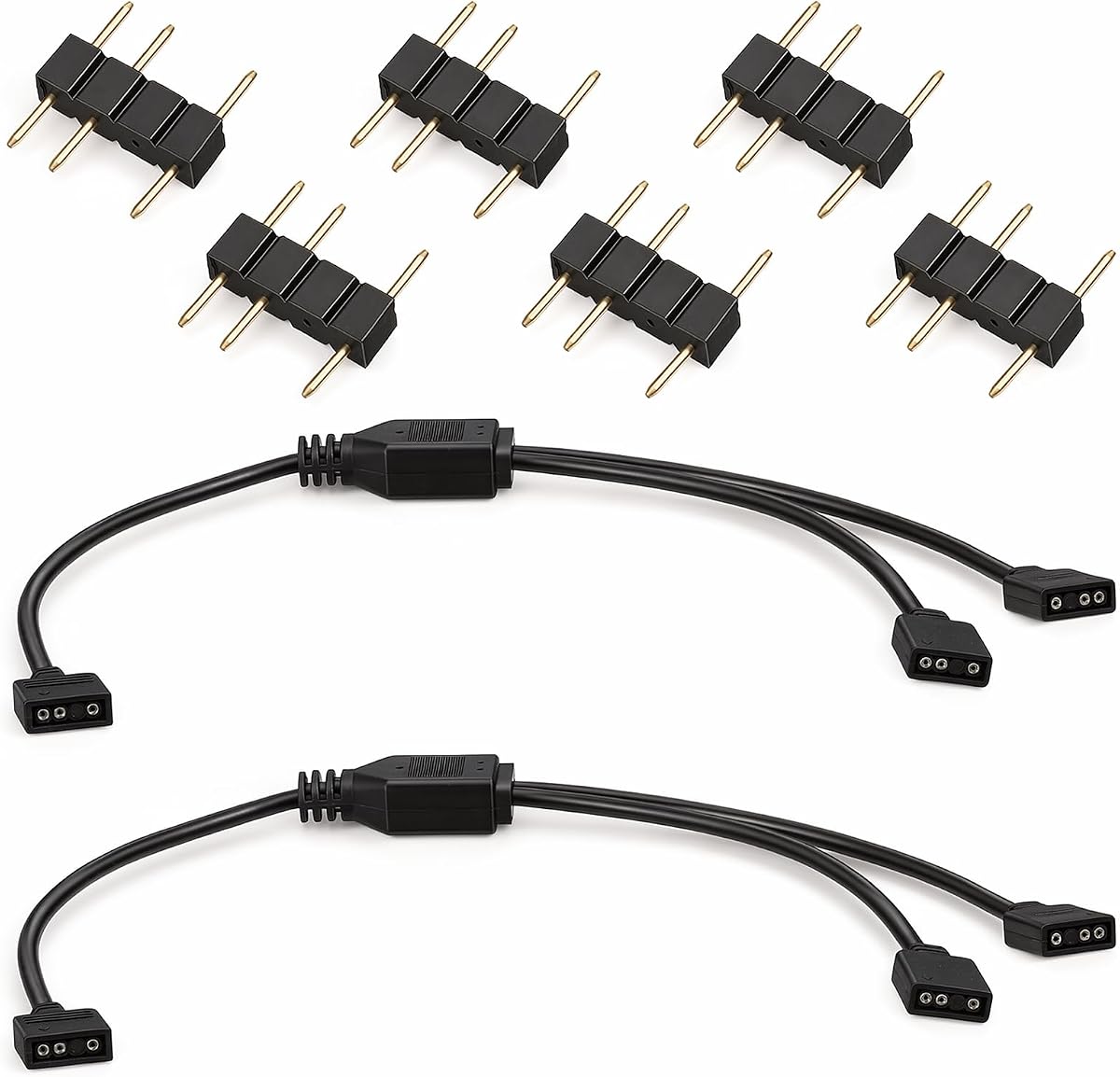
2 Pcs 5V 3 Pin ARGB Splitter Cable
5.0Editor score
Affordable two pack price
Pure copper core wires
Standard 11.8 inch length
This guide compares the top ten ARGB splitter cables for PC builds, evaluating compatibility, length, and build quality to help you choose the right lighting
Building a custom PC often requires expanding your lighting beyond the limited headers on your motherboard. ARGB splitter cables allow you to connect multiple fans and LED strips to a single port for synchronized color effects.
We analyzed ten highly rated splitter cables based on connector quality, wire length, and user feedback. Our list covers various configurations including one-to-two and one-to-three options for different build needs.
Each pick highlights key features like copper core quality and ease of installation. Prices and stock levels change frequently so verify details before purchasing your chosen model.
5.0Editor score

5.0Editor score

4.9Editor score
The following table provides a side by side comparison of the top ten ARGB splitter cables available today to help you quickly identify the right fit for your setup.


This splitter cable holds a perfect five star rating from users who value reliability in their lighting setups. It serves as an excellent solution for connecting multiple fans or LED strips to a single motherboard header without signal loss.
We may earn a commission when you buy through this link, at no additional cost to you.
The package includes two splitter cables and eight male connectors which is a generous amount for the price. Each cable features standard 3 pin male connectors that make installation straightforward without requiring soldering or specialized tools.
While the cable length is standard at around eleven inches which works for most builds users with large cases might find it limiting. The 1-to-3 splitting capability ensures you can expand your lighting zone effectively.
This product is ideal for builders seeking a proven solution that works out of the box. It is highly recommended for anyone needing to expand their ARGB header count reliably.
A perfect rating suggests users have not experienced signal degradation or connectivity issues with this cable over time.
Having eight connectors included means you can connect multiple devices without needing to buy separate adapters.
We may earn a commission when you buy through this link, at no additional cost to you.
This two pack offers an excellent balance of quality and affordability for budget conscious PC builders. It provides a reliable way to connect two ARGB devices to a single header while maintaining consistent color accuracy across your setup.
We may earn a commission when you buy through this link, at no additional cost to you.
The use of pure copper cores in the wiring is a significant advantage for signal integrity. Pure copper is known for better conductivity which helps maintain consistent lighting effects across chained devices without flickering.
Although it only supports a one-to-two split which might not be enough for extensive lighting zones it is perfect for adding a few extra fans or strips. The arrow markers on the connectors prevent common polarity mistakes during installation.
This option is best for those who need a cost effective solution for small lighting expansions. It delivers high performance at a fraction of the cost of branded alternatives.
Pure copper cores provide superior electrical conductivity compared to cheaper alloys ensuring your RGB lights shine brightly without dimming.
Visual arrow indicators on the connectors make it easy to align the first pin correctly with your motherboard header.
We may earn a commission when you buy through this link, at no additional cost to you.
This premium splitter cable set stands out with advanced features designed for long term durability and performance. It includes gold plated contacts and oxygen free copper wiring which are hallmarks of high quality electronic connectors.
We may earn a commission when you buy through this link, at no additional cost to you.
The braided sleeves on the cables provide excellent protection against wear and tangling inside your PC case. This construction choice not only looks better but also ensures the cables remain durable even with frequent adjustments during maintenance.
A four pack inclusion means you can manage lighting for multiple zones like CPU coolers and case fans all at once. The gold plating ensures that the connection remains clean and reliable over years of use.
For builders who prioritize aesthetics and longevity this set is worth the investment. It offers professional grade features that elevate the overall quality of your custom PC build.
Gold plating prevents oxidation at the connection point ensuring a clean electrical signal reaches every LED in your setup.
The durable braided outer layer keeps cables organized and prevents fraying that can occur with standard plastic insulation.
We may earn a commission when you buy through this link, at no additional cost to you.
This two pack of splitter cables provides a straightforward solution for extending your ARGB lighting. It is designed specifically for 5V 3-pin headers which are common on modern motherboards and cooling systems.
We may earn a commission when you buy through this link, at no additional cost to you.
The cables feature standard 3 pin male connectors that allow for easy installation without soldering. This makes them accessible even for first time builders who might feel intimidated by complex wiring tasks.
While the length is standard at about eleven inches it fits most mid-tower cases well. The package includes enough connectors to handle several fans or strips at once.
This is a solid choice for general lighting expansion needs. It performs its function reliably and at a competitive price point for a two pack set.
The connector design allows you to simply plug the cables in without needing any extra tools or technical skills to install them.
The package includes eight male connectors which ensures you have spares if needed for future expansions.
We may earn a commission when you buy through this link, at no additional cost to you.
These white splitter cables offer a unique aesthetic advantage for builds that use white components or cases. The color helps blend in with white hardware making the cables less visible compared to standard black options.
We may earn a commission when you buy through this link, at no additional cost to you.
Made from soft PVC material these cables are flexible and easy to route within tight spaces. The material is firmly wrapped to avoid dust and damage which extends the service life of the product.
The one-to-two splitting configuration is ideal for connecting two fans or a fan and a short strip. It includes six connectors in total which is sufficient for basic expansion needs.
This option is perfect for builders who care about the visual look of their cable management. It delivers functionality while maintaining a clean and consistent theme inside the PC case.
The white color helps the cables blend seamlessly into white builds reducing the visual clutter often seen with black cables.
Soft PVC allows for easier bending and routing around other components without kinking the internal wires.
We may earn a commission when you buy through this link, at no additional cost to you.
This splitter cable stands out due to its longer length of thirteen inches which provides more reach inside larger cases. It is a practical solution for connecting devices that are slightly further from the motherboard header.
We may earn a commission when you buy through this link, at no additional cost to you.
Each needle interface features an insulating protective cap which adds a layer of safety during installation. These caps prevent unused needles from contacting metal parts and causing short circuits when the system is powered on.
The design is simple yet effective for solving insufficient interface problems on motherboards. It allows you to connect multiple devices to a single header reliably.
This is a great choice for builds where cable reach is a primary concern. The safety caps show attention to detail that benefits both beginners and experienced builders.
The thirteen inch length is longer than the standard eleven inch cables providing more flexibility in routing within your case.
Protective caps on unused pins prevent accidental contact with chassis metal which could cause electrical shorts or burns.
We may earn a commission when you buy through this link, at no additional cost to you.
This unique splitter allows you to connect five devices to a single header which is rare for this price range. It is designed for complex lighting setups that require multiple fans or long LED strips connected at once.
We may earn a commission when you buy through this link, at no additional cost to you.
The cable length is 50cm or nearly 20 inches which is significantly longer than standard options. This extra length helps route cables to the rear of a case or across a wide motherboard easily.
Made with durable plastic and genuine new copper cores it ensures reliable signal transmission over years of use. The shell protects the internal wiring from physical damage during installation.
For those with extensive lighting needs this is a powerful tool. It consolidates multiple connections into one point saving valuable motherboard headers for other components.
The 1-to-5 capability allows you to daisy chain many more devices than typical 1-to-2 or 1-to-3 splitters allow.
The 50cm length helps reach components that are far from the motherboard ARGB header without needing multiple extensions.
We may earn a commission when you buy through this link, at no additional cost to you.
This two pack focuses on simple extension needs rather than splitting multiple devices. It allows you to extend the connection distance between a header and a device directly without changing the split ratio.
We may earn a commission when you buy through this link, at no additional cost to you.
The cables are one-to-one extensions which means they simply add length to an existing connection path. This is useful when the header is hard to reach but you already have a splitter for multiple fans.
The package includes four male connectors which can be used to link these extension cables to your devices easily. It is a practical add-on for complex routing scenarios.
This option is best for users who need to add a few inches of distance to their cables. It ensures your lighting setup remains synchronized even with longer cable runs.
These cables act as simple lengtheners allowing you to move fans slightly further away from the header without signal issues.
The included connectors help link these extension cables directly to your fans or strips without needing extra adapters.
We may earn a commission when you buy through this link, at no additional cost to you.
This three pack offers exceptional value for builders who need to expand multiple lighting zones simultaneously. Each cable supports a one-to-three split allowing for three devices per header connection.
We may earn a commission when you buy through this link, at no additional cost to you.
The package includes twelve connectors which is a generous amount for a single purchase. This means you have all the adapters needed to connect many fans and strips without buying extras separately.
The standard length of eleven inches fits most cases well and ensures you can reach typical header locations. The design requires no soldering or tools making installation quick and easy.
This bundle is ideal for large builds requiring multiple splitters. It provides everything needed to manage complex lighting setups efficiently and economically.
Having three splitters in one box allows you to cover multiple zones like the case front and top without needing multiple purchases.
Twelve connectors ensure you have enough ends to connect multiple devices and still have spares for future upgrades.
We may earn a commission when you buy through this link, at no additional cost to you.
This two pack splitter cable set is highly rated for its stability and durability. The use of pure copper core wires ensures that your lighting signals remain consistent and free from interference over time.
We may earn a commission when you buy through this link, at no additional cost to you.
The outer sheath is wear resistant and durable which protects the cables during long term use. This durability is important for components that may be handled frequently during maintenance or upgrades.
The moderate length of eleven inches allows for flexible cabling without taking up excessive space inside the chassis. It is a balanced choice for most standard PC installation scenarios.
This set is recommended for builders looking for reliable performance in a two pack format. It ensures you can expand your lighting effectively with quality materials.
Pure copper wires are selected for their ability to maintain stable signal transmission which is critical for synchronized lighting effects.
The outer layer is designed to resist wear and aging ensuring the cable remains functional and protected for years.
We may earn a commission when you buy through this link, at no additional cost to you.
Selecting the right splitter cable involves considering several technical factors to ensure compatibility and reliability in your build.
The most critical factor is ensuring the cable matches your motherboard header. ARGB typically uses 5V 3-pin headers while standard RGB uses 12V 4-pin headers. Plugging a 5V device into a 12V header can damage the LEDs.
Always verify your motherboard manual for voltage pin count and pin spacing before buying a splitter.
Cable length dictates where you can place components relative to the motherboard. Standard lengths are around 30cm or 12 inches. If your case is large or the header is at the bottom you may need longer cables to reach fans or radiators easily.
Measure your case from the header to the destination component before ordering to avoid purchasing cables that are too short.
Splitting ratios like 1-to-2 or 1-to-3 determine how many devices you can connect to a single header. More splits allow for more fans but can draw more power from the motherboard header which has limits.
Check your motherboard manual for the current limit of the ARGB header to ensure you do not overload it with too many devices.
High quality connectors with gold plating resist corrosion and ensure a stable electrical connection. Cheaper connectors may have loose pins that lead to flickering lights or connection failures over time.
Look for products that mention gold plating or reinforced connector pins for better longevity.
The internal wiring material affects signal stability and current carrying capacity. Pure copper is superior to aluminum or copper clad aluminum for signal integrity and conductivity.
Opt for cables that specify pure copper cores if you want the best performance and reliability for your lighting.
Thicker cables with braided sleeves provide better protection against physical damage and improve aesthetics. Thinner cables might be easier to hide but may lack durability for long term use in a PC case.
Consider whether you prefer the look and durability of braided cables over plain plastic insulated ones.
Some packages include extra male or female connectors to help with assembly. This can save you from having to buy adapters separately if you plan to connect multiple devices.
Check the package contents to see if enough connectors are included to meet your specific setup needs.
Established brands often provide better quality control and customer support if issues arise. Reading reviews can help identify products that have proven reliable across many different build scenarios.
Choosing a product with high ratings and positive user feedback reduces the risk of receiving defective items.
To install a splitter cable first identify the ARGB header on your motherboard which is usually labeled as AURA or JRGB. Ensure your device is powered off before connecting any cables.
Align the arrow on the cable connector with the first pin on the header which is typically marked by a square pad or a number. Connect the male end to the motherboard and the female end to your fan or strip.
Regularly check the connections to ensure they have not become loose over time. Keeping the cables away from high heat sources helps maintain their insulation integrity and prolongs their lifespan.
No you cannot connect a standard 12V RGB header to a 5V ARGB splitter cable. The voltages are different and doing so will likely damage the LEDs. You must ensure your motherboard header and device match in voltage and pin count.
The number depends on the current limit of your motherboard header usually around 3A. Most splitters allow up to three devices but always check your motherboard manual to avoid overloading the port.
Installing the cable backwards means the ground and data pins are reversed. This can cause the lights to behave erratically or not light up at all. Always align the arrow mark on the connector with the first pin.
For typical lighting setups splitters connect directly to the motherboard header which supplies power. You only need a separate power adapter if you are exceeding the current limit of the motherboard header.
Yes you can use extension cables or splitters to increase reach. Just ensure the signal quality is maintained by using cables with proper shielding and good conductor materials.
Flickering is usually caused by poor connections or too many devices drawing power from one header. Check that all pins are aligned properly and verify the current draw does not exceed limits.
Most ARGB cables follow a standard 5V 3-pin layout but there are some proprietary standards used by specific brands. Check the product description to confirm it is compatible with your specific motherboard model.
With proper installation and care ARGB splitter cables can last for many years. The main wear points are the connectors so handle them gently during installation and maintenance.
Choosing the right ARGB splitter cable depends on your specific build requirements and aesthetic goals. The top picks highlighted in this guide offer reliable performance and solid value for most users.
Prioritize compatibility and build quality to ensure your lighting setup works smoothly. Always check your motherboard specifications before purchasing to avoid any potential electrical issues.
Remember that prices and availability change so verify current details before making a final purchase. We hope this guide helps you build a stunning and synchronized lighting setup.