As an Amazon Associate we earn from qualifying purchases. We may earn a commission when you buy through links on this page, at no additional cost to you. Read our affiliate disclosure.As an Amazon Associate we earn from qualifying purchases.Purchases through our links may earn us a commission, at no extra cost to you. Read our affiliate disclosure.
Choosing the right Linux Mini PC can transform your workflow with efficient, open-source computing in a compact form factor. These devices offer versatility for developers and home users alike.
We analyzed ten leading models based on processor performance, expandability, connectivity options, and Linux compatibility. Our comparison highlights strengths across budget and premium categories.
Each pick below details key specs and ideal use cases. Please note that availability and pricing fluctuate frequently, so verify current details before making your final purchase decision.
Top 3 Picks for Best Linux Mini Pcs
Best Budget
ASUS NUC 14 Pro Mini Desktop Computer Linux, Intel Ultra 7 155H (16C/22T, Up to 4.8GHz), 64GB DDR5 RAM 2TB PCIe SSD, Mini PC with Intel Arc GPU, Type-C, WiFi 6E, Thunderbolt 4, VESA Mount for Business
The following table presents a side-by-side comparison of all ten models evaluated in this guide. Review the specifications to identify the device that best aligns with your performance needs and budget constraints.
The TK Node Mini PC stands out as the top choice for users seeking a reliable Linux experience right out of the box. It features a Zorin OS Core installation that simplifies the transition from Windows while delivering robust performance for daily tasks.
Pros
Pre-installed Linux desktop
Dual NVMe slots
2-Year US warranty
Triple 4K support
Cons
Base memory limited
Storage requires config
We may earn a commission when you buy through this link, at no additional cost to you.
Powered by an AMD Ryzen R2314 processor, this unit handles virtualization and container workloads with ease. Its dual SO-DIMM and NVMe slots allow extensive upgrades up to 64GB RAM and 4TB storage, making it highly adaptable for long-term use.
While the base configuration includes 8GB RAM, the potential for expansion ensures it remains relevant as needs grow. The inclusion of a US-based warranty adds significant value compared to many imported alternatives in this market segment.
This device is ideal for developers or small businesses needing a stable, open-source workstation. Whether used for automation or as a media hub, its compact footprint and professional connectivity options make it a versatile investment.
Seamless Linux Integration
Pre-installed Zorin OS offers a familiar interface and immediate usability without complex setup steps or additional downloads.
High Expandability
Dual slots for RAM and NVMe storage allow you to scale memory and capacity independently to match specific workload demands.
The Beelink SER3 delivers impressive value with its 16GB DDR4 RAM and solid AMD Ryzen 3 3200U processor. This combination ensures smooth handling of multiple applications without frequent interruptions or slowdowns during typical office work.
Pros
Strong multitasking
Good connectivity
Lifetime support
Expandable memory
Cons
Older architecture
Fan noise under load
We may earn a commission when you buy through this link, at no additional cost to you.
Its Radeon Vega 3 graphics support dual 4K displays, making it suitable for dual-monitor setups. The system includes essential ports like USB 3.2 and HDMI, facilitating easy connection to peripherals and external monitors for enhanced productivity.
One limitation is its older 14nm architecture compared to newer models, which may affect energy efficiency. However, the lifetime technical support and three-year warranty provide peace of mind for buyers concerned about long-term reliability.
Best suited for general home office use or light creative tasks, this model balances cost and performance effectively. It serves as a reliable daily driver for users who prioritize multitasking capability over cutting-edge raw power.
Solid Multitasking
With 16GB of RAM, the SER3 keeps multiple browser tabs and applications running smoothly without memory bottlenecks.
Dedicated Support
Beelink provides lifetime technical assistance and a comprehensive three-year warranty for all users.
The ASUS NUC 14 Pro represents the pinnacle of Linux Mini PC engineering, featuring the powerful Intel Ultra 7 155H processor. This unit excels in AI research, heavy development, and professional workflows requiring intense computational power.
Pros
Next-gen performance
Mint pre-installed
Massive expandability
Advanced cooling
Cons
Premium price point
Heavy weight
We may earn a commission when you buy through this link, at no additional cost to you.
Linux Mint is pre-installed, providing a stable environment optimized for developers and power users. The system supports up to 96GB DDR5 RAM and offers extensive connectivity including Thunderbolt 4 and WiFi 6E for future-proof high-speed data transfer.
Advanced cooling ensures silent operation even under 24/7 sustained loads. The aluminum fin design and optimized airflow prevent thermal throttling, maintaining consistent performance during prolonged rendering or compilation tasks.
Ideal for corporate environments and researchers, this premium device justifies its cost with unmatched versatility. It replaces traditional towers while offering superior portability and advanced features tailored for high-demand professional applications.
Professional AI Power
The Intel Ultra 7 155H with integrated Arc GPU accelerates machine learning tasks and complex data processing efficiently.
Future-Proof Ports
Thunderbolt 4 and WiFi 6E ensure compatibility with next-generation peripherals and ultra-fast wireless networking.
The Beelink Mini S12 Pro is optimized for energy efficiency with its Intel N100 processor featuring a 6W TDP. This makes it an ideal choice for home labs, NAS servers, or lightweight office desktops where power consumption matters.
Pros
Energy efficient
Low heat output
Solid connectivity
Dual display ready
Cons
Limited raw power
Single RAM slot
We may earn a commission when you buy through this link, at no additional cost to you.
Despite its low power draw, the system supports dual 4K displays and AV1 decoding, ensuring smooth media playback. The inclusion of WiFi 6 and BT5.2 enhances wireless connectivity options without compromising stability or range.
Cooling is handled effectively via a large silent fan and copper heat sink, keeping noise levels minimal during operation. It is a compact solution that fits easily into tight spaces while maintaining professional reliability.
Best for users prioritizing efficiency over heavy multitasking, this model balances performance and energy use perfectly. It is particularly well-suited for digital signage or quiet environments where constant operation is required.
Efficient Performance
The N100 processor offers excellent performance per watt, reducing electricity costs while delivering smooth daily computing.
Media Ready
AV1 decode support and dual HDMI 4K outputs make it a great option for streaming and multi-monitor setups.
The KAMRUI Pinova P2 leverages the Zen3 architecture to deliver strong performance in a compact package. Its AMD Ryzen 7 3300U processor provides efficient multitasking and handles graphical tasks better than many entry-level alternatives.
Pros
Fast single-core
Triple screen output
Modern architecture
Portable design
Cons
Soldered RAM
Limited storage
We may earn a commission when you buy through this link, at no additional cost to you.
It supports triple 4K displays via HDMI, DP, and USB-C, making it ideal for complex workstations or home entertainment centers. The LPDDR4X memory ensures quick data access, though it is not user-upgradeable like other models.
Cooling is effective enough to maintain stability even under load, thanks to improved system design. The sleek silver case fits well in any office or living room, blending seamlessly with modern decor.
For users needing multiple displays without investing in a full desktop tower, this model offers excellent value. It bridges the gap between basic mini PCs and high-end workstations, providing robust features at a reasonable price point.
Triple Display Power
Supports three 4K monitors simultaneously via HDMI, DisplayPort, and USB-C for expansive workspace productivity.
Efficient Design
Zen3 architecture and optimized cooling keep the unit quiet and responsive during daily usage cycles.
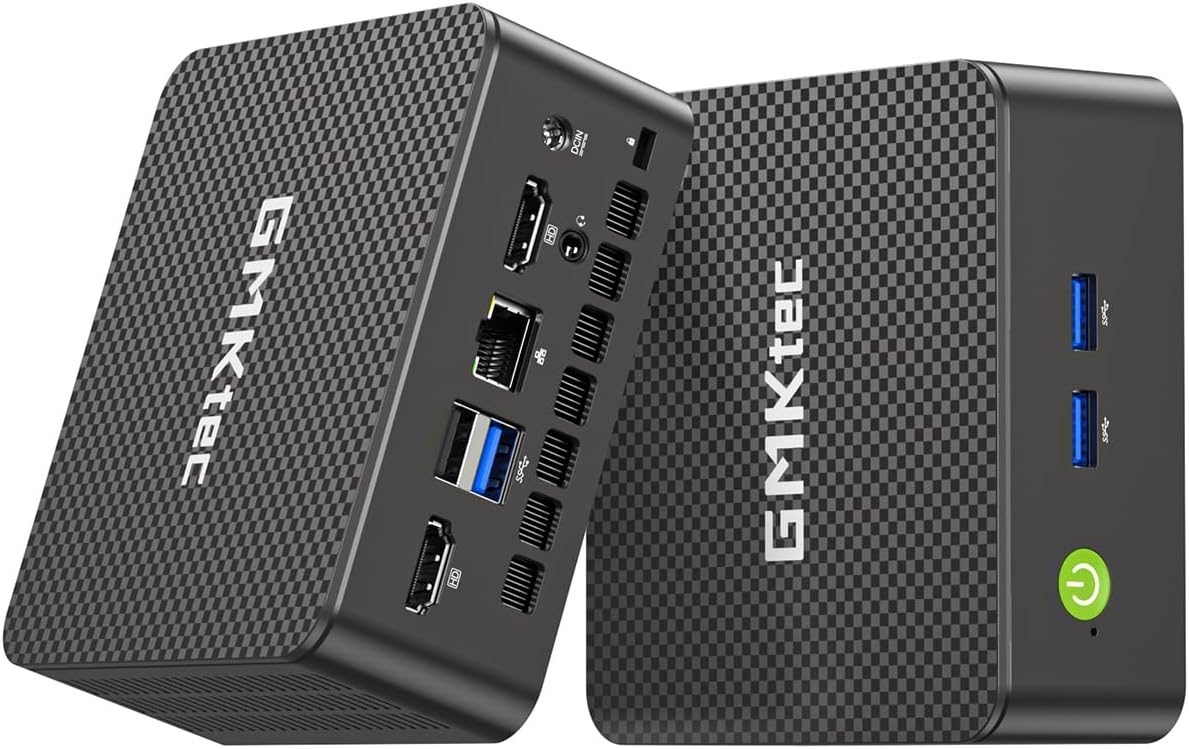
The GMKtec G11 is engineered specifically for networking and server applications with its dual 2.5GbE Ethernet ports. This makes it perfect for firewalls, NAS setups, or virtualized home labs requiring high-speed network segmentation.
Pros
Dual 2.5GbE ports
Dual-channel memory
Strong GPU
Quiet operation
Cons
Limited OS options
Basic ports
We may earn a commission when you buy through this link, at no additional cost to you.
Powered by the Ryzen Embedded R2514 processor, it delivers solid performance in continuous 24/7 operation. Dual-channel RAM ensures efficient data throughput, preventing bottlenecks during heavy multitasking or graphical rendering tasks.
The system supports triple 4K displays, allowing for monitoring setups or complex visual workflows. Its compact chassis includes essential USB-C and HDMI ports, providing flexible connectivity for various peripherals and monitors.
Best suited for IT enthusiasts or small offices needing dedicated network infrastructure, this device offers professional-grade capabilities. It combines robust connectivity with reliable performance for always-on environments.
Professional Networking
Dual 2.5GbE ports enable advanced router or firewall configurations like pfSense or OPNsense without extra hardware.
Reliable Performance
Designed for continuous operation, ensuring stable uptime for servers or network monitoring tasks.
The CyberGeek Mini PC brings desktop-grade power to a compact form with its Intel Core i9-11900H processor. It handles intensive software development, virtualization, and gaming tasks that most mini PCs cannot manage effectively.
Pros
Desktop class CPU
Triple display support
Preloaded Ubuntu
Dual LAN ports
Cons
Large physical size
Runs hot
We may earn a commission when you buy through this link, at no additional cost to you.
Preloaded with Ubuntu Linux, it offers a familiar development environment without the need for immediate reinstallation. The system supports triple 4K displays and includes dual LAN ports, providing extensive connectivity for complex setups.
Cooling is managed by an advanced system designed to sustain full frequency output without throttling. However, users should expect higher power consumption and heat output compared to standard office mini PCs.
This device is ideal for power users who need a full-sized desktop replacement in a smaller footprint. It balances raw performance with portability, making it suitable for advanced home labs and creative workflows.
Desktop Class Power
The 8-core, 16-thread CPU delivers performance comparable to traditional desktop towers in a compact case.
Versatile Connectivity
Six USB ports and dual LAN allow extensive peripheral connections and network customization options.
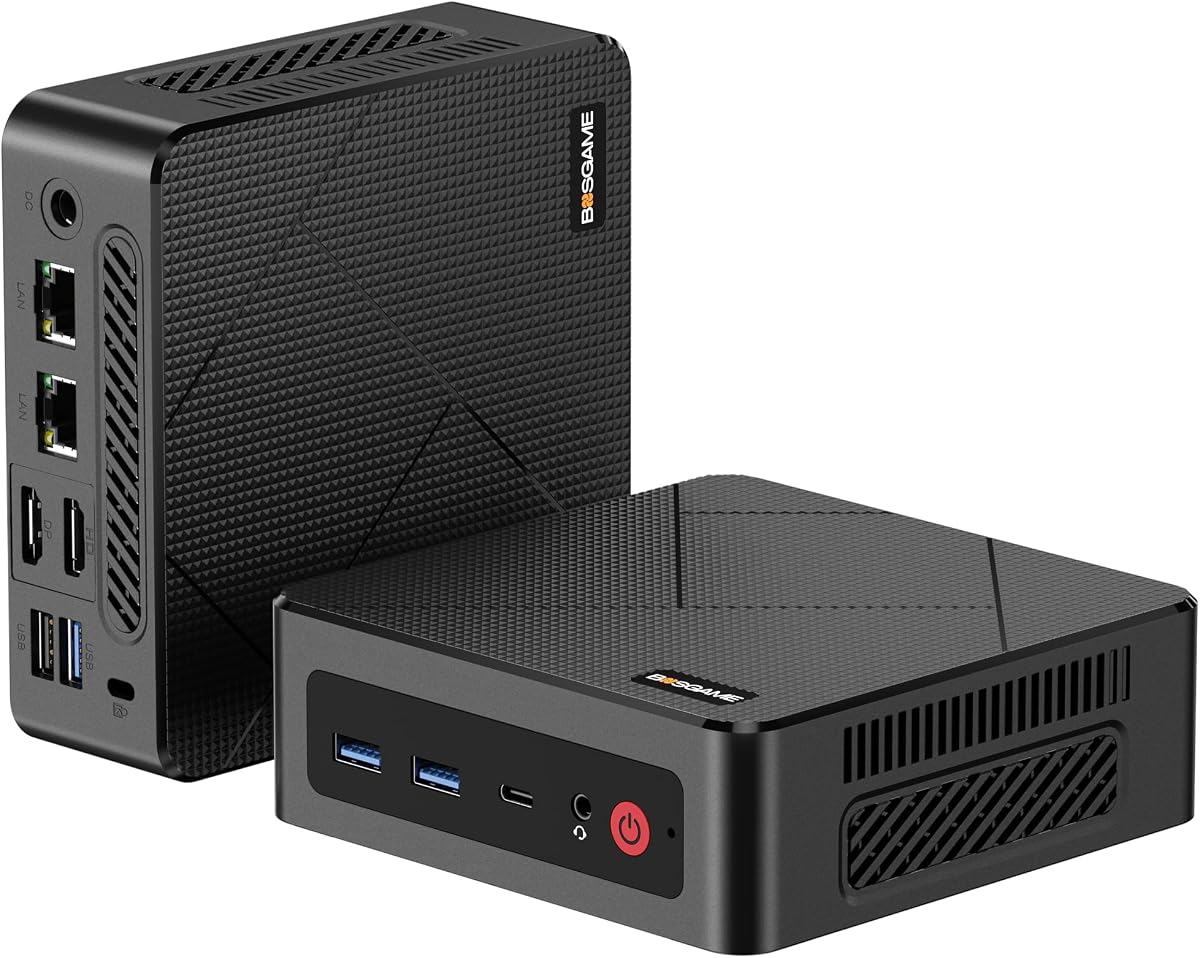
The BOSGAME E5 stands out for its dual 2.5GbE LAN ports, making it exceptionally versatile for network professionals. These ports allow for secure firewall setups or high-speed NAS configurations without requiring additional hardware.
Pros
Dual high-speed LAN
Dual NVMe support
Triple 4K output
Quiet operation
Cons
Limited ports
Fan can be audible
We may earn a commission when you buy through this link, at no additional cost to you.
With 16GB DDR4 RAM and dual NVMe storage slots, it offers solid expandability for data-heavy workflows. Triple 4K display support enables multitasking across multiple monitors, ideal for financial trading or creative editing.
Its cooling system keeps noise low during light tasks, though it may become noticeable under sustained load. The compact design easily replaces traditional towers, freeing up desk space for a cleaner office setup.
Best for professionals needing robust networking features in a mini PC, this model combines speed and versatility. It supports complex IT requirements while maintaining a simple user experience for daily tasks.
Dual Network Ports
Dual 2.5GbE LAN ports provide professional-grade connectivity for secure and high-speed network environments.
Dual Storage
Dual NVMe slots allow flexible storage expansion and RAID configurations for critical data management.
The BOSGAME E4 Air offers an accessible entry point into the world of Linux Mini PCs with its affordable price. It features a reliable AMD Ryzen 5 3500U processor that handles daily productivity and media streaming effectively.
Pros
Affordable pricing
Triple display ready
Quiet operation
Reliable warranty
Cons
SATA SSD speed
Limited upgrade
We may earn a commission when you buy through this link, at no additional cost to you.
Despite its entry-level nature, it supports triple 4K displays, allowing for impressive multi-monitor setups without high costs. The system includes essential connectivity like USB 3.2 and dual LAN, ensuring good compatibility with peripherals.
Storage is provided via a 256GB SATA SSD, which is slower than NVMe but adequate for basic operating system and app storage. This makes it suitable for users who prioritize cost savings over raw speed.
Ideal for home users or students needing a budget-friendly Linux machine, this model provides solid value. It delivers essential features like multiple display support and reliable performance at an attractive price point.
Affordable Performance
Priced competitively, this unit delivers capable performance for everyday tasks like browsing and media consumption.
Display Flexibility
Triple 4K display output ensures you can connect multiple monitors for enhanced productivity at a low cost.
The GMKtec G3S features the Intel N95 processor, offering a significant performance boost over older entry-level chips. This makes it capable of handling routine office work and media streaming smoothly within a small footprint.
Pros
Modern N95 CPU
Dual HDMI 4K
Compact size
Affordable price
Cons
Limited RAM
Basic connectivity
We may earn a commission when you buy through this link, at no additional cost to you.
With dual HDMI 2.0 ports, it supports two 4K displays for multitasking or entertainment. Its compact design allows placement anywhere, from behind a monitor to on a shelf, without taking up valuable desk space.
Storage is provided via a fast 256GB M.2 SSD, ensuring quick boot times and responsive application loading. While memory is limited to 8GB, this is sufficient for basic web browsing and document editing tasks.
Best for users seeking a simple and affordable mini PC for media and light tasks, this model offers good value. It provides modern connectivity and solid performance without the need for complex configuration.
Modern Entry CPU
The N95 processor brings improved performance to budget users, handling basic tasks faster than older models.
Dual Display Ready
Dual HDMI outputs allow users to connect two monitors for enhanced workspace efficiency and entertainment.
We may earn a commission when you buy through this link, at no additional cost to you.
Buying Guide – How to Choose the Best Linux Mini Pcs
Selecting the right Linux Mini PC requires balancing processor speed, memory capacity, and connectivity needs. Consider these factors to find the model that suits your workflow best.
Processor Performance and Efficiency
The processor is the heart of your mini PC. For heavy tasks like development or virtualization, choose an AMD Ryzen or Intel Core i series. For light tasks, N-series chips provide energy efficiency.
Prioritize models with 4 cores or more to ensure smooth multitasking without lag during extended use.
Memory and Storage Options
Linux distributions can run well on 8GB of RAM, but 16GB is recommended for modern web apps and containers. Ensure the RAM is user-upgradeable if you anticipate future growth.
Look for dual NVMe slots or SATA options to expand storage without replacing the system drive.
Operating System Compatibility
Some mini PCs come pre-installed with Linux like Zorin or Ubuntu, which saves setup time. Others offer Windows by default, requiring you to install Linux manually.
Verify hardware compatibility with your chosen distro, especially for Wi-Fi and graphics drivers.
Display Output Capabilities
Many mini PCs support dual or triple displays, which is crucial for productivity. Ensure the device has sufficient HDMI, DisplayPort, or USB-C ports to connect your monitors.
Check for 4K support to maintain visual quality on modern screens.
Connectivity and Ports
Rich port selection including USB 3.2, Ethernet, and audio jacks is essential for peripherals. Some models include dual LAN ports for advanced networking setups.
Wireless standards like WiFi 6 or 6E ensure fast and stable connections for remote work.
Form Factor and Design
Mini PCs come in various shapes and sizes. A compact unit can be mounted behind a monitor using a VESA bracket to save space.
Consider airflow and cooling design to ensure quiet operation during long sessions.
Warranty and Support
Quality assurance is vital since Linux support varies by manufacturer. Look for brands offering US-based warranties and technical assistance.
Lifetime support options can help resolve complex configuration issues quickly.
Use Case Specifics
For media centers, prioritize graphics decoding capabilities. For home servers, focus on Ethernet options and storage slots.
Match the machine's strength to your primary workload to maximize value and efficiency.
How to Use and Care for Your Linux Mini Pcs
Place your mini PC in a well-ventilated area to prevent overheating. Avoid covering ventilation grilles with dust or debris to maintain optimal airflow.
Regularly update your Linux system to ensure security patches and driver improvements are applied. Use package managers to keep software current and stable.
Back up important data regularly using external drives or cloud storage. Mini PCs can serve as servers but are still vulnerable to hardware failure.
Frequently Asked Questions
Are Linux Mini PCs suitable for gaming?
Most mini PCs handle light gaming well with integrated graphics like AMD Vega. However, for heavy AAA titles, you will need a dedicated GPU or a specialized gaming model.
Can I upgrade the RAM on these devices?
Many models allow RAM upgrades via SO-DIMM slots, but some have soldered memory. Always check the product specifications before purchase to confirm upgrade paths.
Do they come with Linux pre-installed?
Some models like the TK Node and ASUS NUC come pre-loaded with Linux. Others require manual installation, which is straightforward but requires additional time and knowledge.
What is the best distribution for these devices?
Ubuntu and Zorin OS are popular choices due to their hardware compatibility and user-friendly interfaces. Choose a distro that fits your technical expertise and workflow needs.
How do I mount a mini PC to a monitor?
Most mini PCs include a VESA mounting kit allowing you to attach the device directly to the back of a monitor. This saves desk space and keeps cables organized.
Are these devices energy efficient?
Yes, many models are designed with low power consumption in mind, making them cheaper to run 24/7 compared to traditional desktops. Look for 6W TDP processors for maximum efficiency.
Can I use them as a home server?
Absolutely. Many models feature dual Ethernet ports and expandable storage, making them ideal for running Docker containers or media servers like Plex.
Is technical support available for Linux?
While hardware support is standard, Linux-specific help varies by vendor. Community forums are excellent resources, but check if the manufacturer offers OS-specific assistance.
Final Thoughts on Choosing the Best Linux Mini Pcs
We recommend the TK Node Mini PC for overall reliability and the ASUS NUC 14 Pro for power users needing top-tier performance. Both offer exceptional value in their respective categories.
Prioritize memory and port flexibility to future-proof your device. A machine that can handle multiple displays and storage expansion will remain useful for years to come.
Prices and availability change frequently so please verify current details before purchasing. Choosing the right model ensures a smooth transition to open-source computing.
This guide compares the top 3000W inverters for RVs and home use, reviewing efficiency, safety features, and output quality for reliable power conversion.