
Transparent Mechanical Keyboard
3.2Editor score
Ultra-transparent acrylic build
RGB backlighting modes
Triple-mode connectivity
Explore our expert guide comparing the top 10 keyboards with acrylic chassis for aesthetics and performance, featuring wireless options, RGB lighting, and
Finding a keyboard with acrylic chassis combines visual appeal with mechanical performance. These keyboards offer transparency, unique designs, and vibrant RGB lighting that elevates any desk setup significantly.
We compared ten models based on build quality, connectivity, battery life, and customization. Our analysis covers wireless capabilities, switch types, and acoustic profiles to help you choose wisely.
Each pick highlights distinct strengths like gasket mounting, hot-swap support, or premium materials. Prices and availability change frequently, so verify current listings before making your final purchase decision.
3.2Editor score

4.7Editor score
5.0Editor score
This side-by-side comparison evaluates the top ten keyboards with acrylic chassis across key specifications including layout, connectivity, battery capacity, and unique features like knobs or screens.


The KiiBoom Phantom81 V4 stands out with its frosted acrylic construction that balances elegance with durability. Its semi-transparent finish hides internal components while allowing RGB light to diffuse beautifully. Rated 3.7 stars, it offers premium build quality but faces mixed user feedback.
We may earn a commission when you buy through this link, at no additional cost to you.
Key strengths include a colossal 8000mAh battery that supports days of wireless use. The gasket-mounted structure ensures a creamy, thocky typing experience. Its rotary knob provides tactile precision for volume control or RGB adjustments. The keyboard also features a stainless-steel weight base for stability.
Trade-offs involve its relatively high price and a rating that suggests some users may experience issues. The frosted finish resists fingerprints, but clarity might not suit those preferring full transparency. Ensure driver compatibility before purchasing for full customization.
This keyboard suits enthusiasts seeking a unique aesthetic with long battery life. Its hot-swap design encourages experimentation with switches. Ideal for minimalist desks or setups prioritizing wireless performance and visual impact without full transparency.
The frosted acrylic body resists scratches and fingerprints, ensuring lasting elegance. Its semi-transparent finish creates an ethereal glow when paired with RGB lighting.
With an 8000mAh battery, it delivers up to 180 hours of use with RGB off. Tri-mode connectivity allows seamless switching between devices.
We may earn a commission when you buy through this link, at no additional cost to you.
This transparent mechanical keyboard offers an affordable entry into acrylic chassis designs. Its crystal-clear body reveals internal mechanics, enhanced by 16.8 million RGB colors. While rated 3.2 stars, it provides essential features like hot-swap and tri-mode connectivity.
We may earn a commission when you buy through this link, at no additional cost to you.
Strengths include a budget-friendly price and a clean, minimalist look. The linear switches are quiet, suitable for office environments. A rotary knob allows easy control over brightness and volume. The 4000mAh battery supports extended wireless sessions.
Users report mixed experiences with build consistency. The acrylic may be less durable than metal alternatives. Ensure compatibility with your operating system for software customization. It serves well as a secondary or decorative device.
Ideal for users wanting a stylish acrylic keyboard without high costs. Its compact 80-key layout saves space. Best for casual gamers or typists prioritizing visuals over premium build quality.
The crystal-clear design reveals intricate internal mechanics. RGB backlighting shines through, creating a mesmerizing visual effect.
Supports Bluetooth 5.0, 2.4GHz, and USB-C. You can switch between devices seamlessly for work and gaming.
We may earn a commission when you buy through this link, at no additional cost to you.
The GravaStar Mercury K1 Lite captivates with its Crystal Aurora gradient inspired by the Northern Lights. Rated 4.7 stars, it combines aesthetics with performance. The translucent keycaps diffuse RGB lighting like dancing lights, transforming any workspace.
We may earn a commission when you buy through this link, at no additional cost to you.
Key strengths include a refined typing experience from GravaStar x BSUN linear switches. The five-layer gasket mount ensures soft, responsive keystrokes. Its open-frame design enhances airflow and light effects. The 4000mAh battery supports weeks of continuous use.
Trade-offs involve potential durability questions with the open frame. It lacks some customization tools found in rivals. The aesthetic focus may limit appeal for purely functional setups. Ensure your desk style matches its pastel gradient.
Best for creators and gamers seeking a statement piece. Its pastel colors complement cozy or minimalist setups. Ideal for users valuing design and sound quality over ruggedness.
Blends soft lavender, icy mint, and clear accents. The gradient creates a dreamy glow when RGB is active.
Tuned for deep, satisfying thock. Five-layer acoustic structure reduces resonance for a balanced sound profile.
We may earn a commission when you buy through this link, at no additional cost to you.
The YUNZII X98 features a glossy white finish with crystal-clear jelly keycaps. Rated 4.7 stars, it balances aesthetics and functionality. The ABS+PC blend enhances RGB glow, creating gradient light effects. It includes QMK/VIA support for deep customization.
We may earn a commission when you buy through this link, at no additional cost to you.
Strengths include a gasket mount for a thocky sound and pre-lubed switches for smooth typing. The rotary knob controls volume or RGB. Its 96% layout retains essential keys while saving space. Multi-device connectivity supports up to five devices.
Trade-offs involve ABS keycaps that may shine over time. The glossy bezel attracts fingerprints. It lacks an acrylic chassis, relying on transparent keycaps for the look. Best for users wanting customization over structural transparency.
Ideal for typists and gamers prioritizing typing feel. The creamy profile suits long sessions. Choose it if you value software control and a clean, bright appearance.
The translucent keycaps dramatically enhance RGB backlighting. Side-printed legends glow evenly for a mesmerizing effect.
QMK/VIA firmware allows key remapping and macros. The knob is programmable for various functions across profiles.
We may earn a commission when you buy through this link, at no additional cost to you.
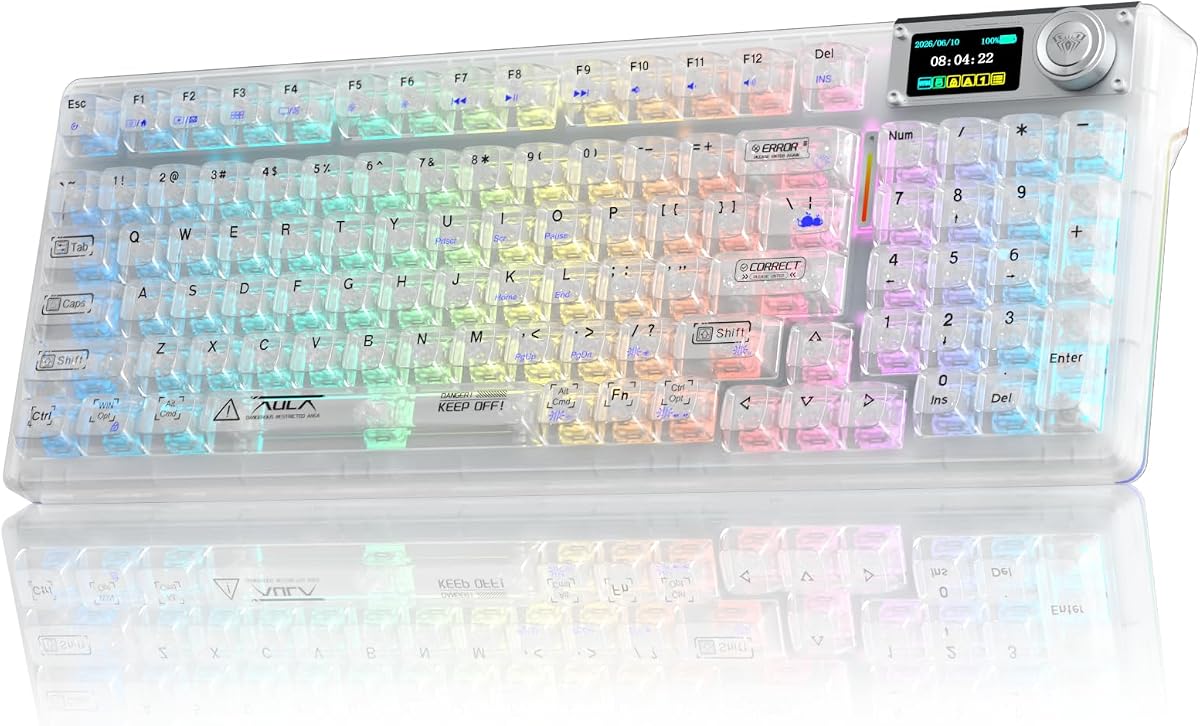
The Aula F98Pro V3 integrates a smart TFT screen showing battery, time, and status. Rated 3.5 stars, it offers practical features like a 10000mAh battery. The screen adds utility for monitoring without switching apps. Its Ice Crystal switches provide a creamy typing feel.
We may earn a commission when you buy through this link, at no additional cost to you.
Strengths include the massive battery life, ideal for travel. The transparent keycaps enhance RGB uniformity. Hot-swap support allows easy switch changes. The knob manages volume and RGB quickly. Its gasket mount ensures soft keystrokes.
Trade-offs involve the driver being Windows-only. The screen requires setup via wired mode. It may suit gamers who prioritize info over aesthetic transparency. Ensure OS compatibility before purchasing.
Best for users needing device visibility and battery longevity. The clear design suits futuristic setups. Ideal for gamers or remote workers wanting status feedback at a glance.
Shows battery level, time, and connection status in real time. Helps reduce the need to check software for updates.
10000mAh battery supports long work or gaming sessions. Eliminates frequent recharging for extended reliability.
We may earn a commission when you buy through this link, at no additional cost to you.
The YUNZII X98 Crystal Switch version features a high-transparency PC casing. Rated 4.6 stars, it offers a clear look similar to acrylic. The double-layer keycaps maintain purity while ensuring anti-fading legends. It includes Snow Switches pre-lubed for creamy actuation.
We may earn a commission when you buy through this link, at no additional cost to you.
Strengths include a satisfying acoustic profile from gasket mounting. The five layers of dampening materials reduce noise. RGB shines brightly through the casing. Its tri-mode connectivity supports up to five devices. QMK/VIA allows full customization.
Trade-offs involve it being a PC case rather than full acrylic. It may lack the weight of premium models. Ensure you prefer clear plastic over frosted glass. Best for users wanting transparency without high cost.
Ideal for gamers and typists valuing clarity. The 98% layout balances space and function. Choose it for a clean, transparent setup.
High-transparency PC material reveals internals. The casing maintains clarity while protecting components.
Five layers of dampening ensure a creamy sound. Poron and IXPE foam reduce resonance and improve feel.
We may earn a commission when you buy through this link, at no additional cost to you.
The GravaStar Mercury V60 HE offers competitive gaming performance with Hall Effect switches. Rated 4.6 stars, it supports a true 8000Hz polling rate for ultra-low latency. The Crystal Rose chassis combines soft pink aesthetics with RGB. Its rapid trigger feature resets keys instantly.
We may earn a commission when you buy through this link, at no additional cost to you.
Strengths include adjustable actuation from 0.005mm to 3.5mm. The magnetic switches enable customizable feel and speed. Multi-layer acoustic foam ensures a satisfying thock. Its design suits streamers and FPS gamers. Wired connections ensure stable performance.
Trade-offs involve its higher cost and lack of wireless options. It may lack battery convenience for travel. Ensure your games benefit from high polling rates. Ideal for competitive users prioritizing speed.
Best for FPS gamers wanting precision. The aesthetic design matches vibrant setups. Choose it if performance and sound matter most.
Hall Effect switches allow precise actuation adjustment. Contactless sensing ensures stable inputs and durability.
8000Hz polling rate delivers 0.125ms latency. Rapid trigger improves movement speed and directional control.
We may earn a commission when you buy through this link, at no additional cost to you.
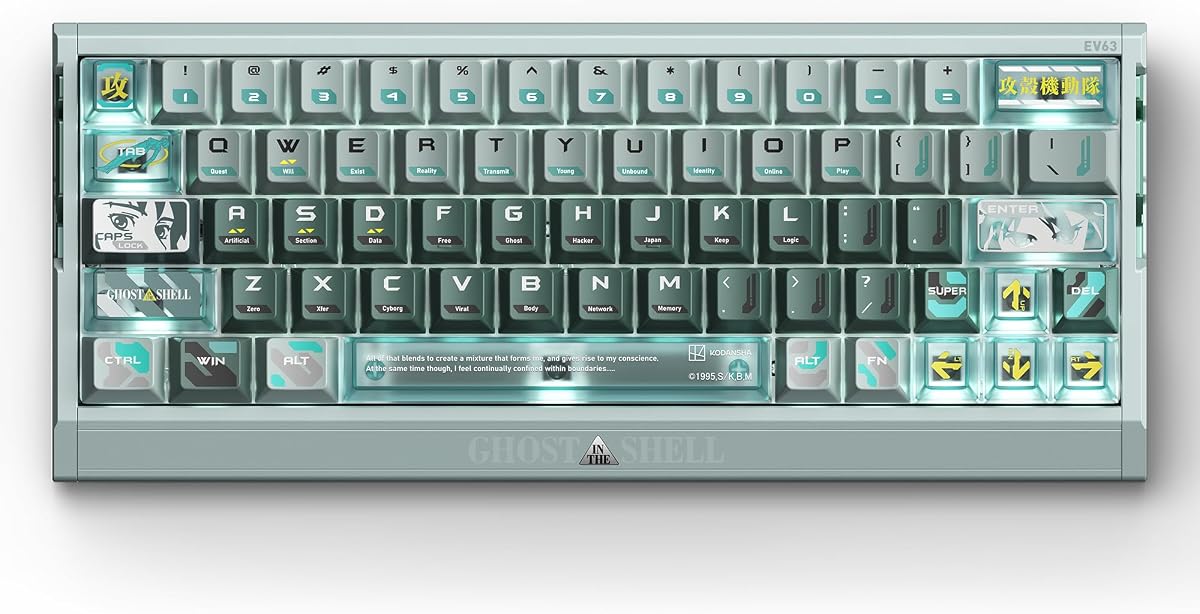
The IQUNIX EV63 combines competitive Hall Effect performance with cyberpunk aesthetics. Rated 5.0 stars, it offers a CNC aluminum case for weight and finish. The Ghost in the Shell theme includes sublegends and RGB effects. It supports 8KHz polling and 0.01mm rapid trigger.
We may earn a commission when you buy through this link, at no additional cost to you.
Strengths include the HyperCore V3 firmware for stable Hall signals. The Nova switches provide smooth linear feel. Its aluminum case offers a cold-touch premium finish. The layout is compact, ideal for FPS setups. Compatibility spans Windows and Mac.
Trade-offs involve the high price and limited space for navigation keys. It prioritizes performance over daily productivity. Ensure you value thematic design. Best for collectors and competitive gamers.
Ideal for users seeking a centerpiece control terminal. The aluminum build ensures longevity. Choose it for precision gaming with unique style.
CNC aluminum case gives real weight and a cold finish. It stands apart from lightweight plastic gaming keyboards.
Linear switches offer precise WASD movement. Adjustable actuation supports faster reset behavior.
We may earn a commission when you buy through this link, at no additional cost to you.
The KiiBoom Phantom81 Lite focuses on creamy sound and solid build. Rated 4.6 stars, it uses ABS molding with frosted finishing. Its gasket mount with multiple foam layers ensures a refined typing quality. VIA compatibility allows deep key customization.
We may earn a commission when you buy through this link, at no additional cost to you.
Strengths include pre-lubricated stabilizers and smooth linear switches. The 75% layout optimizes space while keeping functions. A 4000mAh battery supports wireless use. The frosted finish guards against discoloration. Its RGB adds vibrant backlighting.
Trade-offs involve ABS materials that lack acrylic transparency. It suits functional setups better than display ones. Ensure you value sound over visual clarity. Best for users prioritizing typing experience.
Ideal for programmers and typists seeking comfort. The frosted finish offers a subtle look. Choose it for reliable performance and sound.
Five foam layers ensure a creamy, thocky sound. Latex sandwich foam reduces ping and improves clarity.
Frosted ABS molding resists scratches and discoloration. It offers a refined feel and lasting aesthetics.
We may earn a commission when you buy through this link, at no additional cost to you.
The Aula F98Pro V3 Clear version features high-light transmission transparent keycaps. Rated 4.7 stars, it enhances RGB brightness and uniformity. The five-layer noise-dampening filling ensures a smooth typing experience. Its LCD screen shows real-time battery and system status.
We may earn a commission when you buy through this link, at no additional cost to you.
Strengths include the 10000mAh battery for extended sessions. The Ice Crystal switches provide fast actuation and creamy sound. Hot-swap PCB compatibility allows customization. Its gasket mount design optimizes keystroke resilience. The multi-function knob controls RGB and volume easily.
Trade-offs involve the driver being Windows-only. Setup requires wired connection for calibration. Ensure compatibility before purchasing. Best for users wanting futuristic visuals with practical status feedback.
Ideal for gamers and creators needing battery longevity. The clear keycaps suit vibrant setups. Choose it for a reliable, aesthetically pleasing wireless option.
Transparent keycaps improve RGB brightness significantly. Layered light effects create a unique desktop atmosphere.
10000mAh battery supports high-intensity gaming. Free you from battery anxiety during long sessions.
We may earn a commission when you buy through this link, at no additional cost to you.
Choosing a keyboard with acrylic chassis involves balancing aesthetics, build quality, and performance. Below are key factors to consider when selecting the right model for your needs.
Acrylic chassis offer transparency but vary in thickness and quality. Some use frosted finishes to hide internals while others are fully clear. Ensure the material is scratch-resistant and durable enough for regular use. Premium models may combine acrylic with metal bases for stability.
Most acrylic keyboards support tri-mode connectivity including Bluetooth, 2.4GHz wireless, and USB-C wired. This flexibility allows seamless switching between devices. Check battery life to ensure wireless use matches your daily needs. Wired mode is essential for competitive gaming requiring low latency.
Mechanical switches come in linear, tactile, and clicky types. Acrylic keyboards often feature hot-swap sockets, allowing easy switch replacement. Consider the actuation force and travel distance. Pre-lubed switches provide a smoother typing experience out of the box.
Acrylic chassis amplify RGB lighting effects significantly. Look for per-key RGB or south-facing LEDs for uniform glow. Check software support for lighting profiles and macros. Some keyboards allow screen displays or knob control for brightness adjustments.
Acrylic keyboards come in various layouts including 60%, 75%, and 96%. Compact layouts save desk space but may lack numpads. Ensure the layout fits your workflow. Consider if you need dedicated arrow keys or function rows.
Wireless models depend on battery capacity for uninterrupted use. Ranges from 4000mAh to 10000mAh. Higher capacity extends wireless sessions but increases weight. Check charging speed and type. Some models offer fast charging but may require original cables.
Support for QMK/VIA allows deep customization and layer creation. Check if the software works across your operating systems. Some keyboards have driver limits. Ensure the firmware is updatable to avoid compatibility issues in the future.
Gasket mount designs provide a softer, thocky typing feel. Five-layer dampening reduces noise resonance. Consider if you prefer a solid or bouncy tactile feedback. Acoustic foam helps ensure a refined sound profile for office or home use.
Clean your acrylic keyboard with a soft microfiber cloth to avoid scratches. Use compressed air to remove dust from switches without damaging the casing.
Regularly update firmware and drivers to ensure full customization features work correctly. Recharge the battery before it reaches zero to prolong its lifespan significantly.
Store your keyboard in a cool, dry place away from direct sunlight to prevent discoloration of acrylic or keycaps.
Acrylic keyboards can be durable if made with thick, scratch-resistant materials. Frosted finishes help hide fingerprints and minor wear. However, they may scratch more easily than metal cases, so gentle cleaning is recommended.
Many models with acrylic chassis feature hot-swap PCBs, allowing easy switch replacement without soldering. Check product specifications to confirm compatibility with 3-pin or 5-pin switches.
Tri-mode connectivity including Bluetooth, 2.4GHz wireless, and USB-C wired is standard. This allows seamless switching between up to five devices depending on the model.
Battery life varies from 4000mAh to 10000mAh, offering hours to days of use. RGB brightness and usage frequency impact total battery duration. Higher capacity models last longer between charges.
Acrylic keyboards often feature low-latency wireless or wired modes suitable for gaming. Models with Hall Effect switches or high polling rates offer competitive performance, especially with rapid trigger support.
Yes, most models include RGB customization software allowing per-key lighting, patterns, and brightness adjustments. Some offer knob control for quick changes without opening software.
The GravaStar Mercury K1 Lite and KiiBoom Phantom81 V4 stand out for unique aesthetics and battery life. The IQUNIX EV63 offers premium build quality for competitive gaming.
Prioritize connectivity, battery capacity, and customization needs based on your workflow. Ensure the layout and switch type match your preferences for typing or gaming.
Prices and availability fluctuate frequently, so verify current listings before purchase. Checking warranty and software support ensures long-term satisfaction with your choice.